
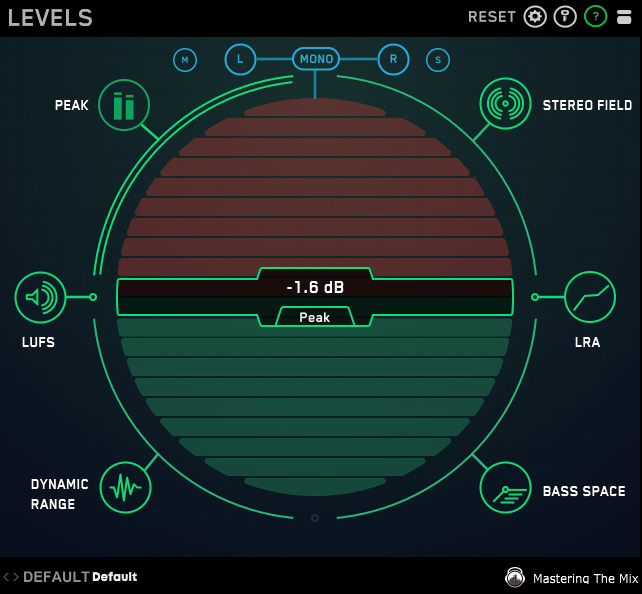
If you’ve ever exported a mix, thrown it on a streaming platform, and wondered why it sounds noticeably different from what you heard in your DAW, LEVELS is pretty much built to answer that question before it becomes a problem.
Mastering the Mix has always had a clear design philosophy around making technical information feel accessible rather than intimidating, and I think LEVELS is probably the clearest expression of that idea they’ve put out.
What you’re getting here is a six-module metering plugin covering loudness, true peak, stereo field, bass space, dynamics, and the mid/side balance of your low end, all laid out in a single window that uses a simple traffic light system to tell you whether each reading is in a good place or needs attention. I love how immediately readable that is, especially when you’re deep in a session and you just want a quick sanity check without having to interpret a wall of numbers.
The green, amber, and red indicators make it genuinely fast to spot problems, and I found that alone changes how often you actually look at your metering rather than ignoring it.
The loudness module follows the LUFS standard and gives you integrated, short-term, and momentary readings simultaneously, with target ranges built in for the major streaming platforms so you know exactly where you need to land without having to look anything up.
I noticed that Spotify, Apple Music, YouTube, and others each have their own target range selectable directly within the plugin, which is a genuinely practical touch that saves you from constantly cross-referencing delivery specs mid-session.
What actually makes it different
I think the thing that separates LEVELS from a more conventional metering plugin is the bass space module, and honestly it’s the feature I’d point to if someone asked me why this is worth considering over something more straightforward.
What it does is show you the mono and stereo energy balance in your low frequencies, which matters because most playback systems below a certain size collapse the stereo field in the low end entirely, and if your bass and kick are sitting heavily in the sides rather than centered, they’re going to disappear or behave unpredictably on those systems.
I realized pretty early in testing that this was something I had been dealing with by ear for years without ever having a clear visual representation of it, and having that information laid out in front of me made a real difference in how confidently I could make decisions about low-end processing.
I’d say this module alone justifies the plugin for anyone who does a lot of work with wide stereo processing or parallel compression that might be affecting the low end in ways that aren’t immediately obvious on studio monitors.
The dynamics module shows you the crest factor of your mix, which is essentially the relationship between your peak levels and your RMS, and gives you a reading of how much dynamic range your mix is retaining before and after any limiting you have on the master bus.
I appreciate that it frames this as a range rather than a single number, because the right amount of dynamics is genuinely genre-dependent and LEVELS accounts for that by letting you select a target profile based on what kind of music you’re working on.
I must say, the stereo field display is also more useful than it might initially look. It’s not just a vectorscope showing you the stereo image in a general sense. It breaks the stereo width down into three frequency bands, so you can see whether your width is coming from the low end, the mids, or the highs, which gives you much more actionable information than a single broadband correlation meter would.
I found this particularly useful when working with multiband stereo wideners or mid/side EQ, where changes in one frequency range can have a knock-on effect on the overall balance that’s easy to miss without that kind of breakdown.
Get the Free Plugin Starter Kit
The genuinely useful free DAWs and plugins worth installing. No filler. Straight to your inbox.
Bottom line
I have to say, what Mastering the Mix got right with LEVELS is that it respects your intelligence without making you do all the interpretive work yourself. You still need to understand what the readings mean and why they matter, but the plugin meets you halfway by telling you clearly when something is outside of the range it should be in, rather than just displaying a number and leaving you to figure out whether that’s a problem.
LEVELS runs as a VST, VST3, AU, and AAX plugin on both Mac and Windows, and the CPU load is negligible even with all six modules active simultaneously. I believe it sits at a price point around $69, which for the amount of genuinely useful information it puts in front of you in a single glance is pretty reasonable compared to assembling the same coverage from multiple separate plugins.
I would recommend it to anyone from a serious hobbyist level upward, and particularly to anyone who delivers music for streaming on a regular basis and wants to stop second-guessing whether their master is going to translate the way they intended. It won’t replace a well-trained set of ears, but it will back them up in ways that are hard to argue with.
Get the Free Plugin Starter Kit
The genuinely useful free DAWs and plugins worth installing. No filler. Straight to your inbox.

Hello, I’m Viliam, I started this audio plugin focused blog to keep you updated on the latest trends, news and everything plugin related. I’ll put the most emphasis on the topics covering best VST, AU and AAX plugins. If you find some great plugin suggestions for us to include on our site, feel free to let me know, so I can take a look!