
Look, there’s no shortage of metering plugins floating around the internet, and honestly a lot of them are either way too complicated for what you actually need day-to-day, or they’re so stripped down that you find yourself reaching for something else anyway. Goodhertz Loudness freebie sits in a really comfortable middle ground, and the fact that it’s completely free makes it one of those tools you really have no reason not to have installed.
I’ve spent a good amount of time with it across different projects, and I want to give you a real sense of what you’re getting here rather than just rattling off a spec sheet.
It Looks Simple, but..
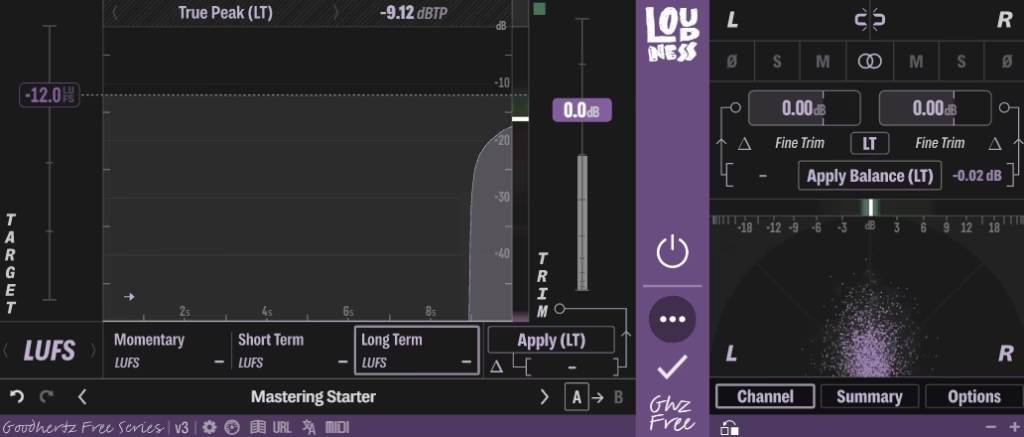
The first thing you’ll notice when you open Goodhertz Loudness is how clean and unfussy the interface is. I mean, Goodhertz as a company has always had a really strong design sensibility across their paid lineup, and that same thoughtfulness carries over here even though this one costs you nothing. The display shows you integrated loudness, short-term loudness, momentary loudness, and loudness range all at once, and everything is laid out in a way where you can actually read the numbers at a glance without squinting or hunting around.
I think what I appreciate most is that it’s not trying to be flashy. There’s no aggressive color coding or animated meters bouncing around trying to grab your attention. It just gives you the information clearly, and you get on with your work. For me, that kind of restraint in UI design is genuinely hard to pull off, and Goodhertz nails it.
The plugin is fully LUFS-based, following the ITU-R BS.1770 standard, which means it’s measuring loudness the way streaming platforms, broadcast networks, and mastering engineers actually care about. Spotify targets around -14 LUFS integrated, Apple Music sits around -16 LUFS, and YouTube lands at -14 LUFS, and having a tool that speaks that language natively without you having to do any mental math is just practical.
Get the Free Plugin Starter Kit
The genuinely useful free DAWs and plugins worth installing. No filler. Straight to your inbox.
Where it earns its place
I realized pretty early on that where Goodhertz Loudness really earns its keep is during mixing, when you’re trying to get a rough sense of where your master bus is sitting before anything hits a limiter or a maximizer. You drop it on the master, hit play, and within a few seconds you have a meaningful integrated reading that tells you whether you’re in the right ballpark or whether you’re about to send your mix through streaming platform loudness normalization and end up with something quieter and thinner than you intended.
I’d say the true peak metering is arguably the most practically useful feature here if you’re delivering for streaming. True peak and sample peak are two very different things, and a lot of people don’t realize their mix is intersample clipping until it’s already been delivered and normalized down. Goodhertz surfaces that clearly, and I found that alone saves you a round trip of exports in a lot of cases.
I also noticed it handles stereo and mono monitoring in a way that’s easy to flip between, which matters more than people give it credit for, especially when you’re checking how your mix will translate on mono playback systems like phones or smart speakers.
Who is this actually for?
I want to note something that I think gets missed in a lot of reviews of free tools like this: Goodhertz Loudness isn’t a beginner’s training wheels plugin that you graduate out of. It’s genuinely useful at every level of the workflow.
Whether you’re a bedroom producer trying to understand why your tracks sound quiet on Spotify, a mixing engineer who wants a clean secondary meter without loading up a heavier paid option, or someone doing podcast or video post work who needs to hit -16 LUFS for broadcast compliance, this plugin has a legitimate place in your setup.
I believe the free-plugin space often gives you something that’s either feature-limited by design to upsell you on a paid version, or just genuinely not that well built. Goodhertz doesn’t do either of those things here. I mean, the company’s reputation is built on their paid plugins like Tone Control and Vulf Compressor, and I think they understand that putting out a genuinely solid free tool builds trust with their audience rather than just farming email addresses.
That said, I’d say if you’re doing serious mastering work where you need deep analysis, things like frequency-weighted loudness histograms, detailed true peak analysis with sample-level resolution, or extensive batch metering across an album, you’re probably going to want something more full-featured alongside this. Goodhertz Loudness is a metering tool, not a metering suite, and being clear about that distinction is important.
Bottom line
I have to say, it’s genuinely rare that a free plugin from a reputable developer feels this considered. I love how it doesn’t overwhelm you on launch, doesn’t nag you to upgrade, and just quietly does exactly what it says it does every single time you open a session. It takes up almost no CPU, loads instantly, and works in VST3, AU, and AAX, so whatever DAW you’re running, you’re covered.
I would recommend this to pretty much anyone who touches audio for any kind of delivery context. Even if you have paid metering options already, having something this lightweight and reliable that you can throw on a bus or a reference track without thinking twice about it is just useful.
It’s one of those plugins that quietly becomes part of how you work without you ever making a deliberate decision to adopt it. You just keep reaching for it because it’s always there and it always gives you what you need. Go download it. You’ve got nothing to lose, and you’ll probably wonder why you weren’t using it sooner.
Get the Free Plugin Starter Kit
The genuinely useful free DAWs and plugins worth installing. No filler. Straight to your inbox.

Hello, I’m Viliam, I started this audio plugin focused blog to keep you updated on the latest trends, news and everything plugin related. I’ll put the most emphasis on the topics covering best VST, AU and AAX plugins. If you find some great plugin suggestions for us to include on our site, feel free to let me know, so I can take a look!