
There’s a reason hardware samplers and grooveboxes are more popular now than they’ve been in twenty years. Working on a dedicated piece of hardware changes how you make music. You stop scrolling through menus, stop getting distracted by emails, and start actually finishing tracks.
The limitations of a physical box force you to commit to ideas instead of endlessly tweaking, and the tactile interaction of hitting pads, turning knobs, and sequencing on a grid produces results that mouse clicking simply doesn’t. I make better music faster on hardware than I do in a DAW, and I’m not the only one who feels that way.
The market in 2026 has options at every level, from pocket-sized sample manglers through mid-range grooveboxes to full production workstations that genuinely replace a laptop for many workflows. What separates these machines from each other isn’t just the feature list.
It’s the workflow philosophy: some want you to finger drum and chop samples like an MPC producer, others want you to step-sequence patterns like a TR-808, and others let you build entire songs with synth engines, audio recording, and arrangement modes.
I’ve picked fifteen machines (plus a bonus) that represent the strongest current options across that entire spectrum.
1. Portable Electronic Drum Set 9 Pad MIDI Kit — $98.99

Before the dedicated hardware samplers below, an honest note about what hands-on rhythm programming actually requires versus what the hardware sampler format provides.
The hardware samplers and grooveboxes on this list start at $400 and run past $2,000 for flagship units. They combine sample playback, sequencing, and in many cases live performance tools into standalone devices. The Portable Electronic Drum Set 9 Pad MIDI Kit from the Pluginerds store represents the other path: nine velocity-sensitive pads, USB MIDI, and a physical performance surface for $98.99 that connects to any DAW and any software sampler. If you have been programming beats exclusively with a mouse in a piano roll and want to understand what physical pad triggering feels like before committing $400+ to dedicated hardware, this is where that starts. The performance dynamics of pad-triggered parts — the velocity variation, the natural human timing, the expressive control that a physical surface gives you — transfer directly to the hardware samplers below. Understanding whether that feel suits your production approach is worth the $98.99 test.
- Nine Velocity-Sensitive Pads
Nine velocity-sensitive drum pads respond to how hard you hit them, producing dynamic variation that mouse-clicked piano roll programming cannot replicate.
The dynamic range of a pad-triggered hi-hat pattern — where lighter ghost hits sit naturally below the louder accented hits based purely on playing touch — is what makes sampled drum parts sound performed rather than programmed. Nine pads cover the full standard drum kit mapping and most electronic beat configurations.
- USB MIDI
USB MIDI connectivity sends pad performance data to any DAW or software sampler immediately. Trigger Battery, Maschine, or any drum plugin; map pads to Ableton Drum Racks; use it as a performance controller for any sample library on this list.
The MIDI compatibility means your pad performance technique and muscle memory develop on this device and transfer directly to the hardware samplers below — most of which use pad-based interfaces built on the same performance principles.
- Compact Format
Portable, self-contained build with 4 units in stock. Ships immediately from the store.
Shop at Pluginerds — Portable Drum Set 9 Pad MIDI Kit $98.99
Get the Free Plugin Starter Kit
The genuinely useful free DAWs and plugins worth installing. No filler. Straight to your inbox.
2. Native Instruments Maschine+
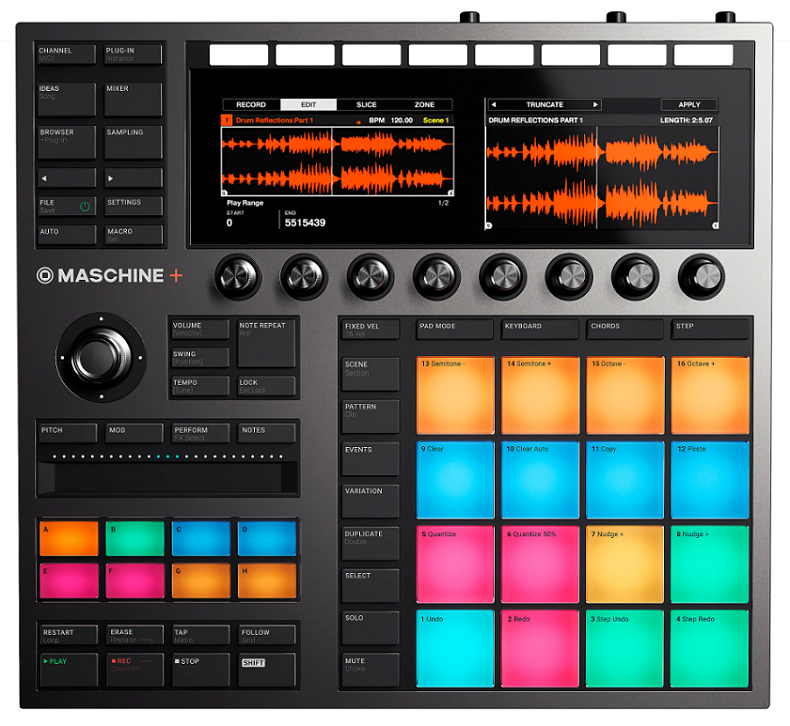
The standalone version of NI’s production environment, running the full Maschine software internally without a connected computer. Native Instruments Maschine+ gives you the Maschine workflow with its signature pad grid, groups, scenes, and pattern system plus access to NI’s synth engines, Kontakt libraries, and effects, all on dedicated hardware with a pair of high-res color screens.
What makes Maschine+ different from competing standalone boxes is the software ecosystem behind it. You’re not limited to whatever synth engines the manufacturer built into the hardware. You get access to NI’s plugin library, which means sounds from Massive, Monark, Prism, and the Play Series instruments are all available inside the standalone hardware.
- NI Ecosystem
Access to Native Instruments’ plugin library directly on the hardware means you’re working with the same synth engines and Kontakt libraries that producers use in their DAW sessions. Massive, Monark, FM8, and others run natively on the Maschine+ without a computer. The ecosystem access gives you a sound palette that no other standalone groovebox matches in terms of quality and variety.
- Pad Workflow
The 4×4 velocity-sensitive pad grid with the group and pattern system provides the core Maschine workflow that thousands of producers already know. If you’ve used Maschine in software, the standalone version feels immediately familiar. The pads are responsive enough for serious finger drumming, and the color-coded group system keeps complex arrangements organized.
- Dual Screens
Two high-resolution color displays show detailed information about your instruments, mixer, effects, and patterns. The dual screen layout means you see both your pattern and your mixer simultaneously, or browse sounds on one screen while viewing your arrangement on the other. Compared to single-screen competitors, the information density is noticeably better.
- DAW Transfer
Projects created on Maschine+ transfer directly to the Maschine software on your computer for further development with the full plugin library and DAW integration. The transfer path means ideas you capture on the standalone hardware aren’t trapped there. You finish them in the full software environment whenever you’re ready.
3. AKAI Professional MPC Live III
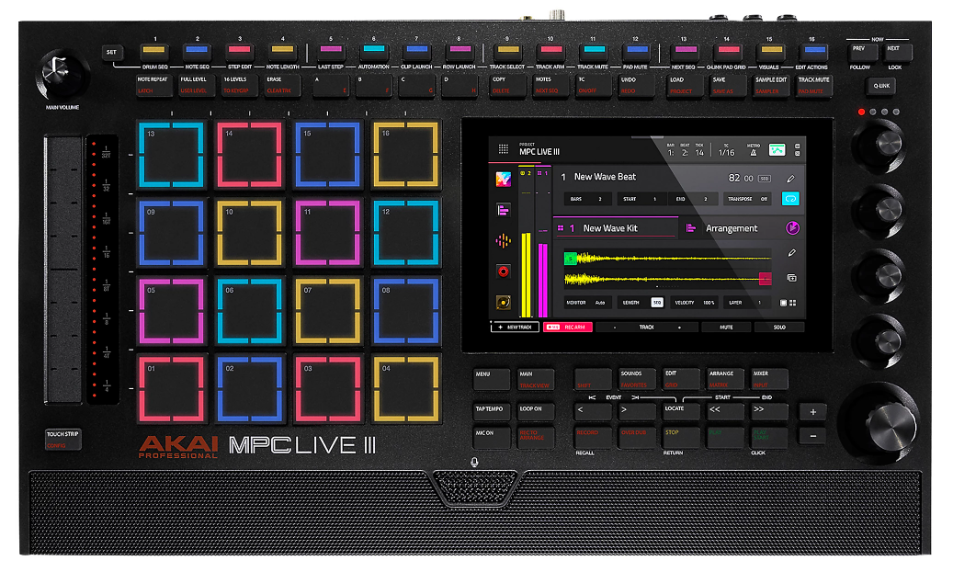
The most powerful standalone MPC ever made, and honestly, one of the most capable pieces of music production hardware at any price. AKAI MPC Live III runs the MPC3 OS on an 8-core processor with 8GB of RAM, giving you enough horsepower for 32 plugin instances, 16 audio tracks, pro-grade timestretching, and stem separation all running on a battery-powered device you can take anywhere.
The headline feature for me is the new MPCe pads with 3D sensing that tracks X/Y finger position for real-time modulation. You’re not just hitting a pad and getting a velocity value.
You’re sliding your finger across the pad surface to morph between samples, control effects, and add expression that previous MPCs couldn’t capture. It’s a genuine evolution of what a pad-based instrument can do.
- MPCe Pads
The 3D-sensing MPCe pads track X/Y finger position alongside velocity and aftertouch, giving you per-pad modulation control that goes way beyond hitting and hoping.
You assign different articulations to each quadrant of a pad, morph between samples by sliding your finger, or route X and Y position to filter and pitch for real-time sound design while drumming. The expression capability turns the MPC from a trigger device into something closer to a performance instrument.
- Step Sequencer
For the first time in MPC history, dedicated 16-step sequencer buttons give you TR-style grid programming directly from the hardware. Previous MPCs relied on the touchscreen for step sequencing, and having physical step buttons makes electronic-style programming dramatically faster. The sequencer supports probability triggering and per-step parameter editing alongside the classic pad-based recording.
- Processing Power
The 8-core processor and 8GB RAM represent a massive jump from the Live II’s specs, enabling the MPC to handle complex sessions that would have choked previous hardware. You run 32 plugin tracks, 16 audio tracks, stem separation, and advanced timestretching simultaneously. The processing power means you’re not constantly compromising or bouncing tracks to free up CPU.
- Clip Matrix
A new clip launching mode lets you trigger loops and phrases in a grid layout similar to Ableton’s Session View, which brings a live performance workflow to the MPC that previous models handled less elegantly. The clip matrix enables you to build arrangements on the fly by launching and stopping individual clip slots.
- Stem Separation
Pro Stems runs directly on the hardware, separating mixed audio into individual stems for vocals, drums, bass, and other elements. The on-device stem separation means you can sample from any source, split it into components, and rework individual elements without needing a computer.
- Portable Power
The rechargeable battery, built-in speakers, and microphone make the MPC Live III genuinely self-contained. You sample from the built-in mic, produce on battery power, and monitor through the speakers without any external equipment. For sketching and producing away from the studio, the portability is complete.
4. Ableton Move
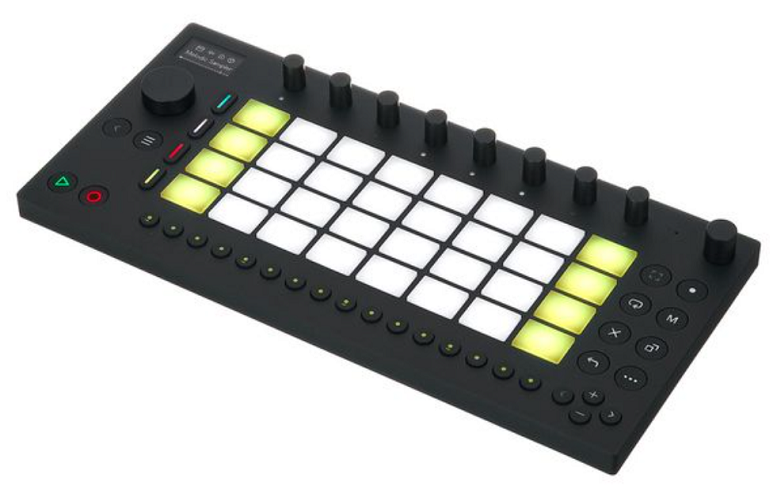
Ableton’s entry into standalone hardware, and it’s deliberately small, focused, and opinionated. Ableton Move isn’t trying to be a full production workstation. It’s a portable idea capture device with pads, knobs, a built-in mic, and onboard sounds that let you build clips and loops that transfer directly into Ableton Live for finishing.
I appreciate the restraint here. Instead of cramming every possible feature into a box, Ableton built a tool for one specific job: catching ideas when they happen. You hear something, you sample it, you build a loop around it, and later you pull it into Live and develop it properly.
- Idea Capture
The entire workflow is designed around grabbing musical ideas quickly using pads, a built-in microphone, and onboard instruments. You’re not arranging full songs on Move. You’re sketching eight-bar loops, sampling environmental sounds, and building the seeds of tracks that you develop later. The focused scope means you actually finish sketches instead of getting lost in features.
- Live Transfer
Everything you create on Move transfers seamlessly to Ableton Live as clips, audio, and MIDI that integrate directly into your full production environment. The transfer isn’t an export/import process. Your Move sessions appear in Live ready to be arranged, layered, and mixed alongside the rest of your project.
- Built-in Mic
A microphone captures sounds directly into Move’s sampler from the world around you. You record a voice memo, a street sound, a rhythmic pattern you tap on a table, and it becomes a sample you build music around immediately. The mic turns Move into a portable sampling tool that’s always listening.
5. Roland MC-101
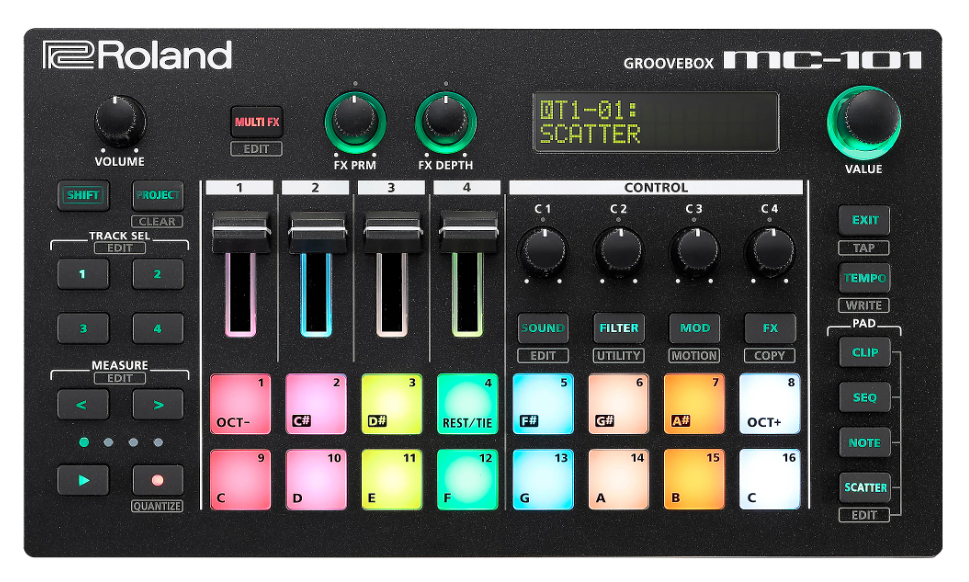
Roland’s compact groovebox that packs the Zenology synthesis engine, sampling, effects, and a four-track sequencer into something roughly the size of a paperback book.
Roland MC-101 runs on USB power or batteries, weighs almost nothing, and provides the kind of go-anywhere production that bigger boxes can’t match because you actually bring this one with you.
The sound engine punches above its weight. You get access to Roland’s Zen-Core architecture with thousands of tones drawn from decades of Roland synthesis history, and the sampling capabilities let you import your own audio. For a box this small, the production capability is surprising.
- Compact Engine
The Zen-Core sound engine with access to thousands of Roland tones provides a production palette that’s genuinely usable for finished tracks, not just sketches. You get sounds from the TR, Juno, Jupiter, and SH lineages in a box you can hold in one hand. The sound quality belies the tiny form factor.
- Four Tracks
Four simultaneous tracks with individual sequencing, effects, and parameter control give you drums, bass, chords, and lead in a compact arrangement workflow. Four tracks sounds limiting on paper, but for focused groovebox production, the constraint encourages efficient arrangement decisions rather than endless layering.
- Battery Life
Battery operation via four AA batteries provides hours of computer-free production anywhere. Combined with the compact size and light weight, the battery power makes the MC-101 a genuinely portable production tool rather than a desktop-only device that happens to have a battery option.
- USB Audio
USB audio interface functionality lets the MC-101 double as your audio interface when connected to a computer, meaning the groovebox handles both standalone production and DAW recording duties. The dual role reduces the gear count for laptop-based producers who want one device for both workflows.
6. AKAI Professional MPC XL
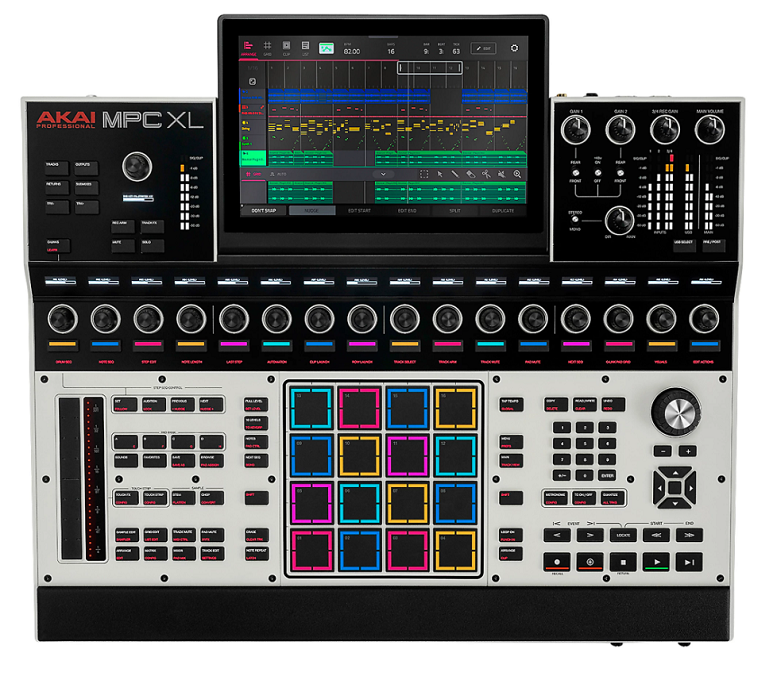
The flagship of the MPC lineup, with a 10-inch touchscreen, channel strip controls, MPCe pads, and the most comprehensive I/O of any standalone MPC. AKAI MPC XL is the studio centerpiece version of the MPC3 platform, adding the physical controls and connectivity that the portable Live III trades for portability.
This is for producers who want the MPC workflow permanently installed in their studio as the central hub. Eight separate outputs, sixteen CV connections, extensive MIDI I/O, and the full MPC3 OS running on flagship-grade hardware.
- Studio I/O
Eight separate outputs, 16 CV connections, extensive MIDI I/O, and USB-C multichannel audio make the MPC XL connectable to virtually anything in a professional studio. The output count lets you route individual tracks to external mixing, process drums through outboard gear, and drive an entire modular system from the CV outputs simultaneously.
- Channel Strips
Dedicated channel strip controls with Q-Link knobs and an audio level display provide hands-on mixing that the touchscreen-focused Live III handles less directly. The physical channel controls give you the tactile mixing workflow that studio-oriented producers expect from a centerpiece device.
- 10-Inch Display
The 10-inch multi-touch display provides significantly more screen real estate than the Live III’s 7-inch screen, making complex editing, piano roll work, and mixer management more comfortable for extended sessions.
7. Roland SP-404MKII
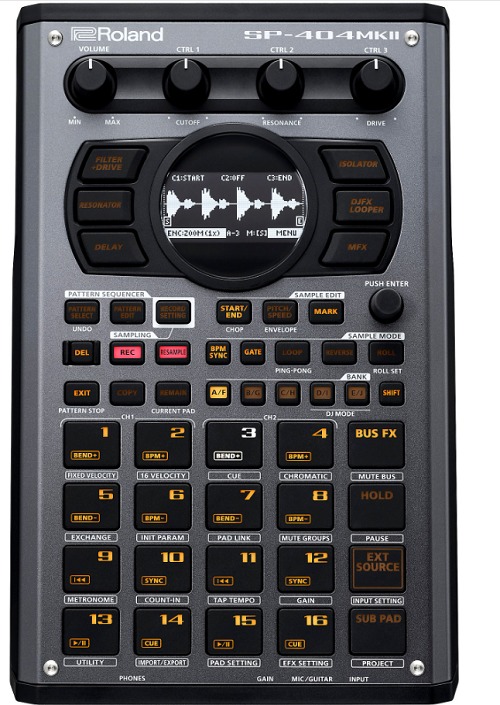
The modern classic for sample-based producers and lo-fi beat makers. Roland SP-404MKII carries forward the SP-404 legacy of hands-on sample triggering, legendary bus effects, and a workflow that rewards spontaneity.
The MK2 adds an OLED display, expanded memory, and quality-of-life improvements while keeping the raw, immediate character that made the original a cult favorite.
The SP-404 sound is a thing. The way the bus compressor and vinyl sim color your audio, the way the resampling workflow encourages happy accidents, the way the whole machine feels like an instrument rather than a computer. You either get it or you don’t, and if you get it, nothing else scratches the same itch.
- Bus Effects
The legendary SP effects including vinyl simulation, DJFX looper, isolator, and the specific bus compressor character define the SP-404 sound that an entire genre of lo-fi and sample-based music is built on. The effects aren’t just processors.
They’re a sonic identity that producers specifically choose this machine to access.
- OLED Screen
The OLED display on the MKII adds visual waveform editing, sample management, and parameter feedback that the original’s LCD couldn’t provide. The screen makes editing faster and more precise without changing the fundamental hands-on workflow that defines the SP experience.
- Pattern Sequencer
A proper pattern sequencer lets you build beats and arrangements from your sample pads, which the original SP-404 series handled less capably. The sequencer adds structured production capability to a machine that was historically more about live triggering and resampling.
- Resample Flow
The resampling workflow captures your output back into a new sample pad, letting you layer effects, combine patterns, and build increasingly complex audio from simple starting material. The resample workflow is where the creative magic of the SP series lives, encouraging experimental layering that produces unexpected results.
- SD Storage
SD card storage provides practically unlimited sample memory compared to the original’s internal limitations. You load entire sample libraries, long audio passages, and complete sets onto a single card, which makes the MKII practical for both studio and live performance.
8. Polyend Play+
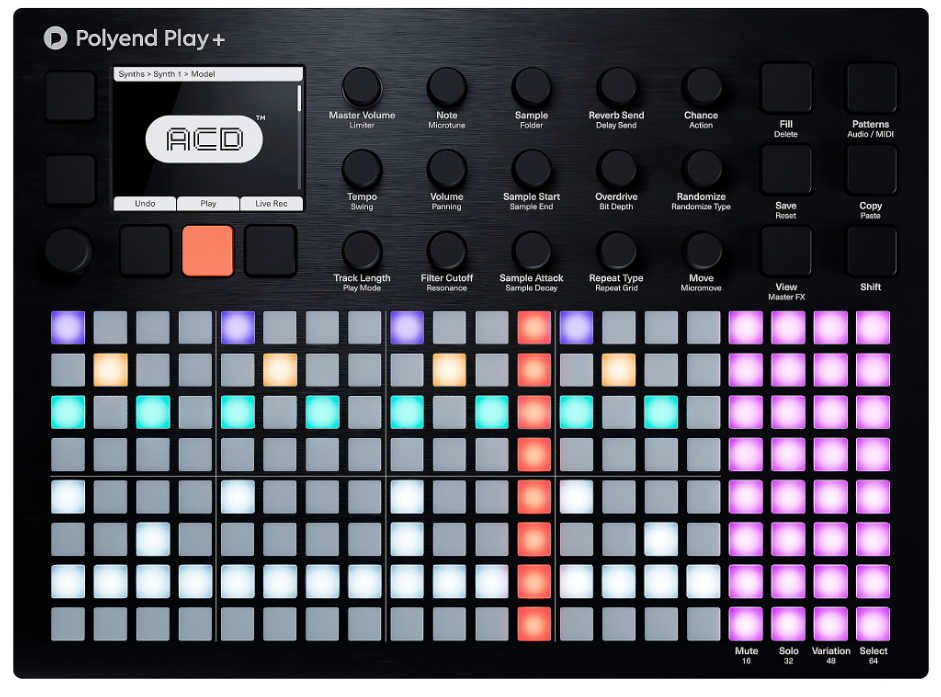
The grid-based groovebox that prioritizes immediacy and visual feedback over menu depth. Polyend Play+ centers around a vibrant RGB pad grid with a workflow designed to get you making music in minutes rather than hours.
The plus version adds sampling capabilities and an expanded sound engine to the original Play’s pattern-based approach.
I find the Play+ compelling because it goes against the trend of adding complexity. It’s deliberately focused, with a grid interface that shows you everything at once and randomization tools that generate musical ideas when you’re stuck.
- Grid Workflow
The 8×32 RGB pad grid displays your patterns, instruments, and sequences in a visual format where everything is visible simultaneously. The grid workflow eliminates the menu diving that characterizes more complex machines, keeping your attention on musical decisions rather than navigation.
- Sample Engine
The plus version adds sampling capabilities with direct audio recording and sample manipulation alongside the built-in sound engine. The sampling addition transforms the Play from a preset-based instrument into a sound design tool where your own audio becomes the raw material.
- Random Tools
Probability and randomization per step generate controlled variation that prevents patterns from becoming static. The randomization tools range from subtle groove fluctuations to complete pattern transformation, which makes the Play+ particularly good at breaking creative blocks when you’re stuck in a loop.
9. Elektron Digitakt II
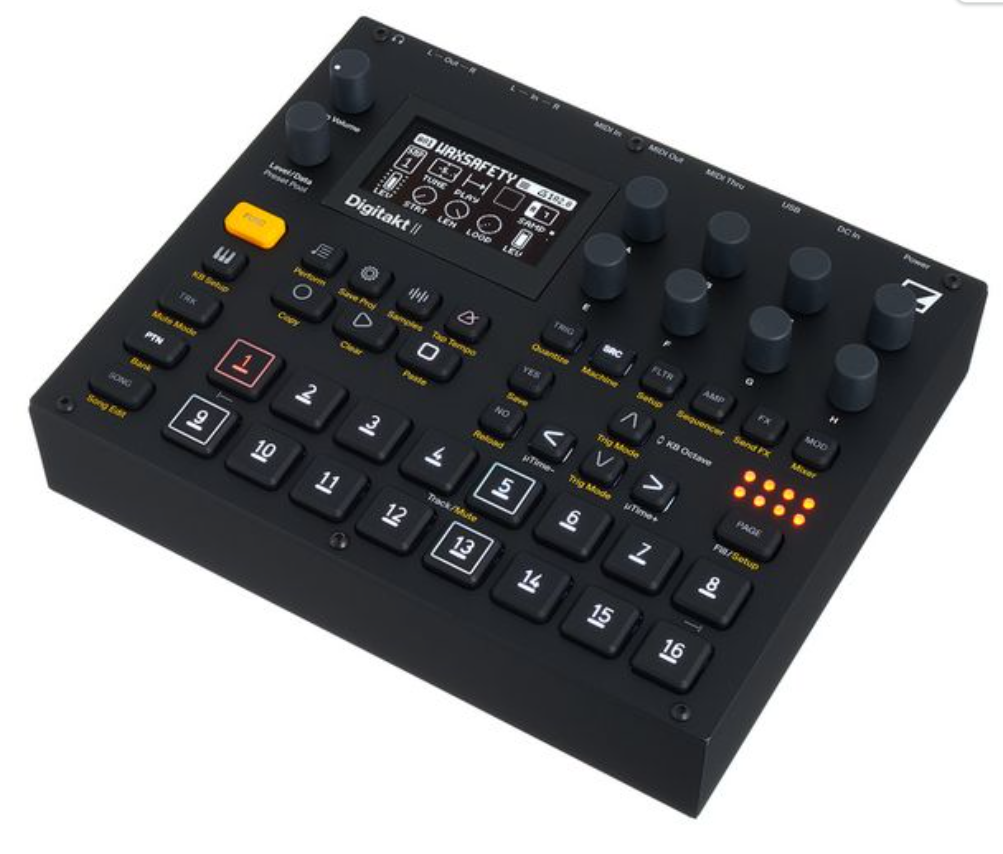
The sequel to one of the most beloved drum machines of the last decade, adding stereo sampling, more tracks, and improved effects while keeping the tight Elektron sequencer that made the original essential.
Elektron Digitakt II gives you 16 audio tracks and 8 MIDI tracks with the parameter locks, trig conditions, and per-step automation that Elektron is famous for.
The Digitakt II doesn’t reinvent the wheel. It takes what made the original great and gives you more of it. More tracks, more effects, stereo samples, and a bigger screen. For existing Digitakt users, the upgrade is substantial. For newcomers, this is Elektron’s most accessible entry point.
- Elektron Sequencer
The parameter lock system stores unique values per step for any parameter, meaning every single step in your pattern can have different filter settings, sample start points, effects, and pitch. Combined with trig conditions that make steps play only under specific circumstances (every other time, randomly, on the first repeat), your patterns evolve organically without manual intervention.
- Stereo Samples
Stereo sample support is the headlining addition over the original Digitakt, which was limited to mono. Stereo samples mean your pads, loops, and atmospheric textures retain their spatial character rather than collapsing to mono. For producers using stereo field recordings or stereo instrument samples, the upgrade matters.
- 16 Audio
16 audio tracks double the original’s count, giving you enough channels for complete arrangements with drums, bass, melodic elements, and atmospheric layers all running simultaneously from one box.
- MIDI Tracks
8 dedicated MIDI tracks control external synths and drum machines with the same parameter lock and trig condition system as the audio tracks. The MIDI sequencing turns the Digitakt II into a capable hardware hub that drives your external gear with Elektron’s famously musical sequencer.
10. Roland AIRA Compact P-6 Sampler
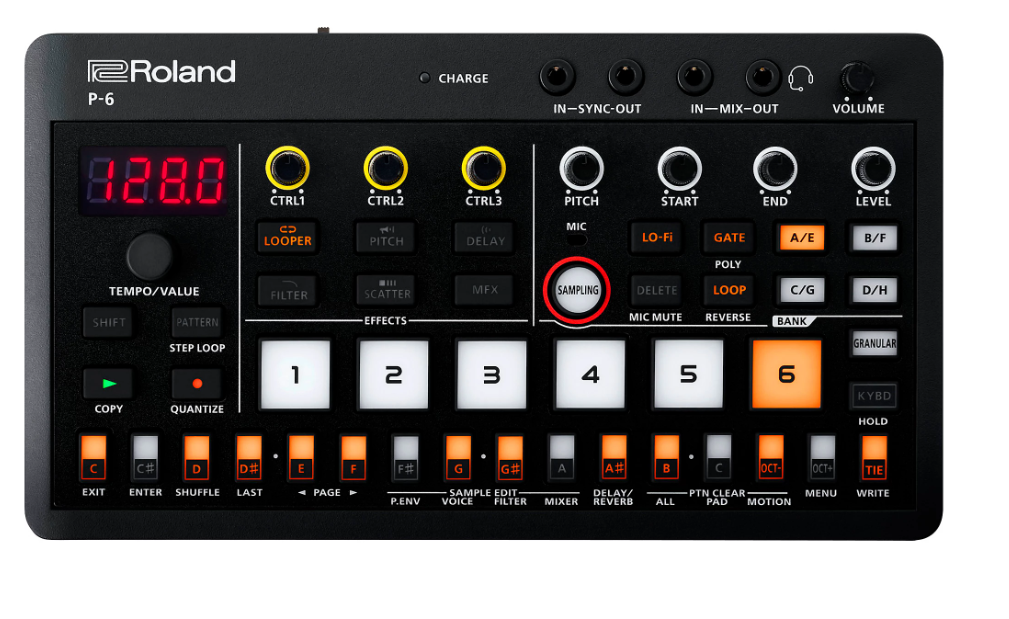
Roland’s pocket-sized sample player from the AIRA Compact line, giving you six sample tracks with effects and a step sequencer in a format barely larger than a deck of cards.
Roland P-6 is fun, immediate, and genuinely portable in a way that bigger grooveboxes claim to be but aren’t.
I think of the P-6 as a sketch tool. You load samples, build a quick loop, twist some knobs, and capture something interesting. It’s not for producing finished tracks. It’s for the moment when you have an idea and want to hear it quickly.
- Truly Pocket
The palm-sized format fits literally in your pocket, runs on batteries, and weighs almost nothing. For spontaneous music making during commutes, breaks, or travel, the P-6 goes places that no other sampler on this list can practically go.
- Sample Twist
The real-time knob controls let you manipulate samples with filter, pitch, and effect changes that respond instantly to your movements. The immediacy of twisting physical knobs on a sample loop is where the P-6’s charm lives.
- Step Sequence
A built-in step sequencer programs patterns from your loaded samples with per-step parameter control. The sequencer is deliberately simple, handling basic pattern creation without deep menus, which keeps the P-6 fast and playful rather than turning it into a miniature workstation.
- Chain Link
The P-6 connects to other AIRA Compact devices for expanding your setup incrementally. You sync a P-6 with a T-8 drum machine and a J-6 chord synth for a portable three-piece production rig that fits in a lunch box.
- USB Audio
USB audio streaming lets you record the P-6’s output directly into your DAW as clean digital audio, and you can load new samples from your computer back to the device. The USB connection bridges the pocket hardware with your full production environment when you’re ready to develop ideas further.
11. Novation Circuit Rhythm
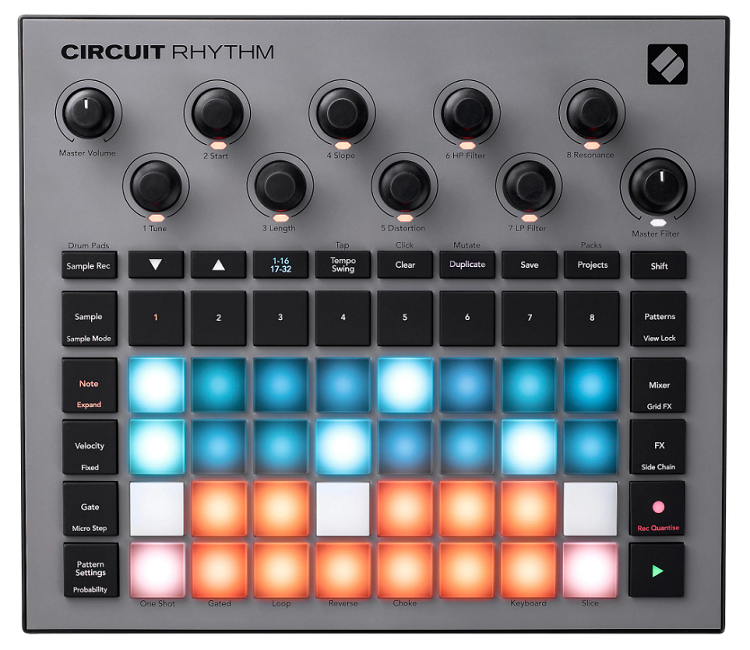
Novation’s sample-focused groovebox dedicated to beat-making, sample chopping, and performance.
Novation Circuit Rhythm gives you eight sample tracks with individual effects, a step sequencer, and the performance-oriented workflow that the Circuit line is known for, all in a compact, battery-powered format.
The Rhythm differs from the Circuit Tracks by focusing entirely on samples rather than splitting between synths and samples.
If your production centers on chopping audio, building beats from recorded material, and performing sample-based sets live, the dedicated focus makes the Rhythm more capable for that specific workflow.
- Eight Tracks
Eight dedicated sample tracks with per-track effects, filter, and volume give you enough channels for drums, bass, melodic loops, and atmospheric samples to run simultaneously. The eight-track count provides a complete arrangement canvas from a single compact device.
- Sample Chop
The sample slicing and manipulation tools let you chop longer audio into individual hits, rearrange them across the grid, and trigger them from the pads with velocity sensitivity. The chopping workflow is central to how the Rhythm operates, turning any audio source into playable musical material.
- Grid Perform
The RGB pad grid doubles as both a step sequencer and a performance surface, letting you program patterns and then perform variations in real time. The dual-use grid means you build your arrangement and then play it live without switching modes.
- Battery Power
Rechargeable battery provides hours of computer-free production, making the Rhythm genuinely portable for production sessions away from the studio or for live performances where power isn’t guaranteed.
12. Korg Electribe Sampler
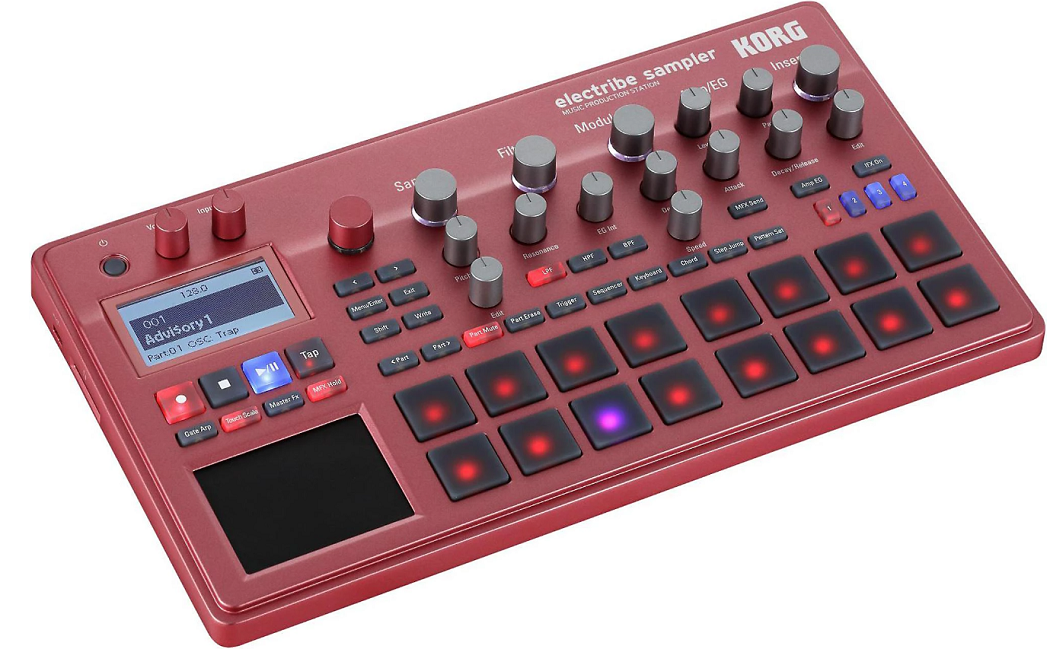
Korg’s mid-range groovebox combining sampling, onboard sounds, and step sequencing in a format built around the iconic Electribe workflow of 16 pads, trigger buttons, and per-step automation. The Korg Electribe Sampler carries forward the ESX legacy with modern capabilities including Ableton project export.
The Electribe Sampler sits in a practical middle ground. It’s more capable than pocket grooveboxes but less complex than workstation-class machines, and the workflow is fast enough that you build patterns and arrangements without getting bogged down in menus.
- Touch Pads
16 velocity-sensitive trigger pads with a touch-sensitive X/Y controller provide both pattern input and real-time performance control. The pads respond to velocity for dynamic sample triggering, and the X/Y surface manipulates filter and effects parameters in real time.
- Ableton Export
The ability to export patterns as Ableton Live project files bridges the gap between hardware and software production. You sketch ideas on the Electribe, export the project, and open it in Ableton with your patterns, samples, and arrangement intact for further development.
- Motion Sequence
Motion sequencing records knob movements per step, capturing real-time parameter changes as part of your pattern. The motion recording means filter sweeps, effect changes, and level adjustments become integral parts of your sequence rather than one-time performances.
- Step Workflow
A 16-step sequencer with parameter automation, active step selection, and swing provides the foundational pattern-building workflow. The step sequencer is fast to program and immediately musical, which keeps the Electribe’s workflow focused on results rather than process.
- Internal Sounds
Onboard PCM sounds supplement user sampling, giving you a factory library to work with immediately. The internal sounds cover basic drum kits, bass, synth hits, and pads, meaning you can start building tracks before you’ve sampled anything of your own.
- SD Storage
SD card support for sample import and project storage expands the Electribe’s capacity well beyond its internal memory. You load entire sample collections from a card, keeping your workflow flexible and your sample library accessible.
13. Elektron Octatrack MKII
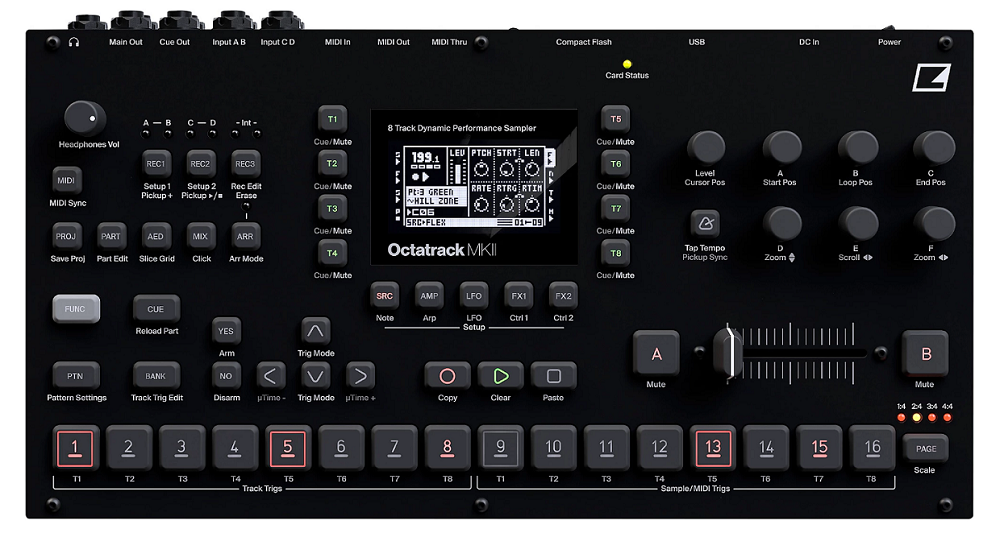
The deep one. Elektron Octatrack MKII is for producers who want the most powerful real-time sample manipulation available in hardware, and who are willing to invest the time to learn a machine that rewards depth with capabilities no other box matches. Eight audio tracks with real-time time-stretching, granular processing, and the crossfader-driven scene system create a performance instrument that blurs the line between sampling and live improvisation.
I won’t sugarcoat the learning curve. The Octatrack is notoriously deep and occasionally unintuitive, and you’ll spend genuine time with the manual before it clicks. But when it does click, you have a performance tool that nothing else replicates.
- Scene Crossfade
The crossfader morphs between two complete parameter states simultaneously, letting you blend between radically different versions of your pattern with a single gesture. In live performance, the crossfader is your main expression tool, transitioning between quiet and loud, filtered and open, dry and effected with physical movement.
- Pickup Machines
Pickup machines record live audio input as a loop synchronized to your tempo, which means you build up layered performances by recording pass after pass of incoming audio. The pickup machines turn the Octatrack into a live looper with Elektron’s sequencing depth underneath.
- Eight MIDI
Eight dedicated MIDI tracks sequence external gear with the full Elektron parameter lock and trig condition system, making the Octatrack a capable sequencer hub alongside its sampling duties. The MIDI tracks carry the same per-step automation depth as the audio tracks.
14. Synthstrom Audible Deluge
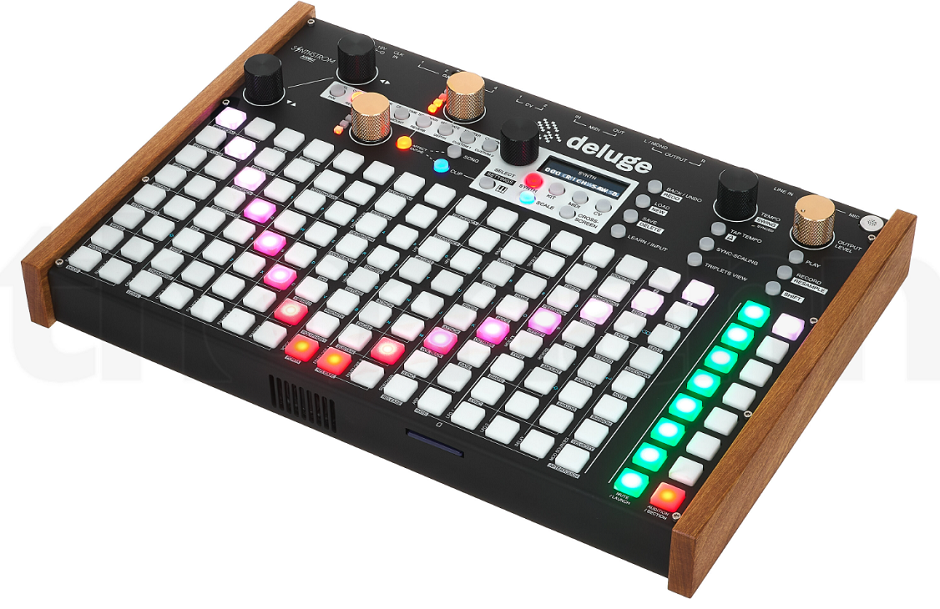
The New Zealand-made groovebox that tries to be everything and somehow mostly succeeds. Synthstrom Deluge combines a synthesizer, sampler, sequencer, and arranger in a battery-powered box with a 128-pad RGB grid, OLED display, MIDI I/O, CV outputs, and a workflow limited only by your willingness to learn it. The open-source firmware means the community actively develops new features alongside Synthstrom’s own updates.
What separates the Deluge from other grooveboxes is the sheer scope. You get subtractive, FM, and wavetable synthesis alongside sampling, audio recording, virtually unlimited track counts, MPE support, and an arrangement mode that lets you compose full songs. The depth is staggering for a device this portable.
- Unlimited Tracks
Track count on the Deluge is limited only by CPU and RAM, meaning you can create projects with dozens of synth, sample, and MIDI tracks running simultaneously. The practical limit is high enough that running out of tracks is rarely the constraint on your creativity. Compared to grooveboxes with 8 or 16 track limits, the Deluge lets you build arrangements of genuine complexity.
- Synth Engine
A full internal synthesizer with subtractive, wavetable, and FM modes provides sound generation that doesn’t rely on samples alone. The synth engine has per-voice filters, a modulation matrix, LFOs, and envelopes deep enough for serious sound design. You can build entire tracks using only the Deluge’s synthesis without ever loading a sample.
- Battery Portable
Rechargeable battery with roughly six hours of life, plus a built-in microphone and speaker, makes the Deluge genuinely self-contained for portable production. You produce complete tracks sitting in a park, on a train, or in bed without any external equipment whatsoever.
- Open Source
The open-source firmware means a community of developers contributes features, fixes, and improvements alongside Synthstrom’s official updates. The community firmware has added features like a grid mode, master compressor, and multi-track export that the official firmware hasn’t yet included. The open development model means the Deluge keeps improving indefinitely.
15. Roland MC-707
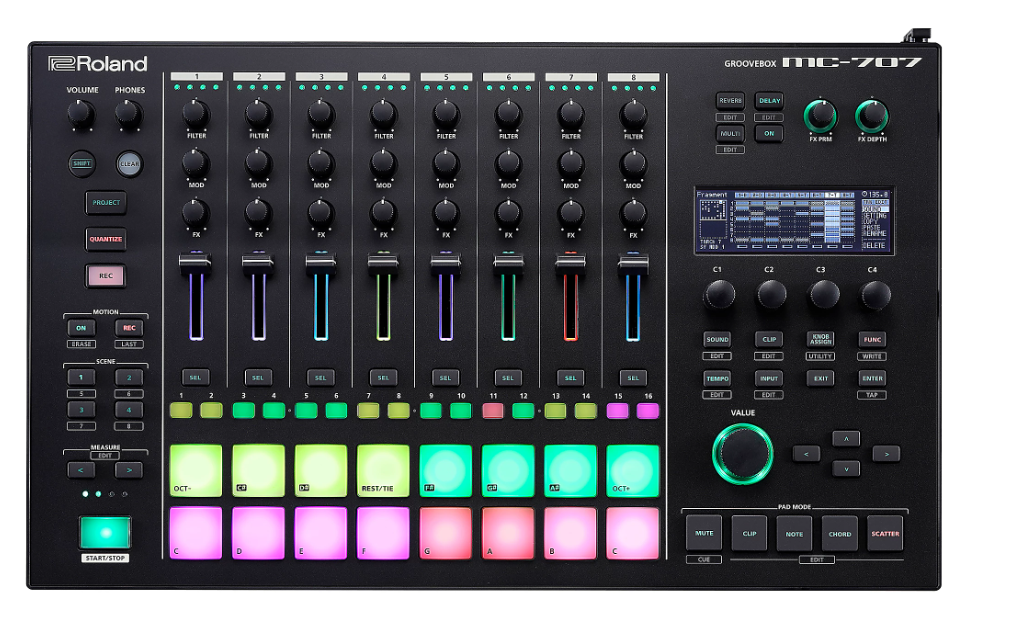
Roland’s full-featured groovebox with the Zen-Core engine, sampling, eight tracks, a large touchscreen, and enough processing power for complex arrangements. Roland MC-707 is the bigger sibling of the MC-101, providing the track count, sound depth, and screen real estate that serious groovebox production demands.
The MC-707 is the machine I’d point at for producers who want one box that handles everything from sound design through sequencing to performance without a computer, but who don’t want the complexity of an MPC or Octatrack. The workflow is approachable, the sounds are good, and eight tracks is enough for complete arrangements.
- Eight Full Tracks
Eight tracks with individual Zen-Core sound engines, effects chains, and sequencing give you a complete arrangement canvas.
Each track can be a drum kit, synth, sample player, or audio recorder, meaning your eight tracks cover drums, bass, keys, pads, leads, and atmospheric elements simultaneously.
- Touchscreen
The color touchscreen provides waveform editing, mixer control, effects adjustment, and parameter browsing in a visual interface that reduces the knob-per-function confusion of smaller grooveboxes. The screen makes sample editing and sound design more accessible than hardware-only interfaces allow.
- Zen-Core Library
The Zen-Core sound architecture provides access to Roland’s vast tonal library spanning decades of synthesis history, from TR drum sounds through Juno pads to Jupiter leads. The factory preset library is extensive enough to produce across genres without importing external sounds.
16. Novation Circuit Tracks
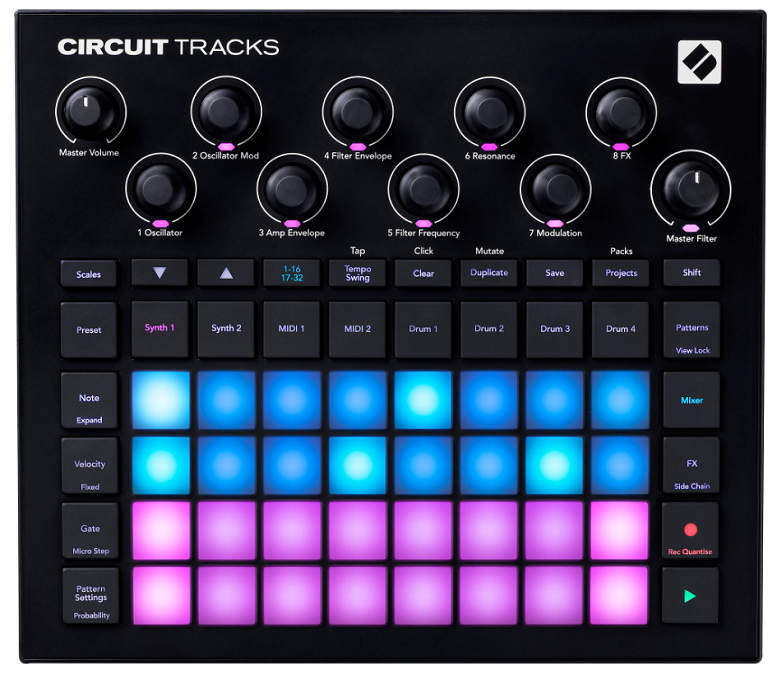
The groovebox that launched a thousand bedroom producers. Tracks combines two synth tracks, two MIDI tracks, and four drum tracks with the RGB pad grid, step sequencer, and Novation’s characteristically accessible workflow. The Circuit Tracks doesn’t try to be the deepest or most powerful. It tries to be the most fun and the most immediate, and it succeeds.
I recommend the Circuit Tracks as a starting point for anyone curious about hardware production. You turn it on, you press some pads, and you’re making music. The learning curve is almost flat, and the results sound good because Novation’s synth engine and the curated presets do the heavy lifting.
- Synth Pair
Two synth tracks running Novation’s digital synthesis engine provide melodic and harmonic content with presets that sound surprisingly good out of the box. The synths cover bass, leads, pads, and keys with enough range to handle most production needs alongside the drum tracks.
- Grid Sequence
The RGB pad grid functions as both a step sequencer and a live performance surface. You program patterns by pressing lit pads, and the visual feedback shows you exactly what’s playing and where. The workflow is so intuitive that complete beginners make their first loop within minutes.
- Portable Sessions
Battery power, compact size, and lightweight construction make the Circuit Tracks genuinely portable for sessions anywhere. The portability combined with the quick workflow makes it ideal for capturing ideas away from the studio.
- Novation Components
The Components software lets you customize synth patches, back up sessions, load samples to the drum tracks, and manage the Circuit from your computer.
The software bridge adds depth to the hardware without complicating the on-device workflow.
- MIDI Tracks
Two dedicated MIDI tracks sequence external synths and drum machines from the Circuit, adding hardware control capability to a compact groovebox. The MIDI tracks mean the Circuit Tracks can serve as the brain of a small hardware setup rather than only an instrument on its own.
Extra: Elektron Analog Rytm MKII
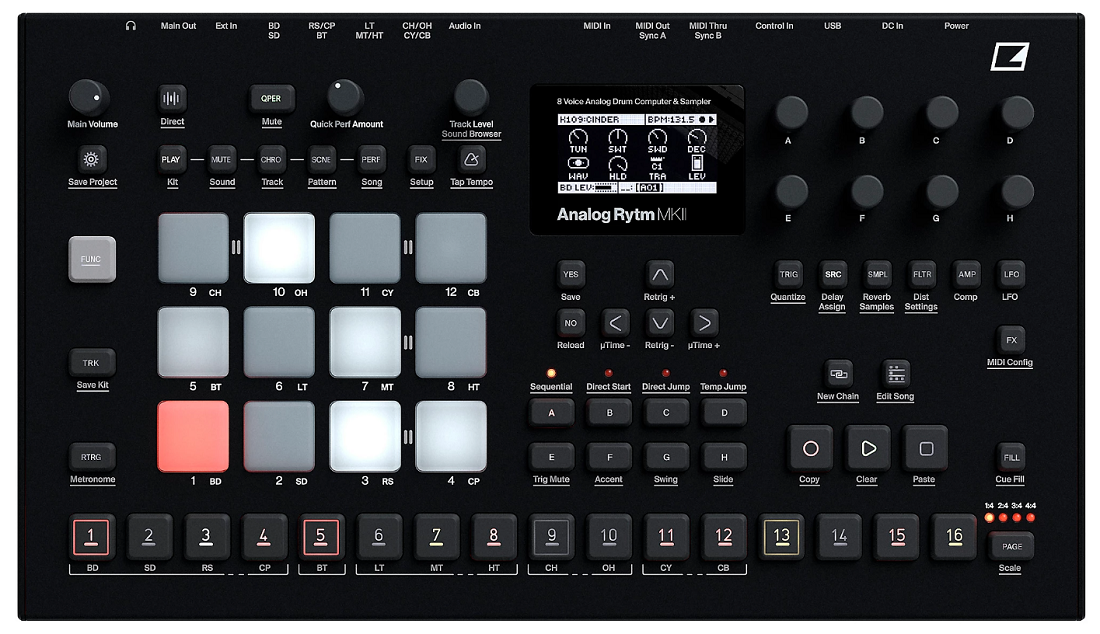
If your production centers on drums and you want the deepest possible drum machine, the Elektron Analog Rytm MKII deserves consideration. This isn’t just a sampler or a groovebox. It’s a dedicated drum synthesizer with analog voice circuits layered with sample playback, the full Elektron sequencer, and a workflow specifically optimized for creating drums that sound absolutely massive.
The analog drum synthesis produces bass drums, snares, and percussion with a weight and character that pure sample playback can’t replicate, and layering samples on top gives you the best of both approaches.
- Analog Drums
Dedicated analog drum circuits generate bass drums, snares, cymbals, and percussion with real analog warmth and punch. The analog synthesis produces low end weight and transient snap that sample-based drums approximate but never quite match.
- Sample Layer
Sample playback layered with analog synthesis gives you the organic depth of analog drums combined with the specificity of sampled material. You layer a snare sample on top of the analog snare circuit for a drum hit that has both the character of synthesis and the identity of a specific sample.
- Performance Pads
12 velocity-sensitive performance pads with the Elektron sequencer underneath provide both live drumming and programmed pattern creation. The pads are sized and spaced for comfortable finger drumming, and the sequencer adds the parameter locks and trig conditions that make Elektron patterns evolve organically.
Get the Free Plugin Starter Kit
The genuinely useful free DAWs and plugins worth installing. No filler. Straight to your inbox.
Hello, I’m Viliam, I started this audio plugin focused blog to keep you updated on the latest trends, news and everything plugin related. I’ll put the most emphasis on the topics covering best VST, AU and AAX plugins. If you find some great plugin suggestions for us to include on our site, feel free to let me know, so I can take a look!