
FL Studio has a massive user base and a workflow that’s genuinely different from other DAWs, yet for years the selection of controllers designed specifically around it was limited. That’s changed significantly, with several manufacturers now offering dedicated FL Studio integration alongside the general MIDI functionality that works with any software.
But even controllers without FL-specific modes work well with Image-Line’s DAW because FL Studio’s MIDI learn system is one of the most flexible in the business. You right-click virtually any parameter, move a knob on your controller, and the mapping is done.
What I think matters most when choosing a MIDI keyboard for FL Studio is matching the controller to how you actually use the software. Some FL producers live in the piano roll, drawing and playing melodic content where a quality keybed with enough range is the priority.
Others build tracks primarily in the Channel Rack and step sequencer, where pads and knobs matter more than key count. And plenty of producers do both, switching between melodic recording and pattern programming throughout a session.
I’ve selected eight MIDI keyboards that cover these different FL Studio workflows, from compact pad-focused controllers through mid-range production keyboards to premium 88-key instruments for producers who play their parts live.
1. 37-Key MIDI Controller Keyboard — $129.99

Before the FL Studio-specific controllers below, one option from the Pluginerds store for producers who need to start playing before committing to a DAW-optimised keyboard.
The 37-Key MIDI Controller Keyboard gives you 37 full-size keys, a pitch and modulation wheel, USB-MIDI connectivity, and plug-and-play compatibility with FL Studio and every other major DAW at $129.99. Three octaves covers the full range of most melody and chord programming sessions without requiring you to spend more on the deep FPC pad integration and macro controls that the specialist FL Studio controllers below provide. If you are setting up a new home studio and need a working controller this week before sorting which DAW-specific features matter to you, this covers the fundamentals.
- Three Octaves
37 full-size keys give you three complete octaves for recording melodies, bass lines, and chord voicings without constantly shifting the octave range during a session.
In FL Studio, three octaves handles the majority of piano roll programming tasks without the frustration of running out of keys mid-phrase. It is also the minimum range at which you can comfortably record most instrument types — including lead synths that use the upper register and bass lines that need the lower end — without shifting octaves constantly.
- Pitch and Mod Wheels
Dedicated pitch bend and modulation wheels provide the expressive performance controls that distinguish a proper keyboard from a minimal pad-only controller.
Pitch bend on a lead synth and modulation assignments in FL Studio’s automation lanes are both easier to record naturally on wheels than on strips or touch surfaces. For producers coming from a mouse-and-piano-roll workflow, adding real-time wheel control to your recordings adds a level of expressiveness that is immediately audible.
- Plug-and-Play
USB-MIDI with no driver installation means the controller appears in FL Studio’s MIDI settings within seconds of being connected. On Windows and Mac, FL Studio detects it automatically — you assign it to a channel and start playing within a minute.
Shop at Pluginerds — 37-Key MIDI Controller Keyboard $129.99
Get the Free Plugin Starter Kit
The genuinely useful free DAWs and plugins worth installing. No filler. Straight to your inbox.
2. Native Instruments Komplete Kontrol S88 MK3
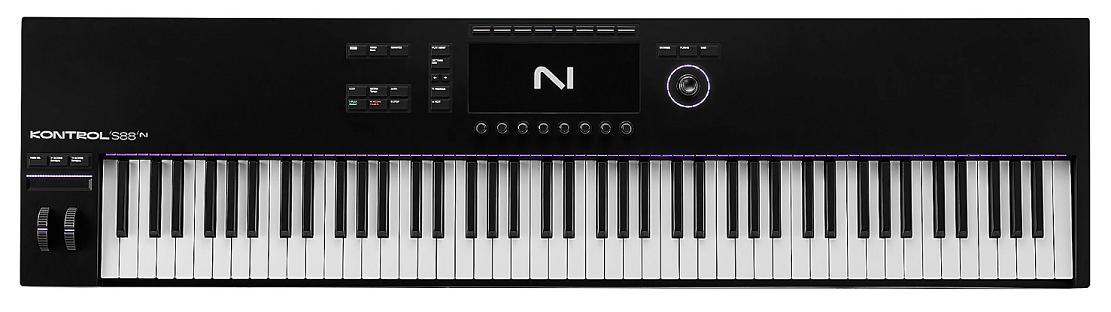
Starting with the premium end because the Komplete Kontrol S88 MK3 delivers a playing experience that makes FL Studio’s piano roll feel like you’re performing on a proper instrument rather than inputting data.
The fully weighted Fatar hammer-action keybed with polyphonic aftertouch and 88 full-size keys provides the expressive, piano-quality playing surface that serious keyboard players need, and FL Studio’s MIDI implementation handles all of the expression data beautifully.
Native Instruments Komplete Kontrol S88 MK3 wasn’t designed exclusively for FL Studio, but FL’s flexible MIDI learn and its support for NKS-compatible plugins means the S88’s automatic parameter mapping works within FL projects the same way it does in any other DAW.
- Hammer Action
The fully weighted Fatar hammer-action keybed provides the playing resistance and response that replicates acoustic piano feel. For FL Studio producers who play piano parts, orchestral arrangements, or any content where touch dynamics carry musical meaning, the hammer-action keybed captures nuance that synth-action and semi-weighted controllers miss. Every keystroke translates to FL Studio’s piano roll with the dynamic range and expression of a real instrument.
- Light Guide
Per-key RGB LEDs illuminate the keyboard to display scales, chord shapes, and drum mappings directly on the keys.
Within FL Studio, the Light Guide helps you stay in key during recording by highlighting scale notes, and it visually indicates which keys trigger which drum sounds when you’re working with percussive instruments. The visual guidance speeds up composition for producers who aren’t confident keyboard players.
- Color Display
A high-resolution color screen shows preset names, parameter values, and waveform information directly on the controller. When browsing Kontakt libraries or Komplete instruments within FL Studio, the display gives you visual context without switching focus to your computer screen.
- Poly Aftertouch
Polyphonic aftertouch detects pressure independently per key, allowing you to apply different expression amounts to individual notes within a chord. FL Studio passes poly aftertouch data to instruments that support it, meaning your sustained chords can have vibrato on one note and filter movement on another based solely on how you vary your finger pressure.
3. Arturia MiniLab 3
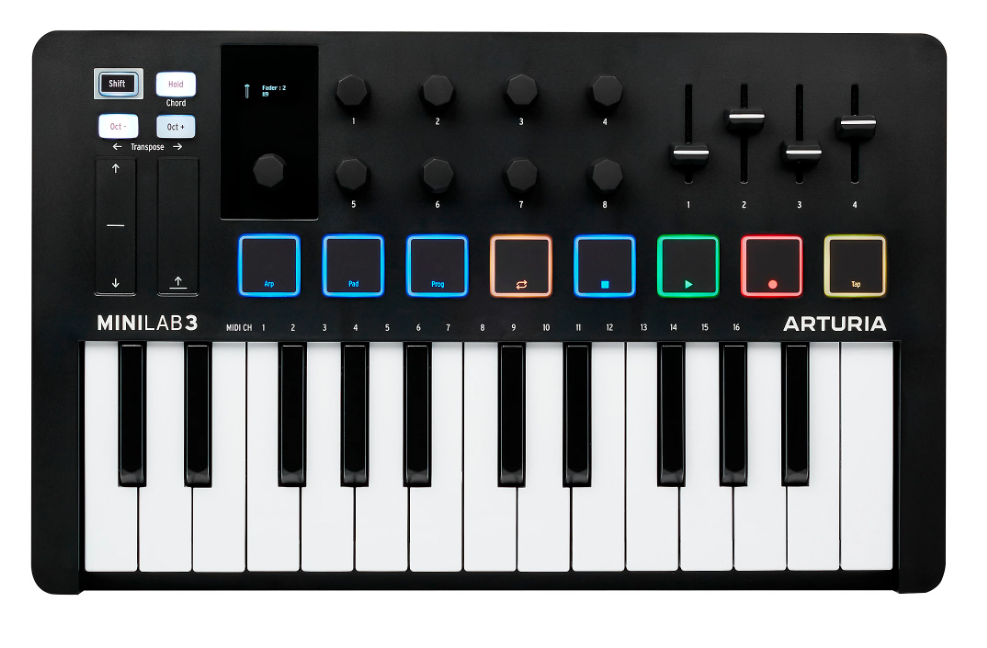
The compact production controller that fits between your monitor and your desk edge while still giving you pads, knobs, faders, and Analog Lab integration alongside FL Studio compatibility.
Arturia MiniLab 3 delivers 25 velocity-sensitive mini keys, 8 RGB pads, 8 continuous encoders, 4 faders, and an OLED display in a footprint that barely claims any desk real estate.
For FL Studio producers working in small spaces who want hands-on control over multiple aspects of their production without a large controller dominating the setup, the MiniLab 3 packs more usable controls per square centimeter than most alternatives.
- Control Density
Eight smooth rotary encoders plus four faders provide simultaneous access to mixer levels, plugin parameters, and any MIDI-mappable function in FL Studio.
The control density means you adjust filter cutoff with one hand while riding a fader with the other, which is the kind of simultaneous multi-parameter control that mouse-based FL Studio work can’t provide. FL’s MIDI learn assigns any of these controls to any parameter with a right-click and a knob twist.
- Pad Section
Eight RGB velocity-sensitive pads with four selectable banks give you 32 total pad assignments for drum programming, clip launching, and chord triggering. In FL Studio, the pads work naturally with FPC, the Channel Rack’s step sequencer, and any sample-based instrument. The velocity sensitivity lets you finger drum with dynamic control rather than triggering flat, uniform hits.
- Analog Lab
Arturia Analog Lab Intro with 500+ presets from Arturia’s V Collection installs as a plugin within FL Studio, and the MiniLab’s controls automatically map to each preset’s most useful parameters. The integration gives you an extensive library of production-ready synth, organ, and keyboard sounds that respond to the MiniLab’s knobs and faders without any manual MIDI mapping.
- OLED Screen
An OLED display shows parameter names, values, and preset information in real time as you adjust controls. The visual feedback confirms what you’re controlling and by how much, which matters when you’re mapping multiple FL Studio parameters and need to keep track of what each knob is doing.
- Chord Mode
A chord mode generates full chords from single key presses, which speeds up harmonic composition in FL Studio’s piano roll. You hold a chord shape, the MiniLab stores it, and you play the chord across the keyboard with one finger while your other hand adjusts controls. For producers who compose chords before melodies, the chord mode streamlines the process.
- Arp Engine
A built-in arpeggiator generates patterns from held notes that record directly into FL Studio’s piano roll. The hardware arp produces rhythmic melodic content independently of any software arpeggiator, and you can adjust rate, pattern, and gate in real time while the arp runs. The arp output records as standard MIDI notes in FL Studio, meaning you can edit the results in the piano roll after recording.
4. AKAI Professional MPK Mini Play MK3
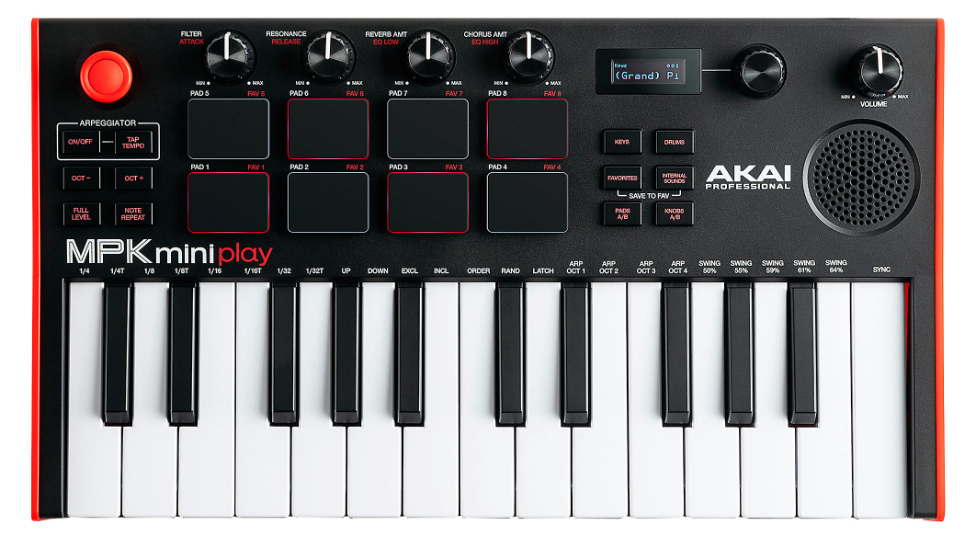
The controller on this list that you can use without a computer, because the MPK Mini Play MK3 includes a built-in sound engine and speaker alongside its MIDI controller functionality.
AKAI MPK Mini Play MK3 gives you 25 mini keys, 8 MPC-style pads, 8 encoders, and 128 onboard instrument sounds that play through the built-in speaker or headphone output, making it a practice and sketching tool when FL Studio isn’t running and a capable controller when it is.
For FL Studio producers who want a controller that doubles as a standalone instrument for practice and idea capture, the Play MK3 fills both roles from a single compact device.
- Standalone Sounds
128 built-in instrument sounds including pianos, synths, drums, and bass play through the built-in speaker without any computer connection. You sketch chord progressions, practice melodies, and capture rhythmic ideas on the MPK Mini Play wherever you are, then plug into your computer and use the same controller to record into FL Studio. The standalone capability means you’re never limited to silent key pressing when your studio isn’t available.
- MPC Pads
Eight velocity-sensitive MPC-style pads carry AKAI’s pad heritage, providing responsive, tactile drum input for FL Studio’s FPC, Slicex, or any sample-based instrument. The pad feel is what AKAI is known for, and the velocity sensitivity translates your finger dynamics into FL Studio’s velocity lanes for natural-sounding drum parts.
- Battery Power
Battery operation with the built-in sound engine means the MPK Mini Play functions as a completely self-contained instrument without USB power. You take it on a trip, to a coffee shop, or anywhere away from your studio, play the onboard sounds, and return home with musical ideas ready to develop in FL Studio.
5. Studiologic SL88 mk2
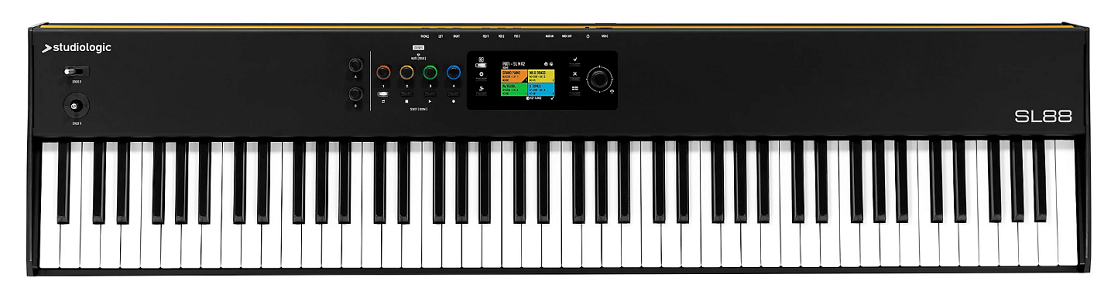
A professional 88-key controller built around one of the most respected keybeds in the industry, from a company that has been making keyboard actions for decades.
Studiologic SL88 mk2 focuses primarily on providing the best possible playing experience with its TP/40WOOD hammer-action keybed featuring wooden key components, three velocity curves, and a response that professional pianists actually enjoy performing on.
For FL Studio producers who are primarily keyboard players and who value the playing surface above all other controller features, the SL88 mk2 provides a keybed quality that’s in a different category from most MIDI controllers.
- Wooden Keys
The TP/40WOOD keybed incorporates wooden key components that provide weight, balance, and a tactile quality that all-plastic keybeds don’t replicate. The wood adds a density and response to the keystroke that makes the SL88 feel closer to an acoustic piano action than the synthetic mechanisms found in most MIDI controllers. For FL Studio piano recording, the keybed quality directly affects the expressiveness of your captured performance.
- Three Curves
Three selectable velocity curves let you match the keyboard’s response to your playing style and the instruments you’re controlling in FL Studio. A softer curve makes gentle playing easier for pad and string parts. A harder curve requires more force for aggressive piano and percussive content. The curve selection means you customize the dynamic response rather than adapting your technique to a fixed setting.
- Stick Controller
A joystick-style controller combines pitch bend, modulation, and two additional assignable axes in a single physical interface. The multi-axis stick provides more modulation options from one control point than separate pitch and mod wheels, which matters when you’re performing expressively into FL Studio and want simultaneous control over multiple parameters.
- Minimal Design
The SL88 mk2 deliberately omits pads, knobs, and faders to focus entirely on the keyboard playing experience in the most compact footprint an 88-key controller can achieve. For producers who already have separate pad controllers or use FL Studio’s mouse-based workflow for everything except keyboard input, the minimal design means you get the best possible keybed without paying for controls you won’t use.
6. Novation Launchkey 49 MK4
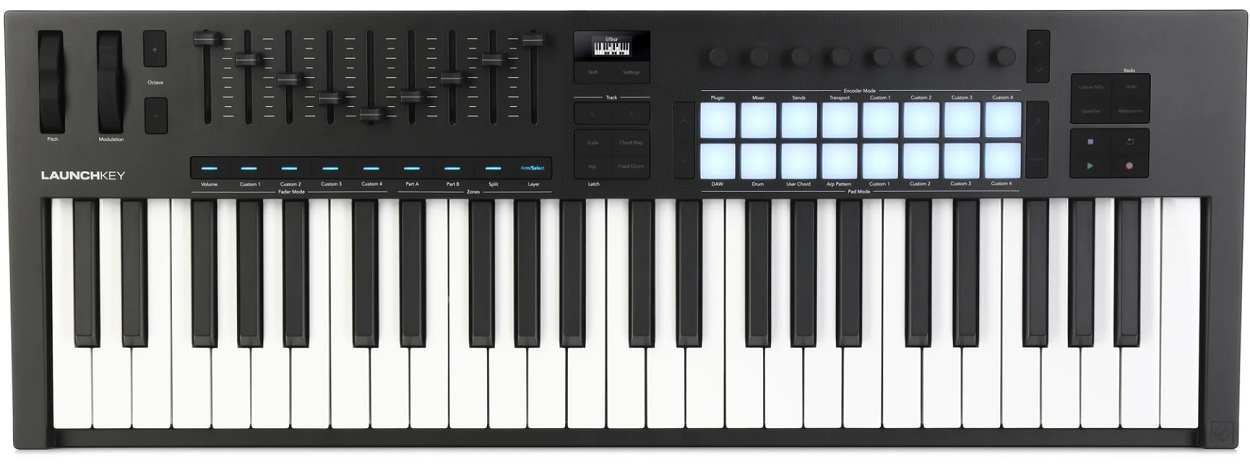
The 49-key sweet spot for FL Studio users who need a proper playing surface with production controls but don’t have room for a 61 or 88-key controller.
Launchkey 49 MK4 gives you 49 full-size velocity-sensitive keys with aftertouch, 16 pads, 8 encoders, 9 faders, and an OLED display with DAW integration that works well with FL Studio alongside its deep Ableton integration.
The 49-key format gives you four octaves, which is enough for two-handed playing across most practical ranges without the desk commitment of a larger keyboard.
- Full Keys
49 full-size keys with channel aftertouch provide the playing range and comfort that mini-key controllers can’t match. Four octaves covers the practical range for most FL Studio recording scenarios, including bass lines, chord progressions, and melodies without constant octave switching. The aftertouch adds pressure-based expression that FL Studio passes to compatible instruments.
- Fader Bank
Nine faders provide dedicated level control for FL Studio’s mixer channels, giving you physical volume adjustment that’s more intuitive than mouse-dragging mixer faders on screen. The ninth fader can control master volume or any assigned parameter, and the fader bank makes mixing in FL Studio a tactile, hands-on experience.
- Pad Grid
16 velocity-sensitive RGB pads handle drum programming, sample triggering, and chord input alongside the keyboard. In FL Studio, the pads work with FPC and the Channel Rack for pattern programming, and the RGB feedback shows you pad assignments and velocity through color intensity.
7. Arturia KeyLab Essential 61 Mk3
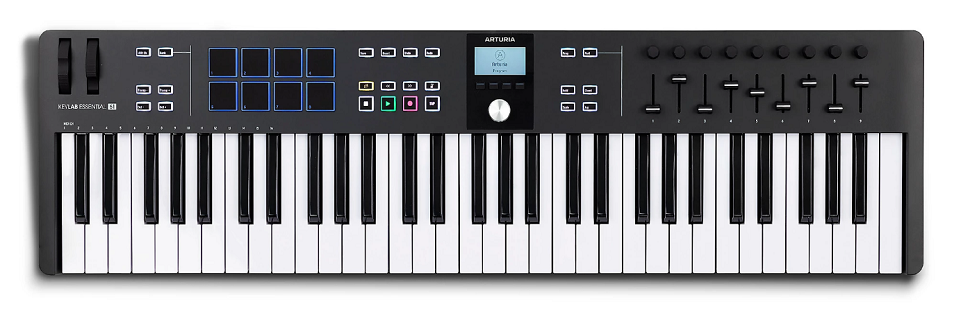
A 61-key production keyboard that bridges the gap between budget controllers and premium flagships while providing Analog Lab integration and broad DAW compatibility including FL Studio.
KeyLab Essential 61 Mk3 gives you 61 velocity-sensitive keys, 16 pads, 9 faders, 9 encoders, a display, and access to Arturia’s extensive preset library in a controller that covers the full production workflow.
For FL Studio producers who want five octaves of range with a comprehensive control surface at a mid-range investment, the Essential 61 delivers the feature count of more expensive controllers without the premium extras.
- Analog Lab
Arturia Analog Lab integration with automatic parameter mapping provides thousands of virtual instrument presets that respond to the Essential’s hardware controls immediately. Within FL Studio, Analog Lab runs as a plugin and the Essential’s knobs and faders auto-assign to each preset’s macro parameters. The sound library spans vintage synths, organs, pianos, and modern hybrid instruments, giving you an enormous production palette that works from the moment you load a preset.
- Control Surface
Nine faders plus nine encoders create a comprehensive physical control surface for FL Studio’s mixer and plugin parameters. The control density means you manage both levels and timbral adjustments from the hardware simultaneously, which speeds up mixing and sound design compared to mouse-only interaction with FL Studio’s interface.
- Display Feedback
A built-in display shows parameter names, values, and preset information as you adjust controls. The visual feedback is particularly useful when you’ve mapped multiple FL Studio parameters to the controller’s knobs and need to confirm which parameter you’re adjusting before making changes.
- Chord Features
Chord mode and scale quantization keep your playing musically coherent by constraining notes to selected scales and generating chords from single keys. Within FL Studio, the chord and scale features speed up composition by removing wrong notes from your recording before they reach the piano roll, which is a practical time-saver for producers who compose quickly.
- DAW Controls
Pre-configured DAW control provides automatic mapping of transport functions, mixer parameters, and navigation to the Essential’s buttons and controls. The DAW integration works with FL Studio through Arturia’s MIDI Control Center software, where you select FL Studio as your target and the controller configures its assignments accordingly.
8. M-Audio Oxygen Pro 61
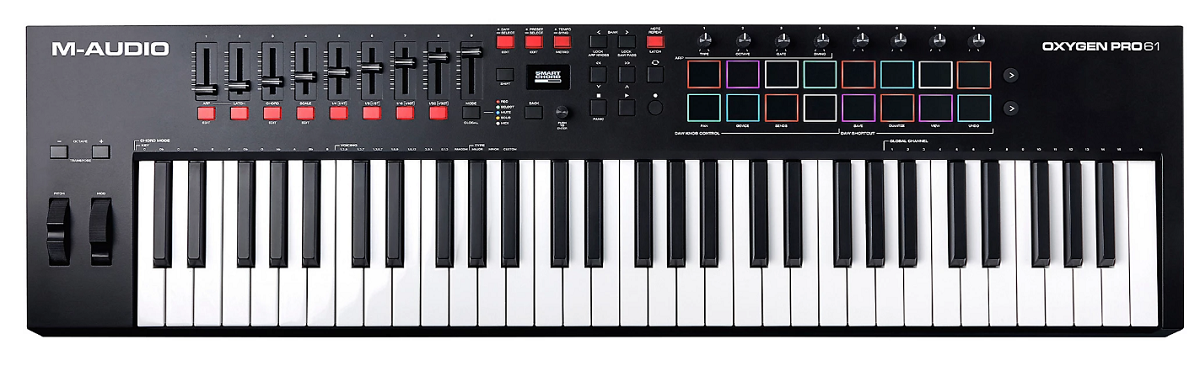
A practical 61-key controller that covers the FL Studio production workflow at a mid-range cost without unnecessary extras.
M-Audio Oxygen Pro 61 gives you 61 semi-weighted velocity-sensitive keys, 16 pads, 8 encoders, 9 faders, and auto-mapping DAW profiles including support for FL Studio in a straightforward, get-to-work design.
For FL Studio users who want a capable 61-key controller with production controls at a reasonable investment and don’t need flagship features, the Oxygen Pro handles the job solidly.
- Semi-Weighted
Semi-weighted keys provide more playing substance than synth-action controllers, offering resistance that suits FL Studio producers who play parts expressively. The semi-weighted feel sits between the lightness of synth action and the heaviness of hammer action, providing a middle ground that works for both piano-style playing and synth performances.
- DAW Profile
A pre-configured FL Studio profile maps the Oxygen Pro’s faders, knobs, and transport buttons to FL Studio’s mixer, plugin parameters, and playback controls automatically. The profile eliminates manual MIDI learn setup for the most common FL Studio functions, getting you from connection to productive work quickly.
- 16 Pads
16 velocity-sensitive RGB pads with multiple banks provide drum programming and sample triggering for FL Studio’s FPC, step sequencer, and any sample-based instrument. The pad count matches what most drum programming scenarios require, and the velocity sensitivity captures your playing dynamics into FL Studio’s velocity lanes.
9. Arturia KeyLab 88 Mk3
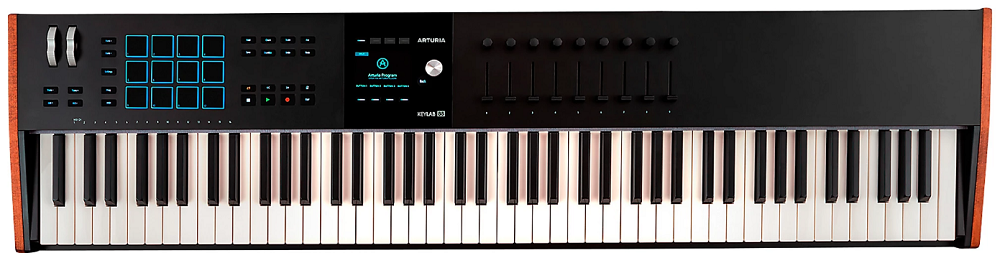
Closing this list with the most comprehensive controller available, combining an 88-key piano-quality keybed with motorized faders, a large color display, polyphonic aftertouch, and full Analog Lab integration. Arturia KeyLab 88 Mk3 is a premium instrument that turns FL Studio into a hands-on production environment where virtually every important function is accessible from the hardware.
For FL Studio producers who want nothing less than the best keybed, the most complete control surface, and the deepest software integration available in a single controller, the KeyLab 88 Mk3 is the top of the range.
- Motorized Faders
Nine motorized faders physically move to match FL Studio’s current mixer positions when you switch tracks or recall projects. The motorized feedback means the faders always reflect the actual parameter values, eliminating the value jumps that occur when non-motorized faders don’t match the software state. For FL Studio mixing, the motorized faders provide a genuine console-quality tactile experience.
- Weighted Keybed
An 88-key weighted keybed with polyphonic aftertouch provides the full piano range with per-note pressure expression. The poly aftertouch captures pressure independently for each key, meaning you can record parts into FL Studio’s piano roll where individual notes within a chord carry different expression amounts. The 88-key range covers every practical scenario from deep sub-bass to the highest register.
- Analog Lab Pro
Full Analog Lab integration with the complete V Collection engine running natively through the controller’s automatic parameter mapping. Within FL Studio, every Analog Lab preset responds to the KeyLab’s knobs, faders, and display with zero setup. The sound library provides thousands of production-ready instruments spanning five decades of keyboard history, all immediately playable through the KeyLab’s premium keybed.
- Production Hub
The comprehensive control surface with encoders, faders, pads, transport buttons, and navigation controls makes the KeyLab 88 Mk3 a complete FL Studio production hub where you handle mixing, sound design, recording, and arrangement from the hardware. The breadth of controls reduces how often you reach for the mouse, which keeps you in a creative flow state rather than switching between physical and on-screen interaction.
Get the Free Plugin Starter Kit
The genuinely useful free DAWs and plugins worth installing. No filler. Straight to your inbox.

Hello, I’m Viliam, I started this audio plugin focused blog to keep you updated on the latest trends, news and everything plugin related. I’ll put the most emphasis on the topics covering best VST, AU and AAX plugins. If you find some great plugin suggestions for us to include on our site, feel free to let me know, so I can take a look!