
Every producer hits the wall where their plugins start feeling predictable. You know what your compressor does. Your reverb sounds familiar. Your synth presets blur together. And the music you’re making starts sounding like everything you’ve already made.
That’s the moment you need something genuinely strange in your toolkit, not another variation on tools you already own, but something that makes sounds you couldn’t have planned and processes audio in ways that don’t follow the rules you’ve learned.
The plugins on this list aren’t trying to be practical mixing tools or bread and butter instruments. They’re chaos generators, sound manglers, AI driven synthesizers, granular destroyers, and vocal transformers that exist to break you out of your patterns. Some of them are difficult to control.
A few will make sounds you have no idea how to use. That’s exactly the point. The most interesting music usually comes from the moments where you didn’t know what was going to happen next. I’ve pulled together eleven plugins that represent the strangest, most creative, and most genuinely innovative tools you can get your hands on right now.
1. Beatsurfing RANDOM

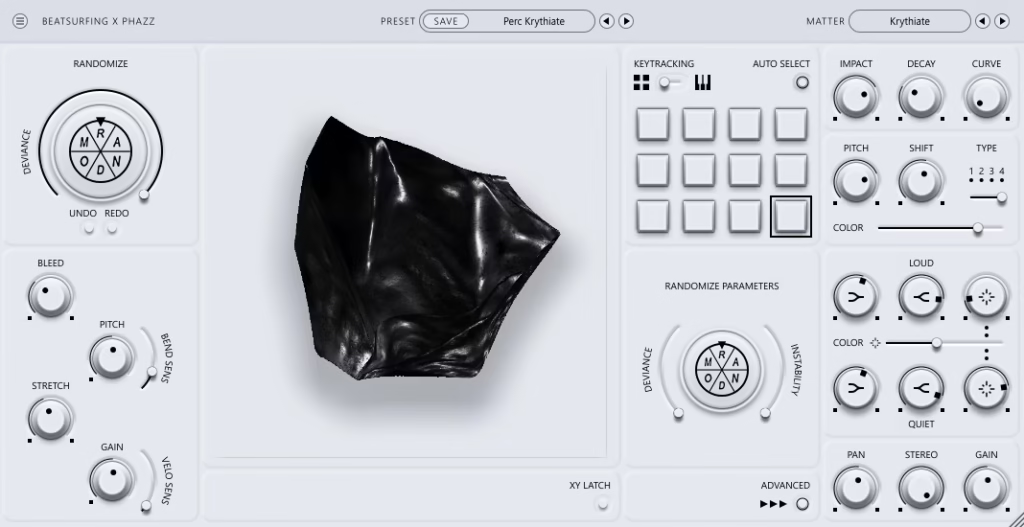
I’ll be honest with you upfront: I can’t fully explain what this plugin does, and I think that’s by design. Beatsurfing RANDOM uses neural network principles to generate an infinite variety of sounds through a synth engine and resonator controlled by an animated ferrofluid XY pad that responds to your touch like magnetic liquid.
The whole thing was developed with multi-platinum producer Phazz, and the philosophy is that you should never be able to predict what comes out next.
It’s not for everyone. The sounds lean heavily toward inharmonic, metallic, percussive textures that feel more like striking strange physical materials than playing a traditional synth. But if that description excites rather than concerns you, keep reading.
- Random Wheel
The RANDOM wheel is the core of the whole experience. You spin it and hundreds of parameters shift at once, generating a completely new sound based on how far the Deviance control is cranked. Low deviance gives you subtle variations from your current sound.
High deviance sends you somewhere completely different with no way back. The wheel is what makes this feel more like exploration than sound design, because you’re discovering sounds rather than building them from parameters. I found myself spinning and playing for an hour before I realized I hadn’t actually started the track I opened the plugin for.
- Ferrofluid XY
The animated XY pad uses ferrofluid dynamics where the matter on screen attracts and repels based on your cursor position. Moving through the space morphs the sound in real time, and each curated table contains a different sonic landscape you navigate by dragging across the surface.
The visual feedback makes sound design feel physical and tactile in a way that knobs and sliders don’t. It’s genuinely one of the most visually interesting plugin interfaces I’ve used, and the visuals actually correspond to what you’re hearing rather than being purely decorative.
- Dual Engines
Under the hood, the sound comes from a synth and resonator working together. The resonator uses 8 modulated delay lines with two feedback loops and distortion, producing everything from metallic flange harmonics to Karplus-Strong bass tones. The two systems interact, which means the complexity comes from their relationship rather than from either engine alone.
- Instability
The Instability control introduces variation between each note you play, meaning the same key press produces slightly different results every time. Combined with the other controls (Stress for decay, Spike for aggression, Bleed and Fluid for resonator color), you end up with a synth that genuinely never repeats itself. Whether that’s a feature or a frustration depends entirely on how comfortable you are with unpredictability.
Get the Free Plugin Starter Kit
The genuinely useful free DAWs and plugins worth installing. No filler. Straight to your inbox.
2. DataMind Audio Combobulator

If you’ve ever wanted to build your own multi-effects processor from scratch with routing options that would make a modular synth jealous, this is it. DataMind Audio Combobulator lets you combine multiple effect modules in configurations that include feedback loops, parallel paths, and cross-modulation routings that produce results no single effect plugin can replicate.
The modular approach is what makes it genuinely creative rather than just another multi-effects unit with a different skin. You’re not choosing from pre-built chains. You’re building signal paths that don’t exist anywhere else.
- Modular Routing
The effect modules can be routed in any configuration you can imagine, including series, parallel, feedback loops, and cross-modulation paths. You can feed a granular processor into a ring modulator whose parameters are being controlled by an envelope follower tracking the original signal.
The routing flexibility creates results that are impossible in fixed chain effects because the unusual signal paths produce unusual sounds. I’ve spent entire sessions just experimenting with routing configurations without even getting to the actual music.
- Effect Modules
The available modules span everything from conventional processors (filters, delays, distortion) through more experimental options (granular, spectral, ring modulation) that you combine into custom chains.
Each module has its own parameter set and modulation options, and the quality of the individual effects is good enough that you’d use them even outside the modular context. The combination is where the creative value multiplies.
- Modulation Web
A comprehensive modulation system connects LFOs, envelopes, followers, and random sources to any parameter across any module. The modulation web is what turns a static effect chain into a living, evolving processor where the parameters are constantly moving.
Modulating the feedback amount of a delay with a random source while an LFO controls the filter that’s processing the delay’s output produces chaos that somehow sounds intentional.
- Signal Analysis
Built in analysis tools including envelope followers and pitch trackers can derive modulation signals from the input audio itself. The analysis means your effects can respond to what you’re feeding them, creating program dependent processing where the effects change based on the dynamics, pitch, and spectral content of the input. It’s reactive sound design rather than static processing.
- Snapshot System
A snapshot morphing system lets you save different effect configurations and morph between them in real time. The morphing transitions smoothly between completely different routing configurations, which creates evolving effect landscapes that shift character over time.
For live performance and automation, the snapshot morphing turns the Combobulator into a performable instrument.
- Visual Feedback
The interface provides real time visual representation of the signal flow, showing you exactly where audio is going through your routing configuration.
The visual feedback is essential because the routing can get complex enough that you lose track of what’s connected to what, and the signal flow display keeps you oriented. It also looks genuinely impressive, which doesn’t affect the sound but does affect how inspired you feel while using it.
3. Dreamtonics Vocoflex
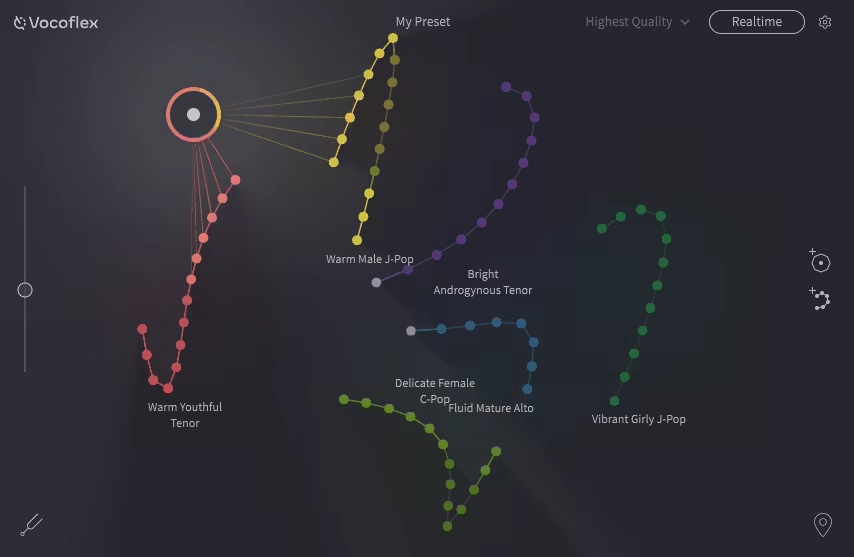
Vocal transformation plugins are common, but most of them just pitch shift or apply effects to existing vocal recordings. Dreamtonics Vocoflex does something fundamentally different: it analyzes vocal content and resynthesizes it using AI, letting you change the character, timbre, and identity of a voice while maintaining the expression and phrasing of the original performance.
If you know Dreamtonics, it’s probably from Synthesizer V, their AI vocal synthesis software. Vocoflex applies similar technology to transforming existing vocal recordings rather than generating them from scratch.
- Voice Conversion
The AI engine transforms the identity of a voice while preserving the performance characteristics. You can make a male voice sound female, change the age and character of a singer, or create hybrid voices that don’t exist in reality.
The transformation isn’t just pitch shifting. The AI actually resynthesizes the vocal with different formant structures, timbral qualities, and character traits while keeping the timing, phrasing, and emotion of the original take.
- Real Time
The processing runs in real time within your DAW, which means you can audition voice transformations during playback and automate parameters for evolving vocal characters. The real-time operation makes it practical for production rather than requiring offline rendering, and the latency is manageable for mixing applications.
- Expression Preservation
The transformation preserves the dynamic expression, vibrato, breath sounds, and emotional qualities of the original performance. This is what separates it from simple pitch shifting or formant manipulation, because the AI understands the performance characteristics as separate from the voice identity and maintains them through the conversion.
4. Unfiltered Audio Sandman Pro
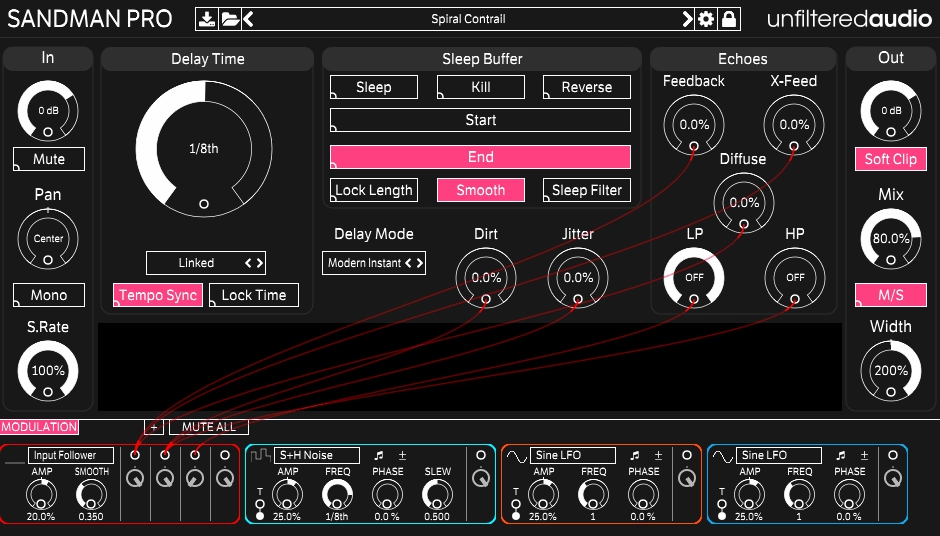
Most delay plugins give you echo and call it a day. Unfiltered Audio Sandman Pro takes delay into completely different territory with a freeze/buffer system that captures moments of audio and lets you manipulate them in real time, combined with delay feedback that can be pushed into self-oscillating, pitch-shifting chaos with granular controls and modulation.
The plugin sits somewhere between a delay, a looper, a granular processor, and a glitch tool, and it’s exactly as weird as that sounds.
- Sleep Mode
The headline feature is Sleep mode, which freezes the delay buffer and lets you manipulate the captured audio in real time. When you engage Sleep, the plugin grabs whatever’s in the buffer and holds it, letting you adjust pitch, grain size, feedback, and filtering on the frozen content.
The result is a performance tool where you can capture a moment of audio and transform it into evolving textures, stuttered rhythms, or pitch-shifted drones while the original track continues playing underneath.
- Dream Sequence
An automated modulation sequencer controls multiple parameters simultaneously with tempo-synced patterns. The sequencer turns the delay into a rhythmic effects generator where the delay time, feedback, filter, and pitch shift all move in coordinated patterns.
The sequenced modulation creates effects that are far more complex than what manual automation could achieve, and the tempo-syncing keeps everything musically relevant.
- Grain Controls
Granular processing within the delay buffer lets you control the grain size, density, and pitch of the delayed signal. The granular controls transform standard delay repeats into scattered, fragmented textures that sound nothing like conventional echo.
At extreme settings, the grains become so small and dense that the delay output turns into a continuous, shimmering texture rather than discrete repeats.
- Feedback Chaos
The feedback path can be pushed well beyond standard delay feedback into self-oscillating territory where the delay generates its own content. Combined with the pitch shifting and filtering in the feedback loop, the self-oscillation produces rising or falling pitch spirals, metallic harmonics, and sustained drones that develop and evolve on their own. The feedback chaos is controllable enough to be musical but wild enough to be surprising.
5. DataMind Audio Concatenator

Another entry from DataMind Audio, this plugin takes a completely different approach: it works by stitching together tiny fragments of audio from your input or from loaded samples, creating new sounds through the combination of micro-segments.
Concatenator is a concatenative synthesis engine that produces results by finding and assembling the best matching audio fragments from a source corpus.
The concept sounds academic, but the results are genuinely creative. You feed it one sound and it reconstructs it from pieces of a completely different sound.
- Corpus Based
The engine works from a corpus of audio that you load (your own samples, recordings, or the included content) and uses it as the raw material for reconstruction. When you play or feed audio into the plugin, it searches the corpus for the closest matching fragments and assembles them into new sound.
The corpus determines the character of the output, so loading a corpus of piano recordings produces output that sounds like fragmented piano, while a corpus of drum loops produces rhythmically fragmented percussive content.
- Fragment Control
You control the size and overlap of the fragments that the engine assembles, which determines whether the output sounds like recognizable pieces of the source or like an abstract granular texture. Larger fragments preserve more of the source character. Smaller fragments produce more abstract, granular results where the source material becomes unrecognizable. The fragment size is where you balance between coherence and abstraction.
- Real Time Input
The plugin can analyze your live input signal and reconstruct it from the corpus in real time, which means you can sing, play, or route any audio through it and hear it rebuilt from completely different source material.
Singing into Concatenator while it’s loaded with a corpus of string recordings produces output that follows your vocal melody but sounds like fragmented strings. The real time aspect makes it performable rather than just an offline curiosity.
6. Klevgrand Tomofon
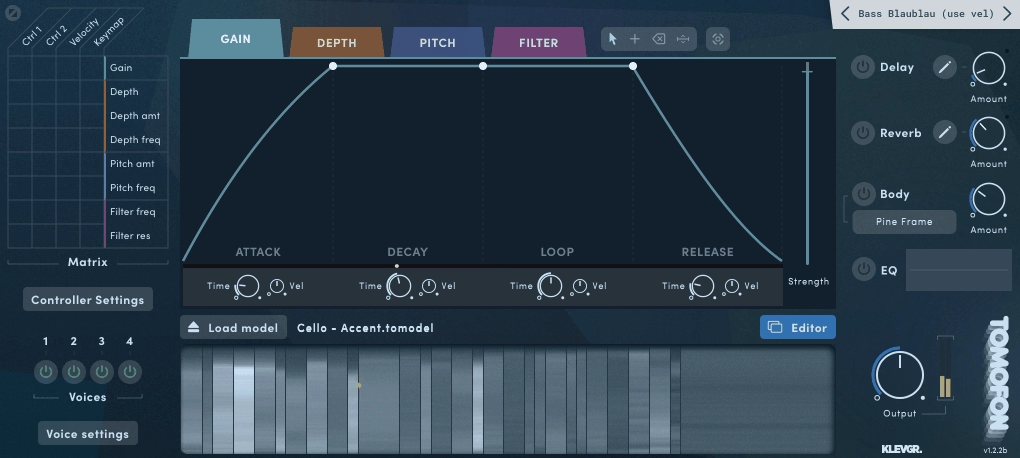
A synthesizer that generates sound from physical modeling of acoustic instruments and objects but gives you control over the physical properties in ways that no real instrument could achieve. Klevgrand Tomofon models the vibration behavior of strings, tubes, membranes, and plates but lets you morph between them, resize them, change their material properties, and combine them in impossible configurations.
The result is sounds that feel acoustic and organic but couldn’t exist in the physical world, which is a specific and useful creative space.
- Physical Models
The engine provides four physical model categories (string, tube, membrane, plate) that simulate how different physical structures vibrate when excited. Each model produces sound through mathematical simulation of the physics rather than sample playback, which means the sound responds dynamically to your playing in the way a real physical object would.
Harder playing doesn’t just trigger a louder sample. It changes the overtone structure, the attack character, and the decay behavior because the physics of the model respond to the excitation force.
- Material Morphing
You can morph between physical models continuously, creating hybrid objects that don’t exist in reality. A sound that starts as a vibrating string can morph into a resonating tube and then into a struck membrane, all within a single note or across a performance. The morphing creates tonal transitions that feel organic because they’re based on physics rather than crossfading between unrelated samples.
- Property Control
The physical properties of each model (size, tension, damping, material density, excitation position) are all adjustable, letting you create instruments that couldn’t physically exist. A string the size of a building. A tube made of glass. A membrane with the tension of a drum head but the size of a football field.
The impossible configurations produce sounds that have an acoustic quality because they’re generated from physics but that sound unlike any real instrument.
- Excitation Types
Multiple excitation methods (bow, strike, pluck, blow) determine how the physical model is activated, each producing fundamentally different sound characteristics from the same model. The excitation choice is what makes the same physical model sound like completely different instruments. Bowing a plate sounds nothing like striking it, even though the underlying resonance is the same.
- Modulation
A modulation system with LFOs and envelopes can animate the physical properties in real time, creating instruments whose material and structure change as they’re being played. Modulating the size of a tube while playing it produces pitch effects that feel organic because they’re based on the physics of a changing resonant cavity rather than an applied pitch envelope.
7. Glitchmachines Fracture (Free)
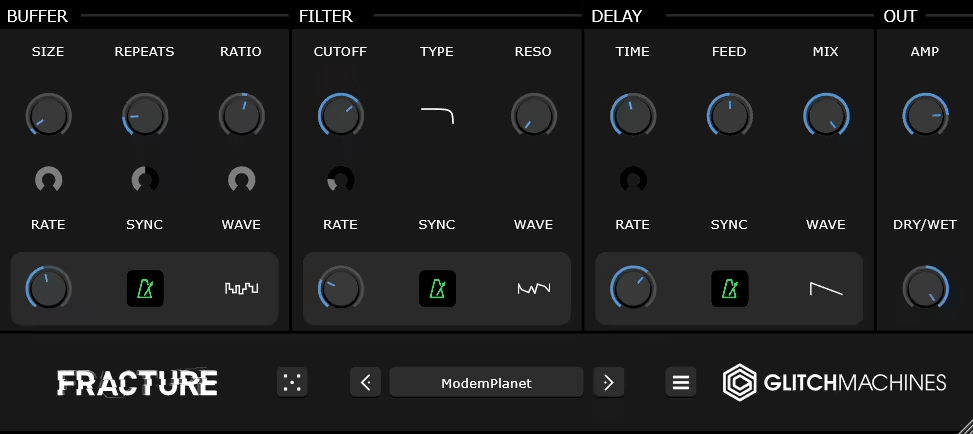
For the cost of absolutely nothing, Fracture gives you a buffer effect processor that chops, stutters, glitches, and destroys your audio in tempo-synced patterns. It’s one of those rare free plugins that’s genuinely useful in professional production rather than being a stripped-down demo of something better.
The glitch and stutter effects that Fracture produces have shown up on enough records and sound design projects that you’ve probably heard it without knowing it.
- Buffer Effects
The engine captures segments of your audio in a buffer and manipulates them through pitch shifting, reversing, speed changes, and repeat patterns.
The buffer manipulation produces the stuttered, chopped, and glitched effects that are difficult to achieve with standard DAW editing because the processing happens in real time and responds to the audio dynamically. You insert it on a track and it fragments your audio into rhythmic glitch patterns that lock to your project tempo.
- Modulation Sources
Multiple modulation sources including LFOs, step sequencers, and random generators control the buffer parameters, creating patterns that range from subtle rhythmic variation to complete sonic destruction.
The modulation is what separates Fracture from a simple stutter effect because the parameters are constantly moving, producing evolving glitch patterns that develop over time rather than repeating the same effect.
- Zero Cost
The plugin is completely free with no trial limitations, stripped features, or account requirements beyond downloading it. For a free tool, the quality and usefulness are genuinely remarkable, and I’d use it even if it cost money. If you make any kind of electronic, experimental, or sound design oriented music, there’s no reason not to have this installed.
8. Beatsurfing RANDOM Metal

The percussion-focused sibling of the original RANDOM, this plugin applies the same neural network driven sound generation to percussive sounds specifically.
RANDOM Metal is percussive monophonic synthesizer designed for creating drum sounds, metallic hits, cymbals, shakers, and experimental percussion that you won’t find in any sample pack.
If you’re tired of scrolling through the same hi-hat samples as everyone else, this offers an alternative approach where your percussion is generated rather than selected.
- Percussive Matter
Over 40 percussive matter types provide the starting point for sound generation, covering everything from aggressive metallic cymbals to shakers, hi-hats, and abstract percussive textures.
Each matter type defines a different sonic territory that the randomization explores, and switching between them changes the fundamental character of what the plugin produces. The range goes from sounds you’d immediately recognize as drum elements to textures that are percussive in behavior but sound like nothing you’ve heard before.
- Pad Mode
A 12-pad trigger interface lets you play and perform different sounds from the engine, each pad holding a different randomization state. You can build custom kits by spinning the randomizer on each pad until you find sounds you like, creating a performance set of unique percussion that’s entirely your own. The pad layout makes it usable as a live performance instrument alongside its sound design applications.
- Randomization
The same RANDOM button with adjustable Deviance as the original plugin, but optimized for percussive results. Low deviance gives you subtle variations on your current sound, useful for creating families of related hi-hats or shaker variations. High deviance throws you into completely new percussive territory.
The adjustable range means you can use the randomization for both practical variation and wild experimentation.
- XY Expression
The expressive XY pad provides real-time control over hundreds of parameters simultaneously, with each matter type responding differently to your cursor position. The XY control adds a performative dimension to the sound generation that static randomization doesn’t provide, because you can move through the parameter space continuously and find sweet spots that a single random click might miss.
9. Sugar Bytes Turnado
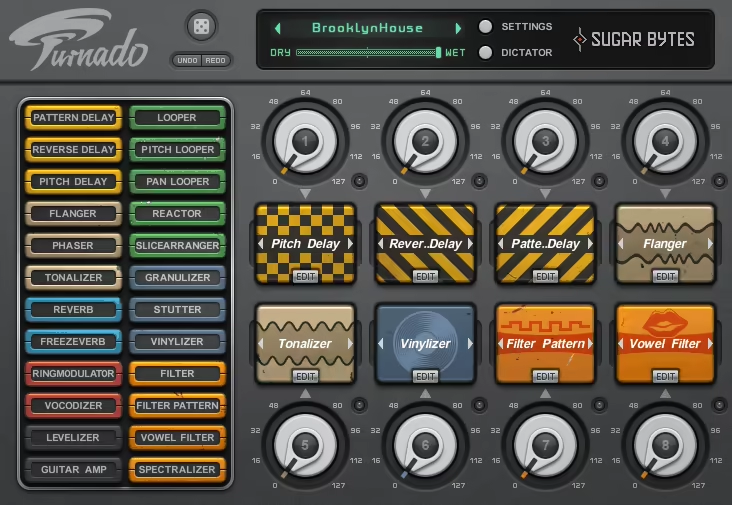
If you want one plugin that does everything destructive and does it with a performance-oriented interface designed for real-time use, Sugar Bytes Turnado is probably the most comprehensive multi-effect performance tool available. It gives you eight simultaneous effects controlled through a macro system designed for live manipulation.
Turnado has been around for years at this point, but it’s still one of the most effective tools for creating builds, drops, transitions, and creative destruction during live performance or studio production.
- Eight Slots
Eight simultaneous effect slots run in parallel, each loaded with a different processor from a library that includes filters, delays, distortion, granular, looping, pitch shifting, gating, and more.
The eight-slot architecture means you can have an enormous amount of processing available at once, switching between effects or combining multiple effects simultaneously for complex, layered transformations. Each slot has its own activation and intensity control.
- Dictator Control
The Dictator macro controls all eight effects simultaneously with a single knob or MIDI controller. As you turn the Dictator, each effect ramps from zero to its configured intensity at different rates and points along the macro travel.
The single-knob control is what makes Turnado usable in live performance, because you can sweep from clean signal to complete sonic destruction and back with one hand while the other hand handles the rest of your performance.
- Performance Design
The entire interface is designed for real-time manipulation rather than set-and-forget processing. Effects have large, touchable controls that respond to mouse or MIDI input instantly. The layout encourages you to play the effects as an instrument rather than program them statically.
For DJs, live electronic performers, and producers who automate effects during production, the performance orientation makes Turnado significantly more immediate than loading eight separate effect plugins.
- Effect Library
The effect library covers a broad range of processing types from standard filters and delays through more experimental granular, looping, and spectral processors. Each effect category contains multiple variations with different characters, and you can swap effects in and out of slots without losing your Dictator mapping.
The library depth means you’re not limited to one type of filter or one delay algorithm. You have enough variety to build effect configurations that cover completely different creative territories.
- Snapshot System
Preset snapshots let you save complete eight-effect configurations and recall them instantly during performance. You can build a collection of different destruction presets, each designed for a specific type of transition or build, and switch between them on the fly.
The snapshot recall is fast enough for live performance, which means you can prepare different effect combinations for different moments in a set and trigger them without reconfiguring anything in the moment.
10. Minimal Audio Evoke

A vocal resynthesis engine that goes beyond conventional vocal effects by analyzing vocal content and regenerating it with modified characteristics. Minimal Audio Evoke doesn’t just process your vocal. It deconstructs it and builds something new, giving you control over pitch, formant, harmonics, and spectral qualities in ways that EQ and pitch shifters can’t touch.
The resynthesis approach means you’re not limited to what processing can do to an existing signal. You’re fundamentally changing the building blocks and reassembling them.
- Vocal Resynthesis
The engine analyzes and resynthesizes vocal content rather than processing the audio signal directly. The difference is significant: processing can only filter, compress, delay, or distort what’s already there. Resynthesis takes the vocal apart, changes the components, and puts it back together differently.
You can shift the fundamental character of a voice in ways that are impossible with any chain of conventional effects, producing transformations that range from subtle character changes to complete vocal reinvention.
- Formant Shifting
Independent formant control changes the perceived character of a voice without affecting pitch, letting you make voices sound larger, smaller, older, younger, or completely inhuman. The formant independence from pitch is what makes this more powerful than basic pitch shifting where formants shift proportionally and destroy the natural quality. You can transpose a vocal while keeping the formants natural, or shift formants dramatically while keeping the original pitch for creative effects.
- Harmonic Control
Controls over the harmonic content of the resynthesized signal let you add or remove tonal complexity in ways that EQ can’t replicate. Adding harmonics creates warmth and presence by generating new frequency content rather than amplifying what’s there. Removing harmonics thins the voice in a controlled, precise way that filtering approximates but doesn’t match.
- Creative Extremes
Pushing the parameters into extreme ranges produces synthetic, alien, and heavily transformed vocal textures that blur the line between vocal processing and sound design.
The creative modes generate content that’s clearly derived from the original voice but sounds unlike anything a human could naturally produce, which is useful for electronic production, sound design, and any context where vocals serve as raw material for texture rather than as recognizable singing.
11. Sugar Bytes Graindad
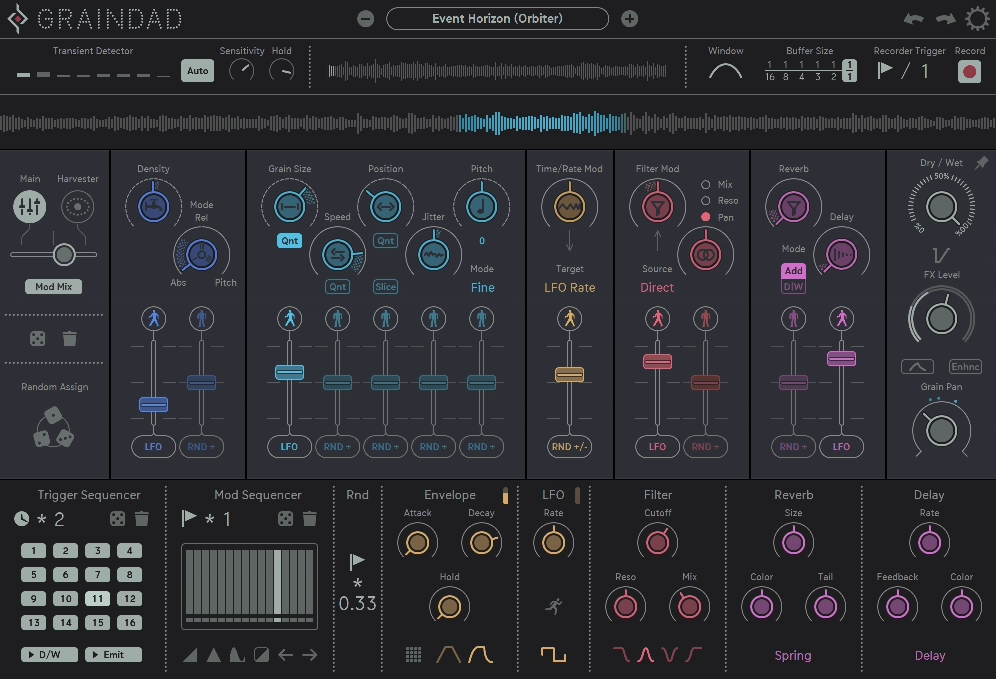
Closing the list with a granular effects processor that combines real-time granular manipulation with stutter, glitch, and creative destruction tools in a performance-oriented package. Sugar Bytes Graindad takes your audio, breaks it into tiny grains, and gives you control over pitch, time, density, and spatial characteristics to create effects that range from subtle textural enhancement to complete sonic obliteration.
Granular processing is available in several plugins on this list, but Graindad specifically balances the creative potential with an interface designed for hands-on real-time use.
- Granular Engine
The processing slices audio into microscopic grains with independent control over size, density, pitch, position, and spatial placement.
The grain-level control produces transformations that no conventional effect achieves, from frozen textures that sustain a single moment indefinitely to scattered, fragmented rhythms that deconstruct your audio into rhythmic particles. Adjusting grain density from sparse to thick transforms the same source from glitchy fragments to smooth, continuous pads.
- Stutter Mode
Rhythmic stutter effects chop your audio into tempo-synced repetitive fragments, creating beat-aligned glitch patterns from any source material. The stutter processing turns sustained sounds into rhythmic content and transforms existing rhythms into entirely new patterns. You can dial the stutter from subtle, barely-there repetition to aggressive, machine-gun-style fragmentation depending on how destructive you want to get.
- Freeze Function
A freeze mode captures a moment of audio and lets you explore it granularly, manipulating a frozen instant of sound indefinitely. Freezing a vocal syllable and adjusting the grain parameters turns it into an evolving pad. Freezing a drum hit and scattering the grains creates shimmering, decaying textures. The freeze is where Graindad becomes a sound design tool rather than just an effects processor, because you’re generating new content from captured moments.
- XY Performance
A real-time XY control maps granular parameters to a two-dimensional space that you manipulate with your cursor or a MIDI controller. The XY performance interface makes granular processing feel immediate and physical rather than technical and parameter-heavy.
Sweeping through the XY space during playback creates evolving granular effects that respond to your gestures, which makes Graindad as much a performance instrument as a mixing tool.
- Mix Control
A dry/wet blend lets you parallel process the granular output with the original signal, keeping the clarity and impact of your source while adding granular texture. The parallel approach is important because granular processing can quickly overwhelm the original content, and the mix control lets you dial in exactly the right amount of granular chaos alongside the untreated signal.
- Tempo Sync
The grain triggering and stutter patterns lock to your project tempo with musical division options, ensuring rhythmic granular effects align with your arrangement. The sync keeps the processing musically relevant rather than randomly timed, which means the glitch and stutter effects feel intentional and grooved rather than arbitrary. You can switch between free and synced modes depending on whether you want rhythmic or ambient granular results.
Get the Free Plugin Starter Kit
The genuinely useful free DAWs and plugins worth installing. No filler. Straight to your inbox.

Hello, I’m Viliam, I started this audio plugin focused blog to keep you updated on the latest trends, news and everything plugin related. I’ll put the most emphasis on the topics covering best VST, AU and AAX plugins. If you find some great plugin suggestions for us to include on our site, feel free to let me know, so I can take a look!