
If you’re running Pro Tools, the AAX format is your reality. While most major plugins have supported AAX for years, there are still plenty of tools, particularly from smaller developers, that only ship in VST and AU formats and leave Pro Tools users out in the cold. Building a production toolkit within Pro Tools means being deliberate about which plugins you invest in, because not everything you see recommended online will actually load in your DAW.
This list focuses on plugins that I’ve confirmed work in the AAX format and that cover a broad range of production needs, from synthesis and sampling through creative effects, mixing utilities, and mastering tools. I’ve included both paid options and genuinely useful free plugins because having access to quality free tools is especially valuable when you’re filling gaps in a Pro Tools setup. Several of these free options have become permanent fixtures in my own template.
What you’ll find here are fifteen plugins (fourteen plus a bonus pick) that span the full production workflow. Whether you’re building arrangements from scratch, adding creative effects, mixing, or preparing a final master, there’s something here for every stage of the process.
From the Pluginerds Store
Before you move on: we also sell studio gear directly at Pluginerds Shop. If you'd rather buy from a site that spends its time reviewing this exact category than roll the dice on an unfamiliar marketplace listing, it's worth a look.
Visit Pluginerds Shop1. Xfer Records Serum 2 (Multi Purpose Synth)

It would be difficult to put together any list of production plugins without mentioning Xfer Records Serum 2, and the version 2 update brings enough improvements to keep it relevant against newer competitors. The dual wavetable oscillator architecture, the drag and drop modulation system, and the built in wavetable editor remain the core of what makes Serum the go to synth for electronic music producers worldwide. AAX support has been solid since the original version.
What keeps me using Serum 2 over flashier alternatives is the workflow. I can go from an initialized patch to a finished sound faster in Serum than in any other synth I own.
The visual feedback on every parameter, the way modulation assignments are displayed directly on the knobs, and the logical layout of the interface all contribute to a speed of sound design that more complex synths can’t match. It’s not the deepest synth available, but the balance between depth and usability is hard to beat.
- Wavetable Editor
The built in wavetable editor lets you create custom wavetables from scratch, import audio files, or draw waveforms by hand. You can also generate wavetables from mathematical functions or process existing tables with spectral tools. This editor is what elevates Serum from a preset player into a genuine sound design tool, and version 2 expands the processing options further.
- Visual Modulation
Every modulation assignment is displayed as a colored ring directly on the parameter it’s controlling, showing the modulation range and depth in real time. This visual approach to modulation makes complex routing immediately understandable at a glance, which is a significant practical advantage over synths that hide modulation in a text based matrix.
- Advanced Unison
The unison engine goes well beyond simple detuning, offering multiple unison modes that distribute voices differently across the stereo field and pitch range. The stack, chord, and custom warp modes produce dramatically different results from the same underlying oscillator, giving you a wide range of textures from a single sound source.
- Effects Rack
A comprehensive 10 slot effects rack includes high quality reverb, delay, chorus, flanger, phaser, distortion, compression, EQ, filter, and multiband processing. The effects sound good enough that you can build complete, mix ready patches without leaving the synth. Each effect slot can be reordered for different signal flow configurations.
Available in VST, VST3, AU, and AAX formats.
Get the Free Plugin Starter Kit
The genuinely useful free DAWs and plugins worth installing. No filler. Straight to your inbox.
2. Arturia Pigments 7 (Multi Purpose Synth)

Where Serum excels at wavetable synthesis, Arturia Pigments 7 takes a broader approach by combining five synthesis engines into a single instrument. You get wavetable, virtual analog, harmonic (additive), granular, and sample playback engines, any two of which can run simultaneously in the twin engine architecture. For producers who want maximum synthesis variety in a single plugin, Pigments covers more ground than almost any competitor.
I reach for Pigments 7 when a project calls for sounds that go beyond what wavetable synthesis alone can produce. The granular engine creates evolving, organic textures that Serum can’t replicate. The harmonic engine provides additive synthesis control over individual partials. The virtual analog engine produces convincing analog style tones. Having all of these available within a single, color coded modulation system means you can build hybrid patches that blend different synthesis approaches without loading multiple plugins.
- Five Engines
The wavetable, VA, harmonic, granular, and sample engines each bring distinct synthesis capabilities. Any two can run simultaneously in the twin engine slots, and the combinations are where Pigments produces its most interesting sounds. A granular texture layered with a VA bass oscillator, for example, creates hybrid patches that neither engine produces alone.
- Drag and Drop Modulation
The color coded modulation system lets you assign sources (LFOs, envelopes, random generators, function generators, macros) to any parameter by dragging from source to destination. Version 7 shows actual parameter values in the modulation rings rather than percentages, which makes precise modulation work much more practical than in previous versions.
- Play View
The redesigned Play View in version 7 provides a simplified performance interface with audio reactive animations and quick edit macro controls. Loading a preset and adjusting it through the Play View is the fastest path from blank slate to usable sound in Pigments, and it’s particularly useful during live performance or when you want to make quick adjustments without navigating the full interface.
- New Filters
Version 7 adds three experimental filters: Rage (feedback fueled distortion), Ripple (all pass resonance), and Reverb (reverb as a filter). The Classic filter also gained an FM section for frequency modulation of the filter cutoff. A new Corroder effect adds frequency selective lo fi degradation. These additions push Pigments into more aggressive, experimental territory.
- Generative Sequencer
The built in sequencer and arpeggiator generates evolving stepped modulation patterns synchronized to your host tempo. You can create complex, evolving sequences with one click through randomization, or program specific patterns manually. The sequencer can drive any parameter in the synth, not just pitch.
- Free Updates
Pigments has received free major updates for existing owners since its initial release, which is a policy Arturia has maintained through seven versions. This ongoing commitment to free updates means the plugin continues to improve without additional cost, which represents genuine long term value.
Available in VST, VST3, AU, AAX, and standalone formats. $199 full price.
3. XLN Audio RC-20 Retro Color (Saturation & Color)
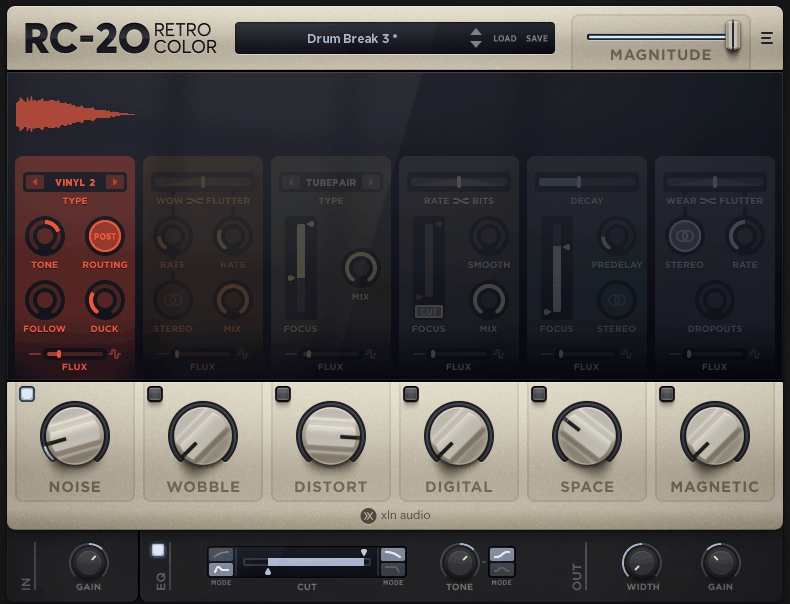
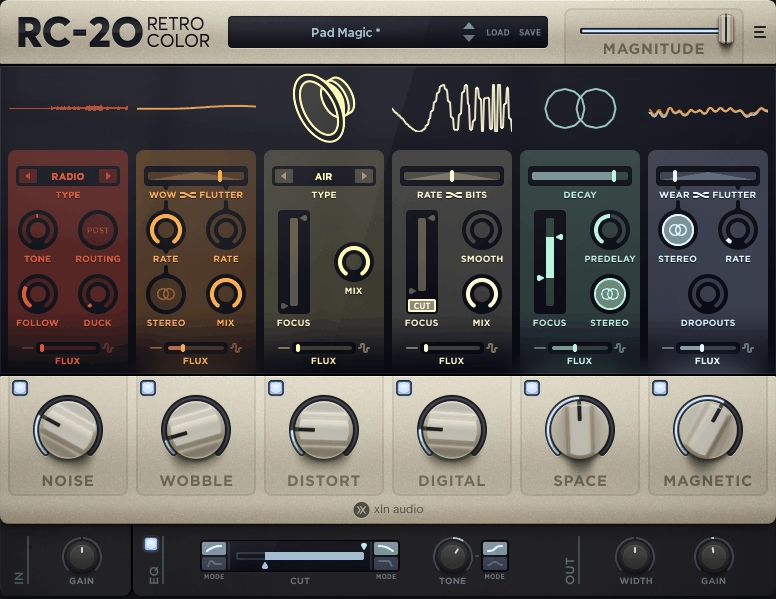
When you need to add vintage character, warmth, and analog texture to modern digital recordings, RC-20 Retro Color handles the job with a modular approach that gives you precise control over exactly which aspects of vintage degradation you’re applying. Its six effect modules cover Noise, Wobble, Distortion, Digital degradation, Space, and Magnetic tape simulation, each independently controllable and reorderable within the signal chain.
I keep RC-20 on my AAX template permanently because it’s the fastest way I’ve found to add convincing lo fi and vintage character to individual tracks. The key to using it effectively is restraint. A touch of Magnetic saturation and a hint of Wobble on a synth pad is usually more effective than loading every module at full intensity. The Flux parameter adds randomized variation that prevents the processing from sounding static and mechanical over time.
- Six Modules
The Noise, Wobble, Distortion, Digital, Space, and Magnetic modules each address a different aspect of vintage character and can be independently engaged, adjusted, and reordered in the signal chain. Reordering matters because distortion before reverb produces a completely different result than distortion after reverb.
- Flux Randomization
The Flux control adds continuous random variation to the effect parameters, preventing the processing from becoming static and repetitive. The randomization mimics the natural inconsistency of real vintage equipment, where no two playback passes sound exactly identical.
- Preset Organization
The preset library is organized by intensity and character, making it practical to find starting points that match your production quickly. Presets range from subtle analog warmth to aggressive lo fi destruction, and each can be further customized by adjusting individual modules.
Available from XLN Audio in VST, VST3, AU, and AAX formats.
4. Devious Machines Infiltrator 2 (Multi Effect)

If you could only have one creative effects plugin, Devious Machines Infiltrator 2 would be a strong candidate. It stacks, sequences, and modulates up to ten different effects simultaneously, choosing from a library of 54 effect modules that cover filters, distortion, delay, reverb, pitch shifting, spectral processing, modulation, and more.
Each module has its own tempo synced envelope for rhythmic modulation, and a 32 step sequencer lets you activate different effects on different steps for complex rhythmic patterns.
What makes Infiltrator 2 more than just a collection of effects is the modulation engine. The multi segment envelopes can be drawn freehand, randomized, or generated as Euclidean rhythms with adjustable swing. Eight macro controls let you map multiple parameters across different effects to single knobs for expressive real time control.
The 1,500 plus presets are organized by genre and character, and many are designed by recognized artists in electronic music.
- 54 Effect Modules
The module library covers 15 filter types (analog and digital), 12 distortion models, pitch shifting, FM, ring modulation, spectral transformation, and standard modulation effects. Each module could function as a standalone effect, but the power comes from combining and sequencing them together within the ten slot chain.
- Sequencer Integration
The 32 step sequencer activates and deactivates individual effect modules on a per step basis, creating rhythmic effect patterns that transform static audio into dynamic, evolving textures. You can activate delay on specific drum hits, engage distortion on certain beats, or trigger a looper effect rhythmically for glitch style processing.
- Envelope Editor
Each effect module has two tempo synced multi segment envelopes with graphical curve editing, eight shape presets, randomization, and pitch snapping that constrains modulation to musical scales. The envelopes can run freely synced to your DAW, trigger from audio input, or respond to MIDI notes.
- Macro System
Eight assignable macros can control any combination of parameters across all ten effect modules, letting you orchestrate complex multi effect transformations with a single knob movement. The macro system is what turns Infiltrator from a sound design tool into a performance instrument.
Available from Devious Machines in VST, VST3, AU, and AAX formats.
5. Analog Obsession ATTRACTOR (Free Dynamic Processor)
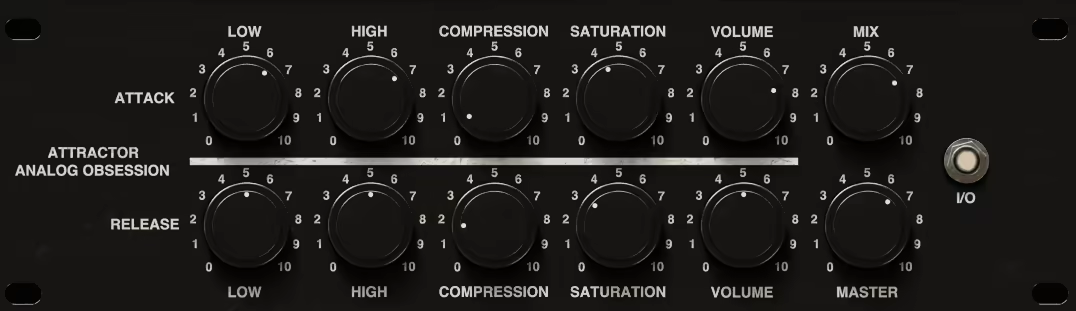
Analog Obsession releases free plugins at an almost absurd pace, and while the quality varies, ATTRACTOR stands out as a genuinely useful dynamic processing tool that sounds good and costs nothing. It provides magnetic style saturation and compression with a simple control set that makes it easy to add warmth and dynamic control in a single insert.
I should be realistic about what you’re getting: ATTRACTOR is not a replacement for a premium compressor or a dedicated saturation plugin. The interface is basic, the documentation is minimal, and there’s no extensive preset library.
But the sound is warm and musical, the processing adds analog style weight to whatever you run through it, and the price is hard to argue with. For filling gaps in a Pro Tools setup without spending anything, it does the job.
- Magnetic Character
The processing adds magnetic style saturation that thickens and warms the signal in a way that feels like running audio through a transformer. The character is subtle at low settings and becomes more pronounced as you push the input harder.
- Simple Controls
The minimal control set means you’re making music within seconds of loading the plugin rather than spending time navigating complex parameter sets. Input gain, processing amount, and output level are essentially all you need to think about.
- Zero Cost
Completely free from Analog Obsession, supported by Patreon donations. No registration, no trial limitations, no in app advertising. The plugin is available immediately upon download.
Available in VST, VST3, AU, and AAX formats. Free.
6. Lunacy Audio HAZE (Free Chorus/Phaser)

Lunacy Audio HAZE is a free modulation effect that combines chorus and phaser processing into a single interface with more depth than most free effects offer. The dual engine architecture lets you run chorus and phaser simultaneously or independently, and the modulation controls provide enough flexibility to create everything from subtle width enhancement to dramatic, swirling modulation effects.
What impresses me about HAZE for a free plugin is how good it sounds on synth pads and guitar tracks. The chorus has a warm, analog inspired quality rather than the thin, metallic character that cheap chorus plugins often produce. The phaser adds musical, sweeping movement that responds well to the rate and depth controls. For Pro Tools users who need a quality modulation effect without spending anything, HAZE is one of the better options available in AAX format.
- Dual Modulation
The chorus and phaser engines can run simultaneously, independently, or in series, giving you multiple modulation configurations from a single plugin. Running both engines together produces complex, layered modulation that would normally require two separate plugins.
- Analog Character
The processing has a warm, analog inspired quality that avoids the sterile, digital sound of many free modulation plugins. The chorus in particular produces a lush, dimensional width that works well on pads, strings, and sustained sounds without introducing obvious artifacts.
- Rate and Depth
Independent rate and depth controls for each engine let you create modulation effects that range from barely perceptible subtle movement to dramatic, attention grabbing sweeps. Slow rates with moderate depth produce the gentle, breathing quality that works well for ambient and cinematic production.
- Mix Control
A wet/dry blend handles parallel modulation directly within the plugin, letting you maintain the clarity of the dry signal while adding as much or as little modulation character as the mix needs. I typically run HAZE at about 40 to 60 percent wet for most applications.
- Stereo Width
The stereo processing creates genuine width enhancement from the modulation, making mono sources sound wider without the phase cancellation problems that some stereo widening techniques introduce. The widening effect is particularly useful on mono synth patches and DI recorded instruments.
Available from Lunacy Audio in VST, VST3, AU, and AAX formats. Free.
7. IK Multimedia MODO BASS 2 (Bass Guitar)

Every production needs bass, and IK Multimedia MODO BASS 2 provides it through physical modeling rather than sampling. Instead of playing back pre recorded bass guitar recordings, the plugin simulates the actual string vibration, body resonance, pickup response, and amplifier behavior of real bass guitars in real time.
The result is a level of expressiveness and dynamic response that sampled bass libraries struggle to match.
I covered MODO BASS 2 in detail in a previous article, so I’ll keep this focused on why it matters for AAX/Pro Tools users specifically.
The plugin runs well in Pro Tools with stable AAX performance, and the physical modeling approach means it responds naturally to velocity, pitch bend, and aftertouch without the sample switching artifacts that can occur with large sample libraries at high track counts. For bass parts that need to groove and feel alive rather than sound like triggered recordings, it’s the best option I’ve found in any plugin format.
- Physical Modeling
The engine simulates real time interaction between string vibration, body resonance, and pickup response as a continuous physical system rather than switching between pre recorded samples. Moving the virtual plucking position changes the harmonic content smoothly, and every note responds dynamically to your playing input.
- 22 Bass Models
Twenty two distinct bass guitars are physically modeled from the ground up, each capturing the specific body shape, scale length, string gauge, and pickup configuration of iconic instruments from Fender Precision to Music Man StingRay to Rickenbacker 4003.
- Amp Section
The integrated bass amp and pedalboard includes models of classic amplifiers and effects that respond authentically to the physically modeled signal. The signal chain can be reordered to experiment with different effect routing configurations.
Available from IK Multimedia in VST, VST3, AU, and AAX formats.
8. XLN Audio XO (Drum Sampler & Browser)
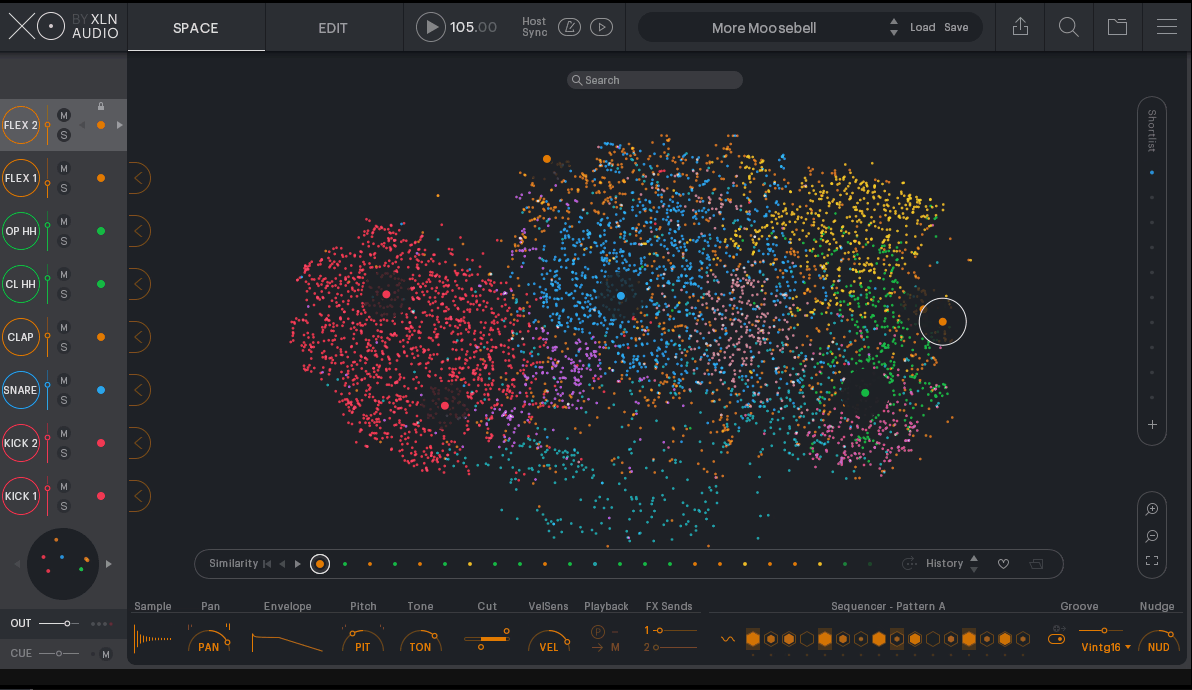
Finding the right drum samples from a collection of thousands is a problem that XLN Audio XO solves with an AI powered visual browser that organizes your entire sample library into a navigable, interactive map.
Instead of scrolling through folders and file names, you navigate a spatial display where similar sounding samples are clustered together, and clicking any point plays the sample instantly.
XO goes beyond browsing by including a built in step sequencer and a beat generation system that creates drum patterns from your selected samples.
For Pro Tools users, the AAX version integrates smoothly and the drag and drop MIDI export lets you move patterns directly into your session. I find XO most useful in the early stages of production when I’m building beats and need to find the right sounds quickly rather than auditioning hundreds of individual files.
- Visual Browser
The AI powered spatial map analyzes your entire sample library and arranges sounds by timbral similarity, so kicks cluster with kicks, snares with snares, and similar sounding samples appear near each other. Clicking anywhere on the map auditions that sample instantly, and you can zoom into specific regions to explore variations.
- Beat Generator
A built in pattern generator creates drum beats using your selected samples, with controls for complexity, feel, and swing. The generator produces musically useful starting points that you can then edit in the integrated step sequencer or export as MIDI to your DAW for further refinement.
- Step Sequencer
The onboard sequencer lets you program and audition beats directly within XO, adjusting velocity, probability, and timing per step. Finished patterns can be dragged as MIDI directly into your Pro Tools session for detailed editing.
- Sample Organization
XO scans and catalogs your entire sample collection across all drives, organizing everything into the visual map without requiring you to manually tag or categorize files. The analysis runs once and updates incrementally as you add new samples.
Available from XLN Audio in VST, AU, and AAX formats.
9. AudioThing Moon Echo (Free Delay)
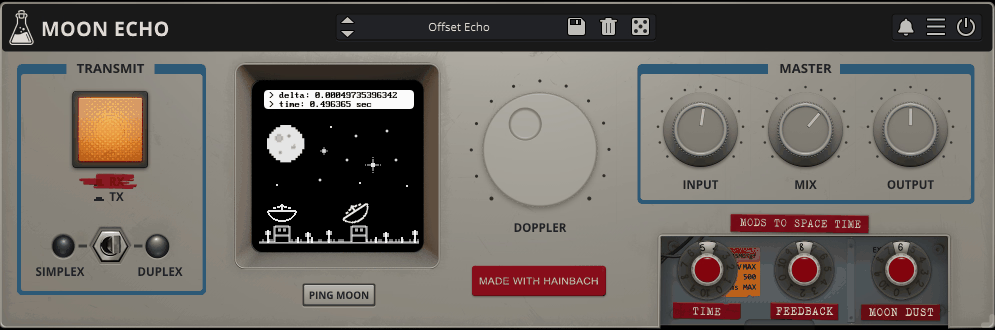
AudioThing Moon Echo is a free delay plugin modeled after the style of vintage tape echo units, providing warm, characterful delays with built in modulation and degradation that make the repeats sound analog and organic. It’s a stripped down, focused tool that does one thing well without trying to be a comprehensive delay workstation.
For a free plugin, the sound quality of Moon Echo surprised me. The delays have a warm, slightly dark character that sits behind the source material in a mix rather than competing with it. The modulation adds subtle pitch instability to the repeats, mimicking the wow and flutter of a tape mechanism. The filter section lets you shape the frequency content of the feedback path, so repeats get progressively darker or brighter with each repetition. It’s not going to replace a premium tape delay emulation for critical work, but for adding atmosphere and depth to a track, it does the job respectably.
- Tape Character
The delay processing adds warm, analog inspired coloration to each repeat, with a slightly lo fi quality that becomes more pronounced as the feedback increases. The degradation is musical rather than harsh, and it produces the natural decay behavior of tape delays where each repeat loses high frequency content progressively.
- Modulation Section
Built in pitch modulation adds wow and flutter to the delay signal, simulating the mechanical instability of vintage tape mechanisms. The modulation rate and depth are adjustable, and even small amounts add a sense of organic movement that makes the delays sound alive.
- Filter Path
A filter in the feedback loop shapes how the repeats evolve over time. Reducing the high frequency content produces increasingly dark, distant repeats that fade naturally into the background. Boosting the low end creates a building, rumbling feedback that works well for atmospheric effects.
- Sync Options
The delay time can be set in milliseconds or synced to host tempo with standard note value divisions. Tempo sync keeps the delays rhythmically locked to your track, while free running mode is useful for ambient and textural applications where strict timing isn’t needed.
- Zero Cost
Completely free from AudioThing with no registration required. The plugin is lightweight, stable, and integrates well with Pro Tools. For adding a quality tape style delay to your AAX toolkit without any investment, this is one of the better options available.
Available from AudioThing in VST, VST3, AU, and AAX formats. Free.
10. Kilohearts Transient Shaper (Free)
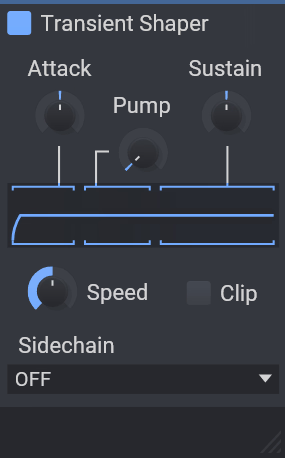
Transient shaping is one of those processing techniques that sounds minor until you start using it, at which point it becomes indispensable. kHs Transient Shaper is a free plugin from their Snapin ecosystem that provides straightforward attack and sustain control with enough precision to be useful on everything from individual drums to full mixes.
What I appreciate about the Kilohearts Transient Shaper is that it does exactly what it claims without adding complexity you don’t need. Two knobs: attack and sustain. Boost attack to add punch and presence. Reduce sustain to tighten things up. Reduce attack to soften transients. Boost sustain to add body and room. The visual feedback shows you what the processing is doing, and the results are clean and transparent. It’s also a Snapin, which means it works inside Phase Plant and Multipass if you use other Kilohearts products.
- Attack Control
The attack knob boosts or reduces the transient portion of the signal, adding punch and click when boosted or softening impacts when reduced. The detection is fast and accurate, responding to the actual transient content rather than applying static level changes.
- Sustain Control
The sustain knob adjusts the body and tail of sounds independently of the transient. Boosting sustain adds room, body, and natural decay. Reducing sustain tightens the sound and reduces ambient bleed, which is useful for cleaning up drum recordings.
- Snapin Compatibility
As a Kilohearts Snapin, the transient shaper integrates into Phase Plant, Multipass, and Snap Heap as a modular building block. This compatibility means the free plugin becomes part of a larger modular processing ecosystem if you use other Kilohearts products.
- Visual Feedback
A waveform display shows the input signal alongside the processed output, giving you clear visual confirmation of how the transient shaping is affecting the dynamics. The display updates in real time as you adjust the controls.
Available from Kilohearts in VST, VST3, AU, AAX, and CLAP formats. Free.
11. Excite Audio VISION 4X by Noisia (Spectrum Analyzer)
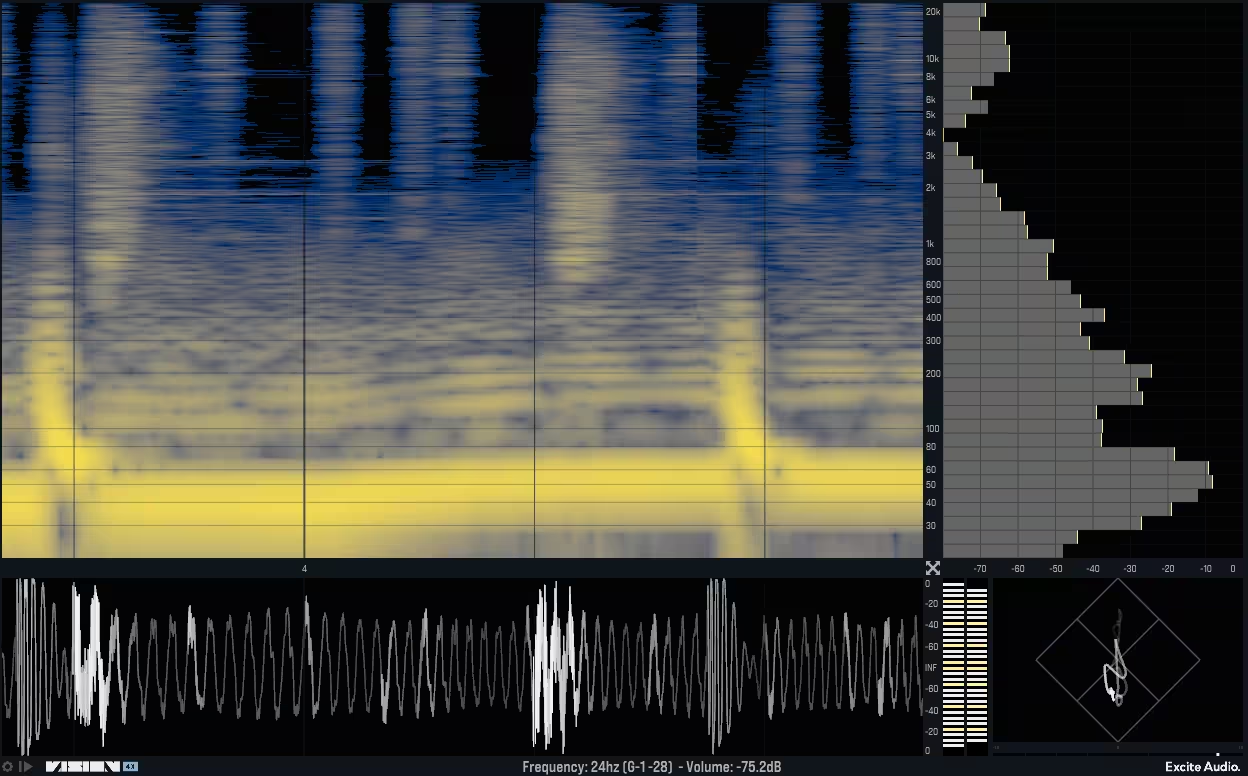
A spectrum analyzer might not seem like a “production plugin” in the traditional sense, but VISION 4X by Excite Audio (designed in collaboration with the legendary Noisia) goes beyond simple frequency display to become a genuine mixing and arrangement tool. It provides multi track spectral comparison, frequency conflict detection, and visual analysis tools that help you make better mixing decisions faster.
What sets VISION 4X apart from your DAW’s built in analyzer or a standard metering plugin is the ability to overlay multiple tracks on the same display and see exactly where they’re competing for frequency space. When your kick and bass are fighting in the low end, VISION 4X shows you precisely where the conflict is. When a vocal is being masked by a guitar, you can see the overlap visually. This turns vague mixing hunches into specific, actionable frequency information.
- Multi Track Overlay
Up to four tracks can be displayed simultaneously on the same spectral view, with each track assigned a distinct color. The overlaid view immediately reveals where instruments are competing for the same frequency space, making it a practical tool for identifying masking problems and frequency conflicts.
- Conflict Detection
Built in analysis highlights areas of spectral overlap between displayed tracks, drawing your attention to specific frequency ranges where instruments are fighting each other. This feature turns the visual display into an actionable mixing assistant rather than just a pretty picture.
- 3D Spectrogram
A scrolling spectrogram view shows frequency content over time in a three dimensional display, revealing how the spectral balance of your mix changes throughout a song. This is useful for identifying sections where specific frequency ranges build up or drop out unexpectedly.
- Noisia Design
The plugin was designed in collaboration with Noisia, whose mixing approach is famously frequency focused and technically precise. The design philosophy reflects their working methods, prioritizing clarity and actionability over visual flashiness. The feature set is tailored to solving real mixing problems rather than providing unnecessary eye candy.
- Resizable Interface
The display is fully resizable, letting you expand it to fill a second monitor for detailed analysis or shrink it to a compact size for quick reference during mixing. The resolution scales cleanly at all sizes, maintaining readability regardless of the window dimensions.
- Low CPU Impact
Despite the real time spectral analysis of multiple tracks, the plugin runs with minimal CPU overhead and doesn’t introduce latency to the signal path. You can leave it running throughout a session without affecting performance.
Available from Excite Audio in VST, VST3, AU, and AAX formats.
12. Audio Damage Circa (Creative Looper)
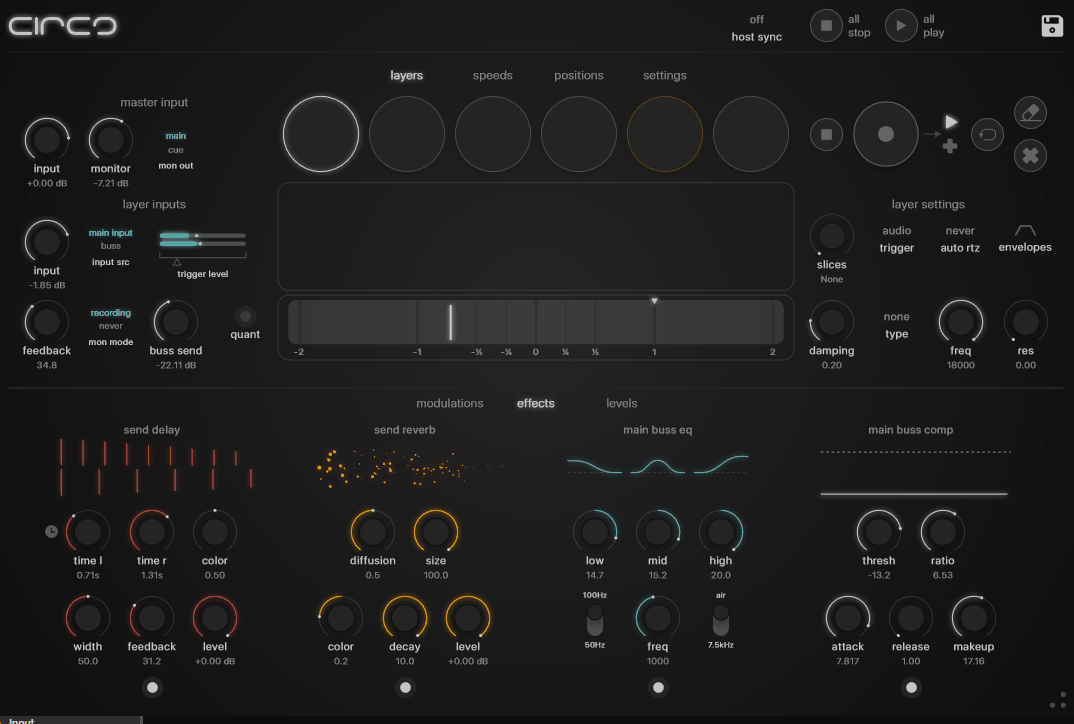
Audio Damage Circa is a real time audio looper and repeater that captures incoming audio and plays it back in creative, rhythmic ways. Unlike a standard delay or loop pedal, Circa provides controls for speed, direction, stutter, reverse, and other manipulation options that turn captured audio fragments into rhythmic performance elements.
I use Circa when I want to create glitch effects, stuttered repeats, and rhythmic audio manipulation that standard delay plugins can’t achieve. It’s particularly effective on drums and percussion, where capturing a beat and then manipulating the playback creates rhythmic variations that would be tedious to program manually. The AAX support has been stable in my Pro Tools sessions, and the plugin is lightweight enough to run multiple instances without performance concerns.
- Loop Capture
Circa captures real time audio and plays it back at adjustable speeds and directions. The capture buffer can be tempo synced or free running, and the captured audio can be manipulated immediately without interrupting the incoming signal.
- Stutter Effects
The repeat and stutter controls create rhythmic fragmentation of the captured audio, producing glitch style effects that range from subtle rhythmic variation to extreme audio mangling. The stutter rate can be synced to host tempo for rhythmic precision.
- Reverse Playback
Captured audio can be played in reverse, and the transition between forward and reverse playback creates unique tape stop and tape reverse effects that add dramatic movement to transitions and breakdowns.
Available from Audio Damage in VST, VST3, AU, and AAX formats.
13. IK Multimedia Lurssen Mastering Console (Mastering)
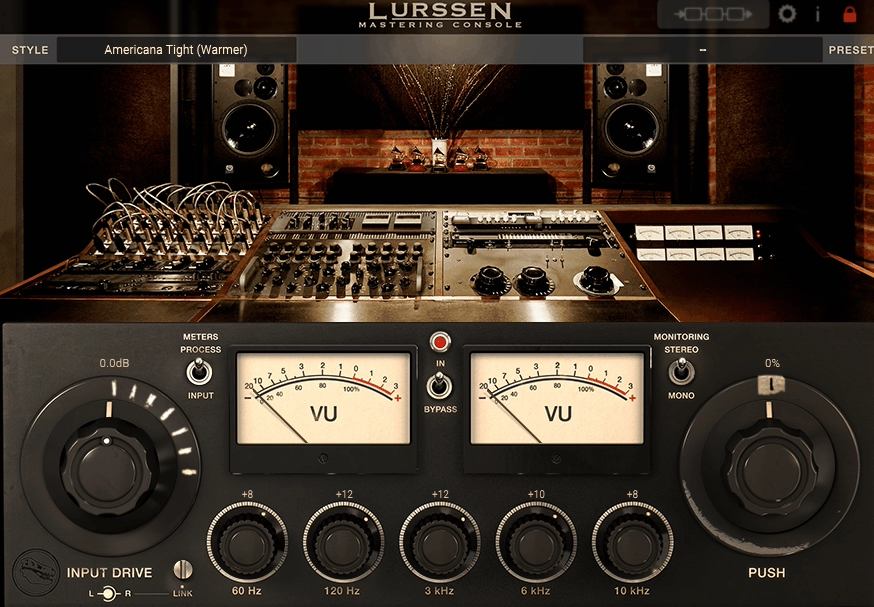
IK Multimedia Lurssen Mastering Console takes a fundamentally different approach to mastering than most plugins. Instead of giving you individual processors to chain together, it provides a curated signal path designed by Grammy winning mastering engineers Gavin Lurssen and Reuben Cohen, with simplified controls that guide you toward professional results without requiring deep technical knowledge of mastering processing.
I’ll be honest about the tradeoff: you give up the granular control of building your own mastering chain in exchange for a guided, session based workflow that’s been designed by people who master records for a living. For experienced mastering engineers, this simplified approach might feel limiting. For producers who are mastering their own material and want professional quality results without spending years learning the technical side, the Lurssen Mastering Console provides a faster, more reliable path to a finished master than assembling a custom chain from scratch.
- Session Based Workflow
Rather than presenting individual plugin controls, the Lurssen Console guides you through a session based process where you choose a processing style, adjust simplified parameters, and the underlying processing chain adapts accordingly. The chain includes EQ, compression, limiting, and harmonic enhancement configured by Lurssen and Cohen.
- Genre Presets
Starting points organized by musical genre and mastering style provide processing configurations tailored to specific types of material. Rock, pop, electronic, acoustic, and other categories each have presets that reflect appropriate mastering approaches for that genre.
- Push Control
The central Push control adjusts the overall processing intensity, letting you dial in how aggressively the mastering chain works the material. Low Push settings provide subtle enhancement. Higher settings produce louder, more processed results. The control provides a practical way to find the right balance between dynamics and loudness.
- VU Metering
Integrated VU meters show the mastering chain’s behavior in real time, providing visual feedback on how much processing is being applied. The metering follows analog VU ballistics rather than digital peak metering, which gives a better sense of the material’s perceived loudness and dynamics.
Available from IK Multimedia in VST, VST3, AU, and AAX formats.
14. Echo Sound Works Vinyl Guitar 2 (Free Vinyl Guitar)

Echo Sound Works Vinyl Guitar 2 is a niche but useful free instrument plugin that provides processed guitar samples with a vintage, vinyl degraded quality built in. Rather than giving you clean, pristine guitar recordings, the samples have been intentionally processed with lo fi character, vinyl noise, and analog warmth that suits genres like lo fi hip hop, chillwave, and ambient production.
This is a straightforward, preset based instrument that doesn’t try to be a comprehensive guitar library. What it does provide is a collection of atmospheric, vintage textured guitar sounds that you can play from your MIDI keyboard and use as textural elements in productions. The sounds have a nostalgic, worn quality that would take significant processing to achieve from clean guitar samples. For the price (free), it fills a specific creative niche well.
- Vinyl Character
The guitar samples come pre processed with vintage degradation including surface noise, frequency roll off, and subtle wow and flutter. This built in character means you don’t need to layer additional lo fi effects to achieve the retro guitar texture that certain genres call for.
- Playable Patches
Multiple preset patches provide different guitar textures, from clean and mellow to more heavily processed and atmospheric. Each patch is velocity responsive and playable from a standard MIDI keyboard, making it easy to incorporate into any arrangement.
- Ambient Textures
Several patches extend beyond straight guitar sounds into atmospheric, pad like textures that use guitar as the source material. These ambient patches work well as background layers that add organic warmth to electronic productions.
- Mix Ready
The patches are designed to be mix ready with appropriate levels and frequency content that sits well in a production context without requiring extensive additional processing. You can load a patch and use it immediately without spending time on EQ and level adjustment.
- Free Download
Completely free from Echo Sound Works with no registration required beyond a standard email signup. The download includes both the instrument and all associated samples.
Available in VST, VST3, AU, and AAX formats. Free.
Bonus: Unfiltered Audio LO-FI-AF (Lo Fi Processing)
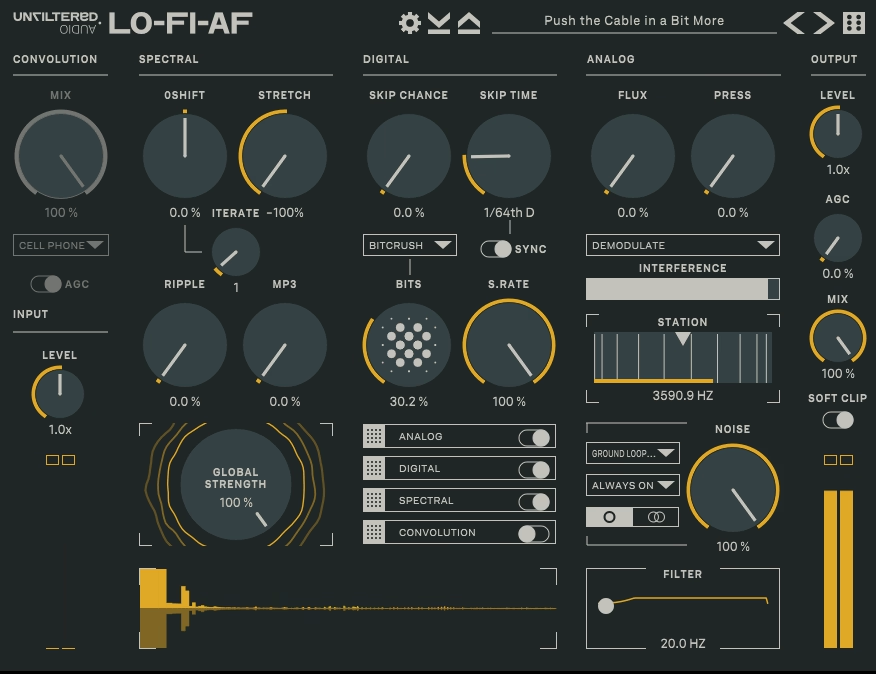
Closing out with a bonus pick, Unfiltered Audio LO-FI-AF (available through Plugin Alliance) is a comprehensive lo fi degradation toolkit that covers tape, vinyl, radio, digital degradation, and everything in between. It provides more depth and more control over the degradation process than most competing lo fi plugins, with module based processing that lets you build custom degradation chains.
From the Pluginerds Store
One more thing before you finish reading: we also stock studio hardware and accessories directly through Pluginerds Shop. Microphones, interfaces, controllers, cables, and the small stuff that never comes included with anything.
Visit Pluginerds ShopWhat distinguishes LO-FI-AF from simpler lo fi effects is the level of control you get over each aspect of the degradation. You’re not just turning a “vintage” knob and hoping for the best. You’re controlling bit depth, sample rate, wow and flutter rate, noise character, filter response, and saturation type independently. This precision lets you create specific, intentional lo fi textures rather than generic “sounds old” processing. For producers who use lo fi as a deliberate creative choice rather than a preset overlay, LO-FI-AF provides the control to execute that vision precisely.
- Module System
Multiple processing modules cover different aspects of audio degradation including bit crushing, sample rate reduction, tape wobble, vinyl noise, radio filtering, and analog saturation. Each module can be independently engaged and adjusted, and the signal flow between modules can be configured for different processing orders.
- Precision Control
Unlike one knob lo fi plugins, LO-FI-AF provides detailed parameters for each degradation type. You can specify exact bit depth values, precise sample rate settings, specific noise profiles, and independent filter characteristics. This precision is what separates intentional, creative lo fi processing from generic degradation.
- Preset Diversity
The preset library covers a wide range of lo fi aesthetics from subtle vintage warmth to extreme audio destruction. Presets are organized by intensity and character, making it practical to find starting points that match your creative vision.
Available through Plugin Alliance in VST, VST3, AU, and AAX formats.
Get the Free Plugin Starter Kit
The genuinely useful free DAWs and plugins worth installing. No filler. Straight to your inbox.

Hello, I’m Viliam, I started this audio plugin focused blog to keep you updated on the latest trends, news and everything plugin related. I’ll put the most emphasis on the topics covering best VST, AU and AAX plugins. If you find some great plugin suggestions for us to include on our site, feel free to let me know, so I can take a look!