
Noise gates are one of those tools that don’t get nearly enough credit for how much they contribute to a clean, professional mix. When they work well, you don’t notice them at all, which is kind of the whole point. The drums sound tight and punchy, the vocal is clean between phrases, and the guitar amp hum disappears when the player stops.
When a gate works badly, though, you definitely notice: chopped off transients, unnatural decay cutoffs, and that terrible pumping sound that screams “this was processed poorly.” The difference between a stock gate and a great gate plugin usually comes down to how intelligently it detects what should stay and what should go.
A basic threshold gate treats everything above a certain volume as “keep” and everything below as “remove,” which works fine on clean material but falls apart on anything complex or dynamic. The best gate plugins use smarter detection methods that consider the character of the sound, not just its level.
I’ve put together nine gate plugins that cover the full range from specialized drum gates to general purpose dynamics processors to creative rhythmic gating tools.
1. Sonnox Oxford Drum Gate 2
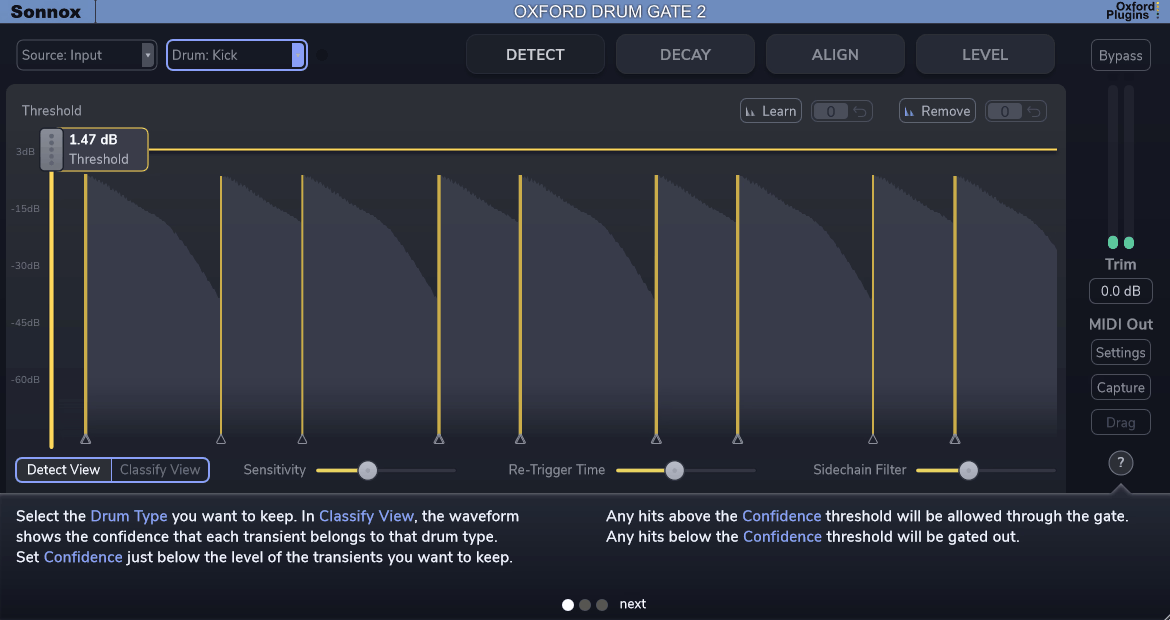
If you mix live drums with any regularity, Sonnox Oxford Drum Gate 2 is probably the single most impactful plugin you could add to your toolkit.
The original Oxford Drum Gate already changed how engineers approach drum cleanup when it launched, and version 2 pushes the concept significantly further with phase alignment, adaptive decay processing, and an improved detection engine that’s even more accurate at distinguishing between intentional hits and bleed.
What makes Sonnox Oxford Drum Gate 2 fundamentally different from a standard gate is that it doesn’t use a volume threshold to decide what stays and what goes. It takes a completely different approach to detecting drum hits, one that understands the difference between an intentional snare ghost note and cymbal bleed regardless of their relative levels. That single distinction eliminates the most frustrating problem with conventional gating on drums.
- Intelligent Timbre Based Hit Detection with Learn Function
Sonnox Oxford Drum Gate 2’s detection engine classifies hits by drum type using timbral analysis rather than simple peak or threshold detection. You tell the plugin whether it’s listening for kicks, snares, toms, or hi hats, and it identifies each intentional hit while ignoring bleed from other kit elements. A loud hi hat bleed into the snare mic won’t trigger a false gate opening, and quiet ghost notes on the snare won’t get lost because they fall below a volume threshold.
The detection system includes a Learn and Remove function where you can train the algorithm on specific examples of what you want to keep and what you want to reject. For complex performances with wide dynamic range, this training capability makes the detection virtually flawless.
- Adaptive Resonant Decay from Claro Technology
Version 2 introduces an Adaptive Resonant Decay system derived from Sonnox’s Claro technology that separates the natural resonant decay of each drum hit from the surrounding spill. The gate closes around the bleed while letting the drum’s own ring and sustain continue naturally. Independent controls for gain reduction, decay time, high frequency damping, and resonant region cutoffs give you precise control over how much of the natural drum tone is preserved.
A Standard mode preserves the original Drum Gate’s decay behavior for users who prefer it.
- Multi Mic Phase Alignment from a Single Analysis Pass
The new Align tab solves one of the most time consuming aspects of multi mic drum mixing: phase coherence. From a single analysis pass, Sonnox Oxford Drum Gate 2 aligns your entire drum setup in both time and phase across every instance. The algorithm enhances tone, punch, and clarity while minimizing the timing artifacts that general purpose alignment tools can introduce.
The system automatically groups tracks by name, provides visual alignment feedback, and supports stereo linking for overhead and room mic pairs.
- Per Hit Clipper and Dual Leveller
The Hit Clipper receives per hit peak information from the leveller, allowing each transient to be clipped on its own terms rather than applying a static ceiling. Separate controls for soft hits and loud hits clipping amounts mean quiet ghost notes and full power strokes each get appropriate treatment. The dual Leveller independently controls big hits and softer articulations without compression, perfect for bringing up ghost notes while keeping louder hits in check.
Available in VST3, AU, and AAX formats with iLok authorization.
Get the Free Plugin Starter Kit
The genuinely useful free DAWs and plugins worth installing. No filler. Straight to your inbox.
2. FabFilter Pro-G

Pro-G brings the same design philosophy that made Pro Q and Pro C industry standards to the world of gating and expansion. If you’ve used any FabFilter plugin before, you already know what to expect: a beautifully designed interface with interactive visual feedback, a workflow that makes complex processing feel intuitive, and audio quality that’s transparent enough to use on anything without worrying about coloration.
The reason I’d recommend FabFilter Pro G even to producers who already have a decent gate is the level of visual feedback it provides. Most gates give you a threshold knob and some timing controls, and you’re left guessing whether the gate is doing what you think it’s doing. Pro G shows you everything in real time, which means you spend less time tweaking blindly and more time making informed decisions.
- Four Operating Modes: Gate, Expander, Ducker, and Combined
FabFilter Pro G operates in four distinct modes that fundamentally change how it processes audio below the threshold. Gate mode provides traditional hard gating with adjustable range. Expander mode reduces quiet signals proportionally rather than cutting them completely, preserving a more natural feel on vocals and room mics. Ducker mode reduces level when the signal exceeds the threshold, which flips the logic for sidechain style processing. The combined Gate/Expansion mode blends both behaviors.
Switching between modes lets you use the same plugin across very different applications without loading a separate processor.
- Interactive Real Time Level Display
The main display shows input and output levels in real time alongside the threshold position and gain reduction curve, making it immediately obvious how the gate is responding to your material at every moment. Unlike most gates where you’re working blind, FabFilter Pro G’s visualization means you can see exactly when the gate opens, how fast it responds, and whether it’s catching every transient. You can literally watch the dynamics processing happen, which makes dialing in settings dramatically faster.
- Sidechain EQ with Visual Feedback
The sidechain EQ section lets you filter the detection signal independently of the audio path, and the filtered sidechain is displayed visually alongside the main signal. You can see exactly how the filtered trigger signal relates to the full frequency content of your audio, making it easy to tune the detection to respond to specific frequency ranges while ignoring others. External sidechain input is also supported for triggering from a separate source.
- MIDI Trigger Mode for Sample Replacement Workflows
Beyond standard audio triggering, FabFilter Pro G accepts MIDI input for triggering the gate directly from MIDI notes. This is invaluable for sample replacement and augmentation workflows where you need the gate to open at precisely defined moments regardless of what the audio is doing. Combined with the lookahead that opens the gate fractionally before transients arrive, the MIDI mode makes Pro G useful well beyond conventional noise removal.
- Surround and Immersive Format Support
FabFilter Pro G supports multichannel formats including surround and immersive audio configurations, making it one of the few gate plugins suitable for Dolby Atmos and spatial audio workflows. Channel linking options let you control how the gate responds across multiple channels simultaneously. This future proofing makes it relevant for post production, film mixing, and immersive music production.
- Instance List Integration with Pro Q 4
Through FabFilter’s Instance List system, Pro G now integrates with Pro Q 4, Pro C 3, and Pro DS, allowing you to view and control all instances from a single interface. For engineers running gates across an entire drum kit, being able to see and adjust every instance’s settings from one window rather than clicking between individual plugin windows is a genuine workflow upgrade.
Available in VST, VST3, AU, AAX, and CLAP formats for Windows and macOS.
3. Antelope Audio VP Gate Keeper II
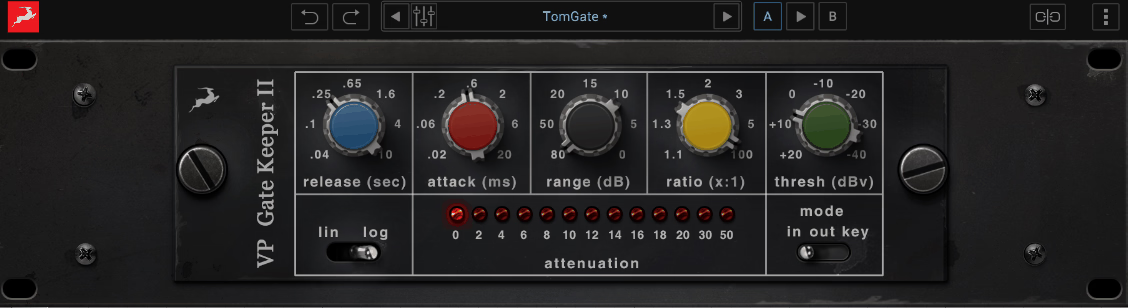
Antelope Audio VP Gate Keeper II comes from a company that approaches plugin design through the lens of high end analog hardware engineering. Their FPGA based hardware processing technology informs the accuracy and responsiveness of their software tools, and Gate Keeper II reflects that heritage with a gate that responds with the speed and precision you’d expect from a hardware unit rather than a typical plugin.
What I find useful about Antelope Audio VP Gate Keeper II is how well it handles sources where the transients are fast and the dynamic range is wide. Percussion, plucked strings, and other material with sharp attacks and quick decays can expose the weaknesses of slower gates, and Gate Keeper II handles these signals without choking on the transients or missing the tail end of the decay.
- FPGA Derived Processing for Hardware Level Response Speed
Antelope’s background in FPGA (Field Programmable Gate Array) hardware directly informs the processing algorithms in Gate Keeper II. The attack response matches the speed of analog gating circuits, catching the leading edge of even the sharpest transients without the slight delay that software based detection can introduce. On fast percussive material like snare rolls or rapid fire hi hat patterns, this speed difference is audible.
- Analog Style Gate Behavior with Musical Transitions
The gate emulates the response characteristics of high end analog gating circuits where the opening and closing transitions have a musical quality rather than sounding abruptly digital. The release curve follows a shape that preserves the natural decay of sustained sounds rather than cutting them off with a linear ramp. On sources like acoustic guitar or piano where the sustain tail is an important part of the sound, this behavior makes the gating significantly less noticeable.
- Integration with Antelope Hardware Ecosystem
For users of Antelope audio interfaces, Gate Keeper II integrates into the hardware’s near zero latency processing chain, allowing gating to happen before the signal even reaches your DAW. This is particularly valuable for tracking situations where you want gated monitoring without adding plugin latency to the signal path. The plugin also operates as a standard insert in any DAW.
Available in VST, AU, and AAX formats.
4. sonible smart:gate
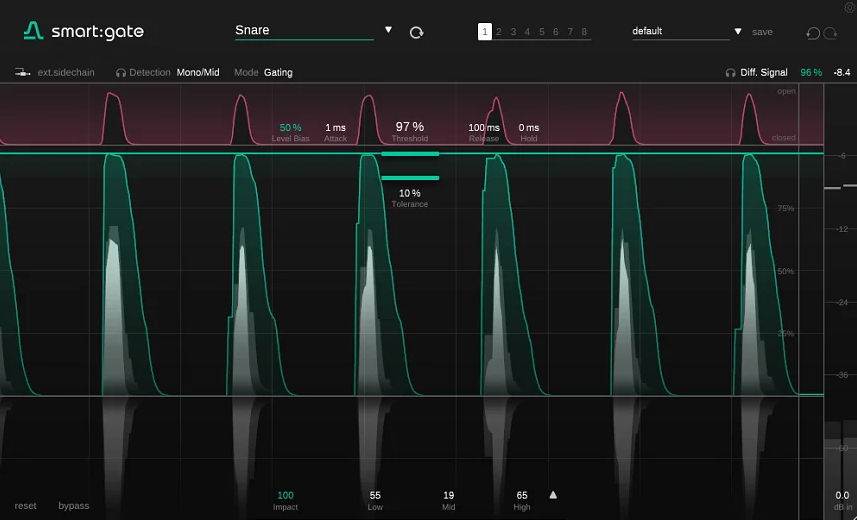
Leave it to sonible to bring AI into noise gating.
sonible smart:gate uses the same intelligent audio analysis technology behind their smart:EQ and smart:comp plugins to take the tedious setup work out of configuring a gate, letting you get to a usable result in seconds rather than spending minutes tweaking threshold and timing parameters manually.
If the idea of an “intelligent” gate sounds like it might be too automated for professional use, I’d push back on that. What sonible smart:gate actually does is handle the boring initial configuration so you can focus on the creative decisions. It’s still fully adjustable. It just gives you a better starting point than a blank slate.
- AI Powered Content Detection and Auto Configuration
Feed audio into sonible smart:gate and it analyzes the signal to determine optimal gate settings automatically. The algorithm identifies the character of the source material, whether it’s a drum hit, a vocal, a guitar, or something else, and configures the threshold, timing, and filtering accordingly. You get a usable gate setting in seconds rather than spending time manually dialing in parameters.
The auto configuration serves as a starting point that you can refine to taste. All parameters remain fully adjustable after the analysis, so you’re never locked into the AI’s decision.
- Spectral Gate Processing for Frequency Selective Gating
Unlike conventional gates that operate on the full frequency signal, sonible smart:gate can apply gating to specific frequency regions based on its spectral analysis. This means it can gate out low frequency rumble while leaving the midrange untouched, or suppress high frequency hiss without affecting the body of the sound. On multi mic recordings where different types of bleed occupy different frequency ranges, this spectral approach is far more surgical than broadband gating.
- Adaptive Release Based on Signal Content
The adaptive release automatically adjusts timing based on what the algorithm hears in real time. Fast, percussive transients get a quick release that tightens the sound without chopping tails. Sustained material gets a longer, smoother release that preserves natural decay. This adaptation happens continuously without you needing to ride the release knob for different sections of a performance.
- Ducking and Expansion Modes
Beyond traditional hard gating, sonible smart:gate offers ducking and expansion modes that provide softer, more transparent alternatives to full signal muting. Ducking mode reduces level by a set amount rather than closing completely, while expansion mode applies proportional reduction that becomes gentler as the signal approaches the threshold. These modes are especially useful on vocals and dialogue where hard gating sounds unnatural.
Available in VST3, AU, and AAX formats.
5. Boz Digital Labs Gatey Watey
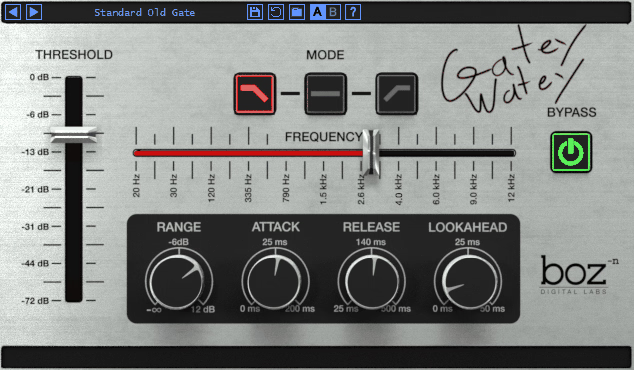
The name might not inspire confidence, but Boz Digital Labs Gatey Watey is a surprisingly capable and cleverly designed gate plugin that does some things its more expensive competitors don’t. Boz Digital has a history of building practical, no nonsense tools that focus on solving real workflow problems, and Gatey Watey continues that tradition with a gate that’s fast to set up and effective on a wide range of material.
I appreciate that Boz Digital Labs Gatey Watey doesn’t try to be everything to everyone. It’s a gate. It gates things. It does it well, it does it quickly, and it doesn’t charge you a fortune for the privilege. Sometimes that’s exactly what you need.
- Visual Waveform Display with Gate Activity Overlay
Boz Digital Labs Gatey Watey shows the incoming waveform with the gate’s activity overlaid in real time, making it immediately clear where the gate is opening and closing relative to the audio content. You can see whether the gate is catching every transient and releasing naturally after each hit. This visual approach removes the guesswork from setting threshold and timing parameters, because the waveform shows you exactly what’s happening rather than making you rely on your ears alone during setup.
- Reverse Gate Mode for Creative Effects
A reverse gate mode inverts the standard behavior, closing when the signal exceeds the threshold and opening when it drops below. This produces the effect of hearing only the quiet parts of a signal while the loud parts are muted. On drums, this isolates room ambience and bleed while removing the direct hits, which is a creative effect that normally requires complex routing to achieve. On guitar, it produces swelling pad like textures from aggressive playing.
- Sidechain with High and Low Pass Filtering
The built in sidechain EQ with high pass and low pass filters lets you focus the detection on specific frequency ranges, and external sidechain input allows triggering from a separate audio source. At its price point, having proper sidechain filtering makes Boz Digital Labs Gatey Watey punch well above its weight class.
Available in VST, VST3, AU, and AAX formats.
6. SSL X Gate
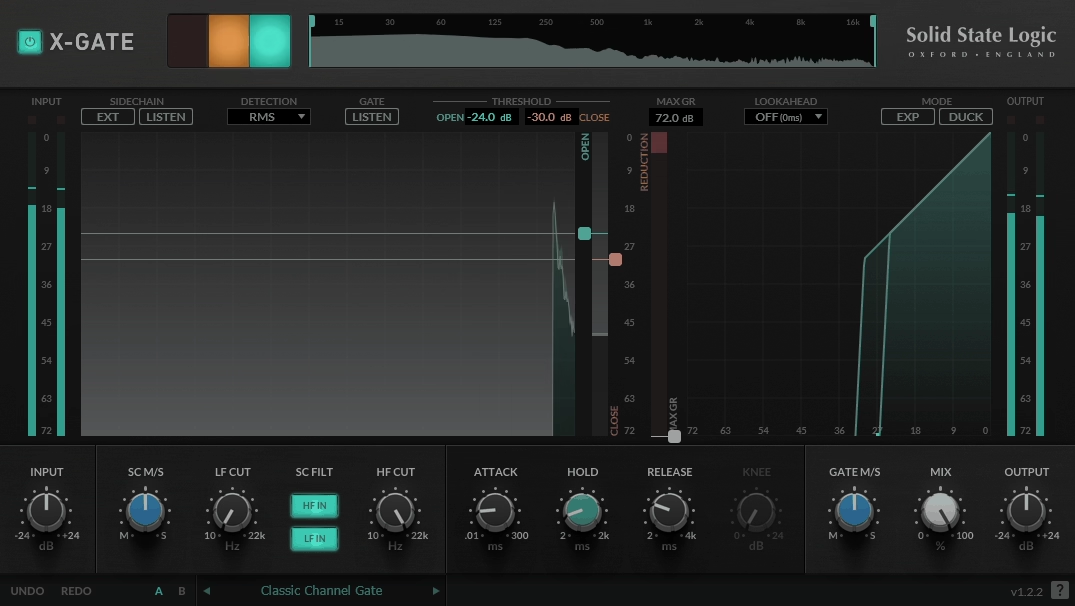
When SSL puts their name on a gate plugin, you know it’s been designed with the same engineering precision that goes into their console hardware. SSL X Gate reflects the company’s philosophy of providing tools that work reliably and sound clean without adding character or coloration to the signal. It does what it’s supposed to do and gets out of the way.
SSL X Gate is the kind of plugin that doesn’t generate excitement on forums or YouTube videos because it doesn’t have flashy features or a novel approach. It just gates. Exceptionally well. For engineers who need a gate they can trust across an entire session without babysitting it, that kind of reliability is worth more than any amount of innovation.
- Console Grade Transparent Gating
SSL X Gate provides transparent dynamic gating that doesn’t impart any tonal coloration on the signal, reflecting the same signal integrity standards SSL applies to their hardware console designs. The gate opens and closes cleanly without clicks, pops, or artifacts, even at extreme settings with very fast attack times. On critical sources like vocals and acoustic instruments where any processing coloration would be immediately audible, this transparency is essential.
- Hysteresis Control for Chatter Prevention
The hysteresis control creates a gap between the gate’s opening and closing thresholds, preventing the rapid on/off switching that occurs when a signal hovers near a single threshold value. Without hysteresis, gates on sustained material like vocals or bowed strings can chatter distractingly as the signal fluctuates around the threshold. This is a feature that experienced engineers consider essential but that many budget gates omit entirely.
- Sidechain Listen Mode for Detection Auditing
The sidechain can be auditioned in isolation to verify that the gate is actually responding to the correct content before you commit to your settings. This listen mode lets you hear exactly what the detection circuit is hearing after the sidechain filters have been applied, which is invaluable for troubleshooting false triggers or missed hits.
- Range Control from Full Mute to Gentle Attenuation
The range control lets you set how much the signal is reduced when the gate is closed, from complete silence all the way to just a few dB of attenuation. At full range, it’s a hard gate that completely mutes the signal. At reduced range, it functions more like a downward expander that gently pushes quiet material further down without eliminating it entirely. This flexibility makes SSL X Gate equally useful for aggressive drum gating and subtle vocal cleanup.
- Low CPU with Session Wide Scalability
SSL X Gate is designed to run with minimal CPU overhead, making it practical to load on every channel of a large drum session or across an entire vocal comp without performance concerns. For engineers who want one gate they can use everywhere, this efficiency matters. Available from SSL in VST, VST3, AU, and AAX formats.
7. denise poltergate

denise poltergate is what happens when a creative effects company decides to build a gate plugin. It’s not just a standard noise gate. It takes a completely different approach to how gating is applied to your signal, combined with denise’s signature design philosophy that always seems to include something unexpected and genuinely useful that you didn’t know you needed.
What makes denise poltergate interesting for producers who already have a standard gate is that it can process different parts of your signal differently. Instead of treating your entire audio as one thing to be gated, it gives you the ability to be selective about which elements are affected, opening up creative possibilities that a conventional gate simply can’t achieve.
- Spectral Gating with Independent Frequency Band Control
denise poltergate splits the signal into multiple frequency bands and applies gating to each band independently. You can gate the low frequencies aggressively to clean up rumble while leaving the midrange and highs completely untouched, or strip away high frequency hiss while preserving the full body of the sound below. Each band has its own threshold, timing, and range settings, providing surgical control over which frequency content is affected and how.
This spectral approach makes denise poltergate far more useful than a standard broadband gate on complex signals. On a drum overhead, for example, you could tighten the low end response without affecting the cymbal detail at all.
- Frequency Dependent Rhythmic Effects
The independent band processing opens up creative gating effects that go well beyond noise removal. You can set different bands to gate at different rates or with different timing characteristics, creating textures where the bass pulses at one rhythm while the high end stutters at another. This kind of frequency dependent rhythmic processing would normally require multiple instances of different plugins with complex routing, and poltergate does it in a single insert.
- Ghost Mode for Atmospheric Bleed Retention
A ghost mode lets you retain a configurable amount of the gated signal rather than removing it completely, creating a subtle atmospheric layer underneath the main gated output. On drum recordings, this preserves a sense of the room and kit ambience even while the close mic bleed is being controlled. It’s the difference between drums that sound gated and drums that sound clean, and that distinction matters in professional mixing.
Available in VST, VST3, AU, and AAX formats.
8. Kilohearts Gate (Free)
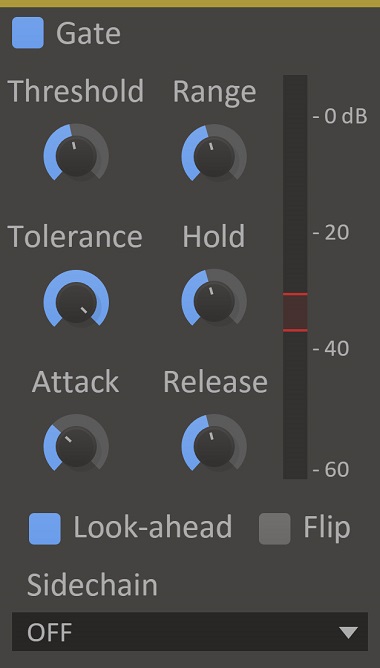
We always try to include a free option in these lists, and Kilohearts Gate is a genuinely useful tool that costs nothing and does the basics well. It’s not going to compete with Oxford Drum Gate 2 on drum processing or FabFilter Pro G on visual feedback, but for straightforward noise gating on clean sources, it handles the job without any issues.
What gives Kilohearts Gate extra value beyond its simple control set is how it fits into a broader production ecosystem. If you use other Kilohearts products, this little gate becomes significantly more versatile than its humble feature list suggests. But even on its own as a standalone insert, it’s a solid, reliable gate that costs you nothing.
- Snapin Architecture for Multiband and Modular Gating
As part of the Kilohearts Snapin ecosystem, the Gate can be loaded inside other Kilohearts plugins like Multipass, Snap Heap, and Phase Plant for use in multiband or modular signal chains. Load the gate inside Multipass and you’ve got a multiband gate that processes different frequency ranges independently. Load it inside Snap Heap and you can build a custom processing chain with the gate at any point in the signal flow. This modular capability transforms a basic free gate into something far more powerful.
- CLAP Format Support for Modern DAW Workflows
Kilohearts Gate supports the CLAP plugin format alongside VST3, AU, and AAX, making it one of the few free gates that’s compatible with the newest plugin standard. CLAP support means better parameter automation, improved CPU efficiency, and future compatibility with DAWs that are increasingly adopting the format. For producers working in Bitwig or other CLAP native environments, this is a practical advantage.
- Zero Cost Entry Point with Upgrade Path
The plugin is completely free with no restrictions, no trial period, and no locked features. The sound quality and gating behavior are identical to what you’d get in Kilohearts’ paid products. If you eventually invest in the Kilohearts ecosystem (Multipass, Phase Plant, or the full Snapin bundle), every free Snapin you’ve already collected becomes part of that expanded toolkit. It’s a genuinely risk free way to start building a modular processing setup.
- Per Voice Processing in Phase Plant
When loaded inside Phase Plant, the gate can be applied on a per voice basis using Phase Plant’s poly toggle, meaning each voice of a polyphonic synth patch gets its own independent gate instance. This creates effects where individual notes are gated differently based on their dynamics, producing textures that are impossible to achieve with a single broadband gate on the master output.
- Lightweight with Universal Compatibility
The plugin uses minimal CPU and introduces no meaningful latency, making it suitable for tracking, mixing, and live applications. The resizable interface scales from tiny to large depending on your screen space needs. Available for free download from Kilohearts in VST3, AU, AAX, and CLAP formats for Windows and macOS.
Extra: Polyverse Gatekeeper (Rhythmic Gater)
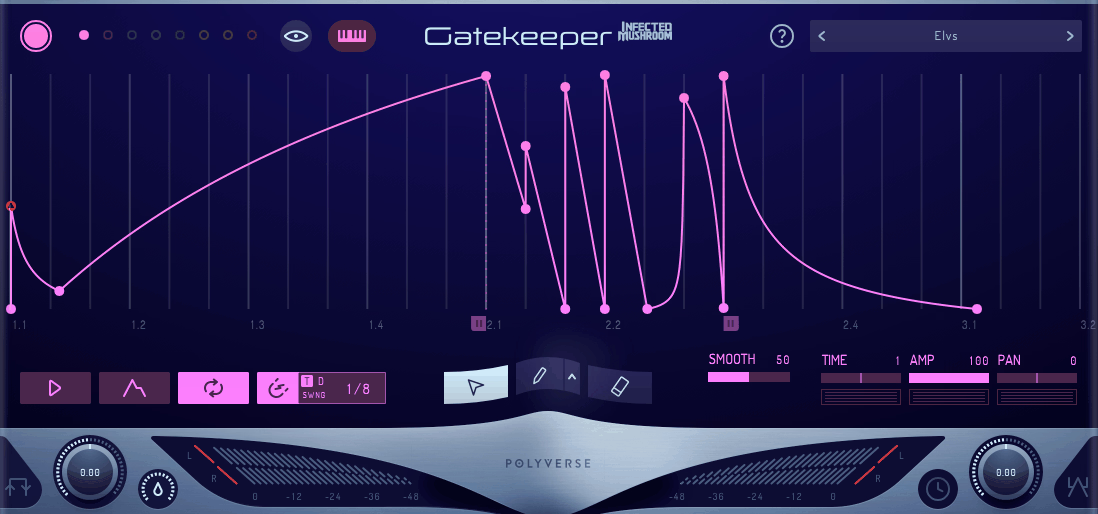
Rhythmic gating is a legitimate and important use of gate technology, even though it serves a completely different purpose from noise removal. Where every other plugin on this list is designed to clean up audio, Polyverse Gatekeeper is designed to create rhythmic volume patterns that chop, stutter, and reshape your audio in musically useful ways.
If you make any kind of electronic, experimental, or beat driven music, having a dedicated rhythmic gating tool is essential. Your DAW’s stock gate can do basic cleanup, but it can’t create the intricate, tempo synced volume patterns that turn a static synth pad into a pulsing rhythmic element or give a guitar part the choppy, syncopated feel that makes it groove with the rest of the track.
- Freely Drawable Volume Curves with Curved Segments
Polyverse Gatekeeper’s primary interface is a visual curve editor where you draw volume patterns freehand or by placing and adjusting nodes. The drawing system supports curved segments between nodes, meaning transitions can be as smooth or as abrupt as you want. A sharp drop followed by a gradual rise creates a completely different rhythmic feel than two sharp cuts, and this level of shape control is what makes Polyverse Gatekeeper more musically useful than a simple on/off trance gate.
The resolution is high enough to create extremely detailed shapes from gentle swells down to razor sharp 32nd note stutter cuts, all synced to your DAW tempo.
- Sidechain and MIDI Retrigger for Live Sync
Sidechain input restarts the gating pattern from incoming audio transients, which is essential for locking the rhythm to a kick drum or another rhythmic element in your arrangement. MIDI triggering provides the same retrigger functionality from MIDI notes, giving you precise control over exactly when the pattern begins. For live performance situations, the MIDI mode lets you manually fire gating patterns at specific moments rather than running them on a continuous loop.
- Multiple Independent Pattern Lanes
Beyond the main volume lane, Polyverse Gatekeeper provides additional modulation lanes that can control other parameters simultaneously. This means you can have the volume gating at one rhythm while a separate lane modulates panning or sends level at a different rate, creating complex, multi dimensional rhythmic effects from a single plugin instance.
- Pattern Length and Speed Manipulation
The gating pattern length is freely adjustable from fractional beats to multiple bars, and the playback speed can be modulated in real time for acceleration and deceleration effects. Automating the pattern speed during a build or breakdown creates dramatic rhythmic tension that static tempo synced gating can’t achieve.
Available from Polyverse in VST, VST3, AU, and AAX formats.
Get the Free Plugin Starter Kit
The genuinely useful free DAWs and plugins worth installing. No filler. Straight to your inbox.

Hello, I’m Viliam, I started this audio plugin focused blog to keep you updated on the latest trends, news and everything plugin related. I’ll put the most emphasis on the topics covering best VST, AU and AAX plugins. If you find some great plugin suggestions for us to include on our site, feel free to let me know, so I can take a look!