
Somewhere between the third hour of a mix session and the moment you convince yourself everything sounds fine, resonances quietly do their damage. A harsh vocal overtone that makes the listener unconsciously pull away, a boxy low-mid buildup on the drum bus that you keep confusing for a room problem, a synth pad that sounds gorgeous soloed but clutters everything the moment other elements come in.
These aren’t things a standard EQ fixes gracefully, because the problem isn’t at a fixed frequency, it’s a dynamic one that shifts with the performance. Resonance suppression plugins are built specifically for this, and the category has expanded considerably in the last few years.
Here are seven that are worth understanding clearly, because they each do it differently.
1. Baby Audio Smooth Operator Pro
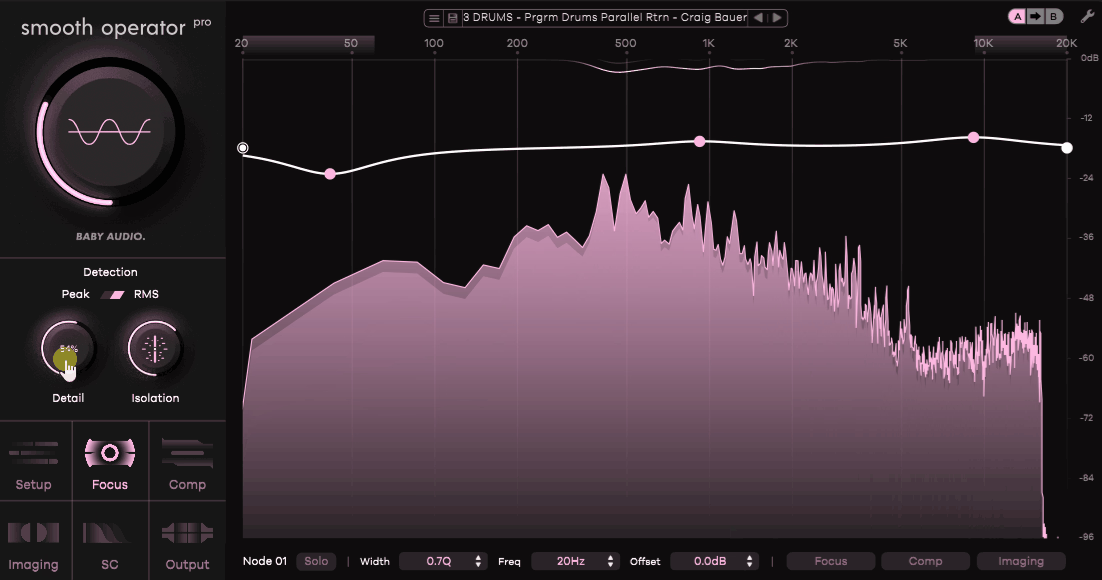
Smooth Operator Pro has the most flexible workflow of anything in this category. Where most resonance suppressors give you a single threshold and a few global controls, this one lets you go as broad or as surgical as the material actually requires. I think that range is what makes it genuinely useful across sessions rather than just on specific problem material.
- Per-Node Override and Global Threshold:
The plugin operates on a global threshold that sets the overall level of resonance suppression, but you can override individual frequency nodes with independent settings, meaning you can leave certain areas of the spectrum completely untouched while pushing harder on the regions that actually need attention. I found this particularly useful on complex sources like electric piano, where the character of the instrument lives in some of those resonances and you don’t want a global setting erasing what makes it sound good.
- Imaging Controls for Stereo Field Processing:
Smooth Operator Pro includes independent control over Left/Right and Mid/Side channels, which means you can reduce harsh resonances in the side channel without touching the centered content, or address low-mid buildup in the mid without affecting the stereo field. I’d say this makes it one of the more complete tools in the category for bus and mix bus work.
- Lo and Hi Preserve Filters:
The plugin includes shelving filters specifically designed to protect the low end and high end from the suppression processing, which matters because a lot of dynamic resonance tools can inadvertently thin out the bottom end or dull the top while cleaning up the mids. I found dragging these directly in the frequency display was a fast and intuitive way to define the boundaries of where the plugin is actually working.
- Auto-Gain Compensation:
A practical addition in the v1.1 update is auto-gain compensation that instantly matches input and output levels so you’re making decisions based on the processing rather than reacting to volume differences. I love how it’s implemented as a single click next to the gain control rather than a separate calibration process.
Get the Free Plugin Starter Kit
The genuinely useful free DAWs and plugins worth installing. No filler. Straight to your inbox.
2. Waves Curves Equator
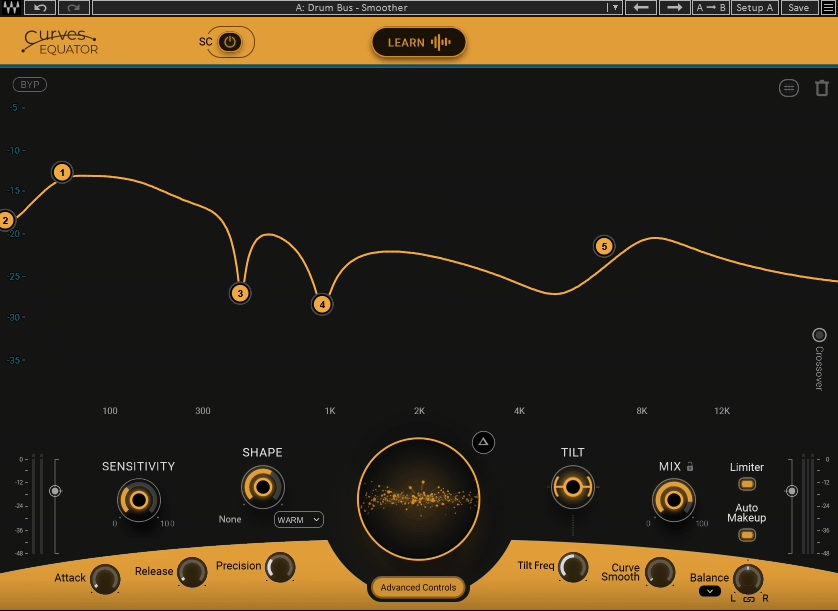
Curves Equator is Waves’ answer to the growing resonance suppressor category, and I mean that in the best sense. They didn’t just copy what Soothe does, they added a workflow that feels genuinely distinct, particularly around how you define where the plugin is working. The threshold curve approach, where you draw or learn a curve that determines which frequencies get processed and how much, gives you a visual connection to the processing that most tools in this space don’t offer.
- Learn Mode (Auto-Generated Suppression Curve):
Press Learn, play your audio, and Curves Equator analyzes the spectral content and generates a personalized threshold curve shaped to that specific source. For tracks that are already sounding mostly good but need targeted cleanup, this gets you to a working setting in seconds. I found it especially useful on full mixes where manually finding the right suppression curve would otherwise take a long time.
- Adaptive Mode with Eight Editable Nodes:
Beyond the learned curve, you have eight flexible nodes that can be set to low shelf, high shelf, or bell shapes to target specific regions with more precision. The multiband crossover splits the threshold into four bands for broader stroke adjustments, giving you a layered system that goes from broad tonal corrections to narrow resonance suppression within the same interface.
- Sidechain with Learn via SC:
The sidechain mode is where Curves Equator gets genuinely useful for unmasking. You can route a sidechain signal, use Learn to analyze its spectral content, and apply an inverse suppression curve to the track being processed, dynamically carving out space for the sidechain source in real time. I believe this approach to frequency unmasking is one of the cleaner implementations I’ve used, particularly for bass/kick relationships.
- Rider Function:
The Rider feature works alongside the sidechain to apply attenuation only when the sidechain audio is actually present, meaning the suppression backs off when the sidechain source goes quiet. For things like vocal presence in an instrumental mix, this produces natural-sounding ducking that doesn’t feel like compression.
3. RESO by Mastering The Mix
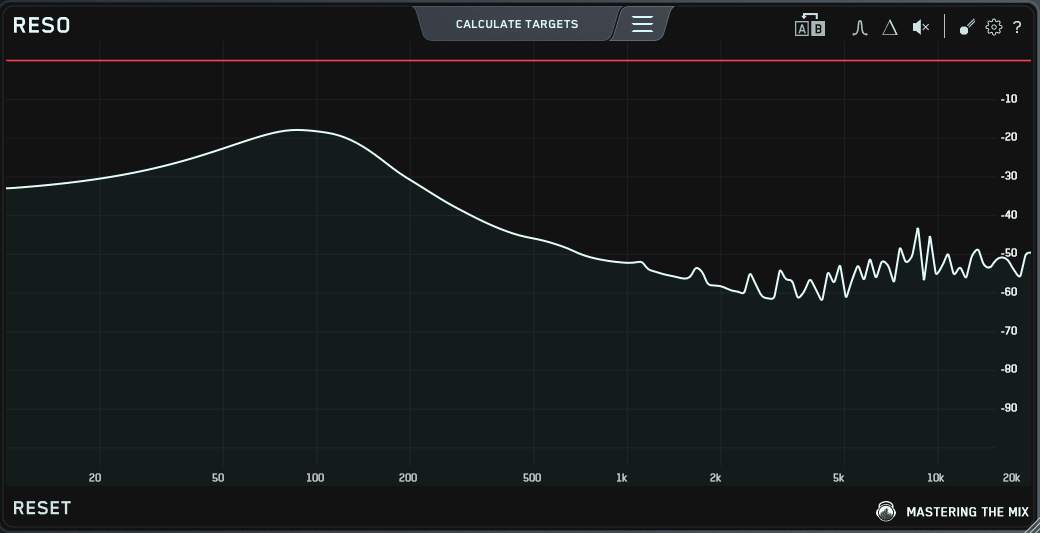
RESO takes a more diagnostic approach than most tools in this category. It’s built around the idea of showing you exactly where resonances are occurring and giving you guidance on what to do, rather than asking you to dial in suppression parameters by ear. I think this makes it particularly strong for anyone who’s still building their ears for this kind of work, but the workflow is fast enough that experienced engineers use it too.
- Resonance Detection and Visualization:
RESO scans your audio and visually identifies resonant frequencies, highlighting them directly so you can see exactly which areas are problematic before you start processing. This combination of detection and visualization means you spend less time hunting and more time making decisions, and I found it genuinely changes how quickly you can move through a session when cleaning up multiple tracks.
- Dynamic Resonance Reduction:
The suppression itself is applied dynamically, only triggering when and where resonances exceed the threshold, which preserves the natural character of the source rather than applying blanket processing across the spectrum. I’d say the transparency of the processing is one of RESO’s genuine strengths here.
- Tonal Balance Reference:
RESO includes the ability to compare your tonal balance against a reference track or genre preset, which gives you a second layer of feedback beyond just the resonance suppression itself. This is useful for catching broader tonal imbalances that might be contributing to the resonance perception even before addressing individual peaks.
- Analysis Feedback:
Like the rest of the Mastering The Mix range, RESO provides written guidance on what adjustments to make, rather than leaving you to interpret meters and graphs alone. I appreciate that this makes the tool genuinely educational rather than just diagnostic.
4. DJSWivel Knocktonal
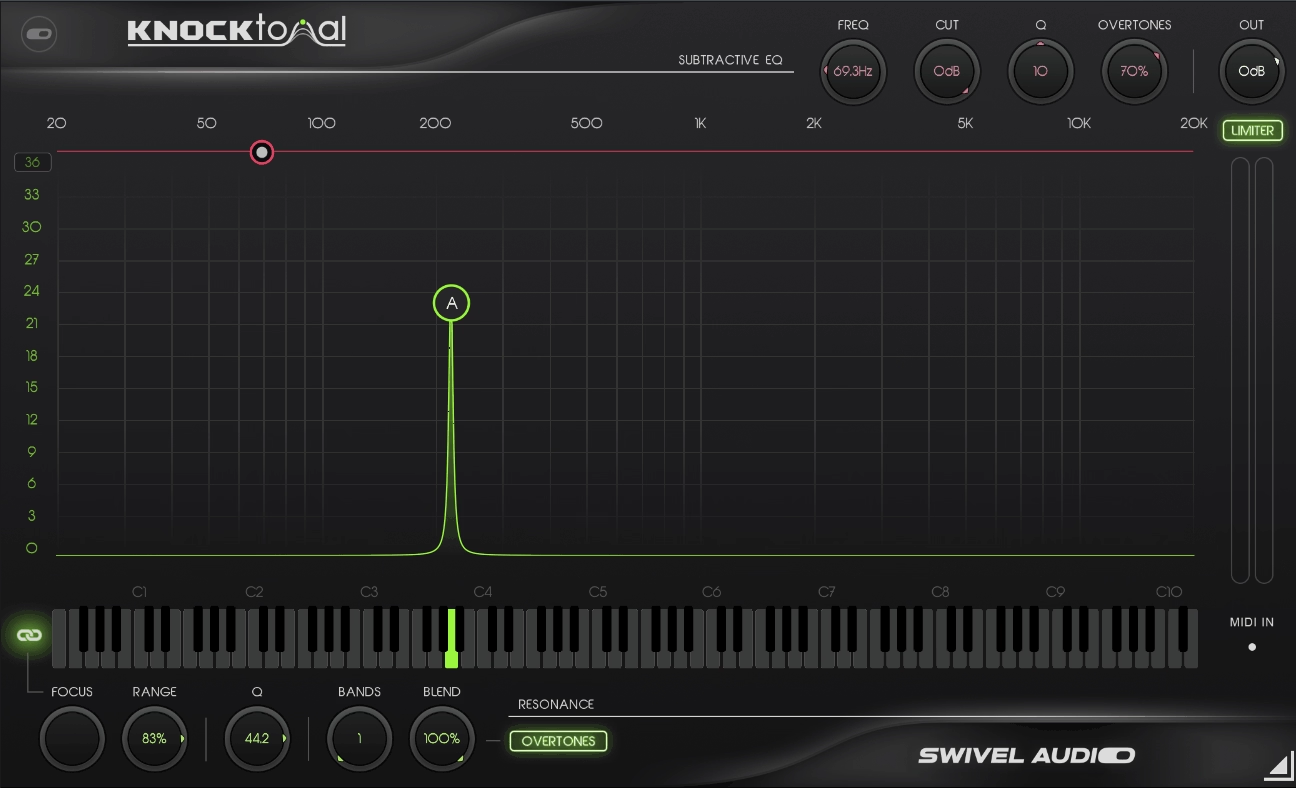
Knocktonal sits in a different lane from every other plugin on this list. Instead of just suppressing resonances, it lets you remove them and replace them with new ones, which makes it a creative tool as much as a corrective one. I mean, the ability to tune kick drums to the key of the track without destructive pitch-shifting is useful on its own, but the ability to then add back harmonics in a specific pitch relationship to the rest of the track is genuinely novel.
- Note-Based Resonance EQ (Additive):
The Resonance EQ section lets you boost a root note and all of its corresponding harmonic overtones simultaneously, with up to 30 bands of resonance control. You can target even and odd harmonics independently or switch to Octaves mode which focuses exclusively on octave multiples for a cleaner, more tonal result. I found this was the fastest way to tune a kick drum to a specific note while keeping the transient intact.
- Subtractive EQ (Resonance Removal):
Before adding new resonances, you use the Subtractive EQ section to remove preexisting resonances from the source, giving you a clean foundation. The frequency placement is intuitive, and having both additive and subtractive tools in one plugin means you don’t need separate processing stages for what is essentially one workflow.
- MIDI Input for Dynamic Control:
Both the additive and subtractive EQ sections have independent MIDI input channels, meaning you can control the pitch of the resonance boost dynamically with MIDI data from your sequencer or a controller. For melodic percussion patterns, bass instruments, or any situation where you want the resonance to track the note being played, this is what makes Knocktonal genuinely expressive rather than just corrective.
- Built-In Limiter:
A switchable limiter at the end of the signal chain prevents distortion from aggressive resonance boosts without requiring an additional plugin in the chain. I noticed this becomes important quickly when you start pushing the additive EQ hard on percussive material.
5. Techivation M-Clarity 2
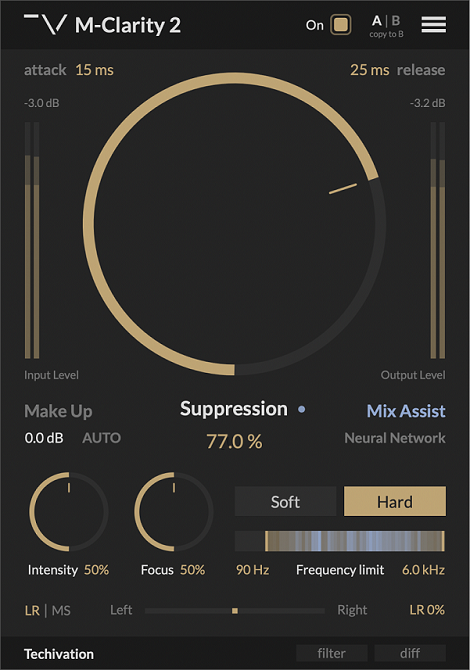
M-Clarity 2 is Techivation’s most refined version of their resonance suppressor, and the difference from the original is meaningful rather than cosmetic. The soft mode in particular has been substantially reworked, the spectral shaping engine is cleaner, and the AI-powered Mix Assistant that analyzes 3.5 seconds of audio before suggesting parameter settings reduces the amount of setup time noticeably. I’d say the overall result is a plugin that gets you to a good result with minimal effort, which is exactly what you want from a tool this focused.
- Adaptive Frequency Range Detection:
M-Clarity 2 continuously analyzes your audio and automatically adjusts the frequency range being processed to target wherever boxiness, muddiness, and harshness are actually occurring at any given moment, rather than processing a fixed band. This real-time adaptation means you don’t need to manually set processing boundaries for different sections of a track, the plugin follows the problem rather than waiting for you to find it.
- Mix Assistant (AI-Powered Parameter Suggestions):
Feed the Mix Assistant 3.5 seconds of audio from the busiest section of your track and it analyzes the content and suggests optimal suppression, intensity, focus, and frequency range settings as a starting point. I found this works well as a preset-quality starting point that still leaves room for manual adjustment rather than trying to be a final answer.
- Soft and Hard Processing Modes:
The two modes give you meaningfully different results rather than just different amounts of the same processing. Hard mode removes resonances directly without additional processing, while Soft mode applies spectral smoothing with shallower filter slopes for a gentler result that’s less likely to introduce artifacts on complex material. The updated Soft mode in version 2 is noticeably better than it was before.
- Mid-Side Processing:
M-Clarity 2 includes independent L/R and M/S processing, letting you suppress resonances in the mid channel without affecting the stereo field, or address side-channel harshness independently. For mix bus and mastering work, this level of stereo control is essential and I appreciate that it’s included rather than gated behind a higher tier.
6. KERN SMOOTH
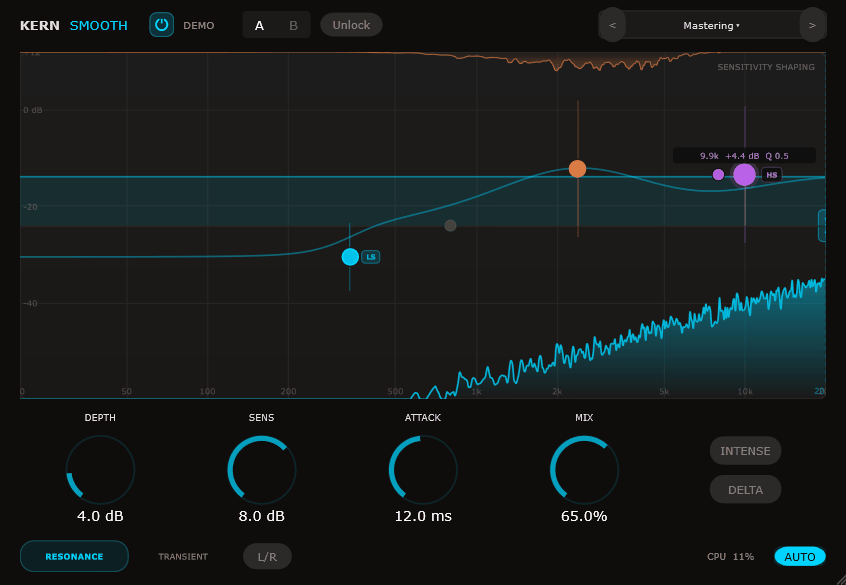
KERN is a solo developer out of Copenhagen building plugins that each solve exactly one problem, with a maximum of five knobs, under 3% CPU, and a foundation in published academic research. SMOOTH is their resonance suppressor, and for $29 it’s one of the strongest value propositions in the category. I must say, the psychoacoustic approach here, using 40 ERB frequency bands mapped to how human hearing actually perceives frequency rather than arbitrary linear splits, is something I haven’t seen implemented quite this way elsewhere.
- 40 Psychoacoustic ERB Bands:
Rather than splitting the spectrum into arbitrary frequency divisions, SMOOTH uses 40 bands based on the Equivalent Rectangular Bandwidth (ERB) scale, which reflects how the human auditory system perceives pitch and frequency spacing. In practical terms this means the resonance detection responds to the same frequency regions your ears are most sensitive to, which I found produces more perceptually accurate results than plugins using linear or octave-based band structures.
- Resonance and Transient Modes:
SMOOTH operates in two distinct modes. Resonance mode targets sustained harshness, while Transient mode targets percussive frequency spikes, giving you appropriate processing behavior depending on whether the problem is a ringing resonance or a sharp transient peak. I realized that having this distinction available is more useful than it might initially seem, particularly on drum overheads where both types of problem can coexist.
- Mid-Side Processing:
Like the better tools in this category, SMOOTH includes independent Mid and Side processing, so you can tame harshness in the center of the stereo image without touching the sides, or vice versa. For vocals in particular, where the issue is usually centered, this precision matters.
- Delta Button
When it comes toDelta button, it lets you hear exactly what the plugin is removing in real time, which is one of the most useful diagnostic features in any resonance suppressor and helps you avoid over-processing. The spectral display shows both the problem and the solution visually so you can always see what the plugin is doing rather than working blind.
- Five Knobs, Under 3% CPU, No Subscription:
Lastly, this is worth noting directly: Depth, Sensitivity, Attack, Mix, and a Frequency Limit control are all you get, and all you need. At $29 with a per-person license that runs on all your computers and no iLok or account required, the friction to try it is essentially zero. I found it to be one of those tools that quietly ends up on more tracks than expected precisely because the low cost removes the psychological barrier to reaching for it.
Get the Free Plugin Starter Kit
The genuinely useful free DAWs and plugins worth installing. No filler. Straight to your inbox.

Hello, I’m Viliam, I started this audio plugin focused blog to keep you updated on the latest trends, news and everything plugin related. I’ll put the most emphasis on the topics covering best VST, AU and AAX plugins. If you find some great plugin suggestions for us to include on our site, feel free to let me know, so I can take a look!