Passive EQs approach tone shaping through interactive circuits where bands influence each other, creating curves that feel more natural and musical rather than purely mathematical.
The bands don’t work in isolation but subtly affect adjacent frequencies, producing smooth tonal balance especially valuable when mixing on headphones or in bedroom studios.
This guide covers eight commercial passive EQ plugins plus three free options that bring vintage passive filtering behavior into your DAW without requiring expensive hardware. Grab a coffee, maybe some cake, and enjoy!
1. Slate Digital SD-PE1
Modern parametric EQs give you surgical precision with endless bands and exact frequency values, which works great for problem-solving but often results in sterile corrections that lack the musical cohesion you hear on classic records.
Passive EQs from the 1960s approached tone shaping differently through interactive circuits where bands influence each other creating curves that feel more natural and musical rather than purely mathematical.
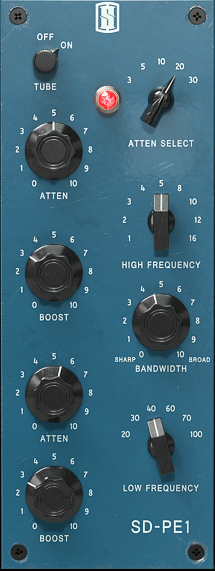
The Slate Digital SD-PE1 is a digitally modeled passive program equalizer based on 1960s era passive hardware from the same design class as classic studio staples like Pultec. I think what makes this different from modern parametric EQs is how it shapes tone in musically subtle ways with a small number of controls that interact with each other non-linearly.
What SD-PE1 offer you:
- Three Passive Circuit Bands with Non-Linear Interaction
The plugin features three distinct EQ bands including a High Shelf (attenuation only), High Bell (boost only), and Low Shelf (both boost and attenuation simultaneously) with frequency choices ranging from 3 kHz up to 30 kHz.
It includes a Tube Stage Toggle that can be switched on or off, and I’ve noticed it offers both stepped detents and incremental frequency selection for hybrid control.
- Tube Stage Toggle for Switchable Harmonic Character
This is a practical difference from most passive EQ models where you can switch the tube amplifier section on or off. I can see how Tube ON emulates the classic tube amplifier makeup gain after the passive network adding harmonic content and saturation that smooths and rounds out frequencies, while Tube OFF bypasses the tube stage without dropping output volume which the original hardware could not do.
I’m convinced this toggle means you can dial in harmonic color when you want it or go fully clean when you don’t, and this is a workflow advantage many analog models lack.
- Extended Frequency Range Beyond Original Hardware
You get frequency choices up to 30 kHz and as low as 3 kHz giving you control well beyond the original hardware range. I think this extended range is particularly useful for modern production where you might need to address high-frequency content in digital recordings that didn’t exist when the original hardware was designed! Also, I feel like having access to these extreme frequencies makes the plugin more versatile without compromising the vintage character.
- Stepped and Incremental Frequency Selection
The plugin lets you choose how the frequency selectors behave where stepped detents work like old analog gear clicking between fixed frequencies for recall and consistency, while incremental adjustment lets you fine-tune between those fixed points.
I’ve noticed this hybrid control gives you more precision than vintage hardware without losing that old-school feel. I wonder how many producers overlook this flexibility, but I’d say being able to switch between modes matters when you want either vintage workflow or modern precision.
- Musical Interaction Over Surgical Precision
Because the bands interact with each other, small moves often have wide perceptual effects rather than isolated frequency changes. I tend to notice this means you’re not thinking in terms of “+6 dB here” but about what frequency balance you want the sound to glide into.
I’ve realized this interaction is what makes it richer and more musical but also less predictable if you’re used to precision graphic EQs, and this character is exactly what makes passive EQs valuable for mixing.
2. Pulsar MP-EQ
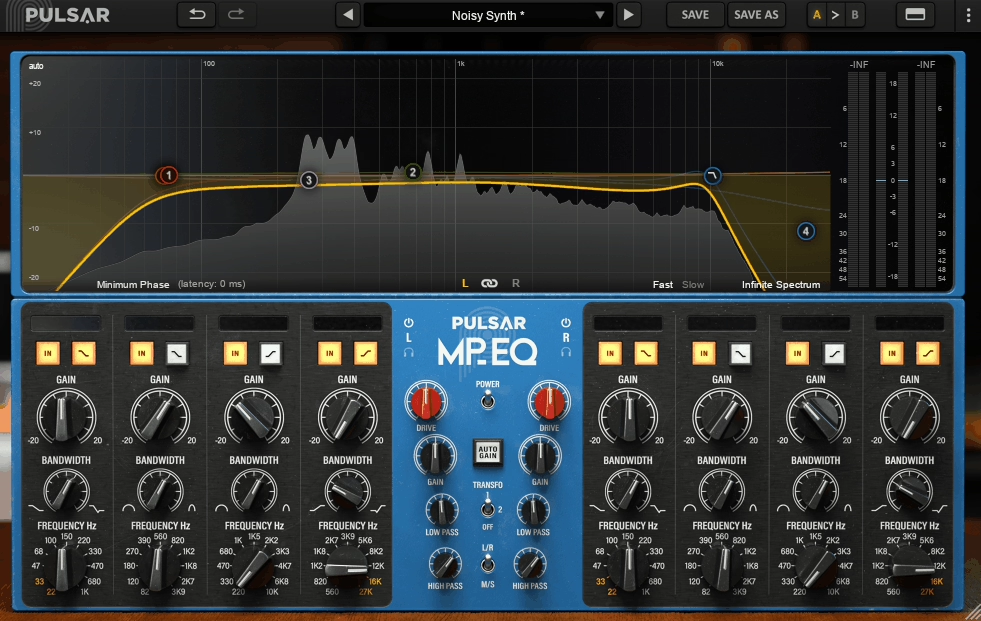
Pulsar MP-EQ is a full-featured emulation of a world-renowned analog passive equalizer redesigned for the DAW era that simulates real passive circuitry with tubes, transformers, and inductors then enhances it with features almost unheard of in passive EQ emulations.
What separates this from typical passive models is how it uses passive parallel filter paths that recombine after equalization giving more natural frequency interaction, and it includes optional linear-phase mode, integrated curve editor and spectrum analyzer, plus Mid/Side processing with solo monitoring.
The plugin features three transformer options (Original, Colorful, Clean) for controlling analog flavor, Drive control for tube/transformer saturation, and up to 4x oversampling.
- Passive Parallel Topology for Natural Frequency Interaction
Unlike serial parametric designs where bands add together linearly, MP-EQ uses passive parallel filter paths that recombine after equalization. I’d argue this behavior gives more natural frequency interaction especially useful when shaping low end and air without the digital EQ sound.
Bands interact in a way that minimizes the harshness that can occur when multiple boosts and cuts pile up. I often find this parallel topology keeps low end coherent even with moderate boosts, and I can see how this matters when you’re working on mix buses where frequency buildups become problematic.
- Optional Linear Phase Mode for Transient Preservation
This is a standout feature where MP-EQ can realign all frequencies after the analog-style EQ stage turning a traditionally phase-rotating analog emulation into a true linear-phase processor when needed.
That said, this preserves transient integrity and waveform shape which matters for mix bus and mastering duties where phase anomalies can muddy low end and smear transients. The dual-mode capability is rare in passive EQ emulations because you’re getting vintage character when you want it or modern phase-coherent processing when you need it.
- Integrated Curve Editor with Real-Time Spectrum Analyzer
Instead of relying solely on knobs and labels, MP-EQ gives you a graphical curve editor where you can drag your equalization shapes directly and see real-time frequency content via the built-in spectrum analyzer.
I feel like this visual workflow cuts down guesswork in complex mixes especially when you want to see what certain passive curves are actually doing in context. It matters most when you’re trying to understand how the passive bands interact because you’re not just twisting knobs hoping for results but seeing the cumulative frequency response.
- Mid/Side Processing with Solo Monitoring
MP-EQ lets you split your equalization between mono (M) and stereo (S) components with separate settings and includes solo monitoring of each channel. I’ve noticed this isn’t just a gimmick because on dense mixes or mastering scenarios being able to EQ only the side information or only the mono center can bring out space and clarity without unintended tonal shifts.
I wonder how many producers overlook Mid/Side capabilitiesin EQs, but I’d say soloing the Side channel and applying curves only there helps control shimmer without upsetting the mono foundation.
- Drive Control and Three Transformer Modes
A dedicated Drive knob lets you push the plugin’s internal tube/transformer simulation harder or softer where this doesn’t just add grit but changes how the low end responds producing subtle program-dependent compression and harmonics.
I believe there are three transformer options where Original matches the modeled hardware circuit, Colorful increases low-end warmth and saturation, and Clean bypasses transformer coloration.
These modes let you dial in the degree of analog flavor and density you want, and this flexibility is what makes MP-EQ adaptable across different sources and mix contexts.
3. Knif Audio Soma
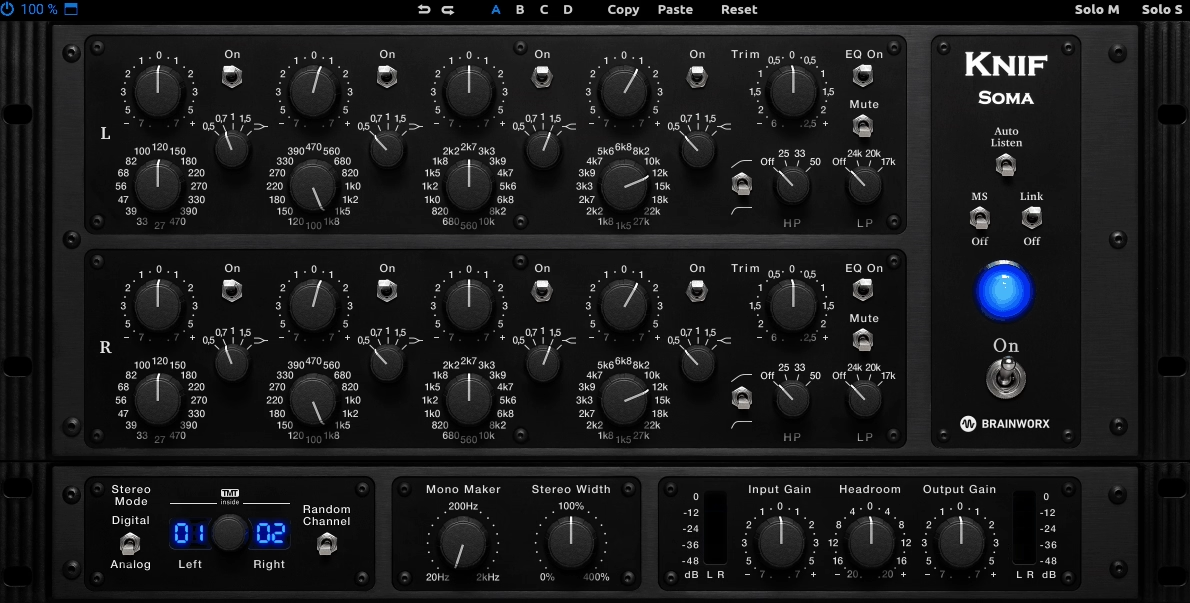
Knif Audio Soma is a mastering-focused passive tube EQ designed to deliver tonal refinement and harmonic subtlety of high-end analog passive circuits rather than exaggerating coloration for character.
The plugin combines multiple passive filter stages with a modeled tube output stage providing surgical-free, context-aware tonal shaping suitable for mix buses, stereo stems, and mastering chains.
I think what makes this practical is the focus on musicality, transparency, and dynamic harmonic interaction where the tube stage responds to input signal levels and frequency interaction.
It includes stepped frequency and gain controls for exact recall, integrated high-pass and low-pass filters, optional linear-phase processing, and oversampling up to 8x plus 12 factory presets.
- Four-Band Passive EQ
Soma features four passive EQ bands each with distinct musical roles where the tube-modeled output stage imparts subtle harmonic content depending on how aggressively the bands are driven.
I’d argue this harmonic layer is dynamic rather than static meaning it responds to input signal levels and frequency interaction preserving mix coherence while enhancing perceived depth and warmth. This differs from static saturation controls because the coloration adapts to what you’re processing..
- Stepped Frequency and Gain Controls for Session Recall
Each band uses stepped control for both frequency and gain providing exact recall across sessions. Gains are adjustable in 1 dB increments ensuring predictable results without guesswork. I think stepped frequencies allow repeatable tonal shaping without the risk of drifting values which is particularly helpful for producers revisiting mixes over multiple sessions.
- Filters
The plugin includes dedicated high-pass and low-pass filters where high-pass ranges from 20 Hz to 150 Hz and low-pass from 10 kHz to 20 kHz. Filters are intended for tonal cleanup rather than aggressive removal allowing low-end rumble or high-end harshness to be controlled naturally without introducing phase issues or dulling transients
- Stereo Linking and Independent Channel Control
Soma supports stereo-linked processing or independent left/right band adjustment making it suitable for subtle stereo enhancements. I believe independent control is useful for widening pads or controlling side-channel elements in dense mixes without altering the mono center. This is particularly beneficial in bedroom setups with limited or uneven monitoring conditions where stereo perception can be deceptive.
- Linear-Phase
The plugin includes optional linear-phase processing and internal oversampling up to 8x. I’m convinced these features preserve transient integrity and phase coherence making Soma appropriate for critical mastering or mix bus processing where high-frequency content and low-end punch must remain accurate.
I wonder how many producers overlook linear-phase capabilities in passive EQs, but I’d say it’s what separates mastering-grade tools from standard mixing EQs!
- Presets for Mastering Applications
The plugin comes with nice presets including mix bus, stem, and instrument-specific starting points. I tend to notice these presets demonstrate musical use of all four bands and tube response providing practical guidance for producers unfamiliar with passive EQ behavior. I imagine they emphasize broad tonal moves rather than dramatic transformations reflecting Soma’s mastering-oriented design.
4. Harris Doyle Natalus DSCEQ
Visual EQ curves and spectrum analyzers in modern plugins encourage you to make adjustments based on what you see rather than what you hear, which often leads to over-EQing especially in untreated bedroom studios where your monitoring already misleads you. You end up chasing frequency response graphs instead of asking whether the sound actually needs correction, and the endless parameter options create decision paralysis where you’re tweaking Q values and frequency sweeps for hours without improving the mix.
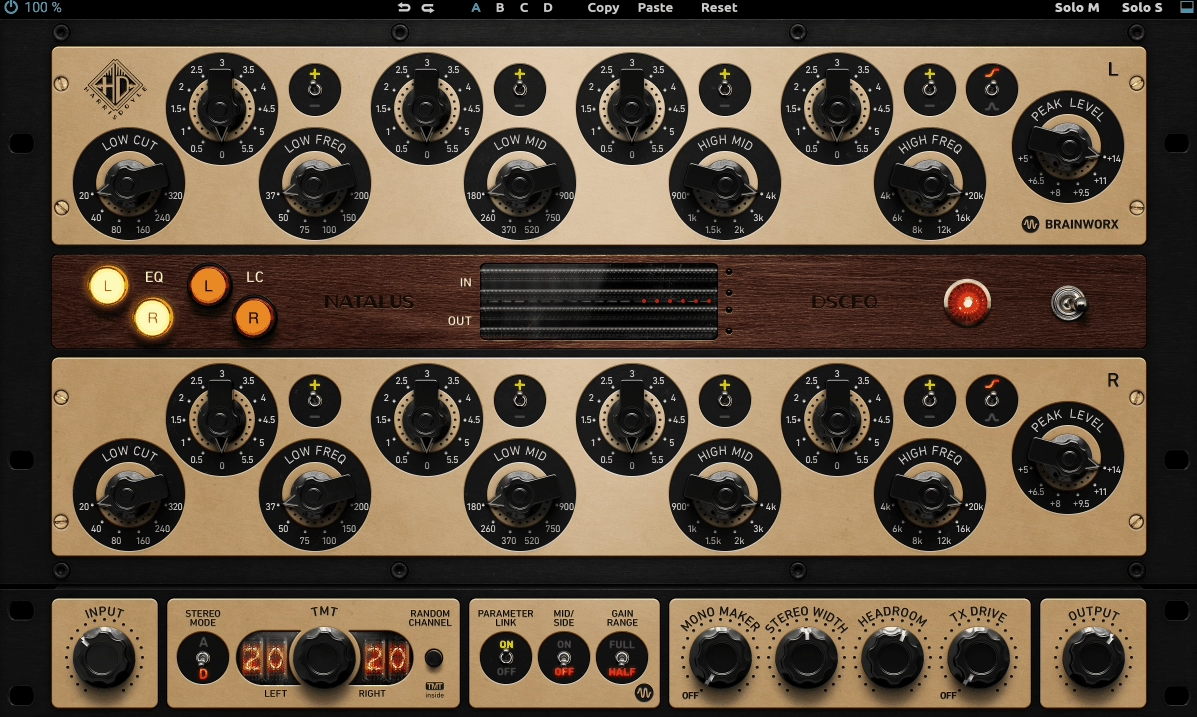
Harris Doyle Natalus DSCEQ takes the opposite approach as a very direct digital model of the equalizer section from the Natalus DSCE hardware, a boutique American passive EQ known for deliberately limited controls and conservative design choices.
Its focus is on repeatable tonal shaping that behaves consistently across sources rather than flexibility or speed. The plugin features a pure passive EQ network followed by makeup gain with three fixed bands (Low shelf, Mid bell, High shelf) where all gain adjustments are stepped not continuous for exact recall, and I believe there’s no visual EQ curve, no spectrum analyzer, and no draggable controls by design.
In addition, ech band is limited to fixed frequency positions exactly like the hardware with no sweepable frequency knob and no adjustable Q.
- Three Fixed Bands with Asymmetric Passive Behavior
The plugin consists of three fixed bands where the Low band is shelf-based designed primarily for weight and foundation, the Mid band is bell-style intended for broad tonal emphasis, and the High band is shelf-based voiced for air and top-end clarity.
Each band is limited to fixed frequency positions exactly like the hardware where there is no sweepable frequency knob and no adjustable Q. This constraint is part of the design philosophy because you’re encouraged to choose a musical zone not a precise problem frequency. The passive circuit means boosts and cuts interact naturally instead of stacking linearly which changes how far you can push the EQ before it sounds forced especially in the low end.
- Fully Stepped Gain Control for Session Recall
All gain adjustments are stepped not continuous which matters more than it sounds because for bedroom producers who revisit mixes over multiple sessions stepped gain makes recall exact even without writing values down. I can see how you can come back weeks later and know that a +2 step boost is exactly the same move you made earlier. This eliminates the frustration of trying to recreate settings from previous sessions.
- No Visual Feedback by Intentional Design
DSCEQ is meant to be adjusted by ear not by eye. This reduces the temptation to over-EQ which is a common problem in small rooms where visual feedback often overrides what’s actually audible. The absence of visual aids encourages listening in context instead of chasing curves, and I wonder how many mix decisions get made based on graphs rather than actual sonic improvement!
- Conservative Low-Frequency Shaping Without Hype
The low band is particularly restrained where boosting low frequencies adds density and perceived weight not sub-bass exaggeration. This makes it quite useful on bass guitars, kick drums, and synth basses where you want the sound to feel more solid
Because the circuit is passive, boosting lows also subtly alters nearby low-mid content instead of isolating a single frequency which feels more natural and musical.
- Broad Midrange Emphasis
The mid band is broad and intentionally non-surgical where this is not the tool for removing resonances or ringing tones but better suited for pushing an instrument forward or backward in the mix.
I’ve realized vocals, guitars, and keys benefit from this when they need presence without the “EQed” sound that narrow parametric boosts often introduce. I’d say this is particularly useful as a secondary EQ placed after a surgical digital EQ that handles problem frequencies letting the DSCEQ handle overall tone.
5. D16 Group Pulsatec
I’ve found that most passive EQ plugins either stick rigidly to vintage hardware limitations with just three bands and fixed frequencies, or they add so many modern features that the original analog character gets buried under digital convenience tools.
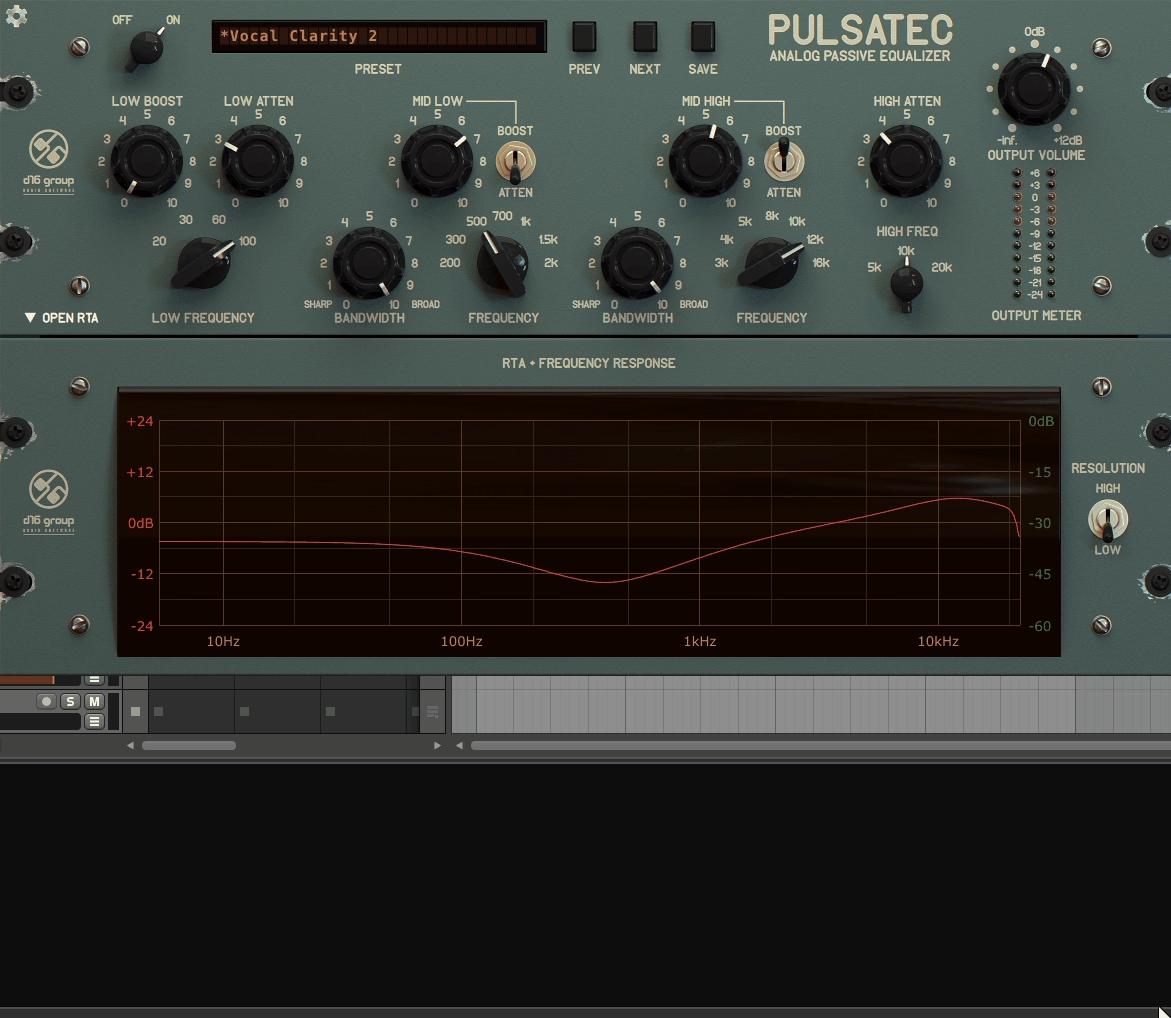
D16 Group Pulsatec takes a middle approach as a modern reinterpretation of classic passive equalization principles integrated into flexible digital workflow rather than simply imitating a specific hardware unit.
To me, what makes this cool is how it blends authentic analog-style circuitry behavior with DAW-native features like stereo linking, oversampling, and detailed metering.
It includes selectable shelf slopes (gentler or steeper), stereo and mono modes with independent band linking, and oversampling up to 8x for reduced aliasing. I’ve noticed the gain range on each band generally sits around ±12 dB with inherent harmonic behavior from the circuit model.
Things you get in more depth:
- Five-Band Layout with Extended Frequency Control
Pulsatec’s architecture includes five distinct bands covering Low Shelf, Low-Mid Bell, Mid Bell, High-Mid Bell, and High Shelf. The additional bell band beyond typical 3 or 4 band designs gives finer tonal control without overcomplication. Each band’s center frequency is fixed to musically relevant points with consistent Q behavior that avoids unnatural narrowing even at extreme settings.
- Passive-Inspired Filter Network with Band Interaction
The plugin models a multi-stage passive equalizer network where filtering occurs before makeup gain and interacts in interdependent ways. Unlike straightforward parametrics, pushing one band subtly alters how adjacent bands behave which is a trait carried over from vintage circuits.
This means the plugin modifies how instruments sit in the mix in context rather than simply adding isolated EQ adjustments.
- Selectable Shelf Slopes Without Resonance Peaks
Shelf bands let you choose between two slope responses where one is gentler and one is steeper without adding artificial resonance peaks. Aggressive shelf slopes often create bumpiness or exaggerated transition zones, but Pulsatec’s implementation stays smooth while still audible.
This is useful for low-end weight or high-end air without the unstable peaks that make passive EQs unpredictable.
- Stereo and Mono Modes with Independent Band Linking
The plugin lets you run in stereo linked mode or independent left/right mode where you can adjust wide synth pads differently across channels without breaking stereo coherence or keep strict stereo linking when shaping mix buses.
This is especially helpful when elements are panned and you need asymmetric shaping while retaining a balanced stereo field.
- Oversampling
o reduce digital aliasing and improve high-frequency integrity, Pulsatec offers up to 8× oversampling. For example, in a 48 kHz session, internal processing runs at 384 kHz
This preserves transient detail and prevents high-band smearing which is a practical benefit when working on masters or high-energy electronic material where transient accuracy matters.
- Inherent Harmonic Behavior from Circuit Modeling
While there is no dedicated saturation knob, the circuit model includes inherent harmonic behavior where this isn’t overt distortion but subtle harmonic texture that becomes noticeable when bands are driven hard. This can lend glue and a sense of richness especially on full mixes or grouped tracks without needing external saturation plugins.
6. Bettermaker Passive Equalizer

Most passive EQ plugins lean heavily into vintage nostalgia with transformer switches, tube stages, and deliberately unpredictable behavior that’s meant to replicate hardware quirks from the 1950s and 60s.
The Bettermaker Passive Equalizer breaks from this pattern as a direct digital translation of Bettermaker’s passive analog EQ hardware following a modern, precision-driven hardware philosophy with stepped controls, exact recall, and intentionally limited but repeatable tone-shaping options.
I think what makes this different is the goal isn’t character exaggeration or vintage nostalgia but controlled, high-resolution tonal balance that holds up in mixing and mastering contexts.
The plugin models a true passive equalization stage followed by active makeup gain with a four-band structure covering Low, Low-Mid, High-Mid, and High bands where each offers predefined, musically chosen frequency points.
I believe it includes dedicated high-pass and low-pass filters as tonal tools, and I’ve noticed every EQ parameter is fully stepped not continuous for exact recall between sessions.
- Four-Band Passive Layout Focused on Tonal Balance
The plugin uses a four-band structure arranged to cover the full spectrum with minimal overlap where the Low band handles foundational weight, Low-Mid band for body and density, High-Mid band for presence and articulation, and High band for openness and air.
I can see how each band offers predefined musically chosen frequency points not sweepable ranges meaning you’re choosing zones rather than chasing exact Hz values. I think the bands are voiced to avoid aggressive resonances which is particularly useful when mixing on headphones or in small untreated rooms where narrow boosts can quickly become misleading.
- Digitally Controlled Passive EQ Architecture
At its core the plugin models a true passive equalization stage followed by active makeup gain mirroring the Bettermaker hardware’s signal flow where EQ changes occur in the passive domain first.
I’m convinced this results in broad coherent tonal shifts rather than isolated frequency manipulation, and I feel like compared to parametric EQs changes feel more like rebalancing than correcting.
- High-Pass and Low-Pass Filters as Gentle Tonal Tools
I’ve noticed these are not steep surgical filters but gentle and intended for tonal cleanup and focus not hard filtering. In practice they help tighten low end or smooth excessive top-end energy without the audible chopping effect common in steep digital filters, and I imagine this matters when you need to clean up frequency extremes without losing musicality.
- No Saturation or Drive Controls for Predictable Stacking
A key design decision is there’s no saturation control, no transformer modes, and no drive knob where any coloration you hear comes strictly from the passive EQ curves and the modeled makeup gain stage.
I tend to notice this keeps the plugin predictable and makes it easier to stack with compressors, limiters, or saturation plugins later in the chain without cumulative distortion. I’ve realized for producers who already manage color elsewhere this restraint is a feature not a limitation.
7. SPL Passeq
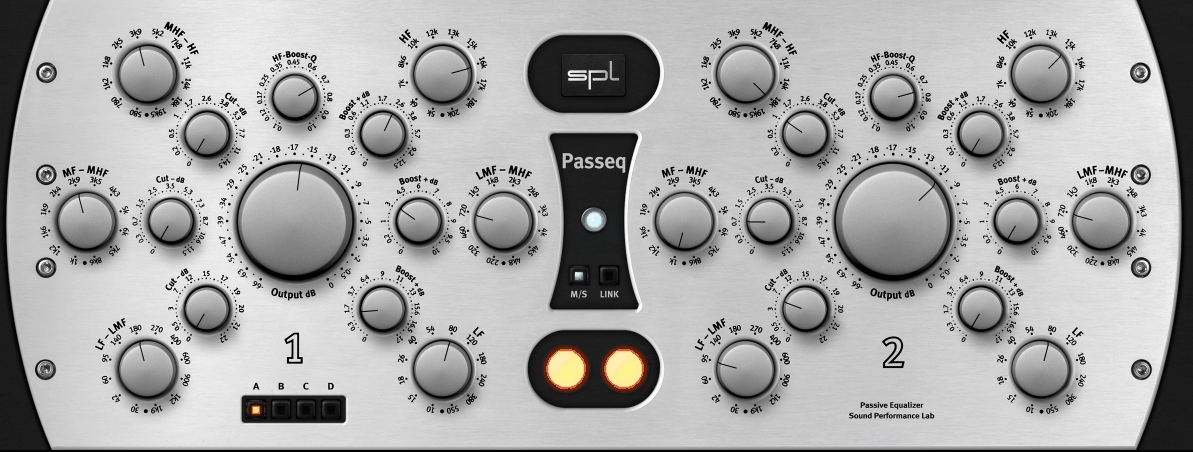
The SPL Passeq passive EQ plugin brings SPL’s PQ hardware passive EQ architecture into the DAW environment combining high-fidelity analog modeling with minimalistic precise controls.
What makes this practical is the linearity at extreme boosts and cuts plus the focus on musical context-driven adjustments rather than surgical or overly colored moves.
The plugin features four distinct bands with stepped control including Low shelf with 8 predefined frequencies from 30 Hz to 300 Hz, Low-mid bell with 7 fixed points between 200 Hz and 1 kHz, High-mid bell with 8 fixed points from 1 kHz to 8 kHz, and High shelf with 6 frequencies from 8 kHz to 20 kHz.
I believe all gain adjustments are ±12 dB in 1 dB increments, and I’ve noticed it includes digital-modeled high-pass and low-pass filters plus internal linear-phase compensation. The plugin ships with 15 factory presets.
- True Passive Topology with Band Interaction
The core design emulates a series of passive LC filter networks followed by active makeup gain rather than digital algorithms.
This results in interacting bands where changes to one frequency range subtly affect adjacent frequencies producing smooth musical transitions rather than abrupt response typical of parametric EQs. This interdependence means boosts and cuts should be approached incrementally but the payoff is tonal coherence across the mix.
- Bands with Fully Stepped Frequency and Gain
The plugin features four distinct bands each with stepped control where all gain adjustments are ±12 dB in 1 dB increments offering precise but predictable tonal shaping. I can see how the stepped design supports session recall with zero ambiguity which is critical for projects revisited over multiple days.
I often find this matters more than continuous controls because you know exactly where you set things weeks later.
- Internal Linear-Phase Compensation for Transient Preservation
While the plugin models analog passive behavior it includes internal linear-phase compensation. I think this ensures that transient material especially drums and percussive elements remains tight and uncolored even when applying high boosts in multiple bands.
Linear-phase handling is useful when processing a full mix or mastering bus where maintaining phase coherence is crucial because you’re not introducing phase rotation that smears transients.
- High-Pass and Low-Pass Filters for Gentle Cleanup
Unlike the hardware PQ, Passeq vst plugin adds digital-modeled high-pass and low-pass filters with adjustable cutoff slopes. I’ve noticed the high-pass sits from 20 Hz to 200 Hz and the low-pass from 10 kHz to 20 kHz allowing for gentle roll-offs that clean low-end rumble or tame harsh top end without introducing phase artifacts or harshness.
- Stereo Linking and Independent Channel Processing
Passeq supports both stereo-linked operation and independent left/right processing. You can tweak stereo imaging subtly such as brightening one side of a synth pad or controlling side elements differently without disturbing mono center content.
I wonder how many passive EQ emulations offer this flexibility, but I’d say it’s unusual for plugins modeling vintage hardware.
8. UAD Manley Massive Passive

Mix bus EQ decisions are tricky in bedroom studios. You need broad tonal shaping that improves the entire mix without creating harsh artifacts or phase issues. Most passive EQs offer three or four bands with conservative gain ranges.
That’s fine for subtle work. But sometimes you need more substantial tonal moves that still sound musical. Full-spectrum control becomes essential. You want the low end tightened, mids brought forward, and air added to the top without each change feeling isolated or artificial.
Parametric EQs can do this but they often sound stacked or layered. The bands don’t interact naturally. Passive EQs solve this through interdependent filtering where boosting one band subtly influences adjacent frequencies. This creates cohesive tonal balance.
Hardware like the Manley Massive Passive became legendary for exactly this quality. It offered four bands with wider gain ranges than typical passive designs. The tube output stage added harmonic richness. These characteristics made it a mastering staple. Translating this to software requires modeling not just the passive network but how bands interact and how the tube stage responds to different boost levels.
The UAD Manley Massive Passive plugin is a faithful emulation modeling the four-band passive network with integrated tube gain stage featuring ±15 dB gain on shelf bands and ±12 dB on bell bands plus 14 factory presets.
And here is what it offers in detail:
- Four-Band Passive EQ with Interdependent Behavior
The plugin models four frequency bands where the Low band is a shelf with ±15 dB gain from 20 Hz to 500 Hz, Low-mid band is a bell with ±12 dB gain from 50 Hz to 2 kHz, High-mid band is a bell with ±12 dB from 1 kHz to 10 kHz, and High band is a shelf with ±15 dB from 5 kHz to 20 kHz.
All bands are interdependent so boosting one band subtly influences adjacent bands’ tonal response which is critical for maintaining natural tonality across complex mixes preventing the EQ from sounding artificial or layered.
- Tube Gain Stage Modeling for Harmonic Richness
After the passive network the plugin simulates the original tube-based output stage adding subtle harmonic content and dynamic smoothness. This tube stage behaves differently depending on how aggressively you drive the EQ bands where light boosts preserve clarity while smoothing transients and strong boosts introduce gentle harmonic richness adding perceived depth without noticeable distortion making it particularly useful on full mixes or busses.
- High-Pass and Low-Pass Filters with Gentle Slopes
The plugin includes dedicated high-pass and low-pass filters with cutoff ranges 20 Hz to 200 Hz and 10 kHz to 20 kHz respectively. These filters are gentle preserving phase alignment while removing rumble or excessive air which is especially useful for producers using small monitors or headphones where low-end overemphasis can mislead mix decisions.
- Stereo Linking and Independent Channel Processing
You can run the plugin in fully linked stereo mode or adjust left/right channels independently. This allows subtle stereo width corrections or tone shaping on side information without altering mono center content which is useful for mastering synth pads, reverb-heavy stems, or dense mixes where side elements need careful tonal sculpting without affecting the center image.
- Oversampling
UAD includes 8x oversampling ensuring that transient information is preserved and high-frequency content remains artifact-free. Unlike some passive EQ plugins the Massive Passive maintains linear response up to extreme boost settings which is especially helpful in mastering scenarios where you’re pushing bands harder than typical mixing applications would require.
Extra: Waves Abbey Road RS56 Passive EQ
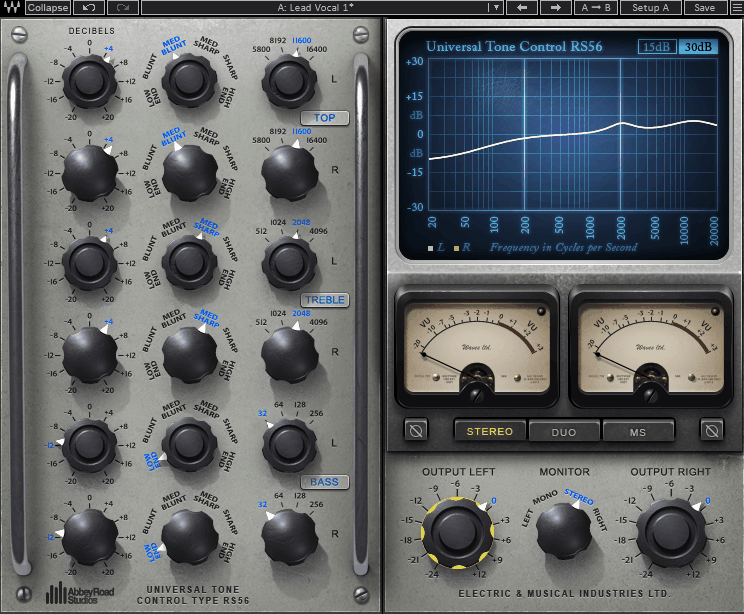
Mix bus EQ should add tonal balance without making the mix sound processed or artificial. You need broad shaping that improves everything without harsh artifacts. I’ve found most passive EQs either try too hard to recreate vintage quirks or they’re so subtle you can barely hear what they’re doing.
The Waves Abbey Road RS56 Passive EQ is a digital emulation of the original RS56 hardware used at Abbey Road Studios recreating the exact passive filter network with proprietary curve-bending design. I think what makes RS56 Passive EQ this practical is how it offers precise tonal shaping over a wide frequency spectrum with subtle coloration while staying transparent enough to leave mixes uncolored when used gently.
The plugin features four interdependent EQ bands including Low shelf with ±15 dB from 30 Hz to 400 Hz, Low-mid bell with ±12 dB from 200 Hz to 1.5 kHz, High-mid bell with ±12 dB from 1 kHz to 8 kHz, and High shelf with ±15 dB from 5 kHz to 20 kHz. I believe it includes gentle high-pass and low-pass filters, stereo and independent channel operation, stepped frequency and gain controls, and ships with 20 factory presets.
Let’s jump into more details:
- Four-Band Passive Network with Interactive Behavior
RS56 emulates four interdependent EQ bands where each band interacts subtly with the others reflecting the real-world behavior of passive LC circuits. Boosting one band affects adjacent bands slightly creating a natural musical balance rather than isolated clinical frequency changes.
This interaction is a key factor in why RS56 works well on full mixes or stereo stems because you’re not getting isolated frequency changes but tonal rebalancing.
- Curve-Bending Design for Smooth Transitions
A distinguishing feature is Waves’ curve-bending technology which allows each band to smoothly transition between bell and shelf behavior depending on the selected frequency.
I can see how this is particularly effective on midrange bands giving tonal flexibility without introducing harsh artifacts even when boosting several bands at once. I feel like slightly raising the high-mid band adds clarity to vocals or guitars while the curves remain smooth across the mix.
- Gentle High-Pass and Low-Pass Filters
The plugin includes gentle high-pass from 20 Hz to 200 Hz for controlling low-end rumble and low-pass from 8 kHz to 20 kHz for taming top-end harshness without dulling transients. These filters are especially useful in scenarios where monitoring limitations can exaggerate certain frequencies allowing you to shape tone reliably without steep surgical filtering.
- Stereo Linked or Independent Channel Processing
RS56 allows stereo-linked processing or independent left/right adjustments. This would be useful for mastering or stereo stems where you want subtle asymmetrical shaping like widening pads, controlling side-channel content, or smoothing one side of a stereo image without affecting the mono center. I imagine you can slightly boost one side of a pad to improve balance where panning is uneven.
- Stepped Frequency and Gain Controls for Exact Recall
All bands have stepped frequency and gain controls with gain steps of 1 dB and preset frequency positions. I’m convinced this makes exact recall across sessions possible which is critical for bedroom producers or anyone revisiting mixes after days or weeks.
- Presets
The plugin includes 37 factory presets for mix bus, stems, instruments, and mastering applications. I tend to notice presets demonstrate practical use of each band and curve-bending options allowing you to quickly start sculpting tone without relying on extreme adjustments. I’ve realized they serve as learning points rather than dramatic one-click fixes showing you how the bands are intended to interact.
Freebies:
1. Analog Obsession MaxBax
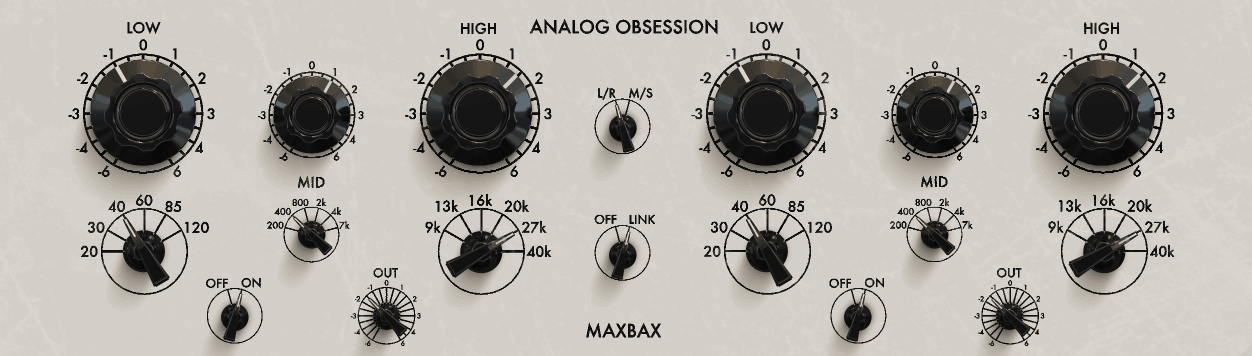
I’ve found that free plugins often lack the musical character or precision needed for serious mixing work. Analog Obsession MaxBax is a free, high-resolution passive EQ bringing vintage Baxandall-style shelving behavior into the digital realm emphasizing musical, broad tonal shaping over surgical precision.
I think what makes this practical for bedroom producers is the lightweight design making it feasible to use on multiple tracks simultaneously without CPU strain. The plugin employs two main shelving bands with ±12 dB gain where Low shelf covers 20 Hz to 300 Hz and High shelf covers 5 kHz to 20 kHz.
I believe it includes independent gain and slope controls for each shelf, stereo-linked or independent left/right channel processing, and ships with 3 built-in presets.
- Baxandall-Style Passive Shelving with Natural Tonal Flow
The plugin employs two main shelving bands with smooth broad response curves where the Low shelf is ±12 dB covering 20 Hz to 300 Hz ideal for enhancing low-end warmth or tightening bass content, and High shelf is ±12 dB covering 5 kHz to 20 kHz designed for air and clarity.
I’d argue the passive nature of these shelves means boosting or cutting one band subtly affects adjacent frequencies creating natural tonal flow without harsh transitions which is especially important when using consumer headphones or small monitors in a bedroom setup.
- Independent Gain and Slope Controls
Each shelf has independent gain and slope controls allowing you to adjust both the intensity of the boost or cut and the character of the shelf curve.
I can see how this level of control is rare in free EQ plugins and allows for fine-tuned tonal shaping while keeping the process simple and intuitive. Being able to adjust the slope means you can make the shelf gentler or more aggressive depending on what the mix needs.
- Low CPU Usage for Multiple Instances
Unlike more complex tube-modeled passive EQs, MaxBax is extremely efficient making it feasible to use on multiple tracks or full mixes simultaneously without noticeable CPU strain! I’m convinced this is particularly helpful in bedroom studios with modest computer setups where plugin overhead can be a limiting factor.
I’ve experienced how commercial passive EQs can eat up CPU quickly when you’re running 10 or 15 instances across a session.
- Stereo-Linked or Independent Channel Processing
The plugin supports stereo-linked or independent left/right channel processing allowing subtle stereo adjustments. I think for instance you can slightly brighten the right side of a synth pad while keeping the left channel balanced without affecting the mono center.
I imagine this matters when you’re trying to fix stereo imbalances or enhance width without complicated Mid/Side processing.
- 3 Built-In Presets as Starting Points
MaxBax comes with 3 built-in presets including Default flat as a starting point, Mix bus boost with gentle high shelf plus low shelf enhancement, and Warm bass with low shelf emphasis for thicker low end. These presets are intended as starting points allowing you to learn how gain and slope interact within the passive shelving network rather than being dramatic transformations.
2. Variety Of Sound FlavourMTC
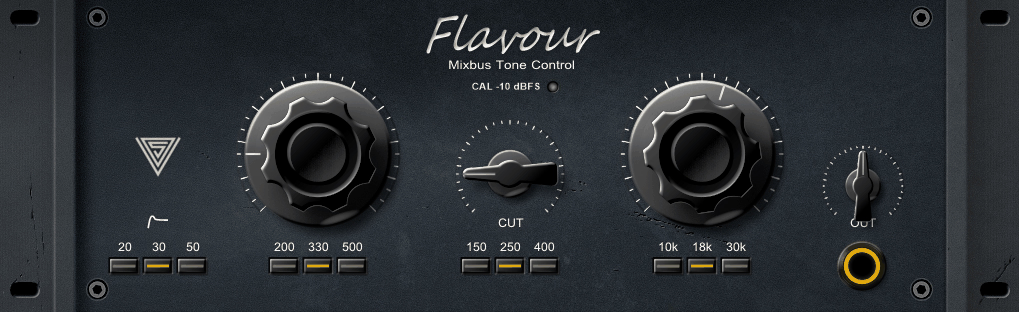
Variety Of Sound FlavourMTC is a mixbus-focused passive EQ plugin bringing classic passive filter behavior into a minimalistic high-efficiency design without adding overt coloration or complexity.
You get three broad passive bands including Low shelf with ±12 dB covering 20 Hz to 300 Hz, Mid band with ±6 dB bell-shaped spanning 250 Hz to 5 kHz, and High shelf with ±12 dB from 5 kHz to 20 kHz. I think what makes this practical is the low CPU usage allowing multiple instances without strain, and I believe it includes slope and gain control for each band plus stereo-linked or independent channel operation.
The plugin ships with 6 factory presets including Flat, Mix Bus Light Touch, Air & Presence, Low-End Tightening, Warm Mix Bus, and Custom Stereo Width.
- Three-Band Passive EQ Network with Interactive Behavior
The plugin features three broad passive bands where these bands interact passively meaning boosting or cutting one range naturally affects adjacent frequencies. This results in smooth tonal balance particularly important when you’re mixing on small monitors or headphones where harsh frequency spikes can be exaggerated.
You can adjust gain and slope independently for each band giving you control over both the intensity of the boost or cut and the broadness of the frequency response which makes it easier to perform subtle tonal shaping on a mix bus without introducing phase anomalies.
- Low CPU Design with Stereo Linking
The plugin is extremely lightweight allowing multiple instances without significant CPU usage which is particularly useful for those running large sessions or multiple stereo stems where efficiency is critical.
You get also both stereo-linked and independent channel operation enabling subtle stereo width adjustments where you can balance side-channel elements, widen pads, or control stereo reverbs without affecting the mono center which is valuable in untreated or small-room setups.
3. Ignite Amps PTEq-X
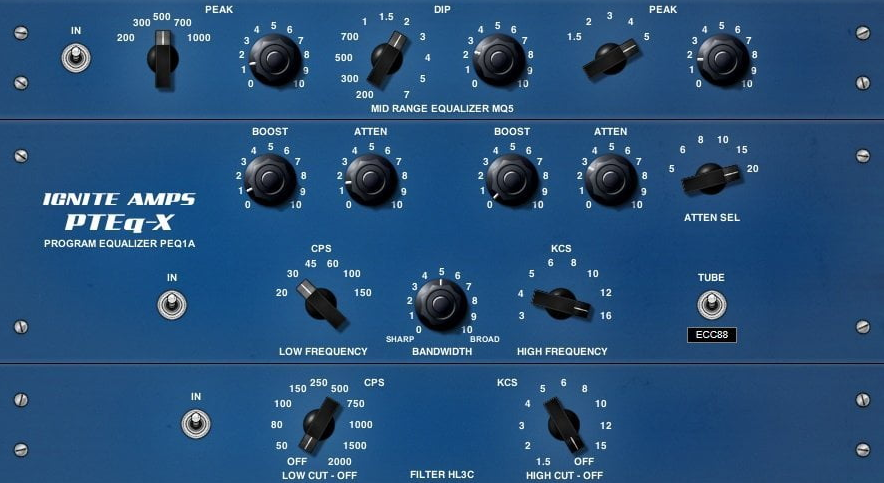
Ignite Amps PTEq-X is a free Pultec-style passive EQ emulation replicating the musical interaction between boost and cut circuits found in vintage Pultec units.
The plugin emulates three primary bands where Low band is shelving with ±12 dB gain at selectable frequencies 20 Hz, 30 Hz, 60 Hz, and 100 Hz, Mid band is bell-shaped with ±6 dB covering 200 Hz to 2 kHz, and High band is shelving with ±12 dB from 3 kHz to 16 kHz.
What makes this practical is the unique Pultec-style boost and cut interaction allowing simultaneous boosting and attenuation for tight defined low-end. The plugin simulates the passive RLC filter network with stepped frequency and gain controls and includes 5 factory presets.
- Simultaneous Boost and Cut Interaction on Low and High Bands
PTEq-X emulates the Pultec EQP-1A design where the unique Pultec-style boost and cut interaction allows simultaneous boosting and attenuation. This is what separates it from standard shelving EQs because you can boost at 60 Hz while cutting at the same frequency creating tight defined low-end that standard EQs cannot achieve.
This interdependence of boost and cut produces musical EQ curves that retain clarity and avoid the brittle artifacts typical of linear digital EQs.
- Passive RLC Filter Network Modeling
The plugin simulates the passive RLC filter network of the original hardware resulting in smooth transitions and natural frequency interactions.
This also models minor harmonic coloration that emerges when bands are driven adding perceived depth to mixes without introducing distortion.The circuit modeling is what gives PTEq-X its vintage character rather than just being a digital shelving EQ with a Pultec interface!
- Stepped Frequency and Gain Controls for Exact Recall
Frequency and gain controls are stepped allowing exact reproduction of settings across sessions. I think for example a low-band boost at 60 Hz can always be recalled precisely which is critical for maintaining consistency across multiple tracks or mixes.
This matters more than continuous controls when you’re working on projects over several days because you know exactly where settings were without writing anything down.
- Extremely Low CPU Usage for Multiple Instances
Unlike full tube-modeled Pultec emulations, when t comes to CPU, PTEq-X is extremely efficient allowing multiple instances on a mix bus or individual tracks.

Hello, I’m Viliam, I started this audio plugin focused blog to keep you updated on the latest trends, news and everything plugin related. I’ll put the most emphasis on the topics covering best VST, AU and AAX plugins. If you find some great plugin suggestions for us to include on our site, feel free to let me know, so I can take a look!