
Microphone modeling plugins solve a problem that used to require a room full of expensive hardware: getting the sound of a specific microphone on a specific source.
A vintage Neumann U47 sounds different from an AKG C12, which sounds different from an RCA 44 ribbon mic, and those tonal differences affect how a vocal sits in a mix, how a guitar’s body resonance comes through, or how much air and presence an acoustic recording captures.
Owning physical versions of these microphones would cost tens of thousands of dollars and require careful maintenance of delicate vintage electronics.
Mic modeling plugins let you apply the tonal characteristics, proximity behavior, and polar pattern response of classic microphones to your recordings after the fact, or in some cases during recording if your system supports real time processing.
Some of these plugins are designed to work with specific modeling microphones that capture a neutral, dual capsule signal. Others work with any microphone and apply the tonal character of the modeled mic to whatever source you’ve recorded.
The results vary depending on the approach, but in all cases, they give you access to a variety of microphone characters that would be impractical to own physically.
I’ve selected eight plugins (plus a creative bonus pick) that cover the main approaches to microphone modeling, from hardware specific systems with the highest accuracy to standalone plugins that work with any recording setup.
From the Pluginerds Store
If this article has you thinking about what's missing from your setup, our own shop is worth a browse. We stock the practical side of a home studio — the accessories, stands, and interfaces that reviews rarely cover but every setup eventually needs.
Visit Pluginerds Shop1. UAD Ocean Way Mic Collection (Vintage Mic Modeling)
The UAD Ocean Way Mic Collection provides twelve vintage microphone emulations hand selected from the legendary mic locker of Allen Sides’ Ocean Way Studios, one of the most respected recording facilities in music history.
These aren’t generic microphone models. Each one was measured from a specific physical vintage microphone that Sides has used on countless recordings for major artists, and the emulations capture the tonal character, proximity effect, and polar pattern behavior of those particular units.
One important thing to understand about the Ocean Way Mic Collection is that it requires a UA Sphere modeling microphone to function as intended. The Sphere mic captures a neutral, dual capsule signal that the plugin then processes to apply the characteristics of the modeled microphone.
Without the Sphere mic, you can’t use this plugin. That hardware requirement is a significant investment, but the accuracy of the system justifies it if you’re serious about accessing high quality vintage mic tones without buying the actual vintage microphones.
- 12 Vintage Models
The collection includes twelve meticulously measured emulations from Ocean Way’s mic locker, covering large diaphragm condensers, small diaphragm condensers, and ribbon microphones.
Each model was selected by Allen Sides as the best example of its type from his personal collection, and the sonic characteristics reflect the specific unit that was measured rather than a generic approximation of the microphone type.
- Polar Control
You can change the polar pattern of any modeled microphone after recording, adjusting between omni, cardioid, figure 8, and intermediate patterns.
This post recording polar pattern adjustment is possible because the Sphere mic captures the full three dimensional sound field, giving the plugin the information it needs to reconstruct different pickup patterns.
- Proximity Adjustment
The proximity effect (the bass boost that occurs when a microphone is placed close to a source) can be adjusted after recording. If you recorded too close and the voice sounds boomy, you can reduce the proximity effect without re recording.
If you recorded at a distance and want more intimate warmth, you can increase it.
- Room Reduction
A room sound control reduces the ambient room character captured by the microphone, effectively letting you make a recording sound like it was captured in a drier, more controlled environment.
This is useful when your recording space isn’t acoustically ideal and you want to minimize the room’s contribution to the final sound.
Available from Universal Audio. Requires UA Sphere microphone and UAD hardware or Apollo interface.
Get the Free Plugin Starter Kit
The genuinely useful free DAWs and plugins worth installing. No filler. Straight to your inbox.
2. Slate Digital Virtual Microphone System (Mic + Plugin)
Slate Digital’s Virtual Microphone System (VMS) takes a similar approach to UA’s Sphere system but within Slate’s ecosystem. The system pairs the Slate ML-1 modeling microphone with the VMS plugin, which applies the tonal characteristics of classic microphones to the neutral signal captured by the ML-1.
The plugin includes emulations of iconic microphones spanning condensers, dynamics, and ribbon mics from the most revered manufacturers.
What sets the VMS system apart is the combination of microphone modeling with Slate’s preamp emulations in the same plugin. You’re not just choosing a microphone model. You’re selecting a complete recording chain that includes the mic character, the preamp coloration, and the interaction between the two.
This matters because the sound of a vintage recording wasn’t just the microphone. It was the mic through a specific console preamp, and the combination of the two produced the final character. The VMS system models both elements.
- Mic Models
A comprehensive library of classic microphone emulations covers large diaphragm condensers (U47, U67, C12 types), ribbon mics (RCA 44, Royer 121 types), and dynamic mics (SM57/SM7B types). Each model captures the frequency response, transient behavior, and tonal character of the reference microphone.
- Preamp Modeling
Multiple virtual preamp emulations model classic console preamps including Neve, API, and SSL style circuits.
The preamp models add the specific harmonic coloration, saturation character, and frequency emphasis that each preamp design contributes to the signal. Pairing different mic models with different preamp models creates dozens of unique signal chain combinations.
- ML-1 Microphone
The system is designed around the Slate ML-1 (or newer ML-2) modeling microphone, which captures a flat, neutral signal optimized for post processing by the VMS plugin.
The microphone is designed to provide the cleanest possible capture so the plugin’s modeling can apply the target mic’s character accurately.
- Real Time Processing
You can monitor through the mic and preamp emulations in real time during recording, hearing the modeled sound as you perform. The real time monitoring means you can make performance decisions based on the final processed sound rather than hearing a neutral capture and imagining what it will sound like later.
- Expansion Packs
Additional mic model expansion packs are available beyond the included library, adding new microphone emulations over time. The expandable library means the system grows with you as Slate releases new models of classic and modern microphones.
- Any DAW
The VMS plugin works in any DAW that supports standard plugin formats, and the real time processing is handled natively by your computer’s CPU rather than requiring external DSP hardware. This makes the system more accessible than UAD’s Sphere setup for producers who don’t own Apollo hardware.
Available from Slate Digital in VST, VST3, AU, and AAX formats. Requires Slate ML-1 or ML-2 microphone for optimal results.
3. IK Multimedia Mic Room (Standalone Mic Modeler)
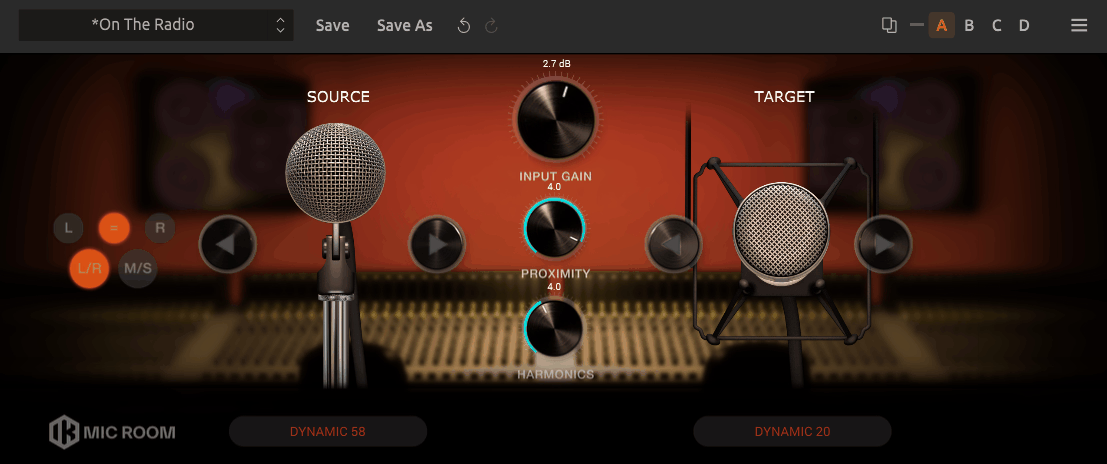
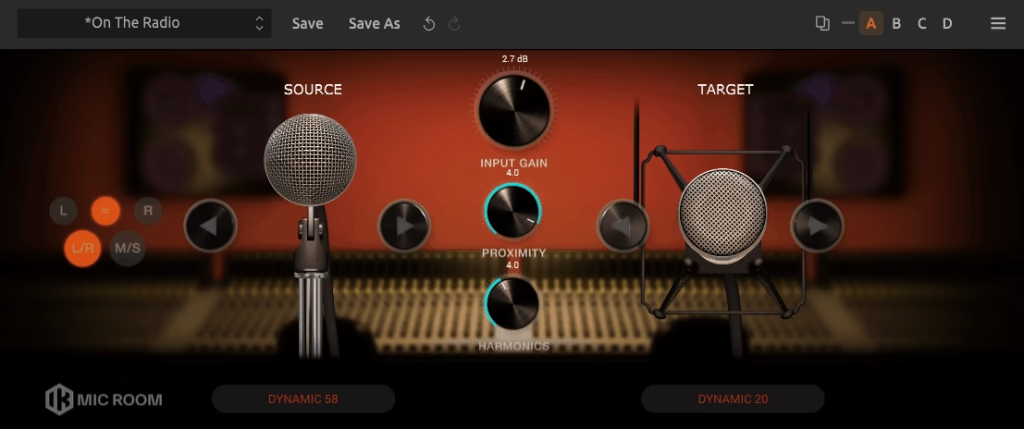
Not everyone wants to invest in a dedicated modeling microphone system, and Mic Room (part of the T-RackS suite) provides microphone modeling that works with any microphone you already own.
You select your input microphone from a list of supported models, choose the target microphone you want to emulate, and the plugin applies the frequency and character difference between the two.
I should be direct about the limitations of this approach: modeling from a generic input mic to a vintage target mic can’t achieve the same accuracy as a dedicated system like Sphere or VMS. The results are closer to sophisticated EQ matching than true microphone modeling, because the plugin doesn’t have access to the polar pattern, proximity behavior, or transient response information that dedicated systems capture.
That said, for the price and the convenience of working with gear you already own, Mic Room provides a useful way to shift the tonal character of your recordings toward the sound of microphones you don’t have.
- Input Selection
You select your actual recording microphone from a database of supported models, and the plugin calculates the frequency difference between your mic and the target. This calibration step is what allows the modeling to work with existing equipment rather than requiring a specific modeling microphone.
- Target Library
A collection of classic microphone emulations provides target tones from vintage condensers, ribbons, and dynamics. You choose the mic you want to sound like, and the plugin applies the tonal shift between your input mic and the target model.
- No Hardware Required
The plugin works with any microphone in your collection, which means you don’t need to buy additional hardware to start using it. This makes Mic Room the most accessible microphone modeling option on this list, though the results are correspondingly less accurate than hardware specific systems.
Available from IK Multimedia in VST, VST3, AU, and AAX formats.
4. UA Sphere Mic Collection (Included With Sphere Mic)
This one ships with every UA Sphere modeling microphone (including the Sphere DLX and LX models), providing a comprehensive library of microphone emulations that you can use immediately upon purchasing the mic. This is distinct from the Ocean Way and Bill Putnam collections, which are additional purchases.
The included Sphere Mic Collection covers a broad range of classic and modern microphones out of the box.
What makes the Sphere Mic Collection the starting point for any Sphere owner is the breadth of the included models. You get large diaphragm condensers, small diaphragm condensers, ribbon mics, and dynamic mic emulations without spending anything beyond the microphone purchase.
The quality of these included emulations is high enough that many users never feel the need to purchase the additional Ocean Way or Putnam collections. For producers entering the modeling microphone world, the Sphere mic with its included plugin provides the best value entry point into serious mic modeling.
- Included Models
A generous library of microphone emulations ships free with every Sphere mic purchase, covering the most commonly used classic microphones across condenser, ribbon, and dynamic categories. The included library is comprehensive enough for most production needs without requiring additional purchases.
- Dual Mic View
A dual microphone mode lets you blend two different microphone models simultaneously, as if you had two mics on the same source. You can combine a warm condenser with a bright ribbon, for example, creating hybrid tonal characters that no single physical microphone produces.
- Pattern Adjustment
Post recording polar pattern control lets you adjust the pickup pattern after tracking, from omni through cardioid to figure 8 and all points between. This is uniquely possible because the Sphere mic captures the full sound field with its dual capsule design.
- 180 Mode
A stereo 180 mode outputs each microphone model on a separate channel, creating stereo recordings from a single Sphere mic. The two models can be different, producing stereo width from the tonal differences between the two selected microphones.
Available from Universal Audio. Included with UA Sphere DLX, LX, and L22 microphones.
5. Waves The King’s Microphones (Abbey Road Collection)
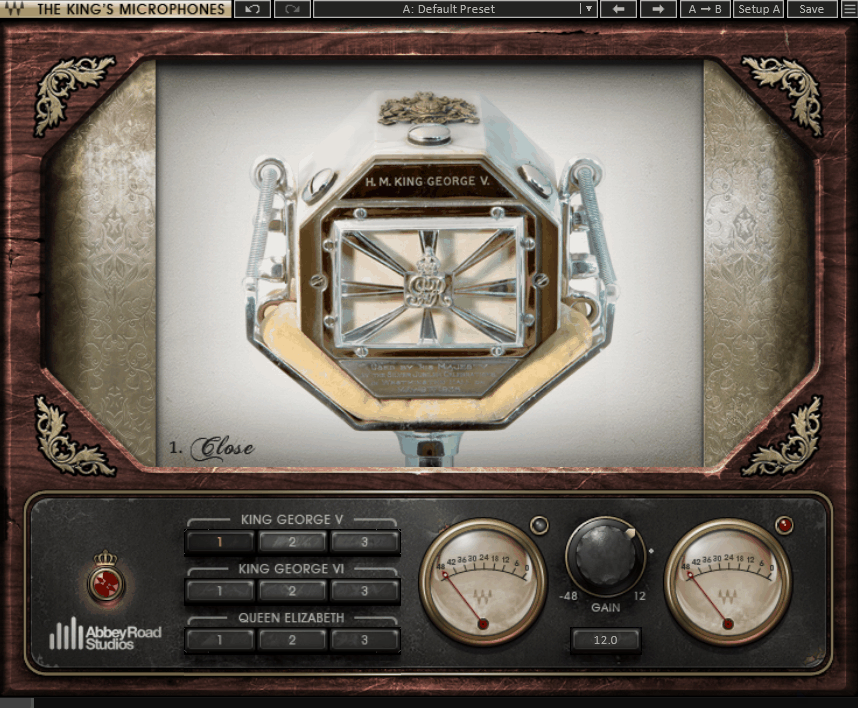
Waves The King’s Microphones takes a different angle on mic modeling by emulating three specific vintage microphones from Abbey Road Studios’ collection that were used to record a historic session for King Charles III (then Prince Charles). The plugin models an STC 4021 ribbon, a Coles 4038 ribbon, and a Neumann KM53 condenser as they sounded on that particular day in that particular room, which gives the models a specificity that’s different from generic microphone emulations.
The appeal of this plugin is its focus and simplicity. You’re not scrolling through a database of fifty microphones trying to find the right one. You have three specific, characterful vintage microphones from one of the most famous recording studios in the world, and you apply them to your recording. For the price (significantly less than the modeling microphone systems), The King’s Microphones provides an affordable entry into mic modeling that adds genuine vintage character to your recordings.
- Three Models
The STC 4021, Coles 4038, and Neumann KM53 emulations each provide a distinct tonal character. The two ribbon mics add warmth, smoothness, and a rolled off top end that suits vocals and acoustic instruments. The condenser adds brightness, detail, and air. Having three options gives you enough variety to choose the right character for each source.
- Room Character
The emulations include an element of the Abbey Road room ambience captured during the modeling process. A subtle room character is baked into the models, which adds a sense of space and dimension that pure frequency matching doesn’t provide.
- No Special Mic
The plugin works with any microphone and doesn’t require a specific modeling mic. You apply the processing to any recording and it shifts the tonal character toward the modeled microphone. The results depend on what you recorded with, but the processing adds convincing vintage character regardless of the input source.
Available from Waves in VST, VST3, AU, and AAX formats.
6. Antares Mic Mod (Classic Mic Emulations)
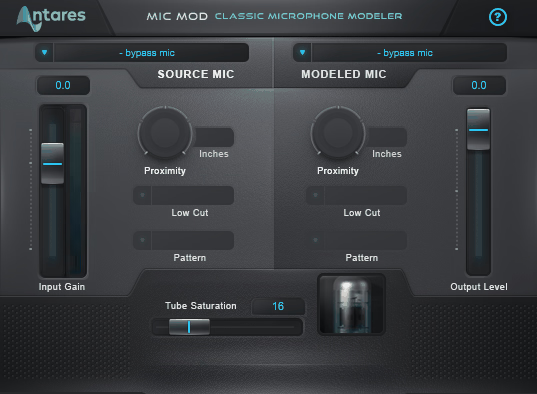
Antares Mic Mod has been around longer than most of the mic modeling plugins on this list, and while the technology isn’t as sophisticated as the Sphere or VMS systems, it provides a large library of microphone emulations that works with any recording setup. You select your input microphone from a database, choose a target mic you want to emulate, and the plugin applies the difference. The approach is similar to IK Multimedia’s Mic Room but with a different model library and interface.
Where Mic Mod has an advantage over newer competitors is in the sheer number of models available. The library includes emulations of dozens of classic and modern microphones spanning condensers, dynamics, ribbons, and tube mics from virtually every notable manufacturer. For podcasters, voiceover artists, and home studio producers who want to experiment with different mic characters without buying additional hardware, Mic Mod provides a wide selection at a reasonable cost. The results are tonal rather than spatial (you won’t get the polar pattern or proximity modeling that hardware specific systems offer), but the character shifts are genuine and useful.
- Large Library
A comprehensive database of microphone models covers dozens of classic and modern microphones across all categories. The library is one of the largest available in any mic modeling plugin, giving you access to a wide variety of tonal characters from a single purchase.
- Input Calibration
Selecting your actual microphone from the input list calibrates the processing to account for your mic’s specific frequency response. This calibration means the plugin is applying the tonal difference between your mic and the target rather than just an EQ curve based on the target alone.
- Tube Warmth
A tube saturation control adds harmonic warmth independently of the microphone modeling, giving you the option to add the tube coloration that many vintage microphones exhibit from their internal tube amplifiers. The tube control works as a separate processing stage from the microphone model itself.
Available from Antares in VST, VST3, AU, and AAX formats.
7. UAD Bill Putnam Mic Collection (Vintage Mic Locker)
The UAD Bill Putnam Mic Collection provides nine vintage microphone emulations modeled from the personal mic locker of Bill Putnam Sr., the founder of Universal Audio and one of the most influential recording engineers in music history. These are the microphones Putnam used to record Frank Sinatra, Ray Charles, Nat King Cole, The Beach Boys, and countless other iconic artists throughout the 1950s, 60s, and 70s.
What distinguishes the Putnam collection from the Ocean Way collection sonically is the character. Users who own both collections consistently describe the Putnam mics as warmer, mellower, and more characterful compared to the Ocean Way models, which tend to be more open and airy with less coloration. If you’re drawn to the sound of recordings from the golden age of American popular music, the Putnam mics are the ones that were physically present for many of those sessions. The collection requires a Sphere mic and UAD hardware, just like the Ocean Way collection.
- Nine Vintage Models
The collection includes emulations of a Neumann U47, RCA 44, AKG C12A, Telefunken 251E and 251A, Neumann U67, Sennheiser 405, and others from Putnam’s personal collection. Each was modeled from the specific unit Putnam owned, with its particular age, capsule condition, and tonal character preserved.
- Vintage Character
The models capture not just the frequency response but the transient behavior, harmonic content, and three dimensional polar response of each original microphone. The depth of modeling goes beyond simple EQ matching to include the subtle interactions between capsule, electronics, and transformer that give each mic its unique voice.
- Pattern Flexibility
Full polar pattern control for each modeled microphone lets you adjust the pickup pattern after recording, including patterns that some of the original microphones didn’t offer. An RCA 44 is fixed to figure 8 in hardware, but in the plugin you can explore what it would sound like in cardioid or omni.
- Proximity Control
Post recording proximity adjustment lets you change the perceived distance between the source and the microphone after the fact. If a vocal was recorded too close and sounds overly warm, you can reduce the proximity effect. If it was recorded at a distance, you can add the intimate warmth of close miking.
Available from Universal Audio. Requires UA Sphere microphone and UAD hardware or Apollo interface.
Bonus: AudioThing Speakers (Speaker Emulation)
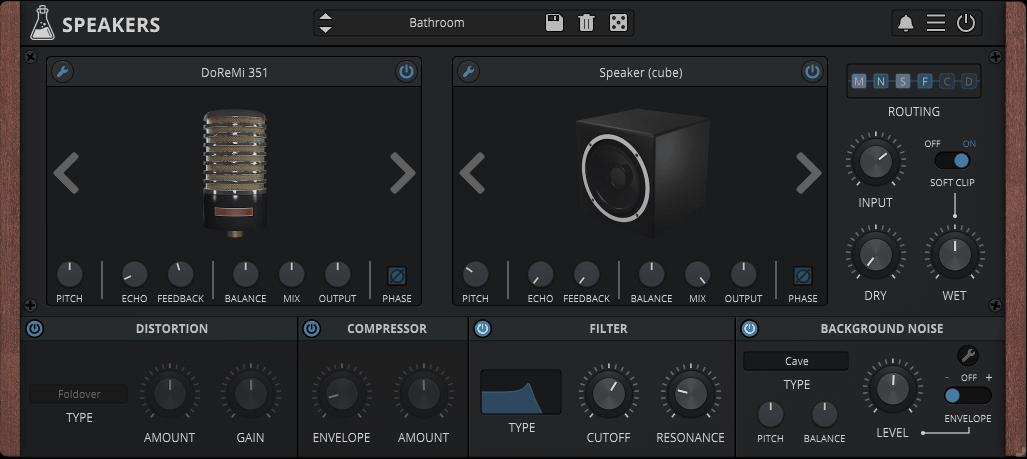
Closing with a creative bonus pick, AudioThing Speakers is not a microphone plugin but rather a speaker and cabinet emulation that simulates how audio sounds when played through different physical speakers. You can make a recording sound like it’s coming through a vintage radio, telephone, guitar amp cabinet, portable speaker, or broken television. While this doesn’t help you capture better recordings, it’s a creative tool for adding lo fi character, retro atmosphere, and speaker coloration to your productions.
I use Speakers primarily for creative sound design, podcast intros, and lo fi music production where I want a specific “played through a physical device” quality. Sending a voice through the telephone emulation for a flashback sequence. Running a synth through a vintage radio speaker for retro character. Making a clean recording sound like it’s coming from a car stereo. These are specific creative applications, and having a plugin that handles them convincingly saves the time of trying to recreate these effects with EQ and distortion.
- Speaker Models
A library of physical speaker and cabinet emulations covers vintage radios, telephone handsets, guitar amps, portable speakers, and other real world playback devices. Each model captures the frequency response, resonance, and distortion characteristics of the physical speaker, producing convincing “played through” effects.
- Processing Chain
Built in EQ, saturation, and noise controls let you further shape the speaker emulation beyond the model itself. Adding noise creates the hiss and hum of vintage electronics. Adjusting the saturation changes how hard the virtual speaker is being driven.
- Mix Blend
A wet/dry control blends the speaker emulated signal with the original, which is useful for creating the impression of a speaker playing in a room (where you hear both the speaker and the direct sound) rather than a pure “everything through the speaker” effect.
- Creative Uses
Beyond straightforward speaker emulation, you can use the plugin for parallel processing techniques where the speaker coloration adds midrange character that blends with the full range original signal. On vocals and guitars, a touch of speaker character adds grit and presence that works well in rock, lo fi, and indie production.
- Automation
All parameters are fully automatable, letting you transition between different speaker models or gradually introduce the speaker effect over the course of a track. Automating the mix from clean to fully “through a speaker” creates dramatic transitions for intros, outros, and scene changes.
Available from AudioThing in VST, VST3, AU, and AAX formats.
Get the Free Plugin Starter Kit
The genuinely useful free DAWs and plugins worth installing. No filler. Straight to your inbox.

Hello, I’m Viliam, I started this audio plugin focused blog to keep you updated on the latest trends, news and everything plugin related. I’ll put the most emphasis on the topics covering best VST, AU and AAX plugins. If you find some great plugin suggestions for us to include on our site, feel free to let me know, so I can take a look!