
Studio One has quietly become one of the most capable DAWs on the market, with a drag and drop workflow, integrated mastering suite, and native plugin set that handles a lot of production tasks out of the box. But like any DAW, the stock plugins have limits.
The built in pitch tools are basic, the saturation options are limited, and certain specialized tasks like granular synthesis, drum replacement, and advanced vocal processing require third party solutions.
The good news is that Studio One supports VST2, VST3, and AU formats with excellent stability and low latency performance. I’ve selected fourteen plugins that address specific gaps in Studio One’s stock toolkit, covering vocal processing, drum tools, guitar enhancement, synthesis, creative effects, and mix bus processing that will expand what you can accomplish without switching DAWs.
1. Devious Machines Pitch Monster
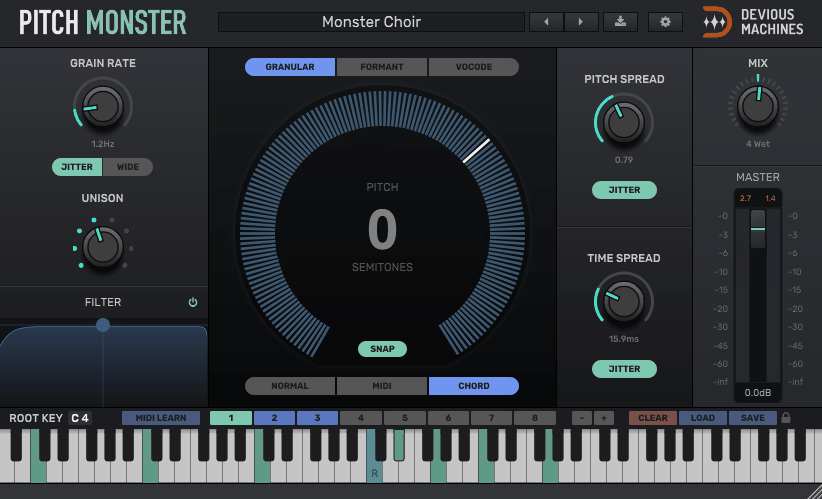
Studio One’s built in pitch tools handle basic correction, but they don’t give you the four voice pitch shifting and harmonizing that modern vocal production demands. Pitch Monster lets you create complex harmonies, octave layers, formant shifted textures, and detuned thickening effects from a single input signal.
For producers who work with vocalists remotely and need to generate harmonies without requesting additional takes, Devious Machines Pitch Monster solves a real problem. The four independent voices each have their own controls for pitch, formant, delay, pan, and level, which means you can construct complete vocal arrangements from one recorded performance.
- Four Voices
Four independently configurable pitch shifted voices each with their own pitch, formant, delay, level, and pan controls let you build complex vocal arrangements from a single source. You can create full choir style harmonies, octave doubles, and detuned layers without needing additional vocal recordings. The independence of each voice means you can place harmonies at different intervals, pan them across the stereo field, and offset their timing for a natural, staggered feel that avoids the artificial sound of perfectly synchronized harmonies.
- Formant Control
Independent formant shifting on each voice preserves natural vocal character during pitch transposition, preventing the chipmunk effect that basic pitch shifting introduces. You can pitch a voice up a fifth while keeping the formants grounded, or deliberately shift formants to transform the perceived gender, age, or size of a voice. The formant independence from pitch is what separates this from simpler pitch tools where formants shift proportionally and destroy the natural vocal quality.
- MIDI Input
MIDI note control lets you play harmonies in real time on a keyboard, defining the pitch of each voice dynamically rather than setting fixed intervals. The MIDI approach turns Pitch Monster into a performance instrument where you experiment with harmonic relationships by playing them live, which is faster for finding the right harmony arrangement than manually programming intervals for each voice.
- Creative Effects
Beyond practical harmonization, the extreme settings produce robotic, alien, and heavily processed vocal textures useful as creative effects in electronic and experimental production. Pushing the formant and pitch parameters into extreme ranges generates textures that go well beyond what you’d associate with a harmonizer, turning it into a sound design tool that produces content no other vocal plugin creates.
2. Eventide H949
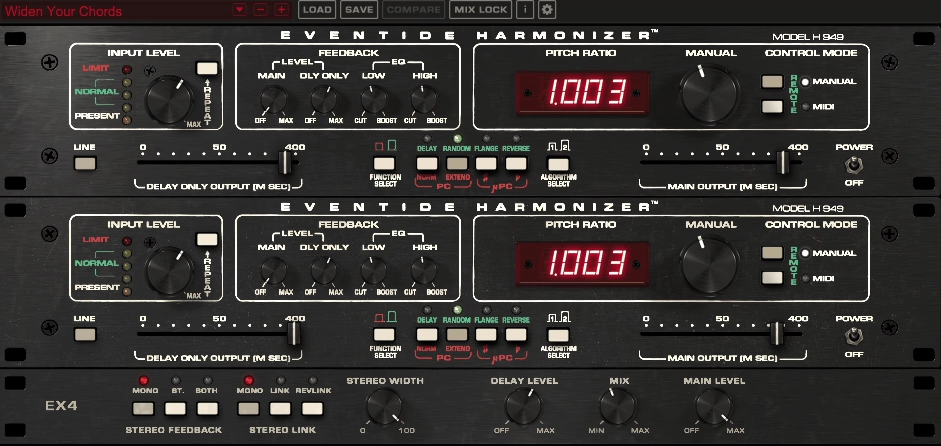
Modeled on the legendary hardware unit from the late 1970s, this plugin provides pitch shifting and harmonizing with the specific sonic character that defined the original Eventide H949 Harmonizer. The hardware was used on records by David Bowie, AC/DC, and countless others.
Where Pitch Monster is a modern, clean harmonizer, the Eventide H949 is a vintage character effect where the pitch shifting introduces artifacts and tonal coloration that are musically useful rather than technically perfect.
- Vintage Algorithm
The modeled H949 pitch shifting algorithm introduces the specific artifacts and tonal coloration of the original hardware, adding a quality of thickness and harmonic richness that modern transparent pitch shifters don’t produce. The algorithm’s imperfections are its strength, creating harmonically complex output that sits in a mix with more character than clean digital processing provides. You hear the difference immediately on guitars and vocals where the vintage quality adds warmth that transparent tools strip away.
- Micro Detune
The micro pitch detuning effect adds subtle width and thickness by shifting pitch by tiny amounts, which was the original hardware’s most celebrated application on classic records. The detuning is small enough that you don’t perceive it as a pitch change, but the interaction between the original and slightly detuned signals creates a stereo widening and thickening effect that’s been a mixing secret for decades. I use this on almost every guitar recording that needs to feel larger without sounding obviously processed.
- Feedback Path
A feedback circuit creates self oscillating pitch effects, cascading harmonies, and metallic textures that extend the plugin well beyond simple pitch shifting into experimental sound design territory. Feeding the pitch shifted output back into the input produces ever rising or falling pitch spirals, shimmering metallic harmonics, and otherworldly textural effects that are unique to this specific circuit design. The feedback intensity determines how far into chaos the effect travels.
- Flange Mode
The original H949’s flanging capability is faithfully reproduced, providing through zero flanging effects that differ from dedicated flanger plugins in their specific harmonic character. The flanging was a secondary function of the original hardware that engineers discovered and exploited on countless recordings, and the modeled version captures that specific quality of sweep and harmonic interaction that generic flangers don’t replicate.
- Randomize
A random pitch modulation feature adds subtle pitch instability that simulates the behavior of analog circuitry, introducing organic movement to static sounds. The randomization prevents the processed signal from sounding digitally frozen, adding the kind of natural variation that real analog hardware introduces through component tolerances and circuit behavior. On pads and sustained sounds, the random modulation adds life that makes the processing feel invisible.
- Reverse Shift
A reverse pitch shifting mode creates backwards sounding pitch effects that work as creative processing on vocals, guitars, and atmospheric elements. The reverse capability produces textural content that sounds like reversed audio playing forward, which is a distinctive effect for transitions, builds, and atmospheric moments that forward pitch shifting can’t create.
3. Plugin Alliance AMEK Mastering Compressor
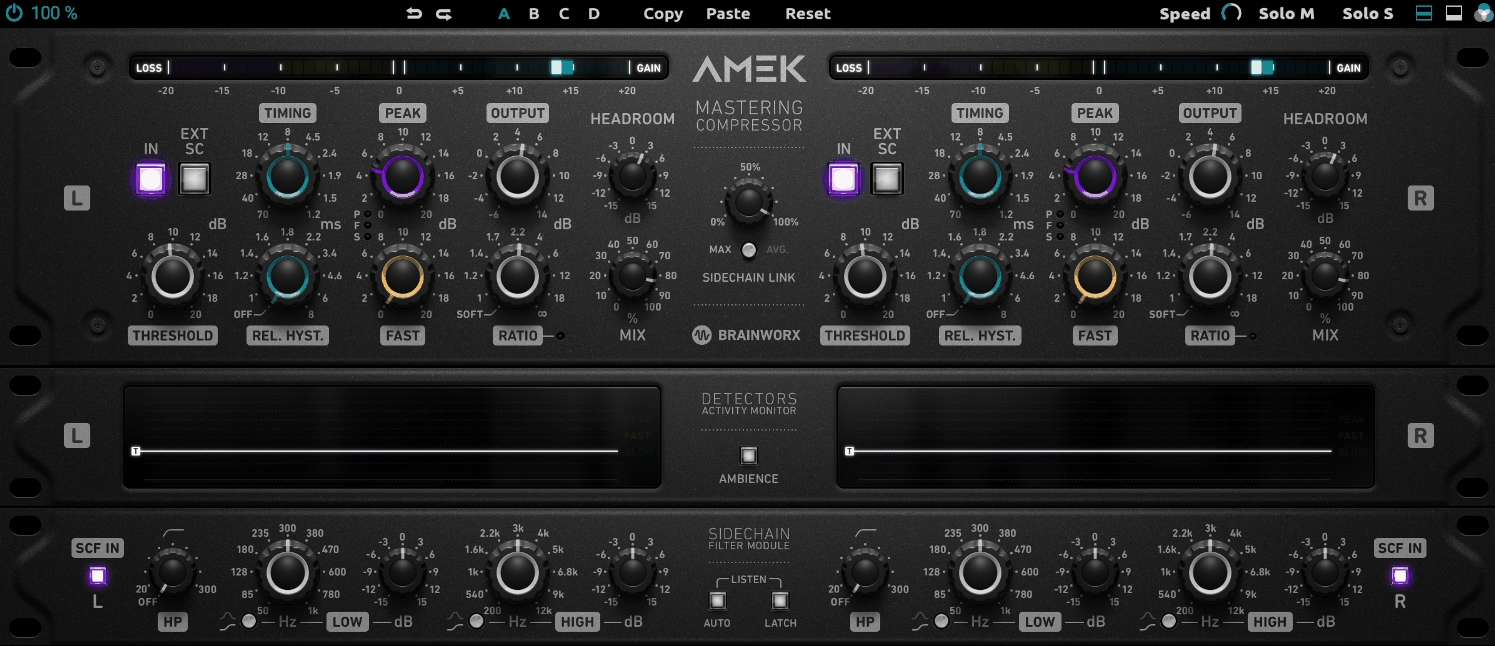
Studio One’s integrated mastering suite is one of its strongest features, and adding a premium bus compressor to the mastering chain significantly elevates output quality. The AMEK Mastering Compressor delivers the transparent, musical compression that mastering demands.
For Studio One users who master their own music within the DAW’s Project page, this compressor fits naturally into the workflow and provides polish that the stock compressor doesn’t quite achieve at the mastering stage.
- Mastering Grade
The compression algorithm is designed for transparent, musical bus processing that controls dynamics without introducing audible artifacts or coloration that would compromise the tonal balance of a finished mix. The mastering orientation means the compressor preserves transient detail, stereo imaging, and frequency balance while adding the cohesion and glue that makes a collection of mixed elements feel like a unified record. You can push it harder than you’d expect before the compression becomes audible.
- Sidechain Filter
A high pass sidechain filter prevents low frequency content from triggering excessive compression, which is essential for mastering where bass heavy material can cause the compressor to pump on every kick drum hit. The filter lets bass energy pass through without affecting the gain reduction behavior, which keeps the compression responding to the midrange and high frequency dynamics where the musical action lives. Adjusting the filter frequency lets you tune the compressor’s sensitivity to match the specific low end character of your mix.
- Analog Character
Subtle analog coloration adds warmth and harmonic richness alongside the dynamics control, producing the tonal quality that premium hardware bus compressors are valued for in professional mastering studios. The coloration is gentle enough that it enhances rather than changes the character of your mix, adding a cohesive warmth that ties the frequency spectrum together in a way that purely transparent digital compression doesn’t achieve.
4. FabFilter Pro-MB
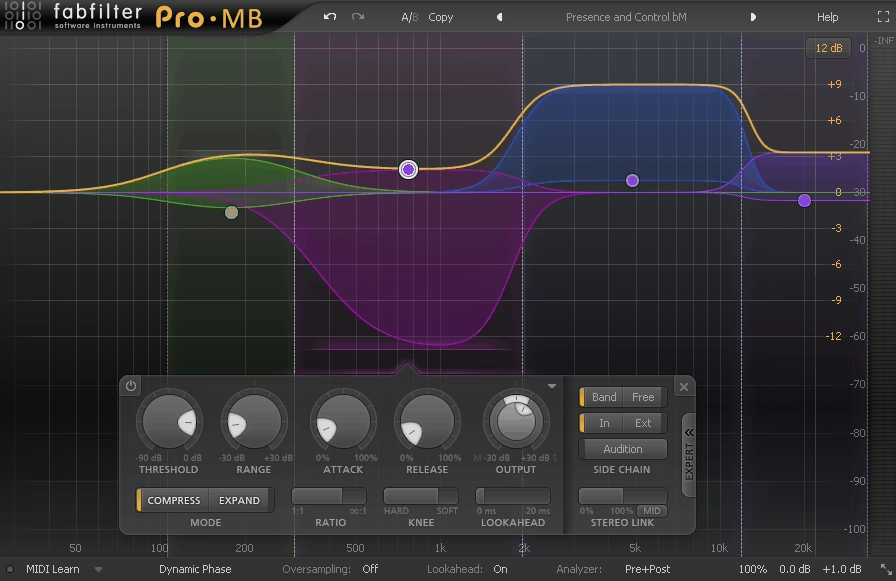
When Studio One’s stock dynamics tools can’t give you frequency specific compression, a multiband compressor becomes necessary. FabFilter Pro-MB provides up to six independent compression bands with the visual precision that FabFilter is known for.
The visual workflow matches Studio One’s own design philosophy, with both the DAW and plugin prioritizing intuitive, visual interaction over hidden menus and numerical displays.
- Visual Bands
The real time spectral display shows compression activity across all bands simultaneously, with each band’s gain reduction clearly visible against the frequency spectrum. The visual feedback teaches you what multiband compression does to your audio as you hear it, which accelerates the learning process for producers still developing their ears. You can see exactly which frequencies are being compressed, by how much, and adjust the bands by dragging them visually rather than typing numbers.
- Intelligent Release
Auto release adapts the release time per band to follow the dynamic content of the material, producing more musical compression without requiring manual adjustment for every section of a song. Faster transient material within a band gets a quicker release to preserve punch, while slower sustained content gets a smoother release to avoid pumping. The intelligent behavior reduces the need for automation that would otherwise be necessary to keep the compression musical across varying dynamic sections.
- Mid/Side Mode
Per band mid/side processing gives you independent compression of the center and side signals within each frequency band, providing mastering level stereo control that’s particularly useful for widening or narrowing specific frequency ranges. You might want the low end compressed identically in mid and side for a solid center, while the high frequencies get lighter side compression to preserve or enhance the stereo width of cymbals and reverb tails.
- Dynamic Range
Each band provides adjustable range limiting that caps the maximum amount of gain reduction applied regardless of how far the signal exceeds the threshold. The range control prevents over compression during loud sections while maintaining consistent behavior during quieter passages, which is particularly useful for live recorded material where dynamic range varies significantly across a performance.
5. Matt Tytel Vital

Studio One ships with Mai Tai and Mojito as its primary synthesizers, and while they’re capable instruments, they don’t offer the wavetable synthesis depth that modern sound design demands. Vital fills this gap as a free synth with capabilities that compete with paid alternatives.
The drag and drop modulation workflow feels natural alongside Studio One’s own drag and drop design philosophy, making it an ergonomic fit for the DAW.
- Wavetable Engine
A full featured wavetable synthesis engine with custom wavetable creation and import provides sound design depth that Studio One’s stock synths don’t offer. You can draw waveforms manually, import audio files as wavetable sources, and morph between frames using modulation to create evolving timbral content that subtractive synthesis simply can’t access. The wavetable editor gives you the same creative capabilities that paid synths like Serum provide, which makes the zero cost genuinely remarkable.
- Visual Modulation
Drag and drop modulation routing with color coded visual connections makes complex modulation patches readable and manageable even when you have dozens of connections active. You can see exactly which sources are controlling which parameters, how much modulation is applied, and in what polarity, all displayed graphically on the interface. The visual system means you can revisit a complex patch weeks later and immediately understand how it works.
- Spectral Effects
Unique spectral filter and warp effects process the signal at the spectral level rather than through conventional filtering, producing tonal transformations that standard low pass, high pass, and band pass filters can’t achieve. The spectral processing creates textures and timbres that are distinctive to Vital, giving you a sonic signature that other synths don’t replicate. These effects are particularly effective for creating evolving atmospheric content and textured lead sounds.
6. Native Instruments Kontakt 8
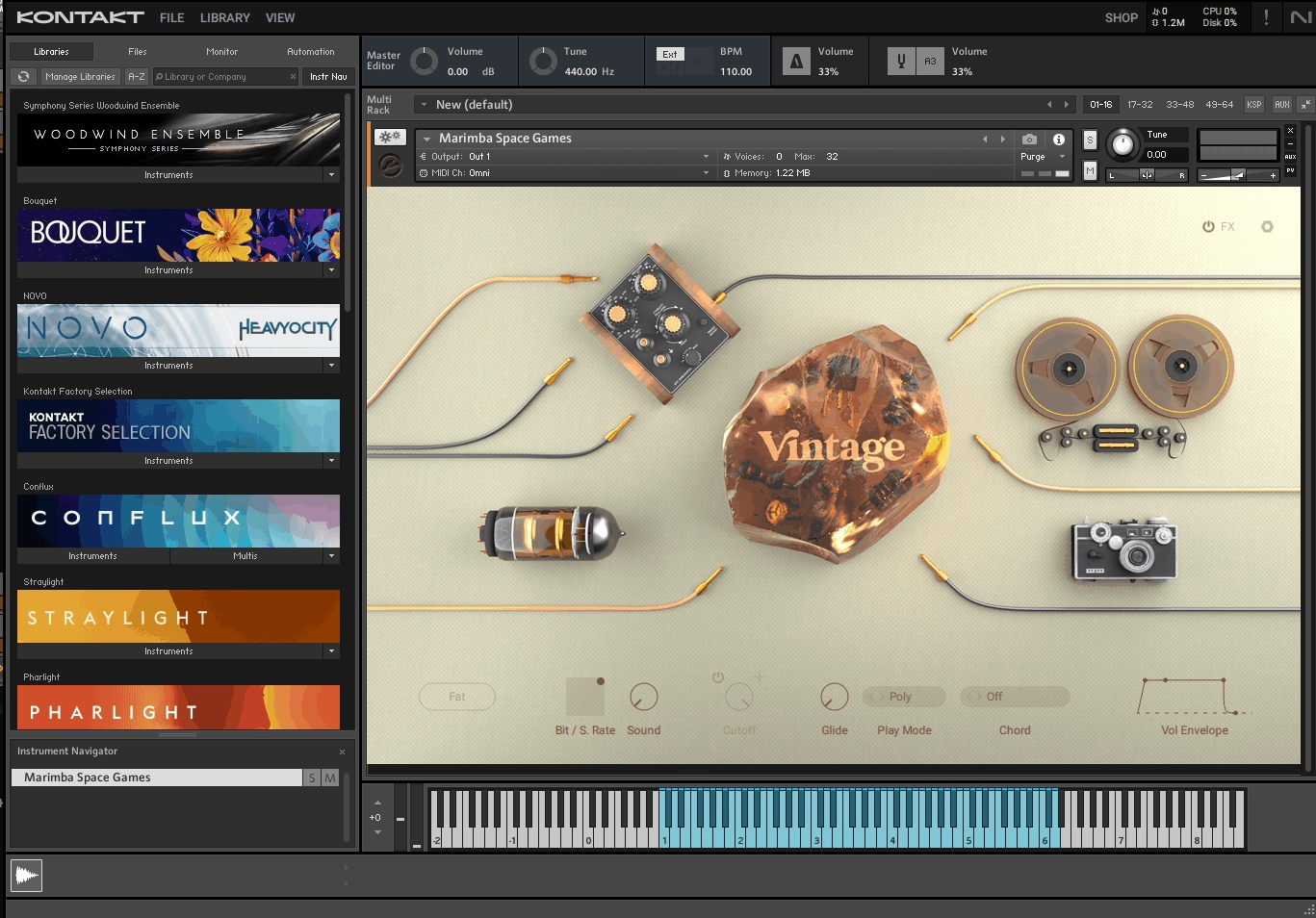
For Studio One users who need realistic sampled instruments beyond the stock sound library, this is the industry standard sampler platform. NI Kontakt 8 opens the door to thousands of virtual instruments from hundreds of developers worldwide.
Studio One’s sound library includes loops and basic instruments, but it doesn’t ship with the deeply sampled pianos, orchestral sections, and acoustic guitars that dedicated Kontakt libraries provide.
- Library Ecosystem
Access to thousands of third party instrument libraries from hundreds of developers gives you virtual instruments for any genre, style, or production need imaginable. The ecosystem covers everything from meticulously sampled concert grand pianos to exotic ethnic instruments, from full orchestral sections to vintage drum machines, from cinematic sound design tools to specialized bass guitars. No other sampler platform offers this breadth of available content, and the library continues growing as new developers release products.
- Scripted Engines
Many Kontakt libraries include custom scripted engines with built in sequencers, arpeggiators, phrase players, and effects that transform simple sample playback into intelligent, responsive instruments. A string library might include automatic divisi and legato scripting that responds to your playing style. A drum library might include pattern generators and groove engines. The scripted functionality means you’re not just triggering samples but interacting with instruments that behave musically.
- Free Player
The Kontakt Player version runs Player compatible libraries without purchasing the full software, giving you access to a massive portion of the ecosystem at zero cost for the sampler itself. Many commercial libraries are Player compatible, which means you can build a substantial collection of high quality sampled instruments without ever buying the full Kontakt license. The Player provides the same playback quality and scripting support as the full version.
- Sample Import
The full version lets you import and map your own samples, building custom instruments from any audio material you record or collect. The sample creation tools include zone mapping, round robin assignment, velocity layering, and scripting capabilities that let you turn field recordings, found sounds, or studio recordings into fully playable, expressive instruments with multiple articulations and dynamic response.
- NKS Integration
The NKS (Native Kontrol Standard) provides automatic parameter mapping for NI hardware controllers, with tagged browsing and preview sounds that speed up the process of finding instruments across your entire Kontakt library. The integration means you can browse thousands of instruments from your keyboard’s display, audition them instantly, and load them without touching your mouse, which keeps you in a creative flow state during composition.
7. Softube Drawmer 1976 Three Band Saturator

Studio One’s stock saturation options are limited, and when you need frequency specific saturation that treats different parts of the spectrum independently, a multiband saturator becomes essential. The Softube Drawmer 1976 splits your signal into three bands with independent saturation per band.
The three band approach prevents the intermodulation distortion that broadband saturation creates when low frequencies generate unwanted harmonics across the full signal.
- Three Bands
Independent saturation processing across low, mid, and high frequency bands lets you apply heavy harmonic content where it’s needed while keeping other ranges clean and controlled. You can drive aggressive saturation into the midrange for presence and bite on guitars and vocals while keeping the bass frequencies clean and tight, and adding subtle tape style warmth to the highs. The per band independence is what makes this more useful than broadband saturation for mixing, because you avoid the low frequency mud that full bandwidth distortion creates.
- Band Controls
Each band has independent drive, character, and output controls that give you precise adjustment of the saturation intensity and harmonic color in each frequency range. The drive determines how hard each band is pushed, the character adjusts the tonal quality of the saturation, and the output controls the level of each band in the final mix. The independent control means you’re making three separate saturation decisions rather than one compromised one.
- Crossover Points
Adjustable crossover frequencies between bands let you define exactly where each band’s processing begins and ends, which is critical because the right frequency split depends entirely on the specific material you’re processing. A guitar might need the crossover between low and mid bands set around 200 Hz, while a vocal might benefit from a higher split. The flexibility ensures the saturation is applied to the right frequency content regardless of what you’re processing.
8. iZotope Stutter Edit 2
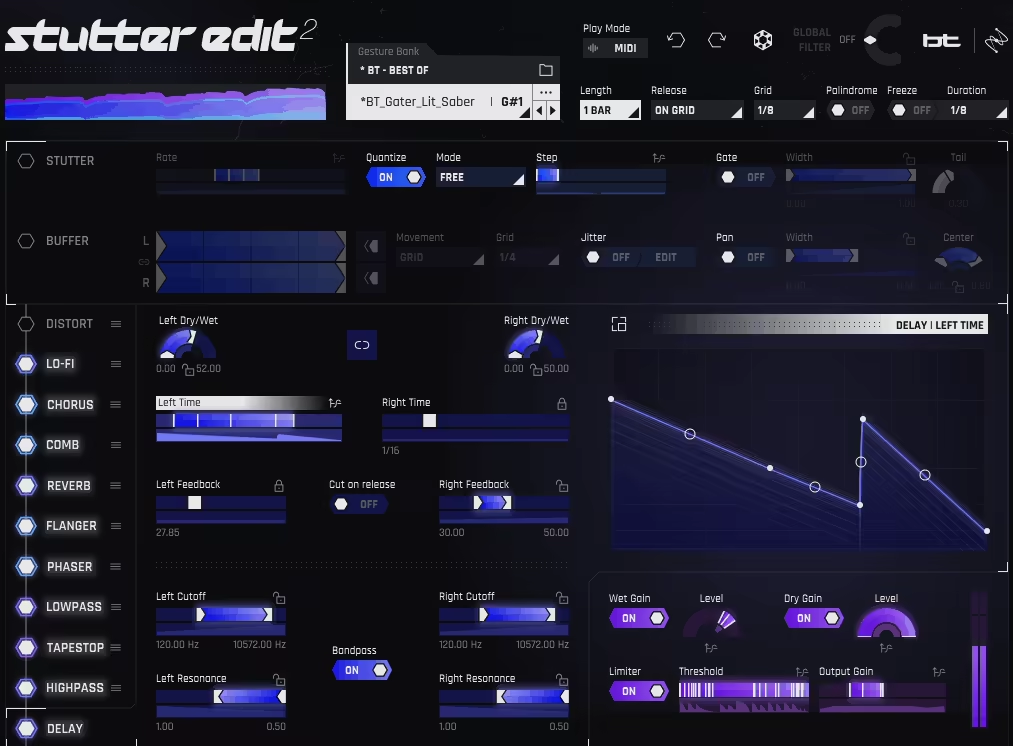
For producers who want rhythmic glitch, stutter, and multi effect processing in their Studio One sessions, this plugin delivers creative destruction that the stock effects can’t approach. iZotope’s Stutter Edit 2 triggers complex, tempo synced effect sequences from MIDI notes.
The MIDI triggered approach makes it feel like a performance instrument rather than a static effect, and in Studio One I use it primarily on drum buses, synth leads, and vocal sections for dramatic builds and transitions.
- MIDI Triggered
Each MIDI note triggers a different effect gesture, turning your keyboard into a real time performance controller for rhythmic audio effects. The MIDI approach lets you perform effect sequences live rather than programming them with automation, which produces results that feel more natural and spontaneous than drawn automation curves. You can audition different effect gestures instantly by pressing different keys, and record the performance as MIDI data that you can edit and refine afterward. The immediacy of the MIDI triggering encourages experimentation that static plugin interfaces don’t inspire.
- Multi Effect
Each gesture combines stutter, filter sweeps, distortion, reverb, delay, and pitch shifting in tempo synced sequences that would require extensive automation across multiple separate plugins to replicate manually. The combined processing creates complex rhythmic transformations where volume stutters are accompanied by filter movement, pitch rises, and spatial effects all working together in a choreographed sequence. The multi effect approach produces results that sound designed and intentional rather than like a collection of separate effects applied independently.
- Gesture Editor
A visual gesture editor lets you design custom effect sequences by drawing curves, timing, and intensity for each effect type independently. You define exactly what happens at each moment of the gesture, from the stutter rate and filter position to the reverb send and pitch offset, with full control over how these parameters interact over time. The editor provides complete creative control, letting you build a personal library of rhythmic effects tailored to your production style and genre.
- Tempo Sync
All effect gestures are locked to project tempo with musical timing divisions, ensuring rhythmic effects align precisely with your arrangement regardless of tempo changes. The sync keeps stutter and glitch effects musical rather than random, and the timing resolution goes from whole notes down to 64th note divisions, giving you everything from slow dramatic builds to rapid fire stuttering at the fastest settings.
9. Audio Damage Quanta 2

When conventional synthesizers aren’t giving you what you need and you want a fundamentally different sound generation approach, Quanta 2 provides granular synthesis that creates sounds by manipulating tiny fragments of audio. The textures it produces fill a sonic space that Studio One’s stock synths can’t access.
Granular synthesis excels at creating evolving atmospheric pads, frozen textures, and shimmering soundscapes that maintain a connection to the source audio while sounding entirely transformed.
- Granular Engine
The granular synthesis engine slices audio into microscopic particles and provides independent control over grain size, density, pitch, position, and spatial placement, producing textures and movements that no other synthesis method generates. The grain level control means you can freeze a single moment of audio and explore it infinitely, stretch time without affecting pitch, or scatter particles across the stereo field to create wide, immersive textures. Adjusting grain density from sparse to thick transforms the same source material from glitchy, fragmented rhythms to smooth, continuous pads.
- Sample Import
You can load any audio file as a granular source, which means your atmospheric textures can be built from vocals, field recordings, instrument samples, or any material unique to your production. A whispered vocal becomes a shimmering atmospheric pad. A piano recording becomes an evolving textural background. A drum hit becomes a sustained drone. The custom sample capability ensures your granular content sounds genuinely original rather than coming from a preset library that other producers also use.
- Modulation System
A comprehensive modulation framework with multiple LFOs and envelopes lets you animate the granular parameters, turning static textures into living, breathing soundscapes that evolve over time. Modulating grain position creates a scanning effect that explores different parts of the source audio automatically. Modulating density creates rhythmic breathing. Modulating pitch creates evolving harmonic movement. The modulation depth transforms Quanta from a texture generator into a dynamic instrument.
- Effects Section
Built in reverb, delay, filtering, and modulation effects process the granular output within the synth, letting you shape the atmospheric quality without routing through external processing plugins. The effects are tuned to work well with granular textures specifically, with reverb algorithms that enhance the spatial quality of scattered grains and filters that shape the tonal character of the granular output without destroying the textural detail.
- Visual Feedback
A waveform display shows the grain position and playback behavior in real time, helping you understand the relationship between your parameter settings and the resulting sound. The visual feedback makes granular synthesis more intuitive than blind parameter adjustment, because you can see where in the source audio the grains are being generated and how the playback position changes as you adjust controls.
10. Plugin Alliance SPL BiG
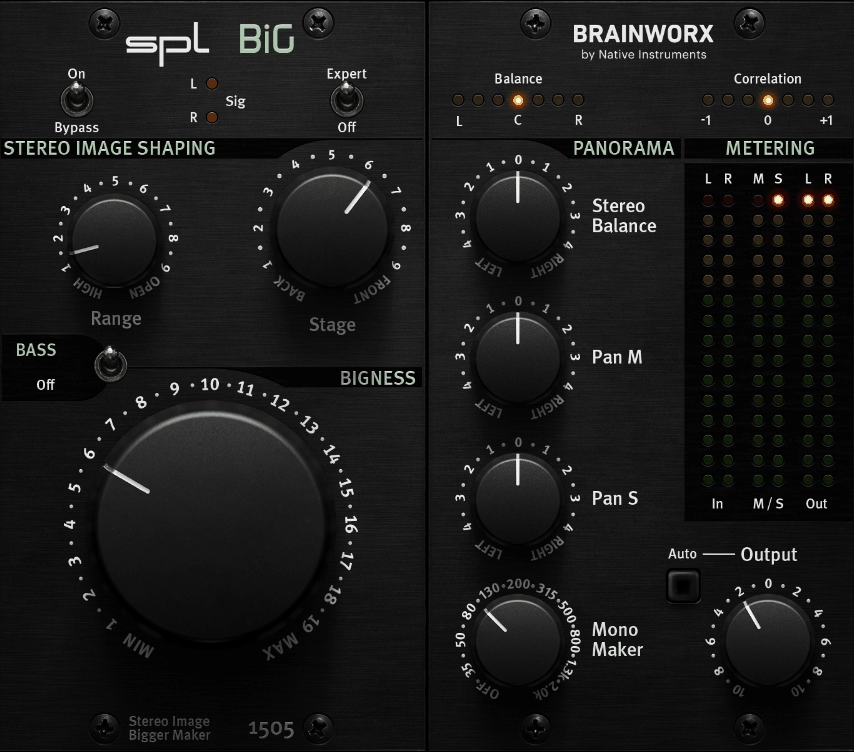
Stereo width manipulation is a mix bus and mastering task that Studio One’s stock tools handle at a basic level but don’t address with the specificity that dedicated tools provide. Plugin Alliance’s SPL BiG (Stereo Image Groomer) enhances width using a unique processing approach.
In Studio One’s mastering workflow on the Project page, I place it on the master bus when a mix feels too narrow and needs width without introducing phase problems.
- Width Enhancement
The proprietary stereo enhancement algorithm increases perceived width through processing that differs from simple mid/side level adjustment, producing a wider sound that feels natural rather than artificially stretched or phasey. The algorithm works by creating subtle differences between the left and right channels that the ear perceives as increased width without the mono compatibility problems that simple side signal boosting introduces. The result is a master that sounds wider on speakers and headphones while still translating correctly on mono playback systems.
- Mono Compatible
The processing maintains mono compatibility significantly better than conventional stereo widening techniques, which is critical for music played on mono systems, Bluetooth speakers, phones, and club sound systems that sum to mono. Many stereo wideners create impressive width that collapses completely when summed to mono, losing significant volume and tonal content. SPL BiG’s approach preserves the essential signal content in mono, which means your width enhancement survives real world playback conditions.
- Bass Protection
The algorithm automatically protects low frequencies from stereo manipulation, keeping the bass centered and solid while widening the mid and high frequency content where stereo information matters most. Bass frequencies in stereo can create phase problems, uneven speaker loading, and muddy low end, so protecting them from the widening process maintains the weight and clarity of your low end while the midrange and highs gain spatial dimension.
- Simple Control
A focused interface with minimal controls makes width enhancement a quick, straightforward task that takes seconds rather than minutes to dial in. The simplicity is deliberate, because stereo width decisions should be about listening to the result rather than navigating complex parameters. You turn the knob, listen to the change in width, and stop when it sounds right.
11. MeldaProduction MDrumReplacer
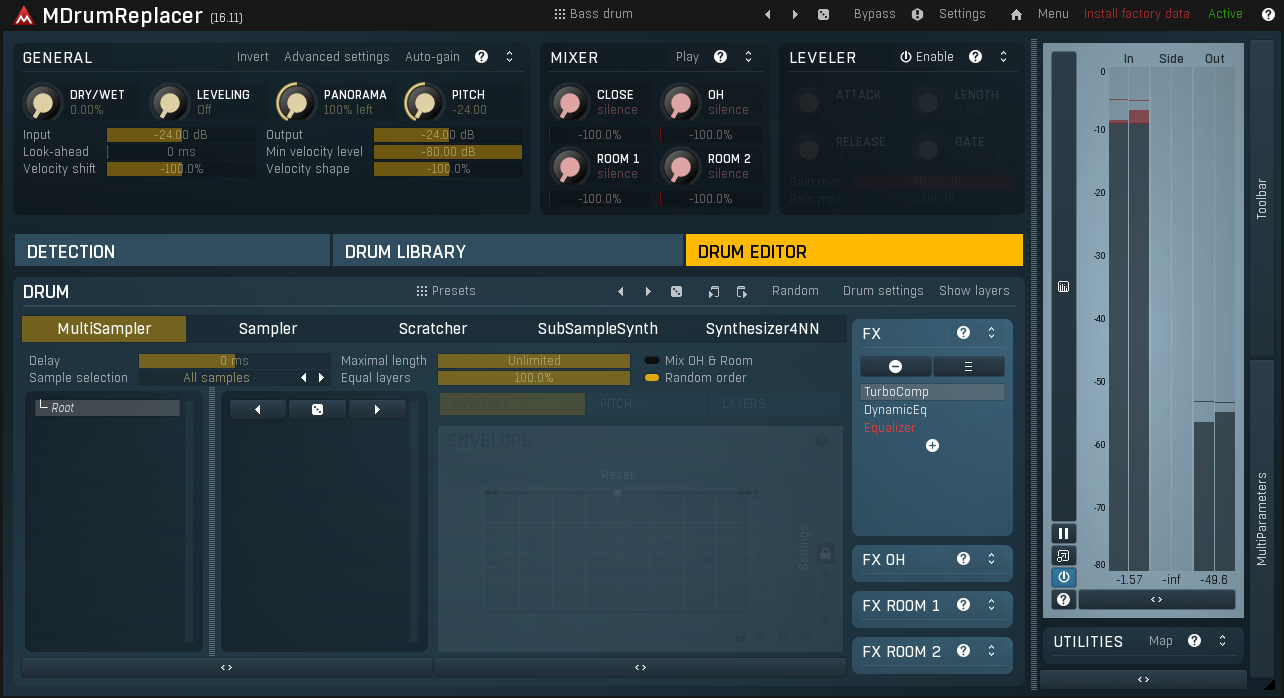
Drum replacement and augmentation is a production technique that Studio One doesn’t handle natively, and when you receive tracked drums that need reinforcement, a dedicated tool saves significant time. MDrumReplacer detects drum hits and triggers replacement or layered samples.
The plugin preserves the velocity and dynamics of the original playing while replacing the sound with samples that are better suited to the genre or production context.
- Intelligent Detection
The transient detection algorithm identifies drum hits automatically with adjustable sensitivity that handles everything from clean close mic recordings to bleed heavy overhead channels. The sensitivity controls let you tune the detection to ignore bleed from adjacent drums while accurately capturing every intentional hit, including ghost notes and softer strokes that less sophisticated triggers would miss. You can verify the detection accuracy through visual markers on the waveform display before committing to the replacement.
- Multi Sample
Support for multiple replacement samples with round robin and velocity mapping prevents the machine gun effect that occurs when the same sample triggers repeatedly on every hit. The round robin cycles through different sample variations, and the velocity mapping ensures that harder hits trigger louder, brighter samples while ghost notes trigger softer, darker samples. The combination produces natural sounding results that maintain the illusion of a real performance rather than exposing the replaced drums as triggered samples.
- Blend Control
A mix parameter lets you blend triggered samples with the original recorded audio for drum augmentation rather than complete replacement, preserving the character and room tone of the original recording while reinforcing it with cleaner or more powerful samples. The blending approach is often more musical than full replacement because you keep the organic quality and microphone character of the original while adding the weight and definition of the triggered samples. Finding the right blend ratio is where the real skill of drum augmentation lives.
- Dynamic Tracking
The triggering responds to the velocity dynamics of the incoming audio, mapping harder hits to louder samples and softer hits to quieter samples with a configurable velocity curve. The dynamic tracking preserves the musical expression and groove of the original drum performance, including the subtle velocity variations that give human drumming its feel and character. Without accurate dynamic tracking, triggered drums sound mechanical regardless of how good the replacement samples are.
- Visual Editor
A waveform display with trigger markers shows you exactly where the plugin is detecting hits, letting you verify accuracy and manually adjust when the detection misses hits or creates false triggers in complex drum recordings. The visual confirmation is essential for quality control, because even the best detection algorithms occasionally make mistakes on recordings with heavy bleed, room ambience, or unconventional playing techniques.
- Sample Browser
A built in sample management system lets you organize, tag, and quickly recall replacement samples across your projects. The browser streamlines the workflow of finding and loading the right samples for each drum element, and the organization means your sample collection grows more useful over time rather than becoming an unmanageable folder of files.
12. Polyverse Gatekeeper
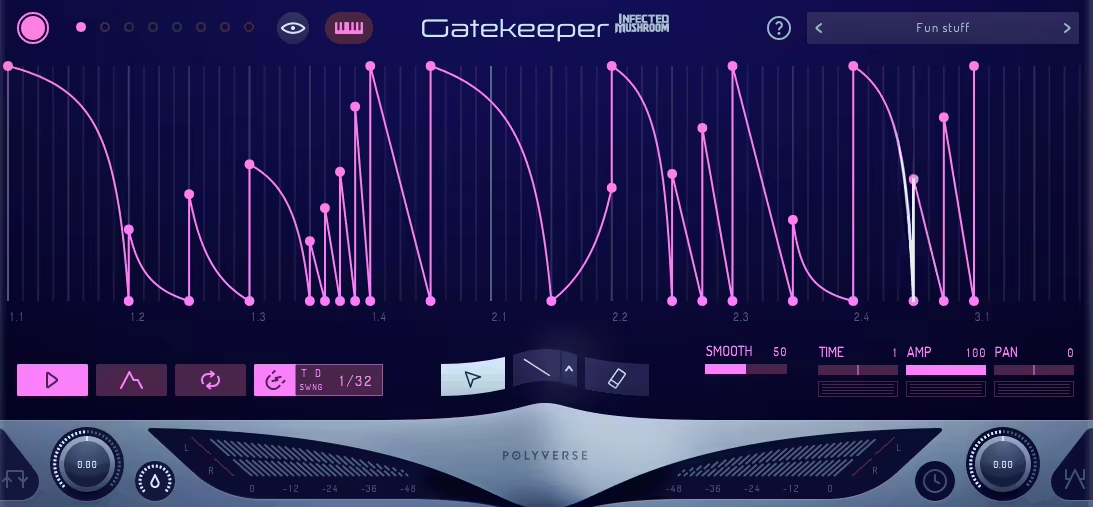
Rhythmic gating and tempo synced volume modulation are essential for creating pulsing pads, chopped rhythms, and sidechain style pumping, and Gatekeeper handles it with more precision than basic gate plugins. You draw the exact volume shape you want rather than setting a threshold and hoping.
The drawn shape approach produces tighter, more musical results than threshold based gating, particularly for creating atmospheric movement in Studio One sessions.
- Shape Editor
A visual shape drawing tool lets you create custom volume envelopes of any complexity, from simple on/off square wave patterns to intricate multi point curves with smooth transitions, sharp cuts, and everything in between. The drawing interface provides point and curve editing where you place nodes and adjust the curve shape between them, giving you exact control over the volume modulation that threshold based gates and simple LFO shapes can’t provide. You can create asymmetric shapes that ramp up quickly and decay slowly, or stuttered patterns that alternate between different volume levels.
- Tempo Lock
All shapes are synced to project tempo with flexible division settings from whole notes to 64th note triplets, ensuring rhythmic effects lock precisely to your arrangement regardless of tempo changes. The tempo sync means your gating patterns stay perfectly aligned with the groove of your track, and changing the tempo of your project automatically adjusts the gating speed to match.
- MIDI Trigger
MIDI input can trigger and reset the volume shape, giving you performance control over when the gating cycle begins rather than running continuously from the start of playback. The MIDI triggering aligns effects with specific musical events, which means you can start a gating pattern on a specific beat, reset it at the beginning of each bar, or trigger different shapes from different MIDI notes for varied rhythmic effects across a performance.
13. Minimal Audio Evoke

A specialized vocal processing and resynthesis engine that goes far beyond conventional vocal effects. Minimal Audio Evoke analyzes vocal input and resynthesizes it with controls over pitch, formant, harmonics, and spectral characteristics.
Rather than processing the audio signal, Evoke analyzes the vocal content and regenerates it with modified characteristics, which means you can change the fundamental nature of a voice in ways that EQ and compression alone can’t achieve.
- Vocal Resynthesis
The engine analyzes and resynthesizes vocal content rather than simply processing the audio signal, providing control over vocal characteristics that conventional processing can’t access. The resynthesis approach means you’re not limited to what filtering, compression, and effects can do to an existing signal. You’re fundamentally changing the building blocks of the sound and reassembling them with different properties. This enables transformations that would be impossible with any chain of traditional effects plugins.
- Formant Shifting
Independent formant manipulation changes the perceived character of a voice without affecting pitch, making a voice sound larger, smaller, older, younger, or otherworldly depending on how far you push the parameters. The formant control is independent from pitch shifting, which means you can transpose a vocal up while simultaneously shifting the formants down to maintain a natural character, or you can shift formants dramatically for creative effects while keeping the original pitch.
- Harmonic Control
Controls over the harmonic content of the resynthesized signal let you enrich, thin, or modify the tonal quality of the vocal in ways that EQ can’t replicate. Adding harmonics creates warmth and presence that sounds different from EQ boosting because you’re generating new frequency content rather than amplifying what’s already there. Removing harmonics thins the voice in a controlled way that’s more precise than filtering.
- Creative Modes
Beyond corrective vocal processing, the extreme settings produce synthetic, processed, and heavily transformed vocal textures useful as creative effects in electronic, experimental, and pop production. The creative modes blur the line between vocal processing and sound design, generating content that’s clearly derived from the original voice but sounds unlike anything a human vocal could naturally produce. For producers who use vocals as raw material for texture and atmosphere, the creative modes provide a unique generation tool.
14. Wavesfactory Quantum
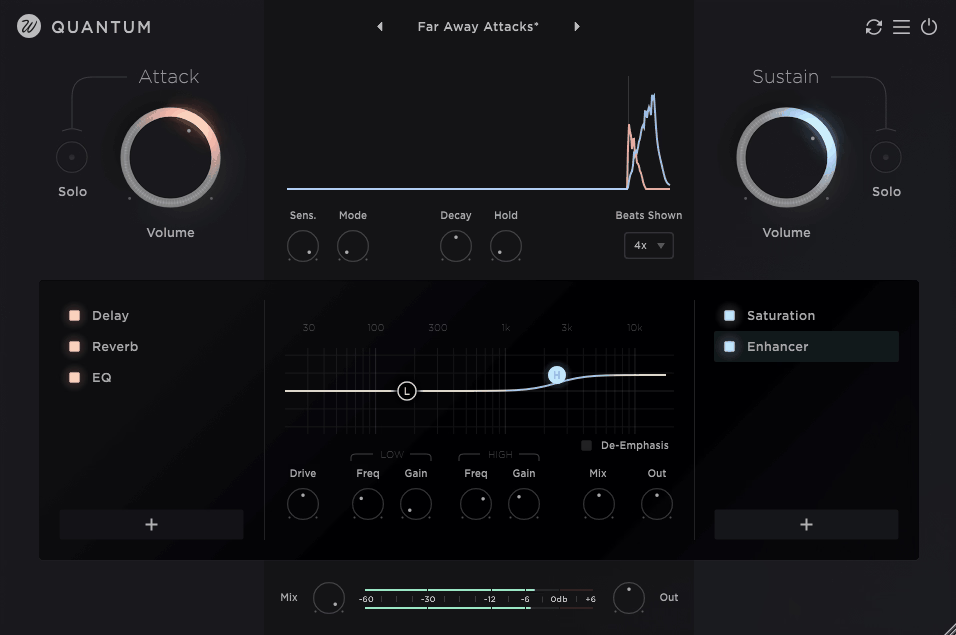
Closing the list with a plugin that goes well beyond the transient designer label to provide comprehensive spectral and transient processing with deep analysis tools. Quantum handles transient shaping, sustain control, and spectral manipulation in a single interface.
What makes Quantum more than a standard transient shaper is the spectral processing dimension that lets you address transient and sustain characteristics across different frequency ranges independently.
- Spectral Transients
Frequency dependent transient and sustain control lets you shape the attack and decay characteristics differently across the spectrum, solving problems that broadband transient designers create. You can sharpen the high frequency attack of a snare drum for cut and presence while simultaneously softening the low frequency transient to reduce boom and boxiness, all within a single plugin instance. The spectral specificity means every transient shaping decision is targeted rather than applying the same processing across the entire frequency range.
- Analysis Tools
Built in spectral and dynamic analysis displays show you the transient and sustain behavior of your audio in detail before you start processing. The analysis helps you understand what needs adjustment and where in the frequency spectrum the issues exist, leading to more informed processing decisions. Rather than guessing whether a snare needs more attack or less sustain, you can see the dynamic profile and make targeted adjustments based on visual evidence.
- Sustain Control
Independent sustain shaping alongside the transient controls lets you extend or reduce the body and tail of sounds independently from the attack characteristics. You can make a drum ring longer without changing its punch, or tighten a guitar’s sustain without affecting the pick attack. The dual control gives you complete dynamic profile shaping that single parameter transient tools force you to compromise on.
- Multi Band
The processing operates across multiple frequency bands for independent transient and sustain shaping in each band, providing the spectral specificity that conventional transient designers lack entirely. The multi band capability means you treat the low, mid, and high frequency dynamics of a sound as separate problems with separate solutions, which produces results that full bandwidth processing simply cannot achieve.
- Visual Display
A detailed waveform and spectral display shows the before and after of your processing in real time, giving you clear visual confirmation that your adjustments are achieving the intended result. The comparison view lets you see exactly how the transient and sustain characteristics have changed, which builds confidence in your processing decisions and helps you develop your ear for dynamic shaping over time.

Hello, I’m Viliam, I started this audio plugin focused blog to keep you updated on the latest trends, news and everything plugin related. I’ll put the most emphasis on the topics covering best VST, AU and AAX plugins. If you find some great plugin suggestions for us to include on our site, feel free to let me know, so I can take a look!