
GarageBand gets underestimated constantly, and I think that’s a mistake. Apple’s free DAW ships with a solid set of instruments and effects, a clean interface, and enough functionality to produce complete songs. But at some point, most producers hit the ceiling of what the built in tools can do.
The stock compressor is functional but not surgical. The EQ is usable but lacks the precision of dedicated mastering grade processors. And the creative effects, while decent, don’t cover the specialized processing that gives productions their character.
The good news is that GarageBand supports Audio Units (AU), which means you can extend its capabilities with third party plugins. Not every plugin format works in GarageBand though. VST and VST3 plugins are not compatible. You specifically need plugins that offer an AU (Audio Unit) version, which most major developers provide alongside their VST builds.
Once you install an AU compatible plugin, it appears in GarageBand’s plugin menu just like the stock effects. The plugins I’ve selected here all provide AU support, covering gaps in GarageBand’s built in toolkit from precision EQ and multiband compression through tape saturation, modular synthesis, granular effects, and professional guitar amplification.
1. FabFilter Pro-MB
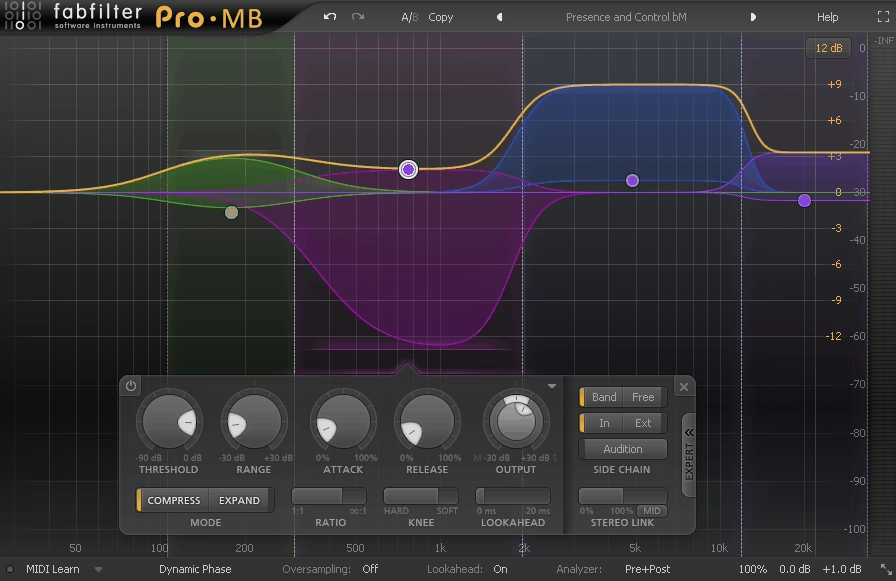
When GarageBand’s single band compressor isn’t enough and you need to control specific frequency ranges independently, a multiband compressor becomes essential.
FabFilter Pro-MB divides your audio into up to six frequency bands, each with its own compressor that you can configure independently, letting you tighten the low end without affecting the vocals or control harsh high frequencies without dulling the overall mix.
The reason I recommend Pro-MB specifically for GarageBand users is the interface design. FabFilter’s visual approach shows you exactly what’s happening across the frequency spectrum in real time, which is educational as well as practical.
You see the compression acting on each band, the gain reduction displayed visually, and the crossover points clearly marked. For producers learning multiband compression, this visual feedback teaches you what the processing is doing in a way that number only interfaces don’t achieve.
- Visual Interface
The real time spectral display shows compression activity across all bands simultaneously, with gain reduction, threshold, and crossover points displayed graphically. You learn what multiband compression does to your audio by watching the processing happen, which accelerates the learning curve significantly compared to interfaces that only show numbers.
- Flexible Bands
Up to six fully configurable bands with adjustable crossover slopes give you precise control over which frequency ranges get compressed and how aggressively. You can use as few or as many bands as the material requires, from a simple two band split to a detailed six band configuration.
- Dynamic Range
Each band offers independent threshold, ratio, attack, release, and range controls that let you dial in exactly the right amount of compression for that specific frequency area. The per band independence means you can apply gentle compression to the mids while aggressively controlling a problematic low end resonance.
- Mid/Side Mode
Processing in mid/side mode lets you compress the center and sides of your stereo image independently. The mid/side option is particularly useful for mastering and bus processing where you want to control the center vocal differently from the stereo ambient information.
Price: $169 | Format: AU, VST, VST3, AAX
2. Pulsar VM-COMP
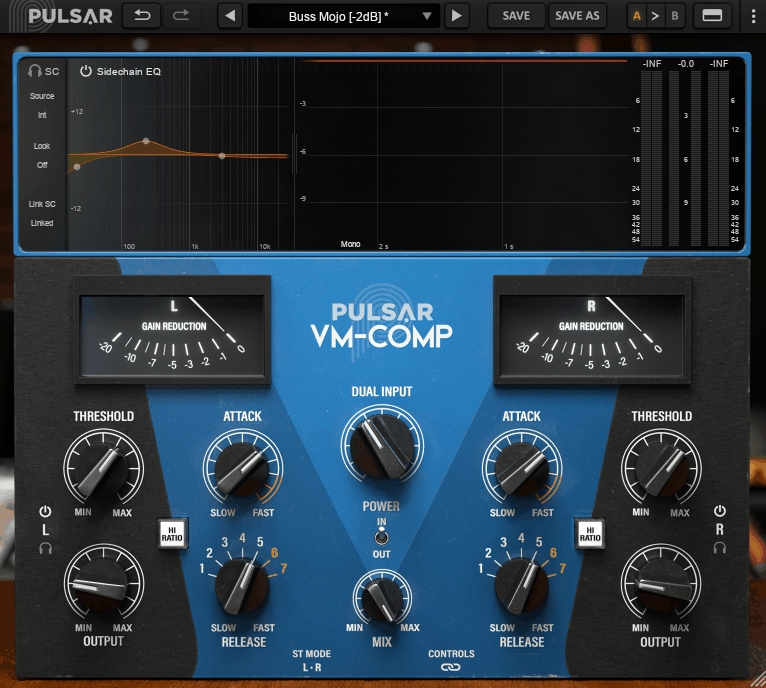
If you’re after compressor character rather than transparency, this plugin models the Tube Tech CL 1B optical tube compressor, one of the most revered hardware units for adding warmth and musical compression to vocals, bass, and full mixes.
Pulsar Audio’s VM-COMP captures the tube saturation and optical compression behavior of the original hardware with a level of detail that puts it among the best analog compressor emulations available.
What makes VM-COMP particularly interesting for GarageBand users is the mid/side processing capability that goes well beyond what the stock compressor offers. You can compress the mid and side signals with different settings, which gives you mix bus and mastering level control that GarageBand’s built in tools simply don’t provide.
The tube saturation adds harmonic warmth that’s absent from clean digital compressors, and the optical compression character produces a smooth, musical response that’s naturally suited to vocals and dynamic material.
- Tube Saturation
The modeled tube circuitry adds harmonic warmth and subtle distortion that gives your audio the analog character that digital compressors lack. The saturation responds dynamically to the input level, adding more color as you drive the input harder, which lets you dial in anything from subtle warmth to noticeable coloration.
- Optical Behavior
The optical compression circuit modeling reproduces the distinctive attack and release characteristics of the original hardware, where the compression responds smoothly and musically rather than with the sharp, clinical precision of a digital compressor. The optical response is particularly flattering on vocals and bass.
- M/S Processing
Full mid/side compression with independent settings for the center and side signals provides mastering grade stereo control. You can compress the vocal heavy center image differently from the reverb and ambient information on the sides, which is a level of sophistication GarageBand’s stock tools don’t offer.
3. FabFilter Pro-Q 4
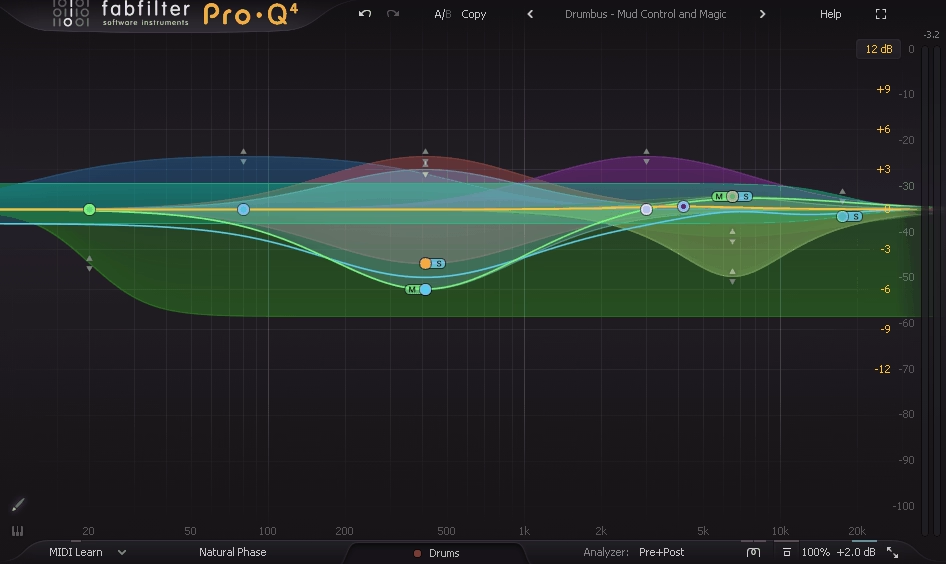
The single most impactful plugin upgrade you can make to any DAW, and GarageBand is no exception. FabFilter Pro-Q 4 replaces the stock EQ with a precision tool that offers up to 24 bands of parametric EQ with options for linear phase, dynamic, and minimum phase processing that the built in equalizer can’t match.
I’d call Pro-Q 4 essential for anyone serious about mixing in GarageBand. The dynamic EQ bands that compress only when a specific frequency exceeds a threshold solve problems that static EQ can’t address. The linear phase mode eliminates the phase shifts that minimum phase EQs introduce, which matters for mastering and parallel processing. And the real time spectrum analyzer shows you exactly what’s happening in your audio, helping you identify problem frequencies visually before you start cutting or boosting.
- Dynamic Bands
Any band can be switched to dynamic mode, where it only activates when the signal at that frequency exceeds or falls below a set threshold. Dynamic EQ solves problems that only occur sometimes (harsh vocal sibilance, resonant bass notes) without affecting the signal when the problem isn’t present.
- Linear Phase
The linear phase processing option eliminates the phase shifts that standard EQ introduces, preserving the time alignment of your audio. Linear phase is particularly important for mastering, parallel processing, and any situation where phase coherence between tracks matters.
- Spectrum Analyzer
A high resolution real time spectrum analyzer displays the frequency content of your audio visually, helping you identify problem frequencies, resonances, and tonal imbalances by sight. The visual feedback is invaluable for learning to hear what you’re seeing and developing your frequency awareness.
Price: $169 | Format: AU, VST, VST3, AAX
4. Studer A800 by Universal Audio
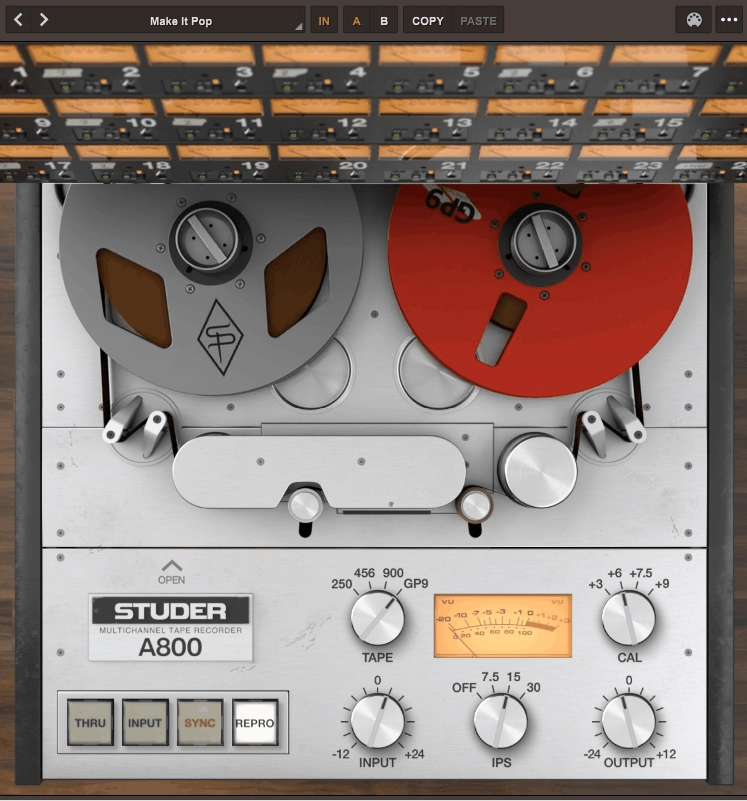
GarageBand’s effects don’t include anything resembling tape processing, which means you’re missing out on one of the most useful coloring tools in music production.
The Universal Audio Studer A800 models the legendary 24 track 2 inch tape machine that recorded countless classic albums, adding tape saturation, compression, and frequency response characteristics that warm up digital recordings in ways that EQ and compression alone can’t replicate.
Loading the Studer A800 on individual tracks or your mix bus introduces the harmonic complexity and subtle compression that real tape imparts to audio. The bass gets rounder, the highs smooth out slightly, and the transients soften in a natural way that makes digital recordings feel less sterile. You can select between different tape formulations and speeds (15 IPS, 30 IPS), each of which affects the frequency response and saturation character differently. For GarageBand productions that sound “too digital,” this plugin addresses that quality more directly than any other single processor.
- Tape Formulations
Multiple tape type emulations provide different saturation characters and frequency responses. Switching between formulations changes the tonal color from brighter, more aggressive saturation to warmer, smoother compression, giving you options for matching the tape character to different material.
- Speed Selection
15 IPS and 30 IPS tape speed options affect the low frequency response and overall saturation behavior. The 30 IPS setting provides extended low end, while 15 IPS introduces a characteristic bass bump and more obvious high frequency rolloff that’s useful for warming up brittle digital recordings.
- Input Drive
The input level control determines how hard you push the virtual tape, which directly affects the amount of saturation and harmonic distortion. Light drive adds subtle warmth. Heavy drive introduces audible compression and saturation that can be used as a creative effect.
- Per Track Use
The plugin is designed for both individual track and bus processing, meaning you can add tape character to specific instruments or apply it across your entire mix. Using it on individual tracks before summing builds up the cumulative analog character that consoles and tape machines provided in hardware studios.
Price: $299 (UA Native) | Format: AU, VST, VST3, AAX
5. Arturia Modular V

GarageBand ships with decent synths for basic production, but nothing approaching the depth and experimental capability of a modular synthesizer. Arturia Modular V gives you a virtual recreation of the Moog Modular System with patch cables, oscillators, filters, envelopes, and signal routing that lets you build synthesizer patches from the ground up.
The learning curve with Modular V is steep compared to preset based synths, and I should be honest about that. This isn’t a plugin where you load a preset and play. It’s a tool for sound design, experimentation, and creating sounds that no preset based synth contains. The patch cable system lets you route any output to any input, creating signal paths and modulation schemes that conventional synths can’t replicate. For producers interested in synthesis beyond what GarageBand’s Alchemy and built in instruments provide, this opens an entirely different dimension of sound creation.
- Patch Cables
A virtual patch cable system lets you connect any output to any input, recreating the signal routing flexibility of hardware modular systems. The patching creates synthesis possibilities that fixed architecture synths can’t achieve, because you define the signal path rather than working within a predetermined routing.
- Moog Modeling
The oscillators and filters model the classic Moog modular circuitry, providing the warm, fat analog character that the Moog name is known for. The Moog filter modeling is particularly strong, delivering the resonant, musical filter sweep that defines the classic Moog sound.
- Experimental Design
The open architecture encourages experimental sound design where you discover sounds through routing and modulation rather than dialing in parameters on a fixed synth. The experimental approach produces sounds that are unique because they emerge from your specific patching decisions.
Price: Part of Arturia V Collection ($399) or $199 standalone | Format: AU, VST, VST3, AAX
6. LFO Tool by Xfer
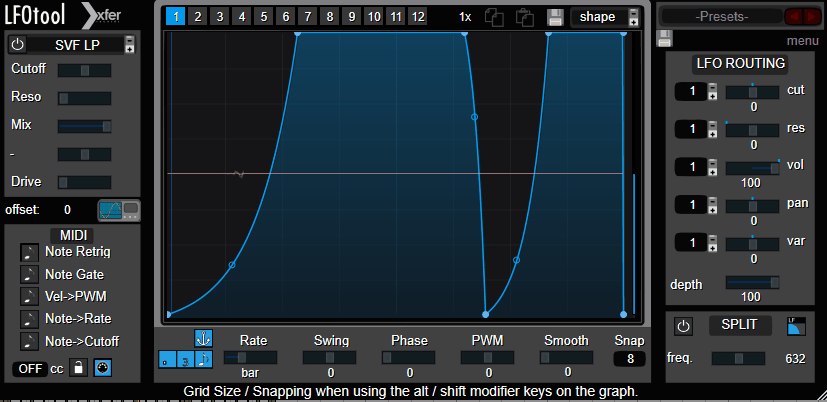
One of the most creatively useful utility plugins available, this tool generates custom LFO shapes that can control volume, filter, and panning to create rhythmic sidechain effects, tremolo patterns, and envelope shaped movement. Xfer’s LFO Tool is the go to plugin for sidechain style pumping without needing an actual sidechain input, which makes it particularly practical in GarageBand where sidechain routing is limited.
The practical value of LFO Tool in GarageBand can’t be overstated. GarageBand’s sidechain compression options are minimal, and creating the rhythmic pumping effect that’s essential to many electronic music genres is difficult with the stock tools alone. LFO Tool lets you draw custom volume shapes that create exactly the pumping rhythm you want, synced to your project tempo. Beyond sidechain emulation, the tool creates tremolo, auto pan, filter movement, and other tempo synced modulation effects that add motion and groove to static sounds.
- Custom Shapes
You draw your own LFO waveforms using a visual editor, creating any shape from smooth sine waves to complex custom curves. The drawing interface lets you design exactly the modulation shape you hear in your head rather than choosing from a limited set of preset waveforms.
- Sidechain Emulation
Volume shaping that mimics sidechain compression without requiring an actual sidechain input signal. The sidechain emulation is the primary reason most producers buy this plugin, and it’s especially valuable in GarageBand where proper sidechain routing is limited.
- Multi Parameter
The LFO can simultaneously modulate volume, filter cutoff, and stereo pan with different shapes for each parameter. The multi parameter modulation creates complex rhythmic effects where volume, tone, and spatial position all move independently.
- Tempo Sync
All modulation is locked to your project tempo with division options from whole notes to 1/64th notes and triplets. The tempo sync ensures your rhythmic effects stay perfectly aligned with the groove regardless of tempo changes.
- MIDI Trigger
MIDI note input can trigger and reset the LFO shape, giving you precise control over when the modulation cycle begins. The MIDI triggering is useful for creating effects that align with specific musical events rather than free running continuously.
Website: xferrecords.com | Price: $49.99 | Format: AU, VST
7. XILS Lab KaoX

If you’ve explored GarageBand’s synths and want something fundamentally different, XILS Lab KaoX offers FM (frequency modulation) synthesis that produces tonal characters completely unlike the subtractive and wavetable synthesis in the stock instruments. FM synthesis generates complex, metallic, bell like, and crystalline timbres through the interaction of multiple oscillators modulating each other’s frequencies.
The FM synthesis in KaoX produces sounds that you simply cannot create with GarageBand’s built in synthesizers. The metallic bells, evolving pads, aggressive basses, and glassy textures that FM synthesis excels at occupy a tonal space that subtractive synths don’t reach. The interface is more approachable than classic FM synths like the DX7, with a visual layout that helps you understand the operator relationships. For producers wanting to expand their tonal palette into territory that GarageBand’s instruments can’t access, this is a practical choice.
- FM Engine
The frequency modulation synthesis engine generates timbres through oscillator interaction rather than filtering, producing the complex harmonic content that gives FM its distinctive metallic, glassy, and crystalline character. The FM approach creates tonal possibilities that no amount of processing on a subtractive synth can replicate.
- Visual Routing
A graphical operator routing display shows how the oscillators are connected and modulating each other. The visual approach makes FM synthesis more approachable than the menu diving that plagued classic hardware FM synths, helping you understand the relationship between operator configuration and sound.
- Hybrid Options
The synthesis combines FM with additional processing including filters, effects, and modulation that let you shape FM sounds with familiar subtractive techniques. The hybrid approach means you’re not limited to raw FM output but can soften, filter, and effect the FM timbres into more conventional musical territory when needed.
Price: $149 | Format: AU, VST, VST3, AAX
8. Arturia Chorus DIMENSION-D
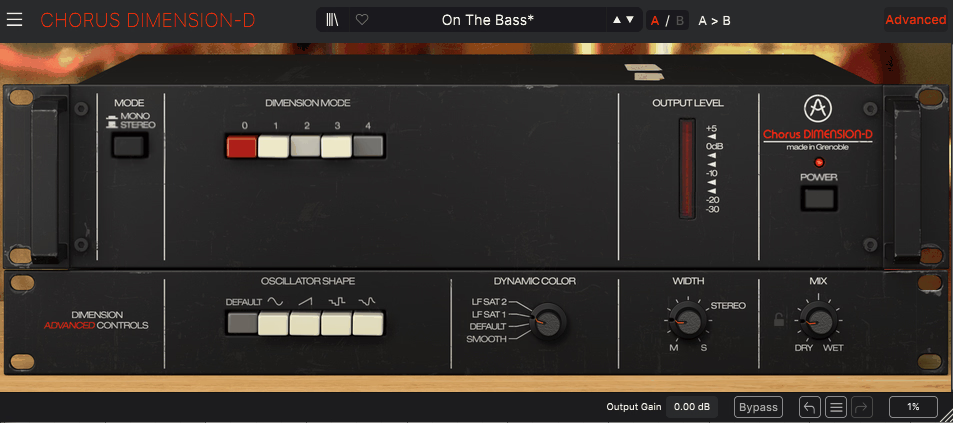
GarageBand includes a basic chorus effect, but it doesn’t capture the specific character of the Roland Dimension D (SDD-320), a studio chorus unit that became legendary for its ability to add width and depth without the obvious wobble that most chorus effects produce. Arturia’s Chorus DIMENSION-D models this specific hardware unit, and the character is distinctly different from generic chorus algorithms.
What makes the Dimension D sound special is the subtlety. Traditional chorus effects modulate the signal in a way that produces audible pitch wobble and a “wet” sound that’s clearly processed. The Dimension D approach uses a multi stage BBD (bucket brigade delay) circuit that adds spatial width and tonal richness while sounding remarkably natural. On pads, strings, electric piano, and clean guitars, it adds the kind of dimensional enhancement that makes sounds feel bigger without sounding effected. The four classic mode buttons are supplemented by continuous controls that let you go beyond what the original hardware offered.
- Dimension D Character
The modeled Roland SDD-320 circuit produces a chorus character that adds width and depth without the obvious pitch modulation of standard chorus effects. The subtlety is what distinguishes this from generic chorus plugins, making it usable on material where traditional chorus would sound too processed.
- Mode Buttons
The four classic mode buttons from the original hardware provide instant access to the unit’s signature settings, from subtle widening to more pronounced stereo enhancement. The mode buttons give you the exact sounds that made the original hardware famous in studios worldwide.
- Extended Controls
Beyond the original hardware’s limited controls, the plugin adds continuous parameter adjustment for rate, depth, and mix that let you fine tune the effect beyond what the four fixed modes provide. The extended control transforms a historically limited effect into a fully adjustable processor.
- Stereo Enhancement
The chorus produces genuine stereo width that translates well in headphones and on speakers, making mono sources sound naturally wider without introducing phase problems that can cause issues in mono playback. The stereo enhancement is particularly effective on keyboards, pads, and clean guitars.
Price: Part of Arturia FX Collection ($399) or $99 standalone | Format: AU, VST, VST3, AAX
9. IK Multimedia AmpliTube 5
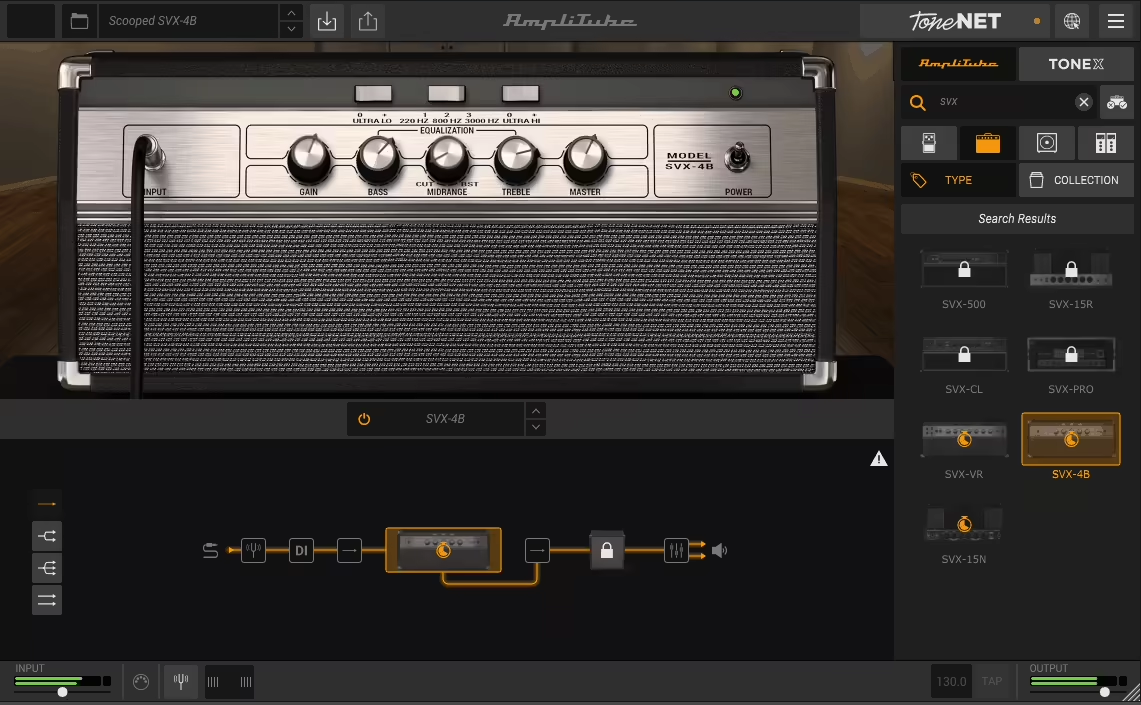
For guitarists and bassists using GarageBand, the built in amp simulations are serviceable but limited in scope. IK Multimedia’s AmpliTube 5 replaces them with a comprehensive guitar and bass rig that models over 400 pieces of gear including amplifiers, cabinets, stompboxes, microphones, and rack effects from some of the most iconic brands in music history.
The depth of AmpliTube 5 goes far beyond what any DAW’s built in amp simulation provides. You’re not choosing from a handful of generic amp models. You’re assembling a complete signal chain from branded, officially licensed models of amps from Fender, Marshall, Orange, Mesa Boogie, and others, combined with specific cabinet models, microphone placement options, and pedalboard configurations. The cabinet section alone lets you mix multiple microphones on multiple speaker positions, which is a level of tone shaping detail that GarageBand’s Amp Designer doesn’t approach. For any guitarist recording through GarageBand, this is the single upgrade that will have the most dramatic impact on your recorded guitar tone.
- Gear Library
Over 400 modeled gear pieces spanning amplifiers, cabinets, stompboxes, microphones, and rack effects provide enough variety to cover any guitar or bass tone. The library includes officially licensed models from Fender, Marshall, Orange, Mesa Boogie, and other legendary manufacturers.
- Signal Chain
You build your tone by assembling a complete signal path from pedalboard through amplifier, cabinet, microphone, and rack effects. The modular chain lets you experiment with gear combinations that would cost tens of thousands of dollars to assemble in hardware, testing how different amps react to different pedals and cabinets.
- Cabinet Modeling
The cabinet section provides detailed control over speaker selection, microphone type, microphone position, and room ambience. You can blend multiple microphones on a single cabinet, which is exactly how professional guitar recording works in real studios.
- Custom IR Loading
You can load your own impulse response files for cabinet simulation, which means you’re not limited to the included cabinet models. Third party IRs captured from specific real world cabinets and microphone positions expand the tonal possibilities beyond what AmpliTube ships with.
- Standalone Mode
AmpliTube runs as a standalone application in addition to an AU plugin, meaning you can use it for practice and performance without even opening GarageBand. The standalone mode with low latency monitoring turns your computer into a dedicated guitar amp.
Price: Free (CS version) / $149.99 (SE) / $399.99 (MAX) | Format: AU, VST, VST3, AAX
10. Eventide Instant Flanger Mk II
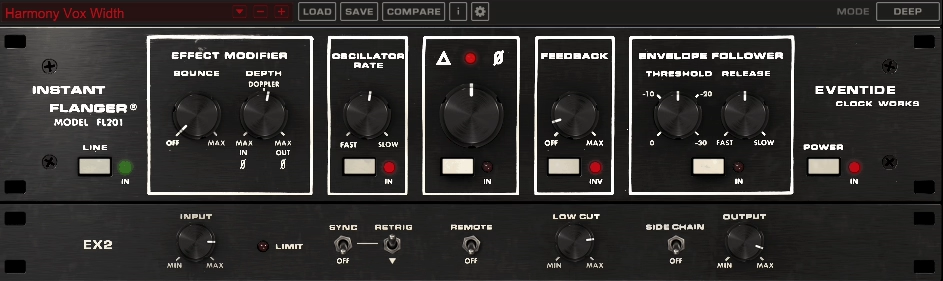
GarageBand’s flanger is basic, and it doesn’t capture the specific sound of hardware through zero flanging that defined the effect on classic records. The Eventide Instant Flanger Mk II models the original Eventide FL201 hardware, which was one of the first dedicated flanger effects and produced a sound quite different from the generic digital flangers found in most DAWs.
What I find valuable about the Instant Flanger Mk II is the character it adds compared to generic flanging. The original hardware produced a particular quality of sweep, depth, and harmonic interaction that this plugin captures. You can go from subtle, barely there movement that adds shimmer to a clean guitar, all the way to aggressive, jet engine flanging that turns any source into a swirling mass of comb filtered sound. The barber pole flanging mode creates a continuous upward or downward sweep illusion that isn’t possible with standard LFO based flangers.
- Hardware Modeling
The modeled Eventide FL201 circuitry produces flanging with the specific character of the original hardware rather than a generic digital algorithm. The hardware character includes subtle harmonic interaction and sweep quality that distinguishes it from the sterile flanging in most stock DAW effects.
- Barber Pole Mode
A barber pole flanging effect creates the auditory illusion of a continuously rising or falling sweep, similar to a Shepard tone. The effect is psychoacoustically striking and isn’t achievable with standard LFO based flangers, giving you a unique creative tool.
- Through Zero
Through zero flanging recreates the tape machine flanging technique where two signals pass through and cross the zero point, producing the distinctive “hollow” swoosh that defined classic flanger effects. The through zero capability produces flanging that sounds fundamentally different from delay line flanging.
- Depth Range
The effect spans from subtle shimmer to extreme jet engine sweeps, covering the full range of flanging intensity. The range means you can use it for gentle tonal enhancement on clean instruments or aggressive creative processing on any source.
Price: $99 | Format: AU, VST, VST3, AAX
11. Waves InTrigger
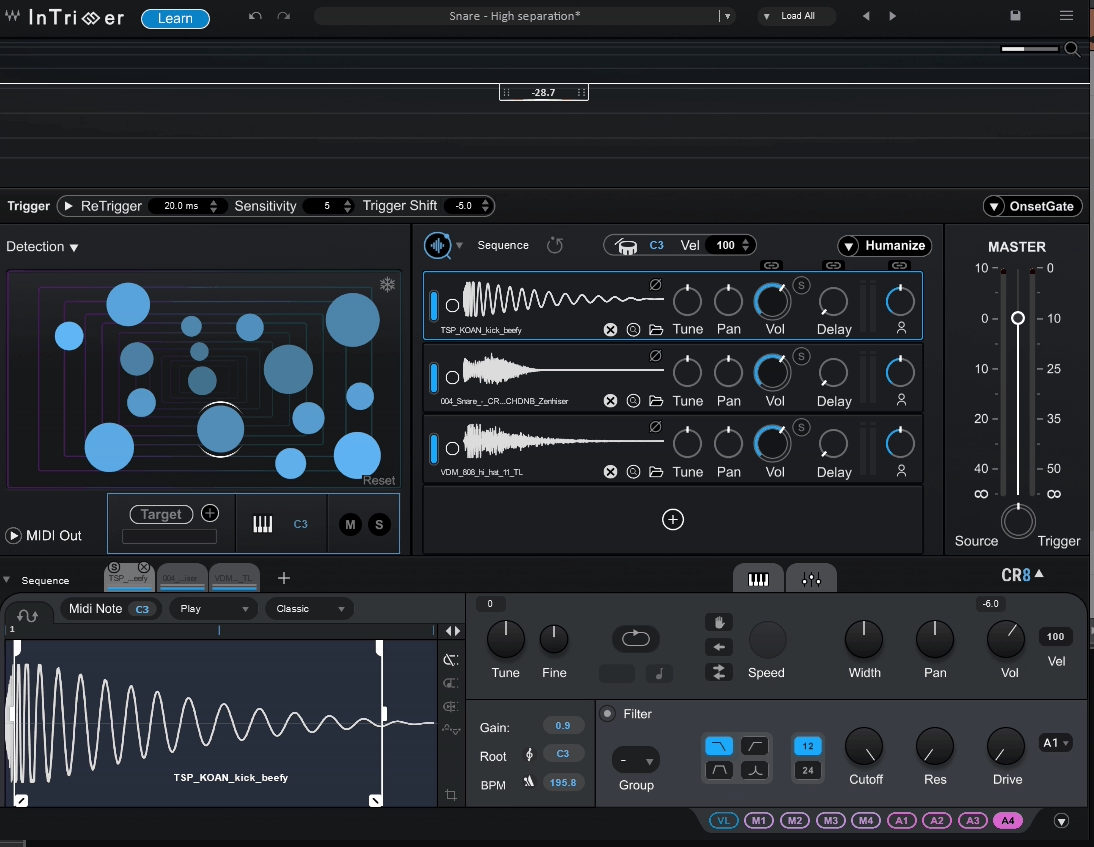
Drum replacement and augmentation is a production technique that GarageBand doesn’t natively support, and it’s one of the most useful mixing tools for improving drum recordings. Waves InTrigger detects drum hits in your audio and triggers replacement or layered samples in real time, letting you reinforce weak recordings with professional quality drum sounds or completely replace poorly recorded drums.
The practical applications of InTrigger for GarageBand users are significant. If you’ve recorded live drums with cheap microphones or in a bad sounding room, InTrigger can save the performance by triggering high quality samples that match the timing and dynamics of the original playing. You keep the human feel and timing but replace the poor recording quality with professional drum sounds. The plugin includes a built in sample library of kicks, snares, toms, and other percussion, and you can also load your own samples for triggering.
- Hit Detection
An intelligent transient detection algorithm identifies drum hits in your audio with adjustable sensitivity, ensuring accurate triggering that follows the dynamics and timing of the original performance. The detection handles complex drum performances including ghost notes, flams, and varied velocity without false triggers or missed hits.
- Sample Library
A built in collection of professional drum samples provides replacement sounds for kicks, snares, toms, and other percussion without needing to source samples externally. The included sounds are production ready and cover multiple genres, giving you immediate access to high quality drum tones.
- Blend Control
A mix control lets you blend the triggered samples with the original audio for drum augmentation rather than complete replacement. The blending preserves the character and room tone of the original recording while reinforcing it with cleaner, more powerful samples.
- Dynamic Response
The triggering responds to the velocity and dynamics of the incoming audio, ensuring that softer hits trigger softer samples and harder hits trigger louder ones. The dynamic tracking preserves the musical performance rather than replacing every hit at the same volume.
- Multi Articulation
Support for multiple sample articulations and round robin triggering prevents the machine gun effect that occurs when the same sample plays repeatedly. The variation makes triggered drums sound natural rather than obviously sampled.
- Low Latency
The processing operates at low enough latency for real time use during recording and mixing. You can monitor the triggered sounds as you record, which lets you evaluate the results immediately rather than processing after the fact.
Price: $29.99 | Format: AU, VST, VST3, AAX
12. Apogee Clearmountain’s Phases

Developed with mixing legend Bob Clearmountain, this phaser goes beyond basic phasing to deliver a musical, tonally rich modulation that reflects Clearmountain’s decades of experience using phasers on hit records. The Apogee Clearmountain’s Phases plugin captures the specific phasing character that Clearmountain uses in his mixing work.
The phaser in GarageBand is functional but generic. What Clearmountain’s Phases provides is a specific musical character informed by how a legendary mixer actually uses the effect in professional productions. The phase shifting has a warmth and depth that the stock effect doesn’t deliver, and the controls are oriented toward musical results rather than technical parameters. For adding movement and tonal interest to guitars, keyboards, synths, and vocals, this delivers a quality of phasing that GarageBand’s built in effect can’t match.
- Musical Character
The phasing algorithm is tuned for musical results rather than technical accuracy, producing warm, rich phase shifting that sits well in a mix. The musical quality reflects Bob Clearmountain’s preference for phasers that enhance rather than overwhelm the source material.
- Clearmountain Presets
Presets designed by Bob Clearmountain provide instant access to the phaser sounds he uses in professional mixing. The presets give you a starting point from a mixer whose credits span decades of hit records.
- Tonal Warmth
The phase shifting introduces harmonic warmth alongside the spatial movement, adding tonal richness that cold, digital phasers don’t provide. The warmth makes the effect usable on sensitive material like vocals where sterile phasing would sound unnatural.
Price: $29.99 | Format: AU, AAX
13. Graindad by Sugar Bytes
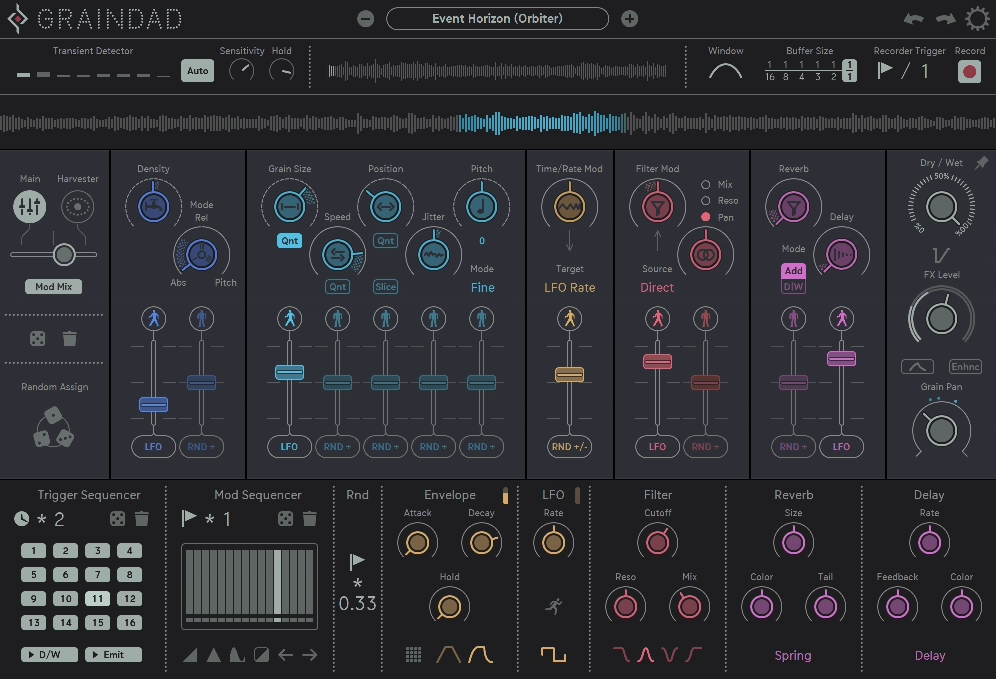
When you want to destroy, glitch, stutter, and granularly deconstruct your audio in ways that GarageBand’s stock effects can’t begin to approach, this plugin delivers creative chaos with musical control. Sugar Bytes Graindad is a granular effects processor that chops your audio into tiny grains and lets you manipulate pitch, speed, direction, density, and position in real time for effects ranging from subtle textural enhancement to complete sonic destruction.
The creative applications of Graindad in GarageBand are unlimited if you’re willing to experiment. You can freeze a moment of audio and explore it granularly, create stutter effects that chop your signal into rhythmic fragments, pitch shift individual grains independently for crystalline or chaotic textures, and reverse sections of audio in real time. The performance oriented interface encourages hands on manipulation rather than static parameter settings, which makes it a genuinely fun creative tool rather than a technical processor.
- Granular Engine
The granular processing slices your audio into tiny grains that can be independently manipulated in pitch, speed, position, and density. The grain level control gives you a fundamentally different type of audio processing than traditional effects, producing textures and transformations that conventional plugins can’t create.
- Stutter Effects
Rhythmic stuttering and glitch effects chop your audio into repetitive fragments that create beat synced rhythmic patterns from any source material. The stutter processing turns sustained sounds into rhythmic content and transforms existing rhythms into entirely new patterns.
- Real Time Control
The performance interface is designed for hands on, real time manipulation rather than set and forget processing. Moving parameters during playback creates evolving effects that respond to your gestures, making Graindad a performance tool as much as a mixing processor.
- Freeze Function
A freeze mode captures a moment of audio and lets you explore it granularly, sustaining and manipulating a specific instant of sound indefinitely. The freeze creates evolving textures from a single captured moment, which is useful for creating pads, drones, and atmospheric content from any audio source.
Price: $99 | Format: AU, VST, VST3, AAX
14. FabFilter Pro-L 2
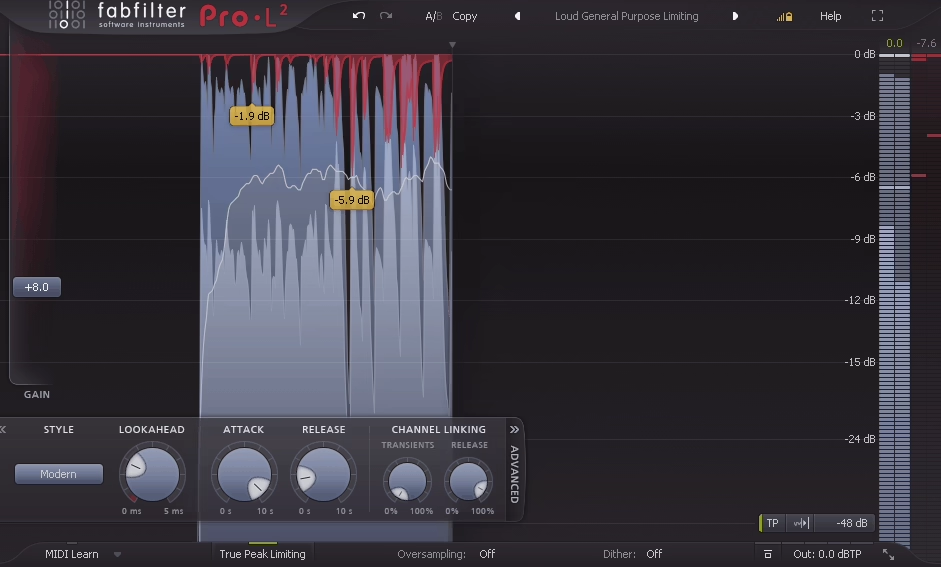
The final stage of any production is limiting, and GarageBand’s built in limiter is basic enough that it can compromise your master if you push it. FabFilter Pro-L 2 is a transparent, precision mastering limiter that handles the loudness maximization stage with significantly more quality and control than stock limiting provides.
Every track you finish in GarageBand needs to be limited before distribution, and the quality of that limiting directly affects how your music sounds on streaming platforms. Pro-L 2 provides eight limiting algorithms that range from transparent to aggressive, a true peak limiter that prevents inter sample peaks from causing distortion on playback systems, and real time loudness metering that shows you where your master sits relative to streaming platform targets. For GarageBand producers who want their finished tracks to sound competitive with professionally mastered music, this is the plugin that handles the final and arguably most critical processing stage.
- Eight Algorithms
Eight distinct limiting styles from transparent to punchy to aggressive let you choose the character that suits your material. Different genres and dynamics benefit from different limiting approaches, and having eight options means you can match the algorithm to the music rather than forcing everything through one fixed limiter.
- True Peak Limiting
True peak detection and limiting prevents inter sample peaks that standard peak limiters miss. Inter sample peaks cause distortion on consumer playback systems and can trigger loudness penalty on streaming platforms, so true peak limiting is essential for professional masters.
- Loudness Metering
Built in LUFS metering with target presets for major streaming platforms (Spotify, Apple Music, YouTube) shows you where your master sits relative to platform loudness standards. The integrated metering eliminates the need for a separate metering plugin and ensures your masters comply with platform requirements.
- Surround Support
Processing supports stereo and surround formats, which provides future compatibility as surround and spatial audio formats become more common in music distribution.
- Gain Reduction Meter
A detailed gain reduction display shows you exactly how much limiting is being applied in real time. The visual feedback helps you identify when you’re pushing the limiter too hard, preventing the over limited, distorted sound that results from excessive loudness maximization.
Price: $169 | Format: AU, VST, VST3, AAX
Bonus: Antelope Audio Tape Delay
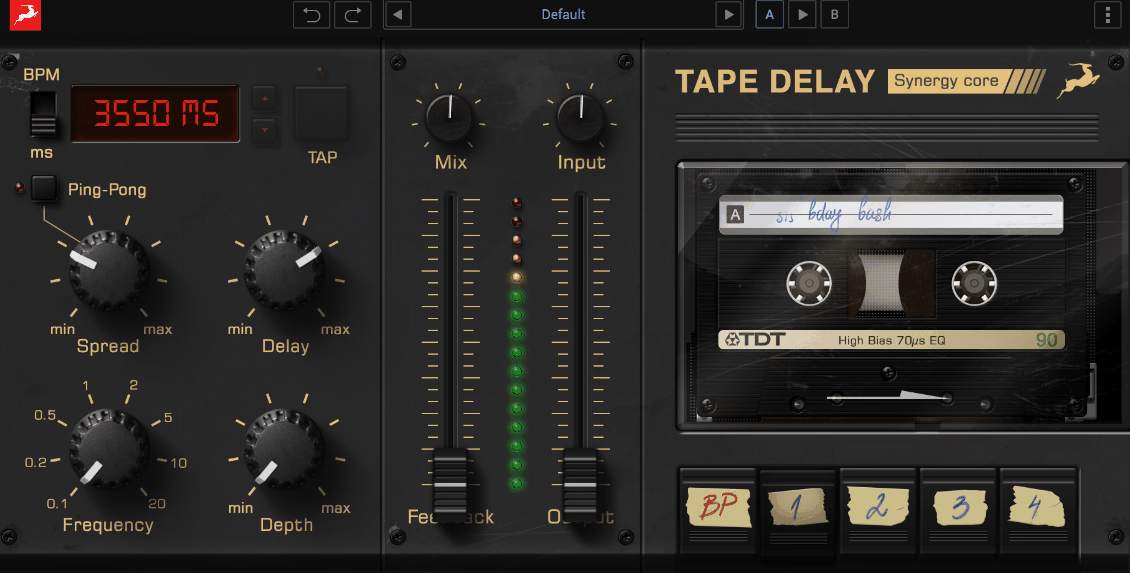
Rounding out the list with a tape delay emulation that adds warm, analog style echo effects with the character of real tape machines. Antelope Audio’s Tape Delay models the specific behavior of tape based echo units, including the wow, flutter, saturation, and frequency response degradation that make tape delay sound fundamentally different from clean digital delay.
The practical difference between tape delay and the digital delay in GarageBand is character. Clean digital delay repeats are precise, pristine copies of the original signal. Tape delay repeats degrade naturally, losing high frequency content, gaining subtle saturation, and drifting slightly in pitch with each repetition. This degradation is what makes tape delay sound musical and warm rather than clinical. For vocals, guitars, synths, and any source where you want echoes that sit in the mix rather than competing with the dry signal, tape delay provides a quality of echo processing that clean digital repeats don’t achieve.
- Tape Character
The modeled tape degradation applies saturation, frequency rolloff, and subtle pitch drift to each delay repetition. The degradation makes echoes sound warm and musical rather than clinical, and the repeats naturally sit behind the dry signal in a mix rather than competing with it.
- Wow & Flutter
Adjustable wow and flutter add the pitch instability of real tape machines to the delay repeats. The instability at subtle settings adds analog warmth, while higher settings create more obviously modulated, character rich delays.
- Feedback Saturation
The delay feedback path introduces additional saturation with each repetition, meaning longer feedback tails become progressively warmer and more colored. The progressive saturation creates a natural decay character that clean digital feedback loops don’t produce.
Price: Part of Antelope Audio FX bundle | Format: AU, VST, VST3, AAX

Hello, I’m Viliam, I started this audio plugin focused blog to keep you updated on the latest trends, news and everything plugin related. I’ll put the most emphasis on the topics covering best VST, AU and AAX plugins. If you find some great plugin suggestions for us to include on our site, feel free to let me know, so I can take a look!