Modular synthesis used to mean filling up a studio wall with patch cables and expensive hardware modules. Now you can build those same complex sonic systems right inside your DAW with modular synth plugins that give you the same creative freedom without the massive price tag or space requirements.
The best modular synth plugins let you wire together oscillators, filters, effects, and modulators however you want, turning sound design into an open-ended playground.
Some of these plugins recreate classic modular systems from the ’70s and ’80s. Others take a modern approach with digital modules you’d never find in hardware. A few blur the line between modular and traditional synths, giving you just enough patching freedom without overwhelming your workflow.
What I love about working with modular VSTs is how they teach you synthesis from the ground up. When you manually route an envelope to a filter cutoff or patch an LFO into oscillator pitch, you start understanding why sounds behave the way they do.
That hands-on approach makes you a better producer, even when you go back to using regular synths. Plus, many of these plugins include free or affordable options, so you can dive into modular synthesis without spending thousands on a Eurorack case.
| Plugin Name | Best For | Engine Type | Key Strength | My Verdict | Pros | Cons |
|---|---|---|---|---|---|---|
| 1. Kilohearts Phase Plant | Modern sound design | Semi modular hybrid | Flexible modulation routing | Best Semi-Modular | Audio rate modulation, fast workflow, clean UI | No cable style patching |
| 2. VCV Rack 2 | Learning real modular | Full modular system | True Eurorack workflow | Closest to hardware modular | Huge module library, total routing freedom | Slow workflow for quick ideas |
| 3. u-he Bazille | Complex digital tones | Digital modular | FM and phase distortion | Deep but musical | Powerful oscillators, rich modulation | Dense interface |
| 4. Arturia Modular V3 | Vintage modular sounds | Analog modeled modular | Classic Moog architecture | Best Vintage Character | Warm tone, visual patching | Large and heavy UI |
| 5. Roland SYSTEM-100 | Retro bass and leads | Semi modular analog model | Clear patch matrix | Focused vintage tool | Authentic tone, simple routing | Monophonic only |
| 6. Cherry Audio PS-3300 | Evolving pads | Semi modular polyphonic | Triple synth layers | Best Value | Resonators, high polyphony | Takes time to dial in |
| 7. Native Instruments Reaktor 6 | Custom instruments | Modular DSP environment | User built systems | Unlimited depth | Blocks, huge user library | Very time consuming |
| 8. Sugar Bytes Nest | Generative MIDI | Logic based sequencer | Algorithmic patterns | Compact pick | Unpredictable results, scene switching | Not an audio synth |
| 9. Cherry Audio PS-20 | Aggressive analog tones | Semi modular analog model | Raw filter sound | Strong value choice | Polyphony, expanded patch bay | Can sound harsh fast |
| 10. Newfangled Audio Generate | Experimental textures | Chaotic synthesis | Physics based oscillators | Unique character | Organic motion, deep modulation | Not suited for classic sounds |
| 11. Sugar Bytes Factory | Polyphonic modular sounds | Hybrid modular synth | Morphing modulation states | Great for evolving patches | Flexible engines, strong mod matrix | Interface needs learning |
| 12. u-he ACE | Learning modular basics | Semi modular analog model | Anything to anything routing | Best for Beginners | Audio rate modulation, polyphony | Minimal effects |
| 13. Madrona Labs Kaivo | Organic sound design | Granular physical modeling | Material based resonance | Perfect for cinematic work | Natural movement, MPE support | Not beginner friendly |
| Matt Tytel Helm (Free) | Free modular style synth | Digital semi modular | Clear modulation visuals | Best free starting point | Open source, cross platform | Digital edge sound |
| Sonigen Modular (Free) | Pure modular routing | True modular synth | Audio rate everywhere | Raw modular freedom | Flexible routing, efficient engine | Basic interface |
| KBplugs 200 C (Free) | West Coast experiments | Digital modular | FM and ring modulation | Fun experimental freebie | Many oscillators, joystick control | 32 bit only |
1. Kilohearts Phase Plant – Best Semi-Modular

Phase Plant semi modular synth plugin feels less like a traditional synth and more like a creative playground where you build exactly the sound you’re imagining. That freedom is what keeps me coming back to it.
You start with four generator types – Analog, Wavetable, Sample Player, and Noise – and stack them however you want. One patch might be pure wavetable leads, another could layer analog warmth under sampled textures, and a third might go full experimental with noise-based rhythms.
The modular routing means you’re not just tweaking presets. You’re designing the signal path itself. You can build patches where LFOs modulate other LFOs, envelopes control wavetable positions, and audio-rate modulation turns harmonic content into something completely unpredictable.
- Semi-Modular Architecture with Four Generator Types
Phase Plant doesn’t force you down a fixed path. You choose which generators to use and how they interact. I love combining a wavetable oscillator with the sample player for evolving textures that sit somewhere between synth and organic.
The built-in wavetable editor lets you carve out custom timbres or convert your own samples into playable wavetables, which opens up sound design most synths won’t touch. If you need classic analog tones, the Analog oscillator delivers. If you want weird, layered complexity, stack all four generators and route them through different effect chains.
- Deep Modulation with Visual Routing
Every modulation source can hit almost any destination. you can use envelopes to shape filter sweeps, bu also patch oscillators to modulate each other for FM-style tones or ring mod effects.
The 8 macro knobs are lifesavers when you want one control to move multiple parameters at once. I map them to cutoff, resonance, wavetable position, and effect wet levels, then automate one macro for massive sonic shifts. The routing grid makes everything visual, so even complex modulation stays manageable once you get the hang of it.
- Snapin Effects Integration
Phase Plant integrates Kilohearts’ Snapin effects directly into the synth window. You can load EQ, distortion, delay, reverb, stereo tools, and more without bouncing to separate plugins. I would use parallel effect lanes to split signals and process them differently, then blend them back together.
The Poly mode applies effects per voice instead of across the whole patch, which creates subtle variations between notes. It’s perfect for evolving pads or detuned leads where you want each voice to feel slightly different. Over 400 factory presets are included, and they’re actually useful as starting points or templates to reverse-engineer.
2. VCV Rack 2 (Free & Pro) – Closest to hardware modular

VCV Rack 2 gives you a full Eurorack-style modular synthesizer right inside your computer, and the best part is you can start building patches for free.
This plugin doesn’t lock you into presets or fixed signal paths. You grab modules from a library, drop them on your virtual rack, and patch cables between them just like hardware modular. The free version includes hundreds of modules, and when you add community contributions, you’re looking at thousands of options without spending a dollar.
You can build anything from basic subtractive synths to weird generative systems or experimental noise machines. The learning curve is real, but once you understand how oscillators, filters, envelopes, and CV routing work together, you can create sounds no preset synth will ever give you.
- True Modular Architecture
VCV Rack 2 works exactly like a hardware Eurorack system. You place modules on your rack and wire them with virtual patch cables. Every connection is manual, which means you decide how signals flow through your patch.
I can take a single oscillator and route it through multiple filters, modulators, and effects in ways that fixed-architecture synths just don’t allow. When I want to modulate filter cutoff with an envelope while also using that same envelope to control reverb mix and trigger a secondary sequencer, VCV Rack lets me patch it exactly that way.
- Hundreds of Free Modules
The standalone version is completely free and open-source, which is wild considering what you get. You can build full generative patches, drum machines, and complex lead synths without paying anything.
The core library covers oscillators, filters, VCAs, sequencers, utilities, and effects. Then you have community developers adding modules constantly, so you get specialty tools like granular processors, custom sequencers, and experimental sound sources that keep expanding your toolkit.
- VST Plugin Integration with Pro
When you upgrade to VCV Rack 2 Pro for $99, you get VST, VST3, AU, and CLAP plugin formats. This changed everything for my workflow because I can now run modular patches directly inside my DAW.
I can automate parameters, use multiple instances in one project, and record everything alongside my other tracks. You also get the ability to host other VST plugins inside VCV Rack, which means I can route modular CV signals into commercial synths or effects.
- Version 2 Workflow Improvements
VCV Rack 2 added features that make patching faster and less frustrating. The module browser now has zoom, favorites, and better sorting, which helps when you’re searching through hundreds of options.
You get dark mode for late-night sessions, and the selection system lets you save groups of modules as templates. I also noticed better CPU optimization and support for multiple audio interfaces, which matters when you’re running complex patches with dozens of modules.
3. u-he Bazille – Best for Complex digital tones

Bazille gives you the routing freedom of a modular system but keeps everything inside a single plugin window.
With Bazille by u-he, you get 4 digital oscillators that can do way more than basic waveforms. Each one can run phase distortion, frequency modulation, and fractal resonance at the same time. You can modulate pitch, phase, distortion, and fractal settings independently on every oscillator. That opens up textures I can’t get from traditional synths.
These oscillators can drop down to super slow speeds, basically turning into LFOs. You can use them as modulation sources or audio signals, which blurs the line between rhythm and tone in really cool ways.
- Mapping Generators & Modulation Sequencer
Bazille includes two Mapping Generators with up to 128 steps each. You can draw custom curves or sequences and use them as modulation sources or even as oscillator waveforms. Consider uing it to create evolving pads or rhythmic textures that shift over time.
There’s also a 16-step modulation sequencer with 8 snapshots, so you can build step-based modulation that changes per voice. It’s perfect for generative patches or sequences that feel alive.
- Advanced Filtering & Signal Routing
You get 4 multimode, self-oscillating filters, and many of them give you multiple outputs at once, like lowpass, highpass, and bandpass running in parallel. That lets you split one signal into different filter paths and layer them back together for complex tones.
On top of that, Bazille includes signal processors like inverters, rectifiers, sample and hold, quantizers, and lag generators. These utility modules let you shape audio and modulation in non-standard ways, which is where the real sound design magic happens.
- Multiplex Modules & Voice Architecture
Bazille has 4 Multiplex modules that do more than just mixing. You can crossfade, apply amplitude modulation, ring modulation, or split and merge signals. This is huge for building experimental FM or phase distortion patches.
The synth supports up to 16-voice polyphony with voice stacking, detune, and drift options. You can build thick pads, dense chords, or evolving textures without needing multiple instances. It also comes with over 1,700 factory presets, so you have plenty of starting points.
Built-In Effects & Performance Tools
Bazille includes stereo delay, multiple distortion types, a phaser, and spring reverb. These effects are solid enough that you can shape your sound without reaching for external plugins. The onboard FX keep your workflow fast and your patches self-contained, which I appreciate when I’m sketching ideas quickly.
4. Arturia Modular V3 – Best vintage character

If you want to explore classic modular synthesis without buying racks of hardware, Modular V3 gives you that space to experiment. It’s based on the legendary Moog Model 55 from the 1960s, but Arturia expanded it with features that actually make sense for modern production.
What I like is how it balances authenticity with practicality. You get the vintage modular vibe with all those virtual patch cables and modules, but you’re not stuck with the limitations of old hardware. The polyphony jumps up to 64 voices, which means you can build thick pads and complex chords instead of just monophonic leads. The interface looks intimidating at first glance, with all those knobs and virtual cables. But once you start patching, it clicks.
You’re connecting up to nine oscillators plus three driver oscillators to filters, VCAs, and modulators however you want. That freedom is what modular synthesis is all about.
- True Analog Emulation Engine
Modular V3 uses Arturia’s component-level modeling to recreate how vintage circuits actually behaved. When you push the levels or stack voices, you get that warm soft clipping instead of harsh digital distortion. It’s subtle but makes a difference when you’re building bass sounds or evolving textures that need to sit right in a mix.
- Flexible Modular Routing System
You can patch anything to anything here. Want to route an LFO to control filter cutoff while another envelope shapes VCA response? Go for it. The plugin gives you complete control over signal flow with visual patch cables you drag between modules.
I like having two X/Y joystick controllers that you can assign to multiple parameters at once. The 24-step sequencer built right in is perfect for creating rhythmic modulation patterns or evolving melodic sequences without leaving the plugin.
- Extended Module Collection
Beyond basic oscillators and filters, you get noise generators, three different filter banks including the classic Moog ladder design, ring modulators, and multiple envelope generators. The plugin also includes built-in effects like stereo delay, chorus, and phaser.
This means you can shape your sound from start to finish inside Modular V3 without immediately reaching for external processing. When I’m designing bass sounds or atmospheric pads, having everything in one place keeps my workflow moving.
- Preset System With Teaching Value
Modular V3 comes loaded with hundreds of presets that work as starting points or learning tools. You can load a preset, then open the patch view to see exactly how it’s routed. This helped me understand modular techniques way faster than starting from scratch every time.
The presets cover everything from classic Moog bass tones to experimental soundscapes, and you can save your own patches once you find combinations you like.
5. Roland SYSTEM-100 (Semi Modular) – Best Retro bass and leads

Roland’s SYSTEM-100 plugin brings back the 1975 semi modular VST plugin synth in software form. It merges the Model 101 Synthesizer and Model 102 Expander into one interface, giving you the full vintage sound with modern plugin convenience.
It’s a two-oscillator monosynth that’s ready to play immediately, yet when you’re ready to experiment, the 14×15 patch matrix allows you to reroute signals just like in a real modular synth. It’s far less daunting than a full modular rig, while still giving plenty of room for inventive signal-path exploration.
The sound quality stands out immediately. Roland used their Analog Circuit Behavior technology to model the original hardware at the circuit level. This means you get authentic oscillator drift, filter character, and that thick analog warmth the original was famous for. If you’re making synthwave, retro electronic music, or anything that needs vintage character, this plugin delivers.
- Dual VCO Architecture with Ring Modulation
The SYSTEM-100 gives you two voltage-controlled oscillators that you can sync, detune, or run through the ring modulator for metallic, bell-like tones. I find the oscillators really shine on bass patches where you need weight and presence.
The drift and slight instability add movement that makes sustained notes feel alive rather than static. You also get a noise generator and sample-and-hold circuit, which opens up random modulation possibilities for experimental textures.
- Flexible Patch Matrix Routing
The 14×15 routing matrix displays all your connections visually, just like patch cables on hardware. You can route any modulation source to almost any destination, which means you’re not stuck with pre-wired signal paths.
When I want to break out of standard subtractive synthesis, I’ll patch an LFO to control filter resonance or route the sample-and-hold to oscillator pitch. The matrix shows you exactly what’s connected, so you never get lost in your patches.
- Built-In Effects and Modern Additions
Roland added practical updates that the 1975 hardware didn’t have. You get tempo-synced delay, reverb, and phaser built directly into the plugin, plus an arpeggiator with pattern variations through the Scatter function.
These additions save me from opening separate effect plugins every time I want to add space or movement to a patch. The effects sound musical and complement the vintage synth character without feeling out of place.
- Authentic Analog Modeling
The plugin recreates the original hardware behavior down to component level, including filter response and oscillator instability. This gives you genuine vintage warmth but also means you get analog imperfections.
Sometimes the pitch drifts slightly or the filter behaves unpredictably, which adds character but might frustrate you if you need surgical precision. Keep in mind this is strictly monophonic, so you can’t play chords or stack voices.
6. Cherry Audio PS-3300 – Best Value

What draws me to PS-3300 is that it’s basically three complete polyphonic synthesizers running side by side in one interface. Cherry Audio modeled this after the original Korg PS-3300 from 1977, a synth so rare that only around 50 units were ever made. Now you can access that same architecture without hunting down vintage hardware.
Each of the three signal generator panels works independently. It comes with separate oscillators, filters, envelopes, and modulation per panel, which means you can stack wildly different timbres or build evolving layers that shift across the stereo field.
The semi-modular routing is where things get interesting. You can patch signals using virtual cables, reroute modulation sources, or connect audio between modules in ways the default signal path doesn’t allow. It’s not a full modular environment, but it gives you enough flexibility to experiment with unusual sounds without needing external gear.
- Three Independent Polyphonic Synth Engines
Each panel includes 6 waveforms (triangle, saw, square, two pulse waves, and PWM), a low-pass filter with two character modes, and a triple-resonator bank. The resonators are what set PS-3300 apart from standard subtractive synths.
They let you create formant-like vowel sounds, metallic textures, or sweeping resonant effects that feel organic and evolving. Good for pads or drones that shift in character over time without relying on heavy external processing.
- Semi-Modular Patching System
The virtual patch bay lets you override default routings and send signals between modules. You can modulate filters with audio-rate sources, cross-modulate oscillators, or create feedback loops that add grit and movement.
It’s not as open-ended as a full Eurorack setup, but it’s more flexible than most fixed-architecture synths. When I’m stuck on a sound, I’ll spend time patching until something unexpected happens.
- 24-Voice Polyphony with Per-Voice Tuning
PS-3300 supports up to 24 simultaneous voices, which is essential when you’re layering all three panels. You also get per-voice tuning control for each of the 12 chromatic notes.
This means you can detune individual pitches, experiment with microtonality, or set up alternate tuning systems. Use this for creating slightly off-kilter textures in ambient tracks where standard equal temperament feels too clean.
- Built-In Effects and Over 360 Presets
Cherry Audio included chorus, tempo-synced delay, and multiple reverb types so you can shape sounds without leaving the plugin. The 360+ presets cover everything from classic analog basses and leads to experimental textures and resonant sweeps. When I need a starting point, I’ll browse presets and tweak the patching or resonators to fit my track.
7. Native Instruments Reaktor 6 – Most Versatile

On photo Block Primes collection of block modules (not part of Reaktor 6)
Reaktor 6 is where modular synthesis stops being something you need hardware racks for and starts living right inside your DAW.
Unlike many modular plugins, this one doesn’t confine you to preset architectures. You can craft your own synths from the ground up, mix and match over 70 built-in instruments, or explore the enormous User Library packed with unique creations. It’s both a creative sandbox and a fully stocked toolkit in one.
I think of Reaktor as three plugins in one. You get a modular synth builder and an effects rack that you can twist into whatever shape you need. Some days I’m loading up a pre-built instrument. Other days I’m dragging modules around and patching something weird together just to see what happens.
- Blocks Modular System
Blocks is the main reason I didn’t bounce off Reaktor when I first opened it. Instead of wiring up tiny components from scratch, you work with rack-style modules like oscillators, filters, LFOs, and sequencers that snap together like hardware Eurorack gear.
You can build a working synth in minutes without touching any code. I love how it makes modular patching visual and intuitive. If you want a weird filter chain or a custom sequencer driving three oscillators at once, you just drag, patch, and turn knobs.
- Custom Instrument Building
Reaktor doesn’t lock you into preset workflows. You can combine synthesis methods, effects, and MIDI processors into instruments that don’t exist anywhere else.
It’s the kind of freedom that pushes you toward sounds you wouldn’t stumble into with a normal preset synth. If you have an idea for how something should work, you can probably build it here.
- Extensive User Library & Community Content
One of Reaktor’s hidden strengths is the User Library, which has thousands of free instruments, effects, and Blocks contributed by other users.
Goremall and Boscomac collections alone are worth the price of entry. You need the full version of Reaktor 6 to access most of them, but once you do, it feels like you just unlocked a second plugin library you didn’t know existed.
- Multi-Format Compatibility & DAW Integration
Reaktor 6 works as a VST, AU, and AAX plugin across Windows 10/11 and macOS 11, 12, or 13. Everything you build or patch saves with your project, so you don’t lose your custom setups. That kind of recall is huge when you’re working on complex modular patches that would take forever to rebuild from memory.
8. Sugar Bytes Nest – Compact pick

With Nest plugin modular synth VST plugin, you’re building logic circuits that create MIDI patterns and melodies. It’s closer to a programmable sequencer brain than a traditional synth.
It comes packed with 20 modules inspired by classic integrated circuits like shift registers, multiplexers, and logic gates mixed with modern tools like quantizers and randomizers. You connect these modules to build sequences that can evolve, branch off, or surprise you with variations you didn’t manually program. I found Nest most useful when I wanted rhythms and melodies that felt alive rather than looped.
The sequences you create can change behavior based on conditions you set up, which means your patterns stay interesting over longer stretches without you touching anything.
- 12 Patch Scenes for Quick Switching
Nest gives you 12 independent scenes per project that you can jump between instantly. Each scene holds a completely different patch with its own module routing and sequence behavior.
This setup works great when you’re sketching out song sections or performing live because you can switch from verse to chorus patterns with one click or MIDI trigger.It’s a good feature to build multiple variations of an idea without opening new plugin instances.
- Quad VST/Synth/MIDI Interface
You can route your sequences to 4 different destinations at once. Nest lets you host up to 4 VST-2 plugins inside it, use its built-in synths and drum modules, or send MIDI out to external gear or your DAW instruments.
This means you can build an entire multi-instrument setup inside one plugin window. The 5 stereo audio outputs let you separate each sound source to different mixer channels for individual processing.
- Circuit-Style Module Patching
The 20 modules work like building blocks you wire together to create sequence logic. You’re not just drawing notes on a piano roll. You can use counters to create polyrhythms, sample-and-hold modules for random pitch jumps, or multiplexers to switch between different melodic paths based on conditions you set. This approach gives you sequences that feel less mechanical and more organic..
- Voice Assignment System
Nest handles up to 8 independent MIDI voices that you assign to your 4 sound destinations however you want. You might send three voices to one synth for thick chords, two voices to a drum module, and three more to external plugins. The scale quantizer keeps everything in key even when you’re generating random or algorithmic patterns, which saves you from hitting wrong notes!
9. Cherry Audio PS-20 – Best for Aggressive analog tones

What I like the most is how PS-20 by Cherry Audio captures that raw MS-20 filter character while fixing the things that made the original hardware frustrating. The dual highpass/lowpass filters are still raunchy and unpredictable in the best way.
But now you get 16-voice polyphony, a cleaner patch panel, and built-in effects that make it production-ready. The modular-style patching is where PS-20 gets interesting. You can rewire oscillators, filters, and VCAs without needing a wall of Eurorack gear. It’s not just a vintage clone, it’s a creative tool that encourages weird routing experiments.
Expanded Patch Panel with Modern Workflow
The reworked patch bay is my favorite upgrade over the original hardware. Cherry Audio added extra patch points for oscillators, filters, and VCAs while cleaning up the confusing signal flow that made the MS-20 hard to understand.
You can route modulation sources into places they were never meant to go, creating sounds that feel broken in the most musical way. The three-layer eight-step sequencer with CV outputs lets you create evolving patches that modulate themselves, perfect for generative textures or rhythmic bass lines that change over time.
Polyphonic Architecture with Unison Mode
Unlike the monophonic original, PS-20 gives you up to 16 voices with optional random panning across the stereo field. This turns a classic monosynth into something you can use for lush pads, evolving chords, or stacked unison leads.
The unison mode with detune control is particularly useful when you need thick bass sounds or leads that cut through dense mixes without layering multiple instances.
Integrated Effects Chain
PS-20 includes distortion, mod echo, and reverb built directly into the signal path. The mod echo is tempo-synced with stereo spread options, which saves you from always reaching for delay plugins.
The reverb offers spring and plate emulations that add space without washing out those aggressive filter tones. Having these effects inside the synth means you can design complete sounds faster, especially useful when you’re sketching ideas or working quickly.
MPE Support and Modern Production Features
Cherry Audio included MPE compatibility for expressive controllers, plus single-key chord memory and full MIDI control over every parameter. You get over 320 presets that range from classic MS-20 patches to modern interpretations, giving you solid starting points whether you’re learning the synth or need quick inspiration. The plugin works as VST, VST3, AU, AAX, and standalone, covering all major DAW formats on both Mac and Windows.
10. Newfangled Audio Generate (Modular-Inspired Polysynth) – Unique character

Where most synths give you predictable oscillators and filters, Newfangled Audio Generate hands you 8 chaotic oscillators that behave more like unpredictable physical systems than traditional waveforms.
What makes this plugin different from others is its physics-based approach to sound. The oscillators are modeled after things like double pendulums and dynamical systems, which means they create evolving, complex tones that shift and morph on their own. You get textures that range from smooth and celestial to gritty and aggressive, all from the same engine.
I find myself reaching for Generate when I want something that feels alive and unpredictable – it has awesome random generator that often generate the unique but really to the point sounds and then I just tweak it to the perfection. It’s built around West Coast synthesis principles with Low-Pass Gates and wavefolders instead of typical subtractive filters. That gives you organic, percussive sounds that breathe differently than standard analog emulations.
The modulation system is where Generate really shines for me. You can route almost anything to modulate anything else, including modulators modulating other modulators. It’s the kind of flexibility you’d expect from a modular setup, but packaged in a way that doesn’t require patch cables or a second mortgage.
Chaotic Oscillator Engine with Multiple Generator Types
Generate offers several generator modes like Double Pendulum, Vortex, Pulsar, and Turbine. Each mode produces a different flavor of chaos, from smooth evolving pads to noisy experimental textures.
I can dial in predictable tones when I need them, or push things into wild, sci-fi territory. This makes Generate incredibly versatile for sound design, especially when I’m working on cinematic projects or ambient tracks that need movement and depth.
Deep Modulation Routing System
The modulation setup includes 2 looping envelope generators, 2 LFOs, sample-and-hold generators, and a step sequencer. What sets this apart is that I can modulate nearly every parameter in the synth, including the modulators themselves.
The interface shows all your modulation routing visually, which helps me understand complex patches without getting lost. It’s easier to manage than a full modular system but still gives me that hands-on control.
West Coast Processing with Low-Pass Gate and Wavefolders
Instead of traditional filters, Generate uses a Low-Pass Gate inspired by Buchla designs. This creates sounds with a natural, plucky character that feels more organic than typical subtractive synthesis.
The wavefolders add rich harmonics and overtones, perfect for leads and basses that need to cut through a mix. I also appreciate the built-in effects chain with EQ, chorus, delay, and reverb, so I can shape sounds completely inside the plugin.
Polyphonic with MPE Support
Generate is fully polyphonic, which is rare for synths with this level of experimental character. That means I can play chords and lush pad textures, not just monophonic leads.
It also supports MPE controllers, so if you have an expressive controller, you can add pressure, slide, and aftertouch for evolving performances. The interface is resizable and comes with hundreds of presets, making it easy to start exploring immediately or dive deep into custom patches.
11. Sugar Bytes Factory – Great for evolving patches

Factory by Sugar Bytes brings authentic modular synthesis thinking into a polyphonic plugin. Most modular-style VSTs lock you into one note at a time, but Factory modular synth lets you build chords, pads, and layered textures without giving up that experimental modular workflow.
The modulation setup feels like the heart of Factory. You’re working with an 8-source by 10-target modulation matrix that can route to 36 different parameters. I can assign LFOs, envelopes, or step sequencers to nearly anything, which opens up evolving pads and rhythmic textures that feel alive. With Factory you get two oscillators with 10 different synthesis engines each, including wavetable, FM, waveguide, and even fractal modes.
That range means you can pull off warm analog bass one minute and glitchy digital leads the next without switching plugins. The color-coded dots in the matrix give you visual feedback, so you can see what’s modulating what at a glance.
- 10 Oscillator Engines Per Voice
Each of the two main oscillators gives you 10 synthesis modes to choose from. You’re not stuck with basic saw and square waves. You can switch between analog modeling, wavetables, FM, phase modulation, and fractal synthesis all in the same patch.
This variety lets you create sounds that range from classic to completely experimental. I like starting with one engine and morphing into another using the mod matrix to get textures that shift over time.
- Morph Fader for State Transitions
The Morph Fader is one of my favorite performance tools in Factory. You can save two complete parameter states and smoothly blend between them using a single control. This works great for live performances or building tension in a track. Instead of tweaking 20 knobs, you just slide the fader and watch your sound transform from a soft pad into a aggressive lead.
- Deep Modulation Matrix with Visual Feedback
Factory’s modulation matrix connects 8 sources to up to 36 targets, which gives you serious control over movement and evolution. You get 4 step sequencers, LFOs, envelopes, and sample-and-hold modules all feeding into your sound.
The colored dots show modulation depth and direction right in the matrix, so you’re never guessing what’s happening. You can create generative patches where the sound changes on its own without automation.
- Built-In Multi-Effects Chain
You get a full effects section that you can reorder however you want. Delay, reverb, chorus, and filter effects are all included, which means you can finish sounds inside Factory without loading extra plugins.
This keeps your workflow faster when you are designing sci-fi atmospheres or spacey pads. The effects respond to modulation too, so you can automate reverb decay or delay feedback through the matrix for even more movement.
12. u-he ACE – Best for beginners

Let’s talk about ACE VST. It’s semi-modular one, which means you get a default signal path that works right away, but you can also patch any output into any input. Want to use an LFO as an oscillator? Route an envelope to modulate another envelope? Use a filter to control pitch? You can do all of that.
I think ACE is perfect if you want to explore modular synthesis without needing a degree in engineering. The interface shows you 16 modules laid out clearly, and the patching system feels intuitive once you start experimenting. It’s also surprisingly musical for a modular synth because it supports up to 16-voice polyphony and includes modern features like unison and effects.
- Semi-Modular Patching System
ACE doesn’t treat audio and modulation signals differently, which opens up creative possibilities that fixed-architecture synths just can’t do.
You get two oscillators, two filters, two LFOs that can run from 0 Hz all the way up to 20 kHz (so they double as audio sources), two ADSR envelopes, a noise generator, and multiplex modules for mixing or ring modulation. The freedom to connect anything to anything means you can build classic subtractive patches in seconds or spend hours designing something totally weird.
- Polyphony and Unison Options
Unlike a lot of modular setups that lock you into monophonic territory, ACE gives you full polyphonic capability with up to 16 voices. That makes it great for pads, chords, and layered textures, not just leads and basses.
You also get up to 8-voice unison with ±2-octave detune per voice, so you can create massive, wide sounds when you need them. The glide settings let you choose between constant-time or constant-rate portamento, and you can offset it per oscillator for more control.
- Mapping Generator and Modulation Depth
One of my favorite tools in ACE is the Mapping Generator. It’s a step sequencer that lets you draw up to 128 values for things like pitch offset, parameter modulation, or randomized variations per note.
This is incredibly useful for evolving patches, creating tuning drift, or adding subtle movement that keeps sounds from feeling static. Combined with the multiplex modules for crossfading and ring mod, you can build patches that change and evolve in ways that feel alive.
- Factory Presets and Learning Curve
ACE ships with over 920 factory presets that cover everything from clean basses to experimental textures. Even if you’re new to modular synthesis, you can load a preset and start playing immediately. Then, when you’re ready, you can open up the patch cables and see how the preset was built. That makes ACE a great learning tool because you’re not starting from zero every time.
13. Madrona Labs Kaivo (Semi Modular) – Perfect for cinematic work
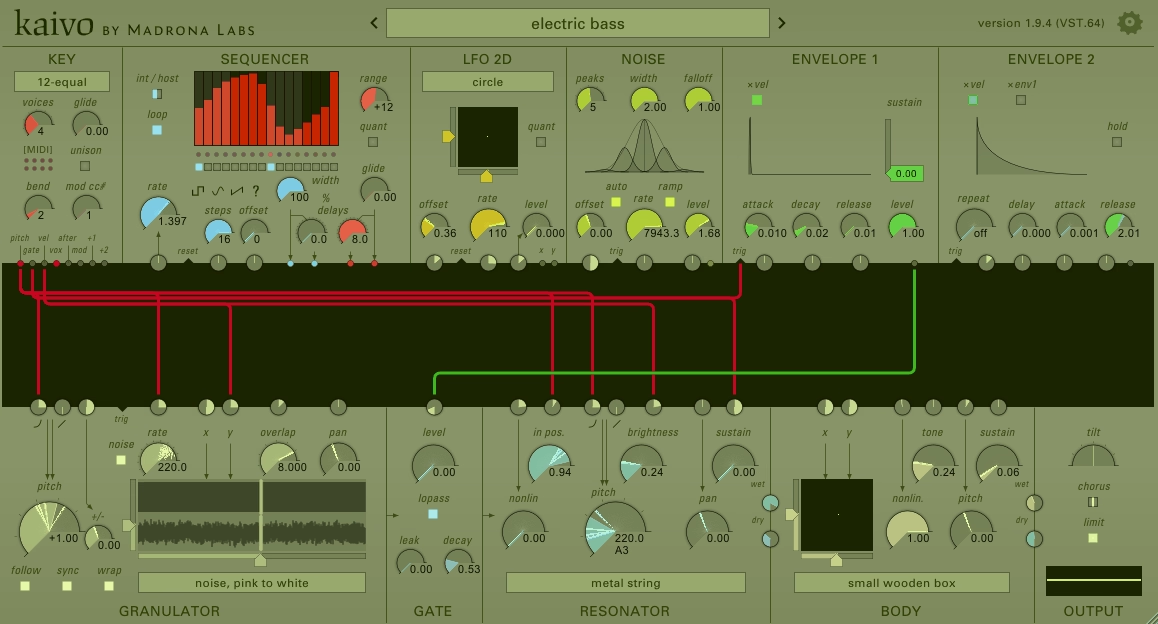
Kaivo from Mandrona Labs sits in a category by itself. It mixes granular synthesis with physical modeling in a semi-modular setup. You’re not working with traditional oscillators. Instead, you’re using sample grains to excite virtual resonators like metal strings, nylon strings, springs, or body models such as wooden boxes and metal plates.
The result is something that sits between acoustic realism and experimental sound design. I can build evolving textures, metallic drones, percussive hits, and atmospheric pads that feel alive. Because the physical models actually simulate how vibrations move through materials, every note behaves a little differently.
That subtle variation keeps sounds from feeling static or looped, which is perfect for ambient, cinematic, or experimental work.
Hybrid Granular + Physical Modeling Engine
Kaivo gives you 8 voices and a granulator that feeds into resonators and body models. You can run up to 16 grains per voice, with control over grain rate, pitch, position, and stereo panning.
The grain rate goes as high as 880 grains per second, so you can create dense textures or sharp percussive hits depending on how you set it.
What I love is how the resonators respond. They use finite-difference time domain simulation, which means the vibrations are modeled in real time. You can change where the string is plucked, how the body resonates, and how the pickup position affects tone. It’s not a sample playback trick. It’s actual behavior modeling, and you hear it in the movement and response of every sound.
Semi-Modular Patching with Deep Modulation
Kaivo’s patch matrix lets you route and modulate almost anything. The granulator, resonator, body, gate, and modulators can all be connected and shaped. Nearly every parameter can be modulated, including grain pitch, resonator position, body coupling, and filter envelopes.
I can assign LFOs, envelopes, or key tracking to multiple targets at once and build patches that shift over time without me touching a knob. The interface keeps modules organized so it doesn’t turn into a mess of virtual cables like some modular plugins do.
Spatial Sound Design & MPE Support
Kaivo handles stereo imaging really well. The granulator uses a 2D sound map with up to 4 channels, and you get per-grain panning plus separate body pickups. This creates wide, immersive soundscapes that work great for film scoring or ambient production.
Kaivo also supports MPE, so if you have an expressive MIDI controller, you can modulate resonator position, grain parameters, or body coupling per note. That opens up live performance possibilities and more human-feeling dynamics.
Kaivo runs natively on Apple Silicon and works on modern systems without issues. It’s $129, which is fair for what it does, especially if you’re after sounds you won’t find in standard subtractive or wavetable synths.
Freebies
1. Helm by Matt Tytel (Semi Modular)

Helm stands out because it’s completely free, open-source, and still packs enough routing and modulation power to feel semi-modular without overwhelming you. You also get a tons of presets. Helm free VST comes with 32-voice polyphony, a clean modulation system with visual feedback, and the freedom to route signals in ways that feel more open than a typical preset synth.
It runs on Windows, Mac, and Linux as VST/VST3/AU/LV2 or standalone, which makes it one of the most accessible synths out there. The character leans digital and raw, which works great for leads, aggressive basses, and experimental tones. If you want something harsh and edgy without spending a dime, Helm delivers.
- Dual Oscillators with Cross Modulation & Feedback
Helm gives you two oscillators with multiple waveforms, and you can route them to modulate each other’s phase or pitch. The feedback control lets you push the oscillators into harsher, more complex tones that feel alive and unpredictable. You also get a sub-oscillator and noise generator, so building full-bodied sounds from scratch is quick.
- Visual Modulation System with 3 Envelopes & LFOs
You get three envelopes and two monophonic LFOs plus one polyphonic LFO, and every modulation connection shows up visually on the interface. When you assign an LFO to filter cutoff, you see the line connecting them, which makes learning modular-style routing way easier.
I love this when experimenting because I can see exactly what’s controlling what without guessing or digging through menus.
- Step Sequencer & Arpeggiator Built In
It comes with 32-step sequencer and an arpeggiator with up to 4-octave range and multiple playback modes. Both tools feel integrated and responsive, so you can shape movement without reaching for external MIDI plugins.
- Multi-Mode Filters & Built-In Effects
Synth also offers multiple filter types including low-pass, band-pass, high-pass, and a formant filter that adds vowel-like tones to your sound. The built-in effects like distortion, delay, reverb, and a stutter glitch effect let you shape your sound inside the synth before it even hits your channel strip.
2. Sonigen Modular

It’s genuinely free modular software synthesizer that doesn’t hide anything behind presets or locked signal paths. You can patch audio and modulation however you want, just like working with hardware eurorack modules, except it’s completely free.
I’ve found Sonigen Modular useful when I want to experiment with routing that goes beyond what typical synths allow. The freedom here is real. You can build simple subtractive patches or create complex feedback loops and layered modulation that would be hard to pull off in fixed-architecture plugins.
The interface shows all your modules and cables in one window, which makes it easier to follow your signal flow compared to some modular plugins that spread everything across multiple tabs. Over 200 presets come included, so you’re not starting from scratch if patching cables feels overwhelming at first.
- True Modular Architecture With Full-Rate Processing
Sonigen Modular processes everything at full sample rate, which means your LFOs, envelopes, and other modulators run at audio rate instead of a slower control rate. This gives you more precision when you’re using modulation sources to shape sound.
You can patch almost anything into anything else: oscillators into filters, LFOs into oscillator inputs, envelopes into mixer channels. The routing flexibility matches what you’d expect from hardware modular systems.
- Integrated Voice and Effects Routing
Unlike many synths that separate your sound engine from your effects chain, Sonigen combines voice modules and FX modules in the same workspace. You can patch from oscillator to filter to reverb to delay without switching windows or tabs.
This keeps your workflow faster and more intuitive, especially when you’re building complex signal chains. The audio algorithms are high quality, and the plugin stays surprisingly efficient on CPU even when you’re using multiple modules and effects at once.
- Flexible Sound Design Capabilities
You can create bass patches, leads, pads, and experimental sounds depending on how you route your modules. The modular setup means you’re not locked into one style or sound. If you want clean, musical tones, you can build straightforward subtractive patches. If you’re after weird textures or ambient drones, you can layer modulation and feedback until you find something unique.
3. KBplugs 200 C

If you’re curious about West Coast-style synthesis but don’t want to spend hundreds of dollars, KBplugs 200 C gives you a real playground to experiment with. It’s not trying to be a perfect copy of vintage hardware, but it brings that modular thinking into a free plugin.
What grabbed my attention right away is how much you actually get inside this thing. You’re looking at 6 oscillators spread across 3 dual-oscillator modules, plus 2 quad envelope generators, dual random voltage sources, ring modulators, and a whole routing system that lets you patch things however you want. It’s like having a small modular case in your DAW, minus the patch cables and price tag.
The workflow takes some getting used to because you route everything through dropdown menus instead of dragging cables around. But once you get the hang of it, you can build sounds that go way beyond basic subtractive synthesis.
- Multiple Oscillator & FM Capabilities
Having 6 oscillators with FM inputs means you can stack complex tones or dive into FM-style sound design without needing a dedicated FM synth. Each oscillator can modulate another, which opens up tons of harmonic possibilities you won’t find in simpler synths.
- West Coast Modular Architecture
The plugin gives you dual ring modulators, dual band-pass filters, and quadrature low-pass/VCAs all in one package. This isn’t just about filters and envelopes. You can route random voltages into pitch or modulation, use ring mod for harsh metallic sounds, or shape things with multiple envelopes running at once. It’s designed for experimentation, not presets.
- Joystick-Style Control Module
One feature that sets this apart is the keyboard control module with 2D joystick emulation. It produces four separate control voltages based on up, down, left, and right movements from center. You can map these to pitch, filter cutoff, modulation depth, or anything else. It adds an expressive layer that feels more hands-on than just turning knobs.
- Dropdown Menu Patching System
Instead of cable spaghetti, you patch modules using dropdown menus at each input. It makes routing cleaner and easier to recall later, though it does lose some of the visual feedback you’d get from cable-based modular plugins. Still, it’s way more approachable if you’re new to modular concepts and want to learn without getting overwhelmed.
Keep in mind this is a 32-bit Windows VST only, so you’ll need a bridge if your DAW is 64-bit. Some users report loading issues in certain hosts, so compatibility can be hit or miss depending on your setup.
What Sets Modular Synth VST Plugins Apart?
Modular synth plugins give you complete control over your signal path by letting you route audio and modulation any way you want. Instead of fixed knobs and preset routing, you get to decide which modules connect to each other and how they interact.
Core Features of Modular Synthesis
The defining feature of modular synthesis is patching. You manually connect oscillators, filters, envelopes, and effects using virtual cables, just like hardware modular gear. This means you’re not stuck with the manufacturer’s idea of how a synth should work.
Most modular VST plugins include voltage-controlled oscillators (VCOs) that generate raw waveforms. You can route these through filters, shape them with envelopes, or send them directly to effects. The flexibility is massive.
Modulation routing is where things get interesting. You can use LFOs to control filter cutoff, envelopes to modulate oscillator pitch, or even send audio signals as modulation sources.
Another core element is the semi-modular approach some plugins take. These give you a default signal path so you can start making sounds immediately, but you can still override anything with custom patching. It’s perfect when you want quick results but need deep editing options.
Benefits for Music Producers
The biggest advantage is sound design freedom. You’re not limited to what presets offer or what the original designers thought you’d need. If you want to create a filter that opens based on velocity while simultaneously modulating reverb decay time, you just patch it that way.
Modular VST plugins teach you how synthesis actually works. When you manually connect an envelope to a VCA, you understand gain structure better than just turning a preset knob. This knowledge carries over to every other synth you use.
You also get unique textures that stand out in a mix. Because you’re building sounds from scratch with custom routing, your patches won’t sound like everyone else’s presets.
Tips for Getting the Most Out of Modular Synth VSTs
Modular synths give you incredible sound design freedom, but they can feel overwhelming without a clear approach. I’ve found that staying organized and embracing creative experimentation makes all the difference.
Workflow and Organization Strategies
Labeling your patch cables is the first thing I recommend when you start working with modular synth VSTs. When you’re routing 30+ virtual cables across oscillators, filters, and modulators, it’s easy to lose track of what’s controlling what.
Most modular plugins let you color-code or name your connections. I use red for audio signals, blue for modulation, and green for gates and triggers. This simple system saves me hours when I revisit old patches!
Save your patches frequently as you build them. I create versions like “bass_V1,” “bass_V2,” and so on. This way, I can backtrack if an experiment doesn’t work out. Some plugins automatically save your cable states, but many don’t, so I make it a habit to manually store presets every few minutes.
Start with templates for common setups. I keep a basic patch with one oscillator, one filter, one envelope, and one LFO already connected. This gives me a foundation I can build on without starting from scratch every time. For drums, I have another template with short envelopes and noise sources ready to go.
Creative Sound Design Ideas
Modulate everything you wouldn’t normally touch. I love sending LFOs to parameters like filter resonance, oscillator shape, or even the modulation amount itself. These unexpected movements create textures that sound alive and unpredictable.
Try cross-modulating between multiple oscillators. Route one oscillator’s output to control another oscillator’s pitch or waveform. This FM-style approach gets you metallic bells, growling basses, and weird digital tones you won’t find in standard subtractive synths.
Layer random sources with sequenced patterns. I’ll run a 16-step sequencer controlling pitch while a sample-and-hold module adds random filter movement. The combination feels musical but never static. It’s perfect for evolving pads or generative ambient beds.
Use audio-rate modulation on non-audio parameters. When you push an LFO from 5 Hz to 500 Hz and route it to filter cutoff, you get ring mod effects and harmonic distortion. I stumbled into some of my best lead sounds this way, completely by accident.

Hello, I’m Viliam, I started this audio plugin focused blog to keep you updated on the latest trends, news and everything plugin related. I’ll put the most emphasis on the topics covering best VST, AU and AAX plugins. If you find some great plugin suggestions for us to include on our site, feel free to let me know, so I can take a look!