I prepared for you the list of the 12 best multi effect plugins, ranging from simple one-knob motion tools to deep modular powerhouses for sound design, texture, and rhythmic movement. If you’re a bedroom producer looking to add movement, texture, and character to your tracks, these are a game changer.
Plugins like Baby Audio Transit 2 and RC-20 Retro Color bring motion and warmth instantly, while tools such as AIR Flavor Pro and CHEat Code let you experiment with modulation, filters, and distortion creatively.
Now, let’s dive in, starting with the first plugin:
1. Serato – Hex FX

Hex FX is a multi-effect plugin that adds movement and glitchy textures to your tracks without making things too complicated. When I use its effects chains on drums, synths, or vocals, my loops become more interesting right away.
You’ll probably like how the macro controls and sequencer patterns let you get usable results quickly, while there’s still room to dive deeper for more complex sound design. Combining filters, delays, and modulation creates evolving textures that can really bring a loop or drop to life.
Hex FX is flexible for live experimentation and precise enough to build polished, automated sequences.
- Quick Glitch and Movement Effects
With Hex FX, you can quickly add motion and texture to loops, synths, or vocals. Setting up and adjusting chains of delays, filters, and modulation is easy. It feels fast and intuitive to create rhythmic patterns without interrupting your workflow.
- Macro Controls for Playable Sound Design
The macro system lets you control several effects at once. You can try out different combinations of distortion, filters, and pitch shifts to create sounds that change over time. It stays flexible but simple, so you can get good results quickly.
- Sequencer Patterns and Tempo Sync
It has a built-in sequencer that keeps tempo with your DAW. You can create patterns for stutters, gates, or rhythmic modulations. This keeps your effects musical and consistent, whether you’re playing live or working in the studio.
- Flexible Routing and Live Performance
Also, you can use it on single tracks or buses, making it well-suited for both mixing and live setups. Its routing options and real-time controls let you make quick changes that fit your session, keeping your workflow smooth.
2. Kilohearts Multipass

This multi FX lets you shape your sound by splitting your track into several bands and applying effects to each one. I find it’s one of the simplest ways to make pads, vocals, or percussion sound more lively without making things complicated. You can use it to add a bit of color or go for more dramatic changes if your track calls for it.
The routing and modulation features are where it really shines because you can make sounds evolve over time and create movement that still feels natural. Try experimenting with different effects on each band and listen to how they interact, sometimes the most unexpected combinations are the best.
Multipass is flexible, so you can get good results quickly. Once you’re more comfortable, you can dig deeper and fine-tune each layer as much as you want.
- Multi-Band Effect Processing
Multipass splits your audio into multiple frequency bands, so you can apply different effects to lows, mids, and highs independently. You can fine-tune each band without affecting the rest of the track, which makes it easy to shape sounds or fix problematic areas.
- Flexible Effects Routing
You can change the order of effects or add different modules to each band. This lets you try out new signal paths and see how effects work together across the whole sound. It’s a fun way to experiment without messing up your mix.
- Modulation Made Simple
You can modulate each effect lane with envelopes, LFOs, or step sequencers. This makes it easy to add movement to filters, delays, or distortions over time. You can try out small or big changes without making your workflow harder.
- Integrated Snapins Ecosystem
Multipass works smoothly with other Kilohearts Snapins, so you can drag in Chorus, Distortion, EQ, or any other module you have. This can save you time since you don’t need to open extra plugin windows to create complex effects.
- Presets and Quick Start
There are built-in presets for pads, drums, and leads, making it easy to get results fast. You can tweak them as you go or use them as inspiration for your own chains. It’s helpful if you need something usable quickly during a session.
- Real-Time Visual Feedback
Each band displays gain, signal, and modulation activity in real time. You can watch how your effects interact, which helps you understand what’s happening with your sound. This is useful for learning and making precise changes.
- Creative Sound Design Flexibility
Multipass works whether you want a gentle texture or bold experimental effects. You can stack several effects on each band, automate settings, and create sounds that change over time. It’s a tool that makes it easy to try new ideas without getting overwhelmed.
3. Baby Audio Transit 2

Transit 2 by Baby Audio lets you sync effects to your DAW’s tempo, so loops, synths, or vocals instantly feel more dynamic. It’s easy to adjust the mix and depth, and it’s rewarding to hear your tracks come to life with just a few tweaks.
Try experimenting with the modulation controls or animating effects further once you get comfortable. This multi FX VST lets you stay creative while keeping your workflow simple.
You can stack different effects or automate parameters to build evolving textures. This makes even simple, repetitive loops sound more interesting.
Transit 2 is great for adding energy, subtle movement, or bold character to your tracks without being too much. It’s a reliable plugin whenever you want to add musical motion.
- Instant Movement
Just add Transit 2 to any loop or synth, and you’ll hear instant movement.
- Tempo-Synced Effects
Delays, filters, and modulation all follow your DAW’s tempo, so everything stays in rhythm without you having to adjust anything.
- Flexible Depth and Mix
Control how subtle or extreme the effect is. You might barely touch it for gentle motion or crank it up to reshape a loop entirely. I’ve found that even small tweaks can dramatically change the feel of a track.
- Advanced LFO Assignment
Assign LFOs or modulation curves to nearly every parameter. This lets you create evolving textures that morph over time. In my opinion, this is where Transit 2 really becomes a creative tool rather than just a plugin.
- Stackable Effects Library
You can freely layer filters, phasers, distortions, and delays. It’s fun to try new combinations, and the plugin keeps things musical even when you push the settings.
- Automation Ready
You can automate every control in your DAW, so you can program changes over time without always adjusting things by hand. This makes it feel like the plugin is working with your track.
4. RC-20 Retro Color
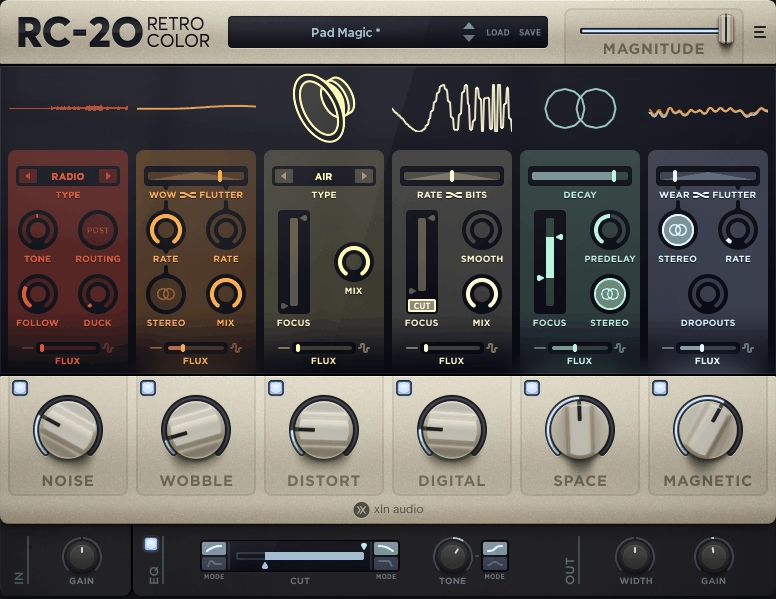
RC-20 Retro Color quickly adds warmth and character to your tracks. You can layer in noise, wobble, or distortion to bring more life to drums, vocals, or synths. Even small changes can make your track stand out in the mix.
Adjust each module one by one to find what works best for your track. Retro Color by XLN Audio is easy to use and gets quick results, but it also lets you dig deeper and experiment with creative textures.
- Instant Dimension
Quickly add depth and space to any track.
- Layered Effects Playground
Combine distortion, delay, reverb, modulation, and filtering all in one place. This lets you try out anything from gentle warmth to bold textures. I especially enjoy automating the settings over time to create evolving sounds that stay under control, so I end up using it in almost every project.
- Flexible Modulation
You can modulate almost anything. LFOs, envelopes, and step sequencers can be assigned to things like filter cutoff, drive, delay time, or reverb mix. You might spend hours finding small tweaks that completely change a loop.
- Macros for Quick Tweaks
Control big changes or small tweaks with just one macro knob. It’s easy to use for live jams, but also detailed enough for precise studio work.
- Realtime Feedback
The visual feedback clearly shows what each effect is doing, so you can avoid over-processing your mix.
- Preset System for Fast Inspiration
There are hundreds of presets included, and you can save your own too. Even if you don’t use them as they are, they’re helpful for seeing how complex effect chains are built.
- Seamless DAW Integration
Since it supports VST, AU, and AAX, you can use it on almost any project. It also uses very little CPU, so it works well even in large sessions with lots of tracks.
5. Devious Machines Infilatrator

You can quickly shape and change your sounds in a fun way. Devious Machines Infiltrator works on loops, synths, or even whole buses, letting you add movement right away with rhythmic gates, filters, and effects.
The modulation and step sequencing features can make static sounds come alive, and they are quick to set up.
You get tools to create rhythmic textures, glitchy details, or gentle movement, all with a playful but precise feel. Almost anything can be automated, so you can add layers and complexity without digging through menus.
- Instant Multi-Effects
Add it to any track and quickly get layered effects.
- Sequenced Modulation Chaos
The plugin includes step sequencers for filters, pitch, delay, distortion, and more. The best part is seeing patterns change as you adjust each step. It feels a bit like playing a small instrument. You can automate settings, sync sequences to the tempo, or randomize effects for unexpected results.
This tool can make a static loop feel lively without lots of manual editing, and it often sparks new ideas when you need inspiration.
- Flexible Routing
Effects chains can be reordered or split in ways that suit your track.
- Live Playability
It works well during live performances. Even small changes in real time can totally change the feel of a loop or synth line.
- Preset Library for Inspiration
There are hundreds of presets to help you get started with sound design. You might spend weeks just exploring all the options.
6. AIR Flavor Pro

Flavor Pro is a plugin I use often when I want to quickly add something extra to a sound. You can put it on synths, drums, or even a whole mix and start stacking effects like delay, reverb, distortion, and modulation without having to think too much.
You’ll probably like how easy it is to blend effects together while keeping control over intensity, mix, and tone. I think the modulation sources are where it gets really fun because you can create evolving textures or automate parameters to make repetitive loops more interesting.
It’s satisfying to hear your tracks get more energy without making the mix too crowded.
Flavor Pro is great for adding polish, movement, or a bit of experimental character. I find it easy to use, so you can keep creating without getting stuck on the interface.
- Instant Texture Boost
Put it on any instrument or mix and you’ll notice it adds character right away.
- Layered Effects Control
With Flavor Pro, you can mix distortion, reverb, delay, and modulation in lots of different ways. What stands out to me is how you can fine-tune each effect and still keep the sound balanced.
You can automate settings, adjust the mix, or change the depth to create evolving textures that still sound musical. It feels like a playground where you can try bold ideas without messing up your track.
- Real-Time Modulation
LFOs, envelopes, and tempo-synced modulation respond right away. Even small changes can really change the feel of a sound, and sometimes just a little tweak is enough to make loops, pads, or drums stand out.
- Presets for Fast Inspiration
There are hundreds of well-made presets for different genres. You can try out ideas quickly and even mix presets together to make new effects without having to build them from the ground up.
- Creative Randomization
When you hit the random button, you get some surprising but useful results. I’ve found that even combinations that seem chaotic at first can actually bring new life to tracks in unexpected ways.
7. Beatsurfing CHEat Code

You can shape your sounds quickly and keep everything sounding clean.
You can stack effects, run them side by side, or blend them to make rich textures without making things complicated. I think the modular setup with 16 engines gives you plenty of space to try new ideas while staying in control.
The performance widgets and macros are useful for live changes or automating your mix. This tool helps you try out rhythmic glitches, granular sounds, and gentle modulation without slowing you down. CHEat Code stands out when you want your loops, synths, or drums to sound lively but still have full control over your mix.
- Dynamic Motion Sequencer
The motion sequencer brings effects to life in real time, so you can build changing rhythmic patterns that transform a loop or synth line in just a few bars. You can set up several steps in each lane, choose the direction, randomize some settings, and even sync lanes to different beats.
You can use it for gentle movement or go for wild, unpredictable changes, but it always sounds musical. You can focus on one lane and adjust the curves while the rest keeps running, just to see how it fits with my mix. This often leads to new textures you wouldn’t have come up with otherwise.
- Tempo Synced Effects
Everything in MOTIONS automatically follows your DAW tempo. Delays, modulations, and filter sweeps stay perfectly in time even if you speed up or slow down your project. This makes it much easier to experiment with complex patterns without losing rhythm.
You can also adjust the grid resolution per effect so slower movements sit nicely underneath fast paced sequences. It’s like the plugin adapts to the track rather than forcing you to fight with it.
- Short and Precise Macro Knobs
Macros let you adjust several settings with just one knob. It’s quick, simple, and works well.
- Multi-Effect Layering
You can combine distortion, reverb, filter, and modulation simultaneously. Small adjustments can completely change a track’s perceived energy, making even basic loops feel alive!
8. Arturia Efx MOTIONS

Efx MOTIONS is a multi-effects plugin that helps you add movement and life to any sound without needing a complex setup. I’ve tried it on loops and synths, and it quickly adds energy without sounding too much.
You can use it to add rhythmic delays, filtered sweeps, and modulation effects to loops, synths, or vocals. It automatically matches your DAW’s tempo.
It makes repetitive parts sound more dynamic but still musical. Try using the motion sequencer and layering effects, you might find new patterns that make your sounds stand out and change over time.
MOTIONS gives you control over tempo-synced effects, LFOs, and modulation, so you can shape your sounds as you work. You can make each effect as subtle or bold as you want, which helps you stay creative without making things too complicated.
- Comprehensive Motion Sequencer
The motion sequencer is the main feature of MOTIONS. It lets you animate delays, filters, modulation, and other effects as you go. You can set up multiple steps, change timing, invert sequences, randomize settings, and sync everything to your DAW’s tempo.
I like to tweak one lane at a time to see how it changes the whole sequence. This often leads to new, evolving textures I didn’t expect. With this much control, you can create anything from gentle movement to wild patterns, all while staying in sync.
- Tempo Sync
Effects follow your project’s tempo, so delays and modulations always stay in time.
- Multi-Effect Layering
You can combine distortion, reverb, filter, and modulation to make your sounds richer. Even small changes can completely change the feel of a loop.
9. Excite Audio Lifeline Console

Having a hands-on multi-effect setup can make your tracks sound much more lively. With Lifeline Console, you can easily add it to your mix, drums, or synths and start blending saturation, EQ, and modulation however you like.
You’ll quickly notice how easy it is to adjust the settings and hear changes in your sound right away.
If you route different effects to separate channels and adjust the dynamics, it feels like using a small hardware console inside your DAW. Lifeline Console can add a gentle polish or let you get creative with bold, colorful processing.
You can experiment as much as you want without worrying about messing up your mix. This makes it a great tool for finishing tracks or testing out new ideas.
- Multi-Stage Processing
With Lifeline Console, you can chain EQ, compression, saturation, and stereo imaging all in one place. I often adjust several stages to shape my sounds, and it’s easy to get a balanced mix without switching between different plugins.
- Intuitive Console Workflow
The layout looks like a hardware console, so it’s quick to set up settings for each track or bus. It feels natural to use and helps me spend less time adjusting things.
- Dynamic Saturation
You can add warmth or grit to your instruments and mixes. Even small adjustments can make a track sound more lively, punchy, and interesting.
- Flexible Routing & Presets
You can route audio in different ways, making it easy to use parallel compression or sidechain processing for more complex effects. The presets also offer a range of templates, so starting a new project is quick and simple.
10. Sugar Bytes Effectrix 2
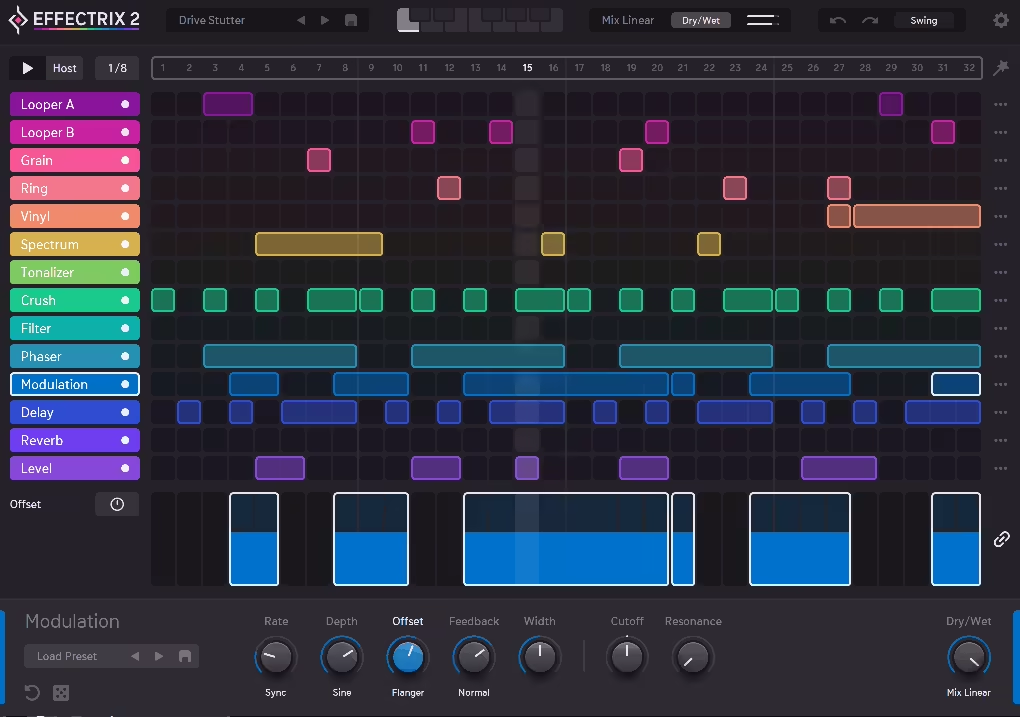
Effectrix 2 is a simple way to add rhythmic and glitchy effects to your loops. Just load it onto drums, synths, or vocal chops, then use the grid to sequence effects like stutter, reverse, and filter sweeps. The interface is visual and straightforward, so you can always see what’s going on.
Build a pattern over a few bars and layer different effects to create something lively and evolving. Effectrix 2 is great for making breakdowns, fills, or transitions more interesting while keeping control of your sound. You can experiment with rhythms and still stay precise for mixing.
- Step Sequencer Effects
With Effectrix 2, you can sequence several effects on a timeline with a lot of control. I like to set up different effects for each beat, creating stutters, scratches, and filter sweeps that evolve as the track progresses. It’s like choreographing the rhythm of a loop without needing automation lanes.
- Extensive Effect Palette
You can pick from delays, filters, reverses, vinyl effects, and more. Mixing them in new ways often creates sounds you wouldn’t expect from just one plugin.
- Real-Time Pattern Editing
Draw, move, and resize effect blocks right on the timeline, so you can experiment without stopping the music. The workflow is so intuitive that you might try out ideas you hadn’t thought of before.
11. Tracktion Dawesome LOVE

This plugin lets you quickly create complex textures. You can add effects to entire tracks and use its modulation and routing to make evolving sounds that still sound musical.
You’ll likely enjoy how flexible Dawesome LOVE is as you adjust delay, filter, distortion, and intensity to shape your sound. Try automating settings or using tempo-synced modulation; you might find some surprising results.
From my experience, LOVE is easy to use for quick results, but it also has enough depth for creative sound design. You can add energy and character to your tracks while keeping your workflow simple, so your music stands out without getting too complicated.
- Multi-Layer Effects Chains
With LOVE, you can stack several effects in complex chains and still keep things manageable. You can send audio through filters, delays, distortion, and modulation simultaneously. I find this makes it easy to create evolving, organic textures and gives you the freedom to experiment without complicating your session.
- Creative Modulation Matrix
The modulation system lets you assign LFOs, envelopes, or step sequencers to almost any parameter. I find it rewarding to see subtle changes happen in real time, especially on pads and synths, so each take feels a bit different.
- Tempo-Synced Effects
Delays, LFOs, and sequencers automatically match your project tempo, so your rhythms stay tight and consistent.
12. Plugin Alliance Unfiltered Audio TRIAD

TRIAD multi-effect plugin gives you a simple way to combine and shape multiple effects in one plugin without overcomplicating your mix. You can stack distortion, modulation, and filtering on drums, synths, or even full tracks and tweak them independently to get the tone you want.
You can quickly adjust the three effect chains and hear the changes right away. Experiment with parallel routing or modulate parameters over time to turn static loops into more dynamic sounds.
TRIAD is flexible, so you can go for subtle changes or bold effects, depending on your track. It keeps your workflow simple while you explore creative sound design, making it great for both finishing tracks and trying out new textures.
- Ultra-Flexible Routing
With TRIAD, you can route signals through different effect chains in any order, giving you full control over your sound.
- Modular Effect Engines
Pick from modules like distortion, modulation, filtering, and delay, and stack them in any way you like.
- Macro Control
You can assign several parameters to one macro knob, making it easy to create quick and expressive changes.
- Intuitive Presets & Deep Modulation Options
Load presets made by professionals or adjust them to fit your mix right away. You can also connect modulators to almost any parameter, so you can create evolving textures or rhythmic changes that keep your track interesting.

Hello, I’m Viliam, I started this audio plugin focused blog to keep you updated on the latest trends, news and everything plugin related. I’ll put the most emphasis on the topics covering best VST, AU and AAX plugins. If you find some great plugin suggestions for us to include on our site, feel free to let me know, so I can take a look!