
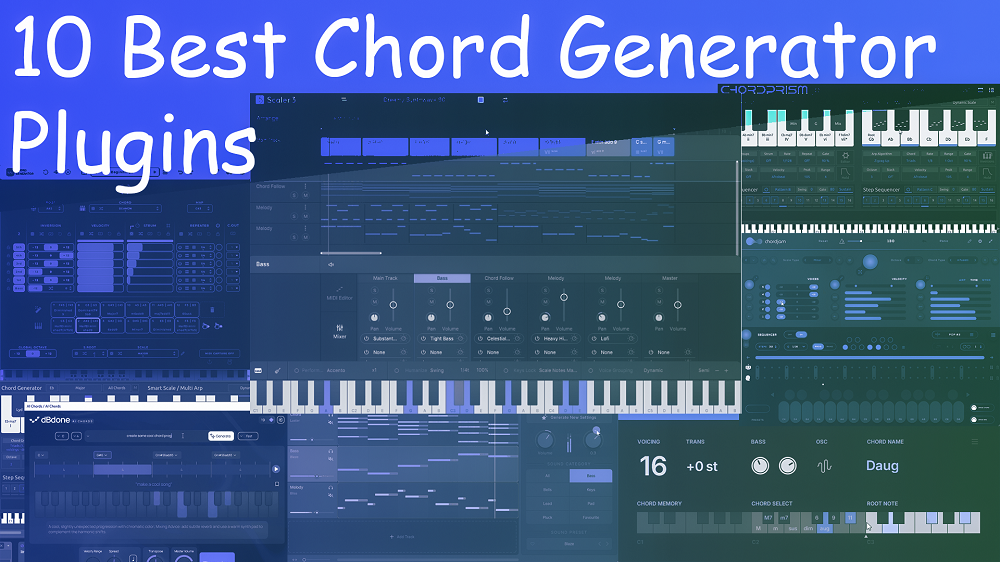
It can be tough to come up with chord progressions, especially when you’re looking at an empty DAW project. If you’ve ever searched for what is the best chord progression generator plugin, you’re not alone. It’s one of the most common questions among producers trying to break out of creative ruts. The right chord progression plugin can make songwriting easier by giving you quick inspiration and musical ideas that fit your style.
These tools help both new and experienced producers get past creative blocks and find fresh harmonic ideas. I’ve tried out different chord progression plugins to find the ones that really help with music production. Some use AI to suggest chords, while others let you control the musical details yourself.
The plugins I’ll talk about include both simple chord generators and full-featured harmonic workstations that can change how you create music. I’ve tested them to see how they handle voice leading and harmonic extensions, making sure they give you real musical ideas instead of just technically correct notes.
If you just want the quick answer, Scaler 3 is the best chord plugin overall, but the right choice really depends on your workflow and how much control you want.
1. PluginBoutique Scaler 3

Scaler 3 from PluginBoutique is a big step up for chord progression tools. It has changed the way I work with harmony in my music, giving me new ideas and more control.
What sets this chord generator plugin apart is the seamless blend of music-theory guidance and hands-on experimentation. The plugin hosting feature means I can now use Scaler as a complete composition environment, not just a chord generator.
For most producers, it’s simply the best chord plugin available right now, and it’s hard to argue against it once you see what it can do.
Here’s what Scaler 3 offers:
- Audio and MIDI Detection Engine
When I add audio or play MIDI in Scaler 3, it quickly finds the key and scale. It works with anything from simple vocals to complex chords. I get instant chord suggestions that fit well, and the accuracy has impressed me no matter the genre or sound quality.
- Expanded Chord Set Library
Scaler 3 has hundreds of chord progressions sorted by mood, artist, and genre. I can explore jazz, cinematic, or pop chords, each with different versions and suggested changes. The artist collections have helped me try new harmonic ideas I might not have found on my own.
- Built-in Plugin Hosting
With VST/AU hosting, I can load my favorite synths and effects right inside Scaler 3. I can play several instruments at once and build full tracks without leaving the plugin. This has made my workflow much faster since I can do everything in one spot.
- Multi-Track Timeline Sequencer
The new timeline view allows me to build complex arrangements with multiple chord parts. I can layer different voicings, create bass lines, and add melodic elements, all synchronized to the main progression. Each track can host different instruments and effects, making it feel like a mini DAW focused on harmonic composition.
If you’re wondering how LANDR Composer vs Scaler 3 stacks up, the next entry gives you a direct sense of where each one shines.
2. EVAbeat Melody Sauce 3
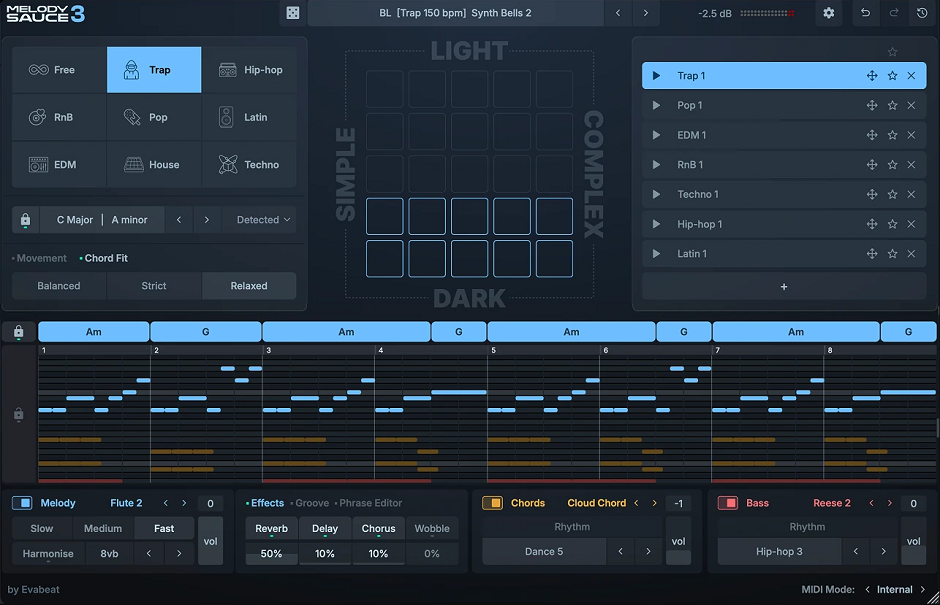
Melody Sauce 3 is trusted by 50,000+ producers and is one of the most popular MIDI generation plugins out there. The latest version (released in early 2026) is a massive upgrade that brings chord progressions and bass lines into what was previously a melody-only plugin, making it a complete musical idea generator.
The big new feature in MS3 is chord progression generation with nearly 1,000 built-in progressions across 9 genres. The progressions are fully editable with expanded chord types (Maj9, sus2, Dim7, etc.), so you’re not stuck with whatever the algorithm gives you.
This is what transforms it from a melody tool into a complete songwriting starting point.
- AI-Powered Melody Generation
The melody algorithms are AI-powered and create a unique melody every time you click a generator pad. MS3 melodies are now 8 bars long (twice the length of MS2), with more natural, flowing melodic lines. Drag the MIDI directly into your DAW or tweak it inside the plugin’s piano roll editor.
- Chord & Bass Rhythm Layers
Chord progressions play via dedicated chord and bass layers with their own internal sounds and rhythms. You get 140+ chord and bass rhythms to choose from, so you can quickly find a groove that matches your track’s energy without having to manually program every part.
- MIDI Import with Chord Detection
This is a great workflow feature: drag a MIDI chord file into MS3 and it automatically detects the key and chords, then generates melodies that match. So if you already have a chord progression in your project, you can use MS3 just for melody generation over your existing harmony.
- 350 Style Presets + 300 Sounds
You get 350 all-new style presets for instant inspiration, a style randomizer for quick exploration, and over 300 internal sounds across melody, chords, and bass. The built-in FX (including a new “Wobble” effect) means you can audition ideas without immediately committing to specific sounds.
3. Pitch Innovations Fluid Chords 2
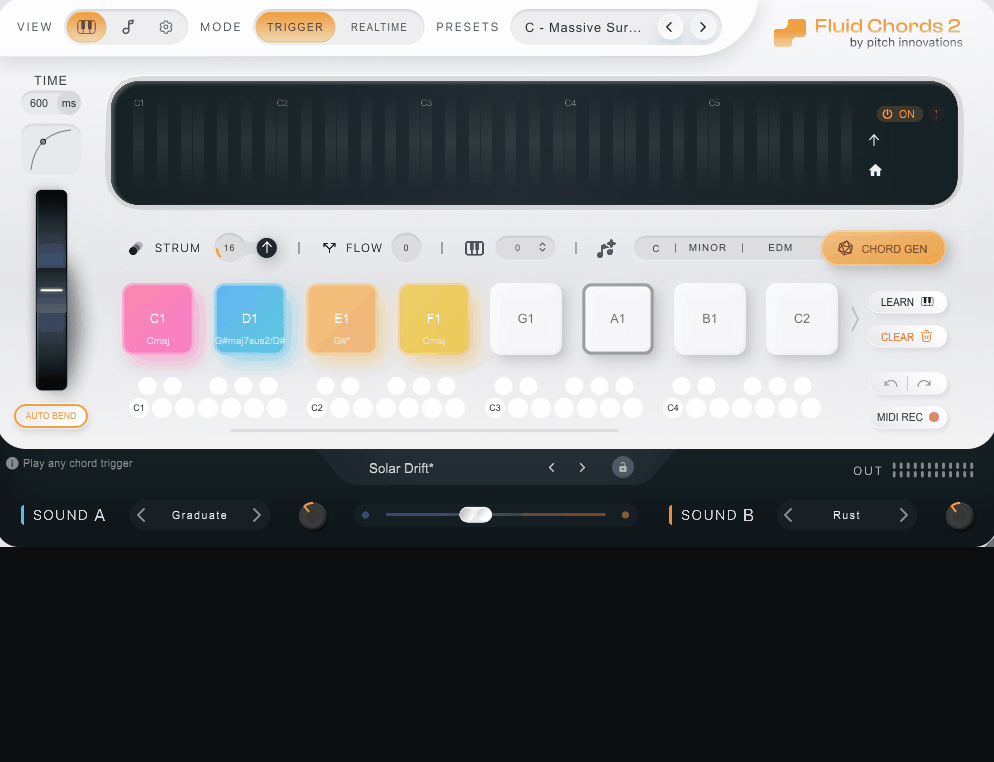
Fluid Chords 2 is a MIDI Innovation Award winner and one of the most genuinely unique chord plugins on the market. Where most chord plugins are about generating progressions, Fluid Chords 2 is about bending between chords in real-time, which gives you harmonic movement that’s basically impossible to do on a regular keyboard.
The core feature is chord bending in real-time: bend from any chord to any other chord, from a single note to a full chord, with smooth, musical transitions. With the new Real-Time Mode, you can bend chords on the fly with just your MIDI controller (no sustain pedal needed).
This is genuinely a sound you can’t get from any other plugin.
- Intelligent Harmony Engine
The Harmony Engine generates fresh chord progressions instantly based on your chosen key and genre. You get 16 chord slots (up from 8 in the original), which can be triggered with single key presses on your MIDI controller, and you can set up keyboard splits to play melodies with the opposite hand.
- Voice-Leading Engine + Strum + Flow
The new voice-leading engine ensures musical bends every time, while Strum mode bends each note one after the other for a natural, expressive feel. Flow mode lets you control how chords resolve, either close together, spread further apart, or crossing each other in unusual ways.
This level of control over chord transitions is what makes Fluid Chords 2 a genuine sound design tool.
- Built-In Hybrid Sound Engine
Fluid Chords 2 includes a hybrid sound engine with a Wavetable Synth and MPE Sampler built in, so you don’t need an external MPE synth to use it. You can blend organic and synthesised textures, plus use the built-in Pumper, Reverb, Delay, and Compressor effects for studio-ready tones out of the box.
- MPE VST Hosting
If you’d rather use your own sounds, Fluid Chords 2 can host third-party MPE-compatible VSTs directly inside the plugin, or you can drag and drop chord progressions as MIDI into your DAW. The plugin auto-maps each chord to a trigger key, which is a major workflow win.
4. LANDR Composer

This AI-powered chord progression generator stands out as a solid Scaler 3 alternative because it mixes automation with hands-on control. In the LANDR Composer vs Scaler 3 debate, LANDR wins on speed and mood-based generation, while Scaler holds the edge for deep theory control. Rather than giving me random progressions, it creates musical ideas that match the mood and style I pick.
What I really appreciate about LANDR Composer plugin is how it balances AI assistance with manual editing. I can generate something instantly but still tweak every note if needed. That said, this is what you get:
- AI-Generated Musical Ideas Based on Mood
I can choose moods like “dark,” “uplifting,” or “dreamy,” and the plugin gives me chord progressions that fit those feelings. The AI looks at chord quality, movement, and tension, so the results feel purposeful, not random.
- Built-in MIDI Editor
Everything happens inside the plugin. I can move notes around, change timing, adjust velocity, and delete or add notes without switching to my DAW’s piano roll. This keeps my workflow smooth and focused.
- Instant MIDI Export
Once I create something I like, I can drag it right onto a MIDI track. There are no complicated steps, and it works with any VST instrument I use.
- Style-Based Presets
The plugin comes with presets for modern genres like trap, EDM, pop, and lofi. These change chord density, rhythm, and melody, so my ideas already match the style I want.
5. Mozaic Beats ChordPrism 2

Instead of only offering chord presets, ChordPrism 2 acts as a full harmony workstation and a capable Scaler 3 alternative. You can build chords, melodies, basslines, and arpeggios that all fit together smoothly.
The plugin runs on what I call ‘musical intelligence’, so everything you create stays harmonically connected. When you change a chord, the melody adapts and when you shift the key, the bassline follows. That cohesion is exactly what makes the ChordPrism 2 vs Scaler 3 debate so interesting, since both aim for harmonic unity but take very different approaches to get there
Key Features:
- Instance Sync Technology
Multiple plugin instances automatically share key, scale, and chord data across your project. I can run one for chords, another for melody, and a third for bass. They all stay in sync without any extra setup.
- Smart Chord Builder with Voicing Control
The chord engine does much more than just basic triads. I can make complex voicings, add extensions, control inversions, and try out different spread patterns. The plugin keeps everything sounding musical.
- Integrated Melody Generator
This melody system understands chord tones and scale relationships. When I build a chord progression, the melody generator creates lines that fit the harmony, not just random notes in the key
With ChordPrism 2.1, you can drop any MIDI file into the plugin and turn it into playable presets. I can take existing chord progressions and quickly make them into templates I can customize.
- Velocity Matrix for Human Expression
The new velocity matrix lets me add realistic dynamics and timing changes to patterns. This makes programmed parts sound more like real performances instead of stiff sequences.
6. Audiomodern CHORDJAM

CHORDJAM is a chord generator plugin from Audiomodern that feels like a creative playground and a fresh Scaler 3 alternative with a modern look. What makes it stand out is its smart randomization. Instead of random results that don’t fit, it uses controlled randomness to build chord progressions that sound good together.
I like how it mixes unpredictability with musicality. You can steer the randomization but still get results that surprise you. For producers who want creative freedom over strict theory, it might just be the best chord plugin in their setup.
Key Features:
- User-Guided Randomization
This is CHORDJAM’s main feature. I can choose things like scale types and chord voicings, then let the plugin come up with unique progressions within those limits. It feels like working with a creative partner who brings up ideas I might not think of myself.
- Intuitive Interface Design
The plugin has one of the cleanest and most stylish interfaces I’ve seen. Everything is organized and easy to find, so I can focus on making music instead of searching through menus.
- Built-in Sequencer
CHORDJAM comes with a strong sequencer that can make endless progression patterns. I can set the rhythm and let it build complex sequences that fit well with my tracks.
- Multiple Scale and Chord Types
The plugin has different scale types and chord voicings. This lets me work in many musical styles and still enjoy the benefits of guided randomization.
7. dBdone AI Chords

dBdone AI Chords uses artificial intelligence to generate chord progressions in real time, making it a strong answer to the question of what is the best chord progression generator plugin for producers who want speed and creative control together. I found it especially useful for getting past creative blocks and coming up with new harmonic ideas fast.
With this plugin, I choose a key and mood, and it generates chord progressions that fit what I want. What really sets it apart is how much I can customize everything after the AI creates the chords.
Key Features:
- AI-Powered Instant Generation
I just pick a key and describe the mood I want, and the plugin quickly creates several chord progressions. The AI recognizes different emotions and makes progressions that sound musical, not random.
- Mood-Based Customization
The plugin has mood settings like dark, uplifting, emotional, and dramatic. Each one changes how the AI picks chord types, extensions, and movements to match the vibe I want.
- Editable Chord Voicings
Once the AI makes a progression, I can change the voicings, add things like 7ths and 9ths, and adjust inversions. This gives me fast results but still lets me control the final sound.
- Direct MIDI Export
The plugin lets me drag progressions right into my DAW or send the output to any software instrument in real time. Everything stays in sync with my project tempo.
- Multiple Progression Variations
dBdone can make several versions of the same progression, so I have different options to try. This helps me find the right chords for each part of my songs.
8. Pentacom ChordBloom

ChordBloom stood out to me because it uses a unique method for generating chords. Rather than using preset progressions or complicated menus, it turns your keyboard into an easy-to-use chord controller.
The plugin divides your keyboard into two sections. Keys from C2 to B2 let you pick the chord type, and keys from C3 upward play the chords using your chosen root note.
Key Features:
- Split-Zone Keyboard Control
I like how ChordBloom splits the keyboard into different areas. The lower octave lets me pick major, minor, diminished, or augmented chords right away. After that, I press any key from C3 up to play that chord type with the root note I want.
- Chord Extensions via Black Keys
The black keys in the lower section add chord extensions like 7ths, 9ths, and 11ths. For example, pressing C#2 gives me a major 7th, and F#2 adds a 9th. This way, I can play complex jazz chords without needing to remember all the theory.
- Chord Memory System
ChordBloom lets me save my favorite chord voicings to the lowest octave, from C1 to B1. When I’m writing songs, I can store cool progressions and bring them back with just one key press. This really helps me work faster.
- Voicing and Bass Controls
The voicing parameter spreads chord notes across different octaves, while bass controls adjust the low-end presence. I can make chords sound tight and clustered or wide and spacious, depending on my track’s needs.
9. Tonespace by Mucoder

Tonespace is a free chord generator plugin and visualizer that approaches harmony in a new way. Rather than using piano rolls or standard interfaces, it shows chords on an interactive grid, so you can watch musical relationships take shape.
This is especially helpful because it turns abstract music theory ideas into something clear and easy to understand. As a free chord generator VST, it offers great depth that can compete with some of the paid plugins.
You can use the plugin as a VST, AU, or on its own. It lets you trigger chords with single MIDI notes or explore them by moving your mouse around the grid.
Key Features:
- Visual Grid Interface
I really like that Tonespace shows chords on a geometric grid instead of a piano keyboard. Each cell is a different chord, and when you hover over them, you can see how they fit with your chosen scale and key.
The grid makes it easy to find chord progressions that sound good together since related chords are grouped close to each other.
- Massive Chord and Scale Library
The plugin comes with 39 chord types and 25 voicings or inversions. It supports 21 scales in 18 keys, and there are 50 grid layouts. This gives me lots of ways to try out everything from simple major progressions to complex jazz harmonies or unusual scales.
- MIDI Input and Output Capabilities
I can send single notes to Tonespace with MIDI, and it plays the matching chord from my chosen grid. The plugin sends out full MIDI chord data, which I can use with any synthesizer. This is great for live shows or recording chord progressions straight into my DAW.
- Smart Scale-Fitting Algorithm
Tonespace automatically matches chords to your chosen scale, so you won’t play notes that clash by mistake. This helps me stay in key but still lets me try out different chord sounds and progressions.
10. Harvest Mini

I was drawn to a free MIDI generator that helps create musical ideas using controlled randomness. With Harvest Mini, I can pick a scale, tap out a rhythm, and let it come up with chord progressions, melodies, or drum patterns that sound good.
The plugin works by letting me lock the notes I like while re-rolling the rest. This means I can keep the good parts and explore variations without having to start over each time.
Key Features:
- Scale-Based Generation
I can pick from preset scales, so all the MIDI it creates fits together musically. This keeps things organized and makes sure the results work well in my projects.
- Custom Rhythm Tapping
The plugin lets me tap out my own rhythms with mouse clicks or a MIDI controller. This rhythm sets the timing for the notes, so I have control over the groove.
- Lock and Re-roll System
Once I have a sequence, I can lock the notes I like and only change the others. This helps me improve my ideas without losing the parts that work.
- Randomization Controls
I can adjust the chance of rests appearing, vary note lengths, and control how much randomness affects the output. These settings help make the generated MIDI feel more natural and less robotic.
- MIDI Output Integration
The plugin works as a MIDI FX in my DAW, sending generated sequences to any instrument I choose. This makes it easy to quickly audition ideas with different sounds.
Extra: Mario Nieto World Chord Generator

This MIDI plugin helps you create chords in real time, adding variety and musical surprises. Instead of making things complicated, it gives you an easy-to-use interface so you can make harmonies that sound new and unexpected.
Chord Generator VST stands out because of how it handles chord variation. Every time you trigger a chord, it creates a new voicing and rhythm, so your progressions always sound natural and fresh.
Features:
- Real-Time MIDI Chord Generation
You can play complex chords right away using your MIDI keyboard or mouse. The plugin responds instantly, which makes it great for jamming or live shows. Each chord sounds musical and expressive, not stiff or robotic.
- 57 Scales and Modes Library
The plugin offers more than just major and minor scales. You get access to unique modes, world music scales, and different harmonic colors. This range lets you try out new musical ideas you might not explore otherwise.
- Intelligent Chord Variations
Each time you press a pad, the plugin changes the voicing, timing, and notes a little. This keeps your progressions interesting and avoids the repetitive “copy-paste” sound you get with other chord tools.
- Customizable Voicings and Inversions
You can change how chords are voiced and spread out on the keyboard. The plugin lets you choose tight clusters for tension or wide spreads for a more open sound, giving you full control over the harmony.
- Retrigger Mode for Fresh Ideas
This feature keeps making new chord variations as you play. It feels like having a creative partner who offers new harmonic ideas in real time, helping your music go in new directions.
Frequently Asked Questions:
Do chord progressions have to be in the same key?
No, chord progressions don't have to stay in one key. Borrowing chords from a parallel or related key is called modal interchange and it's used constantly in pop, jazz, and film scoring to add emotional color. Key changes within a song are also common. The only rule is that it has to sound intentional.
Do chord progressions change in a song?
Yes, most songs use different chord progressions for different sections. A verse might use one set of chords while the chorus shifts to another to create contrast and emotional lift. Bridges often introduce new chords to break up repetition while some simpler songs do loop the same progression all the way.
Can chord progressions be copyrighted?
No, chord progressions on their own cannot be copyrighted. They are considered basic musical building blocks and countless hit songs share the same ones, but what can be copyrighted is a specific combination of melody, rhythm, lyrics, and arrangement. Using the same four chords as a hit song is legal.
Why do my chord progressions sound bad?
Usually it comes down to voice leading, which is how smoothly one chord moves to the next. If notes jump around too much between chords the progression sounds choppy and disconnected. Try keeping common tones in place and moving the other notes by the smallest interval possible to smooth things out.
Why do major chords sound happy?
Major chords sound happy because of the wider interval between their root and third, called a major third, which spans four semitones. This creates a bright, open quality our brains associate with positive emotions. Minor chords use a smaller three-semitone gap that sounds darker and more melancholic.

Hello, I’m Viliam, I started this audio plugin focused blog to keep you updated on the latest trends, news and everything plugin related. I’ll put the most emphasis on the topics covering best VST, AU and AAX plugins. If you find some great plugin suggestions for us to include on our site, feel free to let me know, so I can take a look!