Let’s look at some of the best saturation plugins you can get today. I’ll include both paid and free options, ranging from gentle harmonic boosts to strong tape-style effects.
Even a clean mix sometimes needs a bit of grit to sound more natural. Saturation can tighten the low end, open up the mids, or balance warmth and punch. It adds depth and helps glue the music together.
I’ve used many different tools for saturation, and each one works a bit differently. Some give you subtle, analog-style warmth, while others are more precise or creative. Every plugin has its own sound and workflow, whether you’re mastering, adding grit to drums, or making a synth less digital.
I’ll explain the different types of saturation and harmonic color, and show what each one is best for in real mixing situations. You’ll learn when to use them, what they do well, and how they fit into your creative process. This is a straightforward look at tools that can bring your sound to life.
I’ve tested saturation plugins in different mixing situations to find out which ones add warmth, depth, or controlled distortion without making things muddy or harsh. I tried tools like Moog MF-109S Saturator, Plugin Alliance HG-2MS, Softube Drawmer 1976, BLEASS Saturator, XLN Audio RC-20 Retro Color, and others. Each one handles saturation in its own way, whether you want subtle analog color, strong drive, or a vintage tape sound. Here’s what I found:
| Plugin Name | Best For | Engine Type | Key Strength | My Verdict | Pros | Cons |
|---|---|---|---|---|---|---|
| 1. Moog Moogerfooger MF-109S Saturator | Analog-style Grit | Dynamic Envelope-Following | Moogerfooger drive circuit emulation, CV modulation | Most Versatile | Reactive saturation, Stereo/Mono CV control, Integrated Minimoog noise generator | Complex routing may require learning time |
| 2. Plugin Alliance Black Box Analog Design HG-2MS | Mastering Mid-Side Saturation | Multi-stage Tube Emulation | Four tube stages with Air/Density/Calibration | Best Overall | Brainworx TMT modeling, Subtle harmonic lift, Flexible stereo modes | High CPU load at extreme settings |
| 3. Softube Drawmer 1976 Three Band Saturator | Frequency-targeted Saturation | Three-Band Analog Modeling | Independent band control with stereo width | Best Multiband | Low/High cut filters, LED metering, Authentic hardware modeling | Limited extreme distortion options |
| 4. BLEASS Saturator | Creative Distortion & Modulation | Drive + Waveshaper Engine | Nine waveshaping algorithms with LFO automation | Best Budget | Drive section with built-in EQ, Bit module routing, Rhythmic modulation | Can become aggressive quickly if overdriven |
| 5. XLN Audio RC-20 Retro Color | Vintage Texture & Noise | Multi-effect Saturation | Noise, Wobble, Distort, Degrade, and Space modules | Best for Beginners | Magnitude slider, Tape/vinyl emulation, Quick workflow | Limited deep harmonic control |
| 6. Soundtoys Decapitator | Dynamic Analog Saturation | Five Analog Models | Punish button and dynamic analog response | Best Minimal | Fast tonal shaping, Tone/mix controls, Responsive to input level | No frequency-specific targeting |
| 7. PSP Audioware PSP Saturator | Balanced Saturation for Drums/Bass | Multi-shape Engine | Eight saturation shapes with parallel mix control | Best Value | Three processing engines, Output/headroom control, Clean tonal response | Interface may feel outdated |
| 8. Waves Abbey Road Saturator | Console-style Warmth & Punch | Tube & Solid-State Emulation | Pre/post EQ and mid/side flexibility | Best Vintage Tone | TG12321 compander exciter, Flexible console modes, Musical harmonic lift | Limited extreme distortion |
| 9. Newfangled Audio Saturate | Transparent Clipping | Spectral Clipper | Detail preservation with anti-aliasing | Best Clarity | Frequency-specific clipping, Shape control, Independent input/output | Lacks analog warmth at subtle settings |
| 10. SSL Native X-Saturator | Quick Mix Enhancement | Valve + Transistor Hybrid | Blend of smooth and sharp distortion | Best Quick Tool | Drive/Depth/Shape controls, Wet/Dry mix, A/B comparison | Not as characterful as tape-style saturators |
| 11. iZotope Plasma | Adaptive Saturation | Flux Saturation Technology | Real-time reactive saturation with 24 Target Profiles | Best Adaptive | Channel/frequency controls, 49 presets, CPU-efficient, Adaptive Overdrive | Complex interface for beginners |
1. Moog Moogerfooger MF-109S Saturator – Most Versatile

If you want to add analog-style grit to your projects, this saturator is made for you. The MF-109S plugin copies the Moogerfooger input drive circuit, so you can go from gentle warmth to strong saturation.
The plugin responds to your input signal and shapes the tone as you play, rather than just adding a fixed layer of distortion. It’s a useful tool for giving synths, drums, or full mixes more weight, character, and movement. I highly recommend trying it.
- Moogerfooger drive circuit emulation
It copies the analog input stage from Moog hardware, adding natural compression, distortion, and harmonic warmth to any sound.
- Envelope follower with mono or stereo response
It follows the input dynamics so the saturation changes in real time. With the stereo option, the left and right channels can move independently.
- Integrated Minimoog noise generator
It has a modeled noise circuit with adjustable tone and filter type, which is great for adding a bit of grit or a synthetic texture.
- Comprehensive CV modulation
You can control the drive, noise, and tone settings, and connect it with other Moogerfooger plugins for advanced routing and automation.
- Trial/demo version for you to try
2. Plugin Alliance Black Box Analog Design HG-2MS – Best Overall
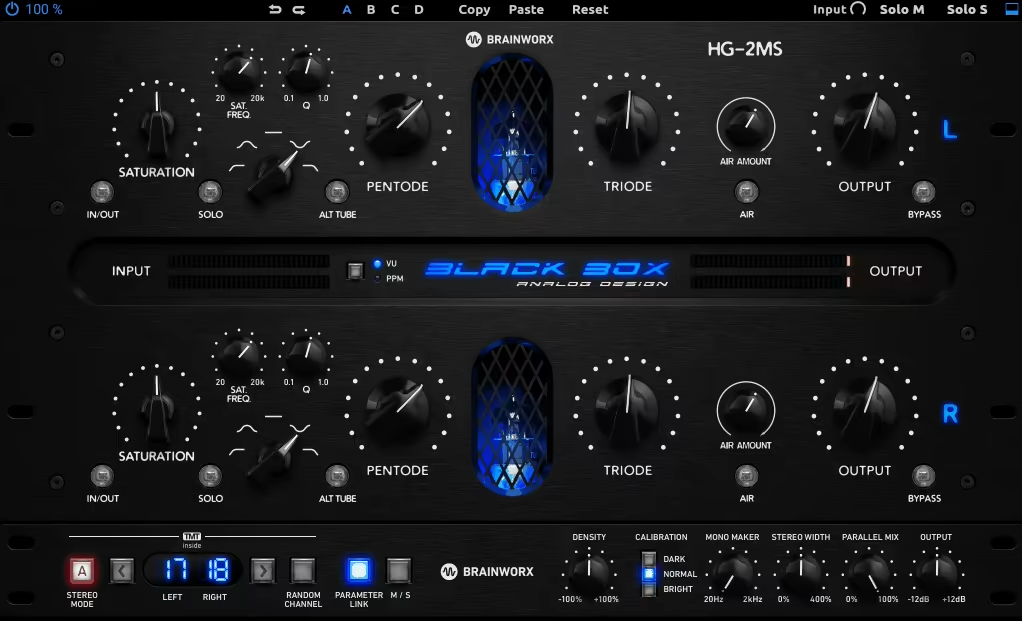
With HG-2MS, I can add just enough saturation to make the mids sound fuller or open up the sides a bit, all without messing up the balance. The mid-side mode is really useful when I’m mastering and want a bit more width but still keep the punch in the center.
It’s not flashy or overhyped. It just does its job quietly and works well in the background.
- Four modeled tube stages
The HG-2MS uses pentode, triode, and 12AX7-style circuits, and each one responds differently depending on how much you push them. You can keep things subtle for a gentle harmonic boost or drive it harder for more edge and weight.
- Density, Air, and Calibration Controls
These controls let you make small but important changes to the sound. Density adds body to the low-mids, Air lifts the highs smoothly, and Calibration lets you make the overall tone darker or brighter. They’re great for fine-tuning the character instead of making extreme changes.
- Brainworx TMT modeling
This one adds a touch of realism. Each channel behaves slightly differently, mimicking analog tolerances.
- Mid/Side, Stereo, and Mono modes
This one really deserves to be on the list of the best saturation plugins. Even though it’s expensive, you get what you pay for. Also, it comes with a trial, so you don’t feel like buying some crap , so go and check out what it does!
3. Softube Drawmer 1976 Three Band Saturator – Best Multiband

When I want to add character to a mix, I use the Drawmer 1976 Three Band Saturator. It lets me control exactly how the tone changes. I can shape the low end, highlight the mids, or brighten the highs without making the mix sound cluttered.
The sound stays clear and natural, even when pushed a little harder. It’s the kind of tool that helps mixes feel more cohesive without calling attention to itself.
- Three-band saturation control
You can focus on certain parts of the frequency range instead of affecting the whole mix. This lets you add warmth to the lows, detail to the mids, or brightness to the highs without making the sound muddy.
- Independent stereo width for each band
You can keep the low end tight and in mono, while making the mids or highs wider to add more space to your mix.
- Built-in filters and clear metering
The low and high cut filters help you shape the tone before and after saturation. The LED meters make it easy to see your levels at a glance.
- Authentic hardware modeling
4. BLEASS Saturator – Best Budget

If you need something that can handle clean tone shaping or heavy distortion in one place, BLEASS Saturator does that well. It gives you a drive section for analog-style warmth, plus a waveshaper that can really change the sound when needed. I’d probably use it to rough up drums, add grit to bass, or automate movement with the LFO for some rhythmic drive.
It feels simple to work with and reacts fast when you want clear control over how much you’re pushing the sound.
- Drive section with built-in EQ
This one is great if you want to control how your saturation hits different frequency areas. You can warm up the lows, brighten the highs, or push everything evenly without stacking extra EQs
- Nine waveshaping algorithms
You get a wide range of distortion styles, from light curve shaping to harder clipping. It’s useful if you want detailed control over how the signal reacts to drive
- Bit module with flexible routing
Lets you decide if the bit crushing happens before or after the main distortion. It’s a good way to get digital grit or glitchy textures that still fit inside a mix
- Built-in LFO for movement
The LFO can target any parameter, so you can automate saturation depth or tone for evolving distortion. It’s practical for adding subtle modulation or synced rhythmic effects
5. XLN Audio RC-20 Retro Color – Best for Beginners
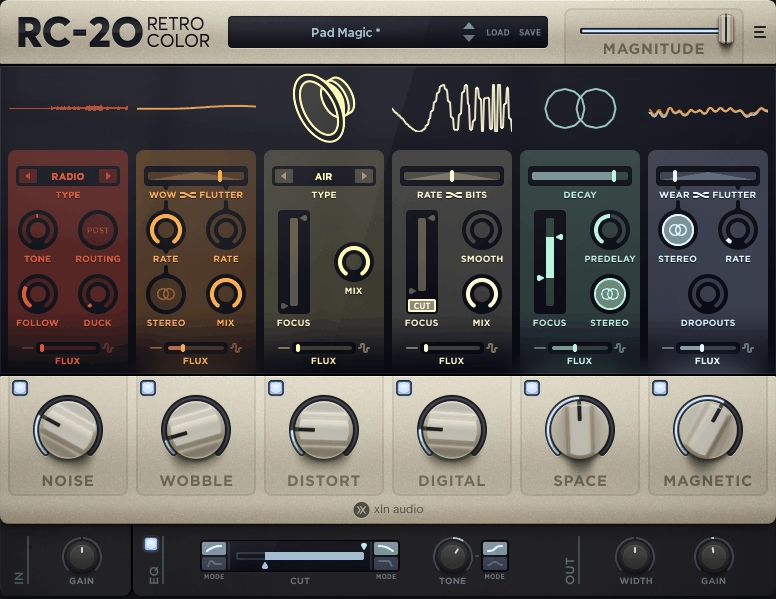
Sometimes a mix needs a little grit to sound lively again. RC-20 Retro Color brings in those small flaws that help a clean digital track feel more real and textured, like tape hiss, vinyl crackle, or gentle wobble.
I like to use it on a synth or drum loop when things sound too polished. Right away, it feels more human and a bit warmer. It’s easy to set up and always adds character that fits well in a mix.
- Noise module
I use this when a sound feels empty or too clean. Adding vinyl crackle, tape hiss, or hum helps fill the space and makes things sound less digital. It’s a quick way to add texture.
- Wobble module
This is where RC-20 really captures the tape and record player feel. It adds gentle pitch movement that makes pads, keys, and guitars sound more lively.
- Distort module
It’s great for adding drive or edge to any sound. You can use soft saturation to glue things together or turn up the fuzz for heavier drums or bass.
- Degrade module
I use this when I want the sound of an old sampler or early digital gear.
- Space module
This adds a built-in reverb that sounds more like a vintage room than a modern hall. It’s not for big ambience, but for width and character. It’s great for warming up guitars, synths, or vocals.
- Magnitude slider
This is probably the easiest control to like. It lets you adjust the overall intensity of all the effects at once, so you can add just enough character without losing mix clarity. It’s also great for automating build-ups or subtle changes in a track.
6. Soundtoys Decapitator – Best Minimal

If a sound seems too flat or lost in the mix, I run it through the Decapitator saturation plugin.
It’s easy to use and helps tracks fit better in the mix without lots of EQ or compression. I use it gently for extra thickness or turn it up to add edge to drums or vocals. It’s reliable, responds well, and makes digital sounds feel more natural.
- Five analog saturation models
There are five hardware-style tones, from clean tube warmth to strong transistor distortion. This lets you quickly find the right sound without needing more plugins.
- Punish button for extra drive
It gives an extra gain boost when you want more bite or presence. This is helpful for making dull tracks stand out or adding weight to a mix bus.
- Tone and mix controls
- Dynamic analog response
Decapitator responds to how hard you push the input. The more you drive it, the more it reacts. It keeps the sound under control but still adds movement and color.
7. PSP Audioware PSP Saturator – Best Value

With PSP Saturator, you start adding life to your drums, bass, or even full mixes without making them sound harsh or muddy. PSP Saturator feels balanced, predictable, and easy to use, which is exactly what I look for in a saturator.
- Eight saturation shapes
This feature is perfect if you want different tone options. You can get anything from subtle analog warmth to heavier distortion, all while keeping the sound musical.
- Three processing engines
If you want to focus on certain parts of your sound, the plugin lets you choose between low, high, or full-band saturation, so you can control exactly where the tone gets thicker.
- Parallel mix control
Phase alignment keeps everything tight, so you can add just the right amount of color without losing clarity. It makes it easy to blend your clean and saturated signals.
- Output and headroom controls
8. Waves Abbey Road Saturator – Best Vintage Tone

This plugin gives me plenty of options but keeps things simple. I often use the Waves Saturator to add grit to vocals or make drums hit harder, and it always manages to sound musical.
I think of it as a tool that works quietly in the background and makes everything sound more lively.
- Tube and Solid-State console modes
The tube mode feels smoother and warmer, while the solid-state mode could give you that punchier, more forward sound.
- TG12321 Compander “exciter” effect
- Pre and post-saturation EQ
You can adjust the tone before the saturation and fine-tune it after. For example, you might cut some low end before adding gain or use a high shelf to keep things bright. The EQ is right where you need it.
- Mid/Side processing and phase control
This is where the plugin becomes really flexible. You can drive the center for weight and leave the sides light for width.
9. Newfangled Audio Saturate – Best Clarity

Many limiters or saturators can make your mix sound dull when pushed too far, which can be frustrating. NA Saturate solves this by keeping everything balanced, no matter how hard you drive it.
- Spectral Clipper processing
It processes each frequency band on its own, so when you push the mix, the low end won’t overpower the mids and highs. This gives you more volume and edge without the usual “mud” that other clippers cause..
- Shape control for clipping curve
You can adjust between soft, smooth clipping and a sharper, harder sound. I usually set it in the middle when I want to add punch but still keep things clear.
- Detail Preservation and anti-aliasing
This feature helps Saturate sound natural. Even when you push it, it avoids digital harshness.
- Independent input and output controls
10. SSL Native X-Saturator – Best Quick Tool

I use the SSL X-Saturator often when a track sounds too clean or needs more presence. It’s easy to use, which I really appreciate. You can add just enough warmth to help a sound fit in the mix, or push it for a stronger, more aggressive feel.
It’s a quick, straightforward tool that adds real weight or grit to your sound without a lot of extra adjustments.
- Blend valve and transistor distortion
You can choose between smooth 2nd-order ‘valve’ saturation and sharper 3rd-order ‘transistor’ distortion, or mix them together. It’s easy to move from gentle tone shaping to a more biting sound.
- Drive, Depth, and Shape controls
These three knobs do most of the work. Drive sets how hard you push the sound, Depth controls the amount of distortion, and Shape lets you pick between a round or sharp clipping style.
- Wet/Dry mix and A/B comparison
11. iZotope Plasma – Best Adaptive

The Plasma VST saturation plugin responds to your track in real time, so you don’t have to keep adjusting gain or EQ to get the right sound. It can warm up vocals, add punch to drums, or smooth out a master, always fitting naturally into your mix. It’s an easy, reliable tool that helps your mix sound more cohesive with little effort.
- Flux Saturation Technology
This is what sets Plasma apart. Unlike static distortion, it adapts to your signal as you play. You don’t have to worry about losing your tone or flattening the dynamics because it follows your track and keeps the warmth and punch balanced.
- Target Profiles & Character Settings
You can shape how Plasma works by picking from 24 Target Profiles. I usually choose one that matches what I’m working on, like drums or vocals, and then adjust the Attack, Release, and Overdrive to fit the sound I want.
- Channel Modes & Frequency Handles
This feature lets you decide which part of the sound gets saturated. You can boost the highs, focus on the mids, or tighten up the low end.
Preset Library with 49 options
- Adaptive Overdrive Control
The Overdrive fader adds extra grit or presence when you need it. Plus, Plasma is lightweight and easy on your computer’s CPU.
Extra: United Plugins DarkFire

I prefer tools that let me shape the details inside a sound, not just make it louder.
That’s why I use United Plugins DarkFire. It lets you pick out and control just the harmonics added by saturation, so you can choose what to keep or remove. I find it’s a practical way to add clarity or depth without using lots of EQs or compressors. If you want more control over your sound’s color and texture, it might work for you too.
- Independent harmonic control
This feature is helpful if you want to adjust the added harmonics without affecting the main sound. You can boost or cut certain frequencies while keeping the original tone the same.
- Analog-style saturation engine
The processing is based on tube and tape circuits, so your sound gets a familiar warmth and smooth drive that responds naturally to what you put in.
- Automatic gain compensation
- Harmonic EQ and compression
You can filter or compress the harmonics you create to get a more balanced sound.
Freebies
1. Caelum Audio Tape Cassette 2

If you want that classic worn-out cassette sound with extra warmth and movement, this plugin does the job. Tape Cassette 2 offers everything from gentle saturation and subtle noise to strong lo-fi wobble. It’s a useful tool for adding character to clean digital sounds or exploring more experimental effects.
The Type 1 cassette impulse response brings the sound of real cassette tape, with gentle high-end roll-off and soft compression that gives you that familiar analog warmth.
Wow and flutter modulation lets you control pitch instability and movement, ranging from a slight tape drift to a strong warble for creative effects.
2. Techivation T-Saturator

When I want to add some color but keep things under control, this free saturator works well. T-Saturator is level-independent, so the sound stays the same even if the input changes. That makes it easy to use on different tracks. I usually put it on buses or instruments where I want a bit of texture without having to adjust the gain all the time.
It’s fast, flexible, and works well as a practical all-purpose saturator.
- Level-independent saturation
It keeps your tone steady no matter how loud the signal gets. You can keep the dynamics while adding warmth or drive.
- Multiple saturation types
It comes with tube, tape, and fold modes.
- Frequency and mid-side controls
You can focus the saturation on certain frequency ranges or stereo areas, which helps keep your mix balanced and clean.
- Auto gain and oversampling
3. BPB Saturator

If you want to add warmth or grit quickly, BPB Saturator is a great choice. It’s light, responds fast, and gives a clean, analog-style tone that works on almost anything.
- It offers both tube and tape saturation modes.
You can use these modes on their own or mix them to shape your sound, from gentle analog warmth to a stronger drive.
- The plugin also includes built-in filters and gain controls.
High-pass and low-pass filters help clean up your sound, and the input and output controls keep your levels balanced.
4. Slate Digital Heatwave

If you want a quick way to make your sound hit harder, this plugin gets it done without any hassle. It’s easy to use—just add it and keep working, no need to adjust settings. Heatwave free VST gives you saturation, transient shaping, and some compression with one control, so you don’t need to stack plugins to add grit or punch.
This tool fits right into a fast workflow when you want your sound to feel more lively.
One knob does it all. The single drive control adds saturation, EQ, and compression at the same time. It’s simple and responds quickly, making it great for shaping your sound fast.
5. Waves Lil Tube

Image Credit: Waves Audio
If you want quick, natural warmth without a lot of effort, the Lil Tube saturation plugin makes it easy. It adds the soft, rounded sound you get from running tracks through an analog desk. It’s simple and not overhyped, just a straightforward way to make your music sound fuller and more natural.
Analog-style tube saturation is great if you want instant warmth and presence. It makes the tone thicker but keeps the details clear, so your tracks sound more balanced.
- It has a simple one-knob drive control.
Frequently Asked Questions (FAQs):
[sp_easyaccordion id=”10035″]

Hello, I’m Viliam, I started this audio plugin focused blog to keep you updated on the latest trends, news and everything plugin related. I’ll put the most emphasis on the topics covering best VST, AU and AAX plugins. If you find some great plugin suggestions for us to include on our site, feel free to let me know, so I can take a look!