Most hip-hop production comes down to a few things: clean low-end that translates everywhere, drums that feel right, and melodies with enough character to keep listeners interested. The plugins you use either help with those things or get in the way.
I’ve been testing plugins to see which ones actually save time and improve results in hip-hop sessions. What matters isn’t having the most features or the biggest name. It’s whether the tool solves a real problem without adding ten more steps to your workflow.
In this list of the best hip hop plugins, I’m covering plugins like SubLab XL, Battery 4, Murda Melodies, and RC-20 Retro Color because they each handle specific tasks better than most alternatives. Some are for bass and 808s while others help with drum programming, texture, or creative effects. I included both paid and free picks at the end that gives nice value to the list.
The best plugins for hip hop aren’t always the ones with the most hype. They’re the ones that fit how you actually produce and help you finish tracks without getting stuck on technical problems. Let’s look at what each one does and when it’s useful.
I spent few hours testing these plugins to see which ones are the best for bass, drums, texture, and creative FX without slowing down the process or adding unnecessary complexity, and here is what I found out:
| Plugin Name | Best For | Engine Type | Key Strength | My Verdict | Pros | Cons |
|---|---|---|---|---|---|---|
| 1. FAW SubLab XL | 808s, trap, mix-ready subs, bass layering | X-Sub Engine, Sampler, Synth Layer | Consistent low-end, Harmonic reinforcement, Layerable sub | Best Sub, Bass & 808 | Phone/club translation, Quick layering, Controlled harmonics | Not velocity-sensitive, Extra clicks for sample audition |
| 2. Native Instruments Battery 4 | Drum kit sculpting, percussion workflow, trap beats | Pad-Based Sampler Engine | Per-pad FX, Waveform editing, Tempo-aware | Best Drums | Macro effects, Color-coded pads, Fast sound shaping | Legacy kit visuals, Slightly dated UI |
| 3. UJam Beatmaker Dope | Groove-driven drums, trap & lo-fi rhythms | Phrase Performance Engine | Kit customization, Layer control, Macro mixing | Best Value | Pre-arranged grooves, Layer swapping, Saturation control | Limited advanced sample synthesis |
| 4. Thenatan Tape Piano 2 | Lo-fi keys, soulful chord loops, ambient textures | 4-Layer Engine, Macro System | Dynamic layering, Modulation-ready, Texture blending | Best Piano | Quick chord shaping, Layerable textures, Built-in effects | Learning curve for multilayer engine |
| 5. Slate Digital Murda Melodies | Melody loops, experimental melodic FX, pitched textures | 8-Control Effects Interface | Pitch shifting, Stereo spread, Wobble modulation | Best Multi Effect #1 | Rapid vibe shifts, Intuitive controls, Nostalgic character | Knob labeling minimal, Requires muscle memory |
| 6. Cradle Audio – The Prince by Frank Dukes | Melody building, layered pads, hybrid scoring | Dual-Layer Blend Engine | Tone shaping, Emotional layering, Mono/legato modes | Curated melodic textures with expressive control | Quick playable tones, Macro blending, Built-in FX | Limited MIDI modulation mapping |
| 7. Valhalla VintageVerb | Cinematic reverb, airy pads, vocal depth | Algorithmic Reverb Engine | Color modes, Plate/Chamber/Hall algorithms, Modulation tail | Spacious, emotional, and versatile reverb | Distinct character modes, Smooth tails, Motion control | Not ideal for subtle room ambience |
| 8. RC-20 Retro Color | Texture, retro warmth, sample aging, lo-fi FX | 6-Module Processing Engine | Noise, Wobble, Distort, Digital, Magnetic, Space | Best Multi FX #2 | Module layering, Flexible tonal shaping, Performance follow | Space module often non-essential |
| 9. AKAI Flex Beat | Live glitching, stutter effects, beat variations | Pad-Based Pattern Trigger | Graph editor, Curve tools, Expansion compatibility | Best Grossbeat Alternative | 16 performance pads, Glitch library, Tempo-locked phrases | Small editor grid, Limited deep customization |
| iZotope Vinyl (Free) | Lo-fi effect, texture, vintage digital character | Sample Warping Engine | Wear, Warp, Year, Spin Down controls | Best for Beginners | Softens highs, Adds nostalgic wobble, Lightweight CPU | Limited creative depth for advanced sound design |
| u-he Triple Cheese (Free) | Dreamy pads, unique comb-filter synthesis, soft melodies | Comb Filter Sound Engine | Layered filter modules, Built-in LFO, Delay FX | Best free synth for hip hop | Soft tone, Gentle modulation, Atmospheric layering | Not suitable for heavy bass or leads |
| Ample Sound AGGuitar M Lite II (Free) | Expressive guitar loops, hip-hop chord textures | Articulation & Strummer Engine | Sustain, Slides, Hammer-ons, Pull-offs, Capo logic | Best free acoustic guitar for hip hop | Natural articulations, Strumming patterns, Easy MIDI mapping | Limited advanced editing |
| Monsterdaw Monsterbass (Free) | Sub-bass, trap & drill bass lines, quick preset use | ROMpler Engine | Preset library, Built-in saturation, LFO/velocity control | Immediate low-end presence without complex setup | Fast audition, Dynamic shaping, Layerable bass | Limited custom synthesis |
| Echo Sound Works Vinyl Guitar 2 | Emotional guitar, lo-fi textures, sample-based realism | Layered Sample Engine | Round-robin, Per-layer sculpting, Built-in effects | Dusty, expressive guitar loops | Realistic performance, Ambient effects, Layerable warmth | Limited tonal range, Focused on lo-fi style |
1. FAW SubLab XL – Best Sub, Bass & 808

My first choice is SubLab, which stands out from every other bass plugin with how it keeps the sub-bass consistent no matter what.
Here, I love that you can layer samples and synth and X-Sub and still end up with a clean, stable low-end that never falls apart on phone speakers, club systems, or cheap Bluetooth cans. It feels like Future Audio Workshop designed SubLab XL specifically for producers who are tired of their bass disappearing in the mix or turning into mud.
- X-Sub Engine
This is the secret sauce. It locks your sub-fundamental into the perfect frequency range while adding harmonics that translate even on tiny phone speakers. You can use this when you need an 808 to stay powerful, centered, and unbreakable in the mix, especially for trap and hip-hop beats.
- Sampler Layer
Being able to drag in your own kicks and turn them into 808s is wild. You can grab a punchy kick, loop it into a tone, and layer the X-Sub underneath, instant modern 808, no hunting presets. The only downside is that auditioning samples takes a few too many clicks.
- Synth Layer for Shape
I like using the synth layer to add extra drive, glide, or growl to my subs. The envelopes are fast and the distortion is tasty without turning everything to fuzz. Paired with the compressor sidechain trick between layers, you get bass that knocks AND breathes.
If there’s anything to note, SubLab isn’t velocity-sensitive, sometimes I wish I could get softer vs harder hits without automation, but it hasn’t been a deal-breaker for me in hip-hop/trap sessions where consistency is king.
For me, SubLab is the go-to when you want instant, mix-ready 808s that hold their weight without endless EQ or layering. It shines in trap, hip-hop, drill, R&B, and dark electronic stuff where bass is the main emotional anchor.
SubLab comes in VST, VST3, AU, and AAX formats for macOS and Windows users.
2. Native Instruments Battery 4 – Best Drums

What always pulls me back to Battery 4 is how quickly you can sculpt a drum kit that feels personal.
A lot of drum samplers try to be everything at once, Battery 4 keeps the focus tight: fast kit building, direct sound shaping, and no getting lost in menus. I love being able to load a sample, tweak it on the spot, and keep the beat moving without breaking the creative flow.
- Pad Layout
The color-organized pad grid makes a huge difference for speed. Kicks, snares, hats, claps, everything visually falls into place, which means my eyes know where to go before my brain catches up.
You can start a track by dragging in raw one-shots and just tapping around until a groove emerges.
- Waveform Editing
Having trimming, reversing, tuning, and gain control directly under the waveform is incredibly satisfying. When you want a hi-hat to be tighter or a kick to punch sooner, it’s a two-second adjustment. No extra windows, no endless sub menus, just click and shape.
- Per-Pad Effects
Each pad gets its own compression, transient shaping, filtering, saturation, and envelope control, so drums in the same kit don’t end up blending into each other. I would recommend you this when layering kicks; one for body, one for click, each treated separately but mixed to feel like a single hit.
- Master Processing
The kit-level compression, EQ, limiter, and saturation help everything lock together once the individual hits are dialed in. If there’s one caveat: some of the older Battery kits can look or feel a little dated, but that’s only noticeable if you rely heavily on the legacy content.
I would reach for Battery 4 whenever you want hands-on drum shaping, especially in hip-hop, trap, drum & bass, and electronic tracks where texture and punch matter.
Battery 4 comes in VST, VST3, AU, and AAX formats for macOS and Windows users.
3. UJam Beatmaker Dope – Best Value

Ujam’s Beatmaker series has always leaned into vibe over complexity, and Beatmaker 2 feels like the moment where that approach really clicks for hip-hop work.
Beatmaker Dope is a trap and hip hop plugin built for people who want drums that feel like songs, not MIDI grids, the kind of grooves that make melodies easier to write because the rhythm already has attitude.
- Phrase Performance Engine
The biggest thing that sets Beatmaker 2 apart is the way you trigger full grooves instead of programming every hit one by one. You can play verses, hooks, fills, and drops straight from your keyboard like you’re performing the drummer.
- Kit Customization and Layer Control
The ability to swap individual drums inside kits is a small detail but it matters a lot. Sometimes trap kicks hit too soft, or a snare needs more bark, being able to switch pieces while keeping the same overall groove saves time.
Layering kicks and claps between different Beatmaker expansions leads to some surprisingly unique textures without needing to stack third-party samplers or find samples mid-session.
- Master Section and Real-Time Tone Shaping
The macro mixing tools are where the fun is. There’s a saturator that adds grit without breaking the tone, an ambience control that goes from dry room to smoky club, and a loudness maximizer for that final push.
I tend to ride these like performance controls, turn up saturation in a hook, widen ambience in an intro, choke the kit when the bass drops. It’s almost like DJ-style mixing inside the drum plugin itself.
If there’s one limitation worth noting, Beatmaker 2 isn’t meant for deep drum synthesis or advanced sample design.
I would recommend Beatmaker 2 when you need drums that already feel like a groove, especially in trap, boom bap, lo-fi rap, and any beat where bounce matters more than machine-style precision.
Beatmaker 2 comes in VST, AU, and AAX formats for macOS and Windows users.
4. Thenatan Tape Piano 2 – Best Piano

I remember using the first Tape Piano all the time for quick dusty keys, but this update opens things up way more. The sounds aren’t just lo-fi for the sake of being lo-fi, they sit inside a beat the way real sampled keys do, like you pulled them off a cassette from someone’s basement studio in ’98. It has that character baked in, but it also lets you shape it in deeper ways when you want to push it.
- Multilayer Architecture
The 4-layer engine is the core of why Tape Piano 2 hits differently. I’ll take a mellow Rhodes-style layer, blend it with something a little more brittle on top, and then bring in a dusty loop or vinyl crackle through the texture layer.
Instead of stacking plugins and hoping they glue together, everything already fits like it belongs. I’ve made keys that feel like a forgotten record store bin find in about 30 seconds.
- Macro System
This system basically removes the need to automate every little movement. You can assign modulations visually and twist one control to move multiple aspects at once.
I use this to let chords breathe, they swell, fade, wobble, and come back, which makes slower beats feel alive instead of static. It works really well when you’re building those soulful chord loops trap artists love to float over.
- Effects Section
The reverb has the right tone for ambience without washing everything out, and the convolution reverb can turn clean keys into something that feels like it was recorded in a barely-lit hallway.
The phaser, bit crushing, and distortion options can push you into more psychedelic territory, especially if you’re working in that contemporary R&B / wavy trap lane. One thing to note, there’s a lot under the hood, so the first few sessions feel like exploring a new instrument rather than a preset machine. Once your ears learn its layout, the speed comes fast.
Go for Tape Piano 2 when you want keys that instantly sound emotional, lived-in, and warm, without going through five mixing steps to get there. To me, it’s definitely one of the best hip hop plugins you can get.
Tape Piano 2 comes in VST/VST3 for Windows (32/64-bit) and AU/VST/VST3 for macOS users.
5. Slate Digital Murda Melodies – Best Effect

Murda Melodies doesn’t feel like a plugin that wants you to engineer the perfect mix, it feels like something you play.
Murda Melodies is useful when a melody loop or sample feels too plain, and within a few tweaks, the whole vibe shifts into something more animated, glossy, or just downright strange.
Here is what you get:
- Effects Section
The 8 main controls are all icon-based, which makes the workflow less technical and more instinctive. Instead of thinking increase mix, you can just twist until the sound starts bending in a way that sparks an idea.
There are moments where I’ll run a simple Rhodes chord loop into this and suddenly it sounds like it was sampled off a dusty cassette synth from another dimension.
- Pitch Shifting
The pitch controls stretch up and down multiple octaves, and they’re not shy about getting weird. The little bit of pitch jitter you can introduce gives melodies that liquid, warbling character that you hear in a lot of current Atlanta-influenced production, especially when paired with half-time chords or atmospheric pads.
- Stereo Spread and Wobble
The spread control does a nice job widening things without destroying the mono center, which is always useful when the beat is built around a heavy 808. And the wobble slider feels like it instantly drops the track into a more nostalgic space, not lo-fi in a cliche way, but like the music has been lived in a bit.
The one thing worth mentioning is that there’s no text labeling on the knobs, so the first few uses feel like learning an instrument by touch, but once muscle memory kicks in, the speed is ridiculous.
Murda Melodies comes in AAX, AU, and VST formats for macOS and Windows users (iLok required).
6. Cradle Audio – The Prince by Frank Dukes

If you want to build your beats from scratch instead of stacking loops, here is The Prince.
There’s a certain attitude in The Prince that you don’t hear in most virtual instruments. It isn’t trying to be a do-everything workstation or another generic synth stack. It feels curated, intentional, and very musical.
When I open it during a hip-hop session, I immediately get tones that spark melody ideas before I even start tweaking anything. It has that character quality that producers chase when they want tracks to feel like they have personality, not just polish.
- Layer Blending
The dual-layer system gives you two sound sources that you can sculpt separately or link together. I find myself balancing warm pads with slightly noisy keys, or pairing a soft organ attack with a buzzy lead tail.
The Blend slider sits right in the middle and encourages quick, emotional decision-making instead of endless tweaking. In hip-hop production where vibe is everything, this lets you get something playable and inspiring in seconds.
- Tone Controls
The main tone-shaping section (Source, Filter, Amp, LFO) is stripped down in the best way. You don’t have to wade through pages of modulation menus, just cut, warm, widen, or shape the sound to sit right with drums and bass.
I especially like setting layers to different mono/legato voicing modes when designing leads; it gives that expressive glide that’s perfect for melodic trap hooks or muted, moody flute-type lines.
- Effects Section
The built-in effects sit right in the sweet spot. The chorus adds width without turning everything mushy, the distortion gives keys grit that helps them cut through 808s, and the delay/reverb lean more emotional than clinical.
Even the noise generator is surprisingly useful with a little vinyl crackle or amp hiss tucked under a pad instantly places the sound into a world. It’s subtle, but it adds storytelling to the production.
If there’s anything to be aware of, it’s that MIDI control mapping is pretty limited and there’s no dedicated mod wheel behavior, so live performance adjustments may require DAW automation instead.
The Prince comes in AU, VST3 and AAX formats for macOS and Windows users.
7. Valhalla VintageVerb

Valhalla VintageVerb has this uncanny ability to make hip-hop beats feel bigger than the room they were made in.
I don’t use VintageVerb for realistic space, as I use it when I want a hook to feel cinematic, when I want a vocal ad-lib to float behind the beat like smoke, or when a pad needs to bloom into the atmosphere instead of just sitting there. It brings emotion, not just reverb.
- Color Modes
The 3 Color modes are the real sauce here. Switching between 1970s, 1980s, and Now instantly shifts the vibe of the track. For grimey boom-bap drums, You can throw it into the 70s mode, the grit just sits right behind the kicks and snares.
For R&B trap vocals, the 80s mode gives this glossy, dreamy tail that wraps around the lead. And when you want something clean and modern (especially for melodic trap choruses), the Now mode works without clouding the mix. It’s like choosing the era of the reverb with one click.
- Reverb Algorithms
The Chamber setting is my go-to, since it keeps the depth and width without washing out the vocal. You can push it and still understand every word, which matters when cadence and delivery are the star.
Plates are great for piano loops, halls go crazy on pad chords or synth swells, and rooms work when you just want a hint of space. Everything feels smooth, never metallic or harsh. That matters when working with 808s and sibilant vocals.
- Modulation Controls
The modulation in the tail is where the atmosphere comes from. Just a little movement makes a vocal ad-lib drift and shimmer behind the main vocal, almost like adding texture instead of effect.
On mellow chord progressions, it introduces motion without needing chorus or phaser plugins. It’s subtle movement that feels expensive.
If there’s a slight catch, it’s that VintageVerb isn’t the best for super-tight, subtle room ambience, it likes to be heard.
I would reach for this one in hip-hop when you want the track to feel emotional, airy, cinematic, spaced-out, melodic, or just plain beautiful on vocals, pads, keys, guitar layers, and even lo-fi drums.
Valhalla VintageVerb comes in VST, VST3, AU, and AAX formats for macOS and Windows users.
8. RC-20 Retro Color – Best Multi FX #2
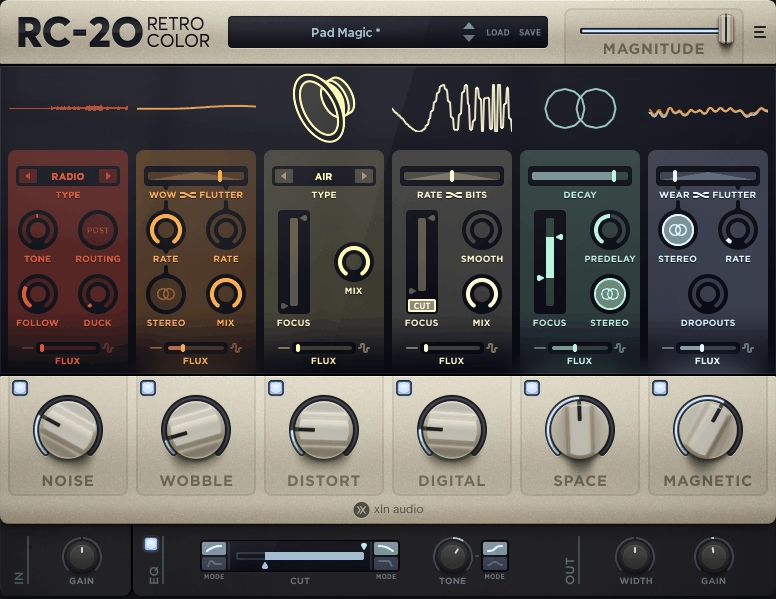
If you like the retro sounds, I gotta say, RC-20 has a unique way of making sounds feel lived-in.
Clean digital instruments suddenly carry the dust and warmth of vinyl, tape, or old media formats, not in a cheesy, caricatured way, but with character that feels intentional. RC-20 isn’t dedicated hip hop plugin but it can shift the emotional tone of a track in seconds.
- Noise
Instead of just adding static, RC-20 gives you everything from VHS hiss to studio air to old computer whine, and the Follow/Duck controls let that texture move with your performance so it doesn’t sit awkwardly on top.
- Wobble
This one is the soul of the plugin. The Wow/Flutter system recreates those gentle pitch bends and mechanical drift that tape machines introduce over time.
A tiny amount can make sustained chords or pads feel more organic, almost like someone actually touched the instrument.
- Distort
The saturation options here cover a lot of ground, from subtle transformer weight to full speaker is dying, but in a good way breakup. I also enjoyed the Focus Filter, as it is the key, you can target just part of the frequency range so things don’t turn to mud.
- Digital
Great when something needs grit or texture without simply getting louder. Bit depth and sample rate reduction become usable for musical color rather than just destruction, especially when gently blended.
- Magnetic
Another favorite of mine was the Magnetic, cause it adds that unpredictable tape wear, small drops in level, fluttering volume, a bit of wobble to the signal’s energy. I find it especially good for pads, sample-based melodies, or anything you want to feel nostalgic or slightly unstable.
The Space module is probably the least essential part of the plugin; useful for quick ambience, but most of the heavy lifting comes from the other five modules.
When a track feels too clean, too polished, or simply missing a vibe, RC-20 usually fixes it, and quickly. It’s especially useful in lofi, hip-hop, alt-pop, indie, electronic, and sample-driven production where texture is the emotion.
RC-20 Retro Color comes in VST, VST3, AU, and AAX formats for macOS and Windows users.
9. AKAI Flex Beat – Best Grossbeat Alternative

Flex Beat is not just a glitch effect you set-and-forget, it’s something you play. I love being able to trigger stutters, reverses, and beat cuts with pads like I’m DJ-chopping samples in real time. It instantly turns even the simplest loop into something alive and unpredictable.
- Pad-Based Pattern Triggering
The 16 performance pads let you fire off edits like you’re finger-drumming. You can put different glitch phrases on each pad and just jam over a drum loop, switching patterns mid-phrase always stays locked to tempo because Flex Beat syncs to the DAW grid.
- Preset Library and Expansion Compatibility
The preset selection is stacked with beat repeats, vinyl scratches, breakbeat backspins, gated stutters, glitch fills, and if you also own the Burn Hues expansion from Native Instruments, you get access to even more patterns specifically designed for DJ edits and glitch-driven transitions.
I usually load Flex Beat, pop in a Burn Hues pack, and suddenly the loop has movement I didn’t have to manually draw.
- Graph Editor with Curve Tools
The built-in editor lets me draw playback direction, volume modulation, and timing shifts with nodes and curves. I would use this when you want a custom tail or unique transition that doesn’t feel like a preset. The ability to invert or mirror a pattern also makes it easy to create variants quickly.
If there’s one limitation: the editing window isn’t resizable, so when you dive deep the small grid can feel cramped and slow for super fine resolution work. Lastly, I would reach for Flex Beat when you want live glitch energy, rhythmic surprise, or high-impact transitions in hip-hop, EDM, experimental beats, or when I’m layering live-DJ style edits into a production.
Flex Beat comes in VST, VST3, AU, and AAX formats for macOS and Windows users.
Freebies:
iZotope Vinyl – Best for Beginners

iZotope Vinyl is one of those plugins I almost forget is free because it feels that essential. When a melody sounds too clean you can throw Vinyl on and instantly get that hazy, slightly damaged character that makes it feel sampled instead of generated.
- Wear
This is my go-to for softening harsh highs or taming sharp hi-hats. A small amount warms the sound and makes it feel like it came off an old pressing, without muddying things.
- Warp Depth
This adds the wobble, just the right amount of pitch drift to make chords feel emotional and imperfect. Light settings feel nostalgic; higher settings get into that melting tape vibe that works great in slow hip-hop or R&B.
- Year Control
Sliding this toward the older eras rolls off the top and bottom in a way that instantly sets a mood. It’s perfect for making instruments feel dusty without stacking tons of EQ.
- Spin Down
Spin Down is great for transitions, reverse a clip, hit spin down, reverse it back, and you get a smooth rise into the next section. Simple, always effective.
This plugin shines when you want a digital sound to feel like it lived a little, mellow, worn-in, and easier on the ears.
iZotope Vinyl comes in VST, VST3, AU, and AAX formats for macOS and Windows users.
u-he Triple Cheese – Best free synth for hip hop

Now, if you are after something unconventional, this VST doesn’t use normal oscillators at all. No saws, no squares, none of the usual synth DNA, instead, Triple Cheese builds sound out of tuned comb filters, which gives it this soft, hazy, slightly digital tone that instantly feels nostalgic.
I would reach for it when you want melodies that feel dreamy without sounding like the same presets everyone else is using.
- Comb Filter Sound Engine
This whole synth is built around comb filters acting like tiny tuned delays, and the result is a tone that feels airy and smooth rather than aggressive or bright. I can imagine using it for pads underneath hip-hop chords as it fills the space gently without stepping on vocals or drums.
- Layered Filter Modules
Each sound runs through multiple comb filter modules in series, and you can either use them to generate tone or reshape what came before. When I start blending subtle detuning and modulation here, I get those slightly warbly textures that remind me of early digital keyboards sampled straight to cassette, perfect for lofi and chill beats.
- Built-In Modulation and Effects
There’s a built-in LFO and delay-based effects like chorus, flanger, and reverb. They’re simple, but that’s the charm, I don’t need to stack plugins to give something movement. A small flutter of modulation and a touch of chorus is usually enough to make a dull melody breathe.
Downside is that it leans toward softer atmospheric tones, so if you want heavy bass or hard leads, this won’t be your main synth, but that’s also why it fills such a unique space in my sound palette.
Triple Cheese comes in AU and VST3 formats for macOS and Windows users.
Ample Sound – AGGuitar M Lite II – Best free acoustic guitar for hip hop

Instead of sounding like a MIDI guitar, AGGuitar M Lite II has that soft, intimate tone that fits perfectly in hip-hop, R&B, and lofi, especially when you want something that feels played instead of programmed.
You can use AGGuitar M Lite II a lot for mellow chord loops and background textures that sit under drums without fighting the mix.
The interface is straightforward, the articulations react musically, and it’s easy to shape chords in a way that feels like how a real guitarist would voice them.
- Articulation Engine
Sustain, slides, hammer-ons, and pull-offs trigger naturally, so my MIDI playing instantly feels more human. I usually just play the part and adjust velocity a bit, no detailed editing needed.
- Capo Logic
This automatically chooses realistic fret positions and chord shapes. You can play normal MIDI chords and it translates them into something a guitarist might actually play, which keeps everything from sounding MIDI fake.
- Strummer Engine
When you want movement, the built-in strumming patterns lock in with drums quickly. You can load one preset, adjust tempo feel, and it’s already sitting in the groove.
I recommend this when you need warm, expressive guitar lines or simple chord loops that blend smoothly into hip-hop and lofi beats.
Ample Guitar M Lite II comes in VST2, AU, and AAX formats for macOS and Windows users.
Monsterdaw Monsterbass

This one is actually a ROMpler, which means the tones are already shaped and ready to sit in a track. For hip-hop, trap, drill, or even cinematic styles, Monsterbass gives you bass that hits without needing a ton of mixing.
The interface is super clean and quick to work with, just pick a preset, adjust envelope or filter if needed, and you’re rolling. No deep menu diving or endless tweaking.
- Preset Library
There are 25 bass presets here ranging from hard, gritty sub textures to more synth-focused low end. You can audition them fast and immediately hear which one fits the beat you’re building.
- Built-In Saturation and Filters
The Gain control adds a bit of drive that can help the bass cut through 808-heavy mixes. The filters and ADSR let you shape sustain and punch, which is especially useful when pairing it with punchy kicks.
- LFO and Velocity Curve Options
When you want movement or a wobble-style bass line, the LFO saves the day. The velocity curve control also lets me dial in how dynamic the performance feels, so it doesn’t become a flat wall of low end.
It’s simple, effective, and surprisingly versatile for something that’s free.
Monster Bass comes in VST and AU formats for macOS and Windows users.
Echo Sound Works Vinyl Guitar 2

Vinyl Guitar 2 actually feels like you sampled a dusty record and chopped it yourself. You can use it when you want that melancholy guitar tone you hear in lofi beats, sad trap, or moody R&B. It has the texture, the softness, and that slightly nostalgic pitch wobble that makes melodies feel lived-in.
The round robin toggle is super useful for realism. When you’re playing repetitive patterns, it keeps the performance from sounding robotic. Turning it off gives a tighter, more loop-like feel, which works great for trap guitar riffs.
- Per-Layer Sculpting
There are 10 sample sets here, and the layering system is where the magic happens. You can blend warmth, pick noise, and vinyl grit the way you want it. You can keep it clean and muted for emotional chords, or push the noise and pitch shift for that true lofi cassette vibe.
- Built-In Effects
The built-in effects save a ton of time. The Speaker and Background Noise controls instantly put the guitar into a dusty sampler world, and the Delay + Reverb options help place the guitar into space without stacking plugins. I especially like the True Stereo IR reverb when I want wide, dreamy ambience.
Vinyl Guitar 2 is a decent plugin for creating emotional guitar that feels like it already has a story behind it, perfect for lofi, soulful trap, late-night R&B, and reflective chord progressions.
Vinyl Guitar 2 comes in VST and AU formats for macOS and Windows users.

Hello, I’m Viliam, I started this audio plugin focused blog to keep you updated on the latest trends, news and everything plugin related. I’ll put the most emphasis on the topics covering best VST, AU and AAX plugins. If you find some great plugin suggestions for us to include on our site, feel free to let me know, so I can take a look!