If you’ve been looking for a variable mu tube compressor plugin that actually delivers the smooth, transparent glue that the hardware is famous for, you’ve probably seen the Pulsar Audio VM-COMP floating around mixing forums and mastering discussions since its relaunch in late 2025.
The VM-COMP is Pulsar Audio’s updated take on the classic variable bias tube compressor (formerly released as Pulsar Mu), built around the idea of faithfully reproducing the hardware’s gentle, program dependent compression while adding modern workflow tools that the original unit never had.
From my experience using it across several months of projects, this approach works well in practice and not just on paper, because the compression genuinely feels musical and cohesive in a way that simpler emulations don’t quite capture.
But the real question to ask is: is the Pulsar Audio VM-COMP actually worth it in 2026?
Yes, I think the VM-COMP is a solid investment for anyone who regularly works on buses, groups, or mastering chains. At around €149 regular price (often discounted), you’re getting a convincing vari-mu compression engine, a visual sidechain EQ, look-ahead and look-behind timing, M/S processing, and tube warmth that adds character even at minimal settings.
It won’t replace every compressor in your toolkit, but for glue, leveling, and adding warmth without obvious artifacts, it covers a lot of ground from a single window.
Compression character and the tube sound
The core compression behavior is where the VM-COMP earns its place, and I should be specific about what “vari-mu” compression actually feels like in practice compared to other compressor types you might be used to.
Here’s how the main compression types compare in practical terms:
- VCA compressors (SSL, API style) grab the signal with precision and controlled aggression. They’re punchy, fast, and transparent when you want them to be.
- FET compressors (1176 style) hit hard with aggressive character and fast transient response. They add energy and bite.
- Vari-mu compressors (like the VM-COMP) use the tube’s own bias to control gain reduction, which means the compression is inherently program dependent and responds to the music organically rather than mechanically. The gain reduction is smoother, the transient handling is gentler, and the overall effect is less about controlling dynamics and more about adding cohesion.
The VM-COMP reproduces this vari-mu behavior convincingly. When I put it on a mix bus with a slow attack and moderate release, the compression is barely visible on the meters but you can hear the difference when you bypass it. The mix feels more unified, slightly warmer, and the elements sit together better. It’s the kind of processing where you don’t notice it working until you turn it off, which is exactly what a vari-mu compressor should do.
Pulsar’s Topology Preservation Technology models the actual circuit behavior rather than just matching the output characteristics.
I can’t verify the technical claims independently, but I can tell you that I’ve A/B compared the VM-COMP against the UAD Manley Vari Mu emulation I’ve used for years, and the Pulsar holds up well.
The compression character is slightly different between the two (the Pulsar feels marginally smoother to my ears on sustained material), but both are convincing and musically useful. At the VM-COMP’s price point, the comparison with more expensive alternatives is favorable.
The tube signal path adds harmonic content even without significant compression, which is another characteristic of the real hardware. Running a mix through the VM-COMP with minimal gain reduction still adds a subtle warmth and density that’s audible on direct comparison. I sometimes use it essentially as a tube color box with barely any compression happening, just for the tonal quality of the emulated circuit.
What I appreciate most about the compression feel is the program dependent behavior. The gain reduction naturally adapts to whatever you feed it. Sustained material gets smooth, transparent leveling. Transient heavy material gets gentle rounding without losing the snap.
You don’t have to chase the compression with automation or constant threshold adjustments because the vari-mu circuit inherently responds to the character of the source. That kind of musical intelligence is what makes this compressor type a studio standard on mix buses and mastering chains.
Sidechain EQ and the visual editor
The sidechain section is where the VM-COMP starts to pull away from simpler vari-mu emulations, and I think it’s one of the plugin’s real strengths.
The original hardware had no sidechain EQ at all. A popular modification was adding a simple high pass filter to prevent bass content from driving the compression, but that was an aftermarket mod rather than a stock feature. The VM-COMP goes much further, offering a four band sidechain EQ with a visual curve editor that works similarly to how you’d draw an EQ curve in FabFilter Pro-Q.
I use the sidechain EQ on almost every instance. Here’s how I typically set it up depending on the material:
- Mix bus: Roll off everything below 80-100Hz so the kick and bass don’t pump the compressor. Sometimes a gentle dip around 200-300Hz to let the low-mids breathe rather than driving the gain reduction.
- Drum bus: More aggressive low cut to prevent the kick from dominating the detector. Sometimes a small boost around 2-4kHz so the compressor responds more to the snare’s presence and crack.
- Vocal groups: Fairly flat with just a subtle low cut, letting the compressor respond naturally to the vocal frequency range without bass bleed from other elements triggering unwanted gain reduction.
- Mastering: Gentle high pass around 60-80Hz and usually flat elsewhere, just enough to prevent sub-bass content from making the compression pump on bass-heavy material.
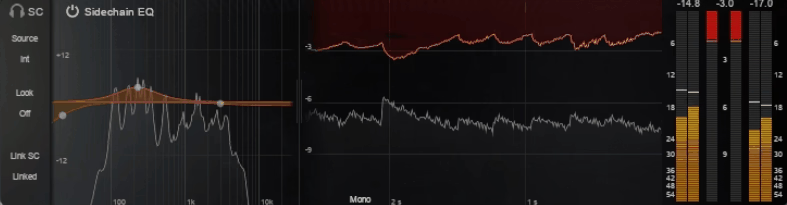
Being able to see the curve you’re applying to the detector signal in real time removes the guesswork that simple filter knobs introduce. I’ve used the visual editor to make the compressor react more to vocal frequencies on a mix bus by gently boosting the upper midrange in the sidechain, or to reduce sensitivity to harsh high frequencies by rolling off the top end of the detection signal.
These are adjustments that take seconds with a visual editor but would require separate routing and an additional plugin in compressors that lack built-in sidechain EQ.
Look-ahead, look-behind, and timing
The timing controls go beyond standard attack and release, and the look-ahead and look-behind features are where the VM-COMP offers functionality that the hardware simply couldn’t.
The extended attack and release ranges let you dial in settings that are both faster and slower than the original hardware allowed:
- Faster settings produce a more aggressive, mid-forward compression character that the original unit couldn’t achieve. This is useful for parallel compression on drums or situations where you want the vari-mu tonal quality but with more assertive dynamics control.
- Slower settings preserve the natural, program-dependent envelope behavior that’s ideal for bus and mastering work, where the compressor should respond to the overall shape of the music rather than reacting to individual transients.
Look-ahead enables the compressor to start reacting to transients before they actually arrive in the signal, effectively turning the VM-COMP into a precise limiter when needed. I’ve used this in mastering contexts where I want the tube warmth and gentle gain reduction combined with peak catching precision that standard attack times can’t provide. It works well for this purpose, though enabling look-ahead introduces latency that your DAW needs to compensate for.
Look-behind is the more interesting feature for me personally. It delays the gain reduction so that the initial transient passes through uncompressed while the sustain gets compressed. I use this regularly on drum buses because it preserves the snap and attack of the drums while tightening up the sustain and adding the cohesive warmth that the tube compression provides. The combination of punchy transients and compressed sustain is a quality that’s normally associated with parallel compression, but look-behind achieves something similar within a single plugin instance.
Mid/Side processing and stereo options
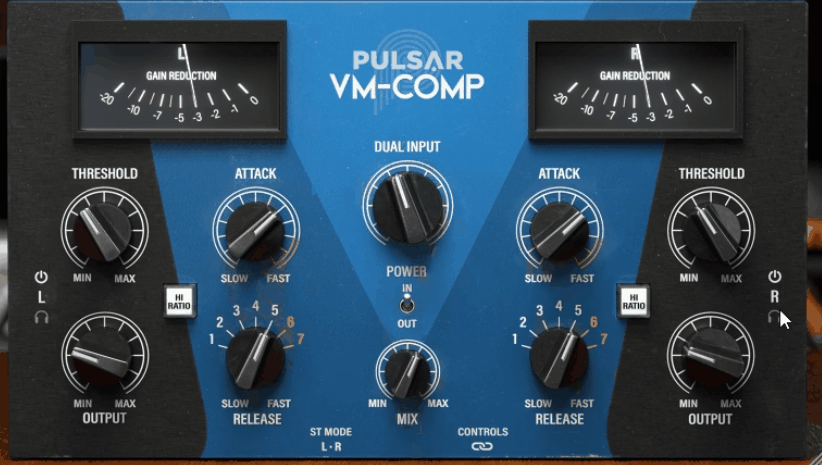
The VM-COMP operates in either left/right or mid/side modes with linkable or unlinkable channels and solo buttons for monitoring each component independently.
Key stereo features worth knowing about:
- L/R linked mode for standard stereo bus compression where both channels share identical gain reduction. This is where I spend most of my time on mix buses.
- L/R unlinked mode for independent compression of left and right channels, useful for material with significant stereo imbalance.
- Mid/Side mode for mastering-oriented work where you want to compress the center image (vocals, bass, kick) more aggressively while leaving the sides (reverb tails, stereo guitars, ambient content) relatively open.
- Solo buttons for monitoring mid, side, left, or right independently so you can hear exactly what you’re affecting before committing to settings.
I’ve used the M/S mode on a handful of mastering sessions where I wanted to tighten the center image without losing width, and the result is a master that feels more focused without narrowing the stereo image. For most mixing applications, I stay in standard L/R linked mode. The M/S option is there when you need it, but I wouldn’t call it essential for the majority of use cases.
Interface, metering, and workflow
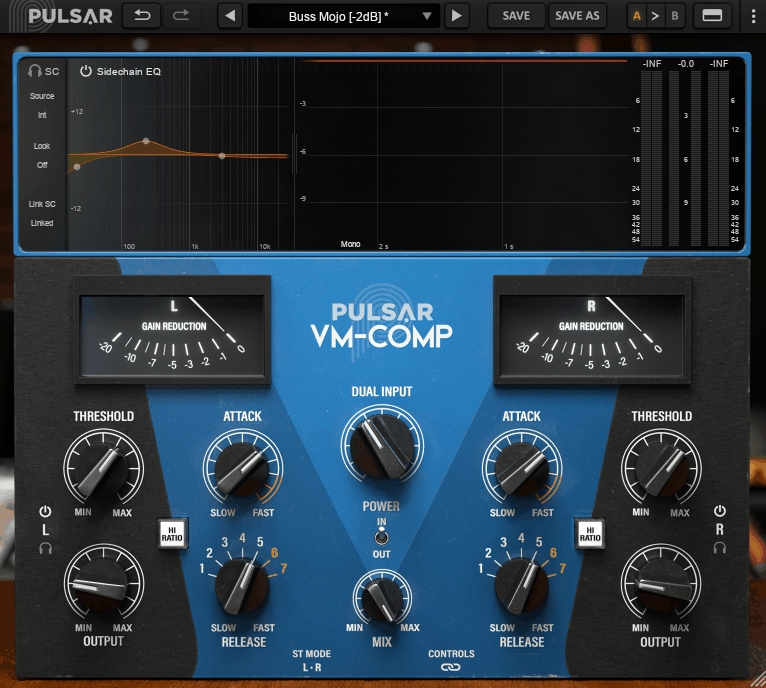
The interface follows Pulsar’s established design approach. The top section shows real-time waveform and gain reduction behavior in a scrolling display, while the main section gives you direct access to threshold, ratio, attack, release, output, and mix controls. I appreciate that the most-used controls are immediately accessible without diving into menus, and the visual feedback helps you understand what the compressor is doing at a glance.
The metering deserves specific mention because Pulsar provides two options:
- SIFAM-style VU meters that replicate the hardware’s original metering for an intuitive, old-school monitoring experience
- Modern waveform visualization that shows the waveform and gain reduction over time, which I find more useful for dialing in settings because it shows me exactly when and how hard the compressor is working
Workflow features that round out the experience:
- Oversampling configurable separately for real-time and offline rendering, which is smart because you don’t need maximum fidelity while making creative decisions, but you definitely want it when bouncing finals
- Zero-latency mode that disables look-ahead and oversampling for tracking situations where latency is unacceptable
- CPU efficiency that’s been genuinely optimized. Pulsar specifically mentions spending significant time reducing resource consumption, and in practice the VM-COMP runs without problems in typical bus configurations with three to five instances. Running it on every channel would add up, but that’s not what a bus compressor is designed for.
- iLok authorization (machine, dongle, or cloud) is required. Minor annoyance if you don’t already use it, but standard for Pulsar products and most professional plugins.
The plugin supports macOS 10.11+ and Windows 7+ in VST2, VST3, AU, and AAX formats.
Where I use it and who it’s for
I’ve settled into using the VM-COMP primarily on mix bus, drum bus, vocal groups, and mastering chains, and those are the contexts where it delivers the most value.
Here’s where I’ve found the VM-COMP earns its keep:
- Mix bus: Slow attack, moderate release, sidechain high-passed around 80Hz, 1-3 dB of gain reduction. This gives me the cohesion and warmth that makes a mix feel finished. The tube character adds a subtle density that cleaner VCA or digital compressors don’t provide.
- Drum bus: Look-behind timing combined with the vari-mu character gives me drums that sound punchy and cohesive simultaneously. The transients stay intact while the sustain gets smoothed and warmed.
- Vocal groups: Medium attack and release adds consistency and warmth that sits a vocal in the mix without obvious compression artifacts. The gentle, program-dependent behavior follows the natural dynamics of the performance rather than imposing a mechanical threshold.
- Mastering: M/S mode with look-ahead timing and the sidechain EQ protecting the low end provides a complete mastering dynamics toolkit in a single window.
- Acoustic instruments: Low gain reduction settings with the tube warmth create organic groove and body, livening up stiff or clinical recordings without obvious processing.
Compared to the UAD Manley Vari Mu, the VM-COMP offers comparable compression quality at a significantly lower price without requiring UAD hardware. The sidechain EQ and look-ahead/behind features give the Pulsar a practical advantage for engineers who want more control from a single plugin. Compared to the Waves PuigChild, the VM-COMP is more detailed and flexible, though the PuigChild has a more straightforward interface if simplicity is your priority.
The VM-COMP won’t be the right choice for every situation. If you need fast, aggressive, in-your-face compression, a FET or VCA compressor will serve you better. And if you want the absolute simplest vari-mu experience without additional features, simpler emulations exist.
But if you want a tube bus compressor that does the classic vari-mu thing with conviction while giving you modern tools for sidechain shaping, transient control, and visual feedback without opening five separate plugins, I think the VM-COMP is one of the strongest options available right now. It’s become my default bus compressor for glue and warmth, and after several months of daily use, I haven’t found a reason to replace it.

Hello, I’m Viliam, I started this audio plugin focused blog to keep you updated on the latest trends, news and everything plugin related. I’ll put the most emphasis on the topics covering best VST, AU and AAX plugins. If you find some great plugin suggestions for us to include on our site, feel free to let me know, so I can take a look!