
Phase issues are one of those things that can quietly drain the life out of a recording without you immediately knowing exactly why something sounds thin, hollow, or just off. You check your levels, your EQ, your compression, and everything looks fine on paper.
Then you flip a phase switch somewhere, and the sound suddenly gets bigger and fuller. But flipping the phase 180 degrees is a blunt instrument, and most experienced engineers know it creates as many problems as it solves. SSL X-Phase takes a more sophisticated approach, and that distinction matters more than it might seem from the outside.
Built by Solid State Logic, one of the most respected names in professional audio going back over five decades, this is an all-pass filter plugin designed to give you precise, frequency-specific control over phase relationships in your audio.
The core idea is simple and elegant: rather than applying a blanket 180-degree flip that shifts everything uniformly, you can apply a phase offset at a specific frequency and adjust the steepness of that correction, leaving other parts of the spectrum untouched.
The gain across the frequency range stays completely flat while only the phase relationship changes, which is exactly what you need when dealing with the kind of complex, frequency-dependent phase problems that come up in multi-microphone recording situations.
I believe SSL X-Phase is worth its asking price for engineers who regularly work with multi-mic setups, hybrid recording chains, or drum recordings where traditional phase flipping creates more comb filtering than it resolves. The focused feature set means you’ll use it on specific problems rather than as a general-purpose tool, and for those problems it handles them in a way that nothing else quite replicates.
Why a simple phase flip isn’t enough
I want to spend time on this because understanding the underlying problem makes the plugin’s value much clearer. When you record a snare drum with both a top and a bottom microphone, the two signals are not exact inverses of each other. The top mic captures the impact, crack, and direct attack of the drumstick hitting the head, while the bottom mic captures more of the snare wires, sympathetic resonance, and a different frequency character entirely.
Their waveforms have different harmonic content, which means they have unique phase relationships at different frequencies across the spectrum.
When you flip the phase of one of these mics 180 degrees to bring them into better alignment, you pull the overall polarity into rough agreement but you inadvertently cause comb filtering at specific frequencies where the two signals are now more out of phase than they were before the flip.
The result is that some frequency ranges get reinforced while others cancel, producing that thin, frequency-scooped sound that makes snares and kick drums feel small and hollow in a mix.
X-Phase addresses this by letting you target the specific frequency range where the phase problem is most pronounced and apply a correction only there, leaving the rest of the spectrum in its natural state. I found this approach genuinely revelatory the first time I used it on an overhead-to-snare alignment problem, because the result felt coherent and full in a way that simple phase flipping never achieved.
Controls
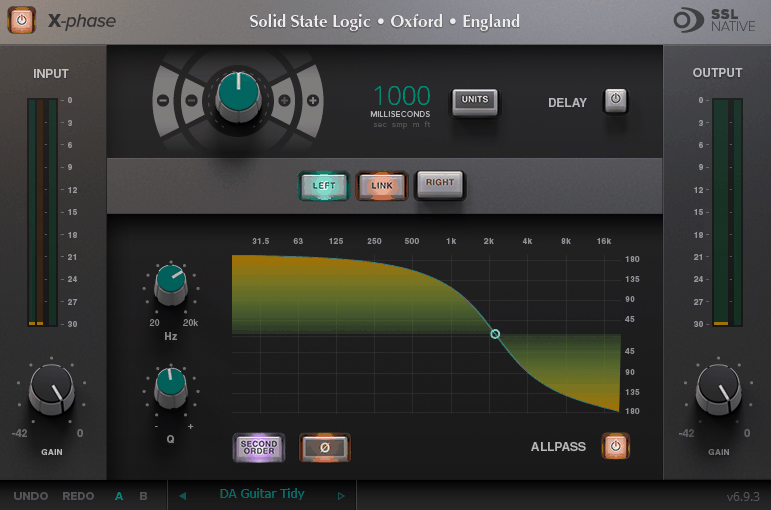
The interface is purposefully sparse, which I appreciate because phase correction is already a somewhat abstract and counterintuitive process, and adding more knobs wouldn’t make it easier. What you have is:
- Frequency: sets the center frequency where the phase shift is applied, ranging from 20 Hz to 20 kHz to cover the full audible spectrum
- Q: controls the slope and width of the correction curve, essentially how narrowly or broadly the phase shift is applied around the center frequency
- 2nd Order button: inverts the filter response for more dramatic phase adjustments when the standard mode isn’t enough
- Phase Invert button: flips the entire signal 180 degrees, available alongside the all-pass filter for situations where you need both
Beyond the all-pass filter section, the Delay section handles broader time alignment of the signal and operates independently from the filter. You can set the delay in seconds, milliseconds, samples, meters, or feet, which is genuinely useful because it means you can work in whatever unit makes sense for the situation you’re dealing with. When aligning a DI signal to an amp mic, working in feet makes intuitive sense because you can estimate the physical distance and dial it in directly. When nudging a recorded track in a DAW context, milliseconds or samples are more natural.
The plugin can be set to process L, R, or both channels simultaneously, giving you flexibility on stereo material. For drum overheads or room mics, processing both channels together typically makes the most sense, while situations where left and right mics are at different distances from a source might call for independent processing.
The most common scenarios where this plugin earns its place in a session include:
- Drum overhead to close mic alignment: bringing overheads into phase coherence with snare, kick, and tom mics without creating the comb filtering that phase flipping introduces
- DI to amp mic alignment: aligning a clean DI signal to a miked cabinet where the mic is physically at a distance from the speaker
- Hybrid session latency: correcting the phase offset introduced when analog outboard gear is in the signal path alongside digital processing in a DAW
- Top and bottom mic phase on snare or guitar cabinet: the classic multi-mic scenario where a simple flip doesn’t fully solve the problem
- Room mic integration: aligning room or ambient mics to close mics without losing the body and weight that room mics are supposed to add
I noticed it also has an interesting creative application that’s mentioned less often, which is the ability to create a comb filter effect by applying the filtered signal alongside an unfiltered version of the same signal. This is a manual process but gives you a level of creative control over comb filtering that you don’t normally have, and it’s a useful tool for sound design and experimental processing when you want that specific character deliberately rather than accidentally.
Presets and A/B Comparison
SSL includes factory presets installed on your system at Library/Application Support/Solid State Logic/SSL Native/Presets/X-Phase on Mac, and at C:\ProgramData\Solid State Logic\SSL Native\Presets\X-Phase on Windows. These give you useful starting points for common phase correction scenarios rather than leaving you completely from scratch on every session.
The A/B preset slots with a dedicated A/B switch are one of the more thoughtful workflow inclusions in the interface. Phase correction is largely a listening exercise, and being able to flip between two different correction settings instantly while the audio plays is significantly faster than trying to remember what one setting sounded like versus another. I suggest using this heavily when dialing in settings on drums particularly, because the differences can be subtle enough that memory alone isn’t a reliable guide.
I want to note that the plugin requires a free iLok account for authorization, which is standard for SSL’s Native plugin range and doesn’t require a physical iLok dongle, just the account itself. It also includes Apple M1 native support as a universal binary, which means it runs natively on Apple Silicon without any Rosetta overhead.
A fair note for the honest review is that X-Phase is a manual tool, meaning it requires you to understand what you’re listening for and to make adjustments by ear rather than through automatic analysis. If you’re looking for something that automatically detects and corrects phase issues, tools like Sound Radix Auto-Align take that approach. X-Phase gives you precise manual control, which for experienced engineers is often exactly what you want, but it does mean there’s a learning curve to getting the most out of it.
I also included X-Phase in this roundup on the best phase alignment plugins.
Formats: VST2, VST3, AU, AAX
Works with: macOS (Apple Silicon and Intel), Windows
Price: $114
Check here: SSL X-Phase

Hello, I’m Viliam, I started this audio plugin focused blog to keep you updated on the latest trends, news and everything plugin related. I’ll put the most emphasis on the topics covering best VST, AU and AAX plugins. If you find some great plugin suggestions for us to include on our site, feel free to let me know, so I can take a look!