When I first opened Heavyocity’s Symphonic Destruction Kontakt library, I wasn’t sure what to expect, though I knew their reputation for aggressive sound design well enough to be curious. What I got was something that sounds like an orchestra that’s been completely reimagined for modern cinematic production, and it felt different from the start in ways I didn’t anticipate.
This isn’t your typical orchestral library, and you’ll understand why within the first few minutes of using it.
Heavyocity recorded close to 100 musicians across multiple stages including Skywalker Sound, Warner Bros Studios, and Sear Sound, then took those recordings and processed them heavily to create something entirely new. The result is over 11,800 samples packed into a surprisingly compact 17.4GB footprint thanks to NI’s lossless compression, which is remarkable considering how much content is included.
The library runs on Kontakt 6.6.1 or later including the free Kontakt Player, which means you don’t need the full version of Kontakt, and I appreciate that accessibility, especially considering the price point.
What stands out most is how ready these sounds are for actual production work, as there are no thin, wimpy samples that need multiple layers of processing before they’re usable. These samples already have weight and presence built directly into them, which saves a tremendous amount of time in the mixing stage.
Two Sides of Destruction
Symphonic Destruction splits its content into two distinct approaches, and understanding this division is key to getting the most out of the library.
First, you have the Designers, which are Heavyocity’s custom engines where you’re layering, sequencing, and processing sounds in creative ways. There are three Designer instruments: the SD Designer, Loop Designer, and Braam Designer, with each one focusing on different aspects of cinematic sound design.
Then you have the Performers, which take a more traditional approach by providing multi-sampled articulations organized into keyswitchable patches that you can play like any other orchestral library. But even calling them traditional feels off because nothing here sounds conventional.
The SD Designer: Where Things Get Interesting
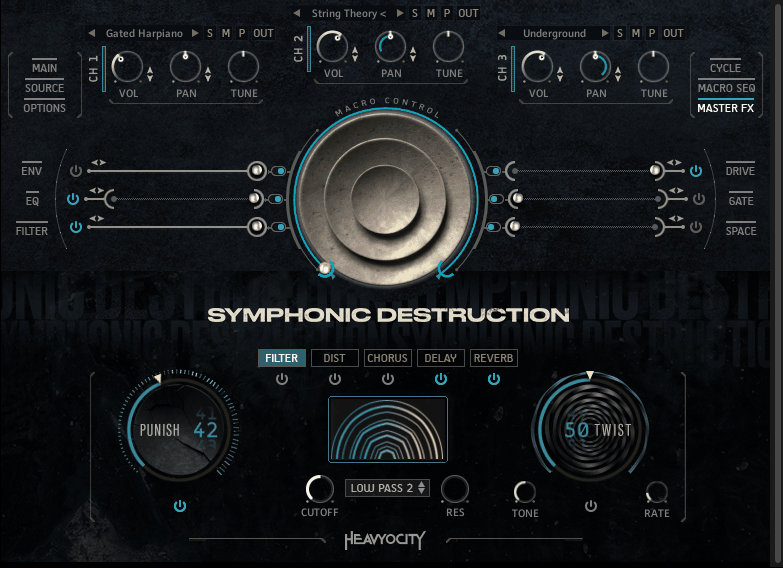
The SD Designer is where I’ve found myself working most often, thanks to its three-layer engine that lets you stack different sound sources and process them with modulation, effects, and sequencing in ways that create genuinely unique textures.
You get five main snapshot categories: All-Stars, Damaged, FX & Textures, Hybrid, and Loop Combos, with the All-Stars folder basically showing you what’s possible when you combine their best sources in thoughtful ways.
The Damaged category is where things get aggressive in the best way possible, and when I loaded up Grimy Divebombs, the low end had serious weight to it that immediately commanded attention. These aren’t subtle orchestral swells but are instead designed specifically for modern trailer work and action scoring where impact matters more than refinement.
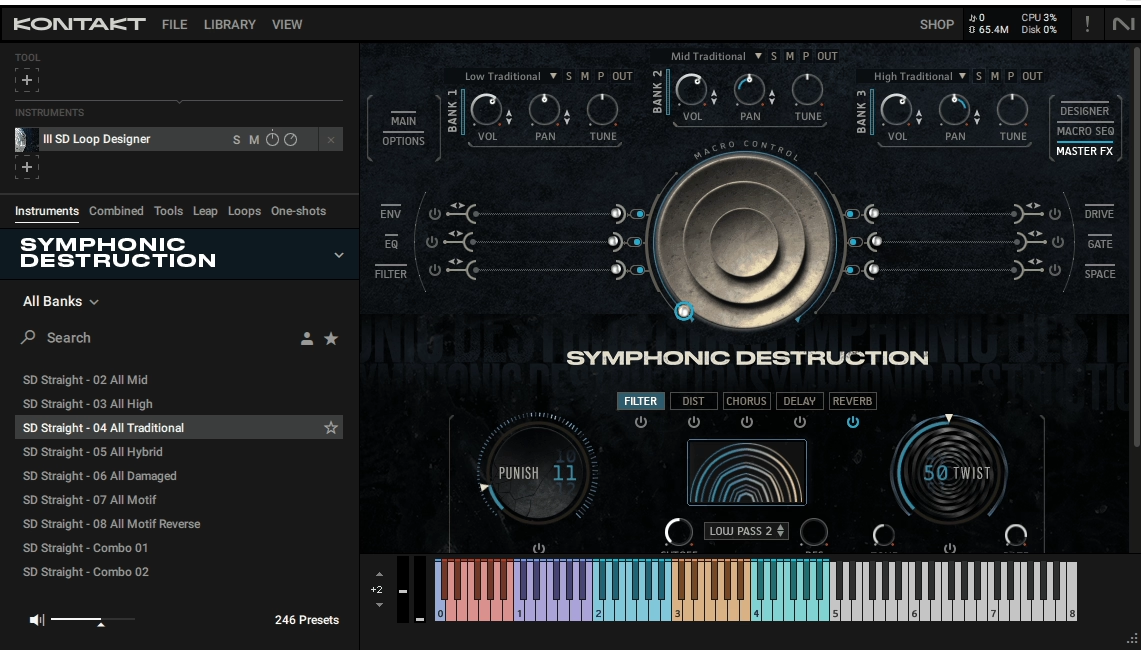
What makes the SD Designer genuinely powerful is the Macro Control system, which goes well beyond just tweaking individual parameters by letting you program how multiple effects evolve over time. The macro sequencer can modulate envelope, EQ, filter, drive, gate, delay, and reverb simultaneously, creating animated textures that evolve naturally rather than staying static.
The Cycle feature deserves special mention because it combines a rhythmic sequencer with granular processing to slice audio into grains and rearrange them rhythmically in ways that feel organic. When I ran sustained strings through Cycle, I got stuttering, pulsing textures that felt alive and responsive, though it takes some time to understand how grain size, spray, and density interact with each other. Once you get it, though, you can create rhythmic beds that sound nothing like the source material while maintaining a musical quality.
Braams That Actually Work
Look, we all know what braams are at this point, that low, processed brass sound from Inception that’s been in every trailer since 2010, and the question isn’t whether we’ve heard them before but whether we actually need more of them.
After using the Braam Designer extensively, I’d say yes, but only if they’re this well made, because there’s a clear difference in quality here that sets these apart.
The Braam Designer gives you 108 individual braam sounds organized into Sub, Mid, and Tail layers, with each layer having three banks to choose from, and you can layer them across different octaves for instant multi-layered impacts that feel massive without becoming muddy. What I appreciate most is the range of tonal colors available, because sure, you can create those massive, subby blasts that shake the room, but you also get options like Studly Thudly Sub which is this quietly menacing plucked bass sound, or Golden Grate which has an unexpectedly euphoric major-chord quality that works beautifully for heroic moments.
I tested these against braams I’ve built from other libraries over the years, and honestly, there’s a clear difference in the processing, the layering, and especially the way the sub integrates with the mid frequencies without creating phase issues. When I hit a single key in the mid-range with all three layers active, the resulting impact had depth and character without being muddy.
Loops
The Loop Designer is structured similarly to the Braam Designer but focused on rhythmic loops instead of impacts, giving you 216 tempo-synced loops split between straight and triplet feels and organized into low, mid, and high banks that let you build complex layered rhythm sections.
The Traditional category gives you standard orchestral rhythm patterns that work well as foundational elements, while the Hybrid stuff blends orchestral with synthetic elements in ways that feel cohesive. The Damaged loops are where things get really interesting for me, with heavily processed, distorted rhythmic patterns that sound like an orchestra being fed through guitar pedals and tape machines.
The Performer Side: More Than Traditional
The Performer patches are where you’ll find more traditional multi-sampled articulations, but Heavyocity’s definition of traditional is still pretty twisted in the best way possible.
There are eight Performer instruments: Traditional, Hybrid, Damaged, Soundscapes, Traditional Pedals, Hybrid Pedals, Damaged Pedals, and Damaged Guitars, with each one loading with eight keyswitchable articulation slots that you can customize by swapping out different samples.
The Traditional patch includes full orchestra sustains, staccatos, and crescendos, and these actually do sound like a proper orchestra, just one that’s been recorded with modern cinematic techniques and has significantly more presence than typical classical libraries. The full string section sustains are stately and serious, the staccatos have genuine bite that cuts through dense arrangements, and the crescendos build with dramatic weight.
But it’s the Soundscapes section that really caught my attention, as patches like Psyborg 2084 are less articulations and more complete sonic worlds that you can explore. This particular preset spans six pitch zones, each containing completely different material: a monumental evolving bass drone, pumped-up string sustains, industrial metallic noise, sci-fi descending effects, a wailing phantom choir, and atonal woodwind textures, all in one patch. It’s essentially six different soundscapes mapped across the keyboard that you can play and layer however you want.
The Damaged patches are where Heavyocity’s processing philosophy really shows itself in full force, with Orchestra Grit and Scorched delivering distorted brass with tremendous low-end punch that feels physical. Punktualika is this manic stabbing orchestra-synth hybrid that feels perfect for competing with heavy guitars in dense rock-orchestra arrangements.
I found the ostinato engine in the Performer shorts genuinely useful for my workflow, as you can trigger automatic repeats at eighth, sixteenth, or 32nd notes with programmable accents that add musical emphasis. Applied to something like Frittharmonika or Underground, this generates instantly propulsive rhythm patterns where you simply set the number of repeats, choose where to accent, and suddenly you have a driving rhythmic element without programming anything manually.
Pedals and Guitars
The Pedal patches contain samples with built-in rhythmic patterns baked right into them, and these are technically called pedals because they work great as sustained bass notes, but since they’re mapped chromatically over four to five octaves, you can actually play chords and melodies with them too.
Arctic Drafts starts with a Bartok snap pizzicato that evolves into a four-bar accented eighth-note rhythm, and holding down a chord gives you this sparse, dynamically accented pattern that creates instant momentum. Only Forward gives you these manic slashing string stabs straight out of Bernard Herrmann territory that would be perfect for thriller or horror scoring.
The Damaged Pedals go considerably harder, with Sinistorch and Biggunz delivering formidable low-pitched impacts that are legitimately startling when you first trigger them. The bottom octave of Doom Hammers sounds genuinely unhinged with rhythmic low-end explosions that I can only describe as chaotic in the best way possible.
Then there’s Damaged Guitars, which are pre-recorded, heavily distorted guitar loops tuned down to Drop A# for maximum heaviness, and we’re talking palm-muted chugs, power-chord slashes, and Djent-style patterns, all tempo-synced and ready to inject aggression into your tracks. I’ve worked with plenty of metal guitar samples over the years, and these loops are well-recorded and processed in a way that lets them sit in a mix without eating up all the frequency space.
The Microphone Mixer: Essential Control
All Performer patches include three microphone positions: Main, Hall, and Rev FX, with the Main mic giving you that close, detailed sound with maximum clarity while the Hall mic adds room ambience and natural space. The Rev FX mic introduces a reversed reverb tail that can add drama to short notes and create tension.
Being able to balance these three positions is crucial for shaping your sound to fit different contexts, as for aggressive, in-your-face sounds, I push the Main mic up and keep the Hall low, while for more atmospheric work, I’ll bring up the Hall and Rev FX mics to create space and depth. Each channel has independent volume, pan, solo, mute, and output routing controls, plus a purge button to unload that mic position from memory if you’re running low on resources.
The Processing: What Makes It Heavyocity
What separates Symphonic Destruction from other orchestral libraries is the extensive processing chain that every sound has been run through before reaching your DAW. According to Heavyocity’s Dave Fraser, they ran signals through API consoles with Burl I/O, then processed with Thermionic Culture Vultures, modular synth rigs, Metasonix effects, and Black Box HG-2s. For mastering, they used the Manley Massive Passive and Dramastic Obsidian.
This isn’t subtle coloration by any means, as the Thermionic Culture Vulture is known for massive compression and harmonic distortion that can turn drums into sonic juggernauts, and that same aggressive philosophy is applied here to orchestral sources, which explains why even the Traditional articulations have so much presence and power.
The signature Punish and Twist knobs that appear on every instrument are essentially one-knob effect chains that have been carefully programmed, with Punish adding compression, saturation, and distortion while Twist handles modulation effects like chorus and phasing. These aren’t just labeled dials for show but are carefully programmed effect chains that always seem to do something musical.
Workflow and Performance
From my experience working with this library daily, Symphonic Destruction fits into production work pretty smoothly once you understand its structure. The Performers are straightforward where you load a patch, use key switches to change articulations, and you’re playing musical ideas within seconds.
The Designers require more initial setup but that’s where the creative possibilities really open up, and I usually start with snapshots to hear what’s possible, then tweak parameters from there. The Source Browser in the SD Designer lets you preview sounds before loading them, which speeds things up considerably.
One thing I noticed is that building cue starters is remarkably fast with this library, as I can load up a Loop Designer snapshot, trigger a braam for impact, layer in some Damaged strings from a Performer patch, and within a few minutes I have something that sounds like a complete idea ready for development.
The snapshot system is really helpful for learning the library’s capabilities, as each Designer and Performer comes with pre-designed combinations that show you what’s possible and teach you how the layers work together. I find myself using the snapshots more than I expected, especially in the Loop and Braam Designers where the combinations are already so well thought out.
Given how processed and layered everything is, I expected Symphonic Destruction to be heavy on CPU resources, but it’s not at all. Even with the SD Designer running three channels of complex samples with the macro sequencer active, I’m seeing CPU usage around 8-15% depending on complexity. The Performer patches are extremely light, typically sitting at 3-7% CPU per instance, and I’ve had six or seven Performer patches running simultaneously without any issues.
The 17.4GB install size is also refreshingly manageable in an era of bloated sample libraries, as we’re so used to orchestral libraries being 100GB or more.
What This Library Actually Does Well
Symphonic Destruction excels at modern, aggressive cinematic production where impact and power matter most, and if you’re scoring trailers, action sequences, horror, or sci-fi, this library gives you sounds that are immediately usable without needing layers of additional processing. The braams sound like braams should with proper weight and character, the loops have professional-grade programming that locks to tempo perfectly, and the hybrid textures blend organic and synthetic elements in ways that actually work musically.
The ostinato engine in the Performers is genuinely useful for creating driving rhythmic patterns quickly, while the Cycle feature in the SD Designer opens up granular manipulation possibilities that most orchestral libraries don’t offer at all. The microphone mixer gives you enough control to shape the sound for different contexts without being overwhelming.
Where I’ve found it most useful is building cue starters that can inspire entire compositions, as the combination of loops, braams, and processed articulations means I can put together something that sounds complete and production-ready pretty quickly.
The Honest Limitations
I have to be honest about what this library isn’t good for. This isn’t a general-purpose orchestral library by any stretch, and if you need delicate, subtle orchestral textures for intimate underscore or period drama, I’d look elsewhere without hesitation. While I found some quieter patches in the Soundscapes section, the core identity of this library is power and aggression.
There’s minimal percussive material included beyond a few hits, which I noticed right away, and Heavyocity clearly expects you to pair this with Damage or Damage 2 for percussion elements. That makes sense from a product strategy perspective, but it does mean I need additional libraries for complete trailer arrangements.
The interface can feel cramped on my laptop screen, as the SD Designer in particular has a lot of controls fighting for space in a single window, and I found navigating between different tabs and menus wasn’t always intuitive at first.
The learning curve is real and shouldn’t be underestimated, as I picked up the Performers pretty quickly, but understanding how to effectively use the Designers, especially the Cycle feature and macro sequencing, took me some dedicated time. The snapshots help bridge that gap, but if I want to build my own sounds from scratch, I need to invest time learning how the routing and modulation work together.
I also noticed that some articulations in the Performers can be hard to locate without using the snapshot system as a guide, as the library contains 445 sound sources spread across multiple instruments and categories.
Who This Library Is Actually For
If you’re a composer working in modern cinematic music like trailers, action films, sci-fi, or horror where power and impact are essential, I think this is an essential tool that should be in your arsenal, as the sounds are designed specifically for that context.
Electronic producers looking to add organic orchestral elements with edge and character will find a lot to work with here as well, as the hybrid textures blend synthetic and acoustic elements in ways that sit well in electronic productions.
Sound designers will appreciate the processed, effected nature of the material immensely, as many of these samples are starting points for further manipulation rather than final sounds meant to be used as-is.
This is definitely not for composers who need clean, pristine orchestral samples for traditional scoring work, and it’s not for subtle, delicate music that requires nuance and restraint.
The Bottom Line
From my perspective working with this library over time, Symphonic Destruction does exactly what it sets out to do with impressive consistency: provide aggressive, modern, production-ready orchestral and hybrid sounds for contemporary cinematic work, and I think you’re getting a massive collection of sounds that would be incredibly time-consuming and expensive to create yourself from scratch.
The immediate usability is the real strength here, as I can open any Designer instrument, trigger a snapshot, and have something that sounds finished enough to drop into a mix without apology. That kind of instant gratification is rare with orchestral libraries, where I typically need to layer multiple patches, process them heavily, and massage samples before they sound right in a modern context.
For what it does, it does it exceptionally well, and this isn’t a Swiss Army knife that tries to be everything to everyone but rather a very specific tool for a very specific job that it executes brilliantly. If you need something subtle and refined for chamber music or period pieces, I wouldn’t recommend this at all, but if you need orchestral destruction, controlled chaos, and immediate cinematic impact that grabs attention, I’d say Symphonic Destruction delivers on its promises without compromise.

Hello, I’m Viliam, I started this audio plugin focused blog to keep you updated on the latest trends, news and everything plugin related. I’ll put the most emphasis on the topics covering best VST, AU and AAX plugins. If you find some great plugin suggestions for us to include on our site, feel free to let me know, so I can take a look!