
I’ve used Kontakt since version 5, so when Kontakt 8 came out, I didn’t expect huge changes. It’s still the go-to sampler that most third-party library makers support. After using version 8 on different projects, I can share what’s new and help you decide if upgrading is right for you.
Kontakt 8 isn’t a complete overhaul of the platform. From my perspective, this is an incremental update that adds useful features while maintaining compatibility with the massive ecosystem of existing libraries. The question isn’t whether Kontakt 8 is good; it’s whether the new features justify the upgrade cost if you’re already using version 7 or earlier versions.
Interface improvements and workflow changes
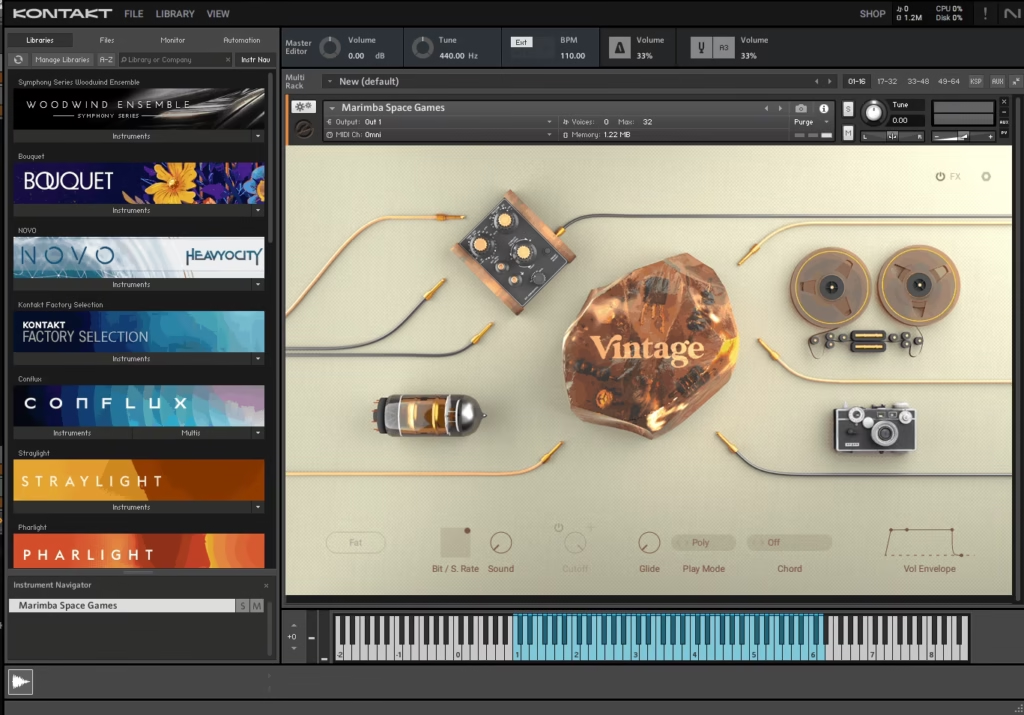
The new interface is the first thing you’ll notice. Native Instruments has finally fixed some old visual problems that made Kontakt look outdated. The darker, modern color scheme is easier on the eyes during long sessions, and the layout feels more unified compared to the patchwork look of earlier versions.
Resizable windows are now properly implemented, which I appreciate, as working across different monitor sizes always felt compromised in earlier versions. You can scale the interface to fit your screen without everything becoming tiny or absurdly large, and high-DPI support keeps it sharp on modern displays rather than blurry or pixelated. From my experience, this matters more than it sounds on paper, because spending hours staring at crisp text and controls noticeably reduces eye strain.
The browser now has better search and filtering, but it’s still not perfect if you have hundreds of libraries. Tag-based organization helps when libraries are tagged well, but many third-party libraries aren’t, which limits its usefulness. On the plus side, search is faster, and you can preview libraries without loading full instruments.
The performance view now gives clearer feedback about your loaded instruments. I like that you can see CPU and RAM usage for each instrument, not just overall stats. This makes it easier to identify which library is using the most resources in a large project.
New instruments and creative tools
Kontakt 8 comes with new instruments and effects, giving you more creative options than before. Analog Dreams stood out to me as a genuinely useful instrument, not just a demo. It offers vintage synth sounds that are great for retro-style music, so you don’t need extra synth plugins.
Choral is another standout addition that delivers realistic choir sounds for composers who need choral elements without investing in specialized choir libraries. I’ve used it on several film cues that needed background-choir textures, and while it’s not going to replace dedicated high-end choir libraries, it’s surprisingly capable for its intended purpose. The different vowel shapes and dynamics respond well to MIDI programming, making it more playable than I expected.
The effects suite now has more useful processors, and I think the new reverb and delay sound better than before. They won’t replace your favorite third-party plugins, but they’re good enough for sketching ideas and basic production without needing extra processing for everything.
Jump is a rhythmic engine that creates stutter, glitch, and rhythmic effects from any audio. I’ve found it useful for electronic music and sound design when you want to get creative with samples. It takes some trial and error to get musical results instead of random noise, but that’s part of the fun for experimental work.

Performance and technical improvements
The engine improvements in Kontakt 8 really help when you use large templates with many instances. I’ve seen faster loading times, especially with large orchestral libraries that used to take ages to load. It seems like Native Instruments put real effort into making things more efficient without changing how your libraries work.
RAM management feels smarter, though I haven’t done scientific testing to quantify the improvements. Large templates that previously pushed my system to its limits now run with more headroom, and I’ve had fewer crashes due to memory problems. For me, this extra stability alone makes the update worth it, since losing work to crashes is really frustrating.
CPU usage is a bit better, but not enough to make older libraries run smoothly. Heavy libraries still need a lot of processing power, but I can run a few more instances before reaching the CPU limit. This might matter more if you’re on a laptop or older computer where every bit of CPU helps.
Disk streaming works more efficiently, and I’ve noticed fewer dropouts or glitches when working with libraries that stream samples from disk. This improvement matters particularly when you’re running SSDs that should, in theory, handle streaming without issues but sometimes struggle in previous Kontakt versions.
Library compatibility and ecosystem
Kontakt 8 is very compatible with older libraries, which is important since users have invested a lot in them. Everything I had from Kontakt 7, 6, and even older versions loads and works fine in Kontakt 8. Keeping this compatibility while adding new features shows that Native Instruments knows how important the ecosystem is.
Most third-party library makers have updated their products to use Kontakt 8’s new features, but many libraries still work fine without updates. Developers who keep their libraries up to date release updates for better performance or new features, while older or abandoned libraries continue to work as before.
The Kontakt Player version means users without the full Kontakt can still run libraries designed for the Player, which maintains the accessibility that’s made Kontakt the standard. This matters for the broader ecosystem because library developers can reach both full Kontakt users and those who only have Player access.
Practical use
If you already use Kontakt 7, upgrading depends on whether the new features and improvements matter for your workflow. If you have performance problems with big templates or dislike the old interface, upgrading is a good idea. But if Kontakt 7 works well for you and you don’t need the new instruments, it’s fine to wait for a sale or skip this version.
If you’re on Kontakt 6 or an older version, upgrading to Kontakt 8 makes more sense because the improvements really add up. Better performance, a nicer interface, and more stability make a big difference in daily use. I recommend upgrading if you use Kontakt often.
If you’re new to Kontakt, version 8 is definitely worth getting if you’re serious about music production. The huge third-party library ecosystem gives you access to almost any sound you want, and the platform is mature and stable. You’re getting a proven tool with years of development, not an untested one.
If you compose or produce for film, TV, games, or any style that needs orchestral, ethnic, or special sounds, Kontakt 8 is essential. It’s the top choice for professionals because it’s reliable, sounds great, and gives you access to the best sample libraries.
Limitations and what to consider
Kontakt 8 still has some old quirks that haven’t been fixed, and some parts of the platform feel limited because they need to stay compatible with older scripting. The scripting language hasn’t changed much, so library developers can’t do as much as they could on newer platforms.
The browser is still not perfect, especially if you have hundreds of third-party libraries with inconsistent names and categories. I would still use third-party library managers to keep big collections organized.
Authorization uses Native Access, which works well but needs an internet connection for the first setup. This is standard for pro software, and once you’re authorized, it doesn’t get in the way of your workflow.
System requirements are fair for today’s computers, but running big templates with several Kontakt instances still needs good hardware. You’ll need at least 16GB of RAM for serious projects, and using an SSD really speeds up loading and streaming.
Final thoughts..
Kontakt 8 brings real improvements over earlier versions, even if it doesn’t completely change the platform. The updated interface makes daily use nicer, performance tweaks help with big projects, and the new instruments add real value beyond just being the latest version.
As I said, if you’re using Kontakt 7 and it works well for you, there’s no rush to upgrade unless you want the new features. But if you’re on an older version or new to Kontakt, version 8 is the best and most up-to-date sampler for professional work.
I still use Kontakt 8 as my main sampler because nothing else matches its ecosystem and library support. The improvements make it better than version 7, but whether it’s worth the upgrade depends on your needs and budget. It’s a solid, reliable tool that does its job well, which matters more than flashy features you might never use.

Hello, I’m Viliam, I started this audio plugin focused blog to keep you updated on the latest trends, news and everything plugin related. I’ll put the most emphasis on the topics covering best VST, AU and AAX plugins. If you find some great plugin suggestions for us to include on our site, feel free to let me know, so I can take a look!