If you’ve been looking for a VCA bus compressor plugin that does more than just recreate the API 2500, you’ve probably come across the Pulsar Audio IPA 25 floating around mixing forums and YouTube demos since its release in late 2025.
The IPA 25 is Pulsar Audio’s updated version of the classic API 2500 RMS/VCA bus compressor. It keeps the compression style the same but lets you switch between four different gain-reduction circuits, each with its own sound. After using it on several projects, I’ve found that this really works. You can change the tone of your compressed signal without having to redo your settings every time you want a new vibe.
But is the Pulsar Audio IPA 25 actually worth it in 2026?
Yes, I think the IPA 25 is a good buy for anyone who often works on buses, groups, or mastering chains. For €149 (and often on sale for €99), you get four unique compression styles, a built-in clipper/limiter, visual sidechain EQ, and timing tools that the original hardware didn’t have. It won’t replace every compressor you own, but it does a lot from one plugin.
Compression character and the four VCA modes
The headline feature is the four swappable VCA topologies, and I’ll be honest, I was skeptical about how meaningful the differences would actually be before I tried it. Switching compression “flavors” sounds like a marketing gimmick, but after spending time with it on real sessions, the differences are genuine and musically useful, rather than just technically different.
Here’s how each mode breaks down in practice:
The Drive control dials in how hard each circuit saturates, which gives you a range from barely noticeable to obviously colored within each mode. I tend to keep it moderate on most material, but it’s nice to have the option to push it when the session calls for something more aggressive. The choice between feed-forward and feedback detection adds another layer of subtle variation, though I’ll admit the difference between these two is less immediately obvious than swapping VCA modes.
What I appreciate most is the speed of comparison. You click between modes and the compression behavior stays put while only the harmonic character changes. No level jumps, no parameter resets. In practice, this means I can audition all four characters on a drum bus in about ten seconds and make a decision based on what I’m hearing rather than what I think should work. That kind of workflow efficiency matters when you’re deep in a session and decisions need to come fast.
Sidechain, clipper/limiter, and timing tools
The sidechain section is where the IPA 25 starts to pull away from simpler API 2500 emulations, and I think it’s one of the plugin’s real strengths.
The Punch Selector gives you three detection modes (Norm, Mid, and Loud) that shift where the detector focuses across the frequency spectrum. These replicate the original hardware’s thrust control, and I’ve found the differences meaningful enough that I actually use them rather than leaving it on the default. On mix bus passes, switching between these changes how the compressor reacts to kick-heavy sections versus vocal-heavy sections, and finding the right mode for specific material makes a noticeable difference in how natural the compression feels.
The visual sidechain EQ with four flexible bands is something I use on almost every instance. Being able to roll off low end from the detector below 80Hz or so while watching the curve in real time is much faster than guessing with a simple high-pass filter. Here’s how I typically set it up depending on the material:
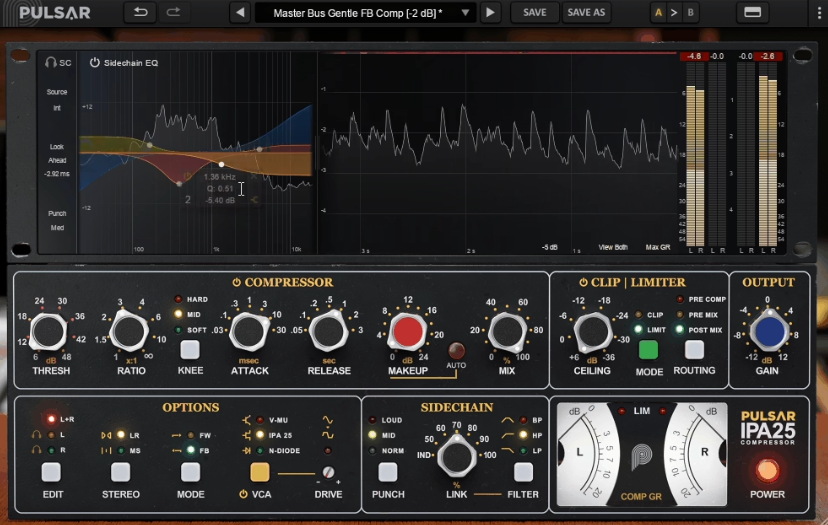
- Mix bus: Roll off everything below 80-100Hz so the kick and bass don’t pump the compressor, and sometimes a gentle dip around 200-300Hz to let the low-mids breathe
- Drum bus: More aggressive low cut, sometimes a small boost around 2-4kHz so the compressor reacts more to snare presence
- Vocal groups: Fairly flat with just a subtle low cut, letting the compressor respond naturally to the vocal range
Other sidechain and routing features worth knowing about:
- Stereo linking goes beyond basic L/R coupling, letting you control how channels share gain reduction across sustained levels versus fast transients
- Mid/Side processing for mastering-oriented work where you want to compress the center image differently from the sides
- External sidechain input for ducking, pumping, or creative triggering from other sources
The timing controls include Lookahead (which anticipates peaks for smoother limiting) and Lookbehind (which lets the initial transient through and compresses the sustain). I use Lookbehind regularly on drum buses because it preserves the snap of the attack while tightening up the sustain, and it’s the kind of feature that I didn’t know I wanted until I had it.
The integrated clipper/limiter is a genuinely useful addition that I wasn’t expecting to use as much as I do. The limiter is designed to intervene only where overshoots actually happen, letting sustained low-frequency content pass through cleanly. The clipper trims peaks instantly and adds a bit of harmonic weight.
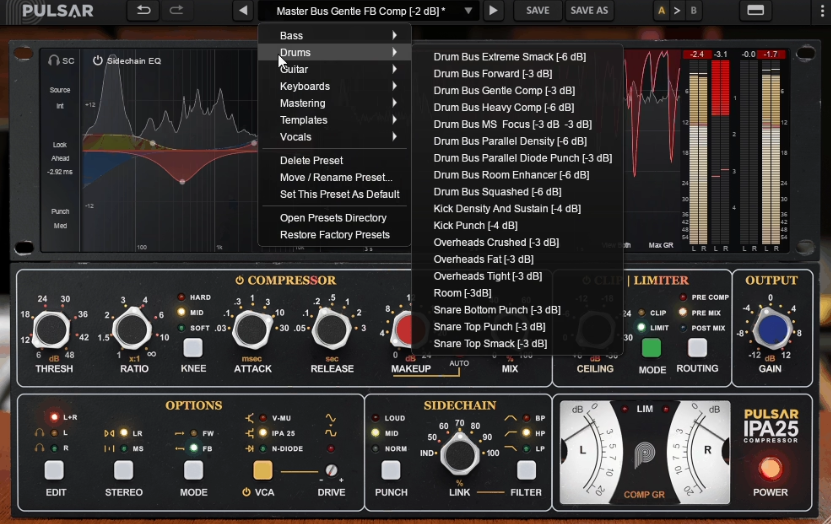
What makes this section practical is the flexible routing. You can place it in three different positions depending on what you need:
- Pre-compressor: Tames wild peaks before they hit the compression stage, so the compressor works on groove and tone rather than chasing stray transients
- Pre-mix: Adds peak control or color inside a parallel compression path
- Post-mix: Acts as a maximizer-style ceiling across the bus, catching anything that slips through
I’ve found the pre-compressor clipper placement especially useful on drum buses where a few stray snare hits were making the compressor work harder than necessary. Shaving a dB off those peaks before compression meant the compressor could focus on shaping groove and tone rather than chasing transients, and the end result sounded more musical with less effort.
That said, I want to be realistic about the clipper/limiter. It’s a nice bonus for streamlining your chain, but it’s not going to replace a dedicated mastering limiter or a purpose-built clipper plugin if those are central to your workflow. It’s best thought of as a convenient, well-implemented addition that reduces the need for extra plugins in your bus chain.
Practical considerations and who this is for
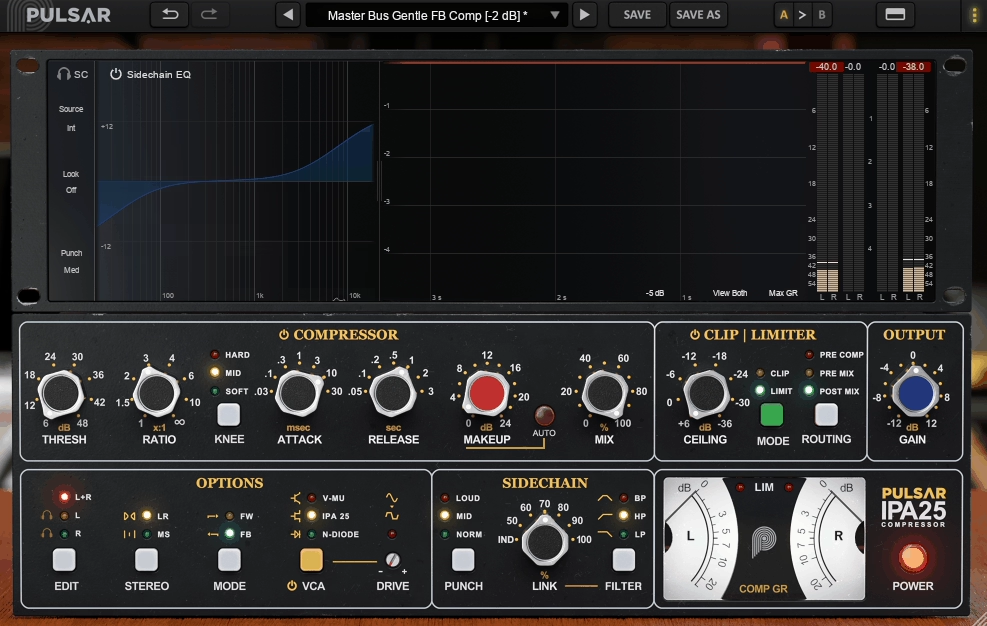
The interface is clean and well-organized, following Pulsar’s established design approach. The top section shows real-time compression, spectrum, and detector behavior, while the bottom section gives you direct access to threshold, ratio, knee, attack, release, mix, and output. I appreciate that the most-used controls are immediately accessible without diving into menus, and the visual feedback helps you understand what the compressor is doing at a glance.
Workflow features that round out the experience:
- A/B comparison, undo/redo, and preset management in the global toolbar
- Stepped knobs option for precise, repeatable settings
- Oversampling configurable separately for real-time and offline rendering, which is smart because you probably don’t need maximum fidelity while making creative decisions, but you definitely want it when bouncing finals
- Zero-latency mode that disables lookahead, limiter, and real-time oversampling for tracking situations where performers are monitoring through the plugin
On the subject of CPU usage, I should be honest: the IPA 25 is not the lightest compressor I own. Running multiple instances with oversampling will add up, especially on older systems. For bus and group work where you might have three to five instances in a session, it’s totally manageable. But if you were thinking about putting it on every channel strip, you’d want to check your system’s headroom first. Pulsar makes great-sounding plugins, but lightweight processing has never been their primary selling point.
The plugin supports macOS 10.11+ and Windows 7+ in VST2, VST3, AU, and AAX formats, and requires iLok for authorization (machine, dongle, or cloud). The iLok requirement is a minor annoyance if you don’t already use it, but it’s standard for Pulsar products and plenty of other professional plugins.
Here’s where I’ve found the IPA 25 earns its keep:
- Drum buses: The mode switching and Lookbehind timing let you find the right balance between punch and control faster than any other compressor I own. Original VCA with Lookbehind is my go-to starting point.
- Mix bus: Clean or Original VCA modes with the sidechain EQ protecting the low end give you transparent, musical compression that holds things together without squashing dynamics.
- Vocal groups: V-Mu with moderate settings adds warmth and consistency that sits well in a mix without making vocals sound compressed.
- Mastering: The combination of the limiter module, Lookahead timing, and M/S processing gives you a self-contained dynamics toolkit in a single window.
- Parallel compression: N-Diode with aggressive settings and the built-in wet/dry mix creates crushed, characterful parallel signals without needing separate send/return routing.
Compared to the UAD API 2500, the IPA 25 offers more flexibility at a lower price without requiring specific hardware. The core compression action is very similar between the two, and the extended features of the IPA 25 (multiple VCA modes, sidechain EQ, clipper/limiter) give it a practical advantage for engineers who want more options from a single plugin. Compared to the API 2500 emulation in DMG Audio’s TrackComp, the basic compression behavior is close, but the IPA 25’s topology switching and visual tools set it apart.
The IPA 25 won’t be the right choice for everyone. If you want the simplest possible API 2500 emulation without extra features, you might find the additional complexity unnecessary. And if CPU efficiency is your top priority, lighter alternatives exist.
But if you want a VCA bus compressor that does the classic API 2500 thing convincingly and then gives you room to explore different tonal directions, sidechain shaping, and peak management without opening five separate plugins, I think the IPA 25 is one of the best options available right now. It’s become my default bus compressor, and I don’t see that changing anytime soon.

Hello, I’m Viliam, I started this audio plugin focused blog to keep you updated on the latest trends, news and everything plugin related. I’ll put the most emphasis on the topics covering best VST, AU and AAX plugins. If you find some great plugin suggestions for us to include on our site, feel free to let me know, so I can take a look!