Electronic music production demands tools that understand genre-specific workflows rather than generic libraries trying to serve every style. Most Kontakt instruments either hand you thousands of presets that sound dated or force you to program everything from oscillators spending hours achieving what should take minutes.
The libraries that actually work for electronic producers solve specific problems – whether you need euphoric trance leads that evolve naturally, hybrid drums with phase-aligned acoustic and electronic layers, or vintage house vibes that capture 90s dancefloor warmth without external processing.
These eight Kontakt libraries were built by producers who understand electronic music production, offering sounds that integrate with synths and programmed beats while maintaining enough flexibility to personalize without rebuilding from scratch. Here are the instruments worth having for modern electronic production.
There are not many Kontakt libraries that could work well for electronic music, but I think these can work great. Except those, definitely check out 2 libraries by Output – Exhale for vocals and Substance for huge low-end (sub, bass and 808s), I just don’t have this purchased so I skiped those in the list.
So now let’s dive in:
1. Native Instruments Utopia (For EDM & Trance)

I’ve noticed that electronic music production often suffers from a specific problem – you either get massive synth libraries with thousands of presets that all sound generic, or you spend hours programming sounds from scratch only to end up with something that feels flat and uninspiring.
I’ve come to see that the challenge isn’t about having more options but about having the right starting points that actually work in modern electronic tracks.
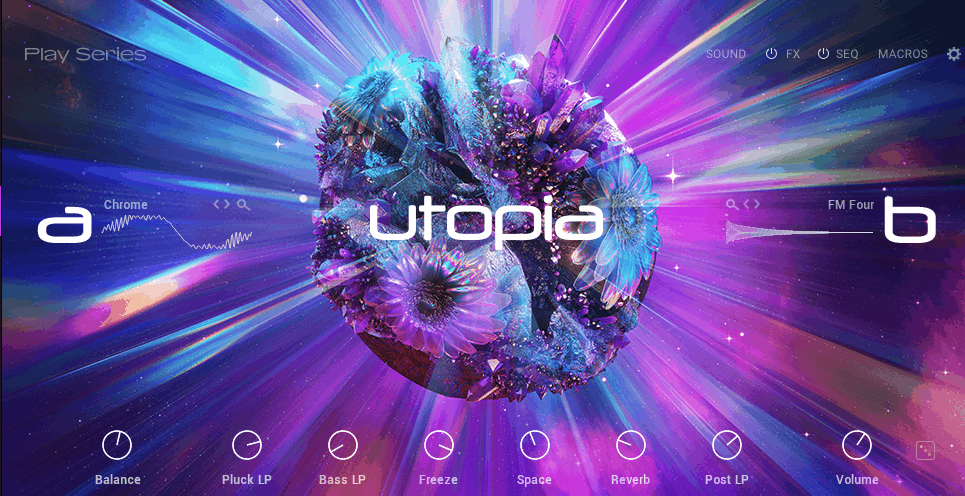
Utopia EDM Kontakt library addresses this as a modern Play Series instrument crafted specifically for electronic music producers working in EDM, uplifting and progressive trance (could work for some other subgenres too), and what separates this from typical preset packs is how it focuses on delivering euphoric, emotionally charged sounds rather than overwhelming you with quantity.
The library comes with 150 carefully designed presets across 118 unique sound sources including leads, basses, pads, and arpeggios where each preset is designed to evoke the soaring, emotional textures typical of trance and progressive EDM.
It comes as a playable instrument with dynamic modulation and performance control sitting at a compact 1.1 GB size that’s compatible with the free Kontakt Player 7.6+ requiring no full Kontakt license.
Features:
- Presets Across 118 Unique Sound Sources
As I said, The library delivers 150 presets spanning leads, basses, pads, and arpeggios all designed for trance and EDM. I think what makes this practical is how each preset evokes soaring, emotional textures without feeling like generic filler content.
- Flexible Effects Chain with Drag-and-Drop Interface
Every preset can be customized via the Effects Editor where you can add, remove, or reorder effects like delays, reverbs, phasers, and distortion with simple drag-and-drop.
- 16-Step Sequencer with Six Assignable Macros
Utopia includes a 16-step sequencer for quickly generating rhythmic patterns, arpeggios, or evolving sequences paired with six assignable macros letting you control filters, distortion, or modulation in real-time. This is perfect feature for trance producers tjat can build the sequences and arpeggios for their tracks.
- Detailed Sound Editing with A/B Layer System
Each sound source has independent tuning, envelopes, panning, and filter controls. You can tweak the A/B layers of a sound making it easy to design hybrid textures or morph between timbres.
- Performance-Focused Interface Design
The interface is clean and focused on performance keeping all essential controls on a single page. Key ranges, velocity curves, and macro mappings are all adjustable. I’m inclined to believe even less experienced producers can craft expressive sounds efficiently because the layout prioritizes what matters during actual music-making rather than burying functions in submenus.
- Randomization
Also, the randomization feature on the right bottom works surprisingly well, where it randomly choose the samples for A and B side, so you can quickly pick 2 versions that would fit to your track rather than searching for it manually.
2. Native Instruments Session Guitarist: Electric Mint (With presets for EDM)

I can’t help but think that guitar in electronic music occupies this awkward middle ground where most producers either avoid it entirely because they can’t play guitar, or they record bland strumming that sits lifeless in the mix competing with synths and drums.
I’ve found the alternative – using guitar sample libraries – often means choosing between rigid audio loops that don’t adapt to your chord changes or basic MIDI guitar instruments that sound obviously fake the moment you trigger them.
Electric Mint solves this as a Kontakt-based electric guitar instrument focused on playable guitar parts, patterns, and song ideas rather than raw sample playback, built around a meticulously sampled 1960 USA-made solid body vintage electric guitar with three combinable single-coil pickups.
I’d argue what makes this compelling for electronic producers is the combination of 222 playable patterns across 53 song presets plus a Melody instrument with realistic articulations spanning roughly 14.6 GB uncompressed and working with free Kontakt Player or full Kontakt.
I believe the instrument includes 71 sound presets with built-in effects chain featuring SUPERCHARGER-GT compressor, Cry Wah auto-wah, multi-stage speaker amps and cabinet emulations, and convolution reverbs making it possible to shape guitar tones that sit well with synths and drums without external amp sims.
- 222 Patterns Distributed Across 53 Song Presets
One of Electric Mint’s biggest features is its library of 222 patterns distributed across 53 song presets. I’ve experienced how each song preset groups multiple patterns and chord progressions that are stylistically consistent from rhythmic funk strums to pop riffs and blues-flavored lines.
I think these patterns are not loops but MIDI-driven performances that sync to your project tempo from 60-160+ BPM without time-stretch artifacts. I often find this library of performance content makes it much more than a static sample player, and I can see how you can drag any phrase, voicing, or progression into your DAW and edit the MIDI further.
- Three Combinable Single-Coil Pickups with Tone Control
The instrument is sampled from a 1960 vintage guitar with three single-coil pickups that yield five distinct tonal variations. I’d say these pickups individually and in pairs give a range from clean, bell-like single-coil clarity to more pronounced midrange sound.
I’ve noticed on the Guitar Settings tab you can mix pickup position, tone, and volume to dial in warmer or brighter guitar character. I imagine this matters because most contact libraries focus on single hits or strums while Electric Mint’s approach lets you tune the raw guitar tone before effects which is essential when blending guitar into EDM mixes.
- Melody Mode with Realistic Articulations
The instrument has a Melody instrument where you can play notes and riffs with realistic articulations. The engine handles hammer-ons, pull-offs, legato, slide-ins, and tremolo bar vibrato allowing expressive control from a MIDI keyboard.
I believe the Mapping Panel color-codes keys for chord and phrase triggers, playable melody notes, and articulations and slides enabling you to combine patterns with melodic fills or craft custom lead lines.
- Feel, Swing, Humanise, and Shift Controls
Electric Mint includes controls that adjust how rigid or relaxed the patterns feel rhythmically. I’ve realized you can move accents between downbeats and off-beats to better fit house grooves or syncopated EDM rhythms, and control swing independently from feel.
I’m convinced this is important because mechanical timing can make guitar patterns sound unnatural in electronic genres if left unadjusted.
- MIDI Drag-and-Drop for DAW Integration
The instrument supports MIDI drag-and-drop letting you extract patterns, chord progressions, voicings and phrases into your DAW for editing or rearranging. I feel like this makes it a songwriting tool as much as a performance instrument because you’re not locked into presets and can reshape them to match your track’s key or groove.
I tend to notice this workflow treats guitar like another synth line rather than forcing you to work in a separate audio-based guitar paradigm.
3. Native Instruments Nacht (Techno & Acid)

Nacht techno Kontakt library was built as a Play Series instrument tailored specifically for techno and acid producers emphasizing high-energy, dark electronic sounds and rhythmic sound design.
I believe what makes this focused is how it delivers 128 total sounds across 85 multisamples and 43 wavetables organized into 150 playable presets covering acid lines, techno arpeggios, and experimental EBM textures spanning 1.86 GB download and requiring Kontakt Player 7.10.5+ or full Kontakt. I’m convinced the strength here is genre specificity rather than trying to serve every electronic style.
- Designed for Techno
Nacht includes 85 multisamples and 43 wavetables giving a total of 128 unique sound sources. These range from hard-hitting basses and metallic leads to atmospheric pads and aggressive FX.
Here, each sound can be further manipulated in the Sound Editor (as with many other libraries on this list) allowing adjustments of tuning, envelopes, panning, and filters for precise shaping.
I’ve noticed this combination of multisamples and wavetables gives you both realistic timbral variation and synthetic flexibility without needing separate instruments.
- Sequencer
The instrument features a 16-step sequencer to quickly build rhythmic patterns, arpeggios, and melodic sequences. In addition, 6 assignable macros can be mapped to parameters like filter cutoff, distortion, and effect intensity offering expressive control in real time. I’d argue this is particularly practical for bedroom producers who want evolving sequences without manually editing every note.
- Presets with Deep Tweakability
The library ships with 150 presets covering everything from acid lines to techno arpeggios. I’ve experienced how presets are designed to be immediately playable but also provide deep tweakability through the macro system.
I can see letting producers personalize them without extensive programming, and I imagine this balance between instant usability and customization is what makes it practical for both live performance and studio production.
- Customizable Effects Chains via Effects Editor
Each preset can utilize an editable effects chain through the Effects Editor where you can add, remove, or reorder effects like phasers, delays, and overdrive. I believe the combination of multiple effects with macro and sequencer modulation enables complex sound transformations without leaving the main interface.
I feel like this integrated approach means you’re not loading five external plugins just to get the distorted acid bass you’re hearing in your head.
- Performance-Focused Interface Design
The interface is clean and performance-focused with visual macro dots that show parameter assignments and mappings. Key ranges and velocity curves can be adjusted in the Settings page making the instrument adaptable to different playing styles.
I tend to notice the Play Series approach prioritizes getting usable sounds quickly over deep synthesis menus, and I’d say this matters when you’re building tracks or performing live and need immediate results.
4. Native Instruments Feel It (for House Music)

This one was built as a house-focused Play Series instrument designed to capture classic US and 90s house tones offering pianos, organs, basses, stabs, pads, and atmospheric textures directly from the dancefloor.
I’m convinced what makes NI Feel It relevant is how it was created in collaboration with multi-instrumentalist and sound engineer Alexkid along with collaborators including Brawther, Okain, Garrett David, and Robin Ordell plus additional content from Monty Luke, Christophe Darbouze, and others.
- 120 Genre-Defining Sound Sources
The library contains 77 multisamples and 43 wavetables totaling 120 unique sound sources. I’ve experienced how all sounds are faithfully sampled from genre-defining synths and classic house instruments providing everything from smooth chord stabs to deep basslines and rhythmic keyboard textures.
I think each source can be edited independently in the Sound Editor with controls for tuning, envelopes, filters, and panning giving hands-on flexibility. I’d say this combination of multisamples and wavetables covers both the organic warmth of classic hardware and the flexibility of synthesis.
- 150 Production-Ready Presets Across Key Categories
Feel It ships with 150 carefully curated presets covering basses, pianos, organs, stabs, pads, and atmospheric layers. I often find presets are designed to be immediately playable but each can be fully customized using A/B layers, envelopes, filters, and macro control.
- 16-Step Sequencer with 6 Assignable Macros
As with many on this list, the instrument includes a 16-step sequencer to create rhythmic patterns, arpeggios, or chord progressions paired with 6 assignable macros. I’ve noticed these macros can modulate filter cutoff, distortion, reverb, and other parameters in real time making it easy to build dynamic movement or evolving grooves.
I feel like the combination of sequencer and macros keeps you in the instrument rather than bouncing between Kontakt and your DAW constantly, and I tend to notice this workflow speed matters when sketching house ideas.
- Editable Effects Chain with Visual Feedback
Each preset supports an editable effects chain allowing you to swap, remove, or reorder effects like EQ, delay, chorus, and reverb. I believe macros can be mapped to multiple parameters with visual feedback via colored dots simplifying live tweaking or automation in the DAW. This visual approach helps you understand what’s actually being modulated rather than guessing which parameters are assigned where.
- Authentic 90s US House Character
The sounds were sampled from iconic synths that defined the genre giving authentic 90s house vibes for creating timeless house tunes or referencing the era in future-facing club sounds. I’ve realized the library captures deep, ubiquitous bass and classic organ stabs plus atmospheric textures and pads that feel genuinely rooted in the genre.
I’d argue this authenticity comes from collaborating with actual house music veterans rather than just sampling random vintage gear.
5. Native Instruments Analog Dreams FREE (Great for Synthwave & Retrowave)

Analog Dreams was built as a retro-styled synth instrument in the Play Series for synthwave, retrowave, and analog-inspired electronic music that fuses classic hardware synth character with modern sound design tools.
I’d argue what makes this practical is how it’s centered on 150 sound sources derived from digitally blended and creatively processed samples of analog synths from the 1970s, 1980s, and beyond organized into 100 carefully curated presets across 5 key categories (Bass, FX, Leads, Pads, and Plucked) spanning 3.6 GB download and requiring Kontakt Player or full Kontakt 7.6+.
I believe the source material isn’t just raw hardware samples but has been processed to support hybrid textures that range from classic analog warmth to more modern, evolved timbres.
- Dual-Layer A/B Architecture for Hybrid Sound Design
Within the Sound Editor you can adjust tuning, filter cutoff and resonance, panning, and ADSR envelopes independently for both Layer A and Layer B.
I’ve experienced how blending these two layers lets you design hybrid sounds such as a deep analog bass with subtle pad underneath or a plucked arpeggio with swelling sweep all without loading separate instruments. I think this layering approach is what gives Analog Dreams its depth compared to single-layer preset banks.
- 16-Step Sequencer with Parameter Modulation
The instrument includes a built-in 16-step sequencer which isn’t common in every Play Series instrument. You can draw in note velocity, tie notes, adjust sequence length, and even modulate up to 6 parameters per step using additional sequencing lanes adding movement to filters, effects, or layer blends.
I’d say this is good news for synthwave producers looking to build pulsing arps or evolving melodic textures that lock into tempo, especially when combined with macros controlling cutoff, distortion, or delay depth.
- 150 Vintage-Inspired Sound Sources
Analog Dreams centers on 150 sound sources including thick bass tones, mellow pads, aggressive leads, percussive plucks, and spacey FX. I’ve noticed these sources have been processed to support hybrid textures rather than being strictly vintage emulations. This gives you both classic analog warmth and more modern evolved timbres without needing multiple libraries.
- Assignable Macros for Real-Time Control
The instrument has 6 assignable macros that offer deep real-time control. I often find you can map a macro to simultaneously open a filter, increase resonance, and add reverb all from a single knob.
- Flexible Effects Chain via Effects Editor
Analog Dreams integrates filters, modulation, delay, reverb, and distortion options available in the Effects Editor. You can add, remove, and reorder effects then assign them to macros for real-time control or automation.
I’m inclined to believe this keeps workflow moving because you’re shaping sounds within the instrument rather than building external chains. I tend to notice the integrated approach means fewer plugin windows and cleaner sessions.
6. Native Instruments Straylight (For Any Genre – Pads, Textures, Drones & Sound Design)
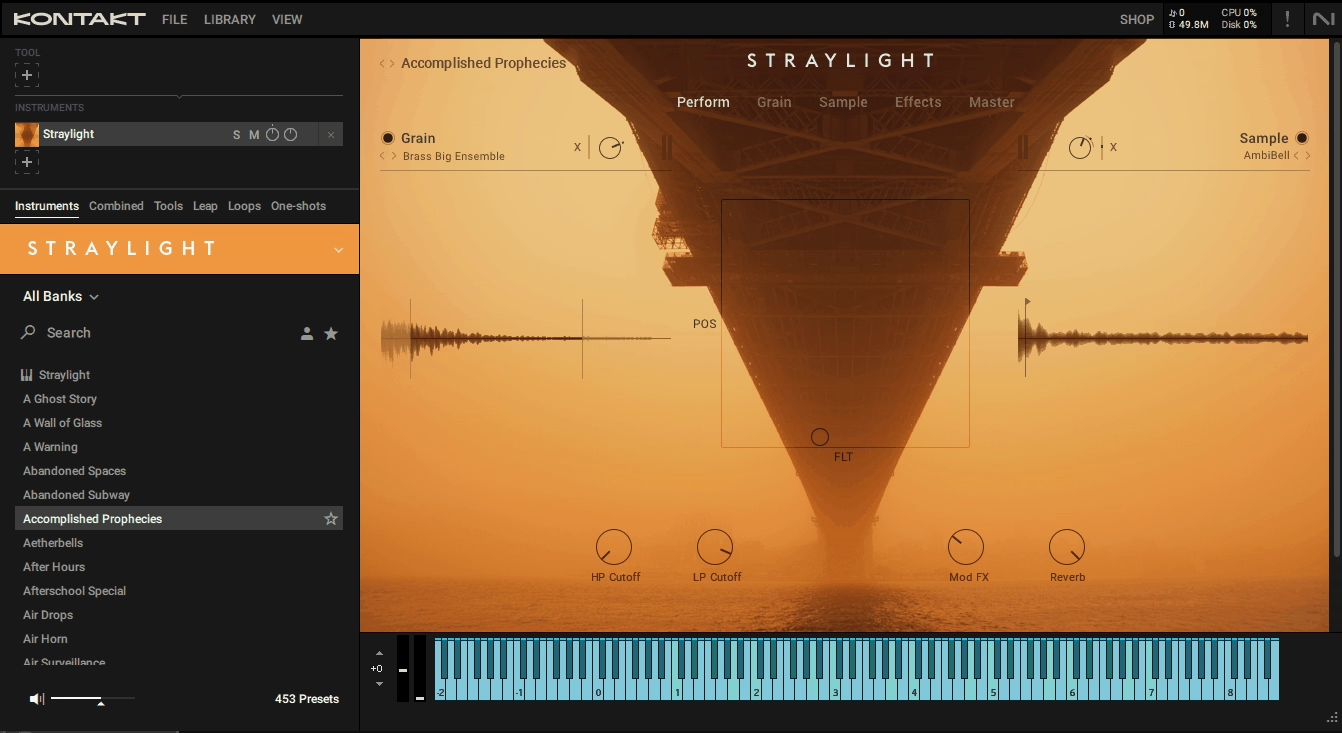
I noticed that most pad presets sounded impressive at first but quickly became static, forcing me to automate dozens of parameters, and unlike typical texture libraries, Straylight solves this as a cinematic granular instrument that creates dynamic, evolving pads, textures, drones, and risers in real time.
The sounds here were recorded using unconventional techniques like rubbing rubber balls on glass, membranes, or stone yielding inherently expressive and cinematic material.
The library includes over 360 unique sound sources comprising 319 granular source sets and 50 sample sets organized into over 300 presets with 450+ master snapshots, all spanning 2.47 GB download (3.86 GB uncompressed) and requiring Kontakt Player 6.2+ or full Kontakt 6.2+.
- Bespoke Granular Engine with Real-Time Modulation
The instrument features a granular engine capable of manipulating pitch, timing, and texture of even tiny audio snippets while maintaining their sonic character. Each granular source can be layered with the sample module allowing for hybrid textures that evolve over time.
I’ve experienced how the engine supports tempo-synced grains ideal for creating risers, transitions, or rhythmic textures that match your project’s tempo without additional editing. I’d argue this matters because you’re not stuck with static pads but can create movement that feels musical and responsive.
- X-Y Modulation Matrix for Expressive Control
Straylight’s X-Y pad allows simultaneous modulation of multiple parameters such as intensity, filter, grain size, and effects. You can assign MIDI CC to the X-Y axes enabling expressive control either in real time or automated within a DAW.
Macros can also be assigned to effects or modulation parameters providing hands-on performance flexibility without leaving the interface, and I often find this approach feels more intuitive than programming individual automation lanes for every parameter.
- Layered Effects Architecture with 9 Categories
Each preset can utilize up to 4 effect types per layer, plus 4 master effects and 2 send effects spanning 9 categories including filters, EQs, dynamics, gater, drivers, modulation, delays, utilities, and reverbs. I can see how specialized reverb impulses are included to match Straylight’s granular textures.
I imagine every effect parameter can be modulated via X-Y or macros making it straightforward to build evolving, mix-ready textures directly inside the instrument.
- Tag-Based Preset and Sound Browsing System
The library includes a tag-based browsing system for both sound sources and presets. Tags apply even when randomizing modules making it quick to locate textures suitable for atmospheres, pads, leads, transitions, or pulses.
- Custom Sample Import for Unique Textures
Producers can drag and drop their own samples to create entirely custom sounds using Straylight’s granular engine. This means you’re not limited to the included 360+ sound sources but can transform field recordings, vocal snippets, or any audio into evolving cinematic textures.
I wonder how many producers overlook this feature, but I’d say it’s what extends the library’s longevity beyond the factory content!
7. Native Instruments Pharlight (For Modern Voice Design)
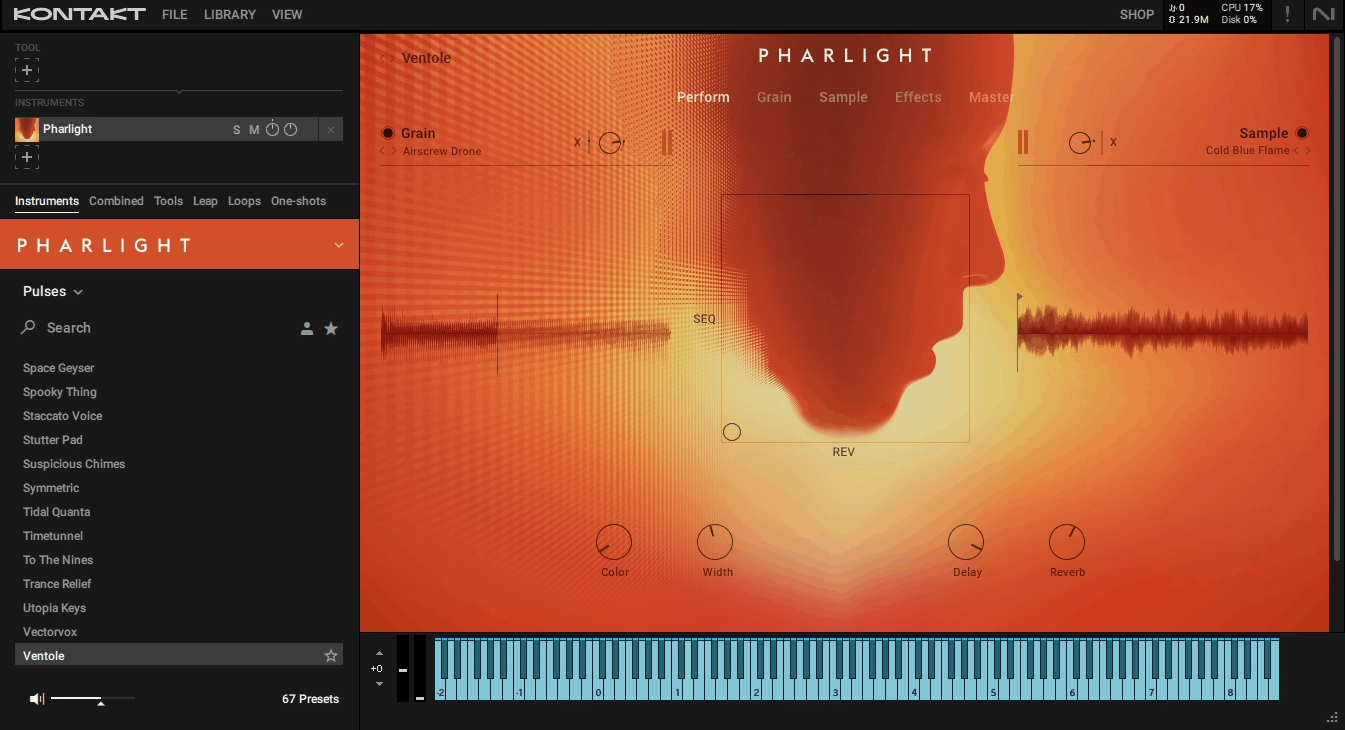
Now let’s talk about Pharlight. It’s a vocal-based granular instrument designed for contemporary voice design, cinematic textures, and experimental soundscapes that uses human voices as its core material rather than oscillators or traditional samples.
I’m convinced what makes this compelling is how it delivers 375 tailored sound sources comprising 270 grain sources and 59 sample source sets ranging from multi-sampled choral tones to beatboxing, whispered phrases, and spectral vocal textures organized into over 350 expertly designed snapshots.
The library spans 1.26 GB download (1.65 GB uncompressed) requiring Kontakt Player 6.2+ or full Kontakt and is optimized for Intel i5 processors or better since granular processing is CPU-intensive.
- Dual Granular and Sample Engine
The instrument features two modules – a granular module for transforming small sounds into evolving textures, and a sample module for multi-sampled, vocal-based layers.
I’ve experienced how you can independently tweak envelopes, filters, and pitch for each layer giving control over texture, timing, and timbre.
I think tempo-synced grains allow precise placement of sweeps, risers, and transitions, and I often find this dual approach means you can create everything from recognizable vocal tones to completely abstracted textures depending on how aggressively you process the source material.
- Real-Time X-Y Modulation for Expressive Performance
As with many libraries on this list I mentioned before (but still want to mention it) you have the X-Y pad that maps multiple parameters such as grain size, intensity, filter, and effects enabling expressive performance. You can morph a whispered vocal into a shimmering pad while simultaneously applying delay or gater effects all in real time. The macros can be pre-mapped in Komplete Kontrol making it intuitive for live performance or studio automation.
- Unique Vocal-Based Sound Sources
The library includes 270 grain sources and 59 sample source sets totaling 375 unique sounds. Each source is designed to maximize the expressive potential of Pharlight’s granular engine letting you stretch, layer, and morph voices into pads, leads, or atmospheric pulses without losing tonal clarity.
I believe this range from multi-sampled choral tones to beatboxing and whispered phrases gives you organic material that still feels human even after heavy processing.
- Comprehensive Effects Architecture
Each layer supports 4 insert effects with 4 additional master effects and 2 send effects including EQ, drivers, reverb, chorus, flanger, and phaser. I can see how every effect can be assigned to the X-Y pad or macros allowing complex sound modulation without diving into deep routing.
I feel like this integrated approach keeps workflow moving because you’re shaping sounds within the instrument rather than building external effect chains.
- Curated Snapshots Covering Multiple Categories
Pharlight ships with over 350 snapshots covering atmospheres, pulses, pads, choral textures, hooks, and transitions. Presets are curated to highlight the unique qualities of each vocal source making it easy to find usable sounds quickly.
8. Native Instruments Drum Lab (Great drums for Drum & Bass)

The biggest problem I’ve faced with electronic drum production is the endless layering required to get hybrid drums that don’t sound either too synthetic or too acoustic – you stack three kick samples, adjust phase relationships, add compression and saturation, then realize the snare doesn’t match and you start the process over.
Drum Lab solves this as a hybrid drum instrument built around an advanced layering concept that blends acoustic drum realism with electronic punch rather than handing you raw samples to figure out yourself.
You get 58 detailed acoustic drum sources and 80 electronic hits where the acoustic sources were recorded by drummer Derico Watson in three distinct rooms using high-end modern and vintage gear on analog tape, and each acoustic sound has a corresponding set of electronic layers that were phase-aligned, faded, and pitched to integrate sonically and rhythmically.
In addition to that, the library includes 108 individual drum instruments plus 60 ready-made kits with 26,500 total samples in a surprisingly compact 2.6 GB footprint (5.26 GB uncompressed) plus 900+ MIDI grooves (90 grooves with 10 variations each).
- Dual-Layer Acoustic and Electronic Blending
The instrument gives instant access to thousands of hybrid combinations through a simple blend slider. I’ve experienced how you can dial between acoustic and electronic components meaning you can push kicks toward more punch and body or pull snares toward grit and character without manually stacking samples in your DAW.
I think this dual-layer workflow is what separates Drum Lab from libraries that just give you separate acoustic and electronic folders, and I often find the phase-aligned integration means the layers don’t fight each other when blended.
- 108 Individual Drum Instruments with Granular Coverage
Drum Lab includes 9 kick variations, 10 snare variations, 3 toms with 6 articulations each, 7 hi-hat variations, 2 ride cymbals, 4 crash cymbals, and 5 percussion sounds chosen from 20 percussion options.
I can see how every variation has both the acoustic and electronic layer ready to blend. I imagine this granular coverage gives you enough tonal variety to build multiple kits without everything sounding like it came from the same drum set.
- 900+ MIDI Grooves with Visual Display
The library comes with 90 grooves with 10 variations each effectively giving 900 playable rhythm patterns and fills covering straight, swung, and genre-flavored grooves. I’ve noticed the grooves were performed live and then mapped with a visual display that shows exactly where hits land making it easier to understand groove timing at a glance. You can drag these MIDI grooves straight into your DAW and use them as starting points.
- Advanced Drum-Optimized Effects Chain
Rather than forcing you to load external plugins, Drum Lab comes with a drum-optimized Compressor designed to preserve punch while controlling dynamics, Transient Master for precise control over attack and sustain, SOLID EQ and SOLID Bus Comp for tonal balance and glue, and high-quality convolution reverb for natural space or ambient tails.
- Preset Kits
The library includes 60 production-ready presets that configure entire drum kits with mixing, effects, and balance tailored to punch and presence right out of the box.
This is ideal if you want usable drums without deep tweaking, and presets are configured for different genres and production styles rather than just being random combinations of samples.

Hello, I’m Viliam, I started this audio plugin focused blog to keep you updated on the latest trends, news and everything plugin related. I’ll put the most emphasis on the topics covering best VST, AU and AAX plugins. If you find some great plugin suggestions for us to include on our site, feel free to let me know, so I can take a look!