
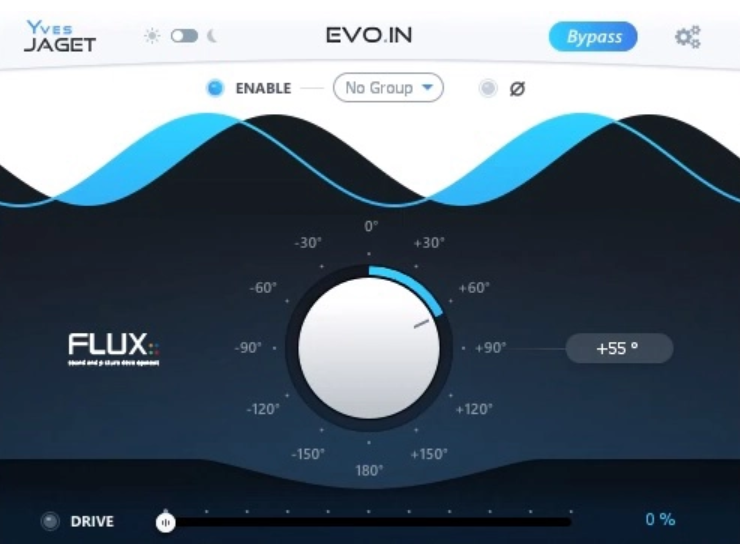
Phase problems are one of the most common and most quietly damaging issues in mixing, and for a long time addressing them meant either accepting the compromise of a blunt 180-degree polarity flip, or spending time manually nudging clips and listening for improvement across multiple tracks simultaneously. FLUX Evo In was designed with a more elegant solution in mind, combining arbitrary and linear phase rotation with a soft saturation Drive in a single, focused plugin that’s genuinely fast to work with once you understand its grouping system.
FLUX Immersive is a French audio company with a solid reputation in the professional audio world, particularly in immersive and surround production. Their tools show up regularly in high-end studio and live sound contexts, and the EVO series in general reflects a philosophy of combining familiar utility processing with genuinely novel ideas.
Evo In sits at the front-of-chain position in that series, handling the two things that matter most before any other processing happens: phase coherence across multiple microphone sources, and the kind of subtle harmonic saturation that brings a recorded signal back to life before it reaches the EQ or compressor.
In my opinion, Evo In is absolutely worth the price if you regularly work with drum kits, guitar rigs using both DI and cabinet mics, orchestral recording with multiple mics, or any other multi-microphone situation where phase relationships need careful attention. The grouping system alone saves significant time compared to working track by track, and the zero-latency operation means you don’t have to worry about compensation issues in complex sessions.
The Phase Rotation System
I want to be clear about what makes the phase correction here different from what you’ll find in most plugins, because the distinction matters for understanding why you’d reach for it. Rather than offering only a polarity flip or a simple delay-based time alignment tool, Evo In provides arbitrary and linear phase rotation implemented through a series of all-pass filters.
The result is that you can shift the phase of a signal gradually and at specific frequencies rather than uniformly, which is precisely what you need when dealing with the real-world complexity of multi-microphone recordings where each mic captures a slightly different frequency response and harmonic character from its position in the room.
The phase is controlled via a jog wheel that sweeps the rotation smoothly, and you listen as you adjust until the combination of the aligned sources sounds as coherent and full as possible. I found this to be a much more musical and intuitive process than working with delay-based alignment alone, because you can hear the low end filling in and the comb filtering dissolving as you dial it in rather than making discrete time nudges and hoping you landed on the right value.
The most important workflow feature is the Grouping system. You assign all instances of the plugin on related tracks to the same Group Number, which then lets you bypass or engage the phase correction on all grouped tracks simultaneously with a single button press on any one of them.
This is critical for the listening process because the whole point of phase correction is hearing what the combination of tracks sounds like together with and without the processing, and being able to flip the whole group in and out instantly makes that comparison immediate rather than requiring you to click through multiple instances one at a time.
Here’s how the workflow typically looks in practice:
- Insert the plugin on every microphone track that was recorded at the same time in the same space
- Assign all those instances to the same Group Number
- Enable Phase on all tracks
- Use the phase slider on each individual track and listen to the combined result
- Toggle Phase on and off for the whole group to compare against the unprocessed combination
- Adjust until the low end is full, the comb filtering is gone, and the combined tracks feel coherent
I love how simple this process actually is once you run through it a couple of times. What might sound like a technical and fussy workflow becomes genuinely fast in practice.
The Drive
I have to say the Drive section is one of those features that sounds like an afterthought on paper but ends up being something you use on almost every session once you understand it. FLUX describes it as adding soft saturation and warmth, and that’s accurate, but the more useful way to think about it is that it restores the harmonic content and vitality that gets flattened out when a recorded signal passes through the various stages of the recording chain before it reaches your DAW.
The Drive generates harmonics over the signal without causing audible distortion in the harsh or clipping sense, and it does so in a way that feels musical rather than processed, meaning the result sounds more like the original source in the room than it does like a signal with distortion added on top. I noticed it’s particularly effective on recorded drums and acoustic instruments where the natural texture of the sound is the point, and where a little harmonic saturation brings back the sense of physical presence that close-miked recordings sometimes lose.
The key thing to understand is that the Drive is intentionally subtle at moderate settings, even at 60 or 70 percent of its range, which is by design rather than a limitation. You’re not trying to push it into obvious saturation territory. You’re using it to restore something, and the best indication you’ve found the right amount is that the track sounds more like the instrument and less like a recording of the instrument.
Multichannel and Immersive Audio Support
This is where Evo In separates itself from simpler phase correction tools in a meaningful way for anyone working in surround or immersive audio contexts. The plugin supports up to 16 channels, covering Dolby Atmos 7.1.2 and 7.0.2 Track and Bus formats, Third Order Ambisonics, and high-resolution DXD audio at sampling rates up to 384 kHz.
For engineers working in immersive formats where phase coherence across many channels simultaneously becomes even more critical than in stereo mixing, having a phase correction tool that natively handles these channel counts and formats without requiring multiple instances or workarounds is a genuinely practical advantage.
I would recommend the full EVO Series Pack if you’re working in immersive audio contexts, since all five EVO plugins carry this multichannel capability and the Pack gives you access to them all in formats including AAX Native, AAX DSP, AU, VST2, and VST3. The AAX DSP support is worth calling out specifically for anyone working on Pro Tools Carbon or HDX rigs, where having processing offloaded to dedicated hardware is a meaningful workflow advantage on large sessions.
The interface offers both Dark and Light mode options, which is a practical inclusion for live and theater contexts where a dark interface is almost a necessity, and the overall layout is clean and uncluttered enough that even on a smaller screen you’re not hunting for controls.
There are no traditional presets in the conventional sense here since the phase correction is specific to each recording and session, and the Drive is something you dial in by ear to taste rather than from stored settings. The plugin’s intelligence is in its algorithm and grouping architecture rather than in a preset library.
Formats: AAX Native, AAX DSP, AU, VST2, VST3
Works with: macOS, Windows
Price: $60 standalone / included in EVO Series Pack
Check here: FLUX Evo In

Hello, I’m Viliam, I started this audio plugin focused blog to keep you updated on the latest trends, news and everything plugin related. I’ll put the most emphasis on the topics covering best VST, AU and AAX plugins. If you find some great plugin suggestions for us to include on our site, feel free to let me know, so I can take a look!