
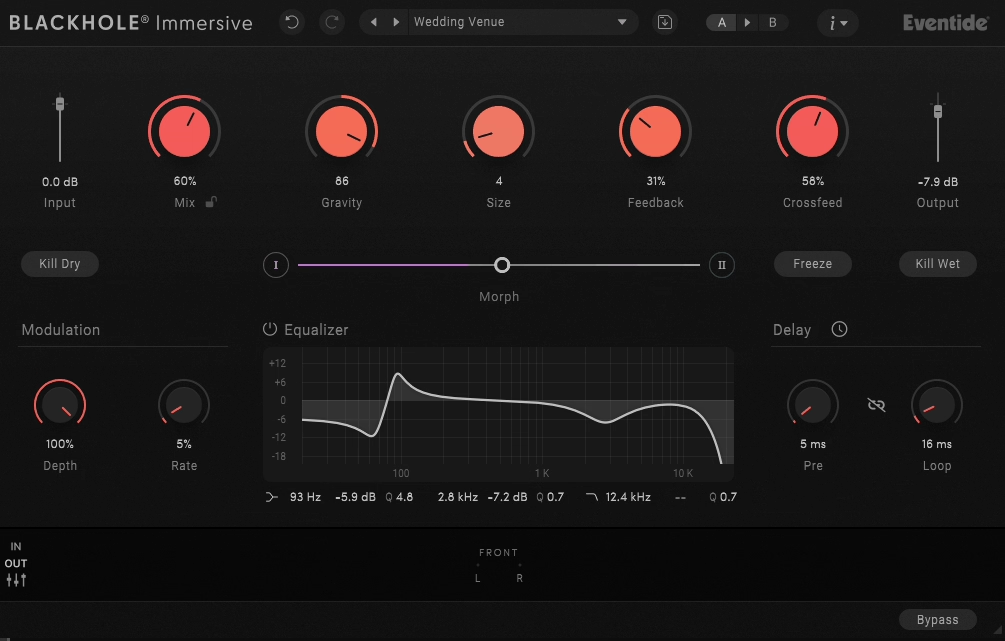
Eventide Blackhole Immersive builds on the original Blackhole reverb by adding support for immersive audio formats, including Dolby Atmos 9.1.6. I’ve used it on a range of projects in both stereo and spatial formats, so I want to share what the plugin offers and whether the price is justified for different users. This isn’t just the original Blackhole with multi-channel output added as an afterthought.
From my perspective, there’s genuine thought put into how the reverb behaves in three-dimensional space, though whether you need that depends entirely on your current work and future plans.
Sound Character and Core Algorithm
The Blackhole algorithm is still at the core, so you get the same dark, dense reverb sound that made the original plugin popular for creative uses. I’ve found it works well for sound design and atmospheric production when you want reverb that adds space without mimicking a real room or hall.
You can set the decay times to go on forever if you want, and the reverb has a unique quality that pulls sounds inward instead of just bouncing them around. I think this makes it more interesting for experimental projects than typical reverbs that try to sound like real spaces. I’ve noticed the reverb tails stay smooth even with very long decay times, which isn’t always true for plugins with infinite decay. The tone is dark but doesn’t get muddy or lose clarity in the low mids.
This actually makes it more useful than you might expect, since you can use a lot of reverb without making your mix cloudy or drowning out lead parts. In mixing, it’s helpful to have a reverb that adds space but doesn’t get in the way, and Blackhole does this well.
The built-in modulation adds movement to the reverb tails, so they don’t sound flat or static. You can tweak these settings for anything from slight changes to more noticeable effects that change over time. I actually use the modulation more than I thought I would because it makes the reverb feel more lively instead of just sitting in the background. The frequency response can be shaped through the built-in filtering, and I appreciate how this lets you control which parts of the spectrum get the full reverb treatment.
For instance, rolling off the lows prevents the reverb from muddying the bass, while adjusting the highs can make the effect more present or more subdued, depending on what your mix needs.
Immersive Format Capabilities
The plugin handles formats from stereo through various surround configurations up to Atmos 9.1.6, and the channel configuration adapts automatically to your session format. I think this flexibility matters if you work across different project types, because you can use the same plugin for stereo mixing or full immersive production without needing separate tools.
The way the plugin handles height channels really adds a sense of vertical space, instead of just sending reverb to the top speakers as an extra. It seems like the algorithm takes the full 3D speaker setup into account, which makes the sound feel more immersive when you’re using an Atmos system. I especially noticed this when working on film music, where vertical space helps create a bigger atmosphere.
The controls for spreading reverb across front, rear, and height channels are easy to use and not overly complicated. Spatial plugins can get confusing with too many options, but Blackhole Immersive keeps it simple.
You get useful control without having to spend a lot of time figuring out what everything does.
For stereo work, the plugin still functions as a high-quality creative reverb even if you’re not doing immersive production.
I feel like this matters because the $499 price might seem high if you’re only thinking about stereo applications, but you’re getting a capable stereo reverb with immersive capabilities that become available as your work evolves in that direction. It’s basically future-proofing your reverb toolkit without needing to buy separate plugins later.
The plugin works well with Pro Tools, Logic, Nuendo, and other DAWs that support multi-channel plugins. You don’t need special immersive audio software to use all the features, which makes it easier for composers and producers to try spatial audio without changing their whole workflow.
Interface and Practical Usage
The interface layout presents controls logically without cluttering the screen with every possible parameter at once. I like how the main controls you’ll adjust frequently are immediately accessible, while more specialized parameters are available without being in your face all the time. Basically, this keeps the workflow moving rather than forcing you to dig through menus for basic adjustments.
Visual feedback shows how reverb energy distributes across your spatial field, which I found helpful when working in immersive formats. You can’t always easily monitor all speakers simultaneously during mixing, so having a visual representation of the spatial distribution helps you make informed decisions about balance. From my experience, this beats relying entirely on metering or walking around your room constantly.
Preset selection includes starting points organized by application type rather than vague creative names. You get presets like “Immersive Hall,” “Atmospheric Pad,” and “Infinite Space” that actually describe what they’re designed for, and I think these provide legitimate starting points worth customizing.
Maybe half of them are genuinely useful for my work, which is better than many plugins whose presets exist purely for marketing.
Automating parameters like decay time, mix level, or spatial controls works smoothly in your DAW, with no glitches or unwanted jumps. I noticed this especially when making evolving soundscapes where the reverb needs to change over time. The automation is reliable and doesn’t cause technical issues that slow you down.
When it comes to CPU usage, it’s moderate for a reverb of this quality and complexity. Plugin format support includes VST3, AU, and AAX, covering the major DAW platforms. The authorization uses iLok, which some people appreciate for reliability, and others find annoying.
At the end of the day, it’s standard for professional plugins, and the system works without creating workflow obstacles once you’re set up.

Hello, I’m Viliam, I started this audio plugin focused blog to keep you updated on the latest trends, news and everything plugin related. I’ll put the most emphasis on the topics covering best VST, AU and AAX plugins. If you find some great plugin suggestions for us to include on our site, feel free to let me know, so I can take a look!