

Programming drums with a mouse works, technically. You click notes into a piano roll, nudge velocities manually, and quantise everything into a grid. The results are correct. They’re just not alive.
The problem isn’t the software. It’s the input method. A mouse click produces a uniform velocity value with perfect timing. That uniformity is exactly what makes programmed drums sound programmed. Real drumming — even from a modest finger drummer hitting a pad with their index finger — produces micro-variations in velocity and timing that no manual editing workflow reliably replicates at scale.
Pad controllers exist to solve this. You play the pattern. The velocity variation and subtle timing shifts happen naturally as a consequence of how you hit the pads, not as a result of editing each hit individually after the fact. The beats that come out of a pad session have a feel that beats coming out of a piano roll session simply don’t, and the difference is audible to anyone listening.
The range of pad controllers available is wider than it’s ever been. You can spend under $100 and get a working pad that improves your drum programming immediately, or you can spend towards $300 for wireless operation, pressure sensitivity, and onboard sequencers that change how you interact with hardware altogether. The gap between the cheap end and the useful end has narrowed considerably in the last few years.
I’ve picked six controllers that represent the strongest options across that range. They cover desk-based beat making, laptop production, Ableton-native workflows, and hardware integration.
1. M-VAVE SMC-PAD Wireless MIDI Controller — from $111.99

The wireless option is worth flagging before any of the wired controllers, because once you’ve used a pad without a cable you don’t miss the cable. The freedom to move the controller to wherever it’s comfortable to play — closer to you, on your lap, over to the side — is a practical workflow change that wired pads can’t match.
The M-VAVE SMC-PAD Wireless MIDI Controller gives you 16 velocity-sensitive pads across three banks, Bluetooth 5.0 wireless connectivity with no audible latency under normal conditions, a built-in rechargeable battery, and USB wired operation as a backup, available in black, white, and grey from $111.99. The 4×4 pad layout with three banks gives you 48 assignable pad slots — enough to cover a complete drum kit, an extended electronic kit, and a percussion layer across three scenes without any additional software configuration.
- Bluetooth 5.0 With No Audible Latency
Bluetooth 5.0 operates at lower latency than older Bluetooth versions, and under normal home studio conditions — a few metres from the connected device — the lag is not perceptible during finger drumming. Wired USB operation is also available if you want zero-latency certainty or if the battery is running low.
The practical point of wireless isn’t just about desk tidiness. It’s that you can position the pad where it’s physically comfortable to play rather than where the cable length allows, which matters when you’re doing extended finger drumming sessions.
- Three Banks for Complete Kit Coverage
Three programmable banks across the 16 pads give you 48 assignable slots. The standard finger drumming approach is to map kicks and snares to one bank, hi-hats and cymbals to a second, and percussion or FX to a third. The SMC-PAD’s three-bank structure fits that workflow directly without any custom configuration.
If you’ve been using a wired pad and haven’t tried wireless, the SMC-PAD is a meaningful quality-of-life improvement alongside the core pad functionality.
- Colour Options That Match Your Setup
Available in black, white, and grey with a rechargeable battery that handles a full working session, and the option to switch to wired USB when battery management isn’t something you want to think about mid-session. The colour selection matters to producers who care about their desk setup looking deliberate rather than assembled from whatever was available.
Shop at Pluginerds — M-VAVE SMC-PAD Wireless MIDI Controller from $111.99
2. Akai MPD 218
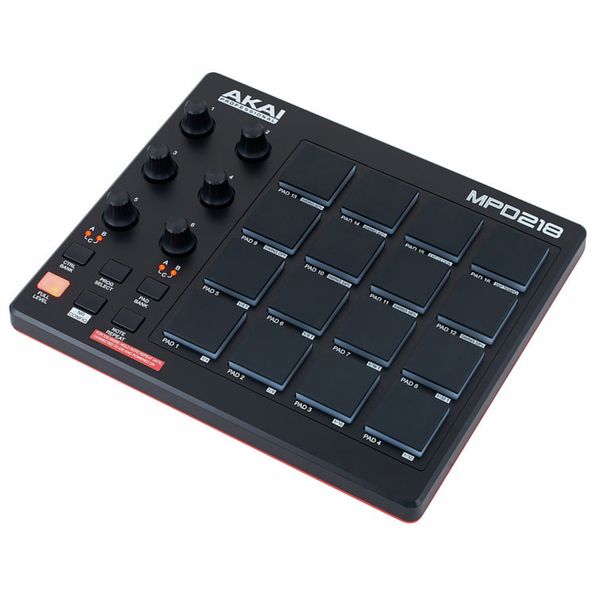
The most consistently recommended pad controller I’ve come back to over the years is this one. Sixteen MPC-style pads, six assignable knobs, Note Repeat, Full Level — everything the workflow actually requires, none of the features that exist purely to justify a price jump. The pad feel is what separates it from cheaper options, and it’s something that’s difficult to explain until you’ve played a pad that doesn’t have it.
Akai MPD 218 is a USB MIDI pad controller with 16 touch and pressure-sensitive MPC pads across 3 banks, 6 assignable 360-degree potentiometers with 3 banks, MPC Note Repeat and Full Level, and class-compliant USB plug-and-play on Mac and PC. The sensitivity curve in Akai’s MPC pads rewards dynamics naturally — ghost hi-hats and hard kick hits translate correctly without any manual adjustment, because the pad is responding to how you actually played them.
- MPC Pad Feel
The 16 MPC-style pads use the same velocity and pressure sensitivity that Akai builds into their professional MPC hardware. The difference between a pad that responds to dynamics and one that doesn’t is audible in every pattern you play — beats that come out of a properly responsive pad contain the micro-velocity variation that makes them feel performed rather than programmed.
You can ghost a quiet hi-hat and slam a kick hard with the same hands and both translate correctly without adjusting anything. That’s the practical value of MPC pad response over budget alternatives.
- Note Repeat for Subdivision Control
Note Repeat locks a pad to a repeating subdivision — 1/8th, 1/16th, 1/32nd — and fires it continuously while held. For hi-hat rolls, trap-style subdivisions, or any rhythmic pattern that requires consistent repeating elements, Note Repeat produces results that piano roll editing doesn’t replicate because the timing variation comes from physically holding the pad rather than from manually placed notes.
It’s the most-used function on this controller for lo-fi and trap production specifically, where subdivision feel defines the character of the genre.
- Six Knobs for Parameter Control
Six 360-degree assignable knobs across 3 banks give you 18 control points for DAW parameters, plugin automation, or performance adjustments alongside the pad section. 360-degree travel means no position jumping when you switch patches — useful for automation recording passes where you need consistent pickup behaviour between takes.
Mapping the knobs to filter, reverb send, and volume levels means the MPD 218 handles both beat programming and basic DAW control without a second controller.
3. Korg nanoPAD 2
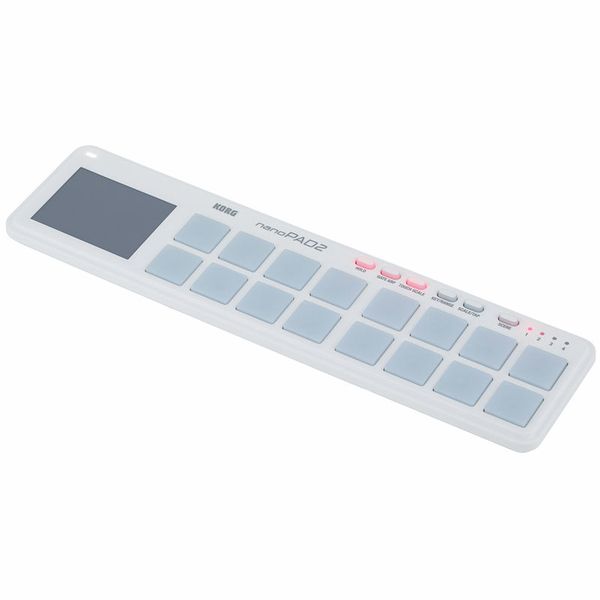
For producers who work across multiple locations, the nanoPAD 2 is the portable pad recommendation I keep coming back to. It’s genuinely thin — 16mm deep — and weighs under 300 grams. It fits flat in a laptop bag without a dedicated compartment and draws power from USB without an adapter. The question for portable pads isn’t whether the nanoPAD 2 fits in your setup, it’s whether you have any reason not to take it.
Korg nanoPAD 2 is a compact USB-MIDI pad controller with 16 velocity-sensitive trigger pads with 4 selectable velocity curves, an X-Y touchpad, Gate/Arp and Touch Scale modes, 4 user scene memory slots, and USB bus power drawing under 100mA. The pads are smaller than a standard MPC pad and the response isn’t as nuanced as Akai’s MPC surface, but for the size and price, nothing else offers the same combination of portability and functionality.
- X-Y Touchpad for Live Expression
The X-Y touchpad is what sets the nanoPAD 2 apart from a simple trigger surface at this size. Map it to filter cutoff, LFO rate, reverb mix, or any two-axis parameter and you get a continuous expressive controller that responds to finger movement across a surface rather than a fixed position. Korg’s KAOSS-style implementation is genuinely playable rather than a feature that exists on the spec sheet and nowhere else.
For automation recording and live parameter control, the X-Y pad captures two-axis motion in a way that individual knobs or faders don’t.
- Four Velocity Curves
Four selectable velocity curves let you tune the pad response to your playing style. A soft curve amplifies touch variation for light players; a harder curve requires more force before the pads register high velocities. Adjustments persist in the controller’s memory across sessions after editing in Korg’s Kontrol Editor.
The practical effect is a controller that adapts to how you play rather than requiring you to adjust your playing to match the default response.
- Portable Enough to Always Have With You
At 325 × 16 × 83mm and 285g, the nanoPAD 2 slides into any laptop bag without taking up space. USB bus power means no additional cables. For producers who work at home and at other locations, it’s the pad you just keep in the bag permanently rather than packing and unpacking per session.
4. Akai LPD8 MKII
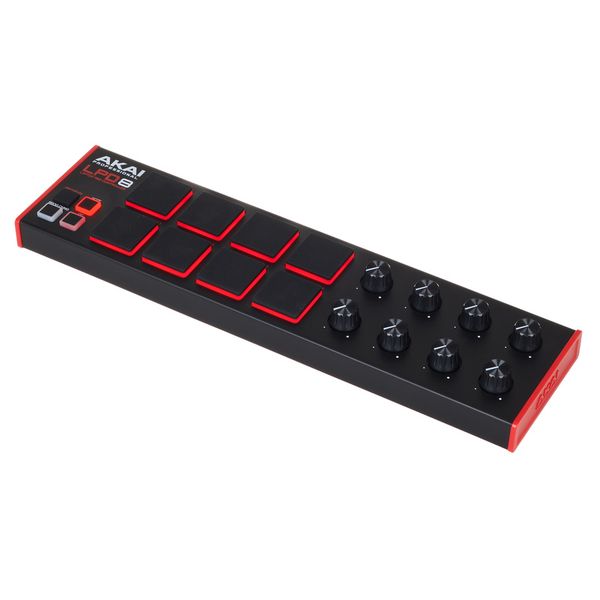
Eight pads is a constraint relative to 16, but for producers who primarily work at a laptop and need a pad that occupies minimal desk space, the LPD8 MKII covers the fundamentals without a footprint cost. The RGB backlighting on the MKII version was the one thing the original genuinely needed — colour-coded bank switching during a session is a practical navigation improvement over checking a display, and it turns out to matter more than it sounds.
Akai LPD8 MKII is a laptop pad controller with 8 RGB backlit velocity-sensitive MPC pads, 8 assignable knobs, 4 programmable memory banks, and class-compliant USB plug-and-play. Eight pads across four banks gives you 32 trigger slots — enough for a standard drum kit configuration and most electronic beat setups without the surface area of a larger controller. It sits beside a laptop without occupying meaningful desk space.
- RGB Bank Identification
RGB backlighting assigns a distinct colour to each of the four memory banks. Switching banks mid-session gives you immediate visual confirmation of where you are from the pad colour rather than from a software display. The original LPD8 required a screen check for bank navigation — the MKII removes that interruption.
For producers who work across multiple banks during a session, the colour coding reduces navigation errors and keeps your attention on playing rather than on which bank you’re currently in.
- Eight Knobs for DAW Integration
8 assignable knobs across 4 banks give you 32 assignable DAW control points in a controller that sits beside a laptop. Mapping them to the most-used parameters in your current session — channel volumes, send levels, filter cutoff, plugin controls — means you’re reaching important controls without touching a mouse during recording passes.
The combination of pads and knobs in the LPD8 MKII’s footprint is why it stays useful to producers who later acquire larger controllers. It’s the compact option that remains on the desk.
- Plug and Play on Windows and Mac
Class-compliant USB means the LPD8 MKII installs automatically on any current Windows or Mac system without a driver download. USB bus power means no adapter. It also works without any software open — standard MIDI input in any application, no companion software required unless you want to remap controls.
5. Novation Launchpad Mini MK3
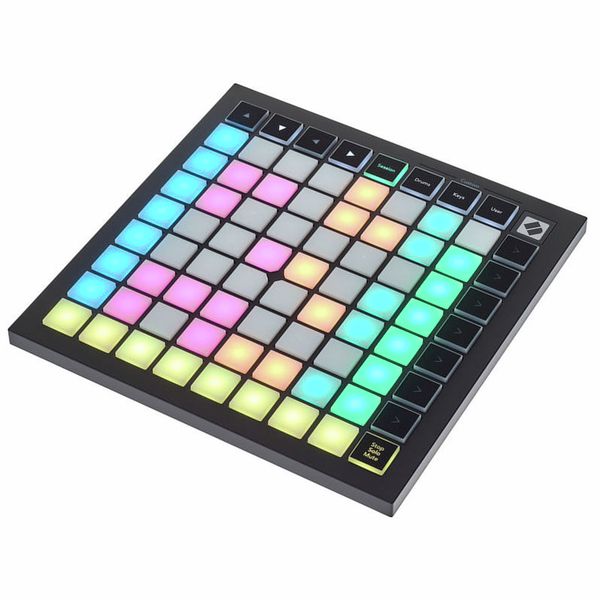
If you’re an Ableton user, this is the most efficient controller you can add at this price point. The caveat is upfront: the full depth of the Launchpad integration only applies to Ableton Live. It works with other DAWs via MIDI mapping but the Session View-native operation — clip launching, scene triggering, stop/solo/mute from the pad surface — is the core value proposition, and that’s Ableton-specific.
Novation Launchpad Mini MK3 is a compact pad controller for Ableton Live with 64 RGB pads in an 8×8 grid, 16 function buttons, direct Session View integration for clip and scene launching, stop, solo and mute, USB bus power, and an included Ableton Live Lite software package. The 64-pad grid changes how you interact with a live set or session — at 8×8, you’re navigating arrangements and launching sections in real time rather than triggering individual sounds.
- 64-Pad Grid for Session View
The 8×8 grid of 64 RGB pads maps directly to Ableton Live’s Session View. Each row is a track and each column is a clip slot — launching clips, triggering scenes, stopping tracks, soloing and muting all happen from the pad surface without touching the mouse or keyboard. All of it is visible and navigable from the hardware.
For live performance this is significant: you build and deconstruct arrangements in real time with a controller that fits in a laptop bag. For studio work, the clip-launching workflow enables arrangement by experimentation — triggering combinations to find structures you wouldn’t have planned in Arrangement View.
- Scale and Chord Modes
Scale mode locks every pad to a note within the selected scale, which means you can’t play a wrong note regardless of which pad you hit. Chord mode fires full chords from single presses. Both modes are built into the firmware without requiring additional software configuration.
For producers who want to record melodic and harmonic parts through a pad surface rather than a keyboard, these modes make that practical — the timing variation of live pad playing comes through without the risk of landing on out-of-scale notes.
- Compact at 180 × 180mm
At 180 × 180mm the Launchpad Mini MK3 takes less desk space than an A4 sheet. USB bus power, no adapter needed. The included software adds Ableton Live Lite, Loopmasters samples, and Novation’s Components editor for custom mode programming. It’s the Ableton controller recommendation that works from day one and scales with the workflow.
6. Novation Launchpad Pro MK3
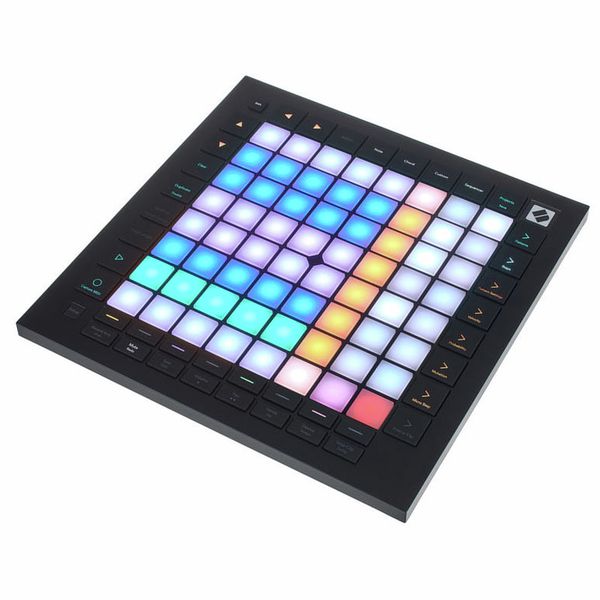
The point where the Mini MK3 stops covering what you need is when you want the pads to do more than trigger. The Pro MK3 adds pressure sensitivity — aftertouch on every pad — and an onboard four-track step sequencer that runs without a computer. Those two additions are either things you need or they’re not, and if you never write melodic parts on a pad surface and never want to sequence hardware independently, the Mini handles everything at significantly lower cost.
Novation Launchpad Pro MK3 is a grid controller with 64 touch and pressure-sensitive RGB pads, a 4-track step sequencer with 32 steps per track, Chord mode and dynamic note and scale modes, 8 user-defined modes via Novation Components, and 5-pin DIN MIDI I/O for hardware integration without a computer. The onboard sequencer is the feature that separates it from everything else in this list — complete arrangements run from hardware, independently of software, which is a genuinely different way of working.
- Pressure Sensitivity on Every Pad
Per-pad pressure sensitivity captures aftertouch — the continued pressure on a pad after the initial hit. Map it to filter cutoff, vibrato, reverb depth, or any assignable parameter and the pad becomes an expressive performance surface rather than a trigger. The difference between velocity-only and pressure-sensitive pads is most audible on melodic content: sustained notes respond to how hard you’re pressing, which creates movement that static velocity values don’t produce.
Beat programming benefits from velocity sensitivity. Melodic performance benefits from pressure sensitivity. If your pad use covers both, the Pro MK3 handles both correctly.
- Four-Track Onboard Sequencer
The 4-track step sequencer with 32 steps per track runs independently without a computer connected, which means you can build patterns and perform with them on hardware before bringing anything into a DAW. For producers who think away from the screen, this is a workflow shift rather than a feature addition.
Each track can run at an independent step length, which means different pattern elements cycle at different rates — polyrhythmic structures that are technically possible in a DAW but emerge naturally when you’re programming on hardware.
- MIDI I/O for Hardware Setups
5-pin DIN MIDI in and out lets the Launchpad Pro MK3 control hardware synths, drum machines, and other MIDI devices directly without a computer. The sequencer drives external hardware, pads trigger external sources, and incoming MIDI from hardware records into the sequencer. For hybrid setups combining software and hardware instruments, the Pro MK3 connects both sides.

Hello, I’m Viliam, I started this audio plugin focused blog to keep you updated on the latest trends, news and everything plugin related. I’ll put the most emphasis on the topics covering best VST, AU and AAX plugins. If you find some great plugin suggestions for us to include on our site, feel free to let me know, so I can take a look!