
Techno production has its own set of demands. You need tools that can generate hypnotic rhythms, build tension through repetition and variation, and produce the kind of driving, textured sounds that hold a dancefloor for hours.
Your DAW’s stock plugins can get you started, but there’s a specific set of third-party tools that I’ve found genuinely transforms how fast and how deep you can go when making techno.
Some of these are instruments, some are creative utilities, and one is an AI-powered sample organizer that changed how I think about drum selection entirely. Whether you’re putting together your first four-on-the-floor track or you’ve been playing dark rooms for years, these plugins are worth your attention.
The plugins I’m covering are Baby Audio Tekno, Beatsurfing RANDOM Metal, Native Instruments Nacht, Roland TB-303, HY-Plugins RPE2, Algonaut Atlas 2, Sugar Bytes DrumComputer, and BLEASS Arpeggiator.
1. Baby Audio Tekno
If you’re still building techno drums entirely from samples, Baby Audio Tekno might change your approach.
Baby Audio teamed up with Jatin Chowdhury, one of the most respected engineers in analog circuit modeling (you might know his free ChowDSP plugins), and spent four years building a drum synthesizer that generates every single hit from scratch using analog-modeled circuits, FM synthesis, and digital DSP. No samples involved at all, which means every hit you trigger is unique at the circuit level.
What sold me on Tekno was the feel of it. I’ve used plenty of drum synths, and most of them produce sounds that are technically good but feel static. Tekno’s hits have a subtle variation baked into the synthesis itself, similar to how a real analog drum machine like a 909 or 808 never hits exactly the same way twice.
The kicks land heavy, the hats have real presence, and the whole thing has a cohesion that makes even a basic kick-hat pattern sound like it belongs on a record.
- 18 Drum Engines
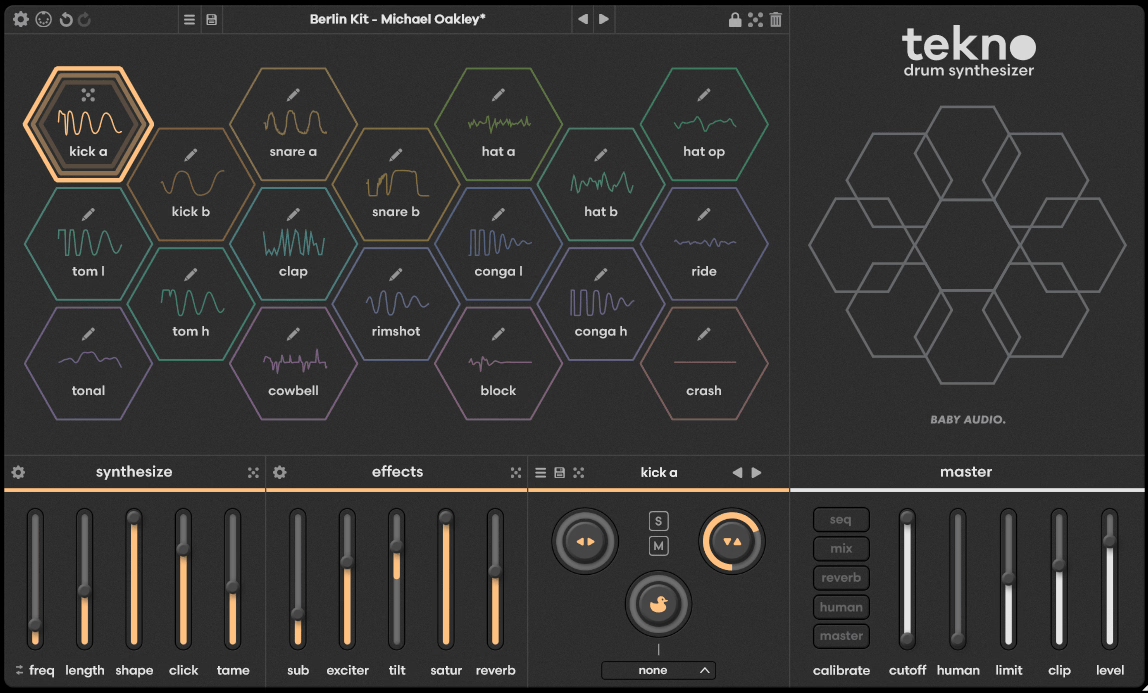
Each of the 18 voice engines is its own dedicated drum synthesizer, not a variation of a single architecture. You get multiple types of kicks, snares, claps, hi-hats, toms, percussion, and even a tonal engine for melodic percussion.
Every engine uses a different combination of analog circuit modeling, FM, and digital synthesis depending on what produces the most convincing result for that type of sound. The kick engines alone cover everything from deep sub-heavy thuds to punchy mid-focused attacks.
- Calibration Panel
Click the gear icon on any voice and you get access to the deeper synthesis parameters underneath the main sliders. Each engine has its own analog-modeled effects section tailored to the specific drum type. Kicks get sub, exciter, tilt, saturation, and reverb. Snares get dispersion, exciter, saturation, compression, and reverb. This is where you shape a sound from a starting point into something genuinely yours, and it’s where Tekno separates itself from simpler drum synths that give you a few knobs and call it a day.
- Built-in Humanize
Because each hit is generated through non-linear virtual analog circuits, no two triggers are identical. But Tekno lets you push this further with dedicated Humanize parameters for pitch/timbre, velocity, and timing.
I set these to modest values on almost every kit because the micro-variations make programmed patterns feel like they’re being performed rather than sequenced. For techno, where repetition is the whole point, those tiny imperfections keep a loop from going stale over eight minutes.
- Creative Sequencer
Version 1.1 added a step sequencer built around two ideas: fast beat generation and optional unpredictability. You get smart randomization, auto-fill, and quick velocity controls for sketching ideas in seconds.
But the standout feature is variable step lengths and lane speeds per track, which means you can set your hi-hat lane to a different step count than your kick, creating polyrhythmic patterns that evolve over time. Any sequence can be dragged into your DAW as MIDI for further editing.
2. Beatsurfing RANDOM Metal

Most techno producers spend more time searching for the right hi-hat or ride cymbal than they’d care to admit. RANDOM Metal takes a completely different approach to that problem. Instead of browsing thousands of samples, you’re synthesizing percussion sounds in real time and using controlled randomization to discover textures you’d never find in a sample pack.
It’s a percussive monophonic synthesizer built by the Herrmutt Lobby collective, and it’s designed specifically for the metallic, textural percussion that defines a lot of modern techno.
I use this plugin almost exclusively for hi-hats, rides, and the weird metallic textures that sit in the upper frequencies of a techno mix. The sounds it produces feel alive in a way that samples don’t, and the randomization system means I’m constantly discovering new starting points instead of recycling the same cymbal hits across every project.
- 40+ Percussive Engines
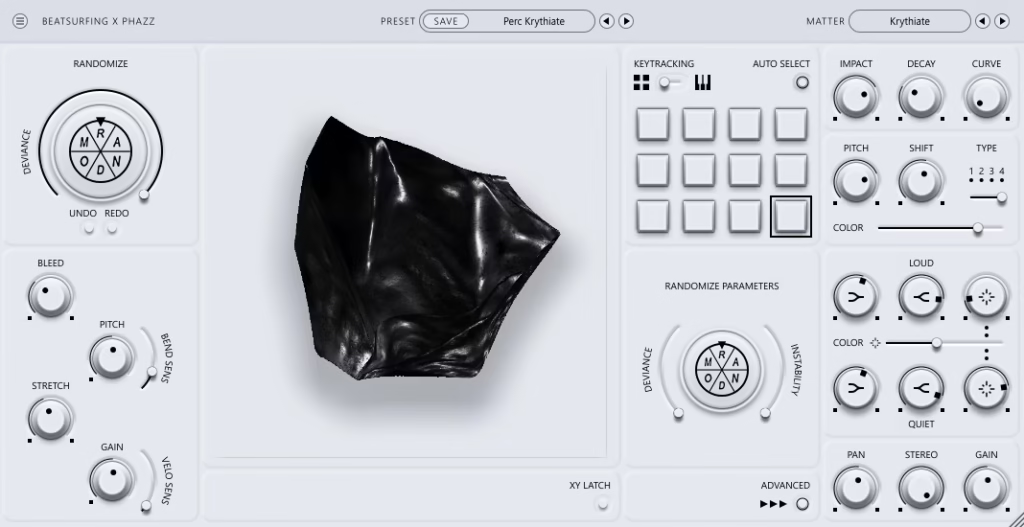
RANDOM Metal gives you over 40 different percussive “matter” types spanning aggressive metallic cymbals, shakers, hi-hats, and genuinely odd textural sounds that don’t fit neatly into any category.
Each engine has its own synthesis architecture and responds differently to the plugin’s global controls. Switching between engines changes the fundamental character of the sound so dramatically that it feels like loading a different instrument.
- Deviance Randomization
The RANDOM button regenerates your sound instantly, but the Deviance knob controls how far each randomization strays from your current settings. Low values give you subtle variations on your current sound. High values produce completely new textures.
I typically find a sound I like, set Deviance to around 30-40%, and click the button until something catches my ear. It’s faster than auditioning samples and consistently produces results I wouldn’t have arrived at through manual tweaking.
- XY Pad Performance
An expressive XY pad routes to different synthesis parameters depending on which engine is active. Moving across the pad changes the sound in real time, and every engine responds to the XY axes differently. For live performance or for recording evolving percussion textures into your DAW, this turns a static hit into something that shifts and breathes.
I often automate the XY position across a track to give hi-hat patterns subtle movement over the course of an arrangement.
- Per-Pad Shaping
Each of the 12 trigger pads has individual controls for instability, impact, decay, curve, gain, pitch shift, FX color, and FX type. The Loud and Quiet knobs sculpt the dynamic balance between high and low frequency content, and you can set the dry/wet mix separately for louder and quieter parts of the signal. This level of per-pad control means you can build a complete percussion kit from a single engine with each pad tuned and textured differently.
3. Native Instruments Nacht

There’s no shortage of synth plugins that can make techno sounds, but very few were built from the ground up with techno as the only goal. Nacht is Native Instruments’ Play Series entry for dark electronic music, developed in collaboration with Clouds, Stewart Walker, Fred Lomas, Ténèbre, and TMPLT, all artists and producers deeply embedded in the underground techno scene.
It runs in the free Kontakt Player, so you don’t need the full version of Kontakt to use it.
What I appreciate about Nacht is that it’s not trying to be everything. It’s a focused library of 150 presets covering the specific territory techno producers actually need: distorted leads, booming basses, atmospheric pads, and hypnotic sequences.
The sounds are immediately usable without heavy editing, which makes it a fast tool for getting ideas down when you don’t want to spend an hour programming a synth patch from scratch.
- Dual-Layer Design
Every Nacht preset runs two independent sound sources (layers A and B) that can be blended, filtered, and processed separately before hitting a shared effects chain. Each layer draws from a pool of 128 sound sources including 85 multi-samples and 43 wavetables.
The Sound Editor page gives you access to tuning, filters, panning, and envelopes per layer, so you can deconstruct any preset and rebuild it around your needs.
- Onboard Sequencer
Nacht includes an integrated 16-step sequencer for building rhythmic patterns and arpeggiated lines directly inside the plugin. For techno, this is particularly useful because you can program a hypnotic sequence, map it to macro controls, and then manipulate it in real time during a set or a recording pass.
The sequencer works well for acid-style patterns and repetitive melodic hooks that benefit from the constraint of a step-based workflow.
- Macro Controls
The main interface gives you assignable macro knobs that map to the most impactful parameters of each preset. These are designed for real-time tweaking rather than deep editing, and they respond well to MIDI controllers.
I map these to hardware knobs during production and treat Nacht almost like a hardware instrument, where I’m performing the sound rather than programming it.
4. Roland TB-303
I’m not going to explain what a Roland TB-303 is. If you’re reading an article about techno plugins, you know. The question is whether Roland’s official software version is worth using over the dozens of third-party clones, and the answer is yes, it is.
The TB-303 Software Bass Line uses Roland’s ACB (Analog Circuit Behavior) modeling to recreate the original circuit at a component level, and it sounds as close to the real hardware as I’ve heard in a plugin.
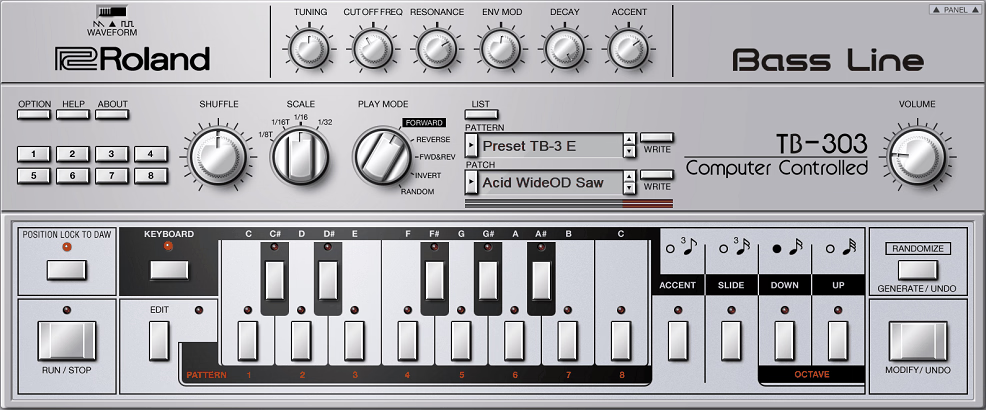
Roland kept the original interface intact, which means you get the same six-knob layout with Tuning, Cutoff, Resonance, Env Mod, Decay, and Accent that defined the instrument.
But they added enough modern features to make it genuinely practical as a production tool rather than just a nostalgia piece. If you make any kind of acid-influenced techno, this is the plugin that belongs in your session.
- Graphical Pattern Editor
The original 303’s sequencer was famously awkward to program, which is part of why it produced such unexpected results. Roland’s software version gives you a visual editing window where you can see and edit every note, slide, and accent in a piano roll-style display.
You get up to 6 octaves of range, user-defined scales, accents, slides, pitch manipulation, and a randomize/generate function that produces classic 303-style patterns with one click. I still use the random generator constantly because the patterns it creates have that distinctive unpredictable quality that makes acid lines interesting.
- Five Play Modes
The original hardware played patterns in one direction. Roland’s plugin adds Forward, Reverse, Forward & Reverse, Invert, and Random modes that let you flip and manipulate patterns in ways the original couldn’t.
Random is particularly useful for live sets because it rearranges the notes in your pattern unpredictably while keeping the rhythmic structure intact. This turns a single pattern into something that evolves and surprises you every time through.
- Secret Panel Mods
A hidden panel on the right side of the interface unlocks circuit modifications that don’t exist on the original hardware. VCF Trim adjusts the filter’s frequency range. Vintage Condition simulates the tonal variations caused by aging components and unit-to-unit inconsistencies in original 303s.
Master Tune lets you globally retune the oscillator. Plus there’s a built-in distortion and tempo-synced delay, both of which are essential for acid techno and save you from needing external effects in many cases.
5. HY-Plugins RPE2 Euclidean Sequencer
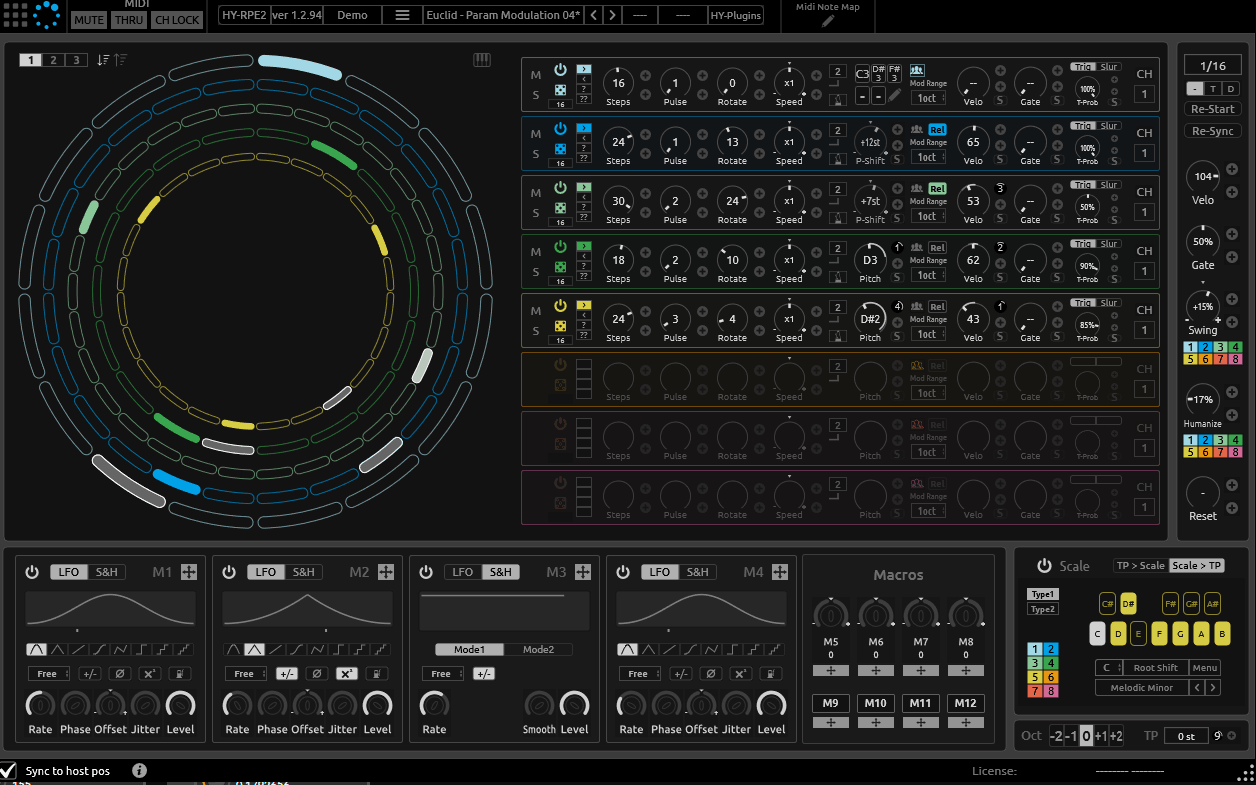
Techno thrives on patterns that feel both structured and organic, and Euclidean rhythms are one of the best tools for achieving that. RPE2 is an 8-track MIDI sequencer that distributes trigger pulses evenly across a given number of steps, creating rhythms that are mathematically balanced but feel surprisingly natural.
If you’ve ever worked with Euclidean modules in a modular synth setup, this brings that same workflow into your DAW.
I load RPE2 on a track, route its MIDI output to drum instruments or synths on other channels, and use it as the rhythmic backbone of my sessions.
The patterns it generates consistently have a groove that’s hard to achieve by hand-programming, because Euclidean distribution creates natural swing and spacing that you wouldn’t think to place manually. It’s become an essential part of every techno project I start.
- Euclidean Mode
The main attraction. Eight concentric rings represent eight independent tracks, each with controls for step count (up to 32), pulse count, rotation, and probability.
Set a different step length per ring and you get polymetric sequencing where patterns of different lengths cycle against each other, creating evolving grooves that don’t repeat for bars at a time. A scale lock option constrains melodic output to user-defined scales when you’re sequencing pitched instruments rather than drums.
- LFO Modulation
The Euclidean engine includes four LFOs with Sample & Hold that can be assigned via drag-and-drop to any sequencer parameter. Modulate the pulse count and the pattern density shifts rhythmically. Modulate the rotation and the beat placement moves.
Target the note value and you get evolving melodic content. This modulation layer transforms RPE2 from a static pattern generator into something genuinely generative, where the sequence is always changing within boundaries you define.
- Grid Sequencer
The second engine is a traditional grid sequencer with a twist: each track is split into eight segments, and each segment can be set to different step divisions from 1 to 8 within its quarter-note block. This makes it perfect for programming tuplet patterns and fills that would be tedious to create in a standard piano roll. A block chainer lets you sequence which segments play and in what order, with options to randomize playback at two different levels of granularity.
6. Algonaut Atlas 2
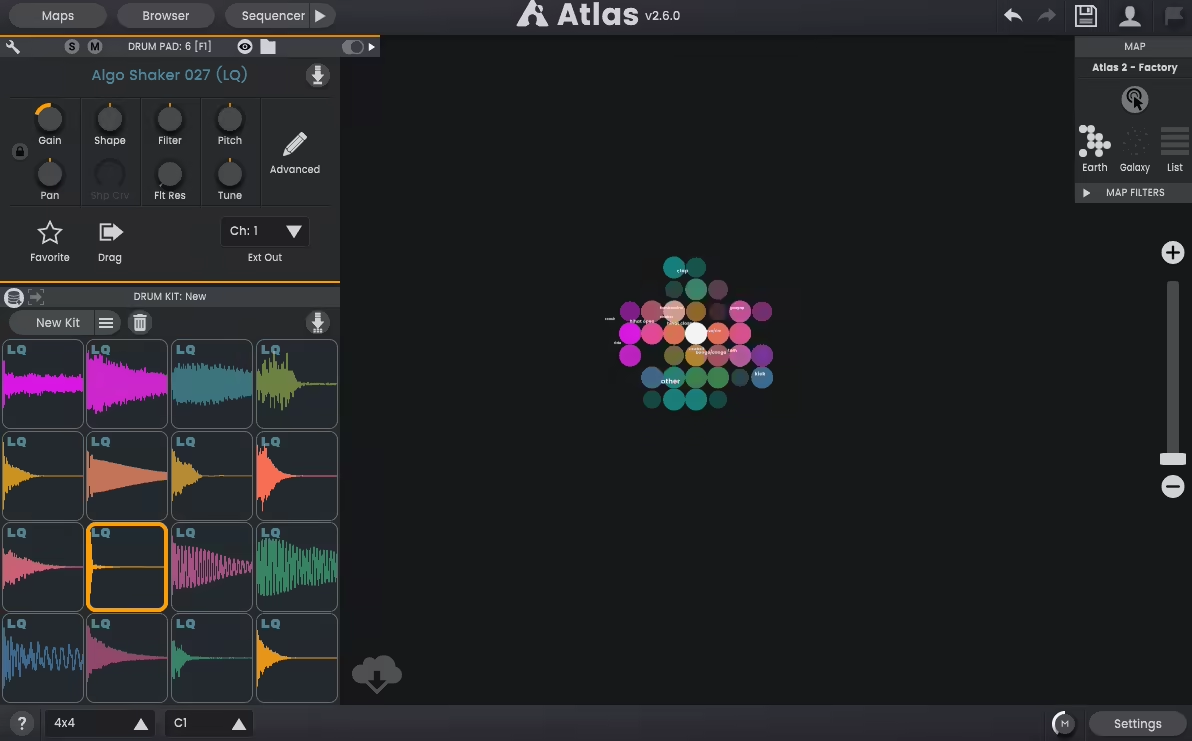
I’ll be direct with you: the main reason Atlas 2 is on this list has nothing to do with its drum sequencer, though that’s decent too. It’s here because of what its AI-powered sample mapping does for your workflow when you have thousands of drum samples scattered across your hard drive and you’re tired of scrolling through folder after folder looking for the right kick.
Atlas uses machine learning to analyze the timbre of every sample you feed it, then organizes them into a zoomable 2D map where similar sounds cluster together. Kicks group with kicks, hi-hats with hi-hats, and within each cluster, brighter sounds sit near other bright sounds while darker ones group nearby.
The first time I scanned my full sample library and saw it visualized like this, I realized how many sounds I’d been completely overlooking for years.
- AI Sample Mapping
Point Atlas at any folder on your hard drive and it builds a visual map from the audio content, no tags or metadata required. You can switch between World view (larger grouped clusters) and Galaxy view (every individual sample visible) and zoom in and out to navigate.
Samples with similar timbral characteristics sit close together, which means once you find a kick you like, the sounds immediately around it are variations on that same character. I’ve found more usable drum sounds in ten minutes of map browsing than in hours of conventional folder navigation.
- Randomize & Lock
Select any combination of drum pads, hit the randomize button, and Atlas fills those slots with new samples from your map. But you can lock any pad you want to keep, so only unlocked slots get randomized.
I start every techno session by locking a kick I like and randomizing everything else until a kit emerges that surprises me. The variation engine adds subtle randomization to sample parameters like pitch, filtering, and volume for humanized playback.
- MIDI Import & Export
Drag a MIDI drum pattern directly onto Atlas’s sequencer and the original timing is preserved, including swing and ghost notes. Export MIDI as a single file or separate files per channel, with the option to include or exclude nudge and shuffle.
This interoperability means Atlas doesn’t have to be your only drum tool. It works beautifully as a sound selection and kit-building layer that feeds into whatever drum workflow you already have.
7. Sugar Bytes DrumComputer
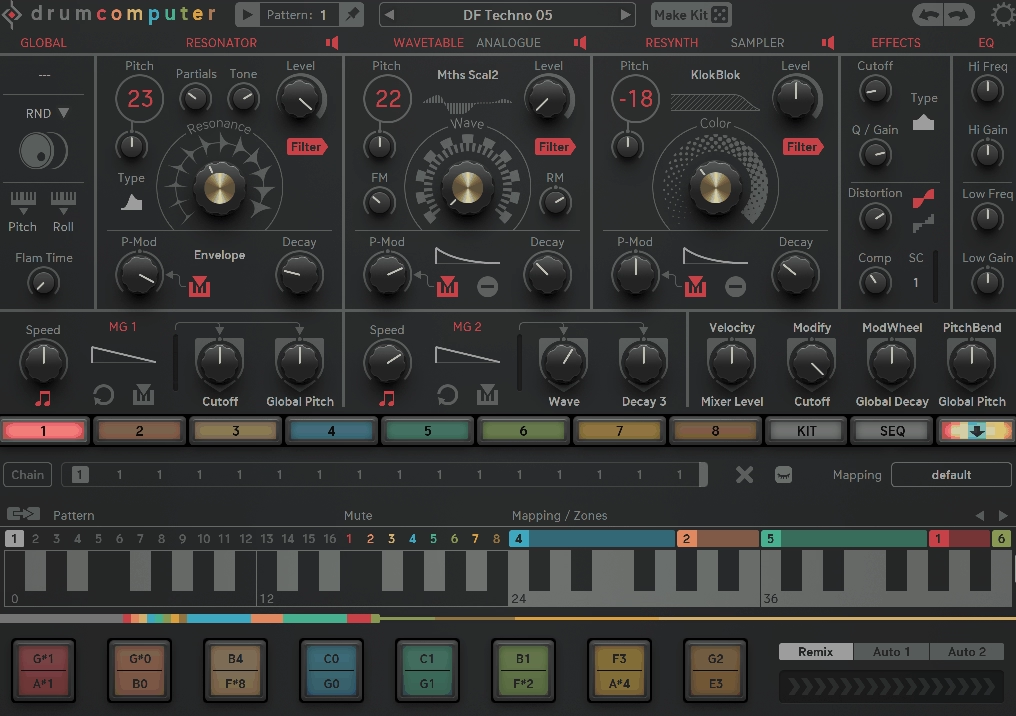
DrumComputer takes a very different angle on synthetic drums than Baby Audio Tekno. Where Tekno focuses on analog circuit modeling and feel, DrumComputer is about deep synthesis architecture and extreme sound design flexibility.
Each of its 8 sound engines layers three synthesis modules together: a Resonator (inspired by 808-style self-oscillating filter circuits), a Wavetable/Analog oscillator, and a Resynth module that produces digital noise textures. The result is a drum synth capable of sounds that range from classic analog to completely alien.
What draws me to DrumComputer for techno specifically is its sequencer and randomization system. The 16-step/16-pattern sequencer generates not just trigger patterns but complete modulation sequences across multiple parameters, and the MakeKit randomizer produces structured, usable beats rather than random noise.
When I need a drum pattern that sounds distinctly different from my last project, DrumComputer is the fastest path to something I wouldn’t have come up with on my own.
- Three-Layer Synthesis
The Resonator defines the transient with a self-oscillating multimode filter driven by a short exciter impulse. The Wavetable/Analog oscillator adds body and tonal character.
The Resynth module provides noise-based textures for snare wires, cymbal tails, and digital grit. Each layer has independent controls for pitch, decay, partials, tone, and color, and you can blend them in any proportion. The fact that all three run simultaneously per engine gives DrumComputer a sound palette that’s genuinely wider than most competing drum synths.
- Remix & Auto Fill
The Remix control generates fills and variations from your existing pattern in real time, ranging from subtle groove variations to complete rhythmic deconstructions. Auto Fill inserts fills and parameter changes at specified song positions automatically.
Together, these features make DrumComputer particularly useful for live techno sets where you need patterns that evolve without constant manual intervention. I also use them during arrangement sessions to break up the monotony of a looped beat.
- MIDI Drag & Drop
After building a pattern, you can drag it out of DrumComputer directly into your DAW as a MIDI file that includes not just the trigger notes but all modulation sequences, auto-fill data, and CC values.
This means you can use DrumComputer as an idea generator, then move the pattern into your DAW’s timeline for fine editing without losing any of the complexity you built inside the plugin. For a tool that packs this much under the hood, this export feature keeps it practical rather than self-contained.
8. BLEASS Arpeggiator
Techno arpeggios can make or break a track. Get them right and they drive energy through an arrangement for minutes without getting boring. Get them wrong and you’ve got a generic up-down pattern that sounds like a preset.
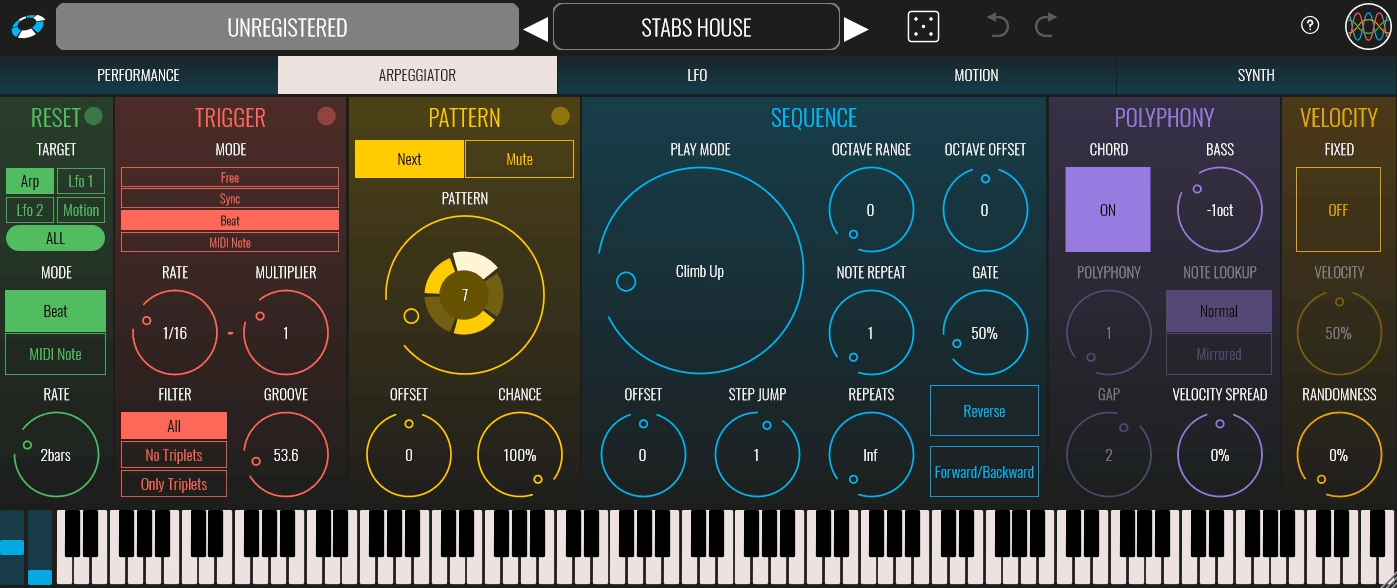
BLEASS Arpeggiator goes far beyond what you’d expect from a standard arpeggiator, offering 20 pattern modes, polyphonic output, polyrhythms, and a modulation engine that turns simple held chords into evolving, hypnotic sequences.
Developed with French producer Canblaster, this plugin feels more like playing an instrument than programming a pattern.
You hold down notes and the arpeggiator interprets them through whichever mode you’ve selected, producing results that range from traditional cascading runs to rhythmically complex sequences that shift and breathe. I load it on a MIDI track, route its output to whatever synth I’m using, and let it handle the melodic motion while I focus on the bigger picture.
- 20 Arpeggio Modes
Beyond the standard up, down, up-down, and as-played options, BLEASS includes genuinely creative modes like Walk Up, Climb Up, and various patterns inspired by musical phrases rather than simple note orderings.
These modes produce lines that feel composed rather than mechanically generated, which matters enormously when an arpeggio needs to sustain interest across an 8-minute techno track. You also get control over octave range, note repeats, gate length, and how many times a full sequence cycles before stopping.
- Polyphonic Output
Where most arpeggiators output one note at a time, BLEASS can trigger up to four simultaneous notes per step with adjustable spacing between them. Enable Chord mode and all held notes play together with the rhythmic pattern and transpositions applied as a group.
For techno stabs and chordal sequences, this turns a simple pad patch into a rhythmic engine that hits much harder than a monophonic arpeggio ever could.
- LFOs & Motion Sequencer
Two advanced LFOs with adjustable smoothing and time-shaping can be routed to virtually any parameter in the plugin. One LFO can even modulate the other, which sounds chaotic but produces uniquely organic movement when dialed carefully.
The Motion Sequencer adds step-based modulation that runs in sync with the arpeggio pattern, so parameter changes follow the rhythmic structure rather than free-running at their own rate.
- Built-in FM Synth
BLEASS includes a simple FM synthesizer with a carrier sine wave and two FM modulators for standalone use without routing to an external instrument. It produces bright, punchy tones that work surprisingly well for techno arpeggios straight out of the box.
Each plugin instance also creates its own MIDI output bus, so routing to your main synth is just a matter of selecting BLEASS as the MIDI input on whatever instrument track you want it to drive.

Hello, I’m Viliam, I started this audio plugin focused blog to keep you updated on the latest trends, news and everything plugin related. I’ll put the most emphasis on the topics covering best VST, AU and AAX plugins. If you find some great plugin suggestions for us to include on our site, feel free to let me know, so I can take a look!