
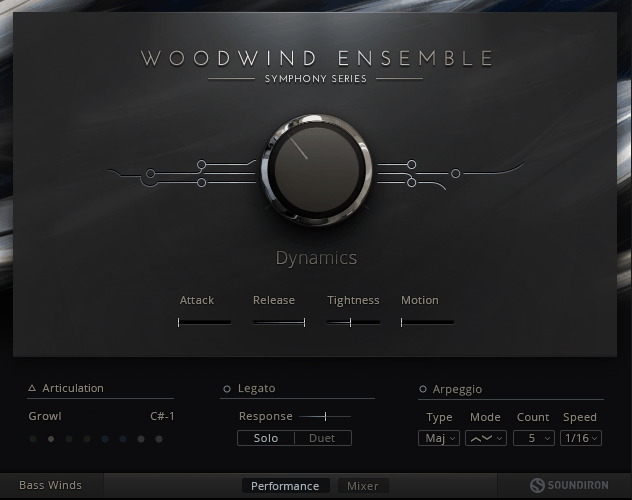
Today, let’s talk about Symphony Series Woodwind. This is a collection from Soundiron and Native Instruments, recorded at a church in Oakland with 14 Neumann mics positioned at distances from 1 to 25 meters.
The ensemble library has 314 articulations with six players per section covering concert flutes, oboes, clarinets, bassoons, tenor saxophones, and bass winds.
The solo library gives you 148 articulations for individual instruments including concert flute, oboe, Bb clarinet, bassoon, tenor saxophone, and contrabassoon. The whole package is 91.3 GB of source material that compresses down to about 50.3 GB installed, and everything was captured at 24-bit/48kHz resolution with multiple mic positions I can work with.
What Actually Works For Me
The staccato articulations are solid across most of the instruments. They have clean attack and the round-robin sampling keeps things from sounding mechanical when I’m playing repeated notes, which matters when you’re writing faster passages or rhythmic sections.
The velocity response feels natural, so you’re not constantly going back into the MIDI editor to fix dynamics. I would use these for articulated lines and they do the job without me needing to spend time tweaking parameters.
The bass winds and contrabassoon are probably the strongest patches in this library. They have real weight and depth that anchors the low end well, and they sound good even when they’re exposed in the mix without other instruments covering for them.
If you need low woodwind sounds for orchestral writing, these patches are what I would reach for, and I think they compete well with options from more expensive libraries.
The effects articulations on the other hand including clusters, sweeps, falls, risers, and various orchestral flourishes. They sound organic rather than obviously scripted or synthesized, and you can use them for transitional moments and adding texture to bigger orchestral sections.
They blend well with other libraries I’m running, which isn’t always the case when you’re mixing content from different developers. These articulations have character and movement that works for cinematic writing.
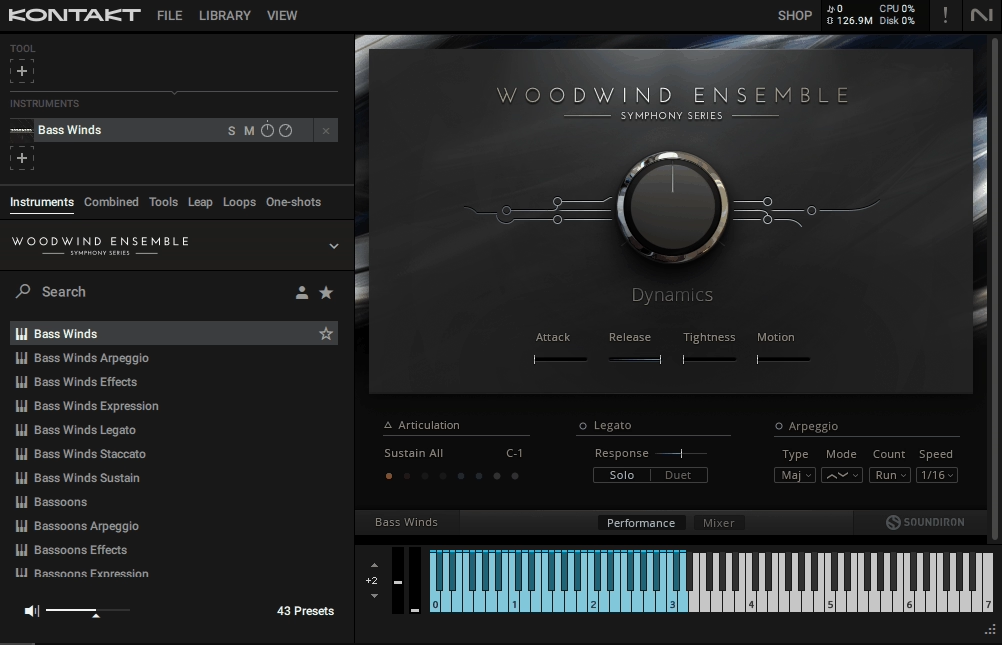
The Arpeggio Runs Tool is something I didn’t expect to use much, but it’s turned out to be practical. This scripted system generates arpeggio patterns in major, minor, augmented, diminished scales, and trills, with control over speed, direction, and note count. I can play chords and have them automatically transformed into runs, which saves time when I need quick flourishes or ornamental passages.
The implementation has enough timing variation that it doesn’t sound rigid or obviously programmed, which makes it actually usable in real projects.
The Recording Character and Sound
The library has church acoustics baked into the samples, which is something you need to understand before you buy it. You get four mic positions to work with, close, mid, far, and master, but even the close mics have noticeable room sound.
If you’re looking for completely dry samples that you can place in your own reverb environment, that’s not what this is. For me, this has worked out fine because these woodwinds can sit in your orchestral arrangements without needing additional reverb processing.
When it comes to sustain patches, they sound warm and full in the lower to mid dynamic range, which is where I find myself working most of the time. They fill out the orchestral texture nicely in ensemble writing without demanding too much attention or sticking out in ways I don’t want.
When I push the modwheel higher into the upper dynamic range, the sound gets more aggressive with more edge and presence.
I would recommend using this strategically when you need the woodwinds to push through denser arrangements, but don’t ride the modwheel all the way up by default because that upper range has a different character that doesn’t work for everything.
The legato transitions are there, and they’re marketed as true legato, which means they recorded actual transitions between notes. In practice, I find they work better for slower, more lyrical passages where I have time to shape each phrase carefully. For faster passages, I tend to use the sustain and staccato articulations instead because they give me more control and feel more responsive. Lastly, the legato patches benefit from thoughtful MIDI programming on my end.
The Interface and Workflow
The GUI follows the same design as other Symphony Series libraries, which means if you’ve used those, you’ll know your way around. Everything’s color-coded by instrument section, and you get separate patches for different articulation types including effects, expression, staccato, sustain, and legato.
There’s also a multi-articulation patch that enables keyswitch control for switching between playing styles while I’m performing or programming.
The articulation slot system is genuinely clever and saves me time by stacking multiple articulations onto the same keyswitch and control them via velocity ranges or MIDI CC. So I might have legato and staccato both loaded in the same patch, and I’m switching between them based on how hard I hit the keys.
In addition to that, I can also adjust individual volume for each articulation within a slot, which gives me flexibility and saves CPU compared to loading multiple instances of the plugin. This kind of design respects my workflow rather than forcing me to adapt to something convoluted.
In the end, mixer section gives you independent control over all four mic positions with loading, gain, pan, and routing for each. You can purge unused mics to save RAM, which matters when you’re running a large template with lots of instruments loaded.
There’s a built-in effects section with compressor, EQ, and over 100 impulse responses for additional shaping if you need it. All my mixer settings save as snapshots that recall instantly across patches, which saves time when you’re moving between projects or trying to maintain consistency across different cues.
Best use cases
I would use Symphony Series Woodwind mostly for ensemble writing where woodwinds play a supporting role rather than carrying the main melody on their own. In full orchestral arrangements with strings, brass, and percussion all working together, these woodwinds blend well and fill out the midrange without you needing to spend excessive time on mixing or processing. They contribute what you need them to without drawing unwanted attention.
The comprehensive articulation set means you’re not in a situation where you’re hunting for a specific playing technique and coming up empty. That said, you have access to sustains, staccatos, legatos, trills, sforzandos, swells, crescendos, and decrescendos, plus all those effects I mentioned earlier. This variety gives you options when you’re writing, and you can experiment with different articulations to see what serves the music best.
The tenor saxophone inclusion is interesting because it’s not standard orchestral fare. I’ve found it useful for hybrid scoring or contemporary arrangements where I want that saxophone color without loading a completely separate library. It expands what I can do with this collection beyond traditional orchestral writing, and I think that’s a thoughtful decision.
The ensemble patches work well when woodwinds aren’t doing heavy lifting on their own. They add body and movement to arrangements, and in the context of a full orchestral mix, they do their job. The solo instruments give you more intimate, exposed sounds when you need a solo voice.
Practical Considerations
The library responds well to careful dynamics control, which I’ve learned through using it. The sweet spot is really in the lower to mid dynamic range where the instruments sound natural and warm. The upper dynamics have more edge and can be useful for emphasis, but I would recommend using them strategically rather than as a default approach. It’s about understanding where each instrument sounds best and working within those parameters.
The room sound is part of this library’s character, and you need to decide if that works for your template and workflow. If you’re building with other libraries that are also somewhat wet, these woodwinds will probably blend fine. If you’re working with very dry libraries and you like to control your reverb environment completely, you might find the baked-in acoustics limiting.
The articulation variety is genuinely comprehensive, which means this library can serve educational purposes if you’re still developing your orchestration skills. You can experiment with different techniques and understand how they affect the musical result without feeling limited by what’s available. I think there’s value in that beyond just the practical application in finished projects.
Integration with Komplete Kontrol S-Series keyboards is supported, which means key parameters are accessible right on the hardware if you’re using one of those controllers. This improves the playing experience and makes the library more performable in real-time rather than just being something you program with a mouse.
What’s Missing
Now, the important part is also that the solo library doesn’t include English horn, bass clarinet, or piccolo, which are standard orchestral woodwinds you’d expect to see. I would have preferred having those instead of or in addition to the saxophones, though I understand the decision to include saxophones for broader versatility. It’s a gap worth noting if you’re evaluating whether this library covers all your orchestral woodwind needs.
Final Assessment
To sum things up, Cinematic: Symphony Series Woodwind delivers solid orchestral woodwind sounds with good articulation variety and practical interface design as it has its own sonic character from the church recording environment, which works well in certain contexts and might be limiting in others depending on your template and workflow. The effects are useful and sound organic, the bass winds are strong and compete well with more expensive options, and the articulation variety gives you options when you’re writing.
For ensemble writing where woodwinds blend with other orchestral sections and play a supporting role, this library does what you need it to do. The staccatos are reliable, the Arpeggio Runs Tool is practical, and the articulation slot system makes workflow efficient.
It’s not perfect, and there are some limitations with the baked-in reverb and the missing solo instruments, but for what it does well, it does it well. If you understand what you’re getting and how to work with its strengths, you can get usable results in your orchestral arrangements.

Hello, I’m Viliam, I started this audio plugin focused blog to keep you updated on the latest trends, news and everything plugin related. I’ll put the most emphasis on the topics covering best VST, AU and AAX plugins. If you find some great plugin suggestions for us to include on our site, feel free to let me know, so I can take a look!