
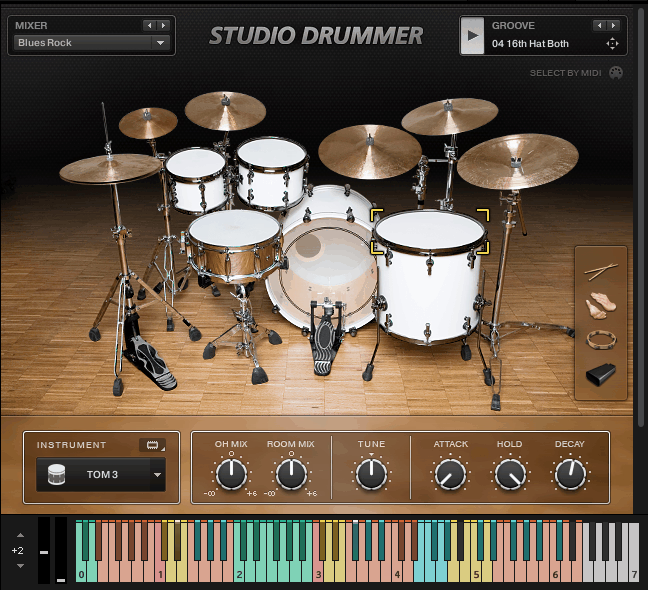
I tried various drum libraries over the years, and most of them follow the same pattern. You load up a kit, you get some velocity layers, maybe a few round-robins, and that’s about it. Studio Drummer is kinda different because instead of giving you finished drum sounds, it gives you the actual recordings with all the microphones that were used during the session.
In addition, it runs in Kontakt or the free Kontakt Player, so you don’t need to buy the full version of Kontakt to use it.
What I noticed right away was that you’re working with multiple mic positions for each drum. The kick has a close mic, room mics, and overhead mics. Same goes for the snare, toms, and cymbals. This gives you options for how the drums sit in your mix. If you want them tight and up front, you use more of the close mics. If you want them bigger and more ambient, you bring up the room mics. You’re not stuck with one sound per kit.
The kits themselves were recorded in actual studios with session drummers, so you’re getting real performances captured with real gear. It’s not just different presets of the same samples. Each kit was tracked in a different space, which means they actually sound different from each other.
I’d say the main thing here is that you’re getting more control over the mix than most drum libraries give you. Instead of loading a pre-mixed kick sound, you’re blending the different mic positions yourself. That takes more work, but it also means you can shape the drums to fit your track instead of hoping the preset sounds right.
The Kits and What They Sound Like
Studio Drummer comes with several complete drum kits, and each one has a distinct sonic personality. I’m not just talking about different tunings or cymbal choices. These are kits that were recorded in different rooms with different gear, so they genuinely sound like different sessions.
The Platinum kit is what I would reach for when you need that big, open, professional studio sound. It’s recorded at the Teldex Scoring Stage in Berlin, which is a massive orchestral recording space. The room sound is huge but controlled. When I need drums that sound expensive and polished without being overproduced, this is where I would likely start.
The Vintage kit gives you that classic rock and funk tone. The tuning is lower, the tone is warmer, and it sits in a mix differently. You can use this for tracks that need drums with character and grit rather than pristine clarity. It sounds like the kind of kit you’d hear on records from the 70s and early 80s.
Then there’s the Black kit, which is tighter and more modern. The attack is sharper, the decay is shorter, and it works better for contemporary pop, R&B, and electronic hybrids where you want the drums to punch through dense arrangements. I would recommend it on tracks where you are layering programmed elements with live drums because it stays defined even when surrounded by synths and bass.
What I appreciate is that each kit was recorded with the same attention to detail. You’re not getting one premium kit and a bunch of filler options. Every kit has full microphone coverage, full velocity layers, and full articulation sets. That consistency means you can switch between kits without losing quality or functionality.
Microphone Positions and Mixing Flexibility
This is where Studio Drummer separates itself from simpler drum libraries. You get independent control over multiple microphone positions for the entire kit. Close mics capture the direct sound of each drum. Overhead mics give you the stereo image and cymbal bleed. Room mics add depth and space. And you can blend them however you want.
In practice, this means I can build different drum sounds from the same kit without loading different patches. If I want tight, punchy drums for a verse, I’ll push the close mics and reduce the room. When the chorus hits, I automate the room mics up for a bigger sound. Same performance, same kit, different feel.
The individual mic channels have their own volume, pan, and processing controls built into the interface. You can compress just the room mics to bring up the ambience or EQ the overheads to tame harsh cymbal frequencies. You can even add parallel compression by duplicating the signal and blending compressed and uncompressed versions together.
One thing I’ve noticed is that the room mics actually sound like the rooms they were recorded in. The Platinum kit’s room sound is massive and natural. The Black kit’s room is tighter and more controlled. You’re not getting artificial reverb pretending to be a room. These are real acoustic spaces captured during the recording, and that authenticity makes a difference when you’re mixing.
Playing It vs Programming It
Studio Drummer responds well to both real-time playing and programmed MIDI. If you’re triggering it with a MIDI controller or electronic drum kit, the velocity response feels natural. Soft hits sound soft, hard hits sound hard, and there’s a smooth gradation between them. I’m not hearing sudden jumps in tone or volume as I move through velocity ranges.
The articulation switching is handled automatically based on how you play. If you hit a cymbal and immediately hit it again, you get a different sample to avoid the machine gun effect. Same with snare hits and tom rolls. The round-robin system cycles through multiple samples so repeated hits don’t sound identical.
For programming, I use the included MIDI grooves as starting points. Studio Drummer comes with hundreds of pre-recorded patterns played by professional drummers. These aren’t just generic beats. They’re actual performances with human timing, velocity variations, and realistic drum language.
What I do is load a groove that’s close to what I need, then edit the MIDI to fit my track. Maybe I’ll change the kick pattern, adjust some hi-hat accents, or replace a fill. Because the grooves were played by real drummers, they have the subtle imperfections and dynamics that make them feel organic. When I edit them, I’m working with something that already sounds human instead of trying to humanize a grid.
The Built-In Effects and Processing
Studio Drummer includes effects and processing tools designed specifically for drums. There’s compression, EQ, transient shaping, and saturation, all optimized for this instrument. I don’t always use these because I often prefer my own plugins, but they’re useful when I want to stay inside the instrument and work quickly.
The compressor works well on the mix bus when you want to glue the kit together. It’s not as flexible as a dedicated compressor plugin, but it does the job without adding weird artifacts or killing dynamics. The EQ is basic but functional for broad tonal adjustments.
What you can actually use more often is the transient designer. It lets you adjust the attack and sustain of the drums independently. So if you want sharper kick and snare attacks for a more aggressive sound, you can push the attack control. If cymbals are ringing too long, you can then reduce the sustain. It’s simple but effective for shaping the overall drum character without reaching for multiple plugins.
The built-in reverb is where I’m less impressed. It sounds okay for adding a bit of space, but it doesn’t compare to dedicated reverb plugins. I usually bypass it and use my own reverbs on an aux send. That being said, having it available is convenient when I’m sketching ideas and don’t want to set up a full mix chain yet.
How It Handles Performance Dynamics
Also, Studio Drummer captures realistic dynamic behavior that goes beyond simple velocity switching. When you play a hard snare hit, the tone changes in ways that feel natural. It’s not just louder. The overtones shift, the attack gets sharper, and the decay behaves differently. This is because the library was recorded with those dynamics in mind, not just volume differences.
The cymbal behavior is particularly realistic. A soft ride hit sounds metallic and controlled. A hard crash sounds explosive and bright. And when you choke a cymbal, it actually cuts off naturally instead of just stopping abruptly. These details matter when you’re trying to create convincing drum performances.
I appreciate how the kick and snare respond to rapid triggering. If you play fast double-kick patterns, the samples don’t just repeat. The round-robin system and velocity layering combine to make each hit sound slightly different, which is exactly what happens with a real drummer. Same with snare rolls where every hit has its own character.
CPU Usage and System Performance
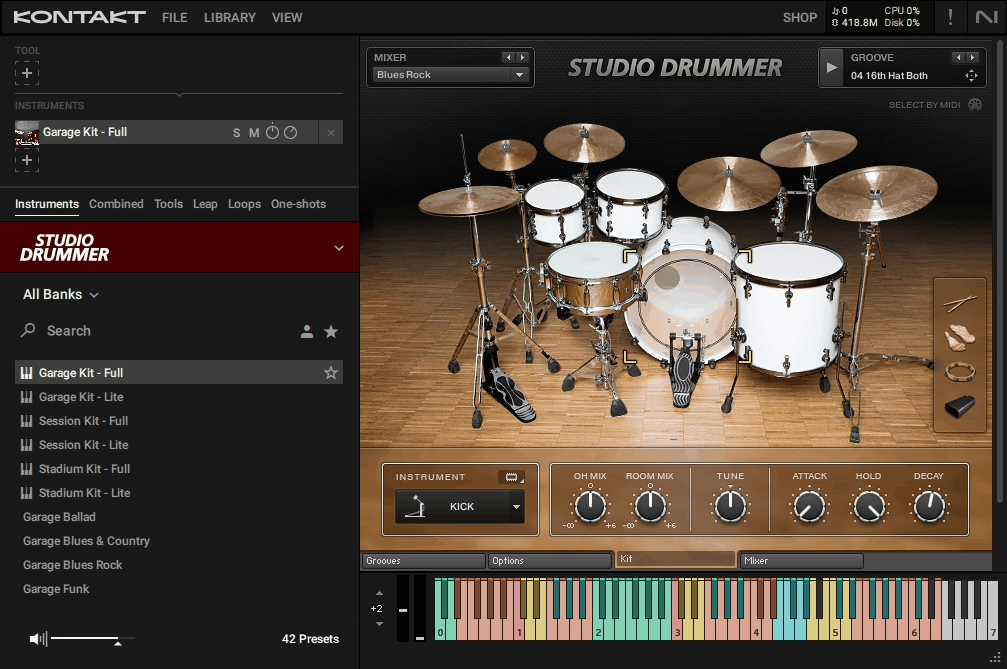
Studio Drummer is not light on CPU or RAM. When you load a full kit with all microphone positions active, you’re looking at 2-3GB of RAM per instance depending on which kit you’re using. The CPU usage varies based on how many voices are playing, but I typically see 10-15% on my system with a moderately complex drum part.
This means you can’t just load five instances of Studio Drummer in the same project without thinking about your system resources. I usually bounce drums to audio once I’m happy with the performance and sound. That frees up the CPU and RAM for other virtual instruments.
The sample streaming is handled by Kontakt, which is generally efficient, but you’ll want a fast SSD if you’re planning to run multiple instances or layer Studio Drummer with other Kontakt libraries. Loading times are reasonable, though switching between kits takes a few seconds as the new samples are loaded into memory.
Where It Fits in Your Productions
I reach for Studio Drummer when I need acoustic drums that sound like they were recorded in a real studio with real equipment. If I’m producing pop, rock, singer-songwriter material, or anything where authentic drum sounds matter, this is a solid choice.
For electronic music, I would use it selectively. The kits work well when you want to hybrid acoustic and electronic elements. You can layer a kick from Studio Drummer with an 808 or use the snare from the Vintage kit blended with a clap sample. The natural room sound adds depth that purely synthetic drums don’t have.
One thing I’ve found is that Studio Drummer works better for traditional drum parts rather than heavily processed or experimental sounds. If you’re making lo-fi hip hop where you want crushed, saturated, vintage-sounding drums, you’ll need to do significant processing after the fact. The source recordings are clean and professional, which is great for some styles but requires work for others.
The MIDI Groove Library
The included MIDI grooves are genuinely useful, which isn’t always the case with these libraries. They’re organized by style and tempo, covering rock, pop, funk, jazz, and more. Each style has multiple variations and fills, so you’re not just getting one pattern per category.
What I like is that the grooves were played by session drummers who understand musical context. The fills make sense. The dynamics follow song structure. The hi-hat patterns have variation and feel. When you drop one of these grooves into a track, it sounds like a drummer would actually play it, not like someone programmed it on a grid.
I would use these grooves as composition tools more than final parts. You can audition different patterns to figure out what drum feel works for a song. Once you find the right vibe, you can either edit that MIDI or play my own version inspired by it. It speeds up the creative process and help you avoid writer’s block when you are not sure what the drums should be doing.
What It Doesn’t Do
In addition, Studio Drummer is focused on acoustic drums in professional studio settings. If you want lo-fi, garage-recorded, or heavily processed vintage drum sounds, this won’t give you that character out of the box. The recordings are clean, detailed, and polished, which is either perfect or wrong depending on your needs.
It also doesn’t include electronic drum sounds or hybrid kits. You’re getting acoustic drums recorded with high-end gear in great rooms. If you want 808s, synthetic percussion, or glitchy electronic drums, you’ll need different tools.
The interface is functional but not inspiring. It gets the job done, but it’s not the most elegant or intuitive design. Finding specific controls sometimes requires clicking through tabs, and the visual feedback isn’t as immediate as some newer drum instruments. That being said, once you learn where everything is, it’s fast enough.
The Practical Reality
At the end of the day, Studio Drummer delivers professional acoustic drum sounds with extensive mixing flexibility. The kits are well-recorded, the microphone options give you real control over the sound, and the included grooves are useful for both composition and final production.
To me, it’s one of those instruments that earns its place by being reliable and consistent. When you need acoustic drums that sound expensive without requiring extensive processing or sample replacement, Studio Drummer gets loaded. The fact that multiple kits are included means you aren’t locked into one sonic character, and the ability to blend microphone positions means you can just shape the sound to fit different mixes.
If you’re looking for a complete acoustic drum solution that sounds like real drums recorded in real studios, Studio Drummer is worth considering. It’s not trying to do everything, but what it does, it does well.
Lastly, I also included Studio Drummer as a contender in this post.

Hello, I’m Viliam, I started this audio plugin focused blog to keep you updated on the latest trends, news and everything plugin related. I’ll put the most emphasis on the topics covering best VST, AU and AAX plugins. If you find some great plugin suggestions for us to include on our site, feel free to let me know, so I can take a look!