
Many of the most effective plugins for monitoring loudness (LUFS) and true peak will help you manage how loud your audio is. As a result of that, regardless of what platform you’re using to share your music with others, it should always be well-balanced.
To monitor loudness effectively, you’ll want to use the best possible plugins. These should provide you with the ability to measure RMS, true peak levels, as well as LUFS and dynamic range. Using this information will allow you to make better decisions regarding the mix and master of your music.
In addition to helping you meet the requirements for many platforms (e.g., Netflix, Apple Music), these plugins will also help prevent clipping from occurring due to high levels during playback and maintain an optimal level of “punch” versus clarity in all aspects of your music.
To determine the effectiveness of free and paid versions of many of these types of plugins I have tested numerous options for providing accurate measurements and useful functions such as histograms, reference tracks, and various metering modes.
Regardless of whether you are creating content for Spotify, Film or Broadcast, these metering plugins makes loudness management much easier:
1. SSL Meter Pro
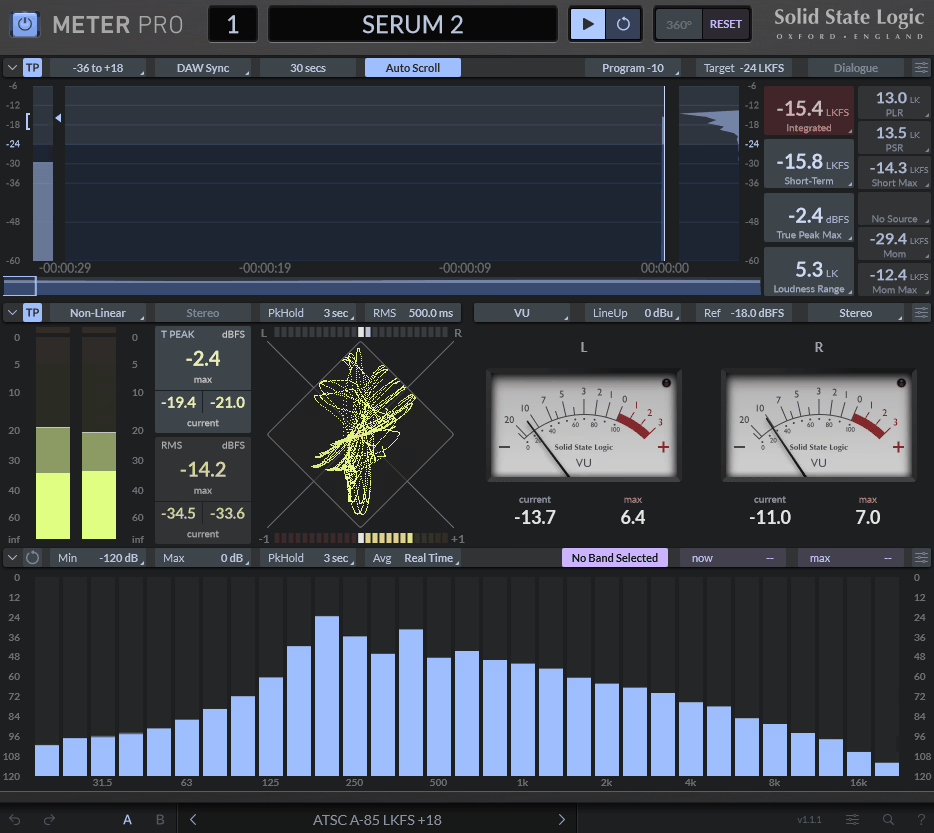
Starting with a first plugin, this one gives you a complete real-time analysis solution in a single package as Meter Pro covers loudness metering, phase coherence, RTA, and stereo balance monitoring. In addition, you can even work with formats from basic stereo up to 7.1.4 for immersive audio projects.
When it comes to specific delivery standards, this plugin really shines. It includes presets for major platforms like Netflix, YouTube, Spotify, and broadcast specs like ITU and EBU which saves you time since you don’t have to manually configure target levels for each project type.
Some of the main features I’d like to mention:
- Multi-Standard Loudness Analysis
Meter Pro displays momentary, short-term, and integrated loudness with histogram views. That said, you can choose from prebuilt standards or set custom target loudness and gating values. Dolby Dialogue Detection mode helps when working with spoken content. Also, I’d like to say that this range of options lets you handle music, film, and broadcast work without switching tools.
- Advanced Peak Metering
Next, you have true peak monitoring that uses oversampling to catch inter-sample peaks that standard meters miss. The RMS and peak bargraphs offer multiple scaling options including K-20, K-14, K-12, Linear, and Non-Linear modes which gives accurate readings that prevent clipping and distortion in final exports.
- Real-Time Frequency Analysis
A 31-band RTA shows frequency distribution as the mix plays, so you can use this to spot problem areas like muddy low-mids or harsh highs. Also, the visual feedback helps you make faster EQ decisions during mixing sessions.
- Phase and Stereo Tools
When it comes to Lissajous phase scope and correlation meter, it show stereo phase relationships instantly. You can check mono compatibility and identify phase issues before they cause problems. Alos, the stereo balance meter shows if the mix leans too far left or right.
- Immersive Format Support
Meter Pro handles multichannel configurations up to 7.1.4 channels and you can meter Dolby Atmos sessions and surround mixes with the same accuracy as stereo projects, which makes it valuable for film and game audio work.
- Hardware Integration
Finally, plugin connects with SSL’s UF1 controller and 360° ecosystem. That means you can view metering data and control parameters directly from the hardware surface, which creates a more tactile workflow for those who prefer hardware control.
2. Mastering The Mix LEVELS
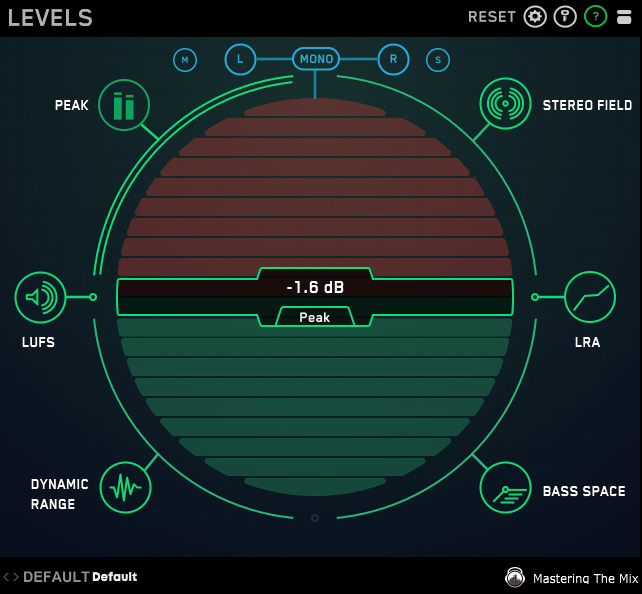
Next, we have plugin from Mastering the Mix. The LEVELS is actually a solid option if you want fast, clear feedback on loudness, dynamics, and stereo imaging. Its main goal is to highlight the most important details in your mix without overwhelming you with data. I like how Color-coded alerts make it easy to spot issues right away, which helps me work faster.
I like to use LEVELS for both mixing and mastering, because presets for platforms like YouTube, Spotify, and club systems make it easy to check if my track meets loudness standards. The Bass Space analyzer also helps me find low-frequency problems before they show up on bigger systems or in mono.
Some features worth mentioning:
- True Peak Metering
LEVELS uses 16x oversampling to spot true peak levels and catch inter-sample clipping that regular meters might miss. I can tell when the signal is close to distorting, even between samples. The plugin has both true peak and standard peak meters, and you can adjust the thresholds based on your delivery format. Basically, this setup helps make sure your masters won’t clip on streaming platforms or when converting formats.
- Integrated and Short-Term LUFS
Also, the plugin follows EBU R128 standards for both integrated and short-term loudness measurements and you can use integrated LUFS to check the overall volume of your track, while short-term LUFS lets you check loudness changes in different sections, like verses and choruses. That being said, it helps you make better choices about compression, limiting, and gain staging.
- Dynamic Range Display with Color Feedback
Another thing so I don’ forget – LEVELS measures dynamic range by comparing peak levels to short-term LUFS over time, and the main oscilloscope changes color to show how much dynamics are left in your mix. So green means good dynamics, orange means you’re getting close to heavy compression, and red warns that your mix is just too compressed.
- Bass Space
It basically checks frequencies at 40 Hz, 80 Hz, 120 Hz, and 160 Hz to show where the low-end energy is. You can quickly see if your bass or kick has too much stereo width, which can cause phase problems in mono. The Bass Space meter has saved me from mix issues many times, especially with synth bass or layered kicks.
- Platform-Specific Presets
In the end, LEVELS includes presets for common delivery formats, such as streaming, CD, broadcast, and club playback where each preset sets the right thresholds for peaks, LUFS targets, and headroom to meet industry standards.
If you’re mastering for YouTube, just load the YouTube preset, and it will show if you’re hitting about -14 LUFS. This eliminates the guesswork and helps me ensure my mixes sound consistent everywhere.
3. IK Multimedia Metering
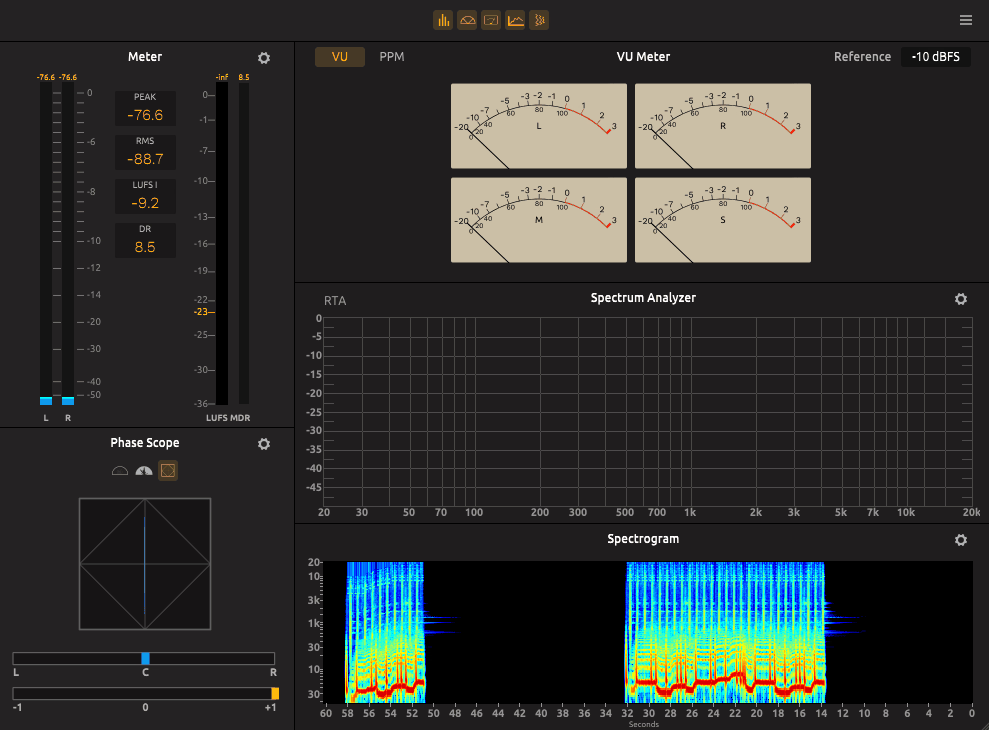
IK Multimedia’s Metering is the complete metering suite that ships standalone or inside the T-RackS ecosystem, and honestly it’s one of the most comprehensive metering tools you can grab without having to buy three different plugins. It’s built for engineers who need to hit broadcast and digital delivery specs without guessing.
The whole thing is designed around professional-grade visual feedback, covering loudness, dynamics, frequency, and phase in a single plugin. It’s especially handy for mastering because you can pop it open as a floating window on a second monitor and keep an eye on everything while you work on the actual processing.
- Precision LUFS Loudness Meter
Here, the core feature is a precision LUFS meter that’s compliant with all leading professional reference standards (EBU R128, ITU, etc.). It gives you integrated, mid-term, and short-term loudness readings, so you know exactly whether your master is hitting the right loudness target for digital music delivery or broadcasting.
This is the meter you’ll use 90% of the time when prepping a track for streaming platforms.
- Peak, RMS, and Dynamic Range
Beyond LUFS, you also get Peak, RMS, and Dynamic Range meters that give you useful info about the “crest factor”, which is the difference between RMS and Peak levels as it helps you decide whether to push for a more compressed sound or keep things dynamic which is quite handy!
- VU/PPM and Mid-Side Meters
This suite also includes VU and PPM meters for classic level reference with different ballistics, plus Mid-Side meters that show you the relationship between the mono and stereo content of your track. That said, the Mid-Side info is genuinely helpful for deciding whether to widen your stereo image or tighten things up to a more focused, in-your-face sound.
- Spectrogram, Real-Time Analyzer & Phase Tools
Rounding out the suite is a spectrogram, real-time analyzer, phase scope, and correlation meter which are visual tools that help you spot frequency imbalances and phase issues that your ears might miss, especially before printing a final master.
- Floating Window for Multi-Monitor Setups
Next minor feature is that the whole suite can be launched as a separate floating window, which can be useful if you have a secondary screen. You can keep all the meters visible at all times while focusing on actual processing in your DAW, instead of toggling between plugin windows.
4. Waves WLM Plus Loudness Meter
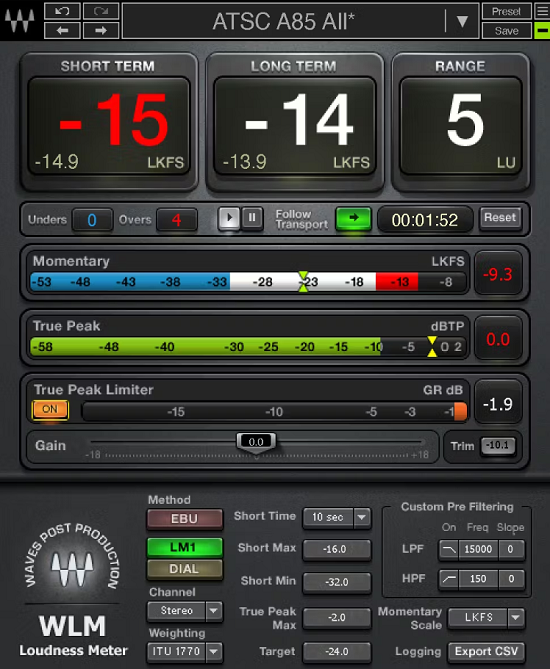
I’d say Waves WLM Plus is the go-to budget loudness meter for music production, broadcast, podcasts, and post, and it’s been a staple in many studios for years. Despite its age, it remains one of the most reliable LUFS meters on the market because it nails the basics without overcomplicating things.
It’s fully compliant with all current ITU, EBU, and ATSC specifications, which makes it perfect if you deliver content to streaming platforms, broadcast, or YouTube.
Going further, WLM Plus gives you Momentary, Short-Term, Long-Term, and True Peak readouts in one window, which covers basically every loudness measurement you’d ever need. The true peak readings are important because they catch inter-sample peaks that regular peak meters miss which minimises the risk of distortion when your file gets transcoded for streaming.
- Built-In True Peak Limiter and Gain Trim
Now, I would say this is what sets it apart from a basic meter: WLM Plus actually has a built-in True Peak Limiter and Gain Trim controls for direct loudness correction, so instead of inserting a separate limiter to fix peaks, you can do it all inside the plugin.
It’s kinda small but genuinely useful workflow win, especially for podcast or broadcast workflows where you just need to hit a target LUFS value cleanly.
- Warning and Logging System
This feature basically keeps track of your levels and alerts you when you exceed (or fall short of) target settings. This is somehow huge for post-production houses, broadcasters, or anyone delivering content with strict loudness specs.
- Multiple Scales and Weightings
Also, you get 5 different momentary scales and 5 different weightings to choose from (or none), so you can configure the meter to match whatever standard you’re working to. Whether you’re targeting -14 LUFS for Spotify, -23 LUFS for EBU R128 broadcast, or something custom, WLM Plus has a scale that fits.
- Mono, Stereo, and Multi-Channel Support
To sum it up, WLM Plus also supports mono, stereo, and multi-channel formats, making it versatile across music, film, and post-production work. Whether you’re mixing a podcast in mono, a stereo track for streaming, or 5.1 for film, the same plugin handles it all.
5. sonible Metering Bundle

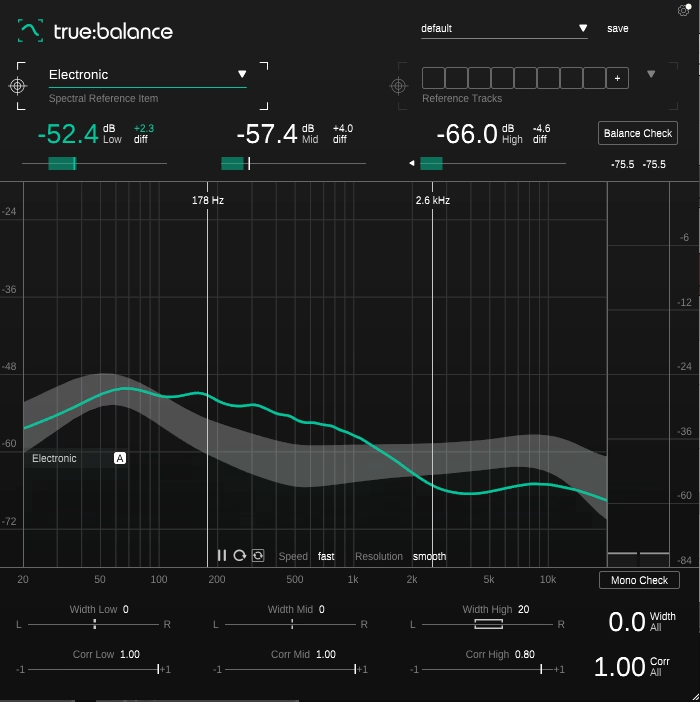
This bundle contains true:level and true:balance, which together give you a complete picture of your mix’s loudness, dynamics, and spectral balance. Where most metering plugins just throw numbers at you, sonible’s tools are actually designed to help you actually understand what those numbers mean and what to do about them.
- true:level – Loudness & Dynamics Visualisation
First, true:level visualises the interplay between loudness and dynamics in a way that’s genuinely unique. Most loudness meters show LUFS and dynamics as separate numbers, but true:level plots them against each other so you can immediately see whether your mix is too compressed, too dynamic, or sitting in the right zone for your target genre.
This bundle includes predefined references for streaming platforms (Spotify, Apple Music, YouTube, etc.) and dynamic references for different genres.
- true:balance – Spectral Balance Analyser
On the flip side, true:balance analyses the spectral distribution of your mix with a real-time spectrum analyser plus an average spectrum overlay. You can simply compare your track’s frequency balance against genre references or your own custom reference tracks, which makes it dead easy to spot when your low-end is too heavy or your high-end is too thin.
It’s pretty similar to iZotope’s Tonal Balance Control but with a cleaner, more focused workflow.
- Level Check & Balance Check
Both tools include interactive Level Check and Balance Check features that don’t just show you the data but actually suggest actions to take to match your reference. I would say this is what separates sonible’s tools from other metering plugins.
In particular, if your mix is too dull compared to your reference, true:balance will literally tell you to brighten the highs.
- Mono Compatibility & Stereo Width Info
true:balance also includes a channel data section with stereo width and correlation values, plus a Mono Check function that flags potential phase issues when your mix is summed to mono. That being said, this is critical for anyone whose music will be played back on club systems, phone speakers, or anywhere mono summing happens.
- 8 Reference Tracks Per Plugin
Also, both plugins let you load up to 8 reference tracks for direct A/B comparison which is a major time-saver for producers who already work with references (which should be everyone) as you don’t have to keep loading and unloading reference plugins or doing manual A/B tests.
6. ADPTR AUDIO Metric AB
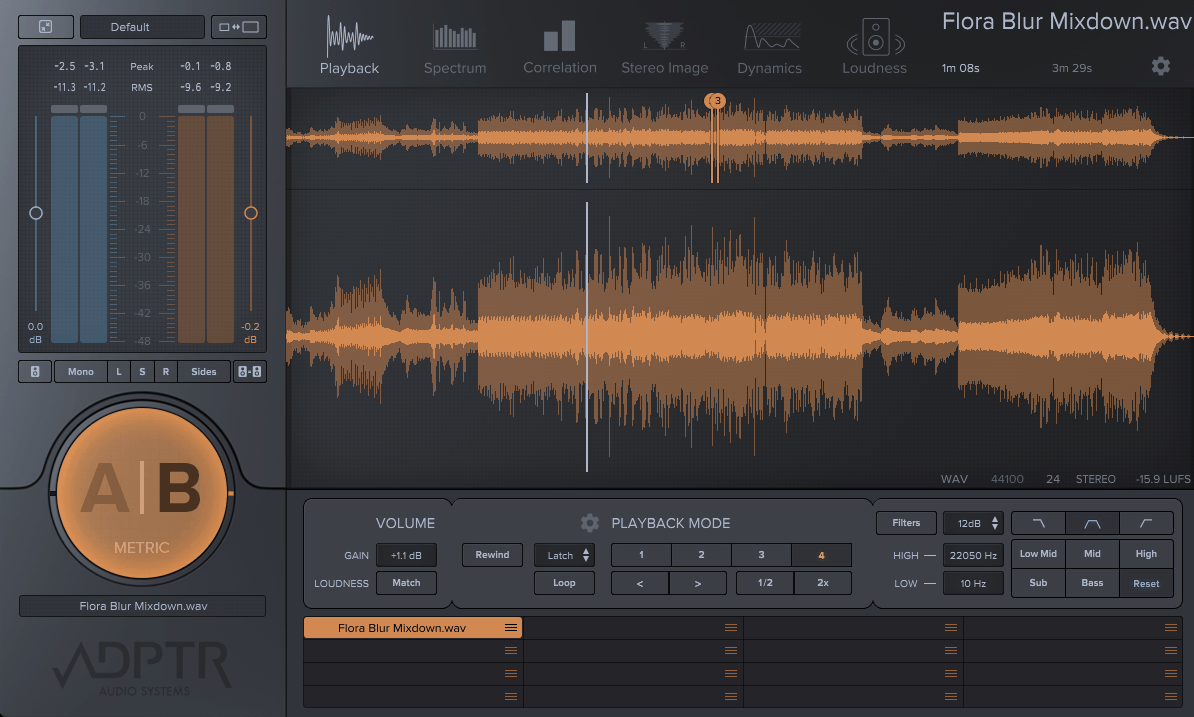
Moving up to Metric AB, it’s a complete comparison system that shows you exactly how your mix stacks up against commercial releases, using multiple analysis tools simultaneously.
Here, you can load up to 16 reference tracks and switch between them with a single button, whereas loudness matching feature removes volume bias from my comparisons. It means you’re hearing real differences in tone and balance instead of just louder-sounds-better tricks.
There is everything you need from LUFS readings, spectrum displays, stereo imaging, and dynamics measurements all updating in real time as you switch between your mix and any reference.
Main features to mention:
- Loudness Matching Modes
Four different loudness matching options normalize levels between your mix and references and Real-time LUFS metering shows Momentary, Short-Term, and Integrated values plus Loudness Range. You can set target LUFS values and get alerts when your mix exceeds them.
- Multi-Band Analysis Tools
In addition, the spectrum analyzer offers multiple graph types including Plot, Octave, and 3rd Octave views and you get a multi-band correlation display that shows phase issues across different frequency ranges.
The PSR meter reveals how compressed my track is compared to references. A filter bank lets me solo specific frequency ranges to compare bass, mids, or treble directly.
- Workflow/Utility Features
When it comes to interface, it resizes from S to XL to fit my screen setup. Also, keyboard shortcuts speed up reference switching during mixing sessions.
- A/B Reference System
You can also import 16 different reference tracks into the plugin. The A/B button lets you instantly switch between my mix and any loaded reference. Playback syncs to your DAW transport with multiple modes like Latch, Cue, Sync, or Manual. I set loop points and cue markers for each reference track individually, which helps me focus on specific sections.
The plugin supports VST2, VST3, AU, and AAX formats across Mac and Windows, including Apple M1 and M2 chips.
7. Youlean Loudness Meter Pro
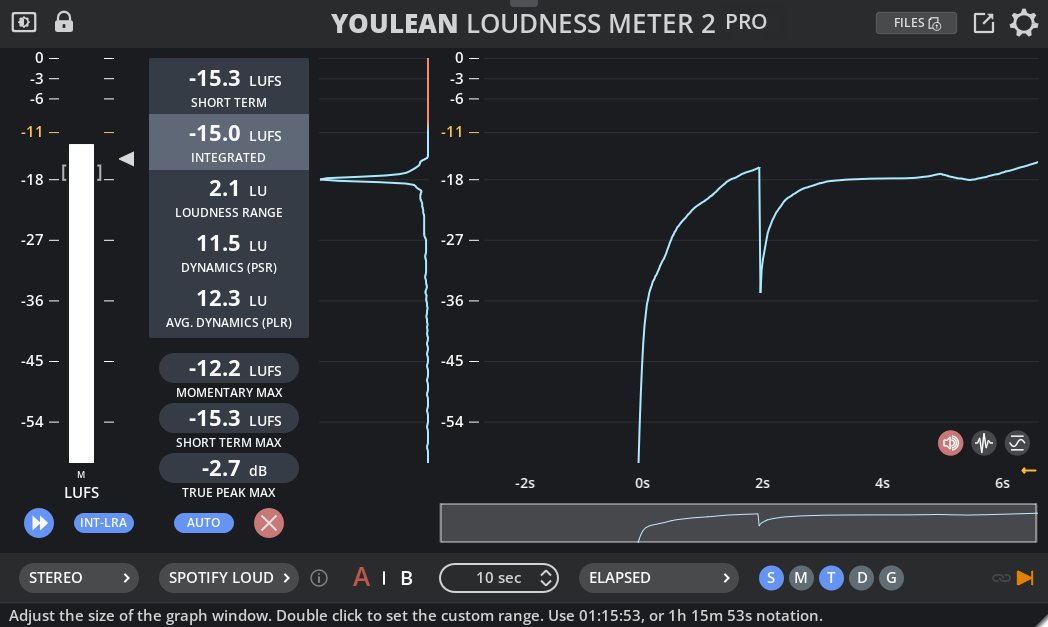
Youlean Loudness Meter Pro is my go-to tool for checking loudness in streaming, broadcast, and mastering projects. In addition, Pro version adds offline file analysis, exportable reports, and more detailed metering that meets professional broadcast standards.
I like that it works for both real-time monitoring while mixing and for analyzing finished files by simply dragging and dropping them in. The interface fits any screen size, and you can pick either a detailed or simple view depending on what you need in the situation,
- LUFS Metering with Multiple Time Windows
The plugin gives you three key loudness readings: momentary (about 400 ms), short-term (3 seconds), and integrated (the whole session). Basically, these help you see how loudness changes in your mix. Momentary shows quick peaks, while integrated shows the overall loudness. You can use all three to keep your track consistent and meet platform standards.
- Adjustable Quality
Speaking of True Peak meter, it finds inter-sample peaks that standard peak meters can miss where you can set thresholds and watch for overshoots that might cause clipping during format conversion. Eco mode helps save CPU while still giving accurate measurements, which can help you avoid distortion problems that only show up after encoding.
- Loudness Range and Dynamics Analysis
I like how Loudness Range (LRA) meter shows how much your mix changes in dynamics. A narrow range means the audio is heavily compressed, while a wider range shows more dynamic variation. The dynamics graph gives you quick look at how compression is working by comparing peak levels to loudness. You can quickly tell if you’re over-compressing the mix.
- Drag and Drop File Analysis
I can drop audio or video files straight into the plugin for offline analysis so I don’t have to import files into my DAW just to check loudness. I recommend using this feature for quick checks of reference tracks or maybe client projects.
- Streaming Platform Presets
Loudness Meter Pro comes with presets for Spotify, YouTube, Apple Music, Netflix, and broadcast standards like EBU R128. You can pick the platform you want and can instantly see if your mix meets its loudness requirements.
- A/B Comparison States
- Exportable Loudness Reports
You can also export measurements as PDF, PNG, or SVG files. This is really helpful for client documentation and broadcast submissions as reports include all the metering data, graphs, and loudness history in a professional format.
8. PROCESS.AUDIO Decibel
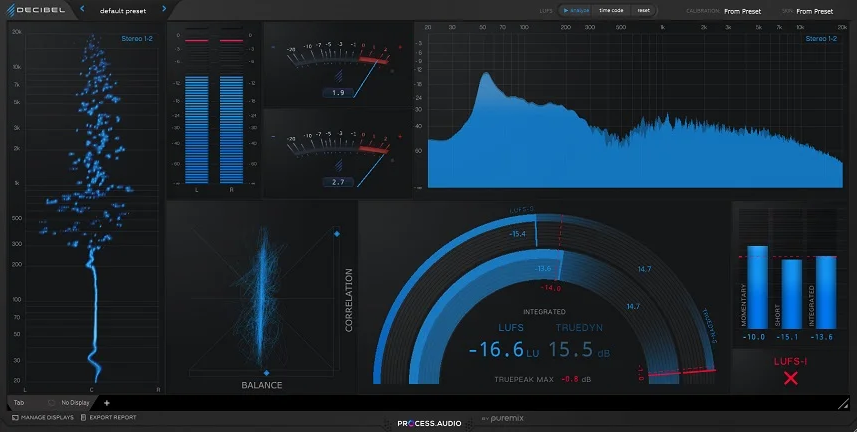
This LUFS meter plugin actually centers around a unique “Super Meter” that tracks three critical measurements at once: LUFS for loudness, TrueDyn for dynamics, and True Peak for peaks. What’s cool is that I can monitor both short-term values on the outer rim and integrated values on the inner rim, all from a single visual display.
The modular design lets you build your own metering layout. You can easily add or remove modules, resize them, and arrange everything to match your workflow.
Decibel also supports remote metering on mobile devices, so you can push the display to an iPad or Android tablet and keep your DAW screen clear.
- Super Meter with TrueDyn Technology
The Super Meter combines LUFS, TrueDyn, and True Peak into one circular display where you can see short-term measurements (based on a 3-second span) on the outer rim and integrated measurements (from the start of playback) on the inner rim. The color-coded rings help you understand how loud, dynamic, and peaky your audio is without checking multiple meters. TrueDyn measures dynamic range and shows how much compression or dynamics are present in your signal over time.
- LUFS Histogram and Loudness Timeline
Also, LUFS histogram shows how loudness and dynamic range change across the entire track. Red dots mark spots where your signal exceeded the True Peak limit, helping you identify problem areas quickly. You can see patterns in your mix’s loudness and adjust processing before finalizing the master.
- Drag-and-Drop Offline Analysis
I can drag audio files directly into Decibel for instant analysis. The plugin measures LUFS, TrueDyn, and True Peak without playing the file in my DAW. This feature can speed up your workflow when you need to check stems, reference tracks, or client files.
- Modular and Scalable Interface
Decibel includes multiple meter modules: LUFS meters, spectrum analyzer, spectrogram, phase scope, stereo cloud, VU meter, and customizable number boxes. You can add only the meters you need and arrange them as you want. In addition to that, each module is resizable, and you can mirror the entire interface to a mobile device for external metering.
- Target Validator with Visual Feedback
Last but not least, Target Validator lets you set three targets: integrated LUFS, Loudness Range (LRA), and True Peak. Lights indicate when you hit or exceed each target. The LUFS target light turns blue when reached, and the True Peak light turns red when exceeded
9. Youlean Loudness Meter 2 (Free Edition)
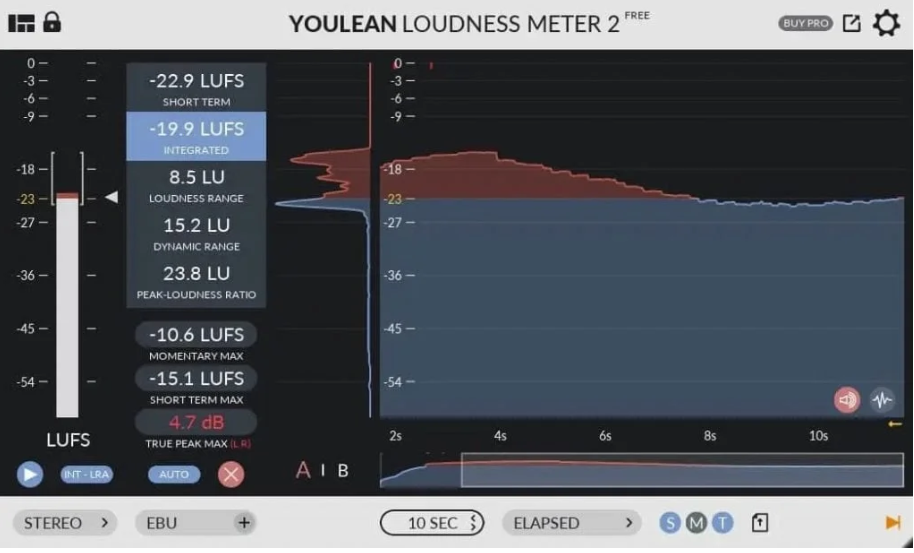
Youlean 2 free LUFS meter plugin is one of the most popular free metering tools out there, and for good reason. In fact, it covers all the main loudness measurements you need, like LUFS, true peak, and dynamic range. The interface is simple and easy to read, giving real-time feedback that helps you make better choices when mixing and mastering.
I like that this free version is still very accurate as it follows the ITU-R BS.1770 standards, so its readings match what professional broadcasters and streaming services look for. The plugin works with VST, AU, and AAX formats, so it fits into any DAW you use.
- Integrated LUFS Measurement
The plugin shows Momentary, Short-Term, and Integrated LUFS all on one screen. You can see how the loudness changes every second or check the average for the whole track. This setup gives you quick feedback and a full overview, where measurements are accurate enough for professional streaming and broadcast delivery.
- True Peak Metering
Youlean finds inter-sample peaks that regular peak meters might miss, meaning, these hidden peaks can cause clipping when your audio is converted or streamed.
- Dynamic Range Display
In the free version, you get a Loudness Range (LRA) and other dynamic readings where you can check if your mix has enough variation or if it sounds too flat from too much compression. This feature helps you keep the music lively while still meeting loudness goals. Streaming services prefer tracks with good dynamics, so watching LRA during mastering is important.
- Broadcast Standard Presets
The plugin comes with presets for ITU-R BS.1770-4, EBU R128, ATSC A/85, and other delivery standards. If you are mastering for TV, film, or a certain streaming platform, you just pick the right preset. The plugin sets the target levels and tolerances for you. This way, you don’t have to remember all the different loudness standards for each client or platform.
- Flexible Interface Options
10. Goodhertz Loudness (FREE)
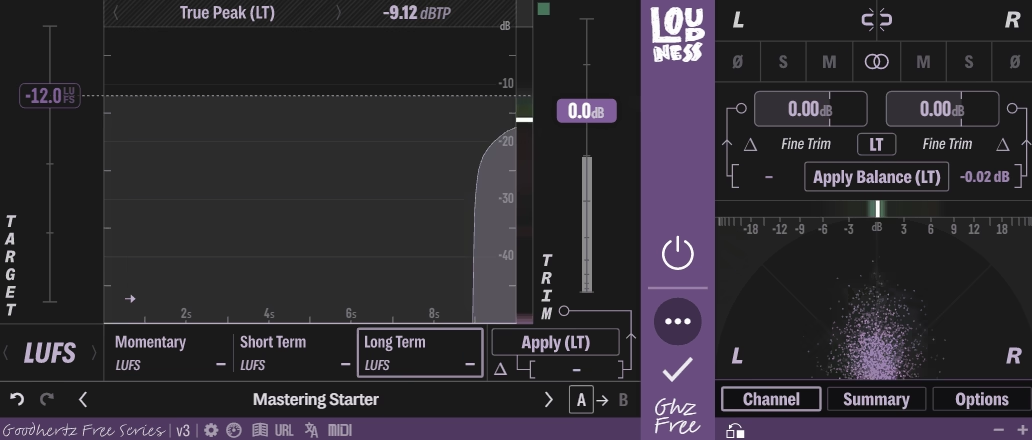
Goodhertz Loudness VST really stands out because it gives you professional loudness metering and smooth gain control.
After trying it myself, I can say it handles everything from quick LUFS checks to detailed long-term analysis, all for free. The interface feels easy to use, with a clear waveform display and real-time metering values, so you can always see what’s happening with your audio.
What impressed me about this tool is that it’s more than just a meter because it lets you trim gain precisely, using special algorithms that stop clicks and pops, even when you automate volume changes. In addition, it also uses full 64-bit processing, so your audio stays clean no matter how much you adjust the levels.
- Multiple Loudness Standards
You can switch between LUFS, RMS, Peak, and True Peak metering based on what exactly you need at the moment. Each mode gives accurate readings that match professional broadcast and streaming standards. When I master for Spotify, I use LUFS mode and for tracking peaks while mixing, I use True Peak.
- Three Time Window Options
You get Momentary, Short Term, and Long Term measurement windows for LUFS and RMS. I use Momentary for instant feedback on level changes. Then, Short-term helps me judge how a section sounds over a few seconds. Long-term shows the overall loudness for the whole track, which is what streaming platforms measure.
- Target Loudness System
In the end, I can set a target value for any metering type, and the plugin tells me exactly how much gain I need to reach it, so when I prepare tracks for different platforms, this saves me from doing the math or making lots of test bounces. I just set my target LUFS and use the suggested gain adjustment!
Frequently Asked Questions
Loudness metering uses technical measurements that can be confusing, especially when the numbers look too high or too low. Knowing the differences between meter types and why they matter helps you make better choices when mixing and mastering.
Why is My LUFS So High?
If your LUFS reading is high, your track is louder than your target. I’ve noticed this happens when producers use their limiters too much or add too much gain at different stages of the mix.
Most streaming platforms aim for -14 to -9 LUFS integrated. If your track is at -6 LUFS, the platform will turn it down during playback. This means you lose dynamic range for loudness that gets reduced anyway.
To fix this, I back off the mastering limiter and check my gain staging. I lower the output gain on my limiter or remove plugins that add extra loudness. Each genre has its own loudness standards, but keeping within streaming targets stops your track from being turned down automatically.
What’s The Difference Between Peak, True Peak, LUFS, and RMS?
Peak metering shows the highest instantaneous amplitude in your signal. It measures the exact moment when your waveform reaches its maximum level. RMS measures average loudness over time and LUFS measures perceived loudness based on how human ears actually hear. It weighs different frequencies according to our hearing sensitivity. For monitoring these accurately, I often rely on top metering plugins for LUFS and True Peak, which give me precise visual feedback during mixing and mastering.
Why is My LUFS So Low?
If your LUFS reading is low, your track will sound quieter than professional songs. I’ve seen this happen when I mix too carefully or don’t use enough compression and limiting in mastering. This usually happens because there’s too much dynamic range or not enough gain added after processing. If your LUFS is -20 but you want -9, your track will sound much quieter than others in a playlist.
To fix low LUFS, I use compression to control the dynamics. Adding a mastering limiter helps me raise the loudness while keeping peaks in check. Tools like Youlean Loudness Meter Pro let me watch these changes in real time as I work.
Does True Peak Matter in Mastering?
True Peak matters significantly in modern mastering workflows. I’ve learned that ignoring True Peak levels causes distortion when files get converted between formats or encoded for streaming platforms. Streaming services and broadcast standards require specific True Peak limits.
Most platforms want True Peak levels below -1 dBTP, while some broadcasting standards demand -2 dBTP. When my masters exceed these limits, the encoding process can introduce unwanted distortion that ruins the final sound.
Plugins like SSL Meter Pro show both peak and True Peak at the same time. I always check True Peak during my final limiting. This step helps avoid technical rejections from platforms and keeps the audio quality good on all systems.
Does LUFS Matter in Music?
LUFS is important because it affects how loud your music sounds to people. I’ve found that hitting the right LUFS target for each platform helps my tracks match up with professional releases. Different situations need different LUFS targets. Spotify uses -14 LUFS, YouTube uses -13, and Apple Music goes for -16. Club music is usually around -8 to -6 LUFS, while more dynamic styles like jazz can be -18 LUFS or even lower.
Meeting these targets doesn’t mean crushing your dynamics. You can balance loudness with musical dynamics by understanding that streaming normalization will turn down tracks that exceed platform targets. Using plugins like ADPTR AUDIO Metric AB lets you compare my LUFS readings against reference tracks and streaming standards before final export.

Hello, I’m Viliam, I started this audio plugin focused blog to keep you updated on the latest trends, news and everything plugin related. I’ll put the most emphasis on the topics covering best VST, AU and AAX plugins. If you find some great plugin suggestions for us to include on our site, feel free to let me know, so I can take a look!