

These are the best limiter plugins I actually use and trust to get results. Some keep your mix sounding clean while helping you reach streaming levels. Others might look good in ads but can add unwanted artifacts or pumping. I’ll start with Brainworx bx_XL V3, Leapwing LimitOne, FabFilter Pro-L 2, and PluginBoutique PeakLimit. After that, I’ll cover more paid choices and some free limiters that really hold up.
Each of these plugins serves a different purpose. Some are made for transparent mastering when you need a clean sound with no artifacts. Others add a bit of character, which can be great for certain tracks.
Getting your track loud enough isn’t just about setting the ceiling. It’s also about controlling the Crest Factor so you don’t lose punch in your transients. I’ve tested these limiters for look-ahead latency, inter-sample peak (ISP) control, and gain-reduction artifacts to find out which ones keep the ‘knock’ while meeting streaming standards.
1. Brainworx bx_XL V3

Brainworx bx_XL V3 seems designed for engineers who care about dynamics, not just loudness. I suggest using it in mastering chains where control is more important than aggressive processing. Its mid side architecture also sets it apart from single channel limiters right away.
The workflow rewards careful listening rather than fast tweaking. You get transparency and precision without the plugin forcing a single character across your entire mix. That combination is exactly what makes it stand out as a best mastering limiter plugin contender, especially for engineers working on material that needs competitive levels without losing dimensional depth.
The plugin comes with 42 presets for mastering, vocals, mix bus, effects, and more. Most of these presets are focused on mastering, so if you need a mastering limiter, it’s worth a look. For engineers who want detailed control over every stage of their master, it ranks among the best limiter plugins available right now.
Here are some more features:
- Mid Side Processing Per Channel
This limiter splits your signal into Mid and Side channels, each with its own dynamics. This is useful when you want to treat the center differently from the sides, like keeping vocals steady while letting stereo synths sound wider. You can tighten the low end in the mid channel without changing the side width, or control loud side elements without affecting the center. This separation helps avoid the problems that can happen when you push regular limiters on wide mixes.
- Three Frequency Bands with Adjustable Crossovers
You have three frequency bands, and you can adjust the crossover points to fit your track. The crossovers stay phase coherent, which is important in mastering because phase shifts can ruin how your mix translates. You can set the bands based on where the energy is, not just fixed frequencies, and control how the lows, mids, and highs hit the limiter separately. This stops things like kick drums from causing limiting across your whole mix.
- Two Distinct Limiting Styles
The plugin has two limiting modes with truly different response curves, not just small changes for marketing. One mode focuses on transparent peak control, while the other lets you get more loudness without ruining transients. You can hear the difference right away when working with full mixes or stems, and both modes stay consistent even with more gain reduction.
- Detailed Gain Reduction Metering
You can see gain reduction for each band and channel, along with input and output monitoring that shows what is triggering the limiting. This makes it easy to spot which frequency range is causing issues, so you don’t have to guess or over-process your mix.
- Integrated Stereo Width and Mono Maker
The Mono Maker feature puts low frequencies in mono, while the width control adjusts the stereo image higher up. You won’t need extra utility plugins for this, and these stereo tools help you avoid phase problems if you use them correctly.
2. Waves L4-Ultramaximizer
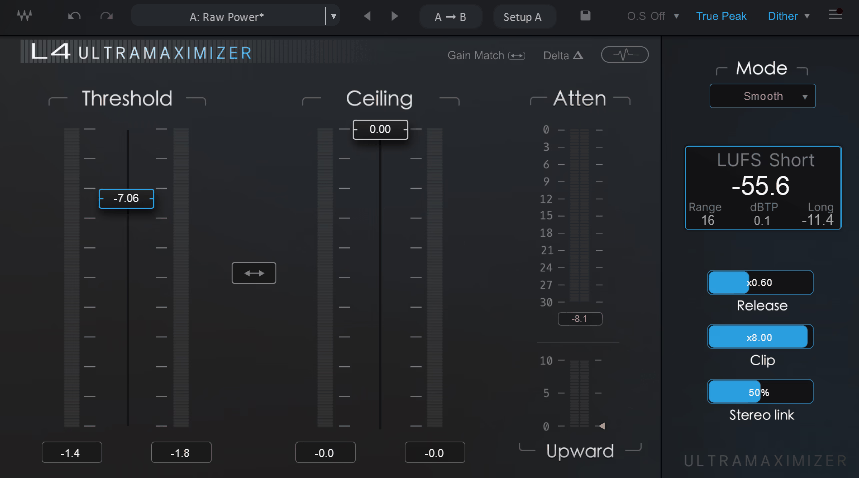
The Waves L4-Ultramaximizer is the long-awaited successor to the L1 and L2, and it carries the legacy without leaning on it. I suggest using it when you want modern loudness with options for character, since it gives you five algorithms instead of one fixed sound. The two-slider workflow stays familiar to anyone who grew up on the older L-series, but the engine underneath has been rebuilt for how mixes actually sound today, with stronger transients, more low end, and wider dynamics.
What makes it stand out is the balance between speed and flexibility. You can drop it on a stem during tracking thanks to the ultra-low latency mode, then push it harder on the master bus without swapping plugins. The upward compression feature is the part that surprised me the most, as it lifts quieter passages without flattening the louder ones, which is something most peak limiters can’t do at all. For producers chasing competitive levels while keeping musical feel, it earns a spot among the best limiter plugins released this cycle.
The plugin includes two GUI views, graph and classic, so you can work the way you prefer. The classic view will feel like home if you’ve spent years on the L2, while the graph view gives you the visual feedback that newer mastering workflows expect.
You get Modern, Aggressive, Smooth, Safe, and the original L2 mode for that vintage signature. Each algorithm has its own response curve, not just a tonal tweak, so the differences are clear when you A/B them on the same material.
- Adaptive Clipping and Release Controls
- Upward Compression Stage
- True Peak Limiting and LUFS Metering
- Ultra-Low Latency Mode
3. FabFilter Pro-L 2
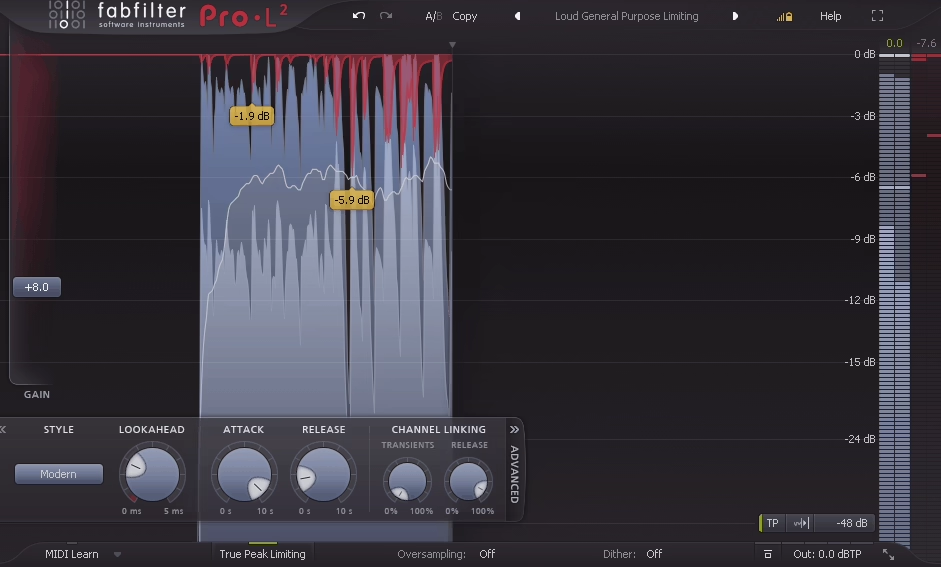
The visual feedback is clear right away. With FabFilter Pro-L 2, you can easily see what’s going on, which is helpful when you’re making adjustments by ear and want to be sure you’re not pushing things too far. The interface is well-designed, and the gain reduction and loudness meters are actually useful in practice. It’s consistently mentioned among the best limiter plugins for mastering, and after using it on dozens of sessions, that reputation holds up.
The algorithms work well for most needs, whether you’re mastering or just want to add a bit more energy to a track. I tend to use Transparent mode when I want to keep the punch in my mixes, but sometimes Modern or Aggressive modes help add more density. True Peak limiting is useful for making sure streaming versions don’t clip, and Unity Gain lets you hear what the limiter is doing without being influenced by loudness changes.
It’s practical and stays out of your way. After many late nights watching meters, I really value when they’re genuinely helpful. My only complaint is that it can feel a bit clinical. You won’t get much color or warmth, which is fine for most mastering, but some mixes can sound too dry if you push it hard. It works best when you use it thoughtfully, not just as an afterthought.
- Clear visual feedback: The precise meters and gain reduction displays make it easy to see what’s happening, which is great for mastering and making adjustments by ear.
- Flexible limiting modes: The different algorithms, like Transparent, Modern, and Aggressive, cover everything from gentle control to loud, dense mixes. True Peak and Unity Gain help keep your levels accurate.
- Clean, neutral sound: This limiter focuses on accuracy instead of adding color, so your mix stays true to the original. It can sound a bit clinical if you push it too far.
4. PluginBoutique PeakLimit
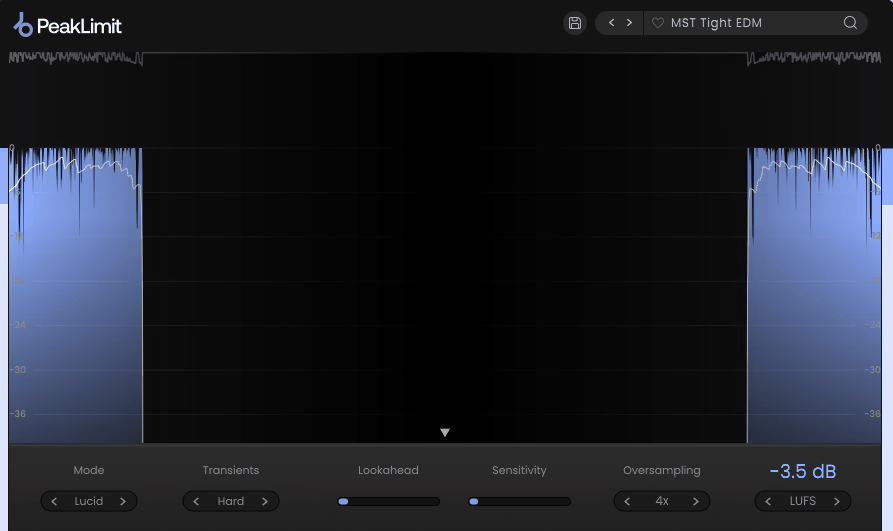
Another best VST limiter, PluginBoutique PeakLimit stands out thanks to its four tone-shaping modes. Lucid keeps things neutral, Warm boosts the lows without making them muddy, Punch brings out dynamics on individual tracks, and Bright lifts the highs without sounding harsh. There are also three transient modes, namely hard, soft, and transparent, that control how it handles peaks. With lookahead and sensitivity controls, you can adjust the response to fit your audio.
The metering shows gain reduction, RMS for each channel, output waveform, plus LUFS and peak readouts, so you’re not guessing about streaming targets or clipping. Up to 8x oversampling keeps aliasing down when you’re limiting hard, which matters on bright material or higher sample rates.
Adaptive release changes automatically with the incoming audio, so you don’t have to keep adjusting it during dynamic parts. I tried it on a folk track with gentle fingerpicking, and it managed the shifts from quiet to loud smoothly, without any pumping. On dense mixes that are already compressed, though, the four modes can sound very similar. The tonal changes become subtle, and it’s hard to tell if you’re really hearing a difference.
- PluginBoutique PeakLimit is versatile because of its four tonal modes. Lucid keeps the sound clean, Warm adds a gentle boost to the low end, Punch makes transients stand out more, and Bright lifts the highs without making them harsh. Each mode changes the tone slightly but keeps the limiter sounding musical and controlled.
- You can choose from three transient modes to control how the limiter handles sudden peaks. Hard, Soft, and Transparent each offer a different feel. With lookahead and sensitivity controls, you can adjust how tightly the limiter holds the sound or lets it breathe.
- The detailed metering and oversampling help you understand exactly what’s happening. You can see gain reduction and RMS for each channel, LUFS and peak levels, and the output waveform for extra context. The 8x oversampling reduces aliasing when you push the levels, which is especially useful on bright mixes.
- The adaptive release works naturally, smoothing out transitions so you don’t have to keep making adjustments. It responds to the audio, keeping quiet parts open and loud parts steady. In testing, it managed a folk track’s dynamics very well, but on mixes that are already compressed, the tonal modes can start to sound similar.
5. bx_limiter True Peak
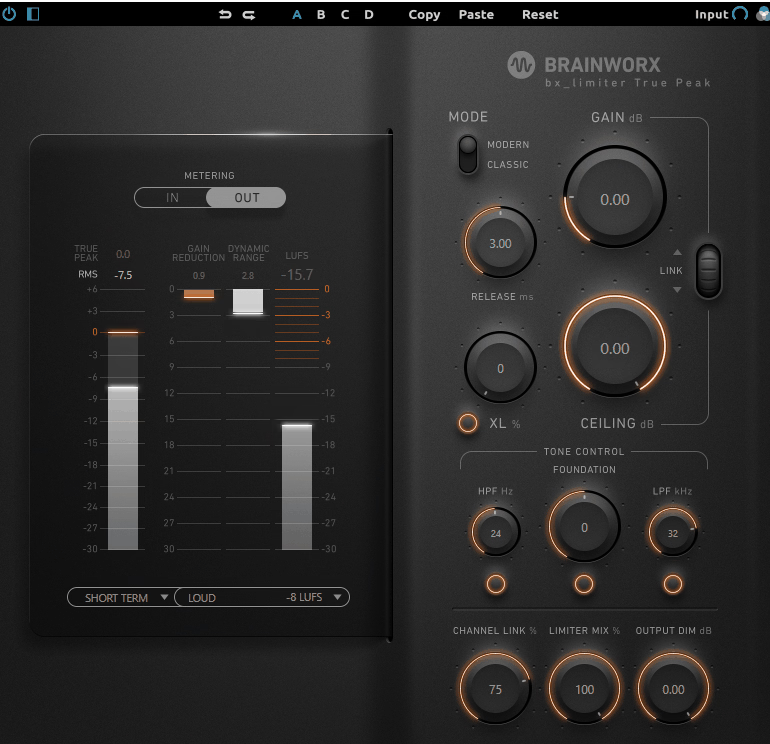
I was surprised by how much I liked it. Most true peak limiters that promise transparency and punch end up feeling the same. But after a few sessions, bx_limiter True Peak won me over. It feels reliable and consistent, focused on solving problems rather than trying to impress.
The Foundation filter does more than it first appears to – small adjustments shift the weight of a mix without touching an EQ, and that helps when balancing low-heavy tracks late in the chain. XL saturation adds a touch of glue, subtle enough that you forget it’s on until you bypass it. What stands out is how the limiter reacts to bass transients.
The low end stays solid, without getting smeared or disconnected like some other limiters when pushed hard. Switching between Modern and Classic modes gives you two usable tones, not just extremes, so you can choose what fits your track best.
Oversampling only where it matters keeps the phase straight, and the meters tell you everything without clutter. If there’s a downside, the limiter can sound a little reserved – it doesn’t give that extra excitement some mixes benefit from. It holds things together and stays out of the way, leaving the mix breathing.
- The Foundation Filter is a pre-limiter EQ that alters tonal weight without frequency-specific controls. It helps adjust the low-end density.
- XL Saturation adds analog-style harmonic glue before the limiting stage.
- There are two algorithm modes: Modern and Classic. Modern is designed for transparent peak control, while Classic adds a bit of analog warmth.
- True Peak Detection follows the ITU-R BS.1770 standard and prevents intersample peaks during digital-to-analog conversion.
- Intelligent Oversampling is used only where needed to keep phase coherence.
6. sonible smart:limit
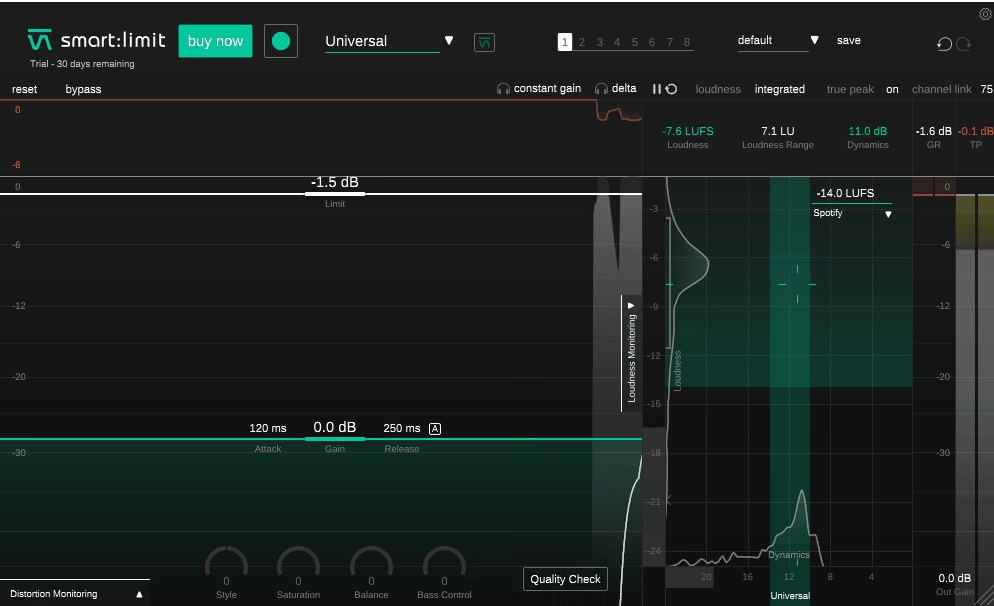
I was surprised that the AI really works here, since most learning algorithms just make average choices for average music. When you load your track into the sonible smart:limit limiter VST, it sets itself up in seconds and gets you close to the sound you want, without the over-squashed effect you get from most auto-limiters. The genre profiles are useful if you’re working in a specific style, but I’ve found that just letting it analyze on its own works well most of the time.
The impact prediction feature lets you turn a knob and instantly see how your loudness numbers change, without having to play the track. This saves you from constantly starting and stopping to check levels when you’re aiming for streaming targets.
The style dial between soft and hard limiting is smooth, with no sudden jumps. Balance control is something I use more than I thought I would, just small spectral tweaks that polish the sound without needing another EQ. For producers who work entirely in the box, it makes a strong case for being the best limiter VST when speed and intelligence matter more than manual tweaking.
- Adaptive AI Analysis learns your track’s dynamics in 3 to 8 seconds and automatically sets all parameters based on its spectral and timing features.
- The Genre Profile System includes presets for Electronic, Hip-Hop, Rock, Pop, Classical, Jazz, Ambient, and Metal. Each one changes the limiting response curves in its own way.
7. SSL X-Limit
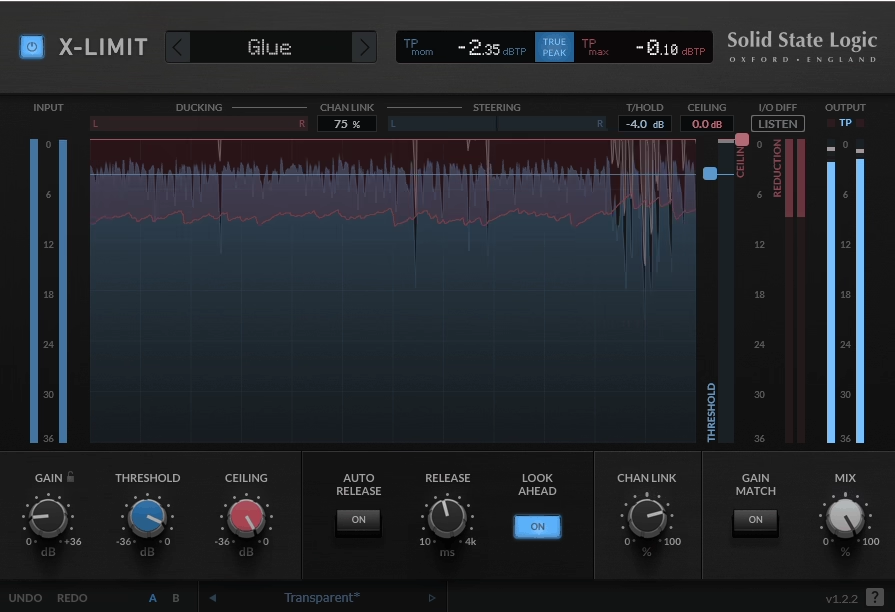
I use this on my master when I want more volume but don’t want the harsh top end that most limiters cause. The transparent mode really is transparent, which is rare, as other plugins say that, but still mess up the highs or add a strange glue. SSL X-Limit offers four options, and the differences between them are clear. Punch mode adds energy that works well on busy mixes, and glue mode tightens things up without making the sound muddy.
The lookahead is quick, so you can record through it without getting that strange, washed-out effect some other designs have. I like using the auto release because it adjusts on its own, and the ducking meter clearly shows which parts are being limited the most, so you don’t have to guess.
Recently, I worked on an R&B mix, and the meter helped me avoid wasting time on low-mid issues that weren’t really there. The waveform display is useful, though I wish it showed more of the gain reduction history so I could check what happened a few bars earlier. The mix knob also makes it easy to use parallel limiting when you want to bring back some dynamics.
- Transparent Limiting That Holds Up: The Transparent mode really keeps the top end clear, without the smeared highs or extra glue that many ‘clean’ limiters add. It keeps the sound open and detailed, even when you push the gain.
- Four Distinct Limiting Styles – SSL X-Limit offers four modes – Transparent, Punch, Glue, and an extra one for more edge – and they actually sound different. Punch adds energy for dense mixes, while Glue tightens things up without crushing the dynamics.
- Responsive Lookahead and Smart Auto Release: The fast lookahead keeps things smooth for tracking, without any latency issues. The auto release adjusts naturally, so it handles different parts of the song without needing constant changes.
- Useful Visual and Parallel Tools: The ducking meter clearly shows where the limiter is working the most, which helps you find problem frequencies. The mix knob also makes parallel limiting easy when you want to add back some movement or dynamic range.
Extra: Signum BUTE 2 Limiter
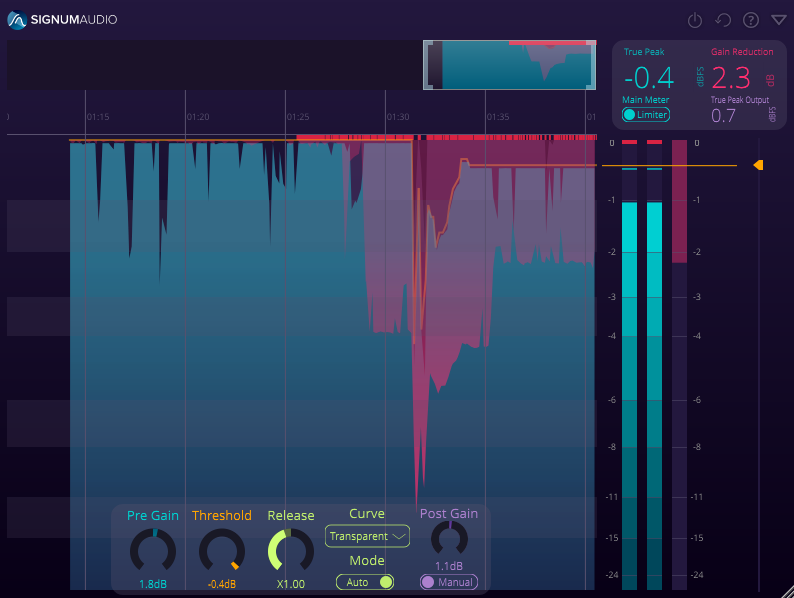
Transparent means it keeps your tone intact while controlling peaks. That’s what the Signum BUTE 2 Limiter does, without the side effects of aggressive limiting. You set pre-gain before the brick wall and post-gain after. This simple setup lets you decide how to hit the ceiling: push it hard and then ease off, or go in gently and boost at the end.
You can switch display modes to see only what the limiter did or the combined result with post-gain. This helps when you’re trying to figure out why something is clipping. The history view lets you zoom in on any part of the track to check gain reduction, threshold, and true peak readings over time, so you don’t have to guess from moving meters.
It automatically warns you if post-gain creates new peaks above your limit. This helps you avoid the embarrassment of your master clipping on some systems.
The re-metering syncs with your DAW and updates the history whenever you change settings, showing the impact across the whole timeline. The interface fits a lot of information onto one screen, which can feel crowded on smaller displays. You get used to it, but the learning curve is steeper than with simpler limiters.
- Dual Gain Staging Pre-gain before limiting stage (±24 dB), post-gain after brick wall (±24 dB). Adjust the approach angle to the ceiling or compensate the output independently.
- Display Mode Switching: Limiter-only view or combined pre/post result. Isolates limiter action from gain changes
- Timeline History View Zoom into any section of the track, review gain reduction curves, threshold position, and true peak readings across the entire session. Scrollable and searchable
- Automatic Peak Warning System Detects when post-gain creates new peaks beyond the limit threshold. Visual alert prevents clipping on playback systems.
- DAW-Synced Re-Metering updates the entire history when parameters change. Shows impact across full timeline instantly without re-rendering
Freebies
1. Press Play Wave Breaker
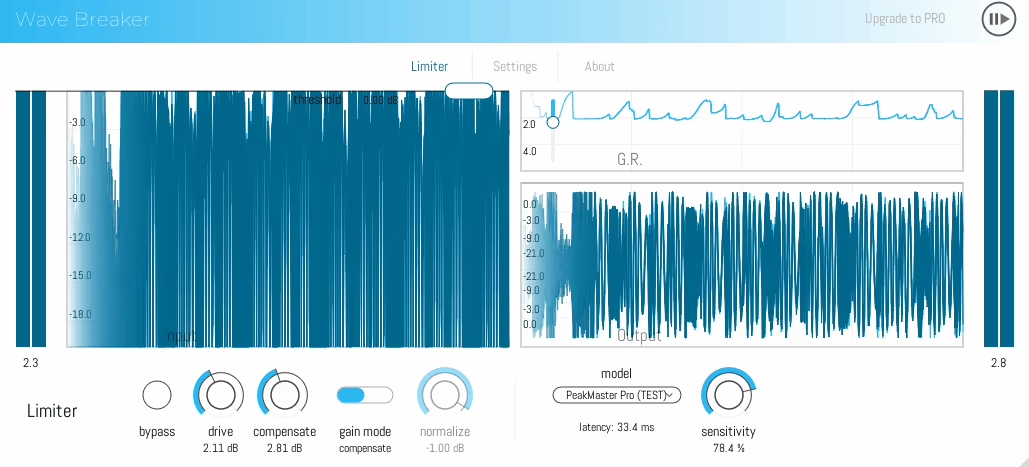
Last month, I was mixing a busy track and needed a limiter that could handle different styles without having to change plugins. Wave Breaker stood out as a top choice for that. Each of its three algorithms has a clear sound: Clarity One is tight and fast for regular mixing, PeakMaster Pro is precise for mastering when latency isn’t an issue, and Clipper X gives you a more aggressive, pushed sound.
True peak detection with 4x oversampling at normal sample rates keeps the high end clean when you push the limiter hard, which is especially important on bright tracks. I tried it on a guitar-heavy indie song, and the top end stayed clear even when aiming for streaming loudness.
Switching between algorithms is smooth, so you can compare them without sudden level changes messing with your judgment.
- There are three unique algorithms: Clarity One gives fast, tight control; PeakMaster Pro is for precise mastering; and Clipper X delivers aggressive, driven tones.
- True peak detection with 4x oversampling keeps the highs clean, even when limiting heavily. This is ideal for bright material.
- Smooth algorithm switching lets you compare modes instantly without any distracting level jumps. It worked well on a guitar-heavy indie mix, keeping the brightness while still reaching streaming loudness.
2. Analog Obsession LALA
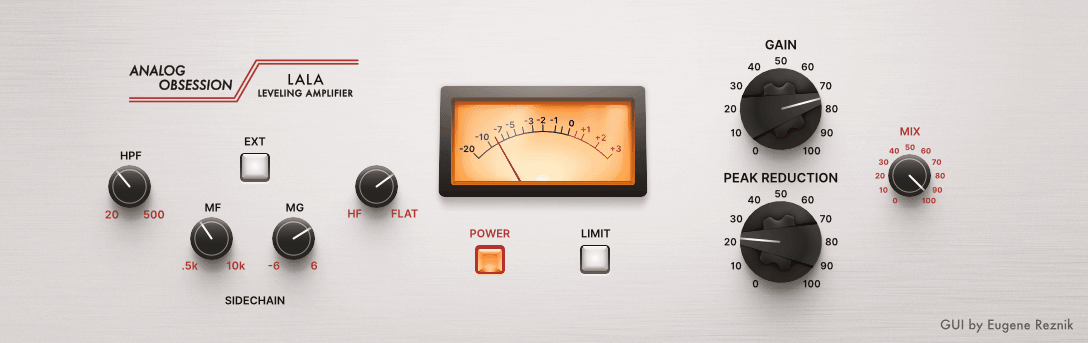
Compressor until you flip the switch. Then it’s a limiter. Both modes make sense in Analog Obsession LALA and the transition is smooth. The frequency controls are what set it apart: MF and MG adjust mid sensitivity, and HF adjusts highs. Enhanced R37 setup means it’s surgical about what triggers compression instead of reacting to everything equally.
The external sidechain works with the HPF, so you can filter out lows before they reach the detector. The 4x oversampling hides behind the logo – click the Analog Obsession label to engage it. Spent ten minutes looking for it the first time I needed it. The LIMIT switch doesn’t change the interface much visually, though, so you can forget what mode you’re in. It would be better with a clearer indicator.
- You can easily switch between compressor and limiter modes with a single control.
- The MF, MG, and HF knobs let you shape how the detector responds to different parts of the frequency spectrum.
- There’s a hidden 4x oversampling feature that smooths out the top end. You can enable it by clicking the Analog Obsession label.
- The external sidechain with HPF stops low frequencies from causing unwanted compression. It’s flexible and punchy, but having a clearer mode indicator would make it easier to know which state you’re in during a session.
3. Sonic Anomaly Unlimited
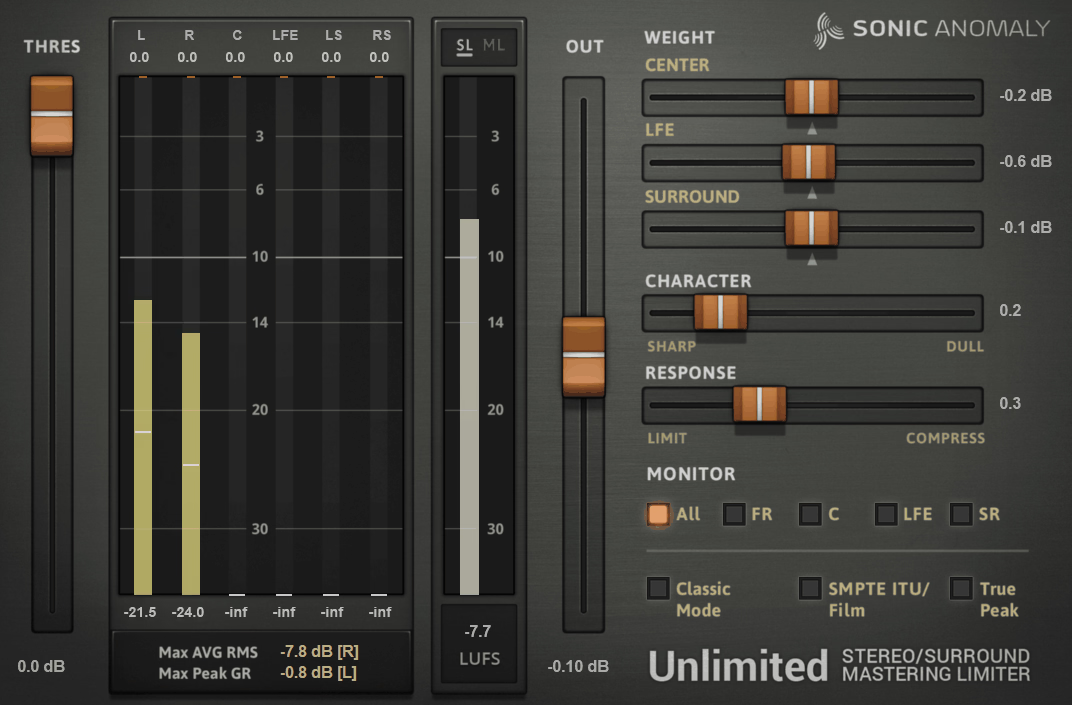
The metering is what caught my attention. LUFS appears right next to RMS, so you don’t need another plugin to check broadcast standards. It supports stereo and 5.1 surround, with automatic channel detection that saves CPU in Sonic Anomaly Unlimited. The Character slider lets you adjust how aggressive the algorithm is: lower values keep transients up front, while higher values help reduce distortion.
The Response slider adds compressor-like gain reduction on top of hard limiting. Classic mode lets you switch between maximizer and traditional limiter behavior. I used this on a podcast edit when I needed steady LUFS without losing the speaker’s dynamics. The interface doesn’t really explain what the weight controls do, so you have to try them out to see how changing thresholds affects the sound.
- The Character and Response sliders help you shape the tone from punchy to smooth, giving you compression-like control.
- The metering is thorough, with LUFS and RMS shown side by side for accurate loudness monitoring.
- Classic mode and weight controls let you switch between limiter types and adjust how thresholds behave across different frequencies.
Once you get used to how the controls work together, Unlimited becomes a precise and powerful tool for managing loudness in both music and broadcast projects.
4. Kilohearts Limiter
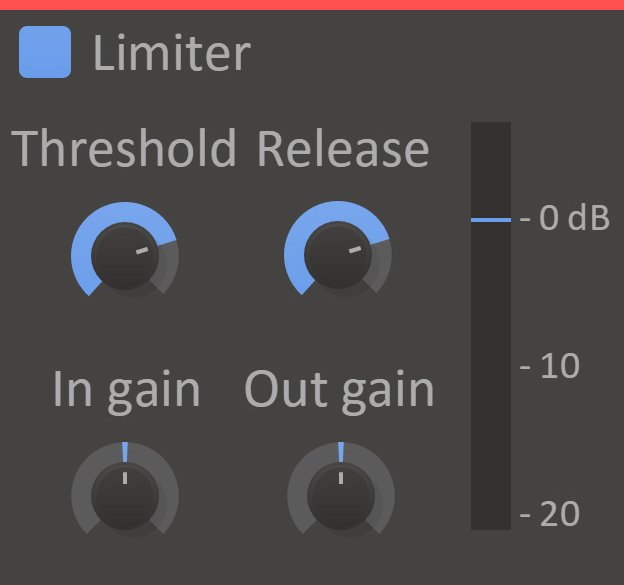
I wanted something easy to use, with no menus or complicated settings.Kilohearts Limiteris definitely one of the best free limiter plugins you can get as it gives you threshold, input gain, output gain, and release, nothing more. The VU meter shows your input level, threshold, and real-time attenuation, so you always know what’s happening.
With independent gain staging, you can drive the limiter hard and lower the output, or keep it subtle and boost later. The release knob sets how quickly it recovers after peaks. There’s no lookahead, so it’s less transparent on fast transients. Still, it’s great for drum buses when you want quick, simple control.
- The interface is simple: threshold, input gain, output gain, and release make it easy to use.
- The real-time VU meter clearly shows input, threshold, and gain reduction.
5. vladg Limiter №6

Limiter №6 has five modules in a row, and you can use each one gently instead of overloading a single stage. For a free tool, it competes seriously with paid options and is arguably the best limiter VST you can get without spending a cent.
This helps keep your mix together when you need it loud. The RMS compressor, peak limiter, high-frequency limiter, clipper, and true peak limiter all work together, so no single module has to do all the work.
The peak limiter and clipper have M/S and multiband modes, so you can shape certain frequencies or tweak the stereo image without changing the whole mix. This is handy if the sides are too loud or the low mids need more control than the highs.
You can turn on 4x oversampling for the peak limiter, HF limiter, and clipper to cut down on aliasing when you push the levels. The true intersample peak limiter also catches overshoots during D/A conversion, which many other limiters miss. The first time I tried it, I spent about half an hour figuring out what each knob did. With all five modules on screen, the interface can feel crowded, and it takes a while to learn which module is affecting the sound.
- The five dynamic modules: RMS compressor, peak limiter, HF limiter, clipper, and true peak limiter work together to give you balanced loudness.
- M/S and multiband options let you adjust the stereo width or focus on certain frequencies with precision.
- 4x oversampling and intersample peak limiting help reduce aliasing and stop digital overs.
6. D16 Frontier
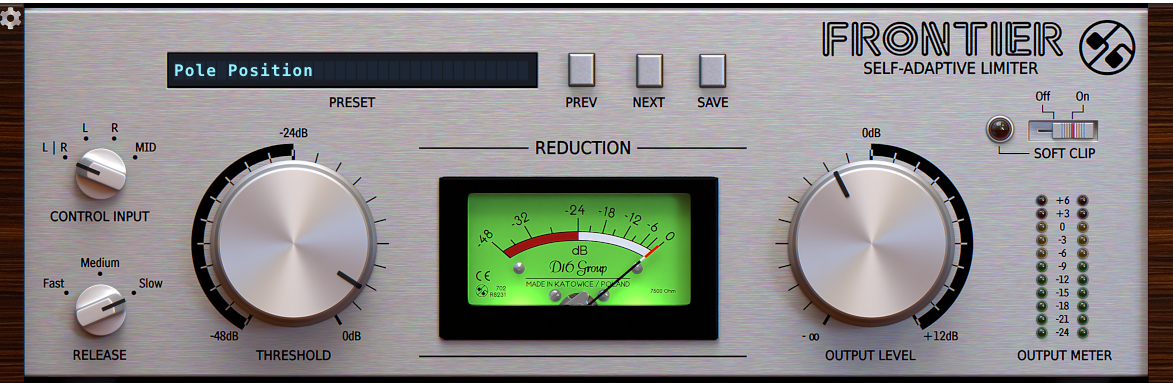
Auto gain makeup saves time by adjusting levels for you as you work, so you don’t have to match them by hand every time you change the threshold. The D16 Frontier limiter VST plugin does this automatically, which is helpful when you need to move quickly. Its control input includes a soft clip option that goes further than standard limiting. You can push it into saturation if your track needs more grit, or keep it clean for simple peak control.
You can use it on individual tracks, buses, or the master, depending on your settings. However, the interface doesn’t show what the soft clip is doing. You have to rely on your ears to judge the saturation, which can be tough when you’re tired at the end of a session.
- Automatic gain makeup keeps your output level steady as you change the threshold.
- The soft clip stage adds analog-style grit when you push it, or stays clean if you want transparency.
- It works on tracks, buses, and masters, so it fits easily into any stage of your mix.
- No visual-saturation display forces you to rely on your ears, which can be tricky when fatigued. Despite that, it’s a go-to limiter when you want solid control without slowing down your workflow.
Final Thoughts
Each limiter here has its own thing going on. Some feel invisible, some add a bit of flavor, and some just get you to the finish line fast. Taken together, they represent the best limiter plugins you can use right now, covering everything from AI-assisted mastering to simple, fast peak control.
LimitOne and smart:limit feel modern and musical, Pro-L 2 and BUTE Limiter 2 bring accuracy and control, and bx_limiter or SSL X-Limit are those stable, dependable tools that never let you down. I hope you found this post helpful and see you next time!

Hello, I’m Viliam, I started this audio plugin focused blog to keep you updated on the latest trends, news and everything plugin related. I’ll put the most emphasis on the topics covering best VST, AU and AAX plugins. If you find some great plugin suggestions for us to include on our site, feel free to let me know, so I can take a look!