
What’s the fastest way to turn static, lifeless sounds into animated textures that breathe and move with your track? Tremolo and vibrato plugins – they modulate amplitude and pitch to create movement that feels organic rather than programmed.
These are the best tremolo and vibrato plugins I recommend for producers, guitarists and sound designers who need rhythmic pulsing, vintage warble, and evolving modulation without settling for mechanical wobble that sounds lifeless.
This guide covers plugins that deliver tremolo, vibrato, and combined modulation effects for contemporary production demands. The selection includes Goodhertz Trem Control, Audiority Tube Modulator, MeldaProduction MTremoloMB, KUASSA Efektor Vibracula, and some other heavy weights including free options as well!
Tremolo and vibrato solve a fundamental problem in modern production: static sounds feel dead regardless of how well they’re mixed. Standard volume automation creates movement but lacks the organic character that makes sources feel alive and dimensional.
Tremolo modulates amplitude to create pulsing motion ranging from subtle shimmer to hard rhythmic gating. Vibrato modulates pitch to create warble and instability that reads as vintage character or intentional lo-fi drift. The difference between amateur wobble and professional modulation is control over timing, curve shape, and how the effect responds to musical content rather than looping identically forever. Now, let’s dive in!
1. Goodhertz Trem Control
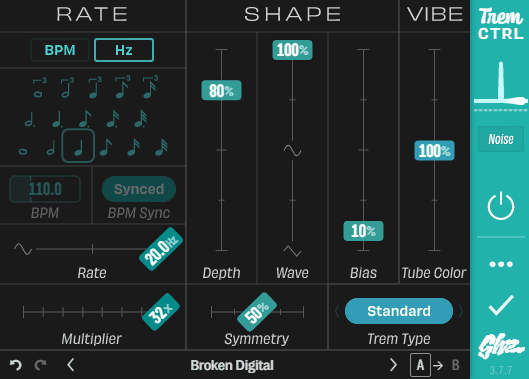
I’ve spent some time time with various tremolo plugins to know that most of them give you the basics and call it done, but Trem Control by Goodhertz takes a different approach by treating tremolo as something that can manipulate tone, stereo space, and timing groove all at once instead of just wobbling volume up and down.
What stands out is how the plugin handles warble as an actual design goal rather than a side effect. You get classic amp-style tremolo when you need it, but you also get harmonic tremolo, frequency-selective modulation, and Mid/Side processing that lets you create movement that feels three-dimensional instead of flat.
For me, the real benefit is speed and control where you can dial in familiar vintage shimmer in seconds, then push into more experimental territory using controls that most tremolo plugins simply don’t include. The interface stays logical throughout, so you’re designing motion instead of hunting through menus trying to figure out why something doesn’t sound right.
- Multiple Tremolo Types That Change What Gets Modulated
The core of Trem Control is its Trem Type system, which fundamentally changes what part of your signal gets modulated and how. Standard mode delivers traditional amplitude tremolo that works exactly like you’d expect, but where things get interesting is when you switch to Harmonic mode.
Harmonic tremolo splits your signal into high and low frequency bands and modulates them out of phase, creating that chewy, swirling wobble you hear on mid-century amp designs. Deep Harmonic pushes this concept further until it starts feeling almost phaser-like with metallic overtones that work beautifully on sustained guitar parts and synth pads.
Then it gets surgical with Bass, Treble, and Air modes that modulate only specific frequency ranges. I find this very useful when you want movement in the highs without the lows pumping, or when you need subtle air-band modulation that adds life without obvious tremolo artifacts.
When it comes to stereo options, it include Mid/Side, Mid Only, and Side Only modes, which completely change how tremolo interacts with your stereo field. You can make the center pump while the width stays stable, or make the sides shimmer while the center remains locked and focused. This becomes essential when you’re working with wide synth pads or stereo guitar recordings where traditional tremolo would collapse the image in distracting ways.
- Musical Rate Control With Timing Flexibility
Trem Control gives you two ways to set speed which are BPM-based and Hz-based timing. In BPM mode you choose a musical Note duration, set or sync your Tempo, and optionally use Tap Tempo for quick adjustments during creative sessions.
What makes the rate section actually useful is the Rate Multiplier, which extends the range beyond what the basic note grid would normally cover. You can create very slow swells that take bars to complete, or rapid stutters that add rhythmic texture without changing your core timing approach. This flexibility means you’re not fighting the plugin trying to achieve specific rates that fall between preset values.
- Shape Controls That Define Movement Character
The primary shape section is where Trem Control really distinguishes itself because it’s not just depth and waveform selection. Depth controls how far the modulation goes from subtle shimmer to full choppy gating, and Wave continuously morphs between triangle, sine, and square behavior so you’re not locked to a single curve type.
Bias acts like a pulse-width control that bends the shape toward spending more time near “on” or more time near “off.” This is crucial for getting that lopsided pump that reads as groove rather than sterile oscillation. When you combine Bias with the right wave shape, you can create tremolo patterns that feel syncopated and musical even when they’re running at straight note divisions.
2. Audiority Tube Modulator
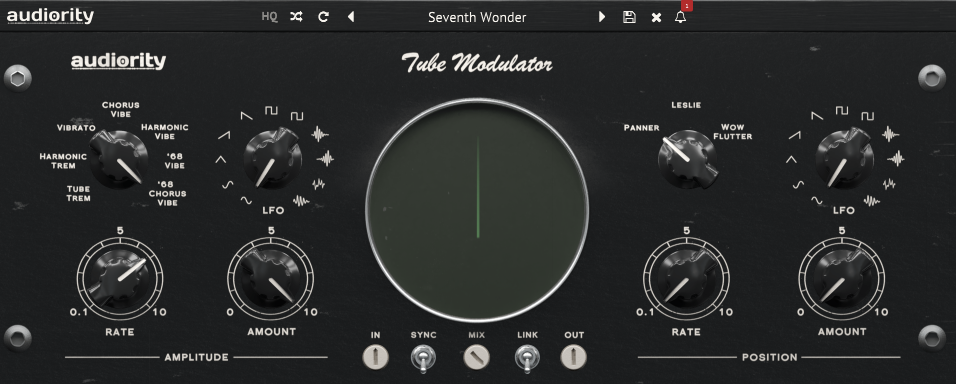
I’ve worked with plenty of modulation plugins that try to stay clean and transparent, but Audiority Tube Modulator takes the opposite approach by putting vintage color and warmth at the center of its design. This is a tremolo, vibrato, and spatial motion plugin that’s deliberately colored rather than neutral, and that choice defines everything about how it sounds.
What makes this plugin distinct is how it handles modulation as a collection of classic-style circuits ranging from late 50s tube bias tremolo to late 60s psychedelic vibe tones. You’re not getting one tremolo algorithm with different presets, you’re getting seven distinct vintage voices that each target a specific era and circuit behavior, plus three spatial engines that add stereo motion and pitch instability on top.
For me, the real value is that Tube Modulator doesn’t pretend to be transparent. It adds warmth and saturation as part of the modulation process, which means the wobble feels like it’s coming from a piece of gear rather than sitting on top of pristine digital audio like a sterile effect.
If your goal is authentic vintage warble, this plugin delivers it through actual circuit-inspired behavior instead of clean digital modulation with vintage labels.
- Seven Distinct Amplitude Modulation Modes
The amplitude side contains seven modes, and each one is aimed at a specific vintage behavior rather than a generic tremolo switch. This is where it give you one tremolo algorithm with different intensity settings.
– TUBE TREM is a 59-style tube bias tremolo approach where the effect comes from changing the operating parameters of preamp tubes, giving a cut-and-return feel that’s familiar from early tube amps. This mode nails that classic amp tremolo pulse without needing separate saturation plugins.
– HARMONIC TREM is a 61-style harmonic tremolo concept where lows and highs are split and modulated as tonal movement, not just volume movement. The implementation is designed around a Baxandall-style circuit modulation to keep it efficient while preserving the harmonic tremolo character that makes frequencies feel like they’re shifting rather than just pumping.
– VIBRATO is a delay-based vibrato placed before the tube preamp stage, which is important because it makes the pitch motion feed into the color stage rather than the other way around. This creates vibrato that feels warm and saturated instead of clean and digital.
– CHORUS VIBE blends some dry signal back into the vibrato signal to produce an early chorus-style warmth instead of a pure pitch-only wobble. I find this useful when you want pitch movement that stays lush rather than obviously detuned.
– HARMONIC VIBE combines the chorus vibe idea with additional tonal motion by modulating the Baxandall circuit following the tube preamp, creating a hybrid that sits between vibrato and harmonic tremolo behaviors. This mode excels when you want movement that changes both pitch and tone simultaneously.
– 68 VIBE and 68 CHORUS VIBE are modeled after the vibe pedal archetype from the late 60s, split into the classic Vibrato switch behavior and the classic Chorus switch behavior. This is the part of the plugin that leans hardest into psychedelic wobble and swirl, and it delivers that late 60s character without needing external processing chains.
- Three Spatial Motion Engines
On top of the amplitude modes, Tube Modulator includes three Position Modes that target stereo motion and pitch instability in different ways. You can run these simultaneously with the amplitude modes, which means you’re creating two-dimensional modulation where volume and space move independently.
– PANNER is an automatic panning design achieved by changing preamp tube input gain, which tends to produce motion that feels more organic than a clean digital pan LFO when you drive it. The behavior is less predictable and more alive than standard auto-pan because it’s interacting with the tube saturation stage.
– LESLIE is an early rotary speaker-style simulator that behaves similarly to a vibe-style movement and adds a slight Doppler effect, so the motion feels like physical rotation rather than just left-right balancing. I would use this when you want movement that feels dimensional instead of flat stereo panning.
– WOW FLUTTER is a wide stereo modulator that widens the signal while detuning it through modulation, explicitly aimed at vinyl and tape-like pitch fluctuations. If your goal is “warble” in the literal sense, this mode is the direct line. It creates that unstable playback character that makes sources feel like they’re coming from imperfect analog media.
- 11 LFO Waveforms with Sync and Free Timing
The modulation engine centers on an LFO with 11 waveforms, which gives you more than the usual sine and square options for shaping how the wobble feels. Rate runs from 0.1 Hz to 10 Hz for free timing, and when Sync is enabled it switches to beat divisions ranging from 32x down to 1/32nd triplet-style values, which covers everything from slow drift to rhythmic chopper patterns.
Depth is handled by Amount, and there’s a practical workflow feature called Link that ties the Rate and Amount controls together across channels so you can keep left and right behavior matched when you want stability, then unlink for more complex stereo movement when you want unease and width. This becomes essential when you’re working with stereo sources where independent channel modulation can create interesting width effects or disorienting wobble depending on your goal.
- Intentional Color
Tube Modulator is intentionally not neutral. The manual explicitly calls out that it is Colored by Design and adds warmth and color to your signal. That’s the point. The wobble is not meant to sit on top of pristine audio like a sterile effect, it’s meant to feel like it’s coming from a piece of gear.
- Where It Excels
If you want your tremolo to feel like a classic amp circuit, the strongest starting points are TUBE TREM for traditional pulsing and HARMONIC TREM when you want the wobble to change tone as it moves. If you want true warble, VIBRATO and WOW FLUTTER are the fastest routes, with WOW FLUTTER being the one that most directly mimics unstable playback.
If you want the late 60s swirl that sits between tremolo and vibrato, 68 VIBE and 68 CHORUS VIBE are the character modes. The big reason Tube Modulator holds up is that it gives you seven distinct vintage voices, then lets you add panning, rotary motion, or wow and flutter on top, with enough LFO control and visual feedback to keep the result intentional instead of messy.
3. MeldaProduction MTremoloMB
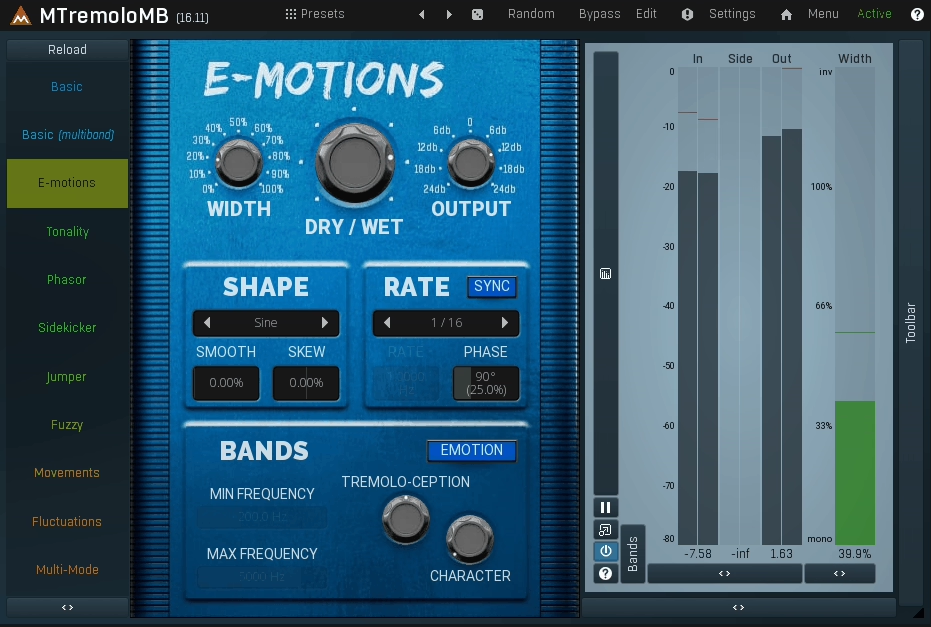
Most tremolo plugins treat the effect as a single global volume wobble, which works fine for basic pulsing but falls apart when you need more control over where the movement actually lives in your mix. MTremoloMB approaches tremolo as a full motion design tool rather than just volume modulation, and that fundamental difference changes what you can accomplish with it.
The core concept is multiband tremolo with up to 6 independent frequency bands, where each band can run its own syncable tremolo shape with deep modulation options. This means you can have sub frequencies pulsing, midrange wobbling, and top end shimmering all moving differently and independently, which creates the kind of controlled instability that reads as modern warble instead of a single global pump that affects everything equally.
What I appreciate most is how this architecture solves a common problem with traditional tremolo where you either get movement everywhere or nowhere. With MTremoloMB, you can keep the lows steady while the mids wobble, or do the opposite and make the sub pulse while the high end stays stable for clarity and definition. This level of control becomes essential when you’re working with full mixes, complex pads, or layered guitars where conventional tremolo would either be too subtle or too destructive.
- 6-Band Processing for Targeted Frequency Movement
The defining feature is 6-band processing, with each band acting like its own independent tremolo lane. You’re not just splitting the signal and applying the same modulation to different ranges, you’re designing completely different movement patterns for each frequency region.
Because each band has its own modulation, MTremoloMB can create the illusion of tape-like movement where different parts of the spectrum don’t breathe perfectly together. That’s one of the most convincing ways to get “warble” without resorting to pitch modulation or complicated routing. I find this particularly effective on synth pads, organs, and stereo guitars where you want movement that feels organic rather than mechanical.
- 16 Tremolo Shapes Plus Custom Envelope Drawing
MTremoloMB gives you 16 standard tremolo shapes plus the ability to draw or customize envelopes, which matters because the difference between musical warble and annoying flutter is usually the curve. Smooth sine-like shapes deliver classic wobble, while sharper shapes deliver choppy rhythmic gating that can add percussive character to sustained sources.
The important part is that you can do this per band, so you can keep the low band smooth while making the high band more percussive to add articulation without changing the core body of the sound. I would use this when I want rhythmic movement in the highs that defines the groove while keeping low-end stability that doesn’t fight the kick and bass.
The custom envelope drawing becomes especially useful when you’re trying to achieve specific rhythmic patterns that don’t fit standard waveforms. You can create syncopated pulses, asymmetric wobbles, or stepped tremolo effects that would be impossible with fixed waveform options.
- 4 Modulators for Evolving Movement
This plugin is built around what Melda calls a modulation-heavy workflow. It includes 4 modulators as a foundation for making the tremolo evolve over time rather than looping identically forever. In practice, that’s where you get lifelike movement instead of robotic repetition.
You can make depth drift, make rate subtly vary, or make stereo motion wander while staying tempo-related. This creates organic instability that feels natural rather than programmed. I find this essential for long ambient pads, evolving textures, and anywhere you need sustained tremolo that doesn’t become predictable or boring after a few bars.
- Mid/Side Processing for Spatial Control
MTremoloMB isn’t limited to left-right stereo. It supports mid/side processing, including targeting mid or side independently. This is a big deal for modern warble because you can make the sides tremble and shimmer while keeping the center stable and punchy, or make the mid pulse while the sides float naturally.
Used gently, that becomes movement you feel rather than obviously hear. Used aggressively, it becomes a wide, animated auto-pan-like tremolo that can turn static pads and guitars into rhythmic textures with clear stereo motion.
4. KUASSA Efektor Vibracula
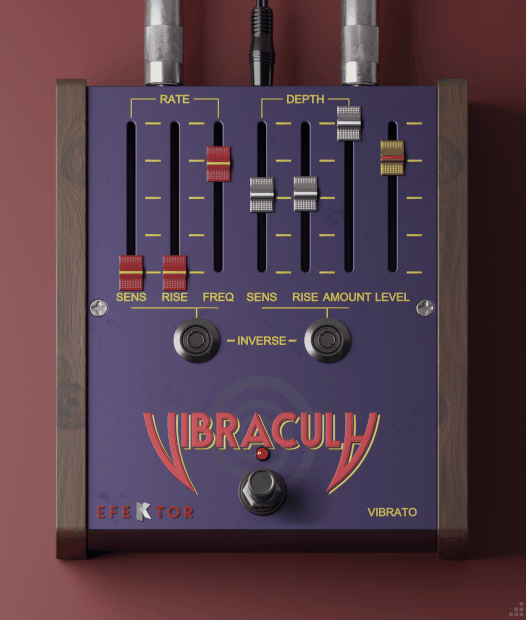
When most vibrato plugins give you rate and depth controls and call it done, Efektor Vibracula takes a different approach by treating vibrato as something that should respond to your playing rather than just loop the same modulation forever.
This is a dedicated pitch vibrato effect built around one practical idea: you should be able to get anything from gentle musical movement to obvious warble, and you should also be able to make that movement behave like a guitar vibrato arm instead of a perfectly even studio LFO.
This is true pitch modulation, not amplitude tremolo. That means the effect reads as wobble, detune, and instability, which is exactly the “warble” vibe people chase for guitars, keys, and vocals when they want a vintage or animated feel. What makes Vibracula stand out is how it handles expressive behavior rather than just static modulation that runs identically on every note.
- Auto Vibrato That Responds to Your Input
The standout concept here is Auto Vibrato, described as simulating a guitar’s vibrato arm. Instead of forcing you to ride automation, the plugin includes detection-based controls that let the vibrato “wake up” based on your playing or the input signal. In fact, this is where Vibracula separates itself from simple vibratos that just loop the same LFO forever.
In Addition, Rate Sensitivity and Rate Rise govern how the modulation rate engages after the plugin detects the initial input signal. Then Depth Sensitivity and Depth Rise govern how the wobble depth engages based on signal transient behavior.
This design is useful for musical parts where you want the note to land clearly first, then bloom into movement naturally. I find this especially effective on lead guitars, electric pianos, and vocals where immediate pitch wobble would smear the attack but delayed vibrato adds expression.
- Rate Control That Can Be Locked or Free
You get Sync to lock the modulation rate to host tempo, and you also get a free rate control labeled Rate Freq for non-grid movement. That combination matters for warble work because sometimes you want tempo-locked rhythmic vibrato for synth stabs, and other times you want slightly unsteady motion that feels like mechanical drift. The flexibility to switch between these modes quickly makes Vibracula practical for both musical vibrato and lo-fi warble applications.
- Stereo Control for Width and Animation
Vibracula includes Stereo mode and a Link control for left and right behavior. When Link is enabled, the movement stays coherent and centered, which is often best for lead vocals, bass-focused material, or anything that must remain stable in mono.
When Stereo is enabled and linking is not the goal, you can get a more animated width and an “unsettled” image that reads as lo-fi warble without needing a chorus. I would recommend you to this on stereo guitar recordings and synth pads when you want movement that feels wide without being obviously pitch-shifted.
- Practical Application for Warble
For realistic instrument movement, the most convincing approach is usually moderate Depth Amount with a slower Rate Freq, then using Depth Rise so the wobble ramps in after the initial attack.
That produces pitch motion that feels like performance, not like an inserted effect. For obvious lo-fi warble, you push Depth Amount higher, keep the rate in the mid-range, and use Stereo mode for wider motion. Efektor Vibracula is best treated as an “expressive vibrato pedal” in plugin form, focused on pitch modulation that behaves like a gesture rather than a static effect.
5. Soundtoys Tremolator
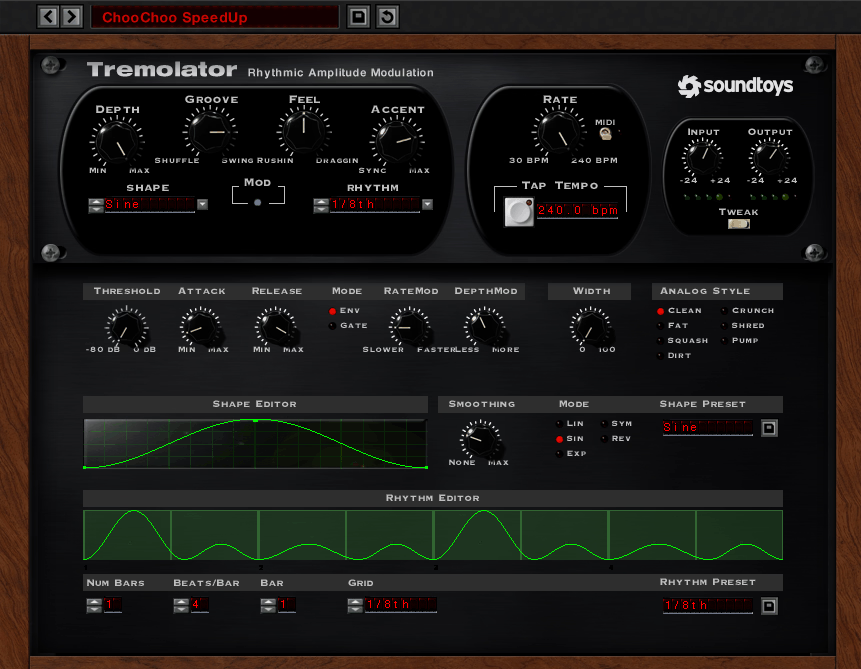
I’ve used plenty of tremolo plugins that give you basic rate and depth controls, and they work fine for simple volume wobble, but they fall apart the moment you need tremolo that actually grooves or responds to the rhythm of your track.
Most designers treat tremolo as a static effect that just loops the same modulation forever, which is why it often feels mechanical and lifeless even when the settings are technically correct.
Tremolator by Soundtoys approaches this differently by building the workflow around timing controls and rhythmic behavior that make it easy to push beyond straight pulses and into grooves that feel played, not programmed. This is a tremolo that covers both vintage tremolo vibe and modern rhythmic auto-gating, with a control set designed specifically to make amplitude modulation feel like it has personality and pocket.
What sets Tremolator apart is how it handles the relationship between modulation and timing. You’re not just adjusting how much wobble you get, you’re controlling where the modulation sits relative to the beat, how it emphasizes different parts of the bar, and how it responds dynamically to your source material.
This approach transforms tremolo from a simple effect into a creative motion design tool that can add everything from subtle shimmer to hard rhythmic gating depending on how you configure it.
- Groove, Feel, and Accent for Musical Timing
Here, Groove adds shuffle or Swing feel by shifting even beats toward a triplet-style pocket. This is tempo feel, not just waveform shape, and it applies regardless of the modulation type or rhythm choice. You can use this when you want tremolo that grooves with the track rather than sitting rigidly on the grid.
Feel shifts the whole modulation earlier or later relative to the beat. It can drag behind the downbeat or rush ahead, functioning like a modulation pre-delay in either direction. This is how you make a tremolo sit in the pocket of a track instead of feeling stapled to the grid. Even small adjustments here can dramatically change whether the tremolo feels tight or laid-back.
Accent changes how the downbeat is emphasized. Turned one way, it makes the first beat dominant and can essentially silence the rest of the bar depending on settings. Turned the other way, it can reduce the downbeat and emphasize the later beats, creating a rhythmic dropout effect on beat one. Combined with Depth and Groove, Accent is what turns Tremolator into a convincing rhythmic gate without needing a separate step sequencer plugin.
- Shape Editor for Custom Modulation Curves
Tremolator includes standard LFO shapes, but the important part is the Shape Editor. You can build custom shapes by adding and moving points to create extremely complex modulation curves, then save them as reusable shapes.
This is where you can design tremolo that behaves like a compressor-style pump, a ramp, a stepped trance gate, or a lopsided vintage wobble that never feels perfectly symmetrical.
Once you draw shapes, Smoothing controls how hard the edges are between points. At zero smoothing the curve becomes stair-stepped and abrupt. At maximum it becomes fully smooth.
Smoothing Mode then determines how the curve connects points, including options like linear connections, sine-like smoothing, exponential-like curves, symmetrical curves, and reverse scooped curves. This matters because the difference between pleasant warble and annoying flutter is usually the curve, not the rate.
- Rhythm Editor for Pattern-Based Modulation
If you want tremolo to behave like a pattern rather than a constant LFO, Tremolator includes a Rhythm Editor that works like a drum machine-style pattern editor. You can build multi-bar patterns, define beats per bar, and choose grid resolution.
Each event triggers one full cycle of your selected shape, which means you’re sequencing shape triggers rather than just turning amplitude up and down. This is why Tremolator can do stutter gates that still feel smooth and musical when you use curved shapes.
- Depth That Ranges From Shimmer to Hard Gate
Depth controls how much the amplitude is modulated. At subtle settings it’s classic shimmer that adds gentle movement without obvious pumping. At higher settings, especially with sharper shapes, it becomes true gating that can chop signals into rhythmic patterns.
Tremolator explicitly frames this as going from gentle amplitude movement to full chop depending on depth and waveform edges, which gives you creative range from vintage wobble to modern stutter effects in a single parameter.
6. Eventide Undulator
Undulator doesn’t approach tremolo as a simple volume wobble effect, and that fundamental difference shows up immediately when you start using it. Most tremolo plugins give you rate and depth controls with maybe some waveform options, but they treat the effect as something that sits on top of your audio and repeats the same pattern forever.
That approach works for basic pulsing, but it falls short when you need movement that evolves, warble that feels dimensional, or modulation that creates texture instead of just chopping volume.
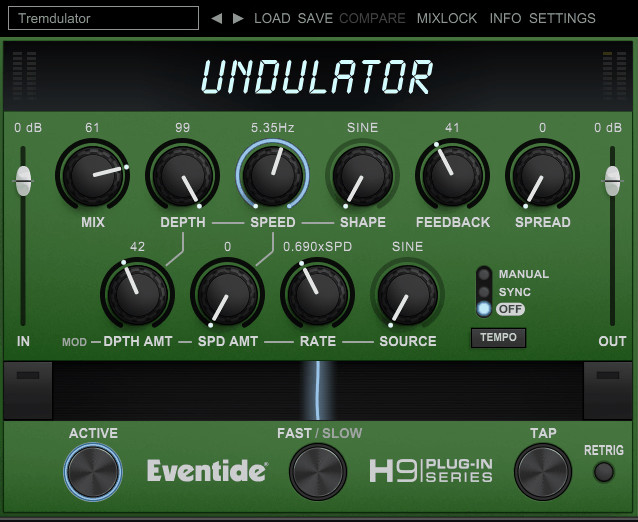
What makes Undulator different is that it treats tremolo as the front end of a much bigger motion engine. The sound is built from multi-tap delay with feedback, detuned echoes, and a tremolo whose depth and speed can be modulated by a second LFO, which is why it can move from simple pulsing into shifting, evolving warble that feels almost like a living texture. This isn’t tremolo with some added features, it’s a complete modulation environment where amplitude movement, pitch instability, and temporal effects all interact.
In my opinion, the practical benefit is that Undulator solves a common problem where static tremolo sounds mechanical and lifeless after a few bars.
With the secondary modulation layer affecting the primary tremolo behavior, you get movement that constantly changes without needing complex automation or multiple plugin chains. You’re creating warble that has structure and intention rather than just looping the same wobble endlessly.
- Practical Application for Warble and Texture
Undulator is at its best when you want warble that has structure. On pads and sustained keys, it can add pulsing motion that also creates width and density through detuned echoes.
On guitars, it can deliver amp-like tremolo, then push into chorus-like movement and psychedelic drift by increasing Spread and using the more animated shapes. On samples and short one-shots, it can stretch the tail into rhythmic, time-lapsed textures by combining Feedback regeneration with evolving tremolo behavior.
If you only need transparent tremolo, Undulator can do it, but it’s not why this plugin exists. Undulator is for tremolo that becomes a sound design layer, where the motion, echoes, and detune interact and keep changing in a controlled way.
- Multi-Tap Delay Structure With Detuned Feedback
Undulator’s foundation is a tremolo that sits inside a delay structure. You control the amplitude movement with Depth and Speed, then you add dimension with Feedback and Spread. Spread is not a stereo widener in the usual sense, it’s the control for detuning inside the delay structure, which turns basic tremolo into a chorused, drifting pulse.
Feedback pushes the taps back into themselves so the motion keeps regenerating, and at higher settings it can head into self-sustaining, looping behavior that creates evolving textures.
If you only use these four controls, you already get the main Undulator personality: a pulse that leaves behind detuned, smeared echoes, which makes sustained sources feel bigger and short sources feel longer. I find this particularly effective on pads, sustained guitars, and vocal phrases where you want movement that adds dimension without just stacking reverb.
- Dynamics-Driven Tremolo Shapes
Undulator offers multiple tremolo shapes for the primary motion, including standard curves and more animated options like Random and Sample and Hold. The Shape selector also includes two dynamics-driven modes that are key for organic warble: Envelope and ADSR.
With Envelope, the tremolo follows the contour of the incoming audio rather than running as a free-looping LFO, which makes the movement feel glued to performance dynamics instead of sitting on top. With ADSR, the input triggers a consistent envelope shape, so you get repeatable rhythmic swells that still feel musical rather than mechanical.
- Secondary LFO for Evolving Modulation
Undulator’s most distinctive feature is that it can modulate its own tremolo behavior. The secondary modulation layer is a secondary LFO that can “wiggle” the tremolo parameters so the effect doesn’t repeat in a perfectly static loop. This is what transforms basic tremolo into something that feels alive and unpredictable.
Mod Depth Amount controls how much the secondary LFO modulates the tremolo’s Depth, which is effectively amplitude modulation of the tremolo depth. Mod Speed Amount controls how much it modulates tremolo Speed, which acts like frequency modulation of the tremolo rate. Mod Rate sets how fast that secondary modulation runs, and Source selects the secondary modulation shape.
- Ribbon Control for Performance-Based Morphing
Undulator is built to be performed. The Ribbon is a macro that lets you morph between two different states of the plugin, so you can move from subtle shimmer to extreme rhythmic instability in one gesture.
This is especially effective with the secondary modulation controls because you can morph not only depth and speed, but also how unstable they are over time.
I find the Ribbon useful for live performance or building dynamic arrangements where you want tremolo intensity to change dramatically without hunting through multiple parameters. You can set up conservative warble on one end and aggressive rhythmic chopping on the other, then use the Ribbon to move between these states smoothly.
- Slow/Fast and Brake for Tape-Style Motion
Undulator includes performance-style speed controls that add hands-on control over timing. Slow/Fast toggles between two LFO rate states, and the Brake behavior temporarily slows the LFOs at a constant rate while held, then releases back to speed.
7. KUASSA Efektor TR3604
A lot of tremolo plugins either give you one knob and hope you like the default behavior, or they overwhelm you with dozens of parameters that take forever to dial in. The middle ground between these extremes is harder to find than it should be, especially when you just need reliable amplitude modulation that can be shaped quickly without fighting a complicated interface or settling for generic results.
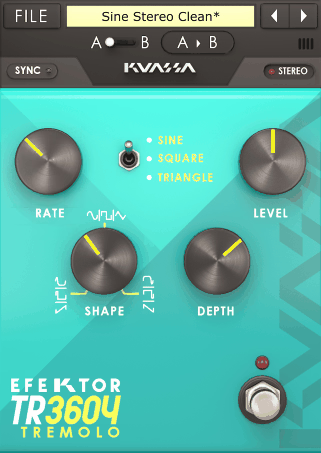
KUASSA Efektor TR3604 occupies that practical middle territory by focusing on classic amp tremolo sound with tighter control than most “one-knob” tremolo effects. The goal is straightforward: volume modulation that can move from soft, musical pulsing to hard, abrupt chop, with enough shaping tools to dial in groove instead of settling for a generic waveform.
This isn’t a massive multi-effect environment, it’s a focused tremolo designed to get you moving fast while still giving you the controls that actually matter for making tremolo feel musical.
What I like the most is how TR3604 handles the balance between simplicity and control. You’re not drowning in options, but you’re also not stuck with a single flavor of tremolo that either works for your track or doesn’t.
The Shape control in particular makes a huge difference in how the tremolo sits in a groove, and having both free and tempo-synced rates means you can use this for vintage shimmer or modern rhythmic gating without switching plugins.
- Three Tremolo Types That Define Movement Character
TR3604 is built around three tremolo types, which are essentially three different modulation wave engines that change how the volume moves over time. You get Sine for smooth movement, Square for hard gating-style chops, and Triangle with Sawtooth behavior for more linear ramps and lopsided pulses depending on how you shape it.
The important part is that these are not decorative options. They define whether the effect reads like a vintage amp shimmer, a modern rhythmic gate, or a forward-driving pump.
I find Sine essential for classic tremolo on guitars and organs, Square perfect for rhythmic chopping on synths and pads, and Triangle/Sawtooth useful for ramped swells that feel asymmetric and more interesting than perfectly balanced wobble.
- Rate Control for Slow Drift and Fast Chop
The Rate control sets tremolo speed in free mode across a wide range, from 0.01 Hz up to 20 Hz, which is enough for very slow swells and fast stutters. When Sync is enabled, Rate locks to tempo with musical divisions ranging from 1 down to 1/32nd triplet, so it can stay tight to the grid for rhythmic parts.
This is the difference between tremolo as “vibe” and tremolo as a deliberate pattern tool. Free mode works beautifully for organic, non-tempo-locked warble that feels like vintage equipment drift, while tempo sync becomes essential when you need tremolo that defines the rhythmic character of a part. I use free mode on ambient pads and textural elements, and sync mode on rhythmic synths and percussive guitars where the tremolo needs to lock with the drums.
- Shape Control That Changes Groove and Feel
TR3604 includes a dedicated Shape knob that changes the symmetry of the LFO curve. At the center twelve o’clock position, the tremolo is symmetrical, meaning the rise and fall are balanced.
Move away from center and the modulation becomes more uneven, which is how you get pulses that feel like they lean forward, lag behind, or spend more time in the loud or quiet portion of the cycle.
8. AudioThing Things Motor
When you’re chasing warble that comes from signal interaction and switching rather than just modulating a single source, most tremolo and vibrato plugins hit a creative wall. They work on one input, which means you’re limited to making that one signal louder, quieter, or pitch-shifted without any ability to create movement through blending multiple sources or switching between different timbres as part of the modulation itself.
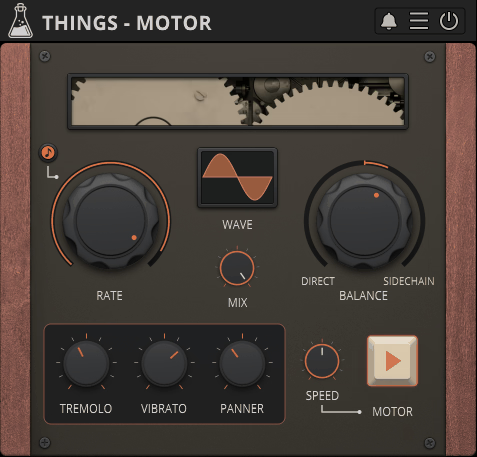
Things Motor by AudioThing breaks this pattern by creating warble through motion, switching, and instability using sidechain-driven signal morphing where your main input and a second sidechain signal are continuously blended under a “motor” that can move smoothly, chop rhythmically, or run fast enough to create ring modulation-like artifacts.
This isn’t tremolo with sidechain filtering, it’s a modulated crossfader that treats two separate audio sources as raw material for creating animated, evolving textures.
- Tremolo, Vibrato, and Panning Synced to Motor Timing
Motor isn’t only about switching between two signals. It layers in three classic modulation lanes that follow the motor timing. Tremolo controls the amount of amplitude modulation. Vibrato controls pitch modulation for true warble. Panner controls spatial modulation so the movement can travel in the stereo field instead of only pumping in place.
The important part is that these are synced to the motor LFO, so the entire effect feels like one coherent machine rather than separate plugins stacked randomly. This is where Motor becomes more than a crossfader trick.
You can morph between two sounds while also adding time-locked pitch instability and time-locked spatial drift, which is a fast route to radiophonic-style movement and animated texture. I use this when I want complex modulation where amplitude, pitch, and stereo position all move together in perfect sync.
- Two-Signal Morphing Via Modulated Crossfader
What I like about Motor is that it behaves like a modulated crossfader between direct track and sidechain. The key control is Balance, which sets how the two sources are weighted as the motor turns. With slow settings, you get gentle morphing where one sound blooms into the other. With faster settings and sharper shapes, the blend becomes a signal chopper that can feel like rhythmic gating, stutter switching, or aggressive interleaving.
The historical inspiration matters because it explains the sound. Motor takes cues from “The Crystal Palace”-style rotor switching approach that created everything from subtle movement to near-granular effects via speed-dependent switching.
- LFO Waveforms With Adjustable Phase
Everything starts with the LFO. Rate sets the LFO frequency and Sync locks it to tempo when you want rhythmic predictability. Wave changes the waveform, and Motor treats the waveform as something you can “perform” because the phase can be adjusted by dragging the waveform, letting you shift where cuts or peaks happen relative to the beat.
Motor supports a wide set of LFO shapes, including Sine, Triangle, Ramp Up, Ramp Down, Square, Sine Up, Sine Down, Exp Up, Exp Down, and Sample and Hold.
- Practical Application for Signal Interaction
If you want classic tremolo, Motor can do it, but that’s not the headline. Motor excels at interaction between sources. When you feed it a pad and sidechain a guitar, or feed it a drum loop and sidechain a texture, you get motion that feels intentional because the modulation is literally deciding which sound occupies the foreground at each moment.
This approach creates warble that has structure and content rather than just modulating a single source predictably, which makes it especially valuable for creative sound design and experimental production.
9. BLEASS Dragonfly
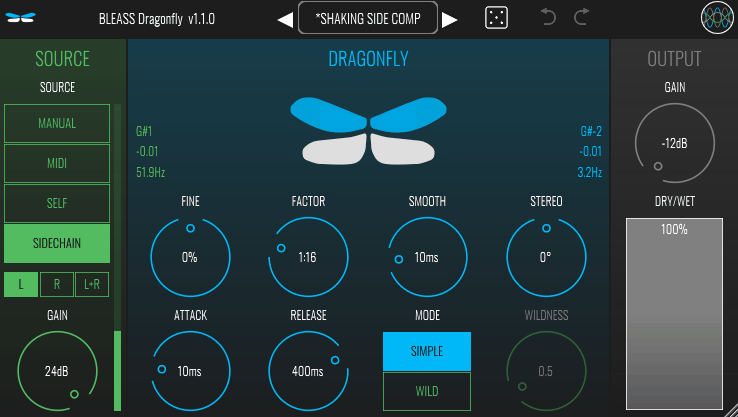
Traditional tremolo plugins lock you into a fixed LFO rate that repeats forever regardless of what’s happening musically, which works fine for basic wobble but feels mechanical when you need movement that responds to pitch, follows performance dynamics, or syncs to musical content in real-time.
BLEASS Dragonfly solves this by building tremolo around dynamic triggering rather than a static LFO, so it can lock the tremolo rate to detected pitch, a sidechain signal, or incoming MIDI notes, making the movement follow musical content rather than sitting on top of it.
You can still run it as a conventional tremolo in Manual mode, but its main strength is making tremolo behave like a responsive, note-aware modulation engine that changes character based on what you feed it. This approach transforms tremolo from a static effect into something that feels connected to the performance rather than applied afterwards.
- Four Source Modes That Define Behavior
Dragonfly revolves around a SOURCE selector that determines where the tremolo timing and intensity come from. In Manual mode, you set Rate and Amplitude directly like a traditional tremolo for predictable pulsing when you don’t need input tracking.
In MIDI mode, Dragonfly uses the lowest MIDI note it receives to set the tremolo rate, and maps tremolo amplitude to note velocity. This makes the wobble playable and consistent across repeated notes, and makes dynamics meaningful because harder hits drive stronger modulation automatically. I find this useful when playing synth leads or electric piano parts where I want the tremolo intensity to follow my playing dynamics naturally.
In SELF mode, Dragonfly does pitch tracking on the input audio to derive the tremolo rate, and matches tremolo amplitude to the input signal’s amplitude. This creates tremolo that naturally follows the performance, which is one of the most reliable ways to get movement that feels “attached” to the sound instead of stamped on after the fact. I would recommend this on lead vocals, guitars, and monophonic synths where you want tremolo that breathes with the part without needing to manually automate anything.
In SIDECHAIN mode, Dragonfly pitch tracks the sidechain input and uses that to set the tremolo rate, while tremolo amplitude follows the sidechain signal’s amplitude. This delivers the signature “one sound modulates another” effect, where a bassline or lead can impose rhythmic wobble onto pads, vocals, or textures in a way that stays musically aligned. You can use this to make pad layers pulse in time with a bassline, creating rhythmic interest without adding more percussion.
- Tracking Controls for Stable Modulation
Pitch tracking tremolo only works if you can control how it reacts to real signals. Fine offsets detected pitch by up to ±0.5 semitone, which is useful when the detection sits slightly sharp or flat and you want the tremolo to lock cleaner to the musical center. Factor multiplies the detected or set rate to produce the final tremolo speed, letting you turn a detected fundamental into musically useful related rates.
Smooth sets the smoothing duration of rate variations, which is critical for warble because raw pitch tracking can jump when the input wobbles. Smooth lets you decide whether you want tight, reactive motion or a more tape-like drift that ignores micro-fluctuations. I would use higher Smooth values on vocals and guitars where you want the tremolo to feel stable and musical rather than jittery.
Attack and Release shape how the effect fades in and out, which helps avoid hard clicks and lets you turn tracking-based tremolo into something more envelope-like and musical on percussive sources.
- Wild Mode for Harmonic Saturation
Dragonfly includes Wild mode, which applies a waveshaper to introduce subtle saturation and more aggressive texture when pushed. This is the difference between a clean tremolo that only moves level, and a tremolo that adds harmonic bite as it moves.
Used carefully, Wild mode makes movement more audible on small speakers. Pushed hard, it can deliberately rough up the signal and turn the modulation into a more obvious effect. I find this especially useful when I want tremolo with character rather than transparent modulation.
- Practical Application for Musical Warble
Dragonfly is most valuable when you want tremolo that follows music. SELF mode is the quickest route to movement that feels bonded to a performance. SIDECHAIN mode is the fastest way to impose rhythmic wobble from one element onto another while staying musically coherent.
MIDI mode turns tremolo into a playable, velocity-responsive effect. The reason Dragonfly stands out is the combination of pitch-aware sync, stabilizing controls like Smooth and Factor, and character options like Wild mode that help it sit in a modern mix as intentional warble rather than a generic wobble.
10. Thenatan VibratoTremolo
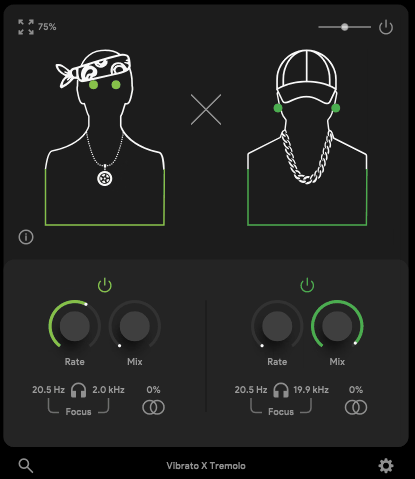
Thenatan VibratoTremolo is a combined modulation effect that focuses on two fundamentals: vibrato for pitch movement and tremolo for volume movement, with the whole identity built around quick access to warble from subtle drift that adds life to static material to more obvious wobble that sounds vintage and unstable on purpose.
This isn’t a modulation laboratory with pages of routing and envelopes,but three-knob solution designed to get you musical movement fast without fighting a complicated interface. I think this approach is what makes it so practical, because sometimes you just need warble without spending fifteen minutes setting up LFO routing.
When it comes to the vibrato side, it creates pitch modulation that produces the classic “warped playback” sensation when used gently and obvious seasick wobble when pushed. The tremolo side creates amplitude modulation that reads as rhythmic pulsing and can move toward choppier motion depending on how hard you drive it.
The plugin frames this as a palette ranging from silky smooth vibratos to agitated jagged tremolos, so it’s intended to cover both clean motion and intentionally rough motion. I like how this range is explicitly part of the design philosophy rather than an accident.
- Three Core Controls That Define Everything
Mix is the most important knob because it lets you decide whether the modulation is a background texture or the main character. On leads and vocals, a lower Mix keeps intelligibility while still adding motion. On pads and keys, a higher Mix lets the warble take over and become part of the timbre. That said,I find this especially useful when I’m trying to add subtle movement without making the effect obvious.
Rate sets how fast the movement cycles. Slower settings lean toward tape-like drift and gentle animation. Faster settings become more obviously effected and can turn tremolo into rhythmic pulsing or vibey flutter. In addition to controlling speed, Rate also affects the overall character of the warble in ways that aren’t always predictable until you hear it in context.
Depth is the intensity control where higher Depth pushes the vibrato toward more audible pitch swing and the tremolo toward deeper volume swings. The key practical point is that Depth changes how “broken” or “natural” the movement feels, while Rate changes how “fast” it feels. I think this is the most important thing to understand about the plugin because these two parameters work together to define the entire character.
- Stereo Motion for Dimensional Movement
The plugin is positioned not only as modulation on the sound, but as motion across the image. It’s explicitly described as being able to create immersive soundscapes by moving sound from left to right, which places it closer to a vibe and motion tool than a strict utility tremolo. Even if the interface stays minimal, the intent is clear: it’s for adding movement, not just adding an on-beat pulse.
I can only say that this stereo behavior makes it particularly effective on wide synth pads, stereo guitars, and ambient textures where you want the warble to feel dimensional rather than flat and mono.
- Practical Application for Fast Warble
Lastly, VibratoTremolo works best when you want fast results and you don’t want to build a complex modulation chain. It’s well-suited to adding life to loops, chord stacks, and melody lines, especially when your goal is to make something feel less static without rewriting the sound design.
The recommended workflow is to start by raising Mix gradually, then adjust Rate until the motion sits in the pocket you want. If you want simple controls that still produce musically useful motion quickly, Mix, Rate, and Depth get you there with minimal friction. In addition to being fast, this approach keeps you focused on the music rather than getting lost in technical parameters.
Freebies:
1. HY TP2

To me personally, what makes this plugin practical is how it handles the Width control, which determines whether the LFO behaves like tremolo or like stereo auto-pan. With Width set for tremolo behavior, you get amplitude movement that can range from subtle shimmer to obvious pumping.
HY TP2 is a free tremolo and auto-pan effect that focuses on fast, musical movement with just the controls you actually need, split into clear sections so you can set an LFO shape, decide whether you want volume pulsing or stereo motion, then quickly tone-shape the result.
With Width shifted toward panning behavior, the same LFO produces left-right motion that can add width, animation, and the feeling of a moving source.
- Eight LFO Waveforms for Movement Character
The Mod Wave section includes sine, triangle, ramp up, ramp down, log up, log down, square, and random waveforms. These shapes let you move from smooth tremolo to hard choppy gating without changing plugins. One thing I’ve noticed is that the log-shaped waveforms create particularly organic-feeling movement that doesn’t sound as obviously LFO-driven as standard shapes.
Phase provides precise timing alignment, letting you shift where the LFO starts so the first dip or peak lands exactly where you want against the beat. Smoothing softens sharp corners in the waveform, which is especially important with square and aggressive ramp shapes because it reduces clicks and makes fast modulation feel more intentional rather than brittle. Because of this, I typically keep Smoothing engaged even on smoother waveforms just to prevent any harshness when the modulation rate gets faster.
- Shelving Filters for Tonal Control
HY TP2 includes low shelf and high shelf filters, which matters because tremolo and auto-pan can make a signal feel thinner, sharper, or more distracting if the moving content includes too much top or bottom end.
Shelving lets you pre-shape the modulated signal so the movement sits in the mix. You can keep harsh highs under control for smoother tremolo on bright sources, or manage low-end energy so stereo motion doesn’t feel messy. As a result, the tremolo effect stays musical rather than becoming fatiguing, especially on sources like hi-hats, bright synths, or acoustic guitars where the top end can get aggressive when modulated.
- Practical Application for Free Warble
HY TP2 is best when you want fast, musical movement without an overbuilt modulation system. For classic tremolo, use sine or triangle with modest Depth and careful Phase placement. For choppy gating, use square with higher Depth and Smoothing to avoid clicks. For stereo animation, push Width toward auto-pan to make static sources feel alive without changing pitch.
2. Adam Monroe Tremolo
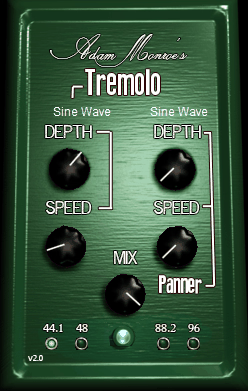
Adam Monroe Tremolo is a free tremolo plus stereo panner built around a simple, pedal-style idea: you get amplitude modulation and left-right motion in the same plugin, each with its own controls, then you blend everything with a wet/dry mixer.
The developer describes this as “vertical” and “horizontal” oscillators, meaning one oscillator drives volume movement and the other drives stereo movement, with direct knob control for both.
The layout is intentionally streamlined. You set Tremolo Speed and Tremolo Depth for the volume wobble, then Panner Speed and Panner Depth for the stereo movement, then use Mix to decide how much of the modulated signal replaces the dry signal. The point is fast results, and it does that well because nothing is hidden behind pages or routing.
- Dual Oscillator Design for Three-Dimensional Movement
This plugin can do classic electric piano tremolo vibe, but the more interesting use is pairing tremolo and panning so the motion feels three-dimensional. With moderate tremolo depth and moderate pan depth, you get a sound that not only pulses, but also shifts position, which reads as “movement” even on static sustained sources like pads, organs, Rhodes-style keys, guitars, and background vocals.
One practical detail is that the tremolo and panner are not inherently locked as identical LFOs. The developer explains that the tremolo sine wave is half the length of the panner sine wave, so if you set all knobs equally, the tremolo tends to move at a 2:1 relationship versus the panner. That makes it easy to get motion that’s not just a single repetitive wobble, because the amplitude and stereo cycles don’t land on the same moments as often.
- Selectable Waveshapes in Version 2.0
Version 2.0 adds selectable waveshapes for both tremolo and panning, including standard shapes like Triangle, Square, and Saw, plus characterful shapes labeled Assassin, Ghost, Distorted, Jaggy, and Mountain. These change the emotional read of the modulation where smooth shapes give classic pulse and sharper or irregular shapes push toward choppy gating or deliberately “broken” wobble.
- Practical Application for Free Warble
For warble-focused production, this plugin works best when you combine tremolo plus stereo panning to create motion that reads as vintage and animated without needing pitch vibrato.
The best results come from treating the panner as the “space” layer and the tremolo as the “pulse” layer, then using Mix to keep the dry signal anchored so the modulation feels musical rather than distracting.
3. Pecheneg Tremolo
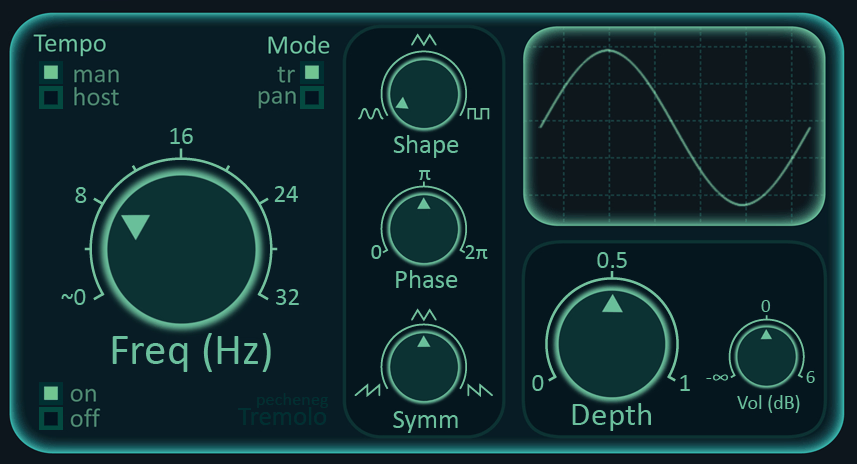
Instead of piling on extras, Pecheneg Tremolo gives you the knobs that actually define tremolo feel, plus host sync when you need rhythmic accuracy and Hz mode when you want free-running motion. This isn’t a tremolo with dozens of presets and feature bloat, it’s a focused tool that prioritizes curve control over visual complexity.
- Tempo Host and Manual Hz Modes
Here, you get two timing modes. In Tempo Host mode, tremolo speed is set by a Note control that defines the modulation period relative to the project tempo. There’s also a note type selector that lets you pick regular, dotted, or triplet feel, which covers the common musical cases without forcing you to think in milliseconds.
In Tempo Man mode, the same control becomes Freq, letting you set tremolo rate directly in Hz. This is the mode for slow drift, non-grid warble, and sound design where you want motion that doesn’t “snap” to a song tempo. You can use Tempo Host for rhythmic tremolo that locks with drums, and Tempo Man for organic wobble on pads and textures. For example, when you are working on ambient material, you can set Tempo Man to around 0.3 Hz to get that slow, tape-like drift that feels vintage and unstable.
- Shape, Symmetry, and Phase for Curve Control
Shape changes the overall form of the modulating curve. Symm adjusts the symmetry of the curve, which shifts the feel toward more time spent rising versus falling, or vice versa. Phase offsets the curve in time, which is how you place the loudest point exactly where you want it in the beat, or intentionally push it off the beat for groove.
In real use, this trio is why the plugin feels more flexible than its simple UI suggests. You can move from smooth vintage pulse to lopsided pumping and into harder rhythmic motion just by changing curve symmetry and phase placement, without needing a separate pattern editor. I can only say that this gives you control over tremolo character that most simple free tremolos don’t offer, and I’ve found myself reaching for Pecheneg Tremolo specifically when I need to dial in a particular groove feel that other plugins can’t quite nail.
- Depth for Modulation Intensity
Depth is the intensity control, the amount of amplitude modulation. At low settings it’s subtle movement that adds life. At high settings it becomes obvious tremolo and can approach choppy behavior depending on how you set the curve with Shape and Symm.
One useful nuance is that Depth is presented as “degree of modulation” rather than a dry/wet blend, which encourages you to keep the original signal fully present while deciding how much the volume should be animated. I think this design choice is smart because it keeps the tremolo feeling musical rather than like an effect that’s been applied on top of the signal.
- Practical Application for Free Warble
Pecheneg Tremolo earns its place when you want fast, musical tremolo with serious curve control. Tempo Host mode with dotted and triplet options makes it easy to lock movement to groove, while Tempo Man mode makes it useful for looser “unstable” motion. The heart of the plugin is the Shape, Phase, and Symm trio, which is enough to cover classic amp-style pulses, modern rhythmic pumping, and offbeat motion without turning the effect into a complex workstation.
I feel that for a free plugin, Pecheneg Tremolo punches way above its weight class, and the fact that it focuses on doing one thing exceptionally well rather than trying to be everything makes it more useful in practice than many bloated alternatives.

Hello, I’m Viliam, I started this audio plugin focused blog to keep you updated on the latest trends, news and everything plugin related. I’ll put the most emphasis on the topics covering best VST, AU and AAX plugins. If you find some great plugin suggestions for us to include on our site, feel free to let me know, so I can take a look!