
These twelve plugins cover MIDI sequence generation, granular manipulation, AI-driven drum programming, physical modeling synthesis, multi-effect chains, and variation engines that make repetitive loops feel alive. They’re built for bedroom producers who need inspiration quickly without spending lots of time programming modulation or manually drawing automation curves across dozens of parameters..
Randomizer plugins address this by generating variations, evolving textures, and unpredictable sequences while maintaining musical coherence rather than outputting pure chaos!
The practical ones balance creative randomness with control, letting you randomize specific parameters independently instead of destroying your entire sound with one button:
1. Mario Nieto World Harmony Bloom
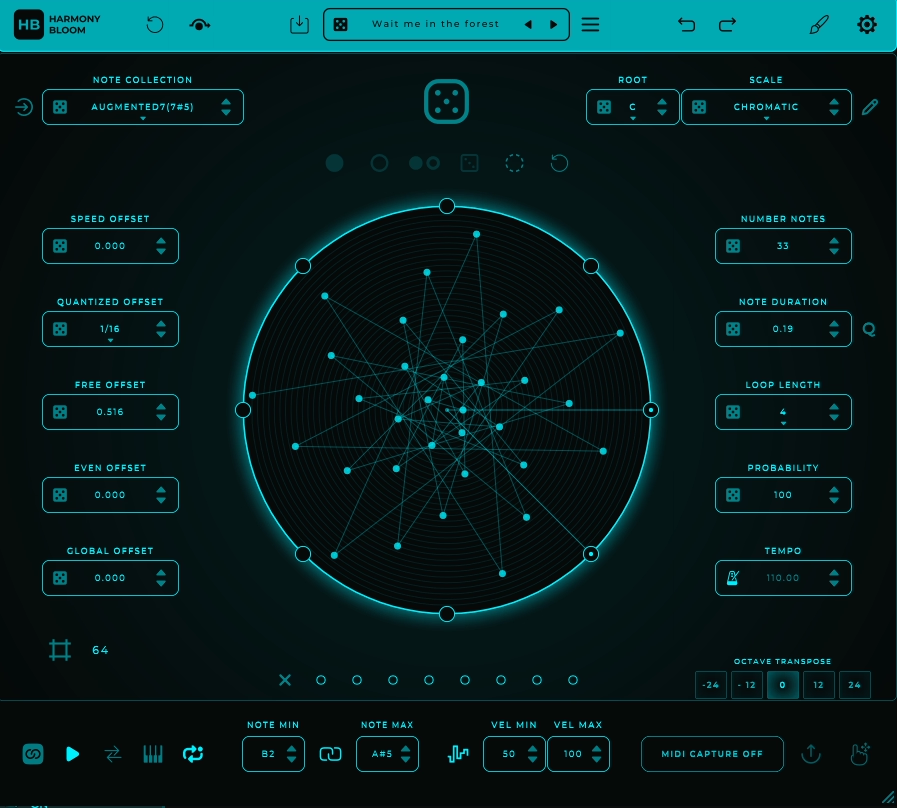
Writer’s block in MIDI programming usually hits when you’re staring at a piano roll trying to come up with chord progressions or melodic sequences that don’t sound like every other track you’ve made. Basic arpeggiators repeat the same predictable patterns, while pure randomizers dump chaos that requires hours of cleanup just to sound musical.
Harmony Bloom positions itself as a MIDI sequence generator built around a polyrhythmic engine and visual pattern interface that sits on a MIDI track feeding any synth, sampler, or instrument accepting MIDI input.
I think what separates this from typical randomizers is the controlled randomness and modular pattern generation with real musical structure rather than just spitting out chaos.
The plugin features a unique visual “Circle Central” interface representing note flows and rhythm behavior as rotating lines and dots, and I believe it includes 57 curated note collections and 57 scale/mode options with the ability to choose anywhere from 2 to 82 notes per sequence.
I’d say the plugin also includes an 8-point trigger bar system acting like gating points where each point can be on/off changing which notes fire as the pattern rotates.
What you get:
- 57 Note Collections and 57 Scale/Mode Options
The plugin includes 57 curated note collections and 57 scale/mode options which is far more variety than a basic arpeggiator’s major/minor options. I’ve experienced how this means you’re not forced into typical Western scales because modal and exotic sets are available straight away.
I often find you can set a root note independently so every sequence you generate stays musically coherent with your project key, and I can see how this range covers everything from common modes to unusual intervals.
- 2 to 82 Note Range for Density Control
You can choose number of notes from 2 up to 82 giving you everything from sparse bell-like motifs up to dense melodic salads. I’d argue many other plugins cap at fixed patterns while Bloom’s upper range lets you create evolving textures and layered harmonies without external editing.
I’m convinced this flexibility matters when you want minimal arpeggios or complex harmonic layers depending on the section.
- Advanced Timing Controls with Free vs Quantized Offset
Rather than basic tempo sync and swing, Bloom lets you shape timing in detail where Free vs Quantized Offset controls the spacing between notes from strict grid timing to more open human-esque offsets.
Speed Offset lets you accelerate or decelerate segments based on their position around the visual circle effectively creating internal rhythmic variations that can feel like polyrhythms even at steady DAW BPM. It let you dial in groove or controlled chaos without resorting to external modulation or manual editing.
Get the Free Plugin Starter Kit
The genuinely useful free DAWs and plugins worth installing. No filler. Straight to your inbox.
2. Beatsurfing RANDOM

Preset browsing in traditional synthesizers means cycling through hundreds of patches that sound similar because they’re built from the same oscillators and filters just tweaked differently.
RANDOM bass synth works differently as a procedural sound generator using neural network principles to explore an essentially infinite space of unique timbres rather than relying on classic oscillator waveforms.
The plugin combines two core sound engines (Synth and Resonator) with a simplified macro interface built from 8 modulated delay lines, 2 feedback paths, multiple filters, phase modulation, noise sources, and 6 envelopes.
I think what makes this practical is the four primary macro controls (STRESS, SPIKE, BLEED, FLUID) that shape multiple internal parameters simultaneously, and the DEVIANCE control sets how far the plugin strays from current parameters on each randomization.
The interface includes a two-dimensional X/Y pad populated with handcrafted sound points designed by artists where the plugin interpolates smoothly between them.
- Neural Network-Inspired Parameter Space Navigation
RANDOM’s engine doesn’t rely on classic oscillator waveform selection like saw, square, or FM but navigates a parameter space shaped by neural network techniques. I’d argue with each spin of the RANDOM wheel the plugin chooses a new point in this space based on hundreds of internal parameters.
The DEVIANCE control effectively sets how far the plugin strays from current parameters where smaller values give subtle variations and larger values give bolder unpredictable sonic changes. I often find this means you’re exploring sound design possibilities rather than just browsing preset variations.
- Four Macro Controls Shaping Multiple Parameters
Instead of exposing dozens of knobs, RANDOM distills its synthesis into four macro controls. I can see how STRESS primarily influences decay and sustain behavior where lower values make sounds shorter and percussive while higher values give longer evolving tones.
SPIKE adds harmonic aggression and presence, while BLEED and FLUID interact with the Resonator engine affecting how energy carries through the resonant network. These macro controls don’t map to single traditional parameters like filter cutoff but shape multiple internal parameters simultaneously which is why results are often rich and unpredictable.
- Modulated Delay Lines with Complex Synthesis Engine
Internally the system is driven by 8 modulated delay lines, 2 feedback paths, multiple filters, phase modulation, dedicated noise sources, and 6 envelopes. I feel like while it feels random from the outside the sound is derived from a complex synthesis engine rather than simple sample mangling.
I imagine this architecture is what gives RANDOM its dense resonant character, and I wonder how many producers realize the depth underneath the simplified interface.
- Semi-Controlled Exploration with Parameter Lock
This randomizer plugin allows control via macro knobs and X/Y pad where producers often reach a sound close to what they want then apply parameter lock features to fix elements while randomizing others.
3. Sugar Bytes Graindad
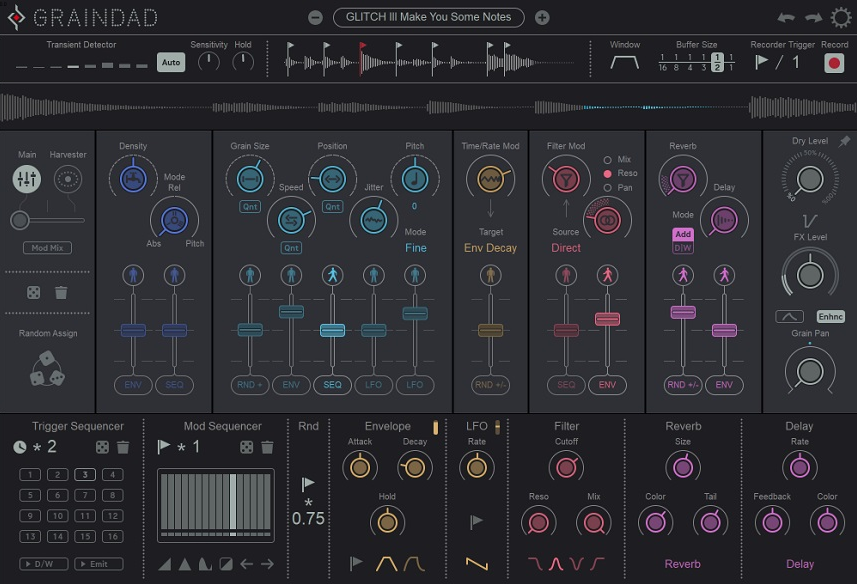
Standard granular plugins slice audio into fragments but leave you manually programming modulation, effects chains, and randomization separately across multiple parameters just to achieve evolving textures that don’t sound static.
You’re stuck either with basic grain controls offering minimal creative variation or complex modular environments requiring hours to understand signal routing. Graindad plugin functions as a multi-layered sound manipulator merging real-time granular synthesis, modulation, and effects into a single environment rather than being just a simple audio slicer.
I think what makes this different is the intelligent randomization and modulation systems that can respond to audio transients, MIDI, or host tempo giving you musical control over chaos.
The plugin centers on a 64-grain engine where you can play a single audio sample multiple times in parallel with each grain independently pitched, stretched, reversed, or delayed.
I believe it features the Harvester modulation system controlling all 12 main parameters simultaneously with 12 breakpoints for performative control, plus a 16-step trigger sequencer and ships with hundreds of professionally designed presets.
- 64-Grain Engine with Real-Time Processing
At the heart is a 64-grain engine letting you play a single audio sample multiple times in parallel where each grain can be independently pitched, stretched, reversed, or delayed.
Real-time playback and recording can run simultaneously meaning you can feed it loops or live instruments and immediately manipulate them on the fly.
I’d argue unlike simpler granularizers, the engine supports dynamic recording triggered by audio transients or MIDI so granular transformations react musically to the input. You can create anything from subtle textural enhancements to chaotic evolving soundscapes.
- Harvester Modulation System
The Harvester is Graindad’s visual modulation playground controlling all 12 main parameters including grain size, density, pitch, position, and feedback simultaneously. I can see how you can define motion paths, automate them, or randomize them with a few clicks.
I’m convinced the 12 breakpoints allow performative control via MIDI letting you morph textures across a track without touching DAW automation. I’ve noticed you can mix the Harvester with traditional modulators like LFO, step sequencer, and envelope using the Modmix control producing complex evolving sounds that are very difficult to achieve in other plugins.
- Parameter-Specific Context-Aware Randomization
Randomization in Graindad is parameter-specific and context-aware where you can randomize pitch independently from density or grain position. You can also define triggers for when randomness occurs like on audio transients or MIDI input.
This controlled chaos is much more usable than a single “global random” function because you retain musicality while generating unpredictable textures, and I often find you’re not losing your entire sound when exploring random variations.
- Trigger Sequencer for Rhythmic Control
The plugin features a 16-step trigger sequencer for rhythmic granular effects where each step can trigger grains individually. This can be especially useful for glitchy stutters, chopped textures, or rhythmically controlled pitch shifts. Combined with transient detection grains can also fire only on hits in the audio so the effect naturally locks to percussion or melodic transients without manual timing adjustments.
4. Newfangled Audio Generate

Generate VST is a chaotic cinematic polysynth designed to merge controlled randomness with musical coherence using eight chaotic generator types that produce patterns ranging from subtle tonal shifts to extreme sonic chaos. It doesn’t rely solely on fixed waveforms but allows smooth morphing from a clean sine wave to full chaos giving you control over sonic density and unpredictability.
The synth includes a 16-step random sequencer and sample-and-hold (S+H) modules for rhythmic unpredictability, 5 distinct wavefolder types combined with a Fractal Wavefolder for complex harmonic structures, and ships with over 800 presets covering basses, leads, pads, plucks, sequences, and textures.
I believe it works in VST2/3, AU, and AAX formats plus standalone mode.
- Eight Chaotic Generators with Unique Algorithms
Each of Generate’s 8 generators acts as an oscillator with a unique chaos algorithm where for example the Turbine generator produces howling evolving tones when modulated while Crescent can mimic stacked sawtooth harmonics with subtle motion.
I’d argue every generator allows smooth morphing from a clean sine wave to full chaos giving full control over sonic density and unpredictability. I’ve experienced how the result is an oscillator that is simultaneously playable and constantly evolving unlike static synth engines, and I often find you can dial in exactly how much chaos you want rather than getting an all-or-nothing random output.
- Fractal Wavefolder
Generate includes 5 distinct wavefolder types each shaping oscillator output in unique ways. Combined with the Fractal Wavefolder you can create complex harmonic structures and timbral variation.
I can see how you can route chaotic generator outputs through these folders for everything from gritty basses to rich evolving pads. The folders are independently modulatable meaning each voice in a chord can behave differently creating polyphonic textures that feel organic rather than synthetic.
- 16-Step Random Sequencer and Sample-and-Hold
The 16-step random sequencer and sample-and-hold modules make Generate excel at rhythmic unpredictability. You can assign the sequencer to modulate multiple parameters simultaneously such as chaos amount, wavefold mix, or LPG filter frequency.
I believe S+H updates per step so each chord voice can receive different parameter values producing evolving harmonic motion. I feel like these tools turn simple patterns into intricate, jittery, or polyrhythmic textures in real time without needing external modulation plugins.
- Integrated Effects with Modulation Routing
Generate comes with high-quality effects including delay (dotted and straight rhythmic), chorus (modulated for subtle width or vibrato), EQ, and reverb to shape frequency content and spatial depth. I imagine effects can be modulated by sequencer, LFOs, or chaos sources meaning the sound is alive and dynamically changing never static.
I tend to notice having effects routable within the synth keeps workflow efficient because you don’t need to load separate effect plugins for basic spatial processing.
- Artist-Curated Presets
The synth ships with over 800 presets from various artists covering basses, leads, pads, plucks, sequences, and textures with modulation paths fully configured allowing you to immediately audition complex patches or tweak them for unique variations.
I wonder how many producers start from scratch when these presets provide solid foundations, but I’d say they’re fully editable giving you creative exploration without building everything from an init patch.
5. United Plugins Randomachine
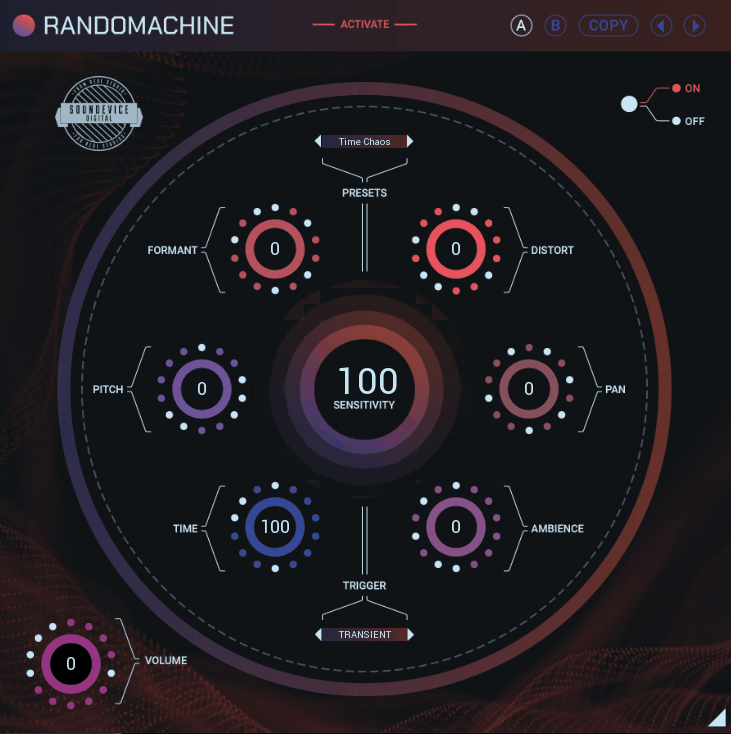
I’ll be honest, one of the most annoying things I’ve dealt with in production is when you have a great drum loop or sample but every hit sounds exactly the same making the entire track feel robotic and lifeless. You’re stuck either manually drawing automation for pitch, pan, and timing variations across dozens of individual hits, or you accept that your hi-hats sound like a drum machine from 1985.
Another randomizer plugin
Randomachine addresses this as a variation engine built to break uniformity in repeated audio material by introducing controlled randomness into key sonic parameters.
This randomizer plugin features six independent effect modules including Pitch, Formant, Pan (stereo position), Ambience (reverb space/time), Time Offset, and Saturation/Distortion where each can be randomized independently.
It includes three trigger modes (Transient Mode, Sync Mode, MIDI Trigger Mode) determining when randomization fires, and it also comes with a built-in preset browser plus A/B slots and Undo/Redo for workflow efficiency.
- Six Independent Random Changers
Rather than a global “make everything random” button, Randomachine has six distinct effect modules and each one can be randomized independently. I’ve experienced how when the plugin is triggered these changers all generate new parameter values within ranges you set.
I’d argue that means on a loop of 16 kicks or hi-hats you can genuinely make each hit feel different in pitch, timing, stereo spread, or texture without having to draw automation lanes manually.
I often find the practical workflow here is to think of Randomachine like a static-to-dynamic converter where you insert it on repetitive audio, choose which randomizers are active and how intensely they vary, then decide when those changes happen.
- Three Trigger Modes for Different Contexts
The plugin includes Transient Mode which analyzes incoming audio and retriggers on peaks like transients from drums or plucks, Sync Mode which fires randomization at DAW tempo intervals like every 1/4 or 1/8 note, and MIDI Trigger Mode where you trigger new random settings via MIDI notes.
I can see how these modes make Randomachine adaptable because you can let it “listen” to audio, keep it grid-tight, or control it like a performance tool. I’m convinced this flexibility is what makes it work across different production styles whether you’re working with sampled drums or synthesized loops.
- Pitch and Formant Randomization
You can randomize pitch and formant independently which I feel like is particularly useful on vocal samples or melodic loops. I’ve noticed small pitch variations can make machine-like patterns sound more human while formant shifts add character without changing the perceived pitch.
On one-shot samples like footsteps or sound effects increasing pitch variation avoids the obvious “copy-paste” feel that kills realism in sound design work.
6. Baby Audio Atoms

Traditional subtractive synths generate sound from fixed waveforms that remain identical every time you trigger a note, which means you’re manually programming LFOs, envelopes, and modulation just to add movement and variation.
Physical modeling approaches this differently by simulating how real objects vibrate and resonate, but most physical modeling synths focus on recreating specific instruments rather than providing flexible sound design tools.
Atoms VST is a physical modeling synth simulating interconnected masses and springs that generates sound behaving organically where no two notes are ever identical. The synth centers on a six-mass spring network triggered by virtual excitation like plucking or bowing where each mass interacts with others creating complex harmonic motion and subtle micro-variations.
- Six-Mass Spring Network with Physical Modeling
Atoms’ core is a six-mass spring network triggered by virtual excitation where each mass interacts with others creating complex harmonic motion and subtle micro-variations that produce rich evolving timbres.
I’d argue the physical model isn’t just aesthetic but drives all six main sound parameters meaning effects like filtering, pitch variation, and resonance are inherently dynamic not post-processed.
You can create organic reactive soundscapes that range from realistic acoustic textures to otherworldly synth tones, and I often find this approach produces sounds that feel alive rather than static.
- Six Main Parameters with Independent Motion Modulation
The synth exposes six main parameters where each can be independently modulated via six motion options including step-sequenced, random, LFO, or envelope-based modulations.
- Dual Randomization System for Controlled Variation
There are two randomization modes where Main Randomize generates entirely new patches while keeping parameter interactions logical, and Recycle produces a variation of the current patch keeping its sonic identity but adding subtle evolution.
I think these are extremely useful for generating hundreds of usable presets without endless tweaking especially for ambient textures or generative music ideas. You’re not getting random noise but musically coherent results because the randomization understands the physical relationships between parameters.
- Integrated Effects Based on Physical Modeling
Unlike many synths relying on post-processing, Atoms’ physical-model-based effects are part of the engine except for the standalone Space reverb. I believe effects include internal distortion, filtering, and modulation all of which inherit the physical behavior of the oscillator network.
I feel like pushing these effects results in alien evolving sounds rather than static coloration which is particularly effective for cinematic, experimental, or ambient production.
- Lots of presets
Atoms ships with 250 factory presets covering pads, leads, sequences, and textures. The presets are designed to demonstrate the depth of the physical modeling engine and are fully editable.
7. Output Portal

Granular processors typically require deep understanding of synthesis principles or modular routing that takes hours to produce musical results instead of experimental noise. Portal by Ouptut functions as a granular audio transformer that takes any input and re-synthesizes it via real-time granular processing balancing creative randomness with musical control.
It can slice incoming audio into tiny pieces called grains and play them back in new musically meaningful orders using up to 16 grains simultaneously with control over grain density, size, playback offset, pan, and envelope shape.
In a nutshell – what makes this practical is the circular XY pad controlling two assigned parameters simultaneously for real-time morphing, and it includes two looping multistage envelopes/LFOs and two assignable macros plus 7 built-in effects (Bit Reducer, Chorus, Distortion, Filter, Phaser, Reverb, Delay). The plugin ships with 250+ factory presets covering glitchy rhythmic effects, ambient pads, vocal mangles, and sound design textures.
But let’s talk in more detail:
- Circular XY Control with Real-Time Parameter Mapping
Portal’s main performance interface revolves around a circular XY pad that controls two assigned parameters simultaneously. This isn’t a gimmick because tying macros to an XY pad lets you morph between gritty stutters, wide ambient spreads, pitch variations, and dense textures in real time with visual feedback.
The pad directly links to granular parameters like grain size, pitch shift, density, or delay feedback so moving it changes multiple dimensions of sound at once without menu diving. I often find this is what makes Portal feel performable rather than just being a static effect you set and forget.
- Granular Engine
As mentioned before, under the hood Portal slices incoming audio into tiny pieces and plays them back in new orders where you can control up to 16 grains simultaneously. You can adjust grain density, size, playback offset, pan, and envelope shape then define whether they stretch or compress time relative to your DAW’s BPM.
I’m convinced this granular structure keeps transformations from being random noise because you can push toward rhythmic textures, pitched sequences, or stretched ambient blur depending on your settings.
- Two Multistage Envelopes and Two Assignable Macros
Rather than just feeding audio through a granular algorithm, Portal provides two looping multistage envelopes/LFOs and two assignable macros. I see envelopes have multiple breakpoints with adjustable curves and both envelopes and macros can be drag-and-drop assigned to almost any parameter covering granular, effects, or modulation depth.
I feel like this system means modulation isn’t just an add-on but central to how textures evolve over time without manual automation lanes, and I imagine this is what separates Portal from simpler granular effects that lack internal modulation routing.
- 7 Built-In Effects Plus Master Processing
Between the granular engine and master bus are 7 internal effects including Bit Reducer, Chorus, Distortion (Soft/Hard/Foldback), Filter (12/24 dB LP/HP with drive), Phaser (up to 32 stages plus Barberpole mode), Reverb with Freeze option, and Delay (Stereo/Ping-Pong with filters).
I believe after effects Portal’s master section adds a compressor and additional low/high-pass filters giving more tonal shaping without needing external processors. I wonder how many producers stack separate plugins for these effects, but I’d say having them integrated keeps workflow efficient and CPU usage lower than loading individual effect chains.
8. Sugar Bytes Turnado
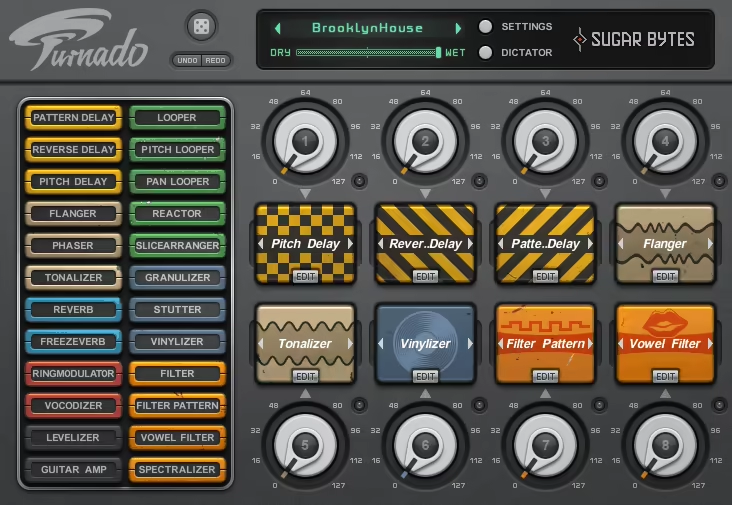
Performing effects changes live in a DAW typically means either bouncing between multiple plugin windows losing creative momentum, or pre-programming every automation curve which kills spontaneity and makes tracks feel rigid.
You need simultaneous control over multiple effects that respond musically to performance gestures rather than requiring precise mouse movements across different interfaces. Turnado randomizer VST plugin is a real-time multi-effect manipulator designed to give you instantaneous control over eight effects each with multiple parameters emphasizing playable, performative modulation rather than static processing.
The plugin features 8 effect slots each capable of hosting one of 24 unique effects including delay, reverb, amplifier distortion, filters, modulation, loops, and DJ-style transformations.
I think what separates this from traditional multi-FX units is Dictator Mode where a single fader controls multiple effect knobs simultaneously, and I believe in Expert Mode each effect exposes 5 tweakable parameters for deep shaping.
The plugin includes two LFOs per slot, a step sequencer, and an envelope follower for modulation, and I’ve noticed it ships with hundreds of factory presets plus recent updates adding 224 new Pitchlooper patterns and 64 PatternDelay variants.
- Dictator Mode for Unified Performance Control
A standout feature is Dictator Mode where a single fader controls multiple effect knobs simultaneously. I can see how each knob’s rotation range and activation can be set individually allowing one hand to execute complex transformations.
I’m convinced this is particularly useful for live sets, DJ routines, or real-time mix experimentation turning Turnado from a static FX plugin into a performative instrument.
I imagine you can create dramatic builds, drops, or texture shifts with single fader movements rather than automating multiple parameters separately.
- Dynamic Signal Flow
Turnado supports Dynamic Signal Flow meaning the audio passes through effects in the order they are activated rather than a fixed series.
- Integrated Modulation Per Effect Slot
Every effect slot supports two LFOs, a step sequencer, and an envelope follower which can modulate any of the effect’s five main parameters. This means you can automate stutters, sweeps, filter changes, or distortion in tempo-synced or free-running patterns generating complex motion and rhythmically evolving textures without drawing automation manually.
- Presets with Recent Expansions
Turnado ships with hundreds of factory presets covering rhythmic glitching, vocal manipulation, lo-fi textures, and ambient pads. I tend to notice many presets exploit Dictator Mode and multi-parameter modulation demonstrating the plugin’s depth.
I’ve realized recent updates include 224 new Pitchlooper patterns and 64 PatternDelay variants expanding the sonic palette significantly, and I’m inclined to think these expansions make it more valuable over time rather than feeling dated.
9. Sugar Bytes Looperator
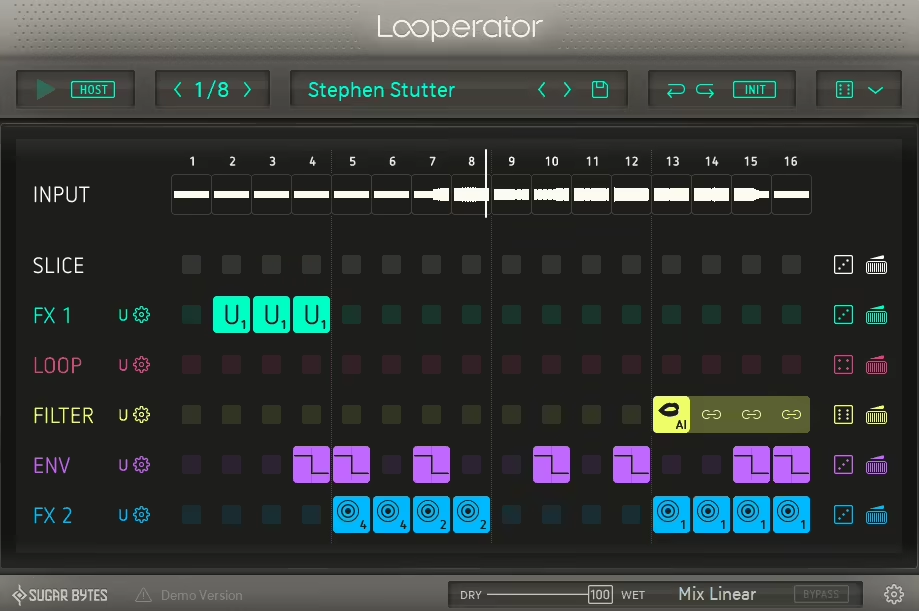
Looperator functions as a 16-step loop mangler and multi-effect sequencer that transforms static loops into highly dynamic, rhythmically complex sequences rather than being just another multi-FX unit.
I’ve noticed the effects can be reordered vertically for dynamic signal flow, and the plugin ships with over 300 factory presets plus supports modulation via 20 selectable envelope shapes.
- Sample Slicer with Independent Processing
At the core is a 16-step sequencer that slices any input audio where each slice can be reversed, time-stretched, pitch-shifted, or filtered independently. I’d argue this allows for creating stutter edits, glitchy fills, or entirely new rhythmic patterns from existing loops.
I’ve experienced how combined with the Talkbox filter and time-stretching per step even a simple drum loop can be reimagined into a complex evolving rhythm with minimal manual editing, and I often find this is what separates Looperator from basic slicer plugins that just chop audio without creative manipulation.
- Effect Lanes
Looperator features 6 effect lanes each with 5 editable parameters per step. I can see how the effects can be reordered vertically giving dynamic signal flow where the order of effects materially changes the output.
Placing the slicer below FX1 will process the loop through FX1 before it’s sliced while moving FX1 below the slicer alters how it interacts with each slice. I’m convinced this flexibility allows for deeply customized sequences ranging from subtle rhythmic enhancements to extreme experimental textures.
- Advanced Modulation with 20 Envelope Shapes
Each effect lane supports modulation via 20 selectable envelope shapes, step sequencers, envelope followers, and a dedicated randomizer. I feel like this allows you to animate parameters such as filter cutoff, stutter speed, and tape-stop depth dynamically step by step.
I wonder how many producers realize this modulation depth, but I’d say combined with the per-step FX parameters Looperator can produce complex polyrhythms, evolving textures, and irregular glitch effects without needing extensive DAW automation.
- MIDI Integration for Live Performance
Looperator offers extensive MIDI mapping enabling you to trigger complete sequences or individual steps via MIDI notes. I tend to notice it can sync with the DAW transport or with DJ software such as Traktor making it suitable for live sets.
10. Audiomodern Playbeat 4
Programming drum sequences from scratch means placing individual hits on a grid hoping the groove feels natural, but most bedroom producers end up with patterns that sound either too mechanical or copied from reference tracks.
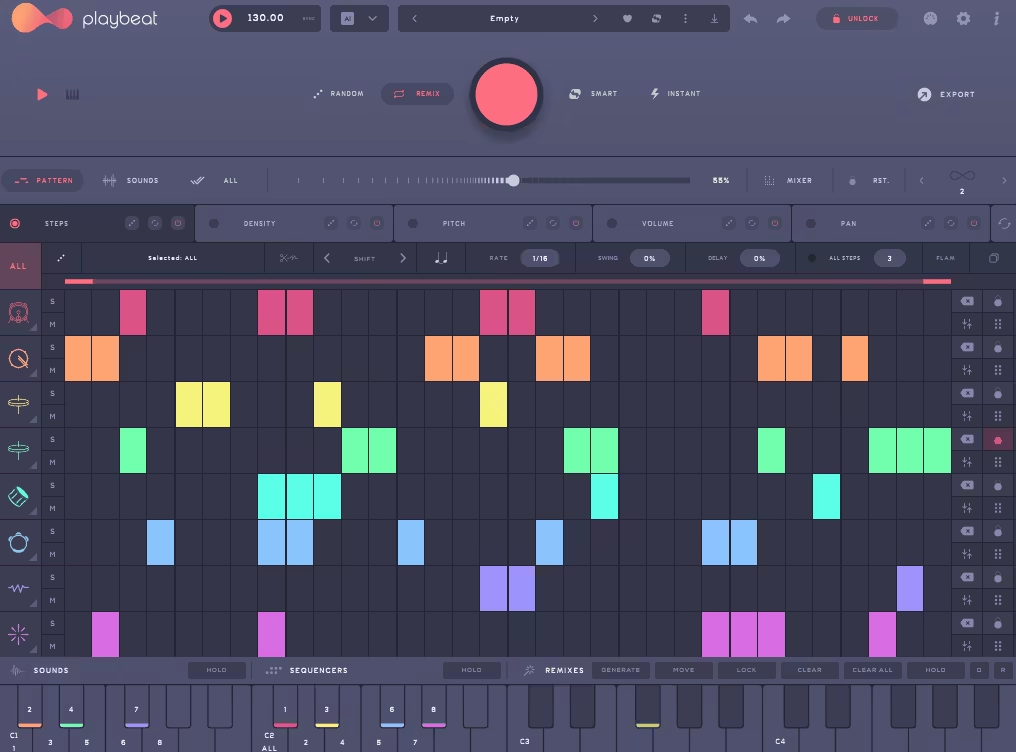
The challenge isn’t just about triggering samples but generating rhythmic variations that evolve without becoming unpredictable chaos requiring constant manual editing. Playbeat 4 is an AI-driven drum sequencer and groove generator designed to produce endless beat variations from existing samples or MIDI tracks where the focus is on intelligent randomness combined with stylistic control ensuring generated patterns are musical and rhythmically coherent.
What separates this from conventional sequencers is the genre-based AI algorithms that generate drum patterns based on user-selected styles and complexity levels. The plugin ships with 1,500 factory kits spanning acoustic drums, electronic percussion, and hybrid textures, and I believe it supports up to 8 pattern variation layers each holding different probabilities, rhythmic offsets, and swing values.
I’ve noticed the sequencer can output MIDI to control external instruments including AUv3 MIDI support on iPad making it portable for live performance.
- Genre-Based AI Pattern Generation
At its core Playbeat 4 features genre-based AI algorithms that generate drum patterns based on user-selected styles. I’d argue you can select from multiple genres and complexity levels allowing the plugin to craft tailored patterns from simple loops to full drum tracks.
AI ensures that no two generated sequences are identical providing virtually unlimited variations for inspiration and workflow acceleration. That said, you’re not getting random noise but musically coherent grooves that fit specific production contexts.
- 1,500 Factory Kits with Custom Sample Import
Playbeat 4 ships with 1,500 factory kits spanning acoustic drums, electronic percussion, and hybrid textures. I can see how you can also import custom samples and create expansion packs which the AI can then integrate into pattern generation.
I believe each kit supports full control over individual drum sounds including pitch, velocity, and probability. I feel like this allows you to craft patterns that feel unique to a track rather than generic preset beats, and I imagine being able to feed your own samples into the AI means you’re not limited to stock sounds.
- Pattern Variation Layers for Polyrhythmic Grooves
The sequencer supports up to 8 pattern variation layers where each can hold different probabilities, rhythmic offsets, and swing values. I think this allows polyrhythms, staggered grooves, and evolving beats without manually duplicating patterns in a DAW.
- MIDI Output for External Instrument Control
Playbeat 4 can output MIDI to control external instruments or other plugins turning it into a central groove engine. I tend to notice this includes AUv3 MIDI support on iPad making it portable for live performance or studio use.
11. Baby Audio Magic Dice (Free)
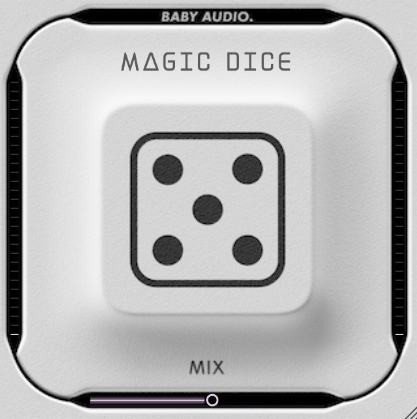
Magic Dice is a super simple randomized effect generator that instantly creates unique delay, reverb, and modulation chains with a single click rather than relying on pre-configured presets.
Here is what you get:
- One-Click Randomized Effect Chain Generation
The main interface is simple where you click a single button to generate a new effect chain. I’d argue each chain includes a combination of delays, reverbs, and modulation effects with varying depths, timing, and tonal characteristics.
- Over 50 Individual Effects Dynamically Combined
Magic Dice draws from a pool of 50+ effects including stereo delays, modulated reverbs, chorus, flangers, phasers, and pitch-shifting elements. I believe these effects are dynamically combined and parameterized on each dice roll creating unique textures ranging from subtle ambience to extreme rhythmic modulation.
I think the underlying algorithm ensures musicality so outputs remain usable in a mix not just chaotic noise. I imagine this means you’re not getting random parameter values but intelligently selected combinations that actually work together.
12. Glitchmachines Hysteresis (Free)
I remember the first time I needed a delay that could actually mess with audio in interesting ways rather than just creating clean rhythmic echoes – most delay plugins are designed to be transparent and musical, which is great until you want something that sounds broken, robotic, or deliberately glitchy.
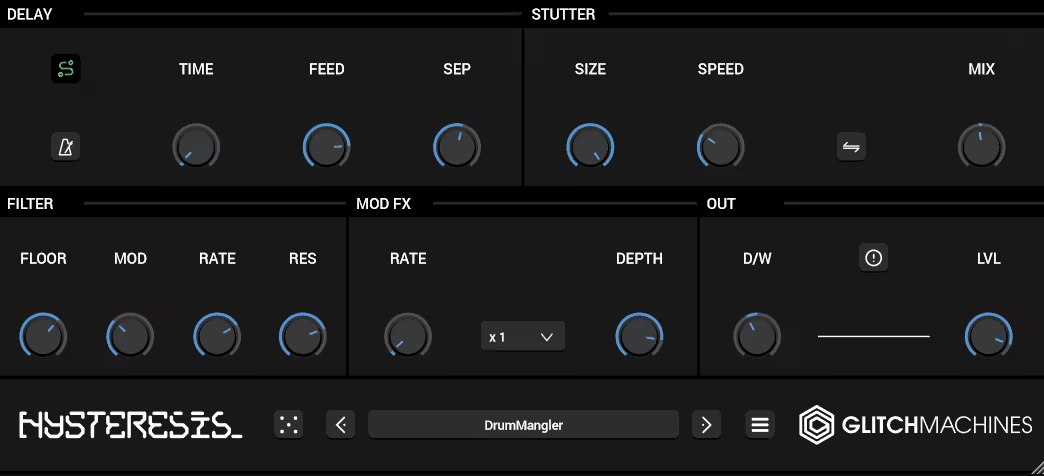
You’re either stacking multiple plugins to achieve stuttering and granular artifacts or settling for clean delays that don’t add the experimental character your track needs. Hysteresis free VST caught my attention as a glitch-focused delay plugin combining conventional delay with stutter, modulation, and filtering effects in a highly experimental signal path.
It comes with nice features such as:
- 60 Factory Presets Showcasing Glitch Range
This randomizer plugin comes with 60 factory presets covering aggressive rhythmic mangling for drum loops, lush evolving textures for pads, and subtle spatial enhancements. I believe this gives instant inspiration while demonstrating how the stutter, filter, and modulation interact.
I tend to notice presets are genuinely useful starting points rather than just generic variations, and I’ve realized they help you understand what the plugin can do before diving into parameter tweaking.
- Modulation Processor for Chorused and Detuned Textures
The modulation processor can act as either subtle chorus or aggressive noisy modulation affecting the delay feedback in real time. I’ve noticed this produces chorused, detuned, or granular textures that react to the input signal rather than simply adding static effects.
Get the Free Plugin Starter Kit
The genuinely useful free DAWs and plugins worth installing. No filler. Straight to your inbox.

Hello, I’m Viliam, I started this audio plugin focused blog to keep you updated on the latest trends, news and everything plugin related. I’ll put the most emphasis on the topics covering best VST, AU and AAX plugins. If you find some great plugin suggestions for us to include on our site, feel free to let me know, so I can take a look!