
Autopan plugins have become essential tools for music producers. They shift sounds around the stereo field, bringing movement, depth, and excitement to your mixes. I’ve tested the top choices for 2026 to help you find the right fit.
I’ve included both premium and free options in this guide. You’ll learn what makes each plugin unique, how they compare to each other, and which one might work best for your production style.
By the end, you’ll understand how these tools function and which features matter most for creating dynamic stereo effects. Let’s dive in!
1. Cableguys Panshaper 4

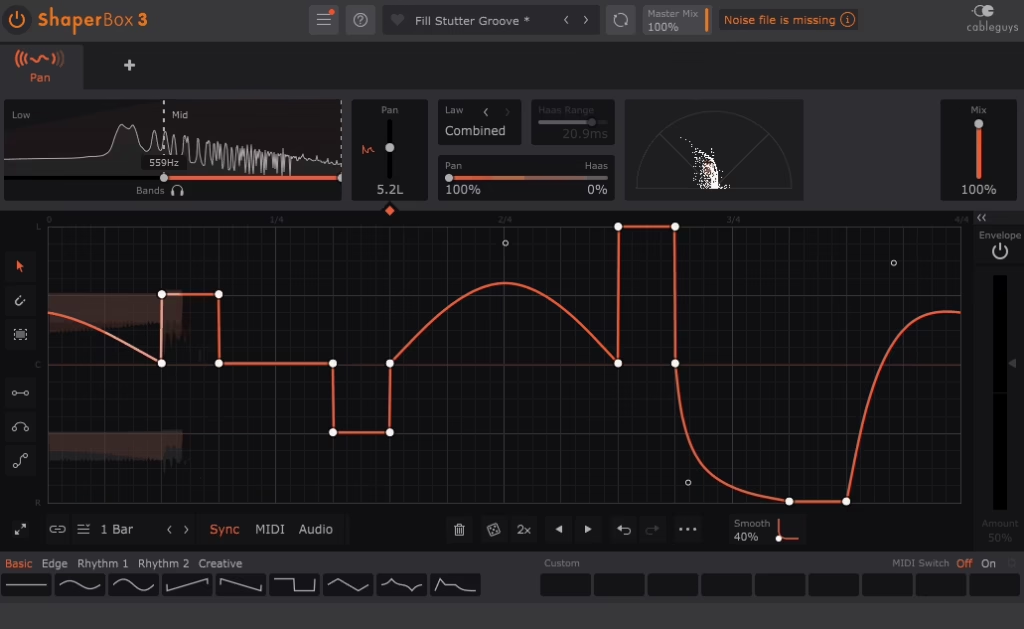
I really like this plugin from Cableguys. It lets me draw my own LFO shapes right in the interface, so I’m not limited to just sine or triangle waves. The multiband feature splits audio into different frequency ranges, and each band has its own panning control.
What makes Panshaper 4 auto pan plugin stand out is how it combines traditional volume-based panning with psychoacoustic Haas delay panning. I’ve used this blend to create stereo movement that feels more three-dimensional and immersive. The envelope followers respond to my audio’s dynamics, so the panning motion changes based on how loud or quiet the signal gets.
Features:
- Custom Drawable LFO Waveforms
As I said, I can click and drag to create any LFO shape I want using bezier curves and breakpoints. This gives me complete control over how the panning movement evolves over time. The shapes can be smooth and flowing or sharp and stuttering. I’ve saved custom waveforms that I use across different projects, and the plugin stores up to nine custom waves per preset.
- Multiband Frequency Splitting
The plugin splits my audio into three bands with adjustable crossovers. I can keep the bass in the center and let the highs move more across the stereo field. Each band has its own LFO and envelope follower, so I can create complex panning patterns that single-band processors can’t do.
- Dynamic Envelope Follower
Every frequency band includes an envelope follower that makes panning respond to the audio’s amplitude. Louder sections can pan differently than quieter ones. This creates motion that feels connected to the performance rather than just mechanical LFO sweeping.
- Haas Delay Panning Mode
The mix control lets me blend regular panning with Haas delay-based stereo imaging. This helps me create wider stereo movement without just changing the volume. The psychoacoustic effect makes sounds seem to move more naturally in space.
- Built-In Stereo Vectorscope
The real-time vectorscope shows me exactly what’s happening in the stereo field. I can see how wide my panning motion is and check mono compatibility
2. Audio Damage Panstation 2

This one completely rebuilds Audio Damage’s classic autopanner from the ground up. I would recommend Panstation 2 autopan plugin to add rhythmic stereo movement if you want it to feel analog and responsive.
It’s inspired by vintage gear like the Drawmer M500 and Audio & Design PanScan, which many producers see as secret weapons for great stereo effects.
The triggered operation mode changed how I approach panning entirely. Instead of just running continuous LFO patterns, I can make the panning respond to audio hits or MIDI notes. This creates musical stereo movement that follows the rhythm and energy of my tracks naturally.
What you get with Panstation 2:
- Multiple Panning Laws and LFO Waveforms
The plugin offers four panning laws, including one that matches the M500 hardware exactly. I can pick from 11 LFO waveforms, either synced to my project tempo or running freely. This range lets me create anything from smooth sweeps to sharp, rhythmic patterns for each track.
- Audio and MIDI Triggered Panning
I can set Panstation 2 to trigger panning movements when my input audio crosses a threshold or when I play a MIDI note. An envelope generator shapes each triggered event, and there’s a count control that determines how many triggers happen before a pan event fires. This means I can create patterns like “pan every fourth snare hit” without automation.
- Side-chain Control and Phase Adjustment
The side-chain input lets me control panning from any audio source in my mix. I use phase offset between channels to create effects from tremolo to stereo widening. MIDI notes and CCs can also control panning, so I can sequence complex movements or play them live.
- Vector-Based Resizable Interface
The interface scales well on any screen because it uses vector graphics. The XML preset manager works on all platforms, including iOS AUv3. I can save presets on my computer and load them on my iPad with no extra steps.
3. SoundToys PanMan

SoundToys PanMan makes rhythmic panning more interesting than just moving left and right. I use it when I want stereo motion that fits the groove of the track, not just a basic automation. It uses tempo-synced patterns and trigger-based movement, so the panning reacts to the music.
This plugin recreates classic hardware auto-panners but adds modern features. I can make subtle width changes or big stereo sweeps that shift with every beat. The analog emulation modes add warmth and character, so the effect doesn’t sound too digital.
- Rhythm-Synced Panning Modes
I can sync the panning to my project tempo or trigger it with audio hits and MIDI notes. This keeps the stereo movement musical and in time with the rhythm. I’ve used it to make pad sweeps follow the kick drum or shift guitar pans with each snare. The sync keeps everything tight without needing manual automation.
- Step and Custom Waveform Shaping
PanMan autopan VST lets me define exact pan positions for each beat using step mode or draw custom shapes with LFO waveforms. I can set up repeating patterns or randomized motion depending on what the track needs. This gives me control over whether the movement feels mechanical or organic. The random mode works well for experimental textures while the step mode helps with precise rhythmic effects.
- Trigger Divider and Frequency Filtering
The trigger divider lets me set panning changes to happen every third or fifth trigger, not just every beat. I can also choose which frequencies trigger the pan, so only bass hits or high transients make it move.
- Analog Character and Saturation
Analog emulation modes add warmth and color when I turn up the input or drive. This makes the panning feel more vintage and less sterile. It helps the movement fit better in a mix, especially on synths and guitars. The effect is subtle enough to use on most sounds without changing their original tone.
- Width, Offset and Smoothing Controls
I can set how wide the panning swings, move the center with the offset control, and smooth out transitions to make the movement feel natural or sharp.
4. MeldaProduction MAutopan (FREE) – Best Value

MAutopan from MeldaProduction gives you strong modulation features for free. I’ve tried it on vocals and synth pads, and its control options are better than many paid plugins. With the drawable LFO, you aren’t limited to just basic sine waves.
What makes this plugin worth downloading is how it handles both subtle and extreme effects. I can create gentle stereo drift for background vocals or aggressive rhythmic chops on percussion. The modulation depth never feels limited for a free tool.
Here is what you get:
- Shape-Editable LFO System
The LFO editor lets me draw my own waveforms instead of picking from simple presets. I can make smooth curves, sharp angles, or odd patterns to fit my track’s rhythm. Classic shapes like sine, triangle, and square are there too. This flexibility helps me create panning that sounds unique in my mixes.
- DAW Tempo Synchronization
MAutopan locks perfectly to my project tempo with options for standard note divisions and triplets. I can set it to quarter notes for steady movement or switch to dotted eighths for more complex rhythms. The free-running Hz mode works when I need motion that doesn’t follow the grid. Sync options make it simple to keep panning effects musical and tight.
- Multi-Parameter Modulation
The modulation section does more than most auto pan plugins. I can use envelope followers so panning reacts to the volume of my input. Random generators add movement that keeps things interesting. MIDI control lets me automate rate and depth changes as my track plays.
- Stereo Phase Controls
Phase shifting between left and right channels gives me control over how the panning feels in the stereo field
- Dry/Wet Mix and Safety Features
5. Waves Brauer Motion

Waves Brauer Motion takes auto-panning Waves Brauer Motion goes further than basic left-right auto-panning. I like how it moves sounds through a three-dimensional stereo field, not just side to side. This plugin was made with Grammy-winning engineer Michael Brauer, known for working with Coldplay and John Mayer.ates motion that feels more natural and musical. I can position sounds not just left or right, but with depth and movement that makes the stereo image come alive. It’s proven especially useful when I need to add life to static tracks without making the effect obvious or mechanical.
- Circular and Spherical Movement Modes
I can choose from six different panning modes including Circular, Cross, Cradle, Shuffle, Classic, and more. The Circular mode moves sound in 360-degree rotations through the stereo field. Cross mode creates a blinking effect that alternates between sides. Cradle rocks the sound back and forth like a pendulum. Each mode offers a distinct type of motion that suits different musical situations.
- Dual Independent Panner System
The plugin has two panners that I can use on their own or link together. For stereo sounds, each panner controls one side. I can set different movement patterns for left and right, which creates more complex effects. This setup gives me more creative choices than plugins with just one panner.
- Trigger-Based Automation
Brauer Motion reacts to my audio in real time using its trigger section. The panning can change with the input level or the track’s rhythm. This way, the effect follows the music instead of sticking to a set pattern, making the movement feel more connected to the performance.
- Built-In Dynamics Control
The dynamics section shapes how panning responds to signal level. Quiet parts can move differently than loud sections. I’ve used this to make the effect feel more organic and less robotic. The dynamic response adds another layer of musicality to the movement.
6. Rhodes V-PAN

It brings the vintage stereo panning circuit from the flagship MK8 electric piano into plugin format. I find it delivers authentic vibrato and panning textures that work far beyond just keyboard sounds. V-PAN autopan plugin recreates the original Vari-Pan circuit with accuracy while adding modern control features.
This plugin stands out because it can go from gentle stereo movement to intense audio-rate modulation. I can set a subtle vintage wobble or push it into metallic ring modulation. The variable waveform lets me go beyond just sine or triangle shapes.
Here is what you get:
- Vari-Pan Circuit Modeling
The plugin recreates the exact stereo panning circuit from the Rhodes MK8 electric piano. I get the same swirling character that defined classic suitcase piano recordings. This modeling captures the smooth movement and musical quality of the hardware. The visual LED feedback shows me exactly where the signal sits in the stereo field at any moment.
- Continuously Variable Waveform
Instead of switching between fixed waveforms, I can blend smoothly between different panning shapes. The Slew and Smooth controls let me reshape the modulation wave to taste. I can soften harsh edges or create unique asymmetrical panning patterns. This flexibility helps me craft motion that fits each specific sound source.
- Audio Rate Modulation
The Rate control extends from slow sweeps up into audio frequency range. When I push it into higher speeds, I get metallic textures and ring modulation effects. This transforms the plugin from a simple panner into a creative sound design tool. I use this feature on synths to generate unusual timbres that go beyond standard stereo movement.
- BPM Sync Integration
The tempo sync locks panning cycles tTempo sync keeps the panning cycles matched to my project tempo. I can set rhythmic patterns that fit the song without adjusting the rate by hand. This makes the motion feel musical and planned, not random. The sync feature makes it easy to create tempo-locked swirls on pads or guitars.REE)
7. quietformat Auralis Multi Mod (FREE)

Auralis Multi Mod gives you three key modulation effects in one free plugin. I like how it combines Vibrato, Auto Pan, and Tremolo in a single interface that saves screen space and CPU power.
The plugin gives me independent control over each effect through dedicated depth and rate parameters. I can run all three modulations simultaneously or use them individually depending on what the track needs. The interface scales to different sizes, which helps when I’m working on smaller laptop screens or larger studio displays.
Here is what you get:
- Three-Effect Modulation System
The plugin includes Vibrato for pitch modulation, Auto Pan for stereo field movement, and Tremolo for volume modulation in one tool. Each effect operates independently with its own controls, so I can blend them together or use just one at a time. This saves me from loading multiple plugins when I want to add different types of movement to a sound.
- Independent Rate and Depth Controls
Every modulation type has separate rate and depth knobs that let me adjust the speed and intensity precisely. I can set slow, subtle panning while adding faster tremolo effects to the same signal. The controls are straightforward and respond exactly how I expect them to without any complicated menus or hidden parameters.
- Tempo Sync Capability
The Auto Pan and Tremolo effects sync to my DAW’s tempo, making it easy to create rhythmic patterns. I can lock panning to quarter notes or set tremolo to eighth notes for tight timing. This feature helps keep modulation effects precise.
- Low CPU Usage
The plugin runs smoothly and doesn’t use much CPU, even on many tracks. I’ve used it in busy mixes without any problems. Its lightweight design lets me experiment as much as I want without worrying about performance.
8. Audiomodern Panflow (Free)

Panflow uses a step-sequencer instead of the usual autopan design. I can draw my own pan patterns step by step, so I control exactly how the stereo movement fits my track. The interface is built around this visual sequencer, making it easy to see and shape the panning.
This plugin is totally free, so anyone can use it to add rhythmic stereo effects. I’ve tried it on trap hi-hats and ambient pads, and the pattern workflow fits well with beat-based music. The randomization tools are great for quick inspiration or trying out new ideas.
Here is what you get:
- Step Sequencer Panning
Instead of picking a sine or triangle wave, I draw the pan position for each step in a grid. Each step moves the sound to a spot in the stereo field. This lets me make syncopated or glitchy panning that matches my drums or synths. I can create sharp jumps or smooth shifts, depending on the steps I set.
- Host Sync with Grid Options
The sequencer syncs to my DAW tempo and lets me pick grid divisions like quarter, eighth, or sixteenth notes, plus triplets. This keeps the panning in time with my track. I can change grid sizes to fit any groove, slow or fast.
- Smoothing Control
A smoothing knob softens the jumps between steps, turning sharp changes into smooth slides. I use it when I want flowing motion instead of choppy panning. It’s great for pads and long sounds where sudden changes would be too harsh.
- Pattern Randomization
Panflow includes randomization features that generate new patterns instantly. I can adjust density and variation to control how wild or subtle the random results are. This speeds up my workflow when I’m experimenting and need fresh ideas without having to draw every step.
- Multi-Bar Pattern
Patterns can stretch over several bars, so the stereo movement evolves instead of just looping quickly. I find this helpful for atmospheric sounds and builds where I want the panning to change slowly.
9. Consint Panacea (FREE)

Panacea VST stood out to me as a lightweight, open-source autopan that still has lots of features for a free plugin. Made by Consint, it adds humanization, so the stereo movement feels more natural and less robotic. I’ve tried many free plugins that feel basic, but this one offers real creative value.
The plugin runs on a simple concept-LFO-driven panning with randomization to mimic human imperfection. What makes it useful in my sessions is how it balances simplicity with flexibility. I can sync the panning to my DAW’s tempo or let it run freely, and the humanization parameter adds subtle drift that keeps static sounds interesting across longer arrangements.
- Tempo-Synced and Free LFO Modes
Panacea locks to my DAW’s tempo with divisions ranging from 16/1 down to 1/32, which keeps the panning tight to the beat. When I switch to free mode, it runs in Hz instead, letting me create slow drifts or fast wobbles independent of tempo. This dual approach works for both rhythmic tracks and ambient textures where timing flexibility matters.
- Humanization Control
The humanize control adds random changes to the LFO rate, so the panning speed shifts in unpredictable ways. I use this on synth pads and vocals to avoid the mechanical feel that regular autopan effects can have.
- Adjustable Pan Offset
Panacea has a pan offset control, so panning doesn’t have to start in the center. I can shift the movement toward the left or right, which helps when I want uneven motion or need to fit the effect around other centered sounds in my mix.
- Phase Shift Parameter
In sync mode, the phase shift lets me choose where the LFO cycle starts in the beat. I use this to line up panning swells with kick drums or snares, so the effect feels planned, not random. It’s a small detail that really helps in rhythmic tracks.
- Visual Waveform Display
The plugin displays the LFO waveform on screen, and I can click to pick different shapes for the panning curve. This visual feedback helps me see how the pan will move before I use it, which speeds up my workflow when I’m using several auto pan plugins.
10. BPB & HY-Plugins HY-TP2

This plugin combines both effects in one simple interface, letting me switch between tremolo and stereo panning with one width knob. HY-TP2 works on Windows and Mac, and supports VST, VST3, and Audio Unit formats in 32-bit and 64-bit.
The interface is simple but doesn’t feel limited. I can resize the window to fit my screen, which makes it comfortable to use whether I’m working on a laptop or a larger display. The straightforward layout means I spend less time figuring out parameters and more time shaping the sound.
- Multiple LFO Waveforms
There are several LFO shapes to choose from, like sine, triangle, ramp up, ramp down, logarithmic, square, and random. The smoothing control lets me blend between shapes for smoother transitions. This variety lets me pick if the modulation feels smooth or choppy.
- Width Parameter for Effect Type
The width knob controls if I’m making tremolo or auto-pan. Lower settings keep the effect centered for tremolo, while higher settings move it into the stereo field for panning. I can set it anywhere in between, making the plugin more flexible than tremolo-only effects.
- Phase Control for Timing
The phase knob changes where the LFO cycle starts. I use it to line up the modulation with certain beats or to offset patterns on different tracks. This makes the movement feel more planned and musical, not random.
- Built-in Tone Shaping
HY-TP2 has low-shelf and high-shelf filters to shape the sound. I can cut harsh highs or boost the low end while panning or tremolo is happening. This keeps the effect from sounding thin or harsh, especially on bright instruments.
- Tempo Sync and Free Rate Modes
The rate control works in both tempo-synced and free modes. When synced, the modulation matches my project tempo for rhythmic patterns. In free mode, I can set the exact Hz for modulation that doesn’t follow the grid.
11. Cableguys PanCake2 (FREE)

This auto pan plugin gives you full control over stereo panning with a drawable interface. Unlike standard auto-pan plugins with basic LFO shapes, you can design any panning movement you want. Drawing custom curves point by point lets you make both subtle and wild effects.
I’ve used PanCake 2 on everything from synth leads to drum loops. The interface is simple enough that I can get results in seconds, but the depth of control keeps me coming back. It syncs perfectly with my DAW tempo, making it effortless to create groovy panning patterns.
What you get:
- Custom Drawable LFO Curves
I can draw any panning pattern directly into the plugin window by clicking and dragging points. This lets me create shapes that would be impossible with traditional LFO settings. The curves are sample-accurate, which means the stereo movement stays tight and precise even with fast patterns. I can add as many points as needed and bend the segments to get exactly the motion I want.
- Tempo Sync and Free-Run Options
The plugin syncs to my DAW tempo with timing options from slow sweeps to fast rhythmic chops. In free-run mode, the LFO ignores tempo and runs at a set speed. This flexibility works for both beat-based music and ambient sounds.
- MIDI Note Triggering
I can set the panning LFO to restart with every MIDI note. This way, each note triggers the same panning movement from the start. It’s especially helpful for synth arpeggios and melodies where I want steady stereo motion on every note.
- Visual Feedback Display
The background shows a real-time oscilloscope of my audio. This helps me see how the panning changes my sound. I can also watch the stereo field move as the LFO cycles.
- Adjustable Panning Range
The mix knob controls how much panning movement gets applied to my signal. I can dial in barely noticeable width changes or push it to extreme left-right swings. This range control lets me match the effect intensity to whatever my mix needs.
How Does Autopan Plugins Work?
Autopan plugins move sound between the left and right speakers in your mix. They create movement in the stereo field by automatically changing where a sound sits in your headphones or speakers.
At its core, an autopan plugin uses a modulator to control the pan position. This is usually an LFO (Low Frequency Oscillator) that makes a repeating pattern. When you use the plugin on a track, it follows the modulator’s movement and shifts the audio to match.
Most autopan plugins let you choose different modulation shapes. These include sine waves for smooth movement, square waves for hard switches, and custom patterns you can draw yourself. The movement’s speed syncs with your project tempo or runs freely at the rate you set.
Key Components:
- LFO or Pattern Generator – Controls the timing and shape of the panning movement
- Rate Control – Sets how fast the sound moves from left to right.
- Depth/Width – Determines how far the sound travels across the stereo field
- Waveform Selection – Chooses the pattern type (sine, triangle, square, custom)
- Tempo Sync – Locks the panning speed to your project’s BPM.
Some advanced plugins have multiband processing. This splits your audio into different frequency ranges and pans each one separately. For example, you can pan low frequencies slowly and high frequencies quickly.
The plugin works in real time, taking your audio and multiplying it by the modulator values to create the stereo movement you hear.

Hello, I’m Viliam, I started this audio plugin focused blog to keep you updated on the latest trends, news and everything plugin related. I’ll put the most emphasis on the topics covering best VST, AU and AAX plugins. If you find some great plugin suggestions for us to include on our site, feel free to let me know, so I can take a look!