
If you’ve been looking for a passive EQ plugin that captures the musical, forgiving character of classic passive hardware without sacrificing the workflow speed of a modern digital EQ, you’ve probably come across the Pulsar Audio MP-EQ floating around mastering discussions and mix bus conversations since its relaunch in late 2025.
The MP-EQ is Pulsar Audio’s updated take on the legendary passive tube equalizer found in mastering studios worldwide (formerly released as Pulsar Massive), built around the idea of faithfully reproducing the hardware’s parallel EQ topology and tube/transformer saturation while adding modern features that the original unit never offered.
From my experience using it across several months of mixing and mastering projects, this approach works well in practice. The EQ moves that would sound harsh or clinical on a standard digital EQ come out warm, musical, and controlled through the MP-EQ, because the parallel design and analog modeling genuinely change how boosts and cuts interact with your audio.
But is Pulsar Audio MP-EQ actually worth it?
MP-EQ is one of the best tonal EQ investments you can make for bus and mastering work. You’re getting a convincing passive EQ emulation with a visual curve editor, three selectable output transformers, a drive control for tube saturation, linear phase correction, and M/S processing.
It won’t replace a surgical parametric like Pro-Q for corrective work, but for tonal shaping, adding warmth, and making things sound more expensive, it covers ground that clean digital EQs simply don’t reach.
The passive character and why it matters
The headline quality of the MP-EQ is something you feel more than you measure. Passive EQs have a specific way of handling frequency adjustments where the bands interact musically rather than operating in isolation. Boost the low end and the mids respond slightly. Add air at the top and the overall balance shifts in a way that feels natural rather than forced.
This parallel topology is what makes passive hardware EQs sound “musical” in a way that’s genuinely difficult to pin down technically but immediately obvious to your ears.
The MP-EQ reproduces this behavior convincingly. When I boost 47Hz by 3dB to add weight to a mix, the result doesn’t sound like someone welded a bass shelf onto the bottom of the mix. It sounds like the mix had that weight all along and I just uncovered it. The bands don’t accumulate the way a standard parametric does. If you boost the same frequency range from two overlapping bands, the result is less than the mathematical sum because the parallel design naturally limits how far you can push things. This built-in restraint is what keeps the EQ sounding musical even when you’re making bold moves.
The Q curves are deliberately wide, even at the tightest bandwidth setting. This is by design, not a limitation. A passive EQ isn’t meant for surgical notch filtering or narrow resonance removal. It’s meant for broad tonal shaping where you’re changing the character and balance of the entire signal rather than targeting specific problem frequencies.
If you try to use the MP-EQ for tight corrective cuts, you’ll be frustrated. If you use it for what it’s designed for, shaping the overall tone of a bus, a master, or an instrument group, the wide curves are exactly what make the results sound natural.
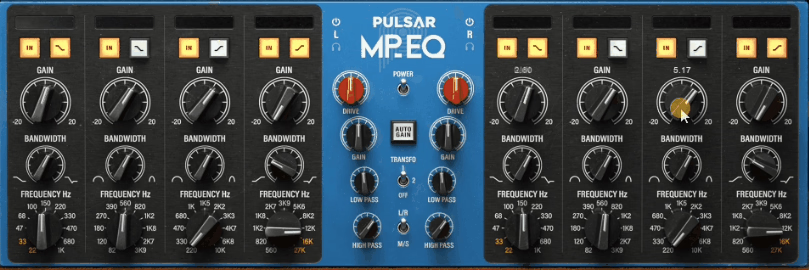
The tube and transformer modeling adds another layer of character on top of the EQ curves. The signal path includes emulated tubes, inductors, and hand-wound transformers that introduce subtle harmonics, dynamic saturation, and the specific low-end compression that passive hardware EQs are known for.
Even with all bands set to flat, passing audio through the MP-EQ with the drive engaged adds a warmth and density that clean digital processing doesn’t provide. I’ve used it as a pure tone box on vocal buses with no EQ adjustments at all, just for the tube saturation character, and the results are worth the plugin load alone.
The dual interface: hardware knobs or visual curves
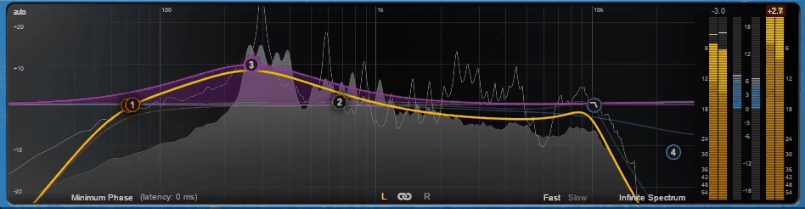
One of the smartest design decisions in the MP-EQ is giving you two completely different ways to interact with the same EQ. You can work with the hardware-style knob layout that replicates the look and feel of the original unit, or you can switch to a visual curve editor with spectrum analyzer that works like any modern parametric EQ. Or you can use both simultaneously.
I typically start with the visual editor when I’m making initial decisions because seeing the curve alongside the spectrum helps me identify where the tonal balance needs adjustment.
Then I switch to the hardware view for fine-tuning by ear, because the knob interface encourages you to listen rather than look. The combination of both approaches means you get the analytical precision of modern EQ editing and the ear-first workflow of classic hardware operation in a single plugin.
Pulsar also fixed one of the hardware’s most annoying design quirks. On the original unit, the gain knobs start at 0dB in the fully counter-clockwise position, so you can only boost unless you flip a separate switch to enable cutting. The MP-EQ puts 0dB at twelve o’clock with boost going clockwise and cut going counter-clockwise, which is how every other EQ on the planet works. It’s a small change, but it makes the plugin significantly faster to use because you’re not fighting an unintuitive control layout inherited from 1960s hardware conventions.
Three transformers and the drive control
The output section gives you three selectable transformers that each add a different saturation character to the signal:
- Transformer 1 is the most neutral option, adding subtle harmonic density without obvious coloration. I use this most of the time on mastering passes where I want the passive EQ character without additional tonal weight from the output stage. It fattens things slightly without changing the overall tonal balance.
- Transformer 2 adds a more noticeable saturation with increased even-order harmonics that warm the midrange and smooth the top end. I reach for this on instrument buses and vocal groups where I want the signal to feel richer and more “analog” beyond what the EQ curves alone provide. On acoustic guitars and piano buses, this transformer adds a quality that’s hard to describe but immediately makes things sound more expensive.
- Transformer 3 is the most aggressive, adding pronounced saturation and harmonic content that colors the signal in a way you can clearly hear. I use this sparingly and mostly for creative effect on individual instruments or parallel chains where I want the MP-EQ to act as a tonal character tool rather than a transparent shaping device.
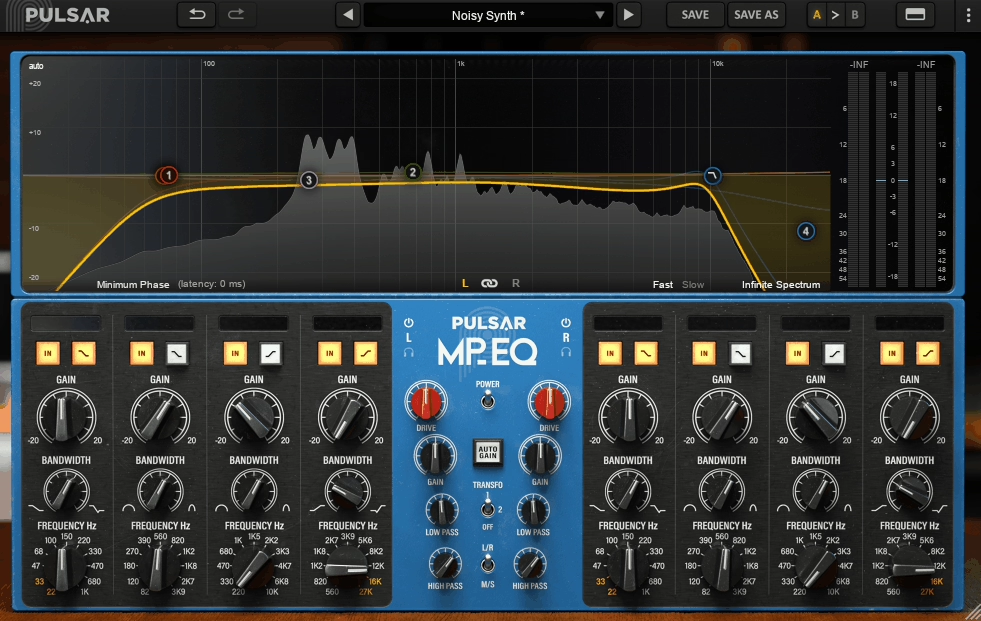
The Drive control adjusts the internal operating level, which determines how hard the virtual tubes and transformers are working. At lower drive settings, the analog character is subtle and the EQ operates with minimal coloration beyond the curve shaping. At higher drive settings, the harmonic content increases, the low-end compression becomes more pronounced, and the overall character shifts from “transparent EQ with analog flavor” to “tube color box that also happens to have EQ bands.”
I tend to keep the drive moderate on most material, but pushing it on individual instruments can produce results that separate saturation plugins don’t quite replicate because the drive interacts with the EQ curves in a program-dependent way.
Linear phase correction
The MP-EQ introduces something genuinely new for a passive EQ emulation: an optional linear phase correction mode that realigns all frequencies after the EQ stage. In standard analog EQ operation (and in most emulations), different frequencies experience different amounts of phase shift as a natural result of the circuit behavior.
This phase shift is part of what gives analog EQs their character, but it can also introduce temporal smearing where transients lose their precision because the frequency components that make up the transient arrive at slightly different times.
The linear phase mode corrects this by realigning all frequencies after the EQ processing, giving you the tonal character of the passive curves combined with the transient precision of a linear phase EQ. In practice, I’ve found this most useful on low-frequency boosts where standard phase behavior can make bass sound slightly bloated or unfocused.
Engaging linear phase while boosting at 47Hz tightens the low end noticeably without changing the tonal quality of the boost.
I should be honest that on most material, the difference between standard and linear phase modes is subtle enough that you have to listen carefully to hear it. On surgical mastering passes and bass-heavy electronic material where phase coherence directly affects the perceived punch and clarity, it’s a meaningful improvement. On a vocal bus or an acoustic guitar, you probably won’t notice the difference. The option is there when it matters, and it doesn’t get in the way when it doesn’t.
Mid/Side processing and practical workflow
The MP-EQ operates in either L/R or Mid/Side modes with fully unlinkable channels, which opens up stereo field shaping that standard EQ can’t achieve. The M/S mode lets you EQ the center image and sides of your stereo signal independently, which is genuinely powerful for mastering work.
I’ve used M/S mode to add air and brightness to the sides while keeping the center image warm and focused, which creates the perception of a wider, more open mix without actually changing the stereo balance. Conversely, I’ve used it to add low-end weight to the mid channel only, tightening the bass center while leaving the sides untouched.
These are the kinds of moves that would require a separate M/S encoder/decoder and two EQ instances in a plugin that doesn’t have built-in M/S support.
On CPU usage, the MP-EQ is genuinely efficient. Pulsar specifically optimized the processing, and despite the complex analog modeling, I’ve been able to run numerous instances in a session without noticeable performance impact. This is a meaningful advantage over some competing passive EQ emulations that are heavier on resources.
The auto-gain feature is also worth mentioning because it compensates for level changes as you boost or cut, which makes A/B comparisons more honest by removing the loudness bias that typically makes any boosted signal sound “better.”
The plugin supports macOS 10.11+ and Windows 7+ in VST2, VST3, AU, and AAX formats, requires iLok for authorization, and offers a free 14-day trial so you can test it before buying.
Where I would use it and who it’s for
I’ve settled into using the MP-EQ primarily on mix bus, mastering chains, vocal groups, and instrument buses, and those are the contexts where it delivers the most value.
Here’s where I’ve found the MP-EQ earns its keep:
- Mix bus: A gentle boost at 47Hz for weight, a small presence lift around 4.5kHz, and a touch of 16kHz air shelf. The parallel topology keeps these moves musical even when the numbers look aggressive, and the tube saturation adds warmth that ties everything together. This is my most common use and where I think the MP-EQ shows its best qualities.
- Mastering: Linear phase mode engaged, Transformer 1 selected, M/S processing with slightly different curves for mid and side. The combination of tonal EQ, phase correction, and stereo field control gives you a self-contained mastering EQ toolkit in a single window.
- Vocal buses: Transformer 2 with moderate drive, a gentle high shelf for air, and the low-mid bands shaping warmth. The tube character flatters vocals in a way that clean parametric EQs don’t, adding body and presence that sounds like it was always there rather than applied after the fact.
- Drum bus: A low shelf boost for kick weight and a presence lift for snare definition, using the parallel topology’s natural restraint to add tone without the boosts feeling heavy-handed. The program-dependent compression in the low end also helps tighten kick drums without a separate compressor.
- Acoustic instruments: Piano, acoustic guitar, and string buses all benefit from the gentle, wide-Q tonal shaping and the inherent warmth of the tube signal path. The EQ character suits acoustic material particularly well because the musical, non-surgical curves enhance rather than correct.
Compared to the UAD Massive Passive emulation, the MP-EQ offers comparable sound quality at a lower price without requiring specific hardware, and the visual curve editor and linear phase mode give it a practical workflow advantage. Compared to the Softube Tube-Tech PE-1C, the MP-EQ is broader in feature set and more flexible for mastering applications.
Compared to a surgical parametric like FabFilter Pro-Q, the MP-EQ does something completely different. It’s a color EQ for tonal shaping rather than a corrective tool, and trying to use it as a Pro-Q replacement will frustrate you. Used for its intended purpose, it’s one of the most musical EQ plugins I’ve encountered.
The MP-EQ won’t be the right choice for every EQ task. If you need tight notch filtering, precise resonance removal, or corrective work on problem frequencies, a parametric EQ is still the right tool. And if you want a completely transparent, clinical EQ with no character, the MP-EQ’s analog modeling is the opposite of what you’re looking for.
But if you want an EQ that makes things sound warmer, bigger, and more polished through broad tonal shaping and tube saturation, with the workflow speed of a modern plugin and the musical character of vintage passive hardware, I think the MP-EQ is one of the best options available right now. It’s replaced three separate plugins on my master bus template (a Pultec emulation, a separate saturator, and a M/S utility), and after several months of daily use, it’s earned its place permanently.

Hello, I’m Viliam, I started this audio plugin focused blog to keep you updated on the latest trends, news and everything plugin related. I’ll put the most emphasis on the topics covering best VST, AU and AAX plugins. If you find some great plugin suggestions for us to include on our site, feel free to let me know, so I can take a look!