
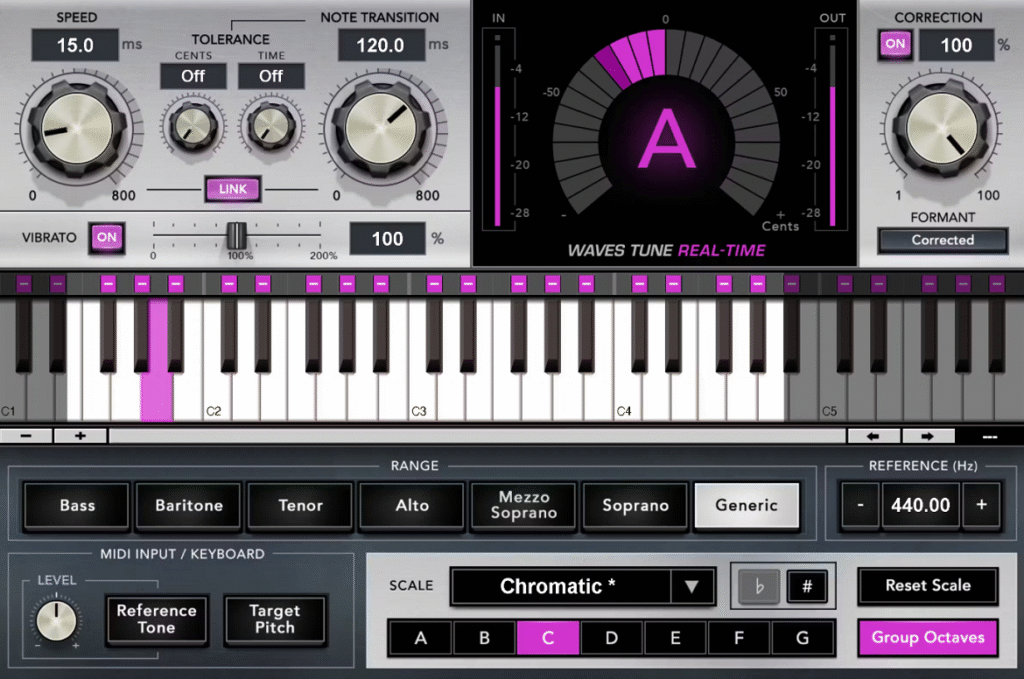
Choosing the best pitch correction plugin isn’t just about hitting the right notes, it’s also about finding a tool that fits the way you like to create.
If you want the clear tracking of Softube Vocal Tuner, the reliable live performance of Waves Tune Real-Time, or the modern workflow of Slate Digital MetaTune and Brainworx bx_crispytuner, there are more choices than ever.
You can pick from precise tools like Antares Auto-Tune Pro 11 and Melodyne 5 Studio, or try free options like Melda MAutoPitch, GSnap, and Graillon 3. There’s something for every budget and style.
I’ve tested the top vocal tuning plugins for pop hooks and beyond, from the advanced AI features in Auto-Tune 2026 to the best free options, to help you find the one that works best for your workflow:
| Plugin Name | Best For | Engine Type | Key Strength | My Verdict | Pros | Cons |
|---|---|---|---|---|---|---|
| 1. Softube Vocal Tuner | Vocal tracking | Real-time monophonic | Zero-latency tuning | Best Vocal tracking | Low latency, clear metering | No graphical editing |
| 2. Waves Tune Real-Time | Live vocals | Real-time scale-based | Instant correction | Live-safe pitch control | MIDI input, formant safe | Limited offline control |
| 3. Slate Digital MetaTune | Pop & hip-hop | Real-time adaptive | Hard-tune precision | Best Auto-Tune | Note stabilizer, groups | No curve editing |
| 4. Brainworx bx_crispytuner | Natural correction | Hybrid auto/manual | Clean tonal shaping | Minimal-effort tuning | Auto key detect | Basic visual editor |
| 5. Antares Auto-Tune Pro 11 | Studio vocals | Hybrid real-time/graph | Full pitch control | Best Overall | Graph Mode, Flex-Tune | Complex workflow |
| 6. Celemony Melodyne 5 Studio | Deep editing | Offline polyphonic | Note-level control | Unmatched editing depth | Polyphonic, microtuning | Steep learning curve |
| 7. Melda MAutoPitch | Free tuning | Real-time automatic | Fast basic correction | Best free utility | Formant, stereo width | Rough interface |
| 8. GVST GSnap | Manual control | Auto + MIDI driven | Exact note targeting | Flexible free option | MIDI pitch input | Weak detection on mixes |
1. Softube Vocal Tuner – Best Vocal tracking

Softube Vocal Tuner doesn’t make your vocals sound obviously auto-tuned. Instead, it works quietly in the background, fixing pitch issues without making itself noticeable.
I recommend this plugin if you want your vocals to fit the key perfectly without sounding artificial. It offers two pitch correction methods for different needs, and both sound clear. The metering shows you exactly what’s happening to your vocal track in real time.
This plugin stands out because of how it works during recording sessions. Low Latency mode lets you tune vocals as you record, saving time later. You also avoid long delays that can mess up your singer’s timing.
- Real-Time Automatic Pitch Correction
I don’t have to wait for the plugin to analyze or manually draw correction curves. You just turn it on and adjust the correction strength until it sounds good. The automatic detection is quick and fixes pitch issues before they affect your mix.
- Dual Correction Methods for Different Styles
This autotune plugin offers two pitch correction options, and you can choose the one that fits your song. One method is better for natural-sounding corrections that keep the singer’s style. The other gives tighter, more noticeable tuning, which is great for modern pop and hip-hop when you want a polished sound.
- Low Latency Mode for Tracking Sessions
Recording vocals with pitch correction used to cause distracting delays. Softube’s Low Latency mode is made for tracking, so your singer hears the corrected pitch in their headphones right away, without lag.You can use this during sessions to help singers stay confident and avoid technical problems.
- Precise Visual Metering
The plugin gives you clear visual feedback about what it’s doing to your vocal pitch. You can see which notes are corrected and by how much. This takes the guesswork out of balancing a natural performance with clean tuning. The meters help you set the right parameters instead of just guessing.
- Hard Tune Effects Option
If you turn up the correction settings, Vocal Tuner can create the robotic effects you hear in modern music. It’s helpful to have this option without needing another plugin. You can go from subtle fixes to full T-Pain effects with one tool.
2. Waves Tune Real-Time – Best for Live vocals
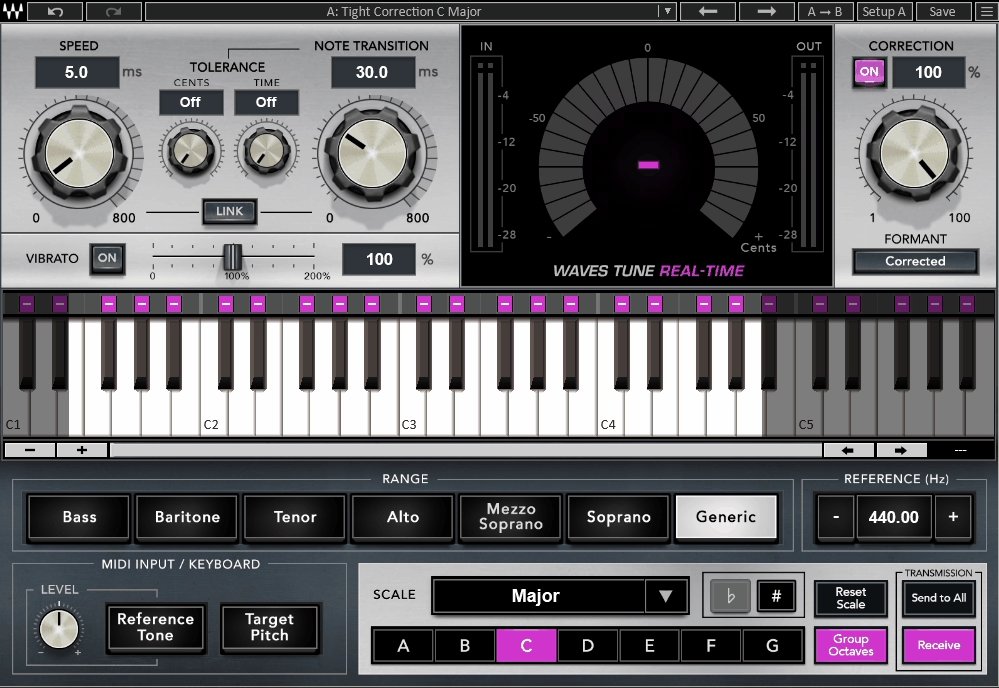
Waves Tune Real-Time earns its place among the best pitch correction plugins because it corrects your pitch as you record or perform live without making you edit anything later or wait for results.
You don’t have to edit anything later or wait for results. You sing, it tunes, and you hear the changes right away in your headphones or monitors. It’s great for recording sessions when singers need a confidence boost or for live shows where pitch needs to be fixed on the spot.
With Waves Tune Real-Time, you can choose between a natural-sounding correction or the well-known auto-tune effect. The plugin lets you shape the vocal sound the way you want, rather than locking you into one style.
Here are some of the features you get:
- Instant Pitch Correction with Zero Latency
This autotune VST plugin listens to your voice as you sing and corrects the pitch right away. There’s no delay between your singing and what you hear. I’ve worked with singers who felt much more comfortable knowing they sounded in tune while recording.
It also works well on stage with systems like Waves SoundGrid, so live engineers can fix pitch issues before the audience hears them.
- Over 40 Scales Plus Custom Note Selection
There are over 40 built-in scales, including major, minor, and other modes. What I really like is that you can turn individual notes on or off right in the plugin.
If you use a non-standard tuning or want to skip certain notes in your song’s key, you can set the plugin to only correct to the notes you want. This helps prevent vocals from being pulled to the wrong pitches.
- Speed, note transition, and tolerance controls
These three settings control how the correction works. Speed sets how quickly the pitch moves to the target note. Note transition gives a short delay before correction starts, so slides and scoops still sound natural.
Tolerance sets how far and for how long a note can be off-pitch before the plugin corrects it. I adjust these settings depending on the singer and the song. Fast speed with low tolerance gives a strong auto-tune effect, while slower speed and higher tolerance keep the sound more natural.
- Formant Correction & Vibrato Adjustment
Pitch correction can change a voice’s natural tone if you’re not careful. Waves Tune Real-Time has formant correction to keep the vocal timbre sounding natural, even when you change the pitch. The vibrato control lets you decide how much natural pitch wobble stays in the performance. You can lower it for a smoother sound or leave it as is to keep the vocal lively.
- MIDI Control for Creative Tuning
You can send MIDI notes into the plugin to tell it exactly which pitches to target. This turns it into a creative tool where you play a melody on your keyboard, and the vocal follows it.
3. Slate Digital MetaTune – Best for Pop & hip-hop
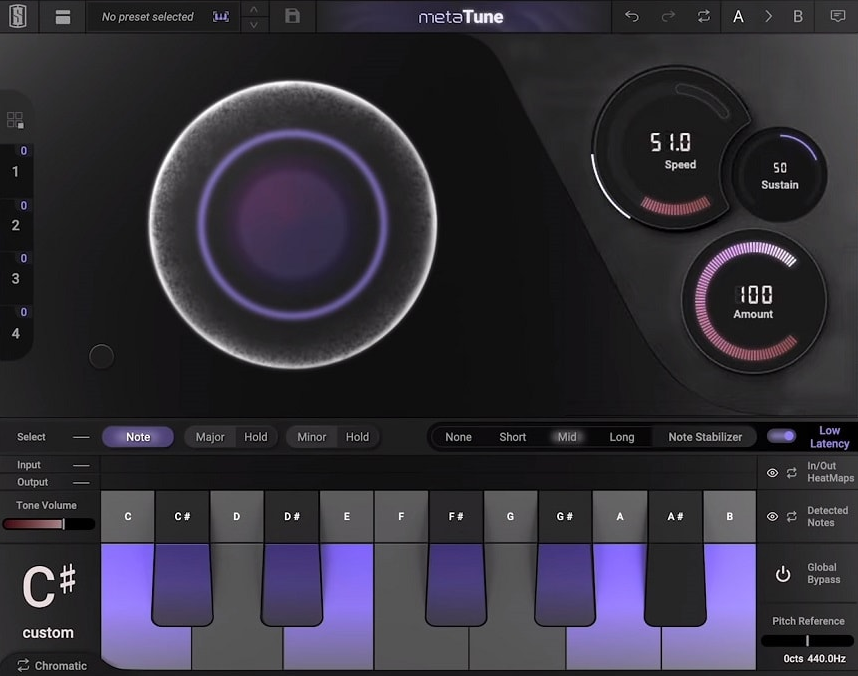
MetaTune sits among the top vocal tuning plugins for pop hooks because it lets you switch quickly from subtle pitch correction to strong tuning effects, all without dealing with complicated menus. The three main knobs make it easy to use, but there are also deeper controls that help fix real vocal tuning issues.
You can use MetaTune for anything from R&B lead vocals to rap doubles. It does a great job with both natural-sounding correction and strong, hard-tuned effects.
- Speed Control with Negative Values
The Speed control sets how quickly MetaTune adjusts vocals to the right pitch. While most tuners only go down to zero, MetaTune lets you use negative values for robotic, hard-tuned effects that work well in modern pop and hip-hop.
I recommend using slower speeds, around 100-200ms, if you want smooth correction that keeps the singer’s natural sound. For a T-Pain style effect, set Speed to a negative value to get that sound right away, without needing extra effects.
- Note Stabilizer for Vibrato Control
This feature solves the main problem with real-time tuning. The Note Stabilizer removes pitch flutter by ignoring short variations under 40ms, 80ms, or 200ms, depending on your chosen setting.
- HeatMaps Visual Pitch Display
With MetaTune, you don’t have to rely only on your ears. The dual HeatMap view shows where the vocalist sang and where MetaTune made corrections, side by side. This helps me see if the key is wrong or if some notes need manual fixing.
The detected notes overlay shows which piano keys the vocal hits most often, so you can pick the right scale much faster.
- Groups for Multi-Track Tuning
If you’re tuning stacked harmonies or doubles, the Groups feature lets you link several MetaTune plugins across different tracks. When you change the Speed on one, all the grouped plugins update at the same time.
This feature can cut your tuning time in half when you have three to five vocal layers that need the same settings.
- Built-In Doubling Effect
MetaTune has a doubler that makes two extra voices from your corrected vocal. You can adjust the stereo width and blend, so you get thick, wide vocals without needing another chorus plugin. This is great for pop hooks when you want instant thickness without extra setup.
4. Brainworx bx_crispytuner – Best Hybrid auto/manual

I like bx_crispytuner because it corrects pitch without making vocals sound stiff or robotic. It was first made by CrispyAudio and later picked up by Brainworx. The plugin is designed to tune vocals cleanly while keeping your voice sounding natural.
You get three separate control modes that adjust to whatever level of detail you need. The plugin comes bundled with bx_crispyscale, a separate tool that automatically detects the key and root note of your material. That can save you a lot of time because you don’t have to guess or manually set the scale every time you start tuning a new track.
- Three Control Modes for Different Workflows
You can pick between Simple, Advanced, and Graphical modes based on how much control you need. Simple mode just has two knobs. Advanced mode lets you adjust formant settings and how strong the pitch correction is. Graphical mode gives you a visual editor to manually fix notes if the automatic correction isn’t perfect.
- Harmonic Enhancement Combined with Tuning
bx_crispytuner does more than just correct pitch; it also includes harmonic enhancement tools that add clarity and definition to your vocals. This combination lets you shape the tone and fix tuning problems in a single plugin, rather than stacking multiple processors. I’ve noticed it works especially well on vocals that sound a bit dull or lack presence in the mix.
- Automatic Key and Scale Detection
The bx_crispyscale plugin checks your audio and finds the key for you. After it figures out the root and scale, bx_crispytuner uses that info to correct the pitch. This is really helpful if you’re working with singers who change keys or when you need harmonies to stay in tune with a certain scale.
- Minimal Effort for Professional Results
This plugin stands out because it’s easy to get clean, clear pitch correction with very little effort. Even if you’re new to tuning plugins, you can use Simple mode and get great results right away. If you’re more experienced, the advanced modes give you the control you need for complex vocal work without needing other tools.
5. Antares Auto-Tune Pro 11 – Industry benchmark

Auto-Tune Pro 11 has been one of the top vocal tuning plugins for pop hooks and professional production for decades, and it still shows why it remains the industry standard.
You get full control with this plugin. Whether you want a subtle correction that keeps every detail or the classic robotic effect, Auto-Tune Pro 11 does both easily. The workflow is smooth because you’re not just fixing pitch, you’re shaping the whole vocal sound.
The graphical editor lets you fix problem notes one by one, while the real-time modes help you stay creative during recording.
- Graph Mode for Surgical Editing
If you want full control, use Graph Mode. You can see each pitch as a curve and adjust notes by hand. You can draw in pitch changes, set vibrato depth, and smooth out note transitions.
With this detail, you can fix a single shaky note without changing the rest of the phrase. This can save you a lot of time on tough vocal tracks.
- Auto Mode with Low Latency Performance
Auto Mode gives you real-time pitch correction with very low latency, as little as 1-2 milliseconds. That said, this is great for live monitoring while recording. The Retune Speed goes from 0 to 400, so you can get anything from natural-sounding correction to the classic hard-tuned effect.
I usually set it between 20 and 50 for clear, natural correction, and lower it to 0-10 for the signature Auto-Tune sound. The Humanize feature helps keep short notes sounding natural by allowing some pitch variation.
- Flex-Tune Technology
Flex-Tune is what makes Auto-Tune Pro different from basic pitch correction. It only fixes held notes and leaves natural slides and bends alone.
This way, you get clean tuning but keep the emotion in the performance. Singers who use slides and expressive moves sound more natural because Flex-Tune knows what to correct and what to leave alone.
- Classic Mode Algorithm
Classic Mode brings back the original Auto-Tune sound that shaped modern vocal production. Use this mode when you want the famous effect heard in pop, hip-hop, and electronic music.
With throat length modeling and formant correction, you can change pitch without making the vocals sound fake or overly processed.
6. Celemony Melodyne 5 Studio – Best Deep editing

Melodyne 5 Studio stands apart from every other best pitch correction plugin on this list because it does more than fix pitch, letting you change the sound in very detailed ways that other tools simply cannot match.
You’re not just dragging notes up or down but working with individual harmonics, formants, and timing elements that other plugins treat as locked-in parts of the audio. The learning curve is real, but once you understand how Melodyne thinks, you can fix things that seem impossible in other tools.
- Direct Note Access for Polyphonic Editing
This is where Melodyne leaves other pitch tools behind. You can edit individual notes inside chords and polyphonic recordings like guitar strums or piano chords. If one note in a strum is flat, you can pitch it up without touching the other notes.
Most pitch plugins only work with one note at a time, so being able to edit chords opens up new options for live instruments and complex harmonies.
- Independent Formant and Pitch Control
Melodyne lets you change pitch and formant separately, so you can adjust how high or low a note is without changing the voice’s character. This is important for big pitch fixes that still need to sound natural.
It’s great when a singer’s pitch drifts but their tone is perfect. You can also deliberately shift formants to make a voice sound darker, brighter, or even change gender characteristics for creative effects.
- Note-by-Note Timing Adjustments
Besides pitch, Melodyne lets you change the timing of single notes without touching the others. You can tighten up a slow vocal phrase or move a word forward to fit the groove.
These timing edits feel musical because you’re moving real notes, not just stretching the audio. This keeps things sounding natural while fixing timing issues that might otherwise need a retake.
- Custom Scale and Microtuning Support
If you use non-standard tuning, Melodyne supports custom scales and microtuning. You can set your own scale or use non-Western tunings that other plugins can’t handle.
This is great for world music, experimental projects, or any time you need more control over tuning than the usual 12-note scale.
- Advanced Note Separation Controls
Melodyne’s note separation settings let you decide how the software splits audio into notes. You can make it catch fast runs or ignore small pitch changes that are meant to be there.
This control means you don’t have to fight the software’s idea of what counts as a note. It’s especially helpful with expressive singers or instruments that have natural vibrato.
7. Melda MAutoPitch – Best Free tuning

Melda Production made this plugin for fast, clean pitch correction. I’ve found MAutoPitch works well on both vocals and single-note instruments like bass or lead synths.
You pick your key, adjust a few sliders, and you’re correcting pitch in seconds. It’s perfect when you need to tighten up a vocal take without spending ten minutes tweaking settings.
MAutoPitch also has creative tools you wouldn’t expect from a free plugin. The formant shifter changes the voice’s character, and the stereo expansion adds width without extra plugins. It’s a small plugin that does more than you’d expect.
- Four Scale Types with Chromatic Option
You can pick chromatic, major, minor, or pentatonic scales to fit your song. The chromatic option is handy for complex melodies that don’t stay in one scale.
What makes this even better is that you can add or remove specific notes from any scale. If you’re working in a mode or want to avoid certain pitches, you just click them off.
- Real-Time Pitch Correction with Speed Control
MAutoPitch works in real time, so you hear changes right away as the vocal plays. The speed slider sets how quickly it corrects pitch. Lower speeds sound more natural and subtle, so most people won’t notice the correction.
Higher speed settings create that recognizable auto-tune effect. I would use this for obvious, stylized sound on certain vocal lines. The control is simple, but it offers a wide range from transparent tuning to creative effects.
- Formant Shift for Vocal Character Changes
The formant control is one of my favorite features. You can shift the vocal timbre without changing the actual pitch. Moving it down makes a voice sound deeper and fuller. Pushing it up creates a brighter, thinner character. This is great for backing vocals when you want them to sit differently in the mix, or for creative effects that change the voice without obvious pitch shifting.
- Stereo Expansion for Added Width
MAutoPitch has a stereo expansion feature that makes vocals or instruments sound wider. It works well on doubled vocals or harmonies to make them feel bigger, without needing another plugin. It’s subtle but works well, especially for background parts that need to stand out from the lead.
8. GVST GSnap – Best free Manual control

GSnap proves that the best pitch correction plugin doesn’t have to cost anything, standing out by offering both automatic correction and manual note targeting that most free options skip entirely.
I’ve used GSnap for quick vocal fixes and for the robotic T-Pain effect by turning up the settings. It works well for both, and since it’s free, it’s a great choice if you’re new to pitch correction or on a budget.
- Manual Note List & MIDI Control
This is where GSnap separates itself from other free options. You can type specific notes like C4, E4, and G4, and force the plugin to correct only to those pitches. Or you can plug in a MIDI keyboard and play the melody you want the vocal to follow in real time. This is helpful when you need a vocal to match a chord progression that isn’t in a standard scale. It’s a level of control you usually don’t get for free.
- Attack & Release Controls
GSnap gives you attack and release knobs that shape how fast the correction kicks in and fades out. If you set a slow attack, the plugin waits a bit before pulling the pitch, which keeps the vocal sounding more natural.
Fast attack and fast release give you the strong autotune effect. Adjusting these two settings makes a big difference in whether your correction sounds smooth or robotic.
- Pitch Detection Window
The detection window setting decides how much pitch error GSnap will fix. A narrow window only corrects big mistakes, while a wide window fixes even small pitch changes.
- Threshold & Sensitivity
The threshold knob sets the minimum pitch error before correction starts. This means tiny expressive bends and vibrato can pass through untouched if you want them to. You’re not forced to flatten every single note. It’s good when working with singers who have good control but just need a safety net on a few problem spots.
Also, check out Graillon 3 Free Edition as another great free alternative!
FAQs:
What is Auto-Tune used for in music?
Auto-Tune corrects vocal pitch so every note lands on the right frequency. At subtle settings it invisibly fixes small errors to make a take sound polished. At extreme settings with fast retune speeds it becomes a creative effect that gives vocals the robotic melodic quality heard in modern rap and pop.
Why does Auto-Tune sound robotic?
Auto-Tune sounds robotic when the retune speed is set very fast, usually zero. This forces every note to snap instantly to the nearest pitch in the scale with no natural slide between notes. That unnatural speed removes human imperfections like vibrato and pitch drift that make a voice sound organic.
Can Auto-Tune make your voice deeper?
No, Auto-Tune does not change the depth or tone of your voice. It only corrects pitch by moving notes to the nearest correct note in the key you set. To make your voice deeper you need a pitch shifter that lowers the fundamental frequency, or formant shifting to darken the vocal character instead.
Auto-Tune vs pitch correction - What's the difference?
Auto-Tune is a brand name for one pitch correction plugin by Antares. Pitch correction is the broader term for any tool that fixes vocal pitch including Melodyne and Waves Tune. When people say autotune they mean the obvious robotic effect while pitch correction usually implies subtle invisible fixing.
Can Auto-Tune be used in live performance?
Yes, Auto-Tune is regularly used live. Antares Auto-Tune Real-Time and Waves Tune Real-Time are designed for low-latency live vocal processing. The plugin runs on a laptop in the vocal chain or through dedicated hardware units. Set the key of each song beforehand and it corrects pitch as you perform.

Hello, I’m Viliam, I started this audio plugin focused blog to keep you updated on the latest trends, news and everything plugin related. I’ll put the most emphasis on the topics covering best VST, AU and AAX plugins. If you find some great plugin suggestions for us to include on our site, feel free to let me know, so I can take a look!