
Bitcrushers occupy a strange corner of audio processing where the whole point is to make things sound worse, and somehow that ends up sounding better.
The concept is straightforward enough: reduce the bit depth, lower the sample rate, and let the resulting artifacts do the talking. But the plugins that actually do this well are surprisingly rare, because the difference between musical degradation and unlistenable noise is thinner than most producers realize.
What I’ve noticed after working with bitcrushers across different projects is that the algorithm behind the crush matters far more than the number of controls on the interface.
Two plugins can both reduce audio to 8 bits and sound completely different from each other, because the quantization method, the anti aliasing behavior, and the way the plugin handles the transition between clean and destroyed signal all contribute to the final character. Some bitcrushers sound clinical and harsh. Others sound warm and almost analog despite being inherently digital effects.
This list covers a genuine range of approaches, from plugins that meticulously recreate the exact signal path of vintage samplers to ones that invent entirely new forms of digital destruction that didn’t exist before.
I’ve included options at every price point, including a free plugin that competes with paid alternatives, and I’ve tried to be honest about where each one excels and where it falls short. Not every bitcrusher works for every situation, and understanding the differences between these tools will save you from buying something that doesn’t fit your workflow.
1. D16 Decimort 2
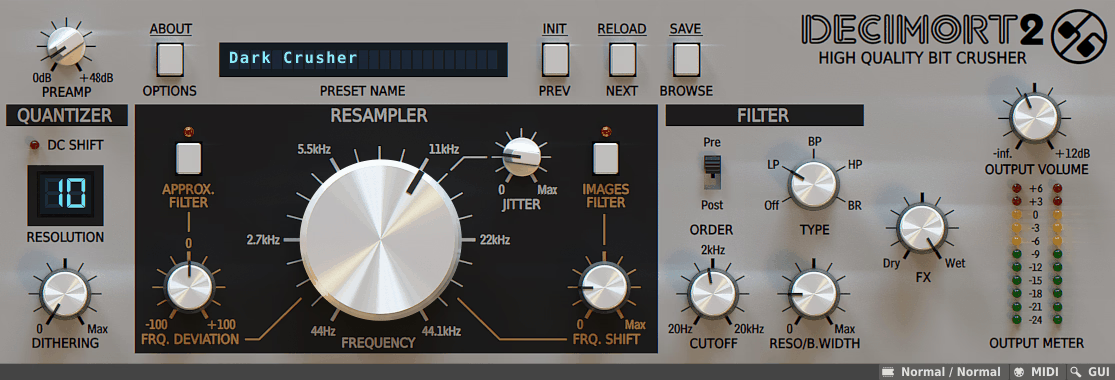
D16 Group earned a reputation in the plugin world for their meticulous hardware recreations, and Decimort 2 continues that tradition by approaching bitcrushing from an entirely different angle than most competitors.
Rather than simply reducing bit depth and calling it a day, the plugin simulates the complete AD/DA conversion path found in vintage sampling hardware, which is why it sounds noticeably different from the stock bitcrusher in your DAW. The Polish developers clearly spent significant time studying the actual circuits inside classic Akai and E-MU units, and it shows in the results.
I think the best way to describe Decimort 2 is that it makes things sound expensive while technically making them sound worse. There’s a fatness and warmth to the processing that sits beautifully in a mix, particularly on drums and bass, which is exactly why hip hop producers have made this plugin a near essential tool.
At around $59, it’s reasonably priced for the quality on offer, and D16’s track record with long term support and updates means you’re buying something that will keep working for years.
- Zero Internal Aliasing with Dual Anti Alias Filters
The single most important technical distinction of Decimort 2 is that the plugin introduces absolutely no internal aliasing of its own. The only aliasing artifacts you hear are the emulated aliasing from the vintage sampler models, which means you get all of the desirable grit and coloration without any of the unmusical digital garbage that cheaper bitcrushers produce.
This is accomplished through an ultra accurate resampling algorithm that functions as an ADC emulation, ensuring no stray harmonics appear above 22kHz in the output.
Two optional anti alias filters give you precise control over the aliasing spectrum. The Approximative pre filter is a steep low pass filter tied to the resampling frequency that removes harmonic content above it before the signal gets crushed, preventing harsh artifacts from entering the signal path in the first place.
The Images post filter is synchronized with the resampler and controls how much aliasing imagery appears above the resampling frequency after processing.
I found the interaction between these two filters to be where Decimort 2 really separates itself from the competition, because you can sculpt exactly how clean or dirty the aliasing sounds rather than simply accepting whatever the algorithm produces.
- Adjustable Jitter for Organic Harmonic Distortion
This is a feature that was essentially unheard of in bitcrusher plugins before Decimort 2 introduced it. The Jitter control adds short period random fluctuations to the resampling frequency, producing a type of harmonic distortion that mimics the behavior of worn or imperfect potentiometers in aging hardware.
The result is a subtle, organic wavering in the crushing effect that makes the processing feel less static and more alive, as though the plugin is an actual physical device with real components that aren’t perfectly calibrated.
Combined with the controllable dithering that lets you add noise to mask quantization steps, and two distinct quantization modes that each produce their own dynamic response characteristics, the total number of variables in Decimort 2’s signal path is genuinely impressive for a bitcrusher.
I appreciate that D16 also included independent stereo channel processing, which allows you to set completely different crushing parameters for the left and right channels. This opens up creative stereo widening possibilities that go well beyond what you’d expect from a plugin in this category.
- Analog Modeled Multi Mode Filter Section
Beyond the resampling engine itself, Decimort 2 includes a four mode analog modeled filter with adjustable resonance that can be placed either before or after the bitcrushing stage.
The filter types cover low pass, band pass, high pass, and band reject, and the analog modeling gives them a warmth and smoothness that complements the digital destruction happening elsewhere in the signal chain. Placing the filter in pre mode shapes what frequencies enter the crusher, while post mode lets you sculpt the output after the damage has been done.
The plugin ships with over 100 tag based presets organized by character and use case, many of which emulate specific vintage hardware sampling units.
The MIDI learn functionality covers every parameter for hardware controller integration, and the interface is available in multiple GUI sizes with HiDPI support. Decimort 2 runs as VST, VST3, AU, and AAX on both Windows and macOS with 64 bit internal processing throughout.
Get the Free Plugin Starter Kit
The genuinely useful free DAWs and plugins worth installing. No filler. Straight to your inbox.
2. Tritik KrushPro
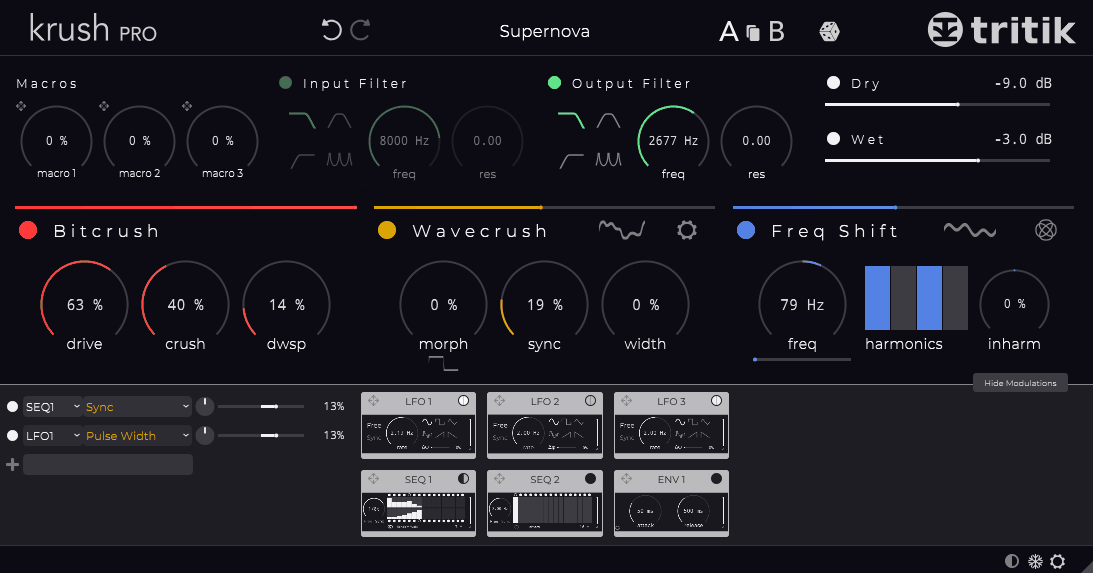
Tritik took the approach of building on something that already worked beautifully and expanding it in every direction. If you’ve used their free Krush plugin, KrushPro keeps that same intuitive core but surrounds it with two additional destruction modules, a vastly expanded modulation system, and full stereo modulation capabilities that make it one of the most creatively deep bitcrushers available.
This isn’t a subtle upgrade. It’s a complete transformation that turns a simple crusher into a full blown sound design environment.
The thing that initially drew me to KrushPro was how quickly you can get from opening the plugin to hearing something genuinely interesting.
Despite the expanded feature set, Tritik managed to keep the workflow fast and visual, with drag and drop modulation routing and a clean interface that never feels cluttered even when you’re running complex modulation chains. At €49, it represents strong value considering the sheer range of effects it can produce.
- Three Reorderable FX Modules with Independent Wet/Dry
KrushPro’s signal path runs through three distinct destruction modules that can be rearranged in any order via drag and drop. The original Bitcrush module combines a crunchy drive stage with bit depth and sample rate reduction, delivering everything from warm digital coloration to full signal annihilation.
The Wavecrush module is built on an innovative wavesets processing algorithm that substitutes and warps successive audio chunks, producing corrosive distortions and sonic dislocations that sit in a completely different territory from traditional bitcrushing.
The third module is a dual frequency shifter and ring modulator that can switch between both modes, adding metallic, inharmonic, and alien frequency content to your signal. The horizontal bars above each module aren’t just decorative; they function as independent dry/wet controls per module, which means you can blend the intensity of each effect stage separately.
I found the most interesting results came from putting Wavecrush before Bitcrush, then feeding the output into the ring modulator, but the ability to reorder these opens up a huge number of signal flow possibilities.
- Full Stereo Modulation Architecture
Every modulation source in KrushPro operates in true stereo, which is the feature that makes this plugin genuinely unique among bitcrushers. The system includes three LFOs with six waveforms each, two 16 step sequencers, and a stereo envelope follower, all of which can be routed to any parameter through a dedicated modulation matrix.
Each modulation slot has its own stereo balance knob that controls how the modulation signal is distributed between left and right channels, meaning you can have a parameter being modulated differently on each side of the stereo field.
The LFOs can operate in free running or DAW synced modes, and the step sequencers include a dedicated stereo mode button for creating rhythmic left/right modulation patterns.
What really pushes the modulation into deep territory is that modulator parameters can themselves be modulated, allowing you to build chains where an LFO’s speed is controlled by a step sequencer whose output is balanced differently across the stereo field. Three macro knobs let you control multiple parameters simultaneously for performance friendly operation.
- Dual Input/Output Filter Sections
Both the input and output of KrushPro’s signal chain are equipped with multi mode filters that include low pass, high pass, band pass, and comb filter options. The analog modeled LP and HP filters provide warm, musical roll offs for shaping what goes into and comes out of the destruction modules, while the comb filter adds resonant, pitched coloring that can produce interesting harmonic effects when combined with the ring modulator. Having filters on both ends means you can remove harsh high frequencies before they hit the crusher and then further shape the output afterwards.
KrushPro includes a generous preset library demonstrating the wide range of effects possible, and the entire plugin interface supports resizable windows that adapt to different screen sizes. The plugin is available in VST, VST3, AU, and AAX formats for both macOS and Windows.
3. SSL DigiCrush
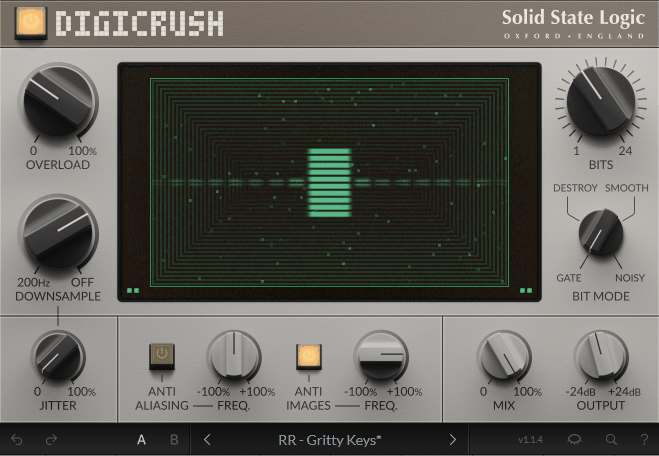
When Solid State Logic releases a bitcrusher, it gets your attention, because this is a company whose name has been synonymous with pristine audio quality for decades.
SSL DigiCrush represents SSL stepping into lo fi territory for the first time, and rather than treating it as a novelty, they’ve applied the same engineering rigor to degradation that they bring to their console emulations and dynamics processors. The plugin is built around recreating the specific digital character of early samplers and rack effects from the 1980s and 90s that defined entire genres of music.
What I appreciate about DigiCrush is that it feels considered rather than gimmicky.
The monochrome CRT style display at the center of the interface isn’t just an aesthetic choice; it provides detailed visual feedback on exactly what the processing is doing to your signal, which is genuinely useful when you’re trying to dial in a specific amount of destruction.
SSL clearly studied the actual sounds that producers associate with those eras, because the plugin nails everything from the gritty 12 bit swagger of boom bap to the crunchy 8 bit Amen breaks of early jungle.
- Four Quantization Modes with Overload Circuit
DigiCrush provides four distinct bit reduction styles selectable through the Bit Mode control: Gate, Destroy, Smooth, and Noisy. Each mode fundamentally changes how the bit depth reduction interacts with your signal’s dynamics, producing dramatically different textures from the same bit depth setting. Gate creates gated, choppy artifacts at low bit depths.
Destroy is the most aggressive mode, pushing toward total signal annihilation. Smooth rounds off the quantization steps for a warmer, more musical result. Noisy adds a layer of broadband noise that mimics the elevated noise floor of cheap vintage converters.
The Overload control simulates the technique of driving signal hard into an analog to digital converter to maximize signal to noise ratio, which was a common practice with early samplers that became an iconic production technique in its own right.
At lower settings, it produces the characteristic driven drum sound associated with boom bap production. At higher settings, it pushes into full signal decimation with reactive digital distortion that responds dynamically to your input level.
I found the Overload particularly effective on drum busses where a touch of input saturation before the bit reduction adds weight and presence without sounding harsh.
- Jitter and Anti Aliasing/Anti Imaging Filter Pair
The Jitter control introduces random fluctuations to the sample rate, generating organic harmonic distortion where the signal flexes and moves in complex ways rather than sitting statically at a fixed reduction level.
This single parameter adds a dimension of movement and life to the crushed signal that makes DigiCrush feel less like a mathematical process and more like an unpredictable piece of aging hardware.
The anti aliasing filter minimizes the harsh digital artifacts produced during downsampling, while the separate anti imaging filter addresses the reflections that appear above the resampling frequency.
Having both filters available as independent on/off options means you can choose exactly how much of the raw digital mess you want to retain. Some styles benefit from the full unfiltered chaos, while others need the filters engaged to keep things musical.
The plugin supports VST2, VST3, AU, and AAX formats with native Apple Silicon support and comes with a 14 day free trial through Roland Cloud.
4. MAGIX colorFX Bitcrusher (part of bundle)
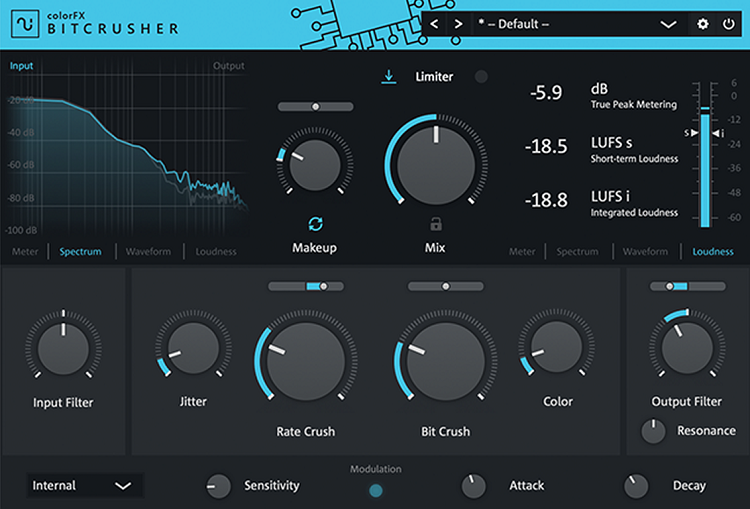
This plugin arrives as part of the MAGIX colorFX Suite alongside a tape saturation unit and a tube distortion, and while it doesn’t generate the same online buzz as some of the bigger names on this list, it quietly delivers one of the more practical bitcrushing experiences available.
MAGIX built the colorFX Bitcrusher around the idea that bitcrushing should serve your mix rather than dominate it, and the result is a plugin that excels at adding focused digital texture to individual tracks, groups, and even master busses without turning everything into unrecognizable noise.
The learning curve here is practically nonexistent. You open it up, start turning knobs, and the changes are immediately audible with zero latency. I found myself reaching for this one more often than expected because of how quickly it integrates into a mixing workflow compared to more complex options.
When you just need a touch of digital grit on a synth pad or some extra crunch on a hi hat bus, colorFX Bitcrusher handles it without requiring you to spend ten minutes navigating a complicated interface.
- Free Parameter Modulation with Real Time Response
The modulation system built into colorFX Bitcrusher allows you to link any parameter to dynamic changes that evolve with your track in real time.
This means the bit depth, sample rate, and distortion amount can shift and breathe rather than sitting at fixed values, which keeps the crushing effect sounding musical and alive rather than static and mechanical.
You can tie the modulation to create subtle movement on a bus for added energy, or use it to build tension during breakdowns where you want the destruction to escalate gradually.
The real time parameter response operates with no perceivable latency, so what you hear from the speakers matches exactly what you’re doing with the controls. This responsiveness makes colorFX Bitcrusher particularly useful for live tweaking and performance situations where you need instant feedback.
Combined with the well curated presets that serve as practical starting points rather than extreme demonstrations, the modulation system gives you a lot of creative range from what appears to be a simple interface.
- Professional Metering and Mix Integration Tools
Where most bitcrushers leave you guessing about what’s happening to your signal levels and frequency content, colorFX Bitcrusher includes professional visualization covering input and output levels with spectrometer and loudness metering displays.
This might seem like a minor detail, but when you’re using a destructive effect that can radically change your signal’s dynamics and frequency balance, having accurate metering built directly into the plugin prevents you from accidentally ruining your gain staging or introducing problems that only become apparent later in the mastering stage.
The plugin is designed to work effectively on grouped signals and master busses as well as individual tracks, which is an area where many bitcrushers fall apart because the artifacts become overwhelming when applied to complex, dense material.
By carefully dialing in the mix between clean and processed signal and using the metering to monitor the results, you can add cohesive coloration across an entire drum bus or even a full mix. colorFX Bitcrusher runs as VST2, VST3, and AU and is part of the colorFX Suite priced at $99 which includes all three plugins in the bundle.
5. United Plugins BITPUNK
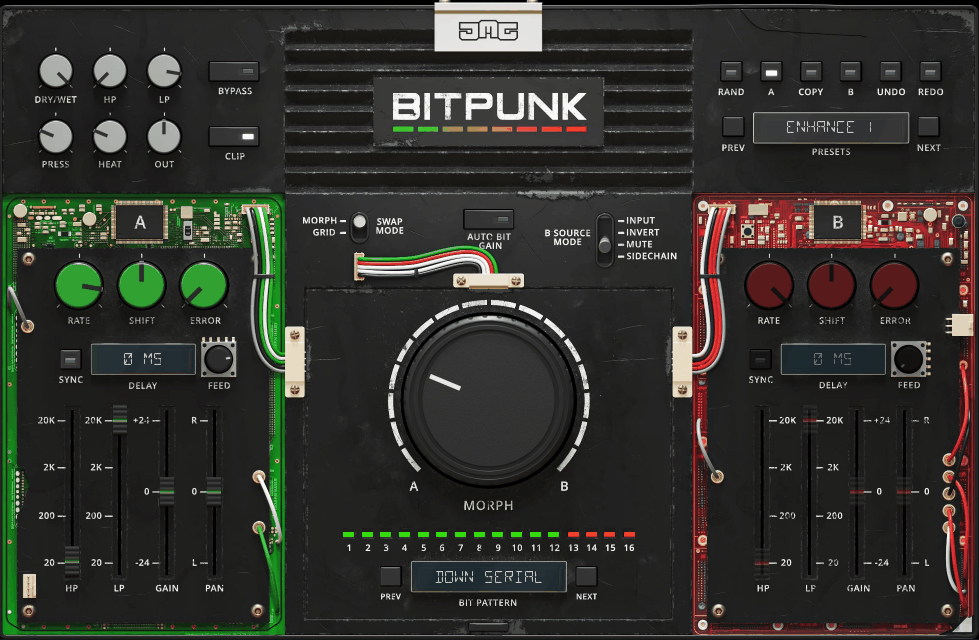
Everything about this plugin is designed to go further than traditional bitcrushing. JMG Sound developed BITPUNK under the United Plugins banner with a philosophy that reducing bit depth is only the beginning of what you can do when you start treating audio as raw binary data.
The plugin approaches digital degradation from an angle that most other tools in this category don’t even consider, opening up a territory of sonic manipulation that produces results you simply cannot achieve with conventional crushers.
I want to be straightforward about something: BITPUNK is not a plugin for everyone. If you want to quickly add some vintage crunch to a drum loop, there are simpler options on this list that will serve you better.
But if you’re the kind of producer who gets excited about circuit bent aesthetics and unpredictable sonic collisions, BITPUNK opens up creative possibilities that nothing else can access. The plugin rewards experimentation and willingness to embrace chaos, and for the right kind of producer, that’s exactly what makes it essential.
- Dual Channel Bit Swapping Engine with Sidechain Input
The core of BITPUNK is a 16 bit resolution bit swapping engine that takes signal A (your input) and signal B (configurable to multiple sources) and swaps their individual bits according to various patterns and modes.
The B Source selector offers four options: Input duplicates the A signal so you use the built in effects to create differences, Invert phase inverts the B channel for bit inverting effects, Mute silences B for traditional bit crushing behavior where bits are muted rather than swapped, and Sidechain routes any external audio into channel B for cross signal bit manipulation.
The Morph mode provides a large dial that progressively crossfades bits from A to B, with each bit individually blended for smooth transitions. Five bit patterns (Even, Odd, Dual, Quad, Serial) each with up and down directions determine the order in which bits swap as you turn the Morph dial.
The Grid mode gives you individual control over all 16 bits, letting you manually assign each bit to come from either channel A or B. I found the sidechain mode most creatively inspiring, because routing a completely different audio signal into channel B and swapping bits between, say, a drum loop and a vocal creates textures that genuinely don’t exist anywhere else.
- Per Channel Processing with Rate, Shift, and Error Effects
Both the A and B channels have their own independent effects processors designed to create the timbral differences that make bit swapping audible and interesting.
The Rate control is a sample rate reducer, Shift applies a square wave frequency shifter that introduces metallic, inharmonic content, and Error triggers random stuttering and skipping for glitch effects. Each channel also has its own gain, pan, high pass filter, low pass filter, and syncable delay with feedback.
These per channel effects sound interesting on their own, but their real purpose is to create divergence between channels A and B so the bit swapping has material to work with.
When both channels are identical, swapping bits has no effect, which means the creative possibilities expand dramatically the more different you make the two channels sound. The Auto Bit gain algorithm operates on a per bit basis to maintain more consistent levels during extreme swapping, though disabling it can produce wilder dynamics if you want to drive the master section harder.
- Master Enhancement Section with Compression and Saturation
After the bit swapping stage, BITPUNK provides a complete master effects chain to tame, polish, or further destroy your processed signal.
An aggressive compressor helps control the often wild dynamics that result from bit manipulation, soft clipping diode saturation adds warmth and harmonic content, high pass and low pass filters clean up the frequency extremes, and a hard clipper catches any remaining peaks. The master dry/wet mix blends the total effect with your unprocessed signal.
BITPUNK uses internal 64 bit audio processing at any sample rate up to 192kHz and beyond, features intelligent sleep on silence for CPU efficiency, and includes zero latency smart bypass that prevents clicks when automating the bypass state.
The plugin has a photorealistic 3D resizable GUI and requires no iLok or dongle for activation. A 15 day unlimited trial is available for testing before purchase.
6. BeatSkillz S12X
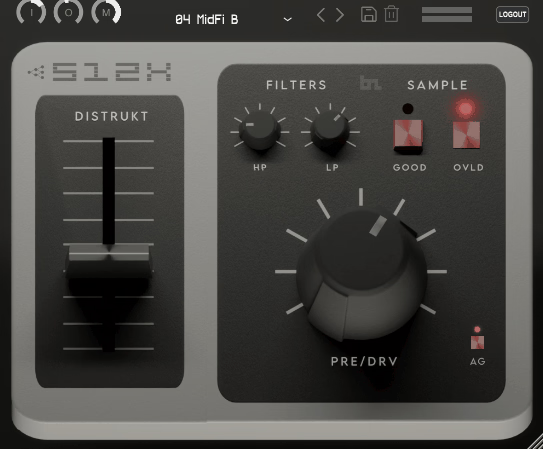
While most bitcrushers give you generic bit depth and sample rate controls and let you figure out the rest, S12X takes a completely different path by zeroing in on one specific vintage sound and nailing it with obsessive precision.
BeatSkillz didn’t try to build a swiss army knife of digital degradation here. They built a scalpel, tuned to capture the exact punchy, gritty character that defined an era of music production and turned a hardware limitation into one of the most recognizable sonic signatures in hip hop history.
This level of specificity is both the plugin’s greatest strength and its main limitation.
If you’re after the dirty, textured drum sound that sits at the foundation of golden age sampling culture, S12X gets you there faster and more accurately than any generic bitcrusher ever could. But if you need versatility across multiple vintage sampler characters, you’ll want to look at the SampleX V3 entry at the end of this list instead. For its focused mission of nailing one iconic sound, S12X delivers impressively.
- Neural Network Pre Amp Capture with Clean and Overload Modes
The pre amp modeling at the heart of S12X was created using BeatSkillz’s NM2 neural network technology, which captured the saturation behavior and tonal signature of the original SP 12 hardware at multiple gain stages.
The Clean mode reproduces the sound of the sampler’s pre amp operating within its normal gain range, adding the subtle coloration and warmth that the original unit imparted to every sample that passed through it.
The Overload mode recreates the sound of deliberately driving the pre amp beyond its intended operating level, producing the thick, saturated distortion that many producers achieved by pushing their gain staging on the original hardware.
Switching between these two modes completely changes the character of the processing. Clean mode works beautifully for adding authentic vintage texture to samples that are already well recorded, while Overload mode is where things get genuinely aggressive and punchy. I found the Overload mode particularly effective on snares and hi hats where the driven pre amp adds bite and presence that cuts through a dense mix.
- Distrukt Aliasing Control Without Pitch Change
The Distrukt parameter replicates one of the most sought after characteristics of vintage samplers: the aliasing artifacts that occurred when pitching samples up or down on the original hardware.
What makes this control special is that it produces the aliasing effect independently of pitch, meaning you can dial in that characteristic ringing, metallic quality without actually transposing your audio.
On the original SP 12 and similar hardware, you had to accept pitch changes to get these artifacts, but S12X separates the two so you can apply the aliasing purely as a tonal effect.
The Sample Decimator lets you set the exact sample rate of the signal, inducing the specific aliasing character that is a key signature of lo fi production.
Combined with the input gain control that lets you drive the signal harder into the emulated pre amp and the wet/dry mix for blending processed and clean signal, S12X covers a range from subtle vintage warming to full on 12 bit destruction. The plugin runs as VST3, AU, and AAX on both Windows and macOS with Apple Silicon support, and a 15 day trial is available.
7. Tritik Krush (Free)
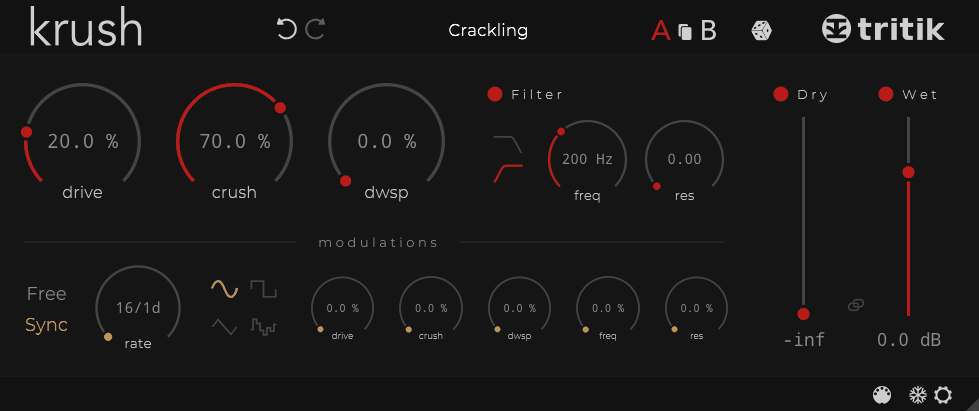
There is genuinely no reason for any producer to not have this plugin installed. Krush costs nothing, sounds excellent, and does things that many paid bitcrushers struggle to match.
Tritik released it back in 2016 and it quickly became one of the most recommended free effects plugins across production forums and YouTube channels, earning a spot in BPB’s best free plugins list and accumulating near perfect user ratings across every review platform.
The fact that it still holds up against paid competition nearly a decade later says everything about how well it was designed.
What makes free Krush work so well is that Tritik understood a bitcrusher needs to feel alive rather than static. Rather than shipping a bare bones crusher with two knobs and calling it a freebie, they built something that genuinely competes with paid alternatives in terms of both sound quality and creative potential.
Combined with a fully resizable interface, tooltips in four languages, and a file based preset system, Krush punches absurdly far above its price point of zero dollars.
- Drive Stage with Analog Modeled Resonant Filter
Krush pairs its bit depth and sample rate reduction with a dedicated drive stage that adds harmonic saturation to the signal before or alongside the crushing. This isn’t just a volume boost; the drive circuit adds its own tonal character that fattens the crushed signal and gives it a warmth that pure bit reduction alone tends to lack.
Many producers use Krush’s drive as much as they use the actual bit crushing, because the combination of analog style warmth with digital destruction produces textures that feel more complete than either effect in isolation.
The analog modeled resonant filter operates in low pass and high pass modes with a dedicated frequency cutoff and resonance control. Running this filter on a send channel with the bitcrusher active is a popular technique for blending crushed and clean signals, using the filter to shape the bitcrusher’s output before it re enters your mix.
The resonance can be pushed into self oscillation for more extreme sound design applications, though most practical use keeps it in the lower range for subtle tonal shaping.
- Tempo Synced Modulation with Per Parameter Depth
The built in modulation section provides an LFO with four waveforms (sine, square, triangle, and random) that can run in free mode at any rate or sync to your DAW’s tempo with a standard selection of beat divisions.
What sets Krush’s modulation apart from more basic implementations is that you can set an independent modulation depth for every single parameter in the plugin, including drive, crush, downsample, filter frequency, and resonance. This means you can have the bit depth modulating aggressively while the filter gently sweeps, or vice versa.
The random waveform in particular is useful for creating unpredictable, organic variations in the crushing that feel less like a repeating pattern and more like genuine hardware instability. The modulation system is arguably the main reason Krush remains so popular among producers who need their bitcrushing to feel like part of the music rather than a bolted on effect.
Krush is available as a free download from Tritik’s website in VST, VST3, AU, and AAX formats for both macOS and Windows, with no registration required beyond downloading the installer.
8. Klevgrand Degrader
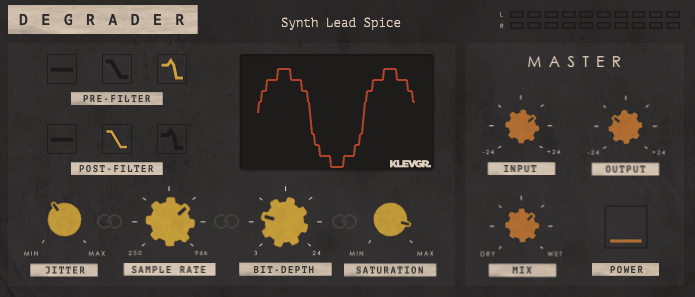
This Swedish developed plugin does something that I think is undervalued in the bitcrusher market: it keeps things simple without sacrificing quality. Klevgrand designed Degrader as a combined resampler and bitcrusher with a tightly focused feature set that covers the essential parameters you actually need and nothing more.
There’s no modulation matrix, no multi mode effects chain, no sidechain input. Just clean, effective controls for sample rate, bit depth, filtering, jitter, and saturation, all wrapped in one of the prettiest GUIs in this plugin category.
At around $40, Degrader occupies the budget end of the paid bitcrusher spectrum, but the sound quality suggests a much higher price point. I found it especially useful as a go to bitcrusher for quick tasks where you need to add some digital character to a sound without getting lost in a deep feature set.
The overall tone sits somewhere between the focused vintage emulation of plugins like Decimort 2 and the raw destruction of more aggressive tools, which makes it versatile enough to cover most common bitcrushing needs without requiring a second plugin.
- Parameter Linking for Single Knob Control
Degrader’s most workflow oriented feature is the ability to link multiple parameters together so they all respond to a single control.
This means you can tie bit depth, sample rate, and saturation together and sweep from pristine audio to total destruction with one knob movement, which is invaluable for creating automated drops, sweeps, and transitions where you need the degradation to escalate smoothly rather than jumping between static settings.
Since every parameter in the plugin is fully automatable, the combination of parameter linking with DAW automation gives you a lot of creative control for building dynamic arrangements.
You can set up a linked macro that gradually crushes a synth pad over eight bars, or automate individual parameters independently for more surgical changes. The factory presets include emulations of specific vintage hardware samplers that serve as excellent starting points, and the interface provides immediate visual feedback for every adjustment you make.
- Pre and Post Resampling Filter Options
The low pass filter section offers three operating modes per position: off, low Q, and high Q, available in both pre resampling and post resampling placement. The filter frequency is automatically locked to half the sample rate value, which means it tracks your resampling setting intelligently rather than requiring manual adjustment.
Pre filter smooths the signal before it hits the resampler, reducing harsh aliasing artifacts. Post filter shapes the output after resampling, letting you control how much of the crushed character comes through.
Bit depth can be adjusted continuously between 3 and 24 bits, providing smooth resolution changes rather than the stepped values found in most bitcrushers. The Jitter control adds timing variations to the resampling clock, and the additional saturation algorithm pushes the signal into overdrive for extra density and warmth.
Degrader runs as VST, AU, and AAX on macOS and Windows with full 64 bit support, and Klevgrand has occasionally offered it as a free download through partnerships with Focusrite for registered hardware owners.
9. Denise Bite Harder
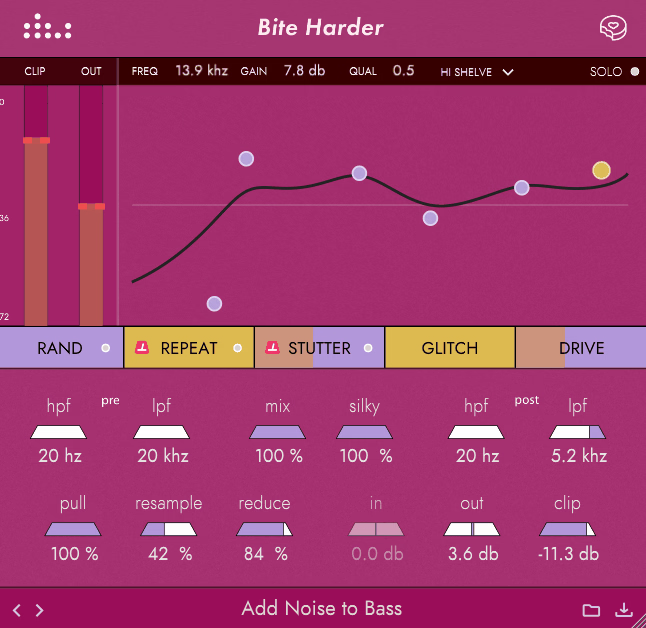
Denise Audio built their reputation on giving producers granular control over where and how effects are applied, and Bite Harder extends that philosophy into bitcrushing territory.
The result is a plugin that lets you be surgical about your destruction in a way that most bitcrushers simply don’t allow. Instead of blanket crushing your entire signal, you get to make precise decisions about which parts of your audio get demolished and which survive intact, which fundamentally changes how useful a bitcrusher can be in a professional mix context.
I think Bite Harder occupies a genuinely unique position in the bitcrusher market because of how well it bridges the gap between creative destruction and musical precision.
You can crunch the low end of a bass into pulverized chaos while keeping the high end sparkling and clean, or add crispy texture to a vocal’s upper harmonics without muddying the fundamental. At $69, it’s positioned at the higher end of dedicated bitcrusher pricing, but the level of control and the additional effects justify the cost for producers who need more than a standard crusher provides.
- Push/Pull Frequency Graph for Multiband Crushing
The centerpiece of Bite Harder is the push/pull equalizer graph that appears across the top of the interface, allowing you to boost the bitcrushing effect in certain frequency bands while reducing it in others.
The graph supports Peak, Low Shelf, and High Shelf band types with adjustable frequency, Q factor, and gain for each node. Pushing a frequency range increases the crushing applied to those frequencies, while pulling reduces it, giving you a visual, hands on way to sculpt exactly where the destruction happens.
Unlike other bitcrushers that use percentages rather than absolute values, Bite Harder’s Reduce and Resample controls use continuous percentage scaling rather than stepped bit depth and sample rate values.
This makes value changes smooth rather than stepped, following any changes in your session’s bit depth or sample rate automatically. The Solo button lets you audition individual frequency bands in isolation, which is useful for hearing exactly what the crushing is doing to specific regions of the spectrum before committing.
A Random button generates random push/pull configurations for quick experimentation when you’re looking for unexpected results.
- Silky Smoothing with Integrated Stutter and Glitch Effects
The Silky dial is Bite Harder’s answer to the harshness that aggressive bit reduction inevitably produces. Turning it up progressively smooths the distortion created by the bit and sample controls, rounding off the sharp digital edges into something warmer and more refined.
At high settings, even extreme bit reduction starts to sound almost pleasant, with a rounded, almost analog quality that makes it usable on material where raw bitcrushing would be too abrasive.
Below the main controls, Bite Harder includes a row of additional effect sliders covering Repeat, Stutter, Glitch, and Drive. The Stutter effect creates tempo synced or free running stuttered repetitions of the signal that pair naturally with the bit crushed output for rhythmic glitch textures. Glitch is actually a ring modulator that adds metallic, inharmonic frequency content for futuristic sound design. Drive provides an extra layer of analog style distortion beyond the digital crushing.
The built in transparent clipper catches peaks for extra saturation, and sidechain input support lets you use an external audio source to control the plugin’s parameters. Bite Harder runs as VST, VST3, AU, and AAX on Windows and macOS.
Extra: BeatSkillz SampleX V3
If S12X earlier on this list felt too narrowly focused on a single sampler, SampleX V3 is the broader alternative from the same developer that covers the full landscape of vintage sampling hardware in a single plugin. BeatSkillz studied the actual circuitry of multiple classic machines, analyzing everything from the AD/DA converters to the pre amps and analog filters, with the goal of recreating not just one iconic sound but an entire era’s worth of digital character. The V3 update brought significant engine improvements that noticeably closed the gap between emulation and reality.
I see SampleX V3 as a different tool entirely from the other bitcrushers on this list, because its primary purpose isn’t creative destruction but rather accurate historical emulation. If you’re working in lo fi hip hop, vintage techno, boom bap, or any genre that references the sound of specific classic hardware, having access to multiple sampler characters from a single plugin saves both money and CPU compared to running multiple specialized emulations.
The ability to design your own custom sampler profiles pushes it even further.
- Six Switchable Sampler Models with Dynamic Convolution
The six hardware emulation modes are accessible through A through F buttons across the interface, and each one recreates the aliasing behavior, frequency response, noise characteristics, and overall tonal fingerprint of a specific vintage sampling unit.
The dynamic convolution system is the key technology here, using impulse responses captured from the real machines at multiple gain levels to ensure the emulation responds dynamically to your input signal rather than applying a static filter. At quiet levels, you get the subtle coloration of the hardware. Push the input harder and the convolution captures the driven, saturated character that these machines exhibited under load.
An IR Machine on/off toggle lets you disable the convolution engine entirely when you want to use just the bit reduction and filtering stages on their own, giving you the option to use SampleX V3 as either a focused emulation or a more general purpose bitcrusher. The built in presets are carefully matched to the original hardware settings so you can quickly call up the character of specific machines as a starting point and then refine from there.
- Aliasing Shift Control with S900 Modeled Drive and Ladder Filters
The Shift control replicates the aliasing that vintage samplers produced when lowering the pitch of samples, but does so without changing the actual pitch of your audio. This lets you dial in the exact amount of that characteristic metallic ringing and harmonic distortion that made these machines so sonically distinctive, treating the aliasing as a tonal effect rather than a side effect of transposition.
The Drive section is modeled on the Akai S900 pre amp and accurately recreates the saturation and harmonic warmth that producers achieved by overloading the input stage of the original hardware.
Version 3 added LP/HP ladder resonant filters modeled on a classic analog mono synth circuit, with a 24dB/octave low pass filter that goes into self oscillation at high resonance settings. These filters are perfect for shaping the crushed signal into warmer, darker tones suited to lo fi and hip hop production, or for cutting unwanted high frequency artifacts from more extreme settings.
The stereo width control provides a fixed expander and collapser that ranges from mono through original stereo to M/S expanded space, giving you additional control over the spatial characteristics of the processed signal. SampleX V3 runs as VST3, AU, and AAX on Windows and macOS.
Get the Free Plugin Starter Kit
The genuinely useful free DAWs and plugins worth installing. No filler. Straight to your inbox.

Hello, I’m Viliam, I started this audio plugin focused blog to keep you updated on the latest trends, news and everything plugin related. I’ll put the most emphasis on the topics covering best VST, AU and AAX plugins. If you find some great plugin suggestions for us to include on our site, feel free to let me know, so I can take a look!