
If you need vocal harmonies but don’t have extra singers or the budget for long recording sessions, plugins like Antares Harmony Engine can be a real help. I’ve used Harmony Engine in many situations, from pop vocals to choir backgrounds, so I want to share what it does well and where it falls short compared to recording real harmonies or using other harmony plugins that compete in this space.
Harmony Engine is Antares’ vocal harmony plugin that makes several harmony voices from one vocal track, and in my experience, it’s made for producers who want fast, easy harmonies without recording lots of takes or hiring more singers.
Knowing what it’s meant to do helps you decide if it fits your workflow and the music you make, which is why understanding its core purpose matters before investing.
How it works
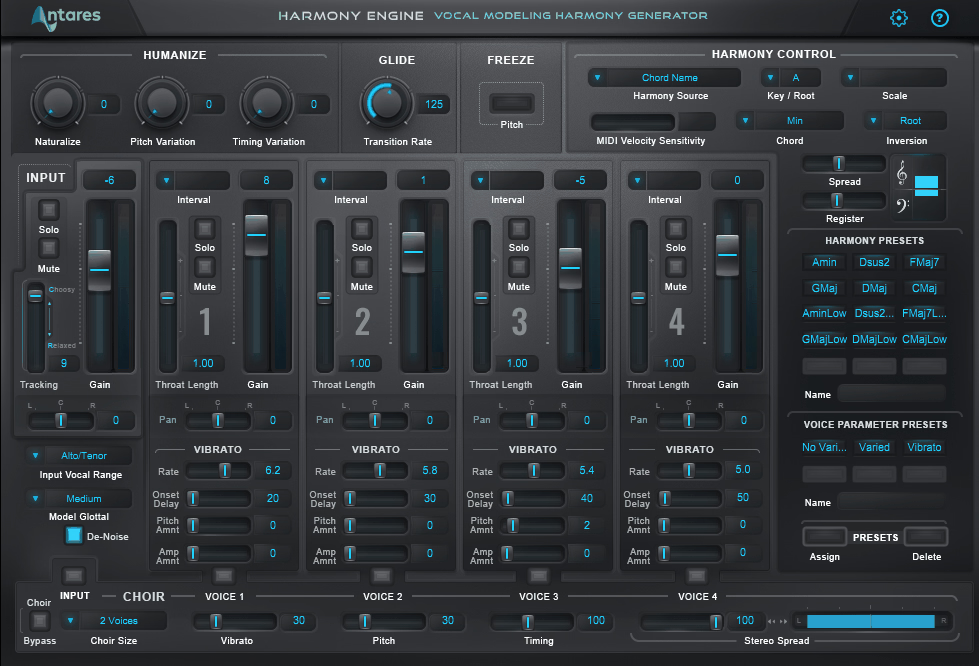
Harmony Engine can create up to four harmony voices from your vocal track, and you can control these voices using MIDI, scale detection, or by setting intervals yourself, depending on how much control you want over the final result. I find MIDI control the most flexible because you can play the harmonies you want on a keyboard instead of letting the plugin guess the intervals based on predetermined scales.
Pitch detection and correction are the core of how Harmony Engine works, and this is where Antares’ experience stands out because the pitch tracking is solid and responds well to vocal details like natural variations and inflections. In my experience, the plugin handles vibrato, slides, and natural changes better than some other harmony plugins, which can sound robotic if the vocal isn’t perfectly steady or controlled.
Scale and key detection let the plugin make harmonies that stay in the key you choose, which works well for simple, diatonic music when you want fast results without much tweaking.
I find this mode helpful for sketching ideas or simple pop songs with predictable harmonies that follow standard progressions, but for more complex or chromatic music, MIDI control is better because you can pick the exact notes you want rather than relying on algorithmic decisions.
One feature that sets Harmony Engine apart is its throat modeling, which changes the formants and tone of the harmony voices to make them sound like different singers instead of just pitch-shifted copies of the original. The results are somewhat convincing but not perfect, and you can still tell the harmonies are generated, especially if you listen closely, though they blend better in busy mixes than in exposed ones where every detail is audible. Humanization controls let you vary the timing, pitch, and vibrato of the harmony voices, which helps avoid that too-perfect, synthetic sound that gives away you’re using a plugin rather than real singers. I’ve found that small timing and pitch changes make the harmonies fit better in a mix, but you have to be careful not to overdo it or the result can sound messy instead of natural and musical.
Get the Free Plugin Starter Kit
The genuinely useful free DAWs and plugins worth installing. No filler. Straight to your inbox.
Interface and workflow
The interface works well but looks a bit old compared to newer plugins with more modern visual design, and I think Antares could update the visuals to match current standards in plugin UI development. Still, everything is organized logically, and once you learn the signal flow, you can work quickly without searching for controls or digging through confusing menus. Each harmony voice has its own section for controls, so you can adjust pan, level, delay, and pitch interval separately for each voice. In my experience, this is important because you often want harmonies spread out in the stereo field or at different depths in the mix, not all stacked in the center where they compete for the same space.
You’ll spend most of your time in the harmony control section, adjusting how the plugin makes harmonies and fine-tuning the musical relationships. I like that you can switch between control modes without losing your settings or having to set everything up again from scratch, and being able to quickly compare scale-based and MIDI-controlled harmonies is helpful when you’re trying out different ideas for a vocal line.
The plugin comes with factory presets that show off different harmony styles and voicings across various musical genres. About half of them are actually useful starting points, not just generic settings that don’t apply to real-world production, but the preset browser could be better organized, since finding specific harmonies means scrolling through everything rather than using smart categories.
Once you make your own preset library for common uses, your workflow gets much faster and more personalized to your typical production needs.
Real-time processing works well in most DAWs and doesn’t add noticeable latency that would make tracking hard or throw off your performance timing. However, if you use all four voices with heavy processing, you might get brief dropouts on less powerful computers that struggle with the CPU load. CPU use ranges from moderate to high, depending on how many voices and effects you use, so plan ahead if you want to run several instances at once across multiple vocal tracks.
Sound quality and musical results
The harmonies sound good in most production settings, especially when they’re mixed with other instruments and not the main focus of the arrangement. I’ve found they work best for background vocals, pop songs, and situations where harmonies add texture and support instead of being front and center in the mix demanding listener attention.
When harmonies are up front in the mix, the results vary a lot and depend on your source vocal quality and how much time you spend tweaking the settings to optimize the output. Simple two-part harmonies usually sound more natural than full four-part ones, since adding more voices can make the artificial qualities more obvious and harder to disguise in the final mix.
Formant shifting is meant to make harmony voices sound like different singers, and it helps to a point in creating timbral variation. But if you push it too far, it can make the sound a bit nasal or unnatural, especially on male vocals where the formant characteristics are more distinctive and harder to convincingly alter. The plugin usually handles vibrato well, keeping or adjusting it in a musical way instead of causing strange sounds or phase issues. However, very wide or fast vibrato can sometimes confuse the pitch tracking, leading to unstable harmonies that might need manual fixing or tighter pitch settings to maintain control.
In busy mixes with lots of layers, Harmony Engine’s harmonies blend in well and don’t obviously sound like a plugin, which is usually good enough for commercial production standards.
In simple, exposed arrangements, though, the artificial sound is more noticeable to critical listeners, and in those cases, recording real harmonies or using the plugin as a creative effect might work better than trying to make it sound completely natural and transparent.
Practical applications
This plugin is best for solo artists and producers who need harmonies but don’t have extra singers or a big recording setup with multiple microphones and isolation booths. If you’re working alone or in a home studio, Harmony Engine gives you options that would otherwise mean hiring singers or spending hours recording and editing harmony takes yourself through tedious punch-in sessions.
In pop and R&B, where harmonies are usually tightly controlled and processed anyway as part of the production aesthetic, Harmony Engine fits right in and doesn’t sound out of place among other modern vocal treatments. I’ve used it on hooks, pre-choruses, and background layers where harmonies support the lead, and in those situations, it gives professional results quickly without requiring extensive tweaking.
Harmony Engine is also useful for live shows, letting solo singers perform with generated harmonies in real time instead of using backing tracks or extra performers who increase complexity and cost. The low latency makes this possible, but you should test it with your own setup to make sure it works smoothly on stage without technical glitches.
Producers of gospel and worship music often use Harmony Engine to create choir-like vocals from solo tracks when full vocal ensembles aren’t available. While it can’t replace a real gospel choir with all its dynamic nuance, it’s a practical option for making demos or for smaller churches that don’t have big vocal teams for recording sessions.
Film and game composers who need quick vocal harmonies for mockups or final tracks can work faster with Harmony Engine than by programming MIDI choirs or layering samples from different libraries.
The results are best for background ambience, not for featured vocal parts that listeners will focus on and scrutinize closely.
Limitations worth knowing
Harmony Engine works best with clean, well-recorded vocals that have little background noise and clear pitch definition throughout the performance. If you use poor or off-pitch recordings, the results won’t be good no matter how much you adjust the settings or try to compensate with processing. The saying ‘garbage in, garbage out’ applies here, so make sure to record quality vocals before expecting great results from the plugin.
The plugin doesn’t handle fast melodic runs or complex rhythms as well as it does simple, sustained notes that give the algorithm time to track accurately. I’ve noticed that quick passages can lead to glitchy or unclear harmonies because the pitch tracking can’t always keep up with rapid note changes, and simplifying the vocal line or using stronger pitch correction can help, but there are limits to what the plugin can do algorithmically.
If your vocal track has other instruments bleeding in or is polyphonic with multiple pitches simultaneously, the pitch detection can get confused and produce unstable or wrong harmonies that don’t match your musical intentions. You’ll get the best results from clean, single-voice tracks that give the plugin clear pitch information to work with throughout the entire performance.
The harmonies made by the plugin will never sound exactly like real, separately recorded vocals because the unique tone, breathing patterns, and small differences of real singers are hard to copy with software no matter how sophisticated the algorithm.
Knowing this helps you see Harmony Engine as a helpful tool, not a perfect replacement for real harmony vocals in situations where authenticity is paramount.
The tuning and timing of the harmonies match the lead vocal exactly unless you add some variation through the humanization controls. If your lead vocal has small timing changes or rhythmic pushes and pulls, the harmonies will copy them perfectly, and this perfect sync can sound less natural than real singers, who each phrase a bit differently based on their individual musicality and interpretation.
Final assessment
Antares Harmony Engine is a practical way to create vocal harmonies quickly, especially if you don’t have time for long recording sessions or extra singers who can deliver the harmonies you need. The sound quality is good for most productions, MIDI control gives you real musical flexibility, and the workflow makes building vocal arrangements much faster than traditional methods that involve multiple recording passes and extensive editing.
If you often need vocal harmonies and don’t have singers available on demand, Harmony Engine is worth considering as a regular tool in your production arsenal. But if you only need harmonies sometimes or can easily record real singers when necessary, it might not be worth the investment given its specialized focus. I still use Harmony Engine for certain tasks where it works best, like quick background vocals, pop harmonies, and demos where the harmonies just need to get the idea across without being final production quality.
The limitations are real but expected, and knowing when to use the plugin helps you get the most out of it instead of running into problems or fighting against its constraints.
Harmony Engine is a solid tool for solving a specific production problem efficiently and musically. It won’t replace real harmony vocals if you have the time and budget to record them properly, but it’s a practical alternative that gives you usable results in many musical situations when used the right way with appropriate expectations.
Get the Free Plugin Starter Kit
The genuinely useful free DAWs and plugins worth installing. No filler. Straight to your inbox.

Hello, I’m Viliam, I started this audio plugin focused blog to keep you updated on the latest trends, news and everything plugin related. I’ll put the most emphasis on the topics covering best VST, AU and AAX plugins. If you find some great plugin suggestions for us to include on our site, feel free to let me know, so I can take a look!