
I’ve been checking out pitch-shifting plugins for spatial audio, and Eventide MicroPitch Immersive stood out as one of the few focused options available. It builds on the classic MicroPitch effect and expands it to immersive formats, including Dolby Atmos 9.1.6, so you get those well-known pitch-shifting and detuning features in a spatial context. After trying it in both stereo and immersive sessions, I want to share what this plugin really offers and help you decide if it’s right for your needs.
This isn’t just a simple port of the original MicroPitch with multi-channel output thrown in as an afterthought. From my perspective, there’s a thoughtful implementation of how pitch-shifting behaves across three-dimensional speaker arrays, though whether you need these capabilities depends entirely on your current workflow.
MicroPitch Immersive provides something genuinely different from standard pitch correction or harmonizing plugins, and understanding that distinction matters when evaluating whether it fits your needs.
The MicroPitch Effect and Sound Character
The main MicroPitch algorithm gives you subtle pitch-shifting that adds width, depth, and space instead of obvious pitch correction or harmony. I’ve found it’s great for thickening vocals, making synth pads richer, and giving guitars more dimension without sounding fake or over-processed. It works by shifting pitch in tiny amounts, measured in cents instead of semitones, which creates the signature shimmer and width that made the original hardware famous.
In stereo mode, the plugin uses two pitch-shifters that work independently on the left and right channels. You can set them to shift in opposite directions for maximum stereo width and a more interesting sound. I find this method more musical than basic stereo widening plugins because the pitch changes actually affect the tone, not just the phase.
Even small shifts of 5-10 cents in opposite directions can make things sound much wider without making the source seem out of tune or heavily processed, and you can adjust delay times to create anything from tight doubling to slapback-style reflections that enhance the spatial characteristics.
From my experience, the interaction between pitch-shifting and delay timing is what gives MicroPitch its distinctive character, and tweaking these parameters together creates results that pure pitch-shifting or delay alone can’t achieve. The modulation applied to both pitch and delay adds movement, preventing the effect from sounding static, which I appreciate because it makes the processing feel more organic.
The feedback controls let you take the effect into more experimental areas, and I enjoy making cascading pitch-shifted echoes that build up for evolving textures. The feedback can get out of hand fast if you’re not careful, but that’s also what makes it fun for sound design when you want something different.
Get the Free Plugin Starter Kit
The genuinely useful free DAWs and plugins worth installing. No filler. Straight to your inbox.
Immersive Format Implementation
The plugin supports formats from stereo through various surround configurations up to Atmos 9.1.6, and the channel handling adapts automatically to your session format without requiring manual configuration. I think this flexibility matters if you work across different project types, because you can use the same plugin for both stereo mixing and full immersive production without having to learn different tools.
Height channel support is implemented thoughtfully rather than just routing the same effect to overhead speakers as an afterthought, and from what I can tell, the algorithm considers the three-dimensional speaker array when distributing pitch-shifted signals. I noticed this particularly when working on Atmos film cues, where vertical dimension adds to the sense of space and immersion, and the way MicroPitch Immersive handles height channels creates genuinely enveloping effects.
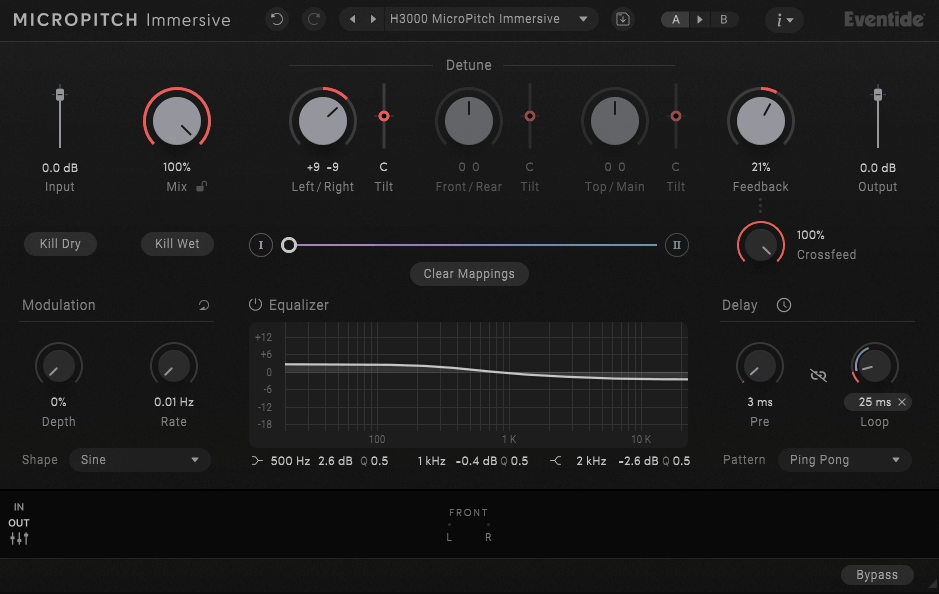
The spatial controls let you easily adjust how the effect spreads across your speakers. I like that you can set the front-to-back balance and height channel strength without needing to know a lot about spatial audio theory. Some spatial plugins can get confusing with too many settings, but MicroPitch Immersive stays pretty straightforward while still offering real creative options.
Even if you’re only working in stereo, the plugin is still a top-notch pitch-shifting and widening tool. This is important because you get a strong stereo effect now, plus immersive features for when you need them later. It’s a way to future-proof your setup without buying extra plugins down the line.
Interface and Practical Usage
The interface is clear and doesn’t overwhelm you with too many controls at once. The main settings you’ll use most are easy to find, while the more advanced options are there if you need them but don’t clutter things up. This helps you work faster since you don’t have to dig through menus for simple changes.
Visual feedback shows the pitch-shifting and delay relationships graphically, which I found helpful for understanding how your settings translate to actual sonic results. You can’t always predict how pitch and delay interactions will sound just from numerical values, so having a visual representation of the effect parameters helps you make informed decisions without relying entirely on trial and error.
Preset management includes starting points organized by application type, and you get presets like “Vocal Thickener,” “Synth Widener,” and “Guitar Shimmer” that actually describe what they’re designed to accomplish. I think these provide legitimate starting points worth exploring and customizing rather than just cycling through hoping to stumble onto something useful. Maybe half of them are genuinely applicable to my work, which is better than many plugins whose presets exist purely for marketing.
You can automate parameters like pitch, delay, and spatial controls in your DAW without any glitches or unwanted jumps. I noticed this is especially useful for making soundscapes or transitions where the pitch shift needs to change smoothly over time.
The plugin uses a moderate amount of CPU for how complex it is, and I’ve been able to run several instances in busy sessions without any problems. It’s not the lightest plugin out there, but it’s efficient enough for real-world use in professional projects.
Practical Applications and Final Thoughts
This plugin is best for producers and composers who work in immersive audio or plan to start. For vocals, it’s great at adding width and depth without sounding processed, and I’ve found it really helps lead vocals stand out in crowded mixes.
Electronic music producers will appreciate how the plugin treats synth pads, leads, and atmospheric sounds. The pitch-shifting creates evolving textures that make static sounds more interesting. I’d recommend it for anyone making ambient, cinematic electronic, or experimental music where spatial effects are important.
Mix engineers can use MicroPitch Immersive as a creative stereo widening tool that offers more character than typical stereo enhancement plugins. From what I can tell, this results in a width that translates better to mono playback than some widening techniques do.
This isn’t a pitch correction tool like Melodyne or Auto-Tune, so it won’t fix out-of-tune performances. MicroPitch is made for creative effects, not for correcting mistakes, and it’s important to know the difference.
Eventide MicroPitch Immersive delivers what it promises: a classic pitch-shifting effect with genuine immersive capabilities. If you regularly work with spatial audio formats, this plugin offers capabilities worth considering for professional work where distinctive pitch effects matter.
Get the Free Plugin Starter Kit
The genuinely useful free DAWs and plugins worth installing. No filler. Straight to your inbox.

Hello, I’m Viliam, I started this audio plugin focused blog to keep you updated on the latest trends, news and everything plugin related. I’ll put the most emphasis on the topics covering best VST, AU and AAX plugins. If you find some great plugin suggestions for us to include on our site, feel free to let me know, so I can take a look!