
The drum machine plugin market in 2026 is genuinely overwhelming. You’ve got pure synthesis engines that build every hit from the ground up, sample based workstations with libraries running into the tens of thousands of sounds, AI powered browsers that organize your entire collection by sonic similarity, and vintage emulations so faithful they make the original hardware feel redundant.
The challenge isn’t finding a good drum machine plugin anymore. The challenge is finding the right one for how you actually work.
What I’ve tried to do here is put together a list that covers real variety across approaches and price points, from free official Roland emulations to modern synthesis powerhouses.
Some of these are best suited for producers who want to design every hit from scratch, others are built for people who already have thousands of samples and just need a better way to find and sequence them. A few sit somewhere in between, blending synthesis with sampling in ways that feel genuinely fresh.
One thing I want to be upfront about: no single drum machine plugin does everything perfectly. The ones with the deepest synthesis engines sometimes lack strong sequencers. The ones with the best sample browsers can feel limited once you start trying to shape sounds. The vintage emulations nail one specific character but won’t cover every genre.
Understanding these tradeoffs before you spend any money is the whole point of this list. I’ve focused on what each plugin actually does well, where it falls short, and who it makes the most sense for based on real usage rather than feature checklists.
With that said, here are ten drum machine plugins worth knowing about in 2026, covering everything from circuit modeled analog recreations to AI driven sample explorers.
1. Baby Audio Tekno
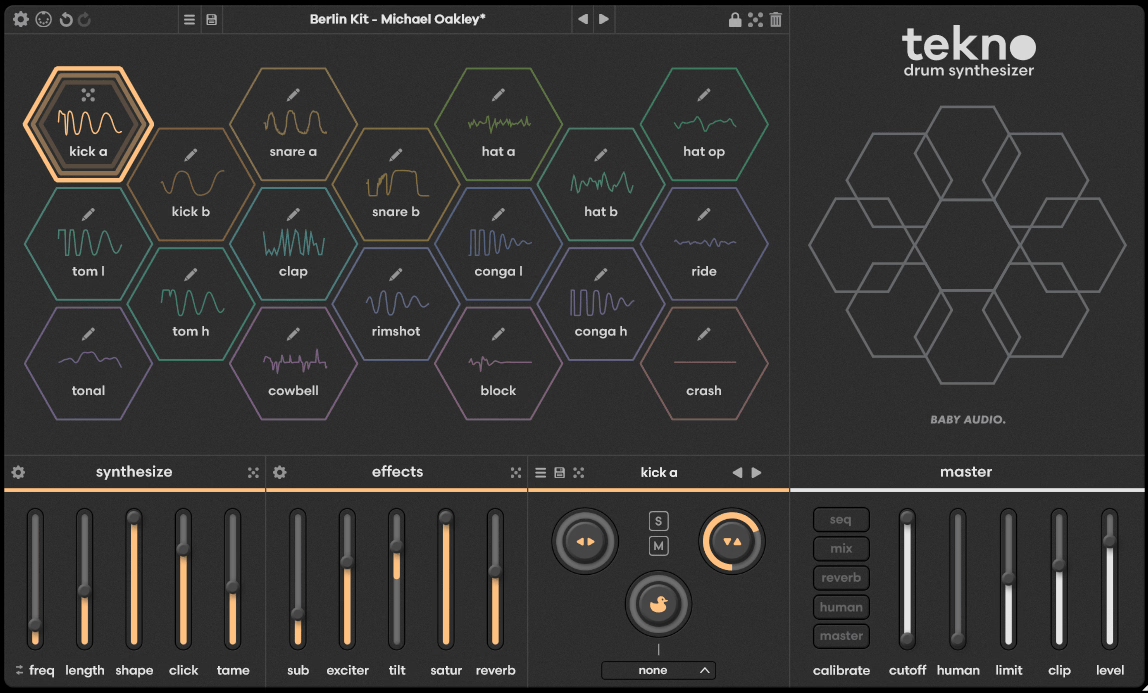
Tekno came out of a four year collaboration between Baby Audio and Jatin Chowdhury, one of the most respected names in analog circuit modeling, and the result is something that feels fundamentally different from loading up another sample pack.
Baby Audio set out to build not an emulation of any specific classic machine, but rather a modern spiritual successor that hits harder and offers more control than the vintage units that inspired it. The entire instrument is built around a philosophy of generating sound from scratch rather than playing back recordings.
What struck me first was how alive the output sounds compared to sample based alternatives. Because the underlying circuit models behave nonlinearly, the subtle variation between hits gives patterns a liveliness that static one shots struggle to match.
I found this quality immediately noticeable on hi hats and snares, where the movement keeps things musical even in repetitive loops. The v1.1 update added a built in step sequencer with polyrhythmic capabilities, addressing the biggest criticism of the original release.
- 18 Independent Virtual Analog Drum Engines
Each of the 18 voices has its own dedicated synthesis engine specifically designed for the type of sound it produces, so the kick engine uses different modeling than the snare engine, which uses different modeling than the hi hat engine, and so on.
This is not a situation where one generic oscillator is being repurposed across different drum types. The engines cover kicks, snares, claps, hi hats, toms, percussion, cymbals, and a tonal voice that can produce pitched melodic content.
Every voice includes five synthesis parameters and five effect parameters that are unique to that specific engine, which means adjusting a control on the kick does something entirely different than adjusting the same labeled control on the snare.
I appreciate this approach because it means each sound type has been given its own tailored set of controls rather than a generic set of knobs that work the same way everywhere. The tonal engine stands out as a particularly creative addition, letting you introduce melodic percussion elements into your patterns without needing a separate instrument.
- Circuit Bending Calibration Layer
Behind each voice’s main controls sits a hidden calibration layer accessible through a gear icon that lets you get into the actual circuit behavior of each engine. This is where Tekno goes from being a straightforward drum machine into serious sound design territory, because you’re essentially adjusting parameters that would normally require a soldering iron and oscilloscope to reach on real hardware. You can reshape transient behavior, filter characteristics, and modulation depth at a level that most drum synths don’t expose.
I found the calibration layer most useful for pushing sounds into experimental and glitchy territory that you simply cannot achieve with the surface level controls alone. The randomize function also operates at this level, and a single click of the dice icon can generate entirely new voice characteristics that would take considerable manual effort to discover.
For producers who like to create their own signature sounds rather than relying on presets, this depth of circuit level access is genuinely rare in a plugin at this price point.
- Drag and Drop Sample Export
Any sound you create inside Tekno can be instantly exported by dragging it from the hexagonal interface directly into your DAW or desktop.
This turns Tekno into something more than just a live performance instrument, because you can use it as a dedicated drum sound design laboratory where you craft one shots and then import them into whatever sampler or arrangement you prefer. The export works with or without the onboard effects applied, giving you clean raw hits or fully processed versions depending on your needs.
I found myself using this workflow more than I expected, designing kicks and snares in Tekno and then loading them into Ableton’s Drum Rack for more granular sequencing control.
Tekno ships with 72 global presets and over 1,296 individual voice presets created by sound designers including Mr. Bill and Virtual Riot, plus expansion packs for genres like Hyperpop and Modern Industrial. The plugin supports VST, VST3, AU, CLAP, and AAX on both macOS and Windows with native Apple Silicon support.
2. Wave Alchemy Triaz
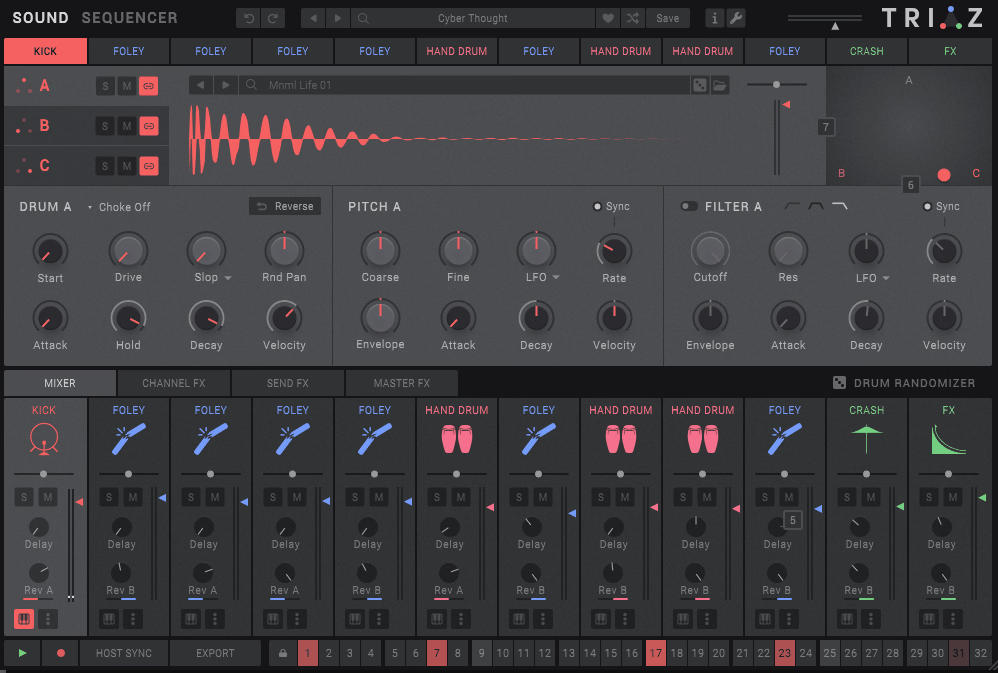
Wave Alchemy spent over 15 years building a reputation as one of the most respected drum sample companies in the industry, and Triaz is where all of that expertise converges into a single instrument.
The design philosophy here is that the quality of your drum sounds matters more than the quantity of features surrounding them, and Wave Alchemy has invested accordingly.
Every sample in the included library has been crafted with the same attention to detail that made their standalone sample packs a staple in professional studios around the world, and the instrument built around those sounds is designed to get you from blank canvas to finished beat as quickly as possible.
The included sound library is nothing short of staggering. You get 15,000 meticulously crafted samples spanning vintage drum machines, modern electronic kits, acoustic drums, modular synth percussion, found sounds, and world instruments, all organized through a tag based browser that makes navigating this enormous collection feel manageable rather than overwhelming.
I think Triaz represents the current gold standard for producers who want a sample based drum machine that doesn’t compromise on either sound quality or workflow speed.
- Triple Layer X/Y Blending Engine
Each channel’s three layers can be independently loaded with any sample from the library or your own imported sounds, and the X/Y pad lets you continuously blend between all three in a way that creates smooth transitions between textures. This isn’t simple crossfading.
The blending algorithm maintains the transient character of each layer while morphing the tonal components, so you get results that sound like a single cohesive drum hit rather than three sounds fighting each other.
Every layer has its own set of sound design parameters including filters, envelopes, distortion, LFO modulation, reverse playback, random panning, and adjustable start position, and these can be either linked across layers or configured independently.
The per layer Slop control adds humanized variation to volume, tuning, start position, and filter cutoff with each hit, introducing the kind of organic inconsistency that makes patterns feel alive.
I found the layering system especially powerful for creating hybrid acoustic and electronic kits where you want the weight of real drums with the precision and texture of synthesized elements.
- Polyrhythmic Step Sequencer with Probability
The sequencer gives each of the 12 channels its own independent playback rate, step length, and swing amount, making it one of the most polyrhythm friendly drum sequencers available in plugin form.
Beyond standard velocity sequencing, you get dedicated lanes for note repeat and stutter, probabilistic chance, and start offset, giving you granular control over how patterns evolve and breathe over time.
The pattern bank stores up to 12 sequences per kit, and the entire contents of any pattern can be exported as MIDI or audio stems via simple drag and drop into your DAW.
The sequencer supports real time recording from MIDI input with both quantized and unquantized modes, and the chromatic keyboard mode lets you play any channel across a two octave pitch range for melodic percussion lines and pitched 808 bass patterns.
Triaz runs as a standalone, VST3, AU, and AAX plugin and includes over 600 production ready presets spanning 18 musical genres.
- Professional Channel and Master Effects
The effects architecture is split into five insert effects per voice, three send effects, and five master effects, providing processing depth that rivals many standalone mixing plugins.
Channel effects include a visual tilt EQ, mastering grade compressor, and a creative strip featuring a transient shaper, OTT maximizer, stereo widener, analog modeled saturation, and an emulation of the iconic SP-1200 sampler’s bit crushing and sample rate reduction circuitry.
The send effects offer an algorithmic reverb, analog style delay, and a convolution reverb loaded with 350 impulse responses captured from legendary hardware reverbs and real acoustic spaces.
The master effects chain adds a four band mid/side EQ, analog bus compressor, and a maximizer with multiband saturation, noise layering, and a transparent limiter tuned specifically for drums. This level of built in processing means you can produce a completely finished drum mix entirely inside Triaz without reaching for any external plugins.
3. Sugar Bytes DrumComputer
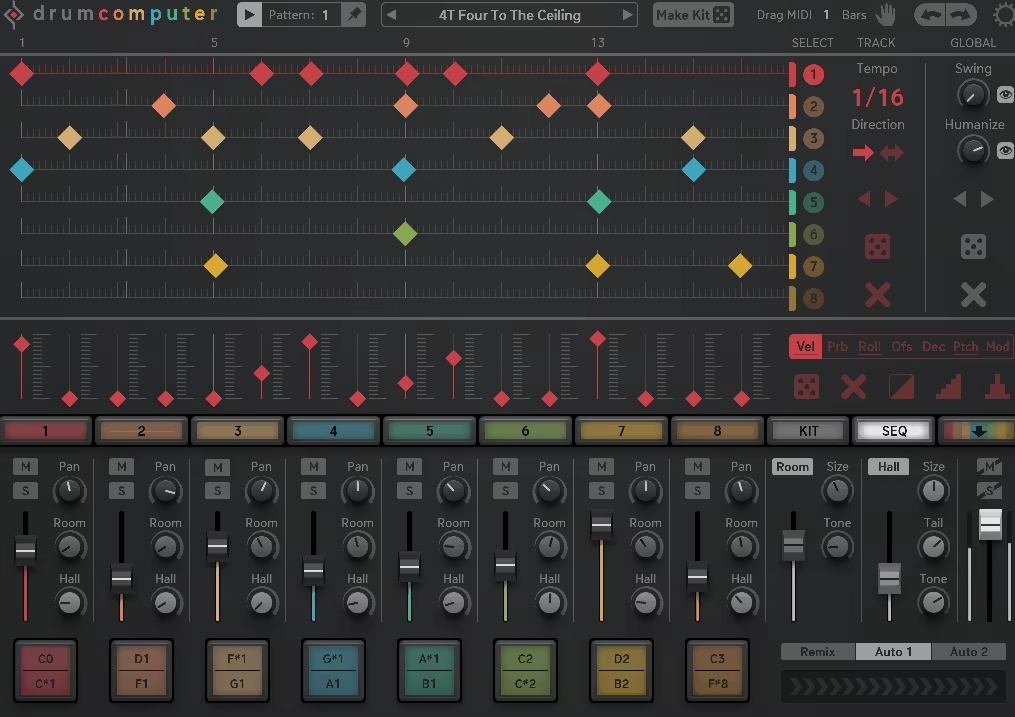
Sugar Bytes has always been the company that makes plugins for people who are bored of doing things the normal way, and DrumComputer is exactly that energy applied to drum production.
This is an eight channel synthetic drum machine built in Berlin that pairs deep sound design with one of the most flexible step sequencers you’ll find in any drum plugin on the market.
The sonic palette ranges from classic analog thump to completely alien textures that don’t exist in any sample library, and the plugin thrives on the unpredictable collisions that happen when multiple synthesis methods interact.
The tradeoff is that DrumComputer has a steeper learning curve than most options on this list, and the sound design rabbit holes run deep enough that you can lose hours without realizing it.
But if you’re the kind of producer who gets excited about stumbling onto sounds you’ve never heard before, this is one of the few plugins that can consistently deliver those moments. The randomization system is particularly smart, generating not just random sounds but random patterns and full kits that are structured enough to actually be musical.
- Three Layer Synthesis Architecture Per Channel
Each of DrumComputer’s eight channels stacks three independent synthesis layers that handle different aspects of the drum sound. The Resonator creates the initial transient and resonance body, working similarly to how classic analog drum circuits generate sound through pulse excitation.
The Wavetable engine adds sustained tonal content, with the option to switch between wavetable and traditional analog oscillator modes and even import your own wavetables for unique textures.
The Resynth layer is where things get genuinely unusual, taking single cycle waveforms or imported audio and liquidizing them into new timbres through a unique synthesis approach that doesn’t quite fit into any standard category.
When you combine all three layers, each with their own pitch, decay, and level controls, the possible sonic combinations become enormous. I found that the interplay between layers is what gives DrumComputer its distinctive character, producing sounds that don’t really exist in any sample library because they’re emerging from the collision of three synthesis methods.
- Advanced Pattern Sequencer with Per Step Modulation
The 16 step, 16 pattern sequencer goes far beyond simple trigger programming. Each step can have its own velocity, pitch offset, decay modification, probability percentage, roll rate, and a modulation depth value, which means a single pattern can contain an enormous amount of musical variation even before you start chaining patterns together. Individual tracks can run at different tempos, directions, and step lengths, opening the door to polyrhythmic and polymetric patterns that evolve constantly.
The Auto Fill feature inserts fills and parameter changes at specified song positions, turning simple loops into dynamic arrangements automatically. What really sets the sequencer apart is the Remix slider, which generates real time variations on your programmed patterns for live performance and creative exploration.
The entire contents of any pattern, including all modulation sequences and auto fills, can be dragged and dropped as a MIDI file directly into your DAW for further editing, which is a workflow feature I wish every drum machine offered.
- MakeKit Randomizer and Sound Profiles
The intelligent randomization system uses profiles to generate sounds that are musically sensible rather than just throwing random values at every parameter.
When you click the MakeKit button, DrumComputer creates an entirely new kit of eight sounds that work together cohesively, and the profile system ensures that kicks sound like kicks and hi hats sound like hi hats even when randomized. You can also randomize individual channels or just the pattern while keeping your sounds intact.
DrumComputer ships with over 400 global presets and 450 individual engine presets that can be mixed and matched between channels freely. The Finalizer section on the Kit page adds transient shaping, dynamics processing, and master distortion with three modes including Sine, Tube, and Tape warmth circuits for gluing your kit together.
Some users have noted that the MIDI mapping scheme uses German note naming conventions which can be confusing, and the kicks can sometimes lack the low end weight of more focused kick synthesis tools, but for experimental percussion and creative sound design, few plugins match its range.
4. Native Instruments Battery 4

Battery has been around in some form since the early 2000s, and while it’s not the newest or flashiest option on this list, it remains one of the most reliable and widely used drum samplers in professional production.
The reason is simple: Battery 4 does the fundamental job of loading, organizing, shaping, and triggering drum samples with a level of stability and flexibility that newer competitors still struggle to match.
It won’t generate sounds from synthesis or organize your library with AI, but what it does do is give you a rock solid platform for building custom drum kits from any audio material you throw at it.
The interface is built around a color coded cell grid where samples can be loaded, layered, and assigned with drag and drop simplicity. I think Battery 4’s staying power comes from the fact that it gets out of your way and lets you focus on building kits quickly, which is exactly what you want when you’re in the middle of writing a track and just need your drums to be ready without fighting the plugin.
- Seven Sample Playback Modes Including Vintage Emulations
Battery 4 includes seven distinct sample playback modes that change how loaded audio is triggered and processed. Beyond the standard sampler mode, you get groovebox emulations that recreate the playback characteristics of classic hardware samplers, adding subtle coloration and behavior that make samples feel less sterile.
The Time Machine Pro algorithm handles time stretching with remarkable quality, letting you radically change the length and pitch of samples independently without the usual artifacts.
Each cell supports multiple velocity layers and round robin variations, which eliminates the machine gun effect that plagues simpler drum samplers when the same sample triggers repeatedly.
I found the velocity layering particularly useful for building realistic acoustic drum kits where the difference between a ghost note and a full hit needs to feel natural and dynamic. The reverse mode works on any loaded sample including your own imported audio, which is a simple but surprisingly useful feature for creating risers, impacts, and textural elements from existing drum hits.
- Professional Effects Routing with Bus Architecture
The onboard effects include Solid EQ, Solid Bus Comp, Transient Master, tape saturation, LoFi processing, and a convolution reverb with a quality that rivals many standalone effect plugins.
What makes the effects implementation special is the routing flexibility: effects can be applied to individual cells, to groups of cells on shared buses, or to the master output, and the entire chain can be reordered and reconfigured with drag and drop.
Battery 4 provides four internal buses plus the master channel, each with independent effects chains and sidechain capability between them. This means you can set up proper sidechain ducking between your kick and bass samples entirely within Battery 4 without needing any external routing in your DAW.
The convolution reverb deserves special mention because it uses impulse responses from real acoustic spaces and hardware reverb units, giving your sampled drums a sense of place that algorithmic reverbs sometimes struggle to achieve.
- Massive Tagged Library and NKS Integration
The factory library is extensive, covering electronic, hip hop, acoustic, experimental, and cinematic drum kits all organized through a tag based browser that makes finding the right sound surprisingly fast.
If you’re already invested in the Native Instruments ecosystem, Battery 4 integrates seamlessly with Komplete Kontrol keyboards using NKS, which gives you hardware light guides and tagged preset browsing from your controller.
Battery 4 runs as a standalone application as well as VST, AU, and AAX plugin, and supports up to eight mono and eight stereo individual outputs for discrete processing of every sound in your kit within your DAW mixer.
The $199 price point is on the higher side, and some users feel the plugin is overdue for a major update given that version 4 has been around for several years without significant feature additions. But for sheer reliability as a professional drum sampler that integrates cleanly into virtually any production workflow, Battery 4 continues to earn its place.
5. ADSR Drum Machine
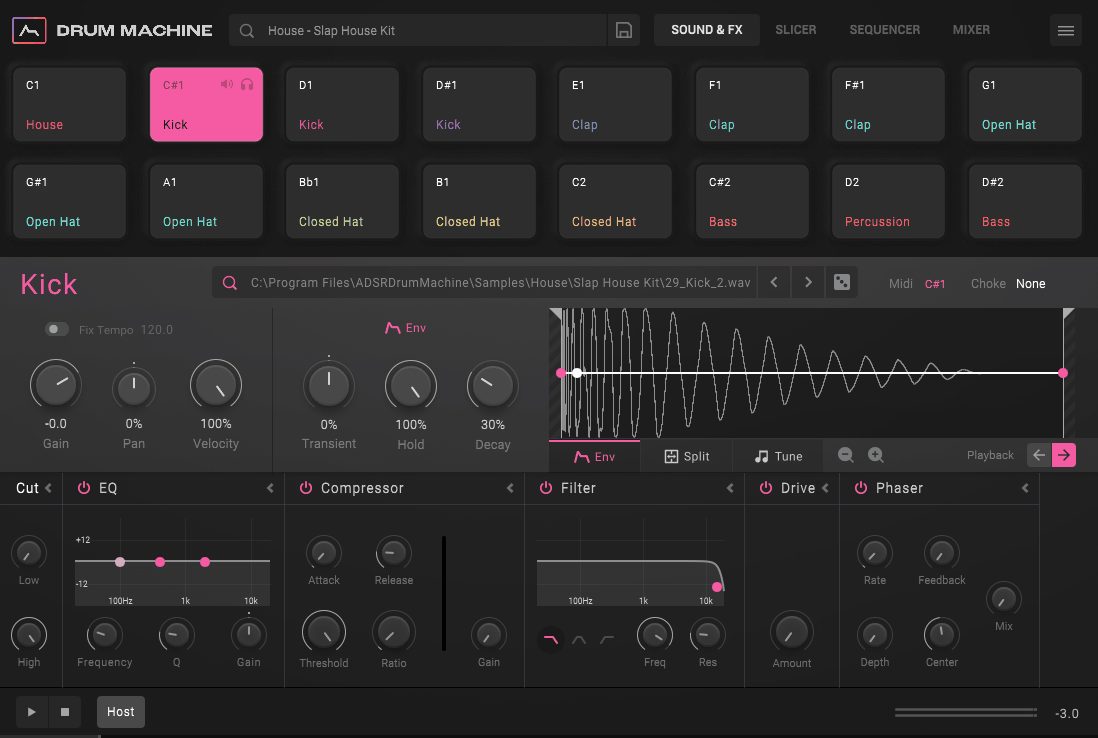
ADSR built their reputation as one of the biggest sample and tutorial marketplaces for electronic music producers, and their Drum Machine plugin is clearly informed by years of watching how producers actually build beats.
What makes this one interesting is that it’s designed around the idea of finishing your drum sound during beat creation rather than fixing it later in the mix. Most drum machines give you a sample, a few knobs, and send you on your way, but ADSR built in processing workflows that normally require multiple plugins and careful routing to achieve.
The plugin follows a 16 pad layout with tabbed panels for Browser, Sound and FX, Sequencer, and Mixer, and the overall design philosophy prioritizes getting a polished rhythm section finished quickly rather than offering bottomless sound design depth.
I think it fills a very specific and underserved niche: the producer who already has good samples but wants a faster way to shape, sequence, and mix them into a finished beat without bouncing between multiple plugins.
- Split Pad Transient and Body Processing
The headline feature is the ability to divide any sample on any pad into two separate channels representing the transient attack and the sustained body of the sound. Once split, each component gets its own dedicated effects lane where you can apply EQ, compression, distortion, and other processing independently.
This means you can add crisp compression and saturation to just the snap of a snare while keeping the body clean and full, or vice versa.
In practice, this gave me a level of per hit sonic control that I’ve only previously achieved through painstaking parallel processing setups in my DAW. The split point is determined automatically, and the results are surprisingly musical right from the first click.
ADSR has effectively taken one of the most time consuming aspects of professional drum mixing, separating transient detail from tonal body, and turned it into something you can do during the beat creation phase rather than after the fact.
- Built In Sequencer with Polyrhythmic Capabilities
The sequencer offers up to 16 patterns across 4 pages per lane, with per step control over velocity, repeat, roll, and probability. Each channel can run at its own time resolution and play direction, which makes polyrhythmic programming straightforward and intuitive.
The Global view lets you see and edit all lanes simultaneously for quick pattern building, while the focused Lane view gives you detailed control over individual drum parts.
The Swing and Shuffle controls are applied per channel rather than globally, so you can have a straight kick pattern running against swung hi hats without any workaround. I found the sequencer perfectly adequate for getting ideas down quickly, though producers who need deep modulation sequencing or probability based generative features will likely want something more advanced.
The included library ships with over 50 kits and 800 patterns across 10 genres, all built specifically to take advantage of the Split Pad processing, which means the presets actually demonstrate the plugin’s unique capabilities rather than being generic starting points.
6. Roland TR-808 Rhythm Composer (Free)
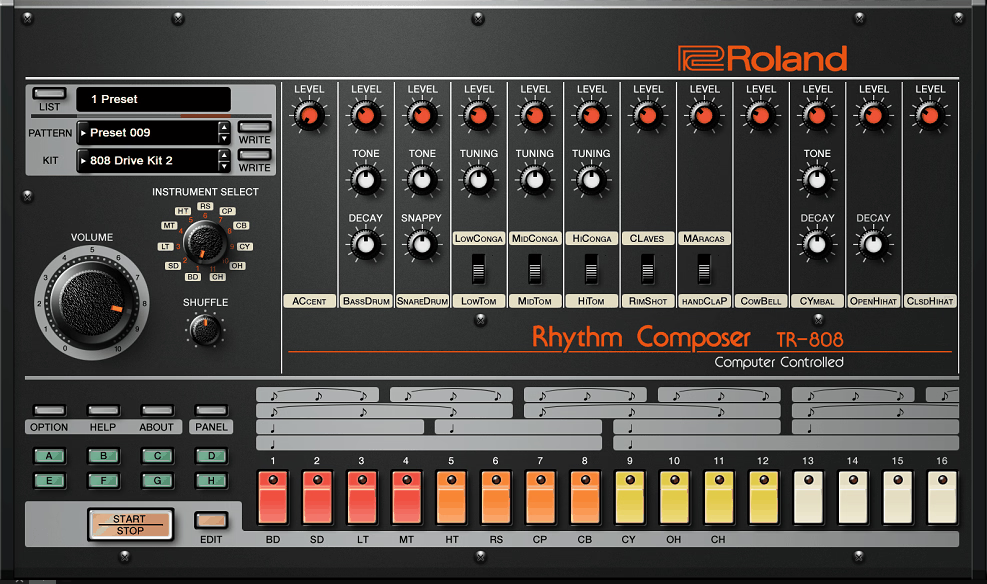
There’s something almost absurd about the fact that the official TR-808 plugin from Roland, the company that invented the original in 1980, is available for free with a basic Roland Cloud account.
This is the drum machine that launched hip hop, defined house music, and became the most sampled electronic instrument in recording history. The kick that sits at the foundation of an entire genre, the snappy claps, the sizzling hi hats: they’re all recreated here by the one company that has access to the original schematics and engineering documentation.
I want to be realistic about what this is and what it isn’t. This is a focused recreation of a specific vintage drum machine, not a modern production workstation with thousands of features.
If you need deep synthesis, AI browsing, or layer blending, look elsewhere on this list. But if you want the actual sound of a TR-808 inside your DAW with zero cost of entry, this is the most authentic way to get it without spending thousands on original hardware or settling for sample packs that can never quite capture the full dynamic behavior of the real circuits.
- Component Level Analog Circuit Modeling
Roland’s ACB technology recreates the individual transistors, capacitors, resistors, and the notoriously defective components that give the original 808 its personality, meaning the plugin responds dynamically to parameter changes in the same way the hardware does.
This isn’t a static set of recordings triggered back at you. The kick drum’s famous long decay and tunable pitch react in real time as you adjust them, and the interaction between the tone and decay circuits produces the same nonlinear behavior that makes hardware 808s feel musical in a way that samples cannot replicate.
Each of the 11 instrument voices has been individually modeled with editable parameters that go beyond what the original hardware offered. You can tweak the tuning, decay, and tone of each voice through a dedicated edit window that provides more precise control than the original panel knobs ever could.
I found the cowbell and clave models particularly well done, capturing the metallic resonance and sharp transient character that these sounds are known for with impressive accuracy.
- Enhanced Step Sequencer with Sub Steps and Flam
The sequencer maintains the classic 16 step grid workflow that defined the original 808 experience but adds modern conveniences that make programming significantly faster and more creative.
You get eight variations per pattern for building longer sequences, and each instrument can have its own independent Last Step and Shuffle settings, encouraging experimentation with polymetric structures the original hardware couldn’t achieve.
The addition of adjustable flams, sub steps, and soft hits gives you detailed control over fill patterns and ratcheted sequences that would have required considerable workaround on the hardware.
Completed patterns can be dragged directly from the plugin into your DAW as MIDI for further editing, which is a modern workflow feature the hardware obviously never offered. The plugin syncs seamlessly to your DAW’s tempo and supports individual outputs for routing each instrument voice to its own mixer channel for independent processing.
7. XLN Audio XO
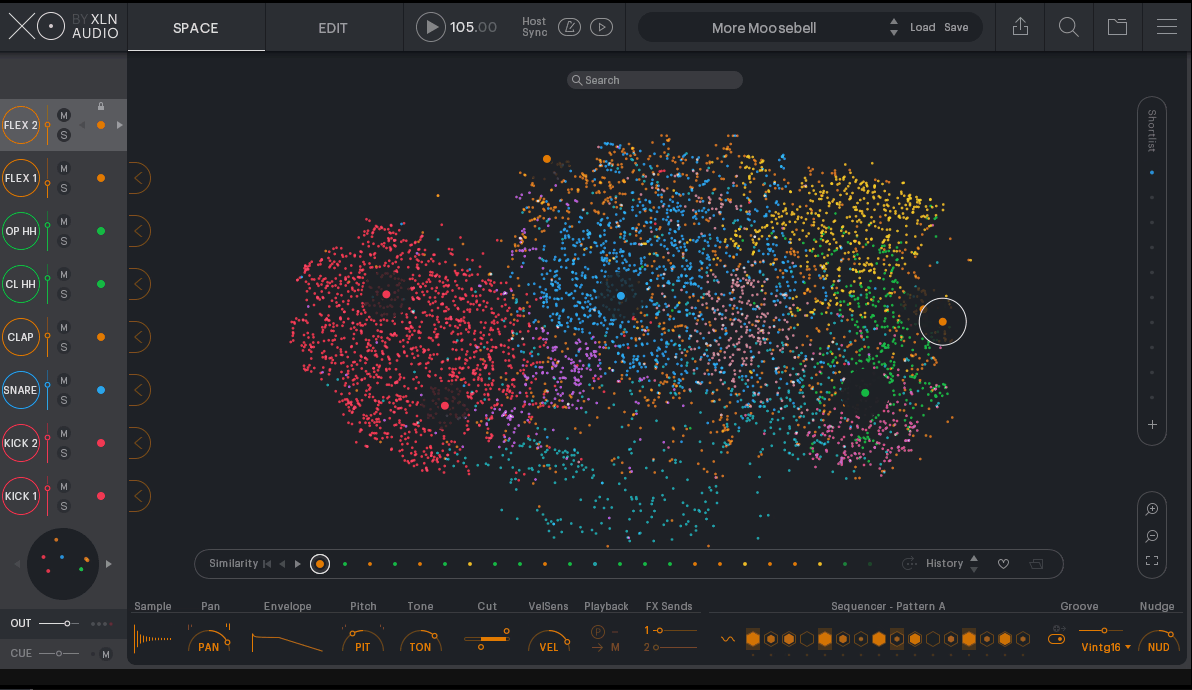
If you’ve been producing for any length of time, you probably have thousands of drum samples scattered across folders on multiple drives with vague names and no real organization. XLN Audio XO exists to solve that exact problem, and it does so with one of the most visually clever interfaces in music software.
The whole idea is that browsing for sounds should happen with your ears, not your eyes, and XLN Audio built an entirely new paradigm around that principle that turns sample selection from a chore into something genuinely enjoyable.
The result is that building drum kits transforms from tedious folder diving into something that feels more like exploring a galaxy. You sweep your mouse across the interface, hear each sample as you pass over it, zoom into areas that sound promising, and assemble kits almost entirely by ear rather than by filename.
I found this workflow genuinely changed how I select drums, because the spatial layout constantly surfaces samples I’d forgotten I owned or would never have found through conventional browsing.
- AI Powered Sample Constellation and Similarity Grouping
XO’s import process scans as many folders as you point it at, analyzes the audio content of every file, and assigns each sample a type classification and position on the map based on its acoustic properties. Kicks cluster together in red, snares in blue, hi hats in yellow, and so on, but within each cluster the spatial positioning reflects timbral similarity, so brighter snares sit near each other and darker ones occupy a different region.
The Drumminess slider is a particularly clever filter that measures how percussive a sample sounds, letting you quickly exclude melodic or ambient one shots from your search when you only want punchy drum hits.
A Similarity List shows the 15 closest matches to any selected sample, and the Kit Visualization panel lets you swap entire kits for sonically similar alternatives with a single click. XO ships with over 8,000 hand picked factory samples, but its real power emerges when you import your own collection and let the algorithm make sense of libraries that may have accumulated over years without any organization.
- Groove Focused Sequencer with Accentuator
The eight track step sequencer features A and B pattern sections that can be chained for variation, and the Beat Combiner tool provides curated groove templates that can be loaded per track with a single click. What sets the sequencing apart is the Accentuator, a dynamics processing feature that adds life and punch to programmed patterns by applying accent curves that emphasize certain beats and soften others.
The Nudge control shifts timing feel between ahead of the beat and behind it, which is invaluable for dialing in the specific groove character you’re after. Per track effects include pitch, tone shaping, filtering, and two shared send effects, with a master saturator for gluing the full kit together.
Every element of your beat can be exported via drag and drop as audio stems, a full mix, individual samples, or MIDI, making XO work seamlessly with whatever DAW workflow you prefer. The plugin runs standalone or as VST, VST3, AU, and AAX and is priced at $149 with a 10 day free trial.
8. AIR Drum Synth
AIR Music Technology has a pedigree that goes back to Wizoo Sound Design, one of the earliest pioneers in virtual instrument technology, and their work forms the core of many effects and instruments bundled with Avid Pro Tools.
The newer DrumSynth is built on a multi synthesis sound generator that combines FM, analog modeling, and physical modeling algorithms across eight individual engines, each one dedicated to a specific drum voice. It arrives from a team with decades of experience building drum instruments including Strike, the Akai MPC sound engines, and Alesis e-Drum modules.
I think AIR Drum Synth occupies an interesting position for producers who want synthesis based drum creation without the complexity of something like DrumComputer or the deep calibration layers of Tekno.
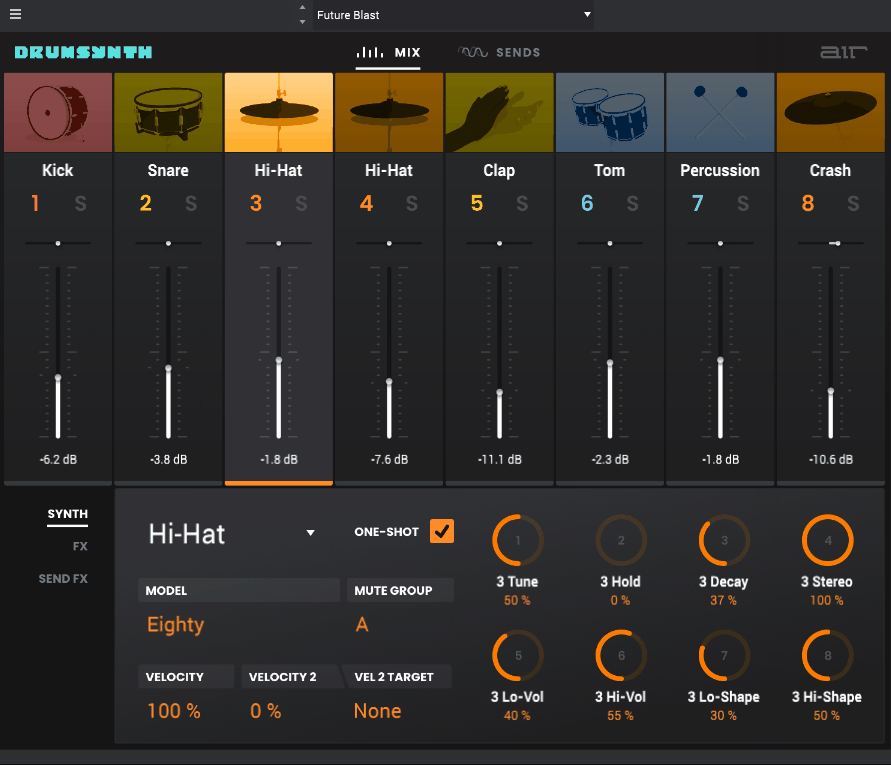
The interface puts everything on a single panel with no hidden menus, and you can go from opening the plugin to having usable custom drum sounds in under a minute. That accessibility doesn’t mean the sounds are shallow, either. The combination of three synthesis methods across the engines gives you a range that extends from punchy classic analog tones to metallic FM textures and physically modeled resonance.
- Eight Dedicated Synthesis Engines Across Three Methods
Each engine covers a specific percussive role: Kick, Snare, Clap, Hi Hat, Tom, Percussion, Crash, and Ride, and the synthesis method behind each one is chosen based on what produces the most realistic and versatile results for that particular sound type.
The FM synthesis handles metallic and tonal percussion like hi hats, rides, and bells with the complex harmonic spectra those sounds require. The analog modeling drives kicks, snares, and claps with the warm, punchy character of vintage circuits.
Physical modeling adds natural resonance and decay behavior to toms and percussion voices that gives them a more organic quality than pure electronic synthesis typically achieves. Each engine exposes its own set of tailored parameters so you’re always adjusting controls that make musical sense for that specific drum type rather than wrestling with generic synthesis parameters.
The randomize button generates new sounds across all engines simultaneously for rapid experimentation, and the included preset library covers territory from faithful vintage recreations to sounds that push well into modern experimental terrain.
- Onboard Effects and Two Sampler Channels
Beyond the six synthesis engines, AIR Drum Synth includes two dedicated sampler channels that let you load your own mono or stereo WAV files with options for loop, forward, and reverse playback. This hybrid approach means you can combine synthesized drums with your own samples, field recordings, or vocal chops in a single instance without needing a separate sampler plugin.
The effects section provides transient shaping, tuning, EQ, compression, delay, and reverb that can be applied to shape and polish each voice before it hits the output. The entire interface operates with no hidden panels, keeping every control visible and accessible for the fastest possible workflow.
AIR Drum Synth is available as a standalone application and in VST, VST3, AU, and AAX formats, and the sound design heritage behind it comes from the same team responsible for some of the most critically acclaimed drum instruments in Pro Tools history.
9. Algonaut Atlas 2
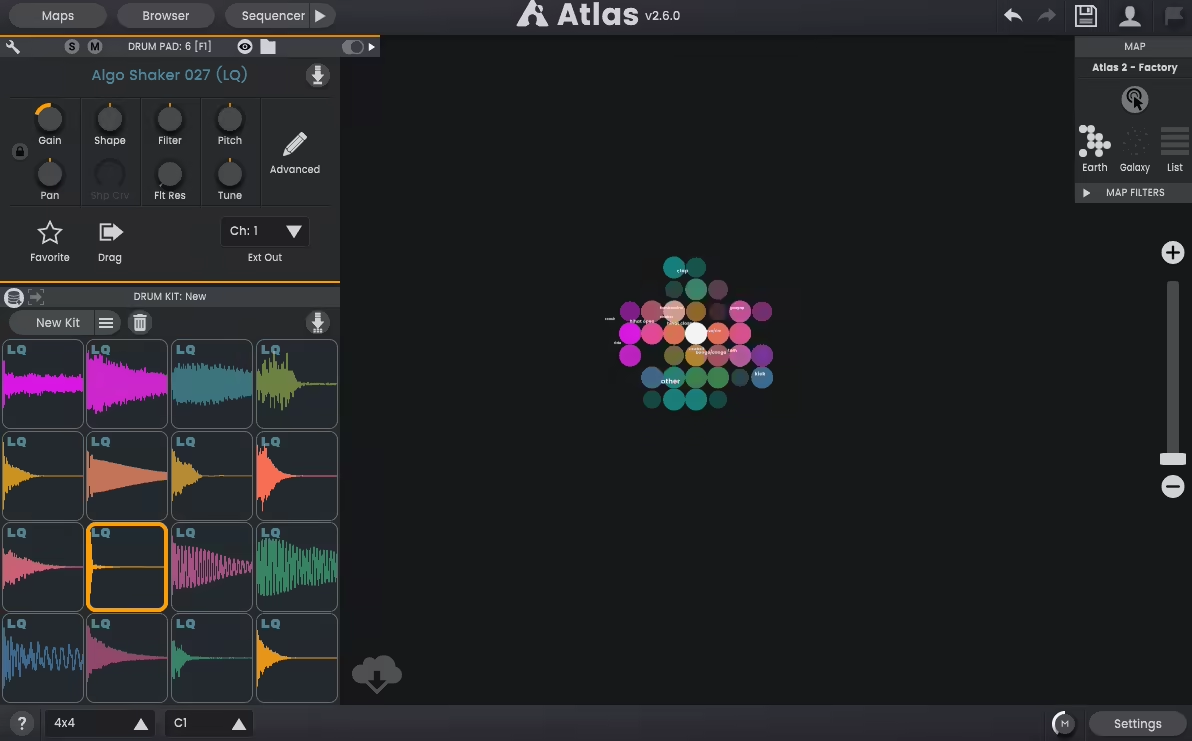
Atlas 2 approaches the same problem as XO, making sense of sprawling sample collections, but pushes in a direction that prioritizes flexibility and personal customization over a single polished experience.
The key philosophical difference is that Atlas 2 treats your library as multiple distinct worlds rather than one unified space, which changes how you think about organizing and accessing your sounds depending on what a specific project demands.
What convinced me about Atlas 2 is how well it handles the complete beat creation pipeline from sample discovery through sequencing to export. You can explore your library, discover forgotten sounds, build a kit, program a pattern, add humanization, and export finished audio stems all without leaving the plugin.
The $99 price point undercuts XO while offering some features that its more expensive competitor lacks, though XO arguably has a more polished visual interface. Both are excellent, and the choice between them often comes down to personal workflow preferences and whether you want one large map or many smaller focused ones.
- Multiple AI Generated Sample Maps
Building a new map is as simple as pointing Atlas at one or more folders and clicking Build, after which the AI scans every audio file and sorts them by type and similarity. The analysis typically takes seconds for a single pack or a few minutes for a massive library like the entire NI Maschine factory collection.
The resulting maps can be saved independently, which means you can have a dedicated map for your vintage drum machine samples, another for acoustic kit recordings, another for experimental modular percussion, and switch between them based on what a project needs.
You can audition samples by clicking individual nodes, using WASD keyboard navigation to move through the map while hearing each sound automatically, or enabling hover mode to rapidly sweep through hundreds of samples with your mouse.
The World view clusters sounds into larger token groups for a high level overview, while Galaxy view shows every individual sample positioned by similarity. Atlas 2 supports WAV, AIFF, FLAC, OGG, MP3, WMA and other formats, and any sounds used in a project can be embedded directly in your DAW session so you never have to worry about missing files.
- Flexible Drum Sequencer with Variation Engine
The sequencer merges the speed of a traditional step sequencer with the flexibility of a piano roll, letting you get ideas down fast and then refine timing and dynamics with precision.
Individual channel lanes can run at different lengths for polyrhythmic patterns, and the Mirror Edit feature automatically replicates changes across specified beat divisions, saving repetitive mouse work when building symmetrical patterns. A MIDI import function preserves original timing from dropped files, and the export system handles MIDI, mixed audio, and individual stems.
The Variation Engine adds humanization and randomization to volume, pan, pitch, filter, and timing on a per sound basis, turning rigid patterns into something that breathes and shifts naturally over time.
Drum kits can be configured with 8, 16, or up to 64 channels, and the UI layout can match your specific hardware controller whether you’re using a Launchpad, Maschine, Push, or any other 4×4 or 8×8 pad grid. Atlas 2 also supports MIDI out for triggering external instruments or hardware, along with multi channel output for processing individual drums in your DAW mixer.
Extra: Cherry Audio CR-78 Drum Machine
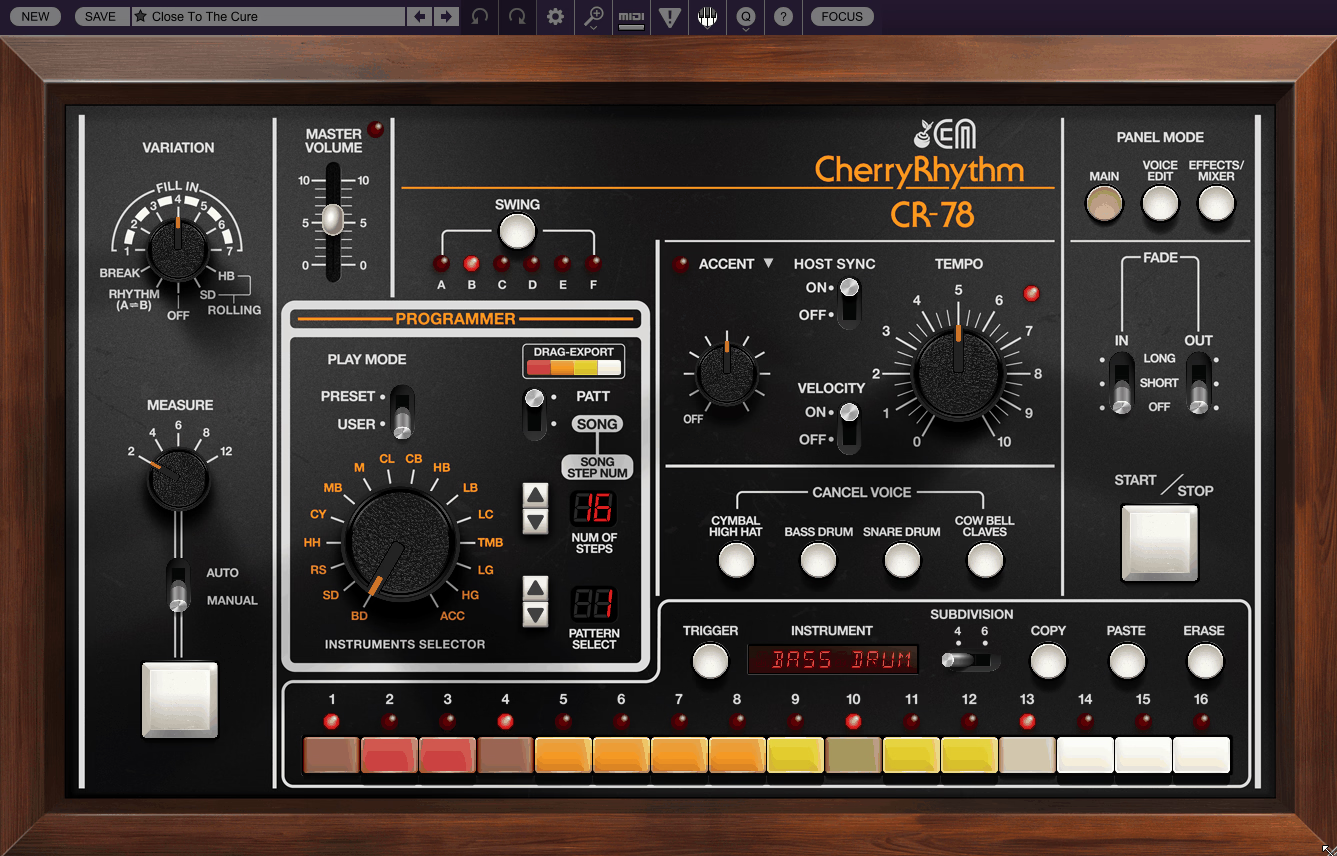
This is the machine that appeared on records by Blondie, Phil Collins, Peter Gabriel, and Orchestral Manoeuvres in the Dark, and its dry, punchy analog sounds have never really gone out of style. What Cherry Audio has done is take a piece of gear that most producers have only ever experienced through sample packs and rebuild it as a fully playable, deeply editable instrument that goes far beyond what the original hardware could do.
The genius of CR-78 Drum Machine is how it balances faithful vintage recreation with modern usability improvements. The original CR-78’s notoriously complex programming system has been replaced with an intuitive X0X style step sequencer, and the sounds are fully tweakable in ways the original hardware never allowed.
At $49, it’s the kind of plugin that pays for itself the first time you need that specific vintage analog percussion character that no amount of sample library browsing quite captures.
- Fully Editable Modeled Synthesis Voices
Every drum voice, including bass drum, snare, rimshot, hi hat, cymbal, cowbell, claves, metallic beat, tambourine, and guiro, has been recreated through component level modeling rather than sampling.
The Voice Edit panel gives you deep control over each sound with parameters for tone, noise level, envelope settings, and tuning that let you range from subtle refinement to extreme sonic transformation that pushes the CR-78’s palette into territory the original designers never imagined.
I appreciate that Cherry Audio included the option to pitch tune voices for melodic use, which opens up the CR-78 as a source of synth bass lines and melodic accompaniment alongside traditional rhythm duties.
The modeling responds dynamically to parameter changes just as real analog circuits would, so the interaction between controls produces nonlinear results that feel organic and musical rather than predictably digital.
Some dedicated hardware purists have noted that certain voices don’t perfectly match their memories of the original, but the modeling captures the essential character convincingly enough for all but the most demanding comparison tests.
- Song Mode with 99 Pattern Chain
Beyond individual pattern creation, the CR-78 includes an expansive Song Mode that lets you chain up to 99 patterns in sequence with up to 99 steps per song. This transforms the plugin from a simple drum machine into a full arrangement tool where you can program an entire track’s drum part from intro through verse, chorus, bridge, and outro without ever touching your DAW’s timeline.
All of the original CR-78’s variation and fill in patterns, accent controls, voice cancel, and fade functions are faithfully included alongside new swing and velocity options.
The plugin includes over 250 presets created by veteran sound designer James Terris, covering everything from faithful recreations of the original factory rhythms to hip hop, EDM, and experimental kits that push the CR-78 into modern territory.
A separate outputs version of the plugin routes each instrument voice to its own channel in your DAW for independent processing.
Completed patterns can be exported as MIDI via drag and drop into your DAW or saved as Standard MIDI Files, and the plugin works as both a standalone application and as a plugin in AU, VST, VST3, and AAX formats with full parameter automation and MIDI learn support.

Hello, I’m Viliam, I started this audio plugin focused blog to keep you updated on the latest trends, news and everything plugin related. I’ll put the most emphasis on the topics covering best VST, AU and AAX plugins. If you find some great plugin suggestions for us to include on our site, feel free to let me know, so I can take a look!