Sampler plugins are now a must-have in modern music production. You can load any sound, cut it up, change it, and make something new. Whether you’re chopping drum breaks, layering sounds, or creating instruments from scratch, a good sampler opens up your creativity!
The right sampler plugin can change how you work with audio as it can turn basic recordings into instruments, soundscapes, or rhythms that shape your music. Some samplers are simple and fast, while others offer advanced features like granular engines and modulation. The best one for you really depends on your workflow and music style.
Some samplers are great for drum sequencing and beat slicing. Others are best for synthesis and sound design, while a few come with huge libraries of ready-to-use instruments. Here, you’ll find eight samplers that stand out for their features, sound quality, and real-world value.
1. LANDR Sampler

LANDR Samplerwas created to solve a common problem: most of us have thousands of samples spread across different folders and drives, but we rarely use most of them.
Rather than searching through countless folders, you can look for samples by key, tempo, loop type, or keywords. The AI indexing scans your whole library and tags each sample automatically, making it quicker and easier to find the right sound.
After you load a sample, you have more options than just playing it as-is. LANDR Sampler offers three playback modes that let you interact with your audio in different ways. You can play samples across your keyboard, slice loops into separate hits, or simply audition them. This helps you stay creative without getting stuck in setup tasks.
- AI-Powered Sample Organization
LANDR Sampler scans and organizes your sample folders for you, tagging each sound by category, length, key, and BPM. This way, you can filter results right away instead of clicking through lots of folders hoping to find something useful.
The “Similar Sound Swap” feature lets you try out related samples without leaving the plugin window. This can save a lot of time when you are looking for a certain sound.
- Three Playback Modes for Different Creative Needs
Normal Mode lets you play samples as they are. Chromatic Mode spreads any sound across your keyboard so you can play it in your project’s key. Slice Mode cuts loops into pieces, either automatically or by hand, and assigns each piece to a different note or pad.
These modes let you recontextualize audio without needing external tools or manual key mapping, keeping your workflow in one window.
- Automatic Tempo & Key Matching
Each sample you load automatically matches your DAW’s tempo and your project’s key. This means you do not have to spend time on steps like time-stretching or pitch-shifting before using a loop.
- Built-In Sequencer & Export Options
You can make pattern loops in the plugin with a step sequencer, adjust velocity and timing for each step, and export MIDI, audio stems, or processed samples directly to your DAW. This makes LANDR Sampler more than just a playback tool. It is a space to sketch ideas and build arrangements before adding them to your main project.
- Six Built-In Effects with XY Pad Control
The plugin comes with six effects, including delay, reverb, bit-crush, distortion, filters, and transient shaping. You control them with an XY pad. You can also set start and end points, adjust ADSR envelopes, reverse playback, and stretch time right in the plugin. This gives you lots of ways to shape your sounds before exporting.
2. Arturia CMI V

When you open the CMI V sampler VST plugin, you get more than just another sampler. It recreates the Fairlight CMI IIx, the first digital sampler that helped define the sound of 1980s music.
This plugin stands out because it combines sampling with additive and spectral synthesis. You can record or load samples, break them into harmonics, and rebuild them from the ground up. It feels like using three sound engines at once.
I use CMI V when I want sounds that mix vintage and modern vibes. The 3D waveform display makes editing easy to see and use, and the built-in sequencer helps me sketch ideas without leaving the plugin.
What you get:
- 10 Instrument Slots with 32-Voice Polyphony Per Slot
You can load up to 10 different sounds at the same time, each with its own settings. This lets you layer a drum, a pad, and a bass right inside CMI V, so you don’t need to set up extra tracks in your DAW. Each slot has 32 voices, so you can play big chords or layers without losing notes.
- Variable Sample Rate and Bit Depth Control
With CMI V, you can set the sample rate anywhere from 2.1 kHz to 44.1 kHz. Lower rates give you a gritty, lo-fi sound like old samplers, while higher rates produce a clean, modern sound. You can also change the bit depth to add warmth or crunch. This makes it simple to move between vintage and modern tones.
- Additive Synthesis with 32 Harmonic Envelopes
The Time Synth section gives you 32 individual harmonics you can shape over time using breakpoints. Each harmonic has its own envelope, so you can create evolving timbres that change as a note plays. A real-time oscilloscope shows what’s happening, which helps when you’re sculpting complex sounds. This goes way beyond typical sampler filters.
- Spectral Synthesis and FFT Analysis
CMI V has a spectral synth mode where you control harmonic distribution with settings like Center, Spread, and Bias. You can analyze a sample with FFT, turn it into a harmonic profile, reshape it, and convert it back into a sample. This workflow connects recording and synthesis in ways most samplers can’t.
- Built-In Page-R Style Sequencer with 32 Steps
The sequencer in CMI V gives you 32 steps for programming patterns. You can add swing, transpose in real time, and make polyrhythmic sequences. It’s based on the original Fairlight’s Page-R sequencer and keeps you creative without switching to your DAW timeline. It’s great for sketching ideas or building loops quickly.
3. Algonaut Atlas 2
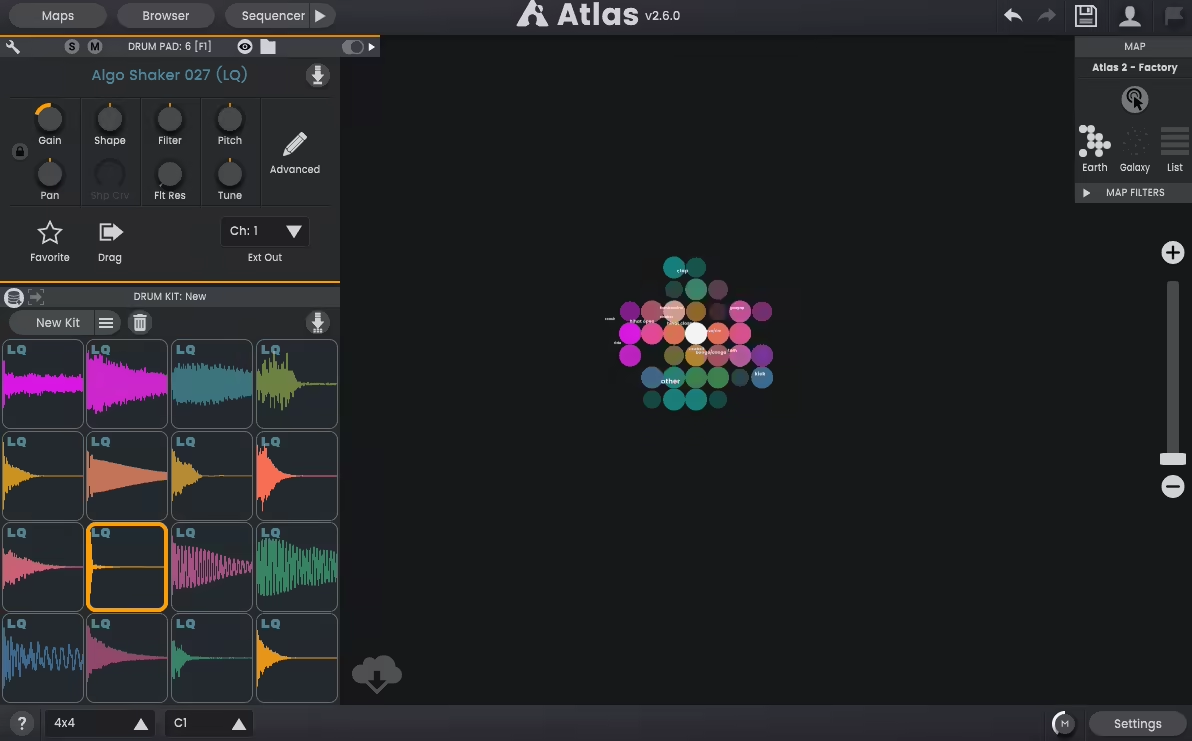
The Atlas 2 sampler plugin completely changed how I work with drum samples. Unlike most samplers that just play back one-shots, Atlas 2 uses AI to organize your whole sample library into visual maps. This way, you can browse by sound instead of digging through endless folders.
I used to spend a lot of time searching for the right kick or snare in messy sample packs. Atlas 2 fixes this by analyzing your sounds and grouping similar samples together on a visual map. All your kicks are in one spot, snare in another, and unique percussion sounds are easy to find too.
What really sets this plugin apart is how it brings discovery, kit building, and sequencing together in one place. You’re not just loading samples; you’re actually creating full drum patterns and exporting them as MIDI or audio stems, all within the plugin.
- AI-Powered Sample Mapping
Atlas 2 scans your sample folders and places every sound on a visual map based on how they sound. Kicks are grouped together; snares are in their own area, and unusual sounds have their own space. You can make different maps for various genres or moods, which keeps things organized. I really like how you can find samples you forgot about just by exploring the map, instead of reading through file names.
- Dynamic Kit Generator
You can drag samples from the map onto eight pads to build your own drum kits or use the randomize button to let Atlas create a kit for you. The plugin automatically balances the volume of different sample types, so your kits sound good right away. Each pad has controls for pitch, filter, envelope shaping, and panning, making it easy to adjust sounds without needing another plugin.
- Built-In Step Sequencer
Atlas 2 comes with a sequencer that does more than just basic 16-step patterns. You can change the step resolution, adjust velocities, add groove, and even use polyrhythms for each track. The Mirror Edit feature lets you copy patterns across different channels, which helps you build variations faster.
- Export Workflows
Once you finish a pattern, you can export it as MIDI or render it as audio loops and stems directly into your DAW. This makes Atlas 2 useful for both building ideas inside the plugin and moving finished beats into your project timeline. It works as both a VST/AU/AAX plugin and a standalone application, so you can use it live or outside your DAW.
4. Native Instruments Kontakt 8
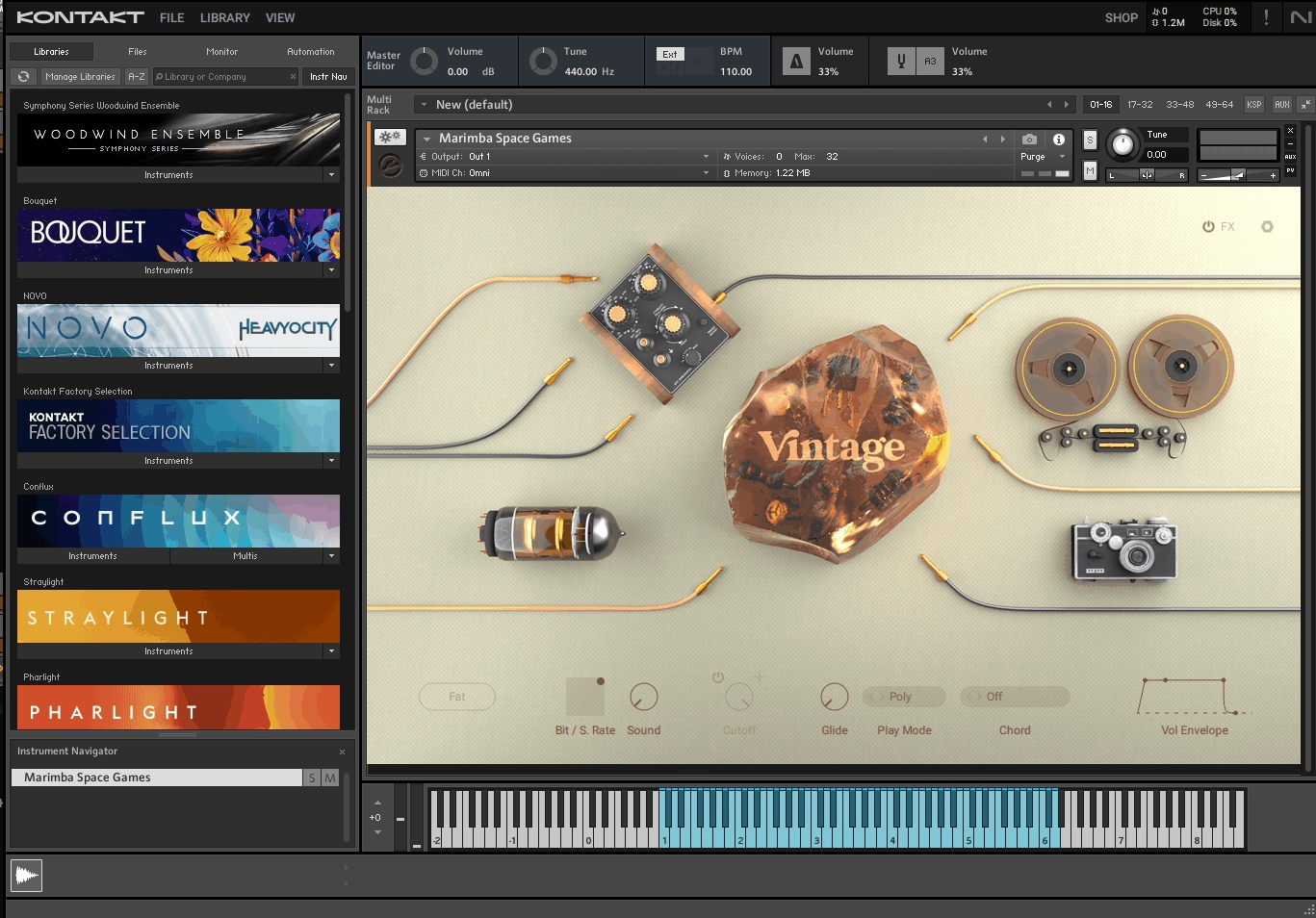
Kontakt 8 stands out from other samplers for its extensive instrument library. You get more than just a sampler engine – you also get access to thousands of commercial libraries made just for it.
If you need realistic strings, experimental sounds, or vintage synths, there’s probably already a Kontakt library for it.
Kontakt’s scripting system helps instrument designers create tools that feel dynamic and responsive. For example, you can use orchestral patches that switch articulations as you play, or try synths with custom interfaces that go beyond standard sample playback.
- KSP Scripting Engine for Advanced Instrument Design
This feature sets Kontakt apart from basic samplers. The Kontakt Script Processor lets developers add custom behaviors to instruments.
You can use a string library that automatically switches between legato, staccato, and pizzicato depending on how fast and how long you play notes. Some libraries also have built-in sequencers, arpeggiators, and controls that respond to velocity, mod wheel, or aftertouch in a natural, musical way.
- Massive Third-Party Library Ecosystem
Kontakt offers one of the biggest collections of sampled instruments you can find. It comes with over 40GB of factory content, plus thousands of third-party libraries, from full orchestras to rare world instruments. Whether you’re scoring films, making cinematic music, or just need sounds you can’t record yourself, this ecosystem is hard to beat.
- Zone-Based Modulation System
With Kontakt, you can assign different envelopes and LFOs to each zone instead of just one for the whole patch. This lets you shape each layer of a sound separately. For example, you can blend acoustic samples with synth textures and give each layer its own attack, decay, and filter movement. This makes hybrid sound design much more flexible.
- Time Machine Pro Stretching
Kontakt’s Time Machine Pro engine lets you shift pitch and stretch time without losing the character of your samples. You can stretch loops to fit your project’s tempo or change the pitch of samples without unwanted artifacts. It also keeps vocal samples sounding natural, even when you move them across several octaves.
5. CR8 Creative Sampler
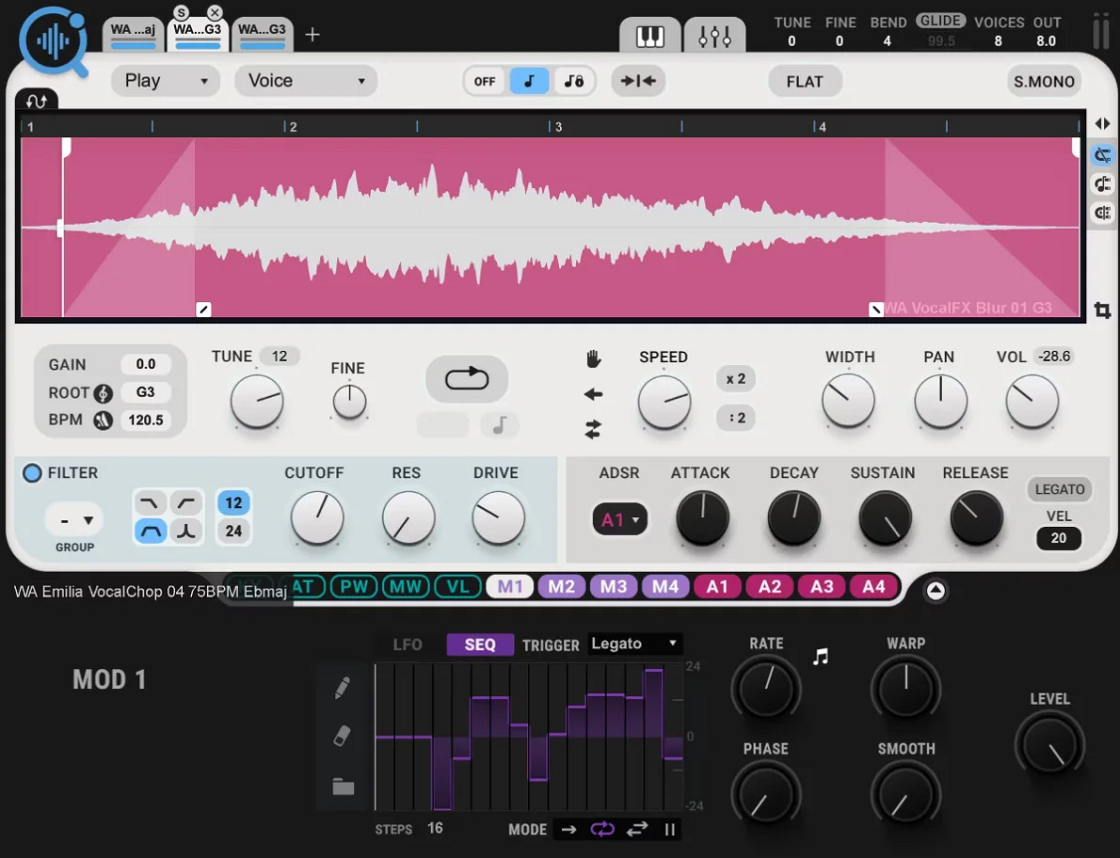
CR8 brings together AI-powered sample discovery and creative tools in one fast workflow. What stands out to me is how it makes sampling easy. You can drag in any sound and start shaping it right away with tools that feel natural to use.
The built-in Cosmos browser uses AI to scan and tag your whole sample library. This saves you time searching through folders, so you can focus on making music.
As someone who owns it, I find the Waves CR8 sampler plugin VST really helpful for building layered sounds fast. Whether you’re stacking drum hits or making textured pads, the interface keeps everything easy to see and edit, without making you dig through menus.
Features:
- 8 Independent Sample Layers
With CR8, you can load up to 8 samples at once, and each layer operates independently. You can stack them for rich, complex sounds or spread them across your keyboard to create multi-instrument patches.
Each layer has its own tuning, panning, and volume controls, giving you a lot of flexibility for building drum kits or hybrid instruments. I use this when I want one key to play several textures at once.
- AI-Powered Cosmos Sample Browser
Cosmos integration is a huge help if you have thousands of samples on your hard drive. It scans your library and tags everything by key, BPM, and instrument type. You can search and try out samples right in CR8, synced to your project’s tempo. It also comes with over 2,500 royalty-free samples and 800 presets to get you started.
- 5 Time-Stretching Algorithms
CR8 offers five stretch modes: Voice, Beats, Melodic, Harmonic, and Classic. Each is designed for different types of sounds. I use Beats mode for loops because it keeps the punch of the transients.
Voice mode is great for vocal chops. Classic mode keeps vintage sampling artifacts if you want a lo-fi sound. This control over pitch and time makes CR8 much more flexible than basic samplers.
- Drag-and-Drop Modulation System
You get four LFO or sequencer modules and four ADSR envelopes, which you can drag onto almost any parameter. The LFOs have 25 waveforms, and you can also draw your own shapes.
I really like Warp mode because it lets you speed up or slow down the LFO timing without changing the overall cycle length. This makes it easy to add movement to static samples without needing complex routing.
6. XLN Audio XO (Sampler, Sequencer Drum Machine)
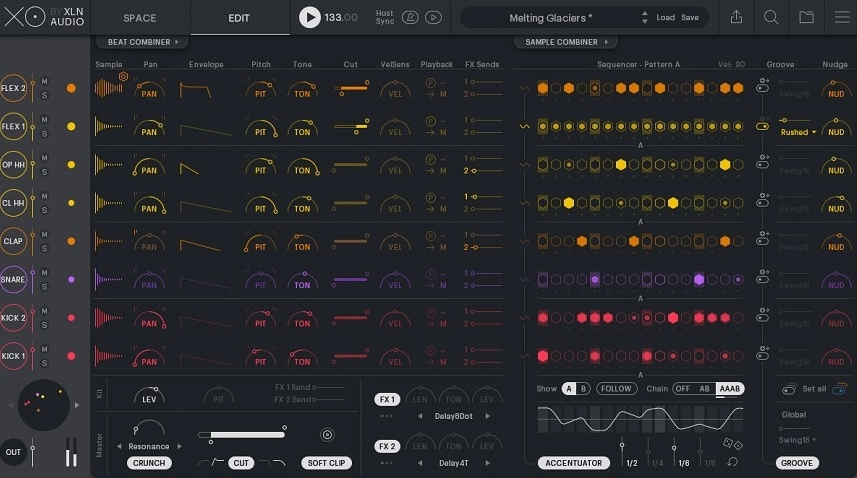
The XO sampler VST plugin scans your drum library and places each sound on a visual map, grouping similar samples together.
It might seem simple, but this feature changes how you build drum kits. You can click around the map to quickly hear kicks that sound similar or snares with the same punch. It feels like your whole sample collection is organized by sound, not just by file name. XO also comes with an 8-slot drum machine and a pattern sequencer, so you can layer sounds, adjust timing, and add variation all within the plugin.
When you find a pattern you like, you can drag the MIDI straight into your DAW.
- AI-Powered Sample Organization
XO looks at your drum library based on how the sounds actually compare, not by folder names. Each kick, snare, hi-hat, and percussion sample is placed on a map, with distance showing how similar they sound. You might even find samples you forgot about just by exploring the map. Browsing becomes quick, visual, and much more enjoyable.
- Smart Sound Swapping
If you swap a drum sound in XO, it suggests similar options from the same part of the map. This helps you keep your groove while trying out lots of variations quickly. It’s useful when a kick is close but needs a little more punch or click. You can keep working without wasting time searching through folders.
- Built-In Pattern Sequencer with Groove Templates
XO includes curated groove templates you can load and tweak instantly. Each pattern lane has controls for velocity, timing offsets, and probability, so you can add human feel or randomness without programming every hit. I love how quickly I can turn a static loop into something that breathes. The sequencer encourages fast iteration instead of overthinking.
- Playground Mode for Endless Inspiration
Playground mode generates pattern variations automatically based on your settings. You set the density, complexity, and style, then XO creates new grooves for you to audition. It’s perfect when you’re stuck or want to explore rhythmic ideas I wouldn’t program myself.
- Third-Party Sample Integration
XO scans factory sounds and your own sample folders, organizing everything in a single unified space. You’re not locked into a preset library. I’ve loaded my entire collection of one-shots, and XO treats them the same way it handles its own content.
7. TAL-Sampler

TAL-Sampler stood out to me because it focuses on doing one thing really well. It gives you the warm, grainy sound of classic hardware samplers, but without the high cost or steep learning curve.
You’re not just slapping a bitcrusher on clean audio. TAL-Sampler actually downsamples your audio, runs it through different vintage DAC chip models, then brings it back up. That’s how you get authentic lo-fi warmth, not harsh digital crunch.
It’s perfect if you want your samples to have character in a mix, not just be clear. With four layers, you can stack and modulate several samples at once, and the filter section offers much more than simple frequency cuts.
- Vintage DAC Emulations with Real Downsampling
TAL-Sampler includes six DAC models, like Emu II, AM6070, and S1000. Each model adds its own character to your sound since the plugin processes audio at lower sample rates before converting it back.
You can adjust the DAC level slider to control how much the sound degrades, so you choose how much vintage grit you want. This is great for getting that worn tape or old drum machine feel right in your sound.
- Four Independent Layers with Deep Modulation
There are four sample layers, and each one has its own envelopes, filters, and effects. The modulation matrix gives you three AHDSR envelopes and three LFOs for every layer. You can even modulate loop positions in real time, so your samples can change and evolve as they play.
When you are layering drums or building atmospheric pads, having this much control over each layer without menu diving keeps you in the creative zone.
- Self-Oscillating Filters with Multiple Slopes
The filter section offers 24/12/6 dB slopes across LP, HP, BP, Notch, and All-Pass types. What makes this special is the zero-feedback delay design that can self-oscillate, adding harmonic content that wasn’t in your original sample. I would use this for resonant sweeps or to design bass sounds that need extra harmonic interest. The filter doesn’t just cut frequencies, it actively shapes tone.
- Simple Sample Import and SFZ Support
You can drag and drop WAV, AIFF, MP3, OGG, and FLAC files straight into TAL-Sampler without conversion. It also handles SFZ import and includes a basic mapping editor, so you can build multi-sample instruments quickly.
You can load everything from one-shot drums to full chromatic instruments in seconds. When workflow matters, and you don’t want to wrestle with complicated sample managers, this straightforward approach keeps you making music instead of organizing files.
8. Glitchmachines Polygon 2

If you’re bored with regular sampler plugins that only play back sounds, Polygon 2 offers something new. This hybrid sampler from Glitchmachines transforms ordinary audio into complex, evolving textures that stand out in any project.
Polygon 2 is great when you want sounds that morph and glitch in ways a regular sampler can’t. It’s ideal for experimental electronic music, sound design, or whenever you want abstract instrument patches that go beyond the usual. The granular engine gives you a whole new way to work with samples.
Polygon 2 stands out because it works with audio at a very detailed level. Instead of just playing samples, you rebuild them in real time using granular synthesis, spectral processing, and advanced modulation.
- 4 Granular Samplers with Multiple Processing Modes
Polygon 2 has four independent granular samplers, each able to process audio in its own way. You can break sounds into tiny grains and control their size, density, and position. This lets you make anything from shimmering pads to glitchy percussion. Each sampler can work alone or blend with the others for evolving, layered textures.
- 8 LFOs and Extensive Modulation System
The plugin comes with eight LFOs that can control almost any parameter. You can sync them to your DAW’s tempo or let them run freely for more unpredictable movement.
Polygon 2’s modulation matrix is a highlight. You can route sources to many destinations and create sounds that are always changing. It’s great for adding movement and variation without having to draw automation by hand.
- Dual Oscillator with FM Synthesis
In addition to the samplers, Polygon 2 includes a dual oscillator section with FM synthesis. This gives you another way to create sounds alongside your samples. You can mix traditional synthesis with granular processing to make unique hybrid patches.
- Over 100 Factory Presets and Large Sample Bank
When you start using Polygon 2, you get over 100 presets and a large factory sample library to explore.
FAQs:
[sp_easyaccordion id=”10025″]

Hello, I’m Viliam, I started this audio plugin focused blog to keep you updated on the latest trends, news and everything plugin related. I’ll put the most emphasis on the topics covering best VST, AU and AAX plugins. If you find some great plugin suggestions for us to include on our site, feel free to let me know, so I can take a look!