I’m going to walk you through the best convolution reverb VST plugins for music production and sound design that I found.
When basic algorithmic reverb isn’t cutting it, I recommend turning to convolution processing. These plugins capture real acoustic spaces and hardware units, giving you authentic spatial character that synthetic reverbs simply can’t replicate.
I’ve put together this list covering options across different needs and budgets – Altiverb 8, Reverberate 3, Fog Convolver 2, MConvolutionMB, Paragon, and several others I recommend depending on your specific workflow, including free ones .
For transparent vocal spaces that sit naturally in mixes, I would say, I recommend plugins with pristine impulse response libraries. For immersive surround work in film scoring, I would lean toward options with native multi-channel support. When you need creative sound design tools that turn impulse responses into evolving textures,you can for plugins with built-in modulation and multi-effect chains. The variety here covers everything from concert hall emulations to multiband processing, modulated spatial effects, and tempo-synced rhythmic reverbs.
Studio mixing, live performance, post-production, and experimental sound design all demand different spatial approaches. You can try different tools depending on whether you need surgical precision for critical mixing work or creative flexibility for experimental production. That versatility matters when you’re juggling multiple projects with completely different sonic requirements.
When your tracks need genuine depth, dimension, and acoustic character, I recommend these convolution reverb plugins for their realism and creative control.
Here’s what I suggest:
1. LiquidSonics Reverberate 3
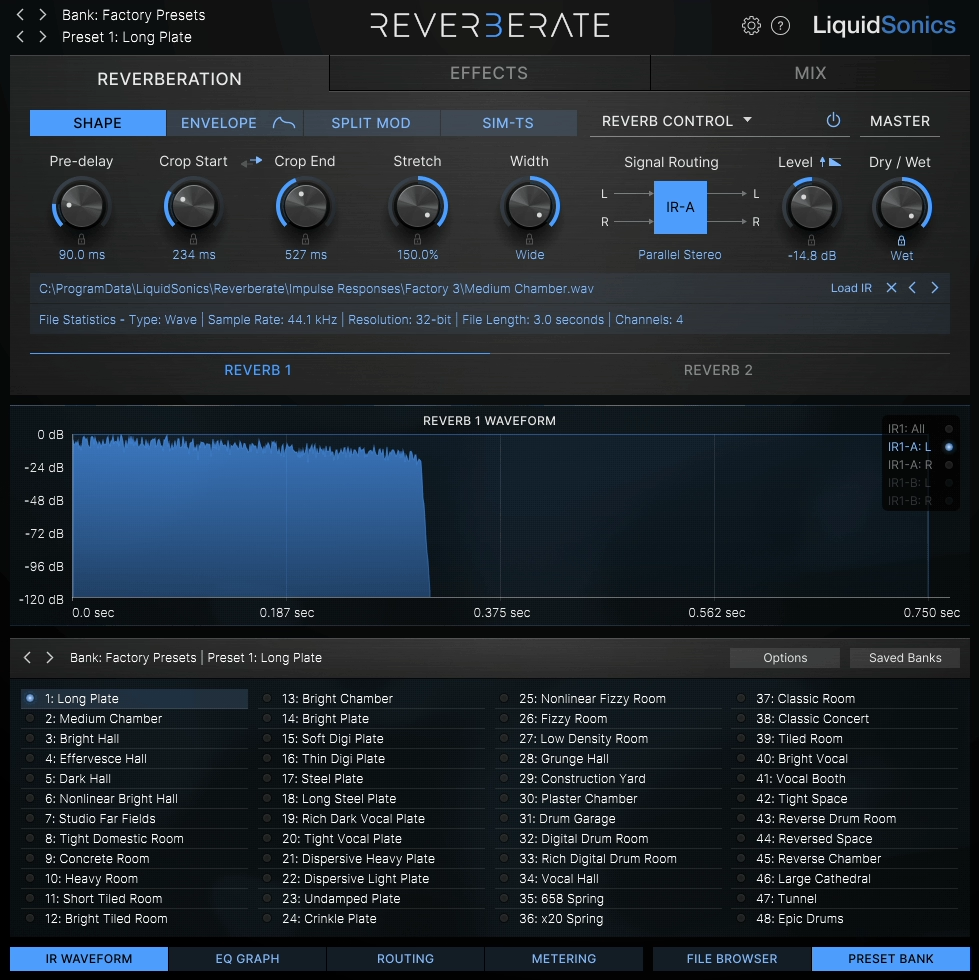
Reverberate 3 takes a completely different approach to convolution reverb than what you might be used to, and I must say it’s one of the few plugins that genuinely rethinks how convolution processing should work. Most convolution reverbs treat impulse responses as static snapshots that you can only tweak with basic parameters, which has always felt limiting to me.
In fact, this plugin challenges that entire concept by introducing Fusion-IR technology that captures hundreds of impulse responses per preset rather than just one. What this means for you is that early reflections and decay tails become separate, editable elements instead of being permanently locked together.
I must say that when I first tried Reverberate 3, I realized most convolution reverbs feel static and frozen in ways I’d just accepted as normal. This one actually breathes and moves in ways I didn’t think were possible with convolution processing.
This convolution reverb plugin offers you over 270 professionally designed presets covering everything from intimate rooms to massive cathedrals, but what matters more is how you can shape those presets.
- Fusion-IR Technology and True Stereo Processing
The Fusion-IR system captures multiple impulse response recordings at different levels and timings, then interpolates between them in real time. When you adjust decay length or tonal characteristics, the plugin isn’t just stretching or compressing a single IR like traditional convolution reverbs do.
It’s actually blending between different captures to give you smooth, musical results. You can stretch decay times pretty far on some presets and they still sound natural rather than grainy or artificial.
The true stereo processing throughout the entire signal path keeps spatial depth intact, which makes a huge difference on complex sources like orchestral recordings where every stereo crossfeed path gets processed independently. In fact, this commitment to true stereo means you’re never getting cheap pseudo-stereo tricks that collapse spatial information.
- Modulation Engine for Convolution
Most convolution reverbs skip modulation entirely because of phase issues and CPU constraints, but I must say Reverberate 3 handles this brilliantly. The plugin built a sophisticated system specifically for this type of processing, and you can apply movement to the reverb tail, the stereo image, or both.
The results sound natural unless you intentionally push things into extreme territory. I find this helpful on vocals and pads where static reverbs can become dull or dense in a mix.
I can only say that the space evolves with your music instead of sitting there frozen, adding subtle movement that keeps the reverb feeling alive. You can use it for transparent mixing or creative sound design depending on how far you take it, and in fact, the modulation never sounds artificial unless you deliberately want that character.
- Deep Sound Shaping Without Additional Processing
The built-in EQ and tone shaping tools let you tailor the reverb response without loading extra plugins. You have precise control over pre-delay, decay behavior, stereo width, damping, and tonal balance all within the plugin itself.
The interface groups these controls logically with real-time visual feedback, which helps you understand what your adjustments are doing. I must say that what impressed me most is how you can take a single preset and completely transform its character just by adjusting the internal tools.
A bright plate can become darker and more intimate, or a small room can open up into something more expansive, all without leaving the plugin window. That being said, this level of sound shaping eliminates the need for external EQ or additional processing in most situations.
- Third-Party IR Integration
Beyond the factory library, Reverberate 3 supports third-party impulse responses and processes them through the full modulation and shaping engine. You can load impulse responses from other sources and give them movement and control they wouldn’t have in a standard convolution plugin.
Your existing IR libraries suddenly become more expressive tools with capabilities they never had before. I must say this transforms any IR collection you already own into something far more powerful.
Despite all this processing with modulation, true stereo paths, and real-time interpolation, the plugin stays efficient. You can run multiple instances in larger sessions without major CPU strain, which matters when you’re working on complex projects with dozens of tracks.
2. AudioThing Fog Convolver 2

Fog Convolver 2 isn’t trying to compete with plugins designed for pristine room emulation. AudioThing built this specifically for producers and sound designers who want to push convolution reverb into experimental territory, and I love how unapologetically creative it is.
If you’re working in ambient, electronic, or cinematic music and need something that transforms sounds rather than just placing them in realistic spaces, Fog Convolver 2 delivers. I’m not sure any other convolution reverb treats impulse responses quite like this, using them as raw material for sound design rather than static acoustic snapshots.
I would say if you are into Drum & Bass and want to make unique sound design, this would be the great tool for it – it can work on percussions, synths, pads, textures, drones, even basses if you make proper tweaks.
- Massive Impulse Response Library
The plugin ships with over 1,200 impulse responses, and this isn’t just standard rooms and halls. You get traditional spaces like plates, springs, and chambers, but what I love the most is the unconventional material included here.
There are processed noises, metallic resonances, field recordings, and abstract textures that you won’t find in typical convolution reverbs. AudioThing clearly curated these IRs as sound sources meant to be reshaped and animated rather than just used as-is!
The library also includes more than 250 factory presets showcasing everything from subtle atmospheric effects to extreme experimental soundscapes. I can only say that I browse presets here more than in other reverb plugins because each one feels like a creative starting point rather than just a utility setting.
- Dual Convolution Engine
This is where Fog Convolver 2 separates itself from standard convolution plugins, and I loove how much flexibility it gives you. You can load two impulse responses simultaneously and blend, layer, or modulate them against each other.
You can also combine realistic room responses with tonal or abstract IRs to create hybrid spaces that feel both grounded and otherworldly. The routing and mixing controls give you precise balance between dry signal, both convolution layers, and additional processing stages.
But I can tell you that the way these two engines interact opens up complex spatial possibilities that go way beyond what single-IR reverbs can do. You’re not limited to simple A/B blending either..
- Four Independent Modulation Slots
Fog Convolver 2 includes four modulation slots that you can assign to parameters like IR position, blend amount, filter cutoff, and amplitude. The modulation sources include LFOs, envelope followers, and random generators, which means your reverbs can evolve dynamically over time or react directly to your input signal.
I would recommend it on pads where you want the space to slowly shift in tone and character, or maybe on percussion where rhythmic motion adds movement without feeling mechanical. What I love the most is how static impulse responses become living, breathing effects that change throughout your track. You can create movement that feels organic rather than obviously processed or artificial.
3. NUGEN Audio Paragon
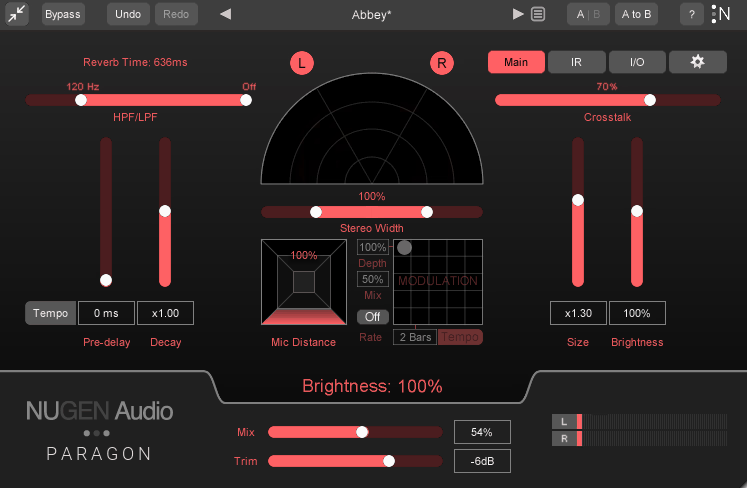
NUGEN Audio takes convolution reverb into territory that most plugins in this category don’t even attempt.
Paragon VST isn’t just another convolution reverb trying to recreate rooms and halls. NUGEN Audio built this specifically for professionals who need both acoustic realism and the kind of precision control that post-production and immersive mixing demand.
If you’re working in immersive audio, surround formats, or just need pristine spatial control alongside traditional stereo mixing, this plugin was designed with those workflows in mind from the ground up. It handles stereo work beautifully, but where I’ve found it really shows its strength is in 3D audio environments and Ambisonics processing. The sonic quality is transparent and natural in ways that make it feel less like an effect and more like an extension of your acoustic space.
- Impulse Response Library With Real Depth
Paragon ships with over 500 impulse responses that have been meticulously captured from actual spaces and hardware units. You’re getting classic halls, chambers, plates, rooms of various sizes, and some uncommon acoustical spaces that add real character to your mixes.
What matters here is that each impulse response preserves natural frequency balance and decay characteristics. I’ve found the vintage plate responses particularly useful for vocals, while the large hall captures have this lush tail that never feels artificial or overly processed. You can also import your own impulse responses if you have custom or boutique IR collections. In addition to that, plugin comes with more than 350 presets organized by category and use case, making it easy for you to find starting points whether you’re doing subtle vocal ambiance or expansive spatial effects.
- Immersive Audio and 3D Capabilities
This is where Paragon separates itself from most convolution reverbs. The engine was designed to operate seamlessly within immersive audio formats including Ambisonics and multi-channel environments. You can define how early reflections and late reverberation behave in three-dimensional space, giving you control over perceived distance, width, and depth that goes way beyond standard stereo processing.
For projects targeting binaural, full surround, or VR soundscapes, this capability becomes essential rather than just a bonus feature. You can use this on immersive film projects where placing sounds precisely within a 3D acoustic field make the difference between something that feels flat and something that truly surrounds the listener. The spatial precision we get here is unmatched by traditional stereo reverbs.
- Advanced Shaping and Modulation Tools
Beyond the convolution engine itself, Paragon gives you sophisticated control over pre-delay, decay time, early reflection density, late reverb character, and frequency balance. Each parameter can be adjusted with precision, and I appreciate how the interface presents these options in a way that encourages exploration without overwhelming you.
The modulation section introduces small, musical variations in reverb characteristics over time, which prevents that static quality you often get with convolution reverbs. I use this constantly because the movement can be subtle enough for natural mixes or bold enough for immersive environments where I want the space to evolve dynamically. It’s kept my reverbs from sounding frozen or lifeless.
- Transparent Processing and Musicality
The sonic quality here is pristine and natural, which is what you need most when working on critical projects. Vocals gain believable space without becoming washed out, and drums retain punch even with lengthy tails.
4. Kilohearts Convolver
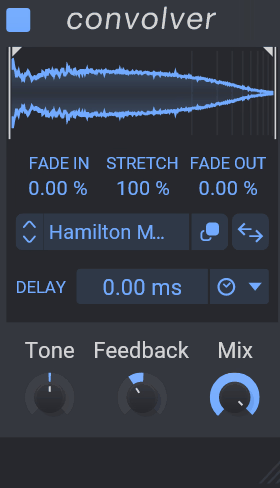
I love this one! At first glance, it looks like there is nothing going on, right? Don’t be fooled. Compared to the other Snappin plugins from Kilohearts, this is easily the most comprehensive of the bunch.
What I appreciate most is how kHs Convolver focuses on what actually matters in day-to-day production. You load an impulse response, adjust the essential parameters, and you’re making music rather than fighting with your reverb plugin. This simplicity doesn’t mean it lacks power, it just means that power is immediately accessible rather than buried under layers of options you’ll never use.
This convolution reverb plugin strips away all the unnecessary complexity perfect for those seeking simplicity. Kilohearts designed this specifically for people who want authentic convolution processing without spending hours learning architectural routing or diving through multilayered menus. I’ve recommended this to producers who are new to convolution because it makes the entire concept approachable without dumbing down the quality.
- Factory Library and IR Management
Convolver comes with a library of 200 factory impulse responses covering small rooms, classic plates, larger halls, and some unique tonal textures. These give you a solid foundation right out of the box.
The real strength here is how seamlessly you can import third-party IRs. You just drag and drop your own IR files directly into the plugin, and each load happens quickly without any fuss. You can build your own collection of IRs, and Convolver lets you access all of them without the tedious file management issues. This integration means the sonic palette extends far beyond the factory content, which matters when you want specific character that standard reverbs can’t deliver.
- Kilohearts Ecosystem Integration
If you’re already using other Kilohearts products, Convolver becomes even more powerful because it works inside modular environments like Snapshot, Multipass, Phase Plant, and Snap Heap. It comes in handy in Multipass where I can modulate Convolver parameters with LFOs and envelopes, creating dynamic convolution effects that evolve over time.
This workflow rarely exists in traditional reverbs, and it’s opened up creative possibilities I didn’t even know I needed. You can place Convolver within complex signal chains, automate parameters with precision, and layer convolution effects alongside synthesis and modulation tools. Even if you’re not deep into the Kilohearts ecosystem yet, knowing this integration exists gives the plugin serious long-term value.
- Essential Controls Without Bloat
The interface focuses on what you actually use: pre-delay, decay control, mix balance, and a simple EQ section. You can dial in pre-delay to align the reverb with rhythmic material, keeping grooves tight or creating purposeful space gaps. The decay control gives you a range from intimate reflections under 0.5 seconds to expansive tails over 4 seconds, which covers everything from subtle polish to dramatic spatial effects.
What I like is that these controls are right there in the main view, not hidden in submenus. When I’m working fast, I don’t want to hunt through panels just to adjust decay time or tweak pre-delay. Everything is where it should be, and the visual feedback makes it easy to understand what your adjustments are doing to the reverb response.
- Built-In EQ and Tone Shaping
The included EQ controls let me tailor reverb tone without inserting external plugins, which keeps my sessions cleaner.
You get low cut and high cut filters that prevent reverbs from muddying mixes, plus simple shelving control for gentle color shaping. I use the high cut filter to tame overly bright tails, especially on vocals where I want the reverb to support the performance without adding harshness. These tools are intuitive and encourage experimentation rather than making you overthink frequency adjustments.
5. EastWest Spaces II
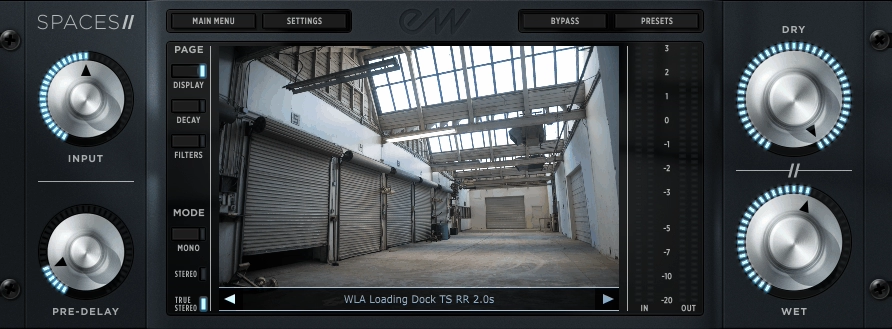
EastWest built this as a comprehensive solution for producers, mixers, and sound designers who refuse to compromise between realism and creative control.
What strikes me most about Spaces II is its scale and ambition. This isn’t a plugin designed to do one thing exceptionally well and ignore everything else. Instead, it tackles stereo mixing, surround production, immersive audio, and creative sound design all within the same framework. I would recommend it on chart pop productions where you needed transparent vocal spaces, and on film projects where spatial accuracy in surround formats is non-negotiable.
The philosophy here is that this convolution reverb should give you both authenticity and flexibility. You’re not locked into static playback of impulse responses, and you’re not limited to stereo workflows if your project demands more.
- Impulse Response Library at Scale
Spaces II includes over 1,600 high-quality impulse responses covering an absurd range of environments. You get small studios, vocal booths, expansive concert halls, chambers, cathedrals, and unusual acoustic spaces (like caves) that add character you won’t find elsewhere. There are also extensive collections of hardware reverb captures, which gives you classic outboard character without owning the actual units.
I’ve found impulse responses here that suit everything from subtle room ambience to dramatic hall tails, and the variety means I’m never stuck with generic options. The library spans realistic acoustic emulations and creatively inspiring textures, so whether you’re doing natural mixing or experimental sound design, there’s always something that works.
- Three-Layer Convolution System
This is what makes Spaces II significantly more powerful than basic convolution reverbs. You can load up to three convolution layers per instance, each with its own controls for EQ shaping, decay behavior, and dynamic response. You can blend these layers together, like combining a tight plate reverb on one layer with a reflective room on another and a vast hall tail in the third.
This layering capability creates hybrid reverbs that feel alive and dynamic rather than static. Each layer includes controls for pre-delay, early reflection density, decay time, and frequency roll-off, so you’re sculpting impulse responses rather than just playing them back. You can create custom spaces that don’t exist in nature by layering different acoustic characteristics, and the results always sound coherent rather than messy, so pretty cool!
- Immersive Audio and Surround Support
Spaces II handles surround and immersive audio formats including 5.1 and higher-order spatial configurations natively. For a film and game audio work, this capability is essential because it allows you place reverbs in 3D space with accurate spatial behavior.
- Extensive Preset Library
The plugin comes with more than 800 presets covering everything from subtle natural spaces to cinematic ambiences and sound design-oriented reverbs.
6. Audio Ease Altiverb 8
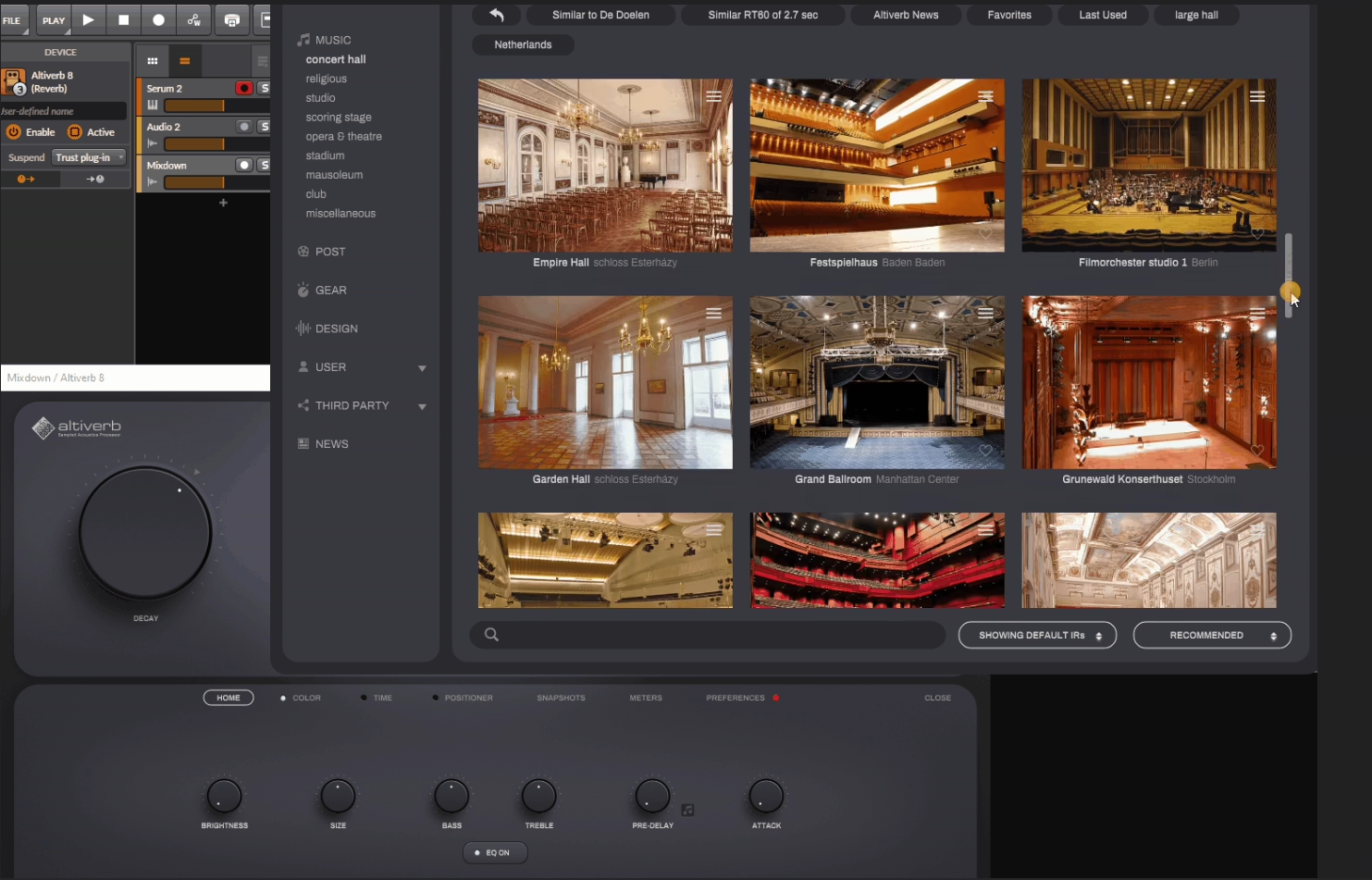
When people ask what’s the gold standard for convolution reverb, there’s really only one answer that comes up consistently across professional studios worldwide. For decades, one plugin has dominated high-end music production, film scoring, and immersive audio facilities.
That plugin is Altiverb 8 by Audio Ease, and it’s maintained this position because it refuses to compromise on quality, depth, or sonic authenticity. I’ve worked with various convolution reverbs, but Altiverb 8 operates on a different level entirely.
The fidelity and realism I get from this plugin makes other options feel like approximations rather than actual acoustic spaces. Whether I’m placing orchestral instruments in a concert hall or creating intimate vocal spaces, Altiverb delivers results that sound genuinely convincing rather than processed.
- Massive Impulse Response Library
Altiverb 8 ships with over 2,500 meticulously captured spaces and hardware emulations, which is the largest library I’ve encountered in any convolution reverb. You’re getting intimate rooms, professional studios, legendary concert halls, cathedrals, iconic hardware plates, vintage chambers, and specialty acoustic environments used in landmark recordings and films.
Each impulse response is recorded with precision microphones and techniques that preserve phase coherence, spatial depth, and frequency balance. I notice this immediately when I load up a concert hall IR because the spatial depth feels authentic and grounded rather than artificially widened.
For my orchestral work, this library provides spatial options that simply don’t exist in other plugins, and I constantly discover new spaces that suit specific projects perfectly. The library requires approximately 50GB of drive space when fully installed.
- Multi-Channel and Immersive Audio Support
The plugin handles stereo, surround, and higher-order spatial formats with ease. Altiverb 8’s multi-channel capacity is deeply integrated into how it implements convolution and spatial decay, meaning reverbs behave differently across channels while maintaining coherence and spatial accuracy.
I can place sound sources convincingly within a three-dimensional field, and the reverb extends naturally into immersive mixes without feeling artificial. This integration isn’t just a checkbox feature, it’s fundamental to how Altiverb processes spatial information, which is why it remains the standard in professional post-production facilities where spatial realism and directionality are crucial.
The plugin supports formats up to 7.1.2 and beyond.
- Multi-Layer Convolution System
One of the most powerful features is the ability to load multiple convolution engines simultaneously and blend them independently. I would recommend this to combine the body of a medium-sized hall with the tail of a larger cathedral, or to mix realistic room acoustics with characterful vintage hardware impulses.
This layered approach gives you a hybrid palette that bridges realism and creative effect in ways that single-engine reverbs simply cannot achieve. Each layer can be sculpted independently with its own pre-delay up to 500ms, early reflection density, tail length extending beyond 10 seconds, and EQ shaping, which means I’m building custom acoustic spaces rather than just selecting from preset options.
The creative possibilities expand significantly once you start experimenting with layers, and you can create spatial characteristics that don’t exist in any natural acoustic environment as with many other convolution reverb plugins.
- Comprehensive Preset System
Despite its depth, Altiverb 8 includes more than 1,200 presets that serve as excellent starting points across every musical and post-production application you encounter.
7. MeldaProduction MConvolutionMB
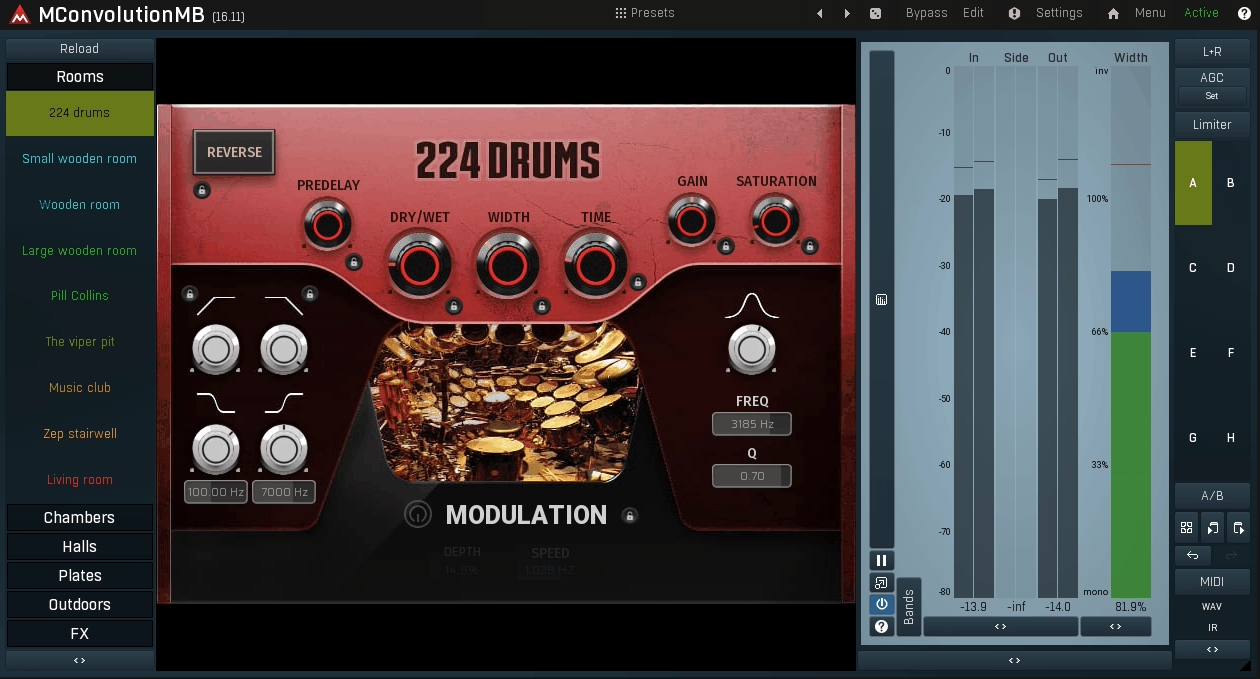
Most convolution reverbs force you into an all-or-nothing approach where the entire frequency spectrum gets the same reverb treatment, which has always frustrated me.
I’ve spent lots of time working around the problem of reverb muddying my low end or making high frequencies too harsh, usually by stacking EQs before and after my reverb plugins. MConvolutionMB eliminates that entirely by giving me the precision control I actually need without compromising on the authentic sound that convolution provides.
This plugin was built for engineers who refuse to accept the limitations of traditional convolution. The ability to sculpt reverb across different frequency ranges while maintaining the realism of impulse responses has made this essential in my mixing workflow.
- Multiband Convolution Architecture
MConvolutionMB divides audio into up to four independent frequency bands, and each band can be assigned its own impulse response and convolution parameters. I would recommend using this to apply a long, lush hall reverb to midrange frequencies while keeping your low end tight and clean with a shorter room IR.
High frequencies can be given a bright plate character without affecting other bands, which solves the problem of harsh reverb tails that many convolution plugins create. Each band has its own pre-delay, decay control, EQ shaping, and dry/wet balance, giving you surgical precision when you need it.
The result is a reverb that can be both expansive and clear without sacrificing mix definition. I’ve achieved spatial effects with this multiband approach that would be impossible with standard single-band convolution alone.
- Extensive Impulse Response Library
The plugin ships with over 450 ready-to-use impulse responses covering acoustic spaces from studio rooms and classic plates to large halls and experimental textures. These factory IRs give me an immediate palette for everyday mixing tasks as well as deeper creative exploration.
What I found powerful is that each band can load independent impulse responses, which means the effective number of possible combinations easily reaches into the tens of thousands of unique hybrid reverbs once I start using my custom IR libraries. MConvolutionMB supports all common IR formats, and I can load millions of samples from my own impulse collections directly into the engine.
This compatibility with third-party IRs transforms the plugin from a standard reverb into a creative spatial engine.
- Deep Modulation and Movement Control
The modulation framework allows you to assign up to four modulation sources like LFOs, envelope followers, or randomizers to parameters across bandsx. You can use this to bring movement into your reverbs, animate decay times, or evolve frequency emphasis over time.
This capability is especially powerful on sustained pads and ambient textures where static convolution tails feel lifeless. Each band has access to dynamic modulation, spectral controls, and EQ shapers that let you tailor the reverb response in musical ways.
The modulation never sounds artificial or forced because it’s working within the convolution framework rather than fighting against it.
8. Heavyocity Vast
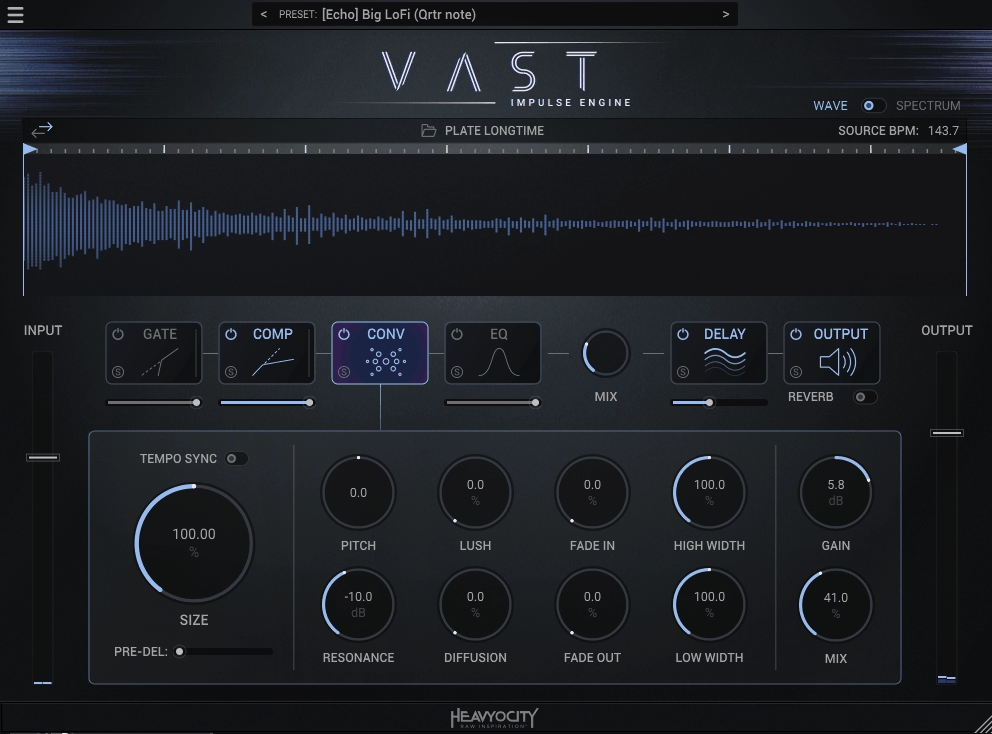
Most convolution reverbs stay in their lane, focused purely on recreating acoustic spaces with surgical precision. Heavyocity Vast takes a fundamentally different approach by building a multi-effect processing engine around its convolution core, which has made it one of my go-to plugins when I need more than just standard reverb functionality.
You can reach for this when your project demands spatial processing that goes beyond simply placing sounds in a room. The plugin combines convolution with delays, modulation, filters, pitch shifting, and dynamic processors in a way that feels integrated rather than tacked on.
What makes Vast practical is that it works equally well for straightforward mixing tasks and experimental sound design. You can use it on film scores where you needed cinematic textures, and on electronic productions where rhythmic space effects needed to lock to tempo.
- Extensive Impulse Response Collection
Vast ships with more than 1,100 high-quality impulse responses covering classic spaces like rooms, halls, and plates, plus unusual acoustic environments and hardware-derived responses. The variety gives me options whether I need subtle natural ambience or dramatic cinematic character.
The plugin also includes over 650 presets organized into categories like Subtle Spaces, Rhythmic Effects, Cinematic Pads, and Abstract Textures. The IR library spans everything from functional mix-friendly reverbs to surreal evolving effects.
- Integrated Multi-Effect Architecture
Each instance includes tempo-synced delays, filters, distortion, modulation sections, pitch shifters, and dynamic processors that can be applied before or after the convolution engine. This integration is what separates Vast from traditional convolution reverbs that only process impulse responses.
You can feed a hall impulse through pitch-shift and delay stages to create ethereal ambiences that evolve over time, or use modulation to make rhythmic space effects that lock to your session tempo. The interplay between convolution and these additional effects keeps the spatial processing grounded in realistic acoustics while opening up creative possibilities.
The processing chain is laid out logically with an input section for gain and tone shaping, the convolution core with IR selection and decay control up to 10+ seconds, the multi-effect section, and a master output stage with EQ and wet/dry mixing.
- Modulation System for Dynamic Space
The modulation architecture includes multiple modulation sources like LFOs, step sequencers, and envelope followers that can be assigned to parameters across convolution, delay, filters, and pitch processing. This brings movement to what would otherwise be static IR tails, making reverb breathe, pulse, or evolve in sync with my music.
The modulation can be subtle and musical or boldly experimental depending on how you route it, which gives you flexibility across different production styles.
- Tempo Sync and Rhythmic Integration
The convolution module includes tempo sync options that allow early reflection patterns or tail modulation to lock to my session tempo. This feature has become essential in my electronic productions where rhythmic ambience needs to enhance the groove rather than work against it.
Freebies:
1. Impulse Record Convology XT
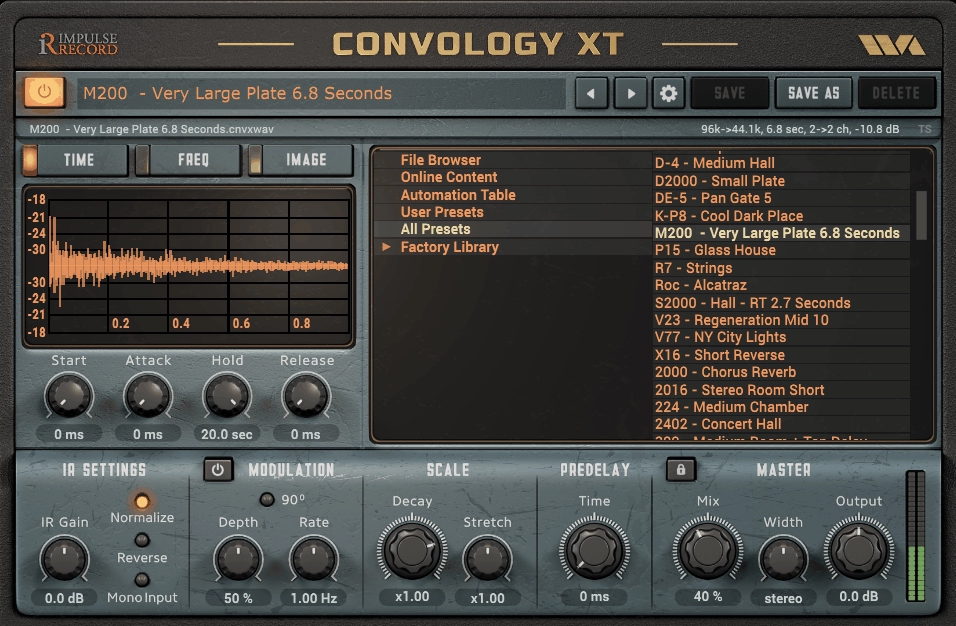
Getting started with convolution reverb doesn’t have to drain your budget. Convology XT is a completely free, fully featured convolution engine that delivers professional-quality spatial processing without costing you anything, which makes it perfect if you’re building your plugin collection on a tight budget.
I recommend this to producers because it sounds genuinely good, not just acceptable for a free plugin. The fact that it’s free doesn’t mean you’re getting watered-down features or low-quality processing.
- Massive Free Impulse Response Library
Convology XT comes bundled with more than 1,300 free impulse responses covering small rooms, studios, chambers, larger halls, plates, and character-rich hardware emulations. This library is extensive enough that you won’t feel limited by the default content, and the variety covers both realistic mixing needs and creative sound design applications.
The included IRs span everything from tight room ambiences under 1 second to longer plates and halls approaching 5 to 6 seconds of decay. The organization is thoughtful and makes exploring different acoustic environments straightforward, which matters when you’re learning how different spaces affect your mix.
- Expandable With Third-Party IRs
Beyond the included content, the plugin supports standard IR formats and works with thousands of third-party impulse response packs, both free and commercial. This expandability means your reverb library can grow with your skills and budget without needing to switch plugins.
You can loaded boutique IR collections and free community packs into Convology XT, and the plugin handles them all seamlessly. This design gives you a strong free foundation that scales with your creative ambitions as you build custom libraries over time.
- Professional Sound Quality
Despite being free, Convology XT delivers detailed, authentic spatial responses that sit naturally in mixes. Vocals gain realistic space without becoming washed out, and acoustic instruments breathe with convincing depth. The convolution processing doesn’t sound cheap or degraded compared to paid alternatives, which honestly surprised me when I first tried it.
2. MeldaProduction MConvolutionEZ
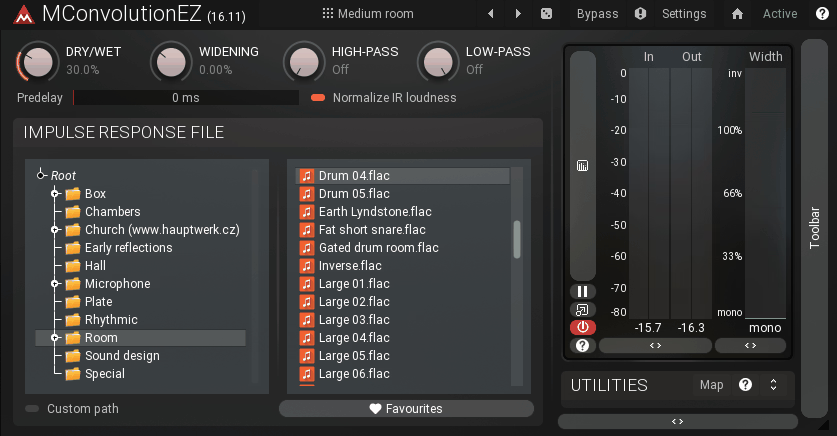
MeldaProduction MConvolutionEZ is the company’s free entry into convolution reverb, and honestly, it punches way above what you’d expect from something that costs nothing. I’ve tested plenty of free reverb plugins over the years, and most of them either sound thin or come loaded with limitations that make them frustrating to use in actual production scenarios.
That said, MConvolutionEZ takes a different approach by giving you legitimate convolution processing without the bloat or complexity that makes some reverb plugins intimidating. MeldaProduction designed this as a streamlined version of their more advanced Multiband plugin (MConvolutionMB mentioned in the paid section), which means you’re getting real technology here rather than some stripped-down demo that’s trying to push you toward a paid upgrade.
I would say this free convolution reverb plugin is perfect if you’re just getting into world of convolution reverbs or if you already have expensive reverbs but need something lightweight that won’t bog down your system.
- Built-In Impulse Response Collection
MConvolutionEZ ships with a library of more than 250 ready-to-use impulse responses covering small studios, chambers, classic plates, medium and large concert halls, and ambient textural environments. This variety gives you convincing room ambience for vocals, gentle plate shimmer for guitars, or expansive hall tails for cinematic sounds without downloading additional content.
The included IR set isn’t as massive as premium plugins, but it’s substantial for a free release and covers most conventional mixing situations I encounter. You can also load your own impulse responses, which means the plugin expands far beyond its bundled content as your IR library grows.
- Streamlined Interface Design
The interface presents only the controls you actually need without burying you in submenus or advanced options. You get pre-delay, decay control, mix balance, and a simple EQ section for brightness and tone, which keeps the workflow fast and intuitive.
Pre-delay helps tight rhythmic parts retain their punch before the reverb kicks in, and the decay parameter ranges from short intimate spaces under 1 second to longer ambient tails approaching 5+ seconds. The mix control lets me balance between subtle ambience and fully saturated space depending on what the track needs.
3. NuSpace Audio Riviera
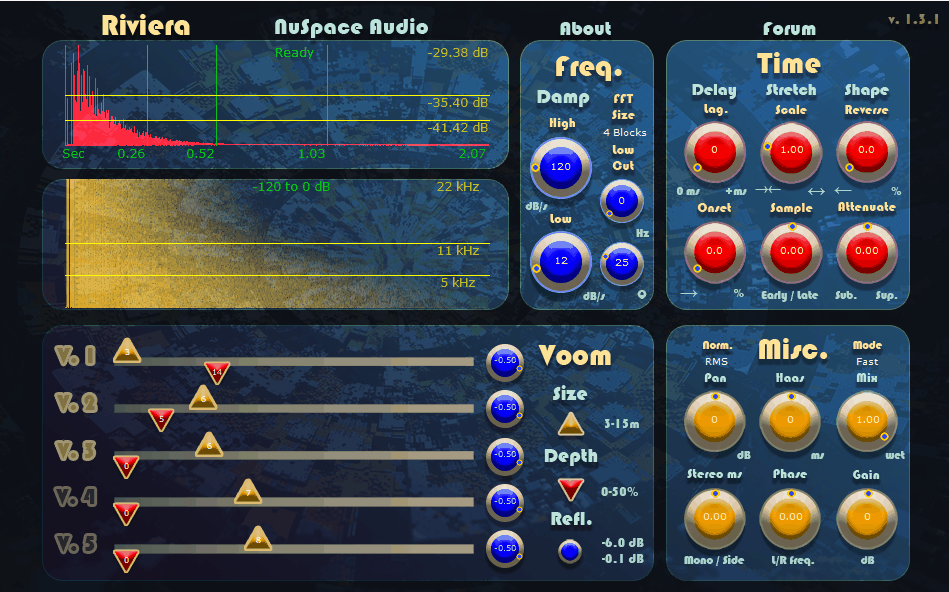
NuSpace Audio Riviera is a hybrid reverb that blends convolution-like realism with algorithmic flexibility.
I love how this plugin doesn’t feel like a stripped-down version trying to push you toward an upgrade.
You get genuine hybrid processing that creates rich, high-dimensional spaces with both precision and character, which makes it perfect whether you need natural mixing reverbs or experimental textures.
- Hybrid Engine With Built-In Space Models
Riviera combines impulse responses with internal algorithmic elements to create lush tails and expressive spatial behavior. The plugin includes over 100 built-in space models covering small rooms, chambers, plate-like tails, and larger virtual spaces that add depth to your vocals, pads, and effects.
I can only say that this diversity means you’re not locked into one type of ambience. You get natural-sounding rooms and halls for foundational mixing work, plus the ability to push parameters into vivid, dreamlike territory for cinematic sound design.
The space models feel well-designed and usable rather than just filler content to inflate the count.
- Flexible Decay and Pre-Delay Control
You can adjust decay time smoothly from short ambience below 1 second up to expansive tails exceeding 8 seconds, which covers everything from tight studio room vibes to atmospheric cinematic textures. The pre-delay control helps you maintain clarity and punch in rhythmic elements before the reverb tail kicks in.
I love how the mix control lets you dial between subtle enhancement and fully immersive effects depending on what your track needs. The built-in tone control section shapes the reverb’s frequency response so you can tame excessive highs or thicken the low mids without loading external EQ.
These tonal controls become essential when you’re trying to fit reverb tails into dense mixes without them competing with other elements.
- Built-In Modulation System
The plugin includes time-based modulation that adds movement to the reverb tail, making the space feel like it’s shifting or breathing. This characteristic can be subtle and musical when you want richness and depth on pads and vocals, or you can push it toward more surreal, evolving textures for ambient work. I would definitely use this modulation on sustained sounds where static reverbs quickly become boring or lifeless. You don’t get deep modulation routing like premium plugins, but what’s here is integrated well and sounds natural.
- Factory Presets and Fast Workflow
Finally, Riviera includes over 80 factory presets spanning classic room, hall, and plate simulations plus more expansive creative textures. These presets provide helpful starting points if you’re new to hybrid reverbs, and they demonstrate how the parameters interact in musically satisfying ways.
I love how the interface stays responsive and intuitive, which lets you audition presets, adjust decay, and achieve useful spatial effects quickly. The clean layout presents main controls like decay time, pre-delay, mix balance, and character controls without confusion or overwhelming menus.
4. Christian Knufinke Software SIR 1
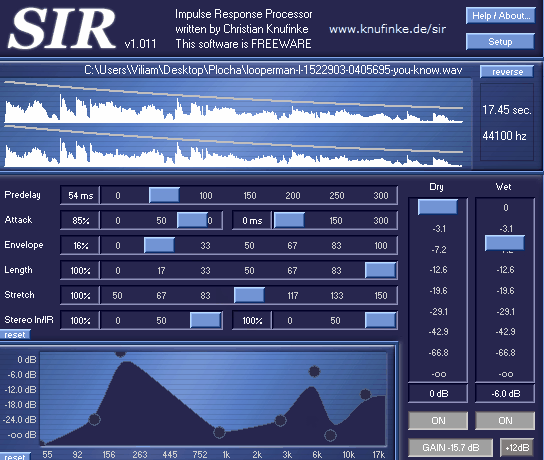
SIR 1 is one of those legendary plugins that helped make convolution reverb accessible to bedroom producers before it became standard in modern DAWs. I must say this plugin deserves recognition as a foundational tool even though it comes with some serious workflow constraints that might make it impractical for your setup.
In fact, SIR 1 free convolution reverb is what many producers first used when they discovered that convolution could make their tracks sound like they were recorded in actual acoustic spaces. The plugin is discontinued now, but people still mention it because it delivered convincing spatial processing without costing anything.
I think you can still get excellent results from SIR 1 if you’re willing to work within its limitations. That said, this is very much a product of its era, and you need to understand what you’re getting into before deciding whether it fits your workflow!
- Core Convolution Engine
SIR 1 loads standard WAV impulse responses and applies them to your audio in real time with clean, direct convolution processing. The sound quality is fundamentally tied to the IRs you feed it, which means you’ll need to source your own impulse response collections rather than relying on bundled content.
The plugin supports impulses up to 18 seconds in length, which covers most halls, plates, and atmospheric spaces you’ll need. I cannot speak on the included IR library because the plugin is really designed as a bring your own IR platform rather than shipping with thousands of factory impulses.
This approach worked well when SIR 1 was current, but modern plugins have definitely raised expectations with extensive preset systems and curated IR collections.

Hello, I’m Viliam, I started this audio plugin focused blog to keep you updated on the latest trends, news and everything plugin related. I’ll put the most emphasis on the topics covering best VST, AU and AAX plugins. If you find some great plugin suggestions for us to include on our site, feel free to let me know, so I can take a look!