
Finding the best UAD plugins can feel overwhelming when you’re staring at their catalog of hundreds of options, each claiming to be essential for your productions.
UAD plugins are known for authentic hardware modeling, but not every emulation justifies the cost or CPU hit. What separates their best work from the rest is access to original hardware, proprietary schematics, and partnerships with companies like API, Moog, and Manley that other developers simply don’t have.
I focused on plugins where the specific character, workflow advantages, or sonic behavior actually matters in real mixing and production scenarios rather than just collecting vintage names. These are the UAD plugins I’ve found genuinely useful in projects where generic alternatives couldn’t deliver the same results.
1. Anthem Analog Synthesizer
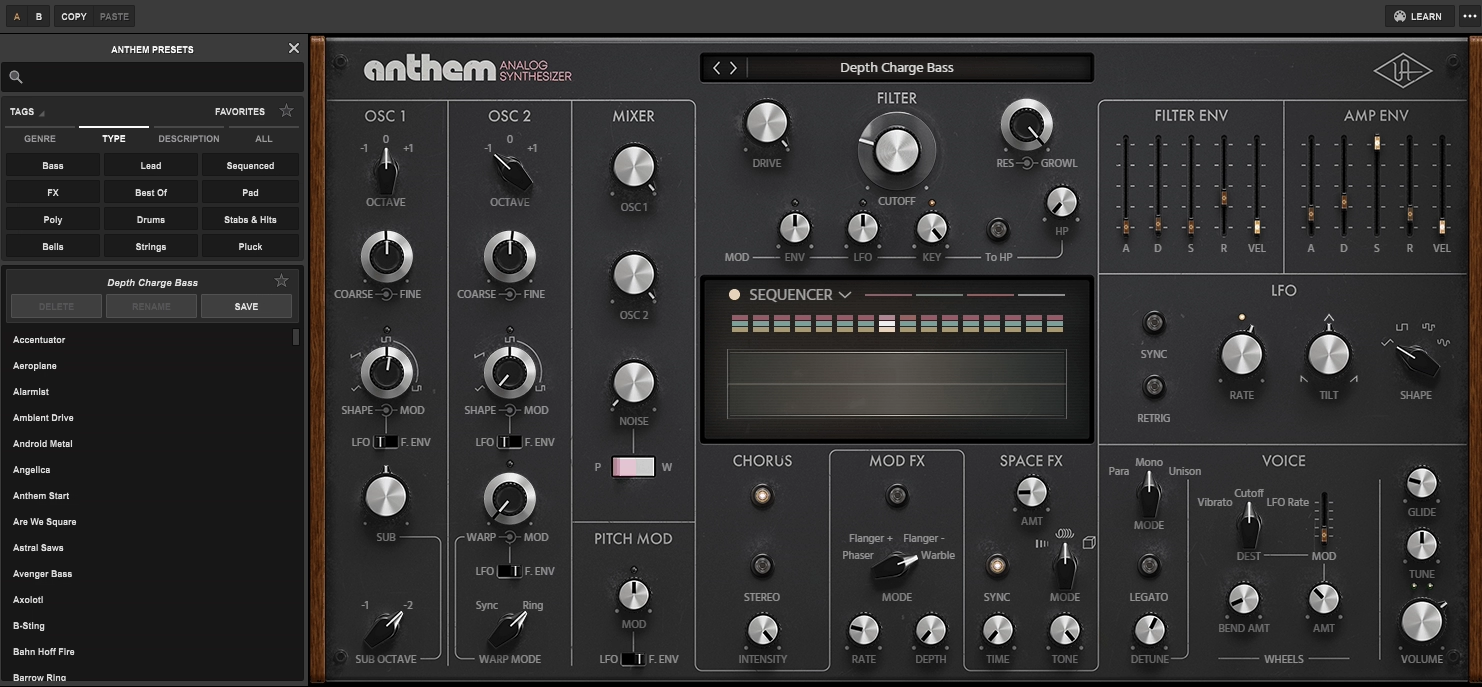
I’ve various virtual synths that claim to sound analog, but most of them still feel digital when you push them. UAD Anthem is designed for bold, gritty sounds rather than trying to be clean and polished. This is a mono synth at its core, though you get Unison and Paraphonic modes that let you play up to 4 voices through the same filter.
What impressed me most is the analog-modeled low-pass filter with its Drive, Growl, and Resonance controls that interact in ways you won’t get from mathematical DSP filters. The plugin comes with around 260 factory presets covering everything from thick bass to aggressive leads, which is decent considering this is focused on a specific sonic character rather than being a do-everything synth.
Here is what you get:
- Two Analog-Modeled Oscillators with 4 Waveforms
You get two oscillators that produce continuously variable waveforms spanning triangle, saw, square, and pulse waves. I would recommend it for creating evolving bass tones where you slowly morph between waveforms to add movement. The oscillators include sync and ring modulation accessible through the warp control, giving you those classic aggressive timbres without needing external processing.
- Interactive Filter with Drive, Growl, and Resonance
When I push the resonance high and add drive, it becomes genuinely aggressive and unstable in musical ways. The filter can go from subtle warmth to complete sonic destruction, making it useful for everything from polished pop bass to even experimental sound design!
- 3-Lane, 16-Step Sequencer
The built-in step sequencer features 3 lanes with 16 steps each, plus swing, accents, polyrhythmic patterns, and randomization modes.
This makes it easy to create evolving sequences without opening a separate MIDI plugin. I find the polyrhythmic mode quite useful for creating complex patterns that add movement and interest to otherwise static synth parts.
- Vintage-Modeled FX
You get built-in chorus, flanger, phaser, tape echo, spring reverb, and hall reverb all modeled on vintage hardware. These aren’t just basic digital effects; they add genuine character and lo-fi charm. The tape echo and spring reverb are particularly good for adding space and analog-style degradation without needing external plugins.
- Paraphonic Mode for Chord Voicing
Beyond standard mono operation, the Paraphonic mode lets you play up to 4 notes simultaneously through the same filter and amp envelopes. This gives you those vibey, slightly detuned chord sounds that work great for pads or adding texture to bass lines.
2. Moog Minimoog
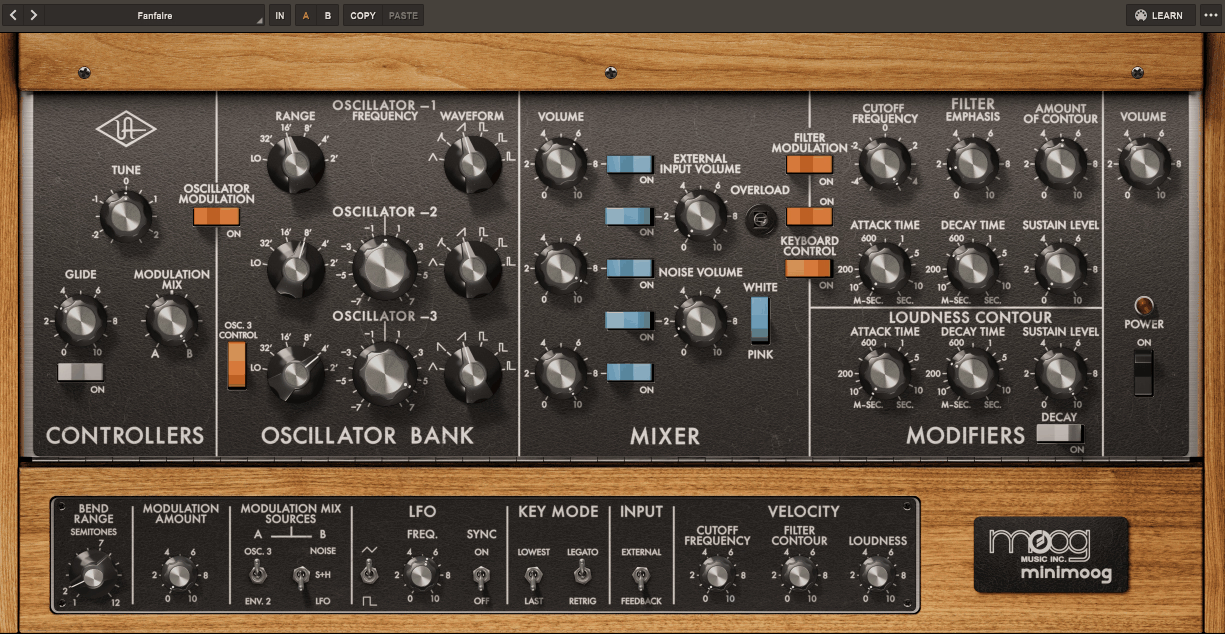
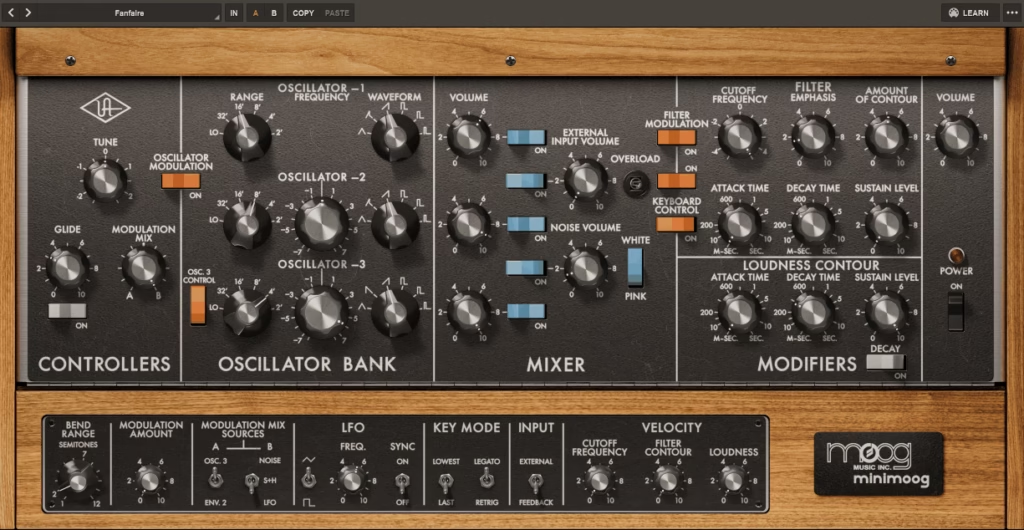
There’s a reason the Minimoog Model D has been sampled, cloned, and emulated more than almost any other synth in history. When Bob Moog introduced it in 1970, it transformed synthesizers from intimidating walls of patch cables into something musicians could actually perform with on stage.
Minimoog UAD plugin was developed in an exclusive partnership with Moog Music, and they spent 2 years meticulously modeling every detail of the signal path.
What sets this apart from other Minimoog emulations is how UA selected a “Golden Unit” from 3 vintage Minimoogs after rigorous listening tests, then used custom robotics for ultra-precise knob measurements to capture the exact behavior of each module. They didn’t just model the sound; they captured the module-to-module coupling, impedance interactions, and pitch tracking anomalies that give the original its character.
- 3-Oscillator Engine with Ladder Filter
You get three analog-modeled oscillators plus the iconic Moog ladder filter that made this synth legendary. The filter includes self-oscillation and extreme resonance capabilities that let you create everything from subtle warmth to screaming leads. It can be useful when making acid bass lines because it has that unstable, alive quality you can’t get from mathematical filter models.
- Feedback Loop Effect
The plugin faithfully reproduces the “feedback” effect where you route the Minimoog’s output back to its input for varying degrees of distortion. This was a popular mod on hardware units that added harmonic richness and aggression. When I push the feedback on bass patches, it creates that thick, saturated low end that sits perfectly in electronic music without needing additional saturation plugins.
- Custom Modifications Beyond Original Hardware
UA included several custom mods that power users added to their hardware Minimoogs: switchable note priority, legato mode, sample and hold, and an extra LFO. These weren’t on the original 1970 model but became standard modifications over the years. The extra LFO is particularly useful for creating evolving pads and sequences without relying on DAW automation.
- Pitch Tracking Anomalies Modeled
The plugin captures the pitch tracking instabilities and tuning imperfections of the original hardware, which ironically contributed to its fat sound. Real Minimoogs weren’t perfectly stable, and those slight pitch variations added character and warmth. You can hear this particularly on sustained notes where there’s subtle movement that makes the sound feel organic rather than digitally locked!
- Module-to-Module Coupling and Impedance
UA modeled how each module affects the others through circuit impedance and coupling, not just the individual components in isolation. This means the oscillators, filter, and amp interact in complex ways that create harmonic interplay you won’t find in synths where each stage is completely buffered.
The midrange punch and high-end presence come from these interactions as much as the individual components.
- Near-Zero Latency Operation
The plugin runs with near-zero latency, making it responsive enough for real-time performance and live use. I’ve used this during live sessions where timing is critical, and it responds instantly without the sluggishness some modeled synths have.
3. Topline Vocal Suite
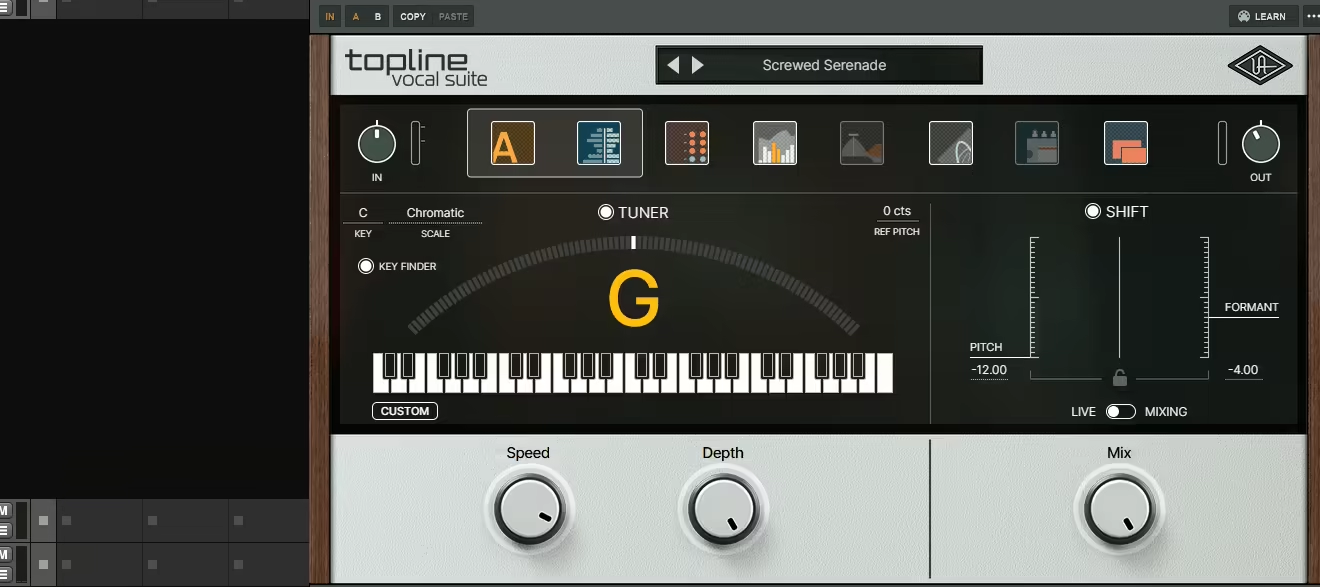
The UAD Topline Vocal Suite combines 8 stages of vocal processing into one interface, from pitch correction through analog-style channel strip to time-based effects.
What surprised me most is how the plugin includes over 170 professionally designed presets created by engineers who’ve worked with Beyoncé, The Weeknd, and U2. The Topline Key Finder tool automatically detects your song’s key and scale, which saves ridiculous amounts of time compared to manually setting pitch correction parameters..
- 8-Stage Processing Chain in 3 Sections
The plugin organizes everything into 3 main sections: Tuner & Shift, Channel Strip, and Modulation/Delay/Reverb. Each section contains multiple processors that flow left to right in a logical signal path. I can toggle individual effects on or off by shift-clicking them, giving me granular control over which stages are active. This organization makes it much faster to build vocal chains compared to opening separate plugins.
- Over 170 Professional Presets
You get more than 170 factory presets spanning multiple genres from hip-hop to pop to R&B, designed by top engineers. I’ve found these presets genuinely usable rather than just starting points, which is rare.
The preset browser includes tags for style, character, and designer, plus a search function and favorites system that makes finding the right sound quick.
- Integrated Key Finder Tool
The Topline Key Finder is a separate tool that automatically detects the key and scale of your song, then sends that information to all Topline Vocal Suite instances in your session. This means I set the key once and every vocal track automatically gets the correct pitch correction settings. The key information persists when browsing presets, so I don’t have to reapply it constantly.
- Low-Latency Live Mode
The plugin includes a low-latency Live Mode designed for real-time recording and performance. When I’m tracking vocals with the plugin active, it provides near-zero latency so singers can hear processed vocals in their headphones without distracting delay. You can switch to Mixing Mode later for more CPU-intensive processing with better quality!
- Vintage-Style Analog Processing
The channel strip section includes vintage-style mic preamp modeling, tape saturation, studio compressor, and EQ all using UA’s analog emulation technology.
The compression section apparently has Silver LA2A characteristics according to multiple engineers, giving you that smooth optical compression without opening separate plugins. The Air feature in the EQ uses a Dolby A model that adds high-frequency clarity without harshness
4. Ampex ATR-102 Mastering Tape Recorder
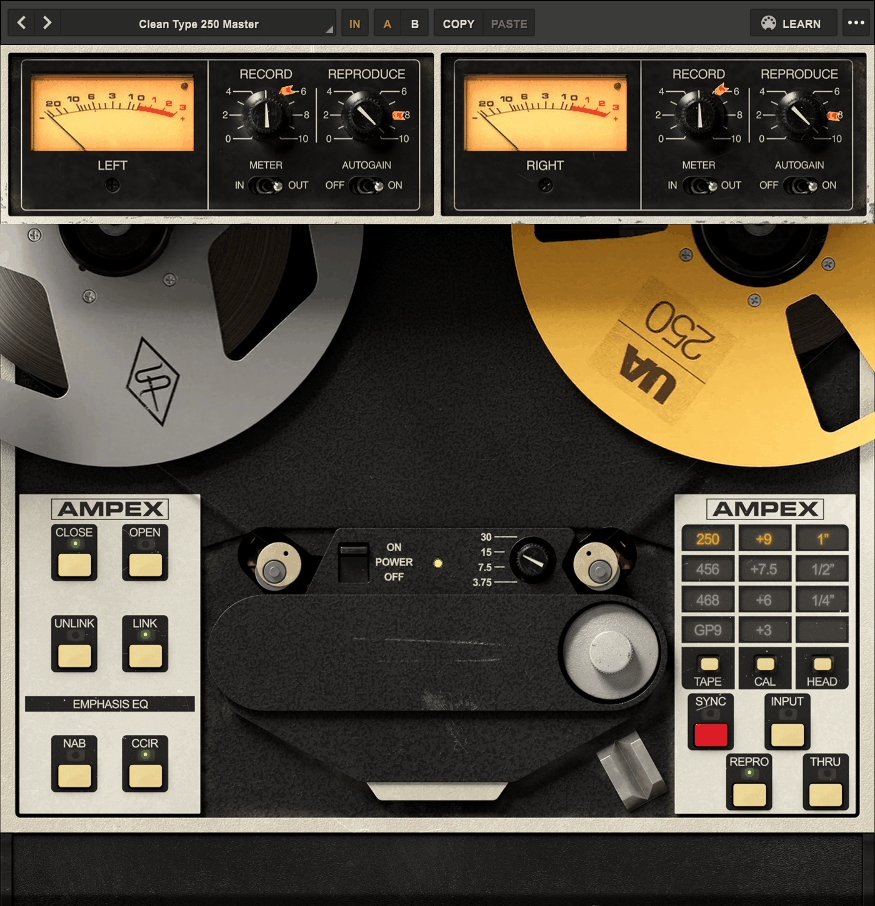
Mastering engineers have been fighting over the remaining Ampex ATR-102 machines for decades, with only around 3,000 units ever manufactured. Most tape emulation plugins claim to sound analog, but the UAD Ampex ATR-102 Mastering Tape Recorder is the only one fully authenticated by Ampex Corporation itself.
What makes this special is how UA modeled 7 different tape formulas. Also, you get 3 tape head widths (1/4″, 1/2″, and 1″) plus 4 tape speeds ranging from 3.75 IPS to 30 IPS, giving you everything from lo-fi cassette character to pristine mastering quality.
Features:
- 7 Authentic Tape Formula Models
These including Ampex 456, GP9, 900, ATR Master Tape, Scotch 250, Agfa 468, and Quantegy GP9. Each formula has its own subtle sonic variation, distortion onset, and tape compression characteristics.
I would use Ampex 456 at 15 IPS for most mixes because it provides that classic tape warmth without being too colored, but the Scotch 250 could work great when you want more aggressive saturation and character on rock mixes.
- 3 Interchangeable Head Widths
You can select between 1/4″, 1/2″, or 1″ tape head configurations, with wider tracks providing improvements to stability, fidelity, and noise performance. The 1″ head option wasn’t available on most original hardware units but was a popular custom modification. When you are working on mastering, I would recommend the 1″ setting for maximum fidelity, while 1/4″ gives you that more colored, saturated sound perfect for adding character to individual tracks.
- 4 Tape Speed Options
The plugin offers 4 different tape speeds: 3.75, 7.5, 15, and 30 inches per second (IPS). Each speed provides distinct frequency shifts, head bumps, and distortion characteristics, with higher speeds delivering higher fidelity. I love using 7.5 IPS when I want more pronounced low-end head bump that adds weight to thin mixes, while 30 IPS gives you the cleanest, most transparent tape sound when you just need subtle glue.
- 3 Signal Path Options: Input, Sync, Repro
You get 3 different signal paths to choose from: Input (just the electronics without tape), Sync (playback via record head), and Repro (standard playback head). The Sync mode has less accurate frequency response but creates interesting special effects with different tonal character. I use Input mode when I want the transformer and amplifier coloration without any tape compression, which works great on vocal buses where I need warmth but not the dynamics processing.
5. API 2500 Bus Compressor
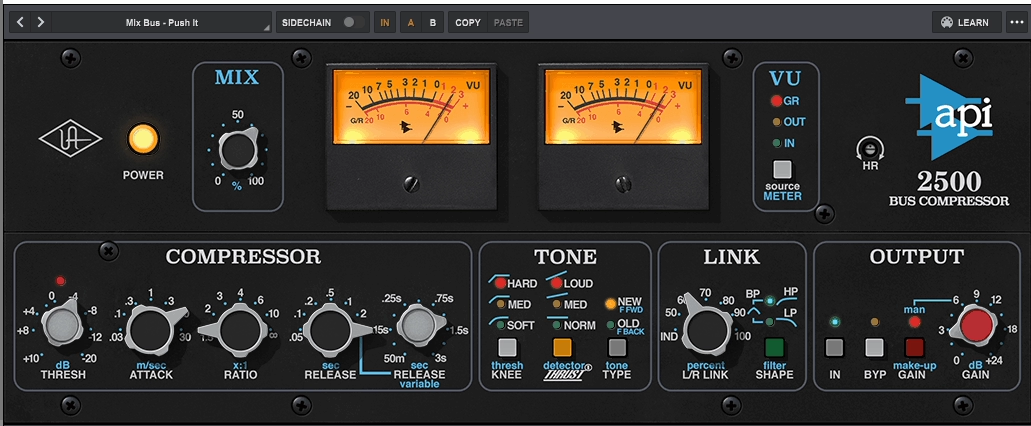
UA worked directly with API engineers and got access to proprietary schematics, then analyzed two classic “golden unit” API 2500s (both rackmount and in-console versions) to create what they claim is one of their tightest circuit models ever.
The API 2500 Bus Compressor is another UAD plugin models everything from API’s custom 2510 and 2520 op-amps to the transformers in the discrete signal path. The way it adds energy without losing punch is exactly what the hardware is known for.
- Three Custom-Voiced Compression Knees
You can select between Soft, Medium, or Hard knee settings, which dramatically changes how the compressor responds to signals crossing the threshold. When I’m working on delicate acoustic material, I use Soft knee for gentle, transparent compression that sneaks in unnoticed. Hard knee is what I reach for on aggressive rock mixes where I want obvious, punchy compression that adds attitude. The Medium setting has become my default because it works on about 80% of what I mix.
- Old and New Compression Types
The plugin gives me two completely different compression topologies: Old uses feedback peak-based compression similar to the API 525, while New employs feed-forward design. I almost always prefer Old mode on my mix bus because it has smoother, more musical compression that sits back slightly. New mode is perfect when you are compressing individual drum groups where you need faster, more aggressive transient control that grabs peaks immediately.
- API’s Patented Thrust Circuit
The Thrust feature applies a filter before the RMS detector that evens out high and low frequency energy so neither triggers compression more than the other. This is massive for on bass-heavy mixes because without Thrust, the kick drum would constantly trigger gain reduction and make everything pump. With Thrust engaged, I get tight low-end punch while the compressor still responds to midrange content naturally.
- Variable L/R Link Control
Instead of just on/off linking, you get percentage-based L/R link control that let you set exactly how much the left and right channels influence each other. When you are compressing drum overheads, you can use partial linking around 70% to maintain some stereo movement while still keeping the kit cohesive. The Shape control further refines how the linked channels interact dynamically.
6. Manley Massive Passive EQ

This is a 4-band passive tube EQ that uses only resistors, inductors, and capacitors for tone shaping, with no active components in the EQ circuit.
What makes Massive Passive EQ special is that UA spent 6 months modeling every component including transformer and inductor hysteresis, which adds broadband distortion that can’t be replicated with convolution. You get both Standard and Mastering versions included with one license, with the Mastering version featuring 16 stepped bandwidth positions for easier recall versus the continuous control in the Standard version.
- 4-Band Passive EQ with 11 Frequencies Per Band
Each of the 4 bands (Low, Low Mid, High Mid, High) offers 11 different frequency choices that are specially tuned and overlapping. When you are working on vocals, you can select from frequencies like 68Hz, 150Hz, 330Hz up through 16kHz depending on which band you’re using.
The passive design means frequency controls intentionally interact with each other, as do the gain and bandwidth controls, creating that organic, musical sound I’ve come to rely on for mastering work.
- Parallel Band Routing with Complex Interaction
The EQ bands are routed in parallel instead of series, which means gain values don’t simply add up like the EQs you are used to. If you boost two bands by 20dB at the same frequency, you get much less than 40dB total boost because of how the bands interact.
- Standard and Mastering Versions Included
Your license includes both Standard and Mastering versions as separate plugins. The Mastering version has 16 stepped bandwidth positions instead of continuous control, making your settings easily recallable between sessions. You can use the Standard version when you are tracking and mixing where you need more flexibility to dial in exact curves, then you can switch to the Mastering version for final touches where consistent recall across multiple songs is critical.
- Transformer and Tube Distortion Modeling
UA modeled the audio transformers, tube gain stages, and inductor hysteresis down to component level with help from Manley Labs who provided actual hardware components. The hysteresis adds mild broadband distortion that combines with transformer saturation and tube harmonics to create that characteristic warmth you could hear on classic records. Even when I bypass the EQ bands, the plugin retains desirable system filtering and coloration, which is exactly how the hardware behaves.
7. API Vision Channel Strip
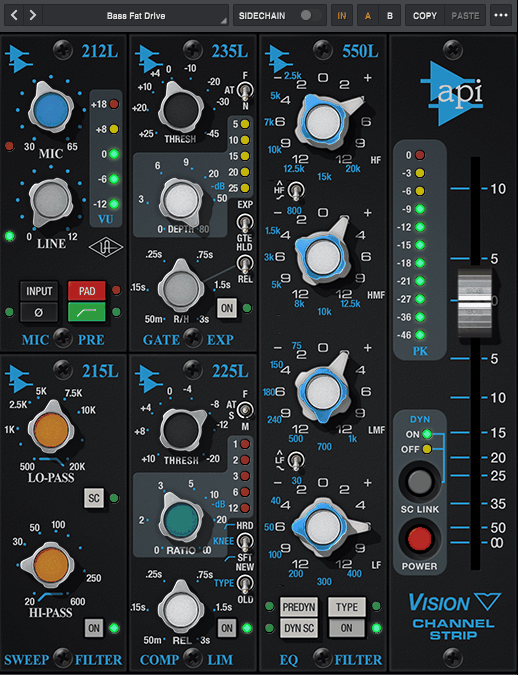
Channel strip plugins usually try to pack too many features into one interface and end up being confusing to use. When I first loaded the UA API Vision Channel Strip, I was surprised by how logically everything flows from the 212L preamp through dynamics, EQ, and output stages.
This UAD plugin models API’s flagship Vision console from 2003, giving you 5 separate processing modules including preamp, compression, gating, filtering, and dual EQ options all in one.
You can switch between the 550L 4-band parametric EQ and the 560L 10-band graphic EQ with a single button click. The plugin includes Unison technology for Apollo interfaces, which means the hardware preamps in my Apollo actually inherit the impedance and gain staging characteristics of the API 212L preamp circuit.
Things to mention:
- 212L Preamp with API 2520 Op-Amp Modeling
The preamp stage models the legendary API 2520 discrete op-amp and custom transformers from the original Vision console. I can push the gain from 30dB to 65dB which lets me dial in subtle warmth or aggressive saturation depending on how hard I drive it. If you are tracking vocals through Apollo with Unison enabled, the impedance matching makes the preamp respond exactly like the hardware, giving you those sweet spots where everything just sounds right.
- Switchable 550L and 560L EQ Modules
This is huge for you because you get two completely different EQ types in one plugin. The 550L offers 4 bands of parametric EQ with ±12dB of gain per band, perfect for surgical adjustments. The 560L provides 10 bands of graphic EQ also with ±12dB range, which you can use when you need faster, more visual frequency shaping. Both EQs use API’s Proportional Q technology that automatically narrows bandwidth at higher boost/cut levels and widens it at lower levels.
- 225L Compressor with Old and New Modes
The compressor section gives me two compression topologies: “Old” feedback peak-based and “New” feed-forward styles. I use Old mode when I want smoother, more vintage-style compression that sits back slightly in the mix. New mode is perfect when you need aggressive, forward compression that grabs transients quickly. The versatility means you can use this compressor on everything from individual drums to full mix buses.
- 235L Gate/Expander with Dual Attack Speeds
The gate module includes two selectable attack speeds and continuously variable release from 50ms to 3 seconds. The Depth control ranges from 0dB to -80dB, giving you everything from subtle noise reduction to severe gating. You can use this constantly on drum tracks to control bleed, setting gentle expansion around -10dB to reduce cymbal spill in tom mics without completely cutting the signal.
- 215L High/Low Sweep Filters
These are passive, fully sweepable filters that you can use for broad-stroke EQ sculpting. The low-pass extends from 500Hz to 20kHz with 6dB/octave slope, while the high-pass covers 20Hz to 600Hz at 12dB/octave. What’s clever is the SC button that lets you route these filters into the sidechain path of the dynamics section, giving me frequency-dependent compression without affecting the actual audio output.
- Artist Presets from Top Engineers
The plugin comes with presets that are quite useful from engineers like Joe Chiccarelli (The Strokes, Morrissey), Ann Mincieli (Whitney Houston), and David Isaac (Marcus Miller).

Hello, I’m Viliam, I started this audio plugin focused blog to keep you updated on the latest trends, news and everything plugin related. I’ll put the most emphasis on the topics covering best VST, AU and AAX plugins. If you find some great plugin suggestions for us to include on our site, feel free to let me know, so I can take a look!