Stereo imaging can make your mix sound wide and professional, but if used wrong, it can cause phase issues that disappear in mono. The key is to use the right tools and keep your low end centered while adding width only where it works.
The best stereo imaging plugins do more than just make everything wider with one knob. They let you control different frequency ranges, keep your mix in phase, and show you what’s happening to your stereo field with clear visuals.
In this breakdown, I’ll go over tools like PSP stereoController2, PluginBoutique StereoSavage 2, Leapwing StageOne 2, and a few others. I’ll also include some free options at the end. Each one handles spatial processing in its own way.
Some plugins are designed for precise correction and mastering, while others focus on creative multiband widening. A few even offer 3D positioning that goes further than basic left-right stereo. I want to show you what makes each one unique so you can pick the best tool for your needs.
I tested and compared these stereo imaging plugins. Here’s what I found:
| Plugin Name | Best For | Engine Type | Key Strength | My Verdict | Pros | Cons |
|---|---|---|---|---|---|---|
| 1. PSP stereoController2 | Stereo correction & mastering control | M/S with Frequency Split | Phase-safe width and balance | Most precise corrective tool | Mono-safe, detailed control, transparent | No creative widening modes |
| 2. PluginBoutique StereoSavage 2 | Creative multiband widening | Multiband Stereo Processor | Band-specific width shaping | Flexible creative shaper | Transient control, mono bass protection | Easy to over-widen |
| 3. Leapwing StageOne 2 | Natural stereo enhancement | Frequency-Aware Algorithm | Automatic low-end focus | Best multiband | Zero-latency, mono-safe, clean sound | Limited manual control |
| 4. UnitedPlugins Expanse 3D | Depth and 3D placement | Psychoacoustic 3D Engine | X/Y/Z spatial positioning | Best minimal pick | Depth control, visual positioning | Not subtle by default |
| 5. BOOM Library STEREOLAB | Stereo movement & animation | Dynamic Stereo Modulation | Automated stereo motion | Motion-based spatial tool | Tempo sync, multiband motion | Not designed for static mixes |
| 6. SSL Stereo Image | Quick stereo width control | Phase-Coherent Width Engine | Fast, safe widening | Best minimal pick #2 | Low CPU, mono bass handling | Single-band processing only |
| 7. Softube Widener | Most transparent | Phase-Optimized Widening | Minimal controls, clean sound | Premium choice | Very simple, mono-safe | No advanced shaping options |
1. PSP stereoController2 – Most precise
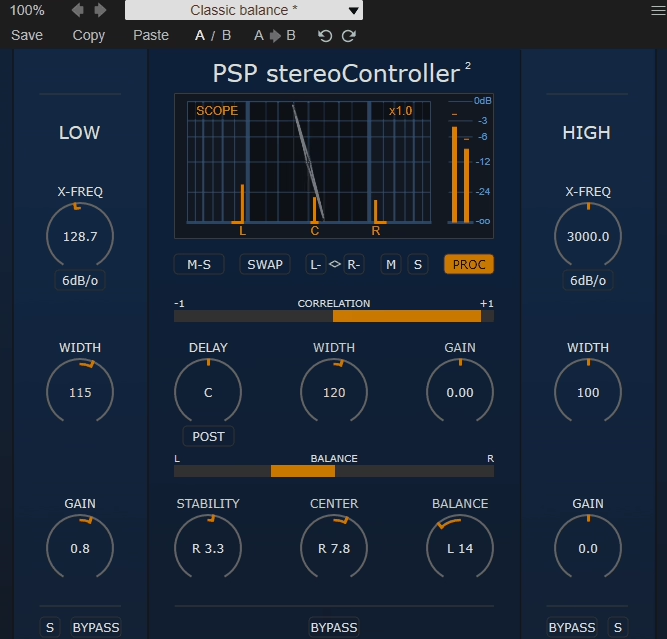
PSP stereoController2 provides independent width adjustment with detailed control over how much stereo information gets expanded or narrowed, and I’d say this precision is what makes it more useful than basic widening tools. The width parameter goes beyond simple stereo enhancement by letting you dial in exact amounts of expansion or contraction, from completely mono to exaggerated stereo.
When used gently, the width control adds space without making the processing obvious. I found narrowing the stereo width is just as helpful as expanding it, especially for samples or synths that are too wide and need to be more centered. The smooth adjustment lets you fine-tune the width to fit your mix, instead of picking from presets.
I’ve noticed that PSP’s width algorithm keeps phase coherence better than cheaper widening tools. This means your tracks still sound good in mono. The phase-aware processing avoids the hollow, phasey sound that can happen with aggressive widening, so your mix stays solid even when you push the width.
- Stereo Balance and Pan Control
The plugin has a stereo balance control that lets you move the whole stereo image left or right without changing the width or space. This is really useful for fixing off-center recordings or making the mix intentionally uneven.
Balance control differs from simple panning because it preserves the stereo relationship between left and right channels while shifting the overall position.
I like that the balance feature helps fix recordings with small positioning errors or mixes that feel heavier on one side. The fine adjustments let you make subtle changes to improve the mix without anyone noticing.
This precision is helpful when you have stereo sounds that are nearly centered but need a little adjustment. Small tweaks can make a big difference.
- M/S Processing Capabilities
PSP stereoController2 offers mid-side processing, so you can control the center and sides of your stereo image separately. This feature makes the plugin stand out. M/S mode lets you adjust width, level, and processing for the center and sides independently.
The M/S feature is great for mastering, where you might want to make the sides wider but keep the center strong. It’s also useful in mixing when you need to balance vocals and other center sounds with the stereo background.
I love how the M/S processing gives you surgical control over your stereo field, letting you emphasize or de-emphasize specific spatial zones.
In my experience, M/S processing is especially useful for full mixes or complex stereo sources. Standard width adjustment changes everything at once, but M/S lets you control the center and sides separately. This way, you can add stereo width without losing power in the center.
- Frequency-Dependent Processing
PSP stereoController2 has crossover controls, so you can apply different stereo processing to different frequency ranges. This frequency-based approach is what sets professional stereo tools apart from basic wideners. You can keep low frequencies centered for power and widen the mids and highs for more space.
I think stereoController2 is one of the best stereo imaging plugins for wide synths.
2. PluginBoutique StereoSavage 2 – Most Flexible/versatile
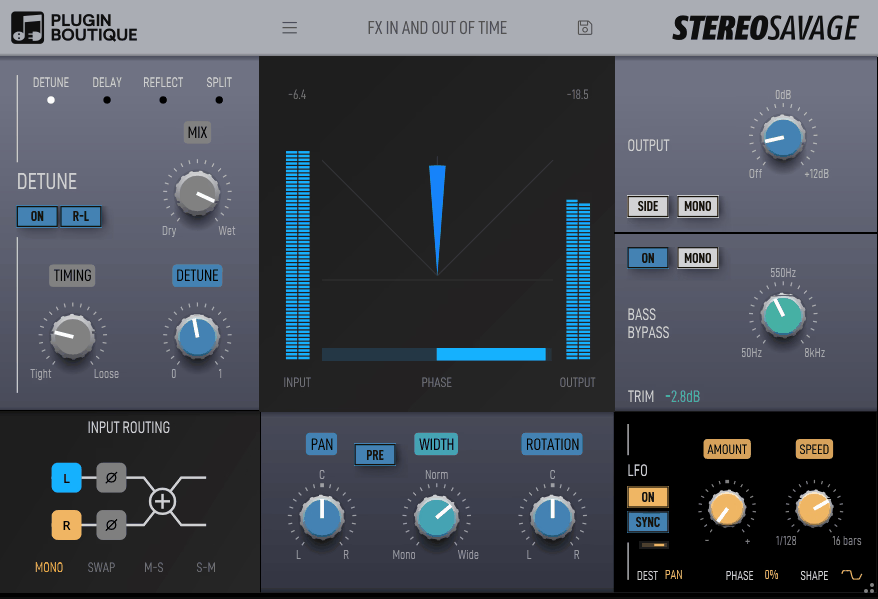
Width processing can make your mix sound big and professional, or it can ruin it with phase issues that fall apart in mono. PluginBoutique StereoSavage 2 lets you control width for different frequency ranges. I find this frequency-focused approach makes it useful for real mixing, not just for flashy stereo effects.
This design avoids phase problems that come from widening low frequencies, since the bass stays centered for strong impact and good mono sound. I noticed that targeting width to certain ranges lets you use the effect more boldly, since you only widen the parts that actually benefit.
- Transient and Sustain Processing
StereoSavage 2 gives you separate controls for transients and sustained sounds, so you can set different width for attacks and for decays or sustains. This is really helpful, since transients usually sound better centered for punch, while sustained sounds can be spread out for a bigger feel.
Being able to split transients and sustains gives you more control than just basic width settings. You can keep the punch of drum hits by centering the transients, while making the room and reverb tails wider for more space. This way, you don’t have to choose between impact and width.
- M/S Processing Mode
The plugin has mid-side processing, so you can control the center and sides separately. This adds another way to shape your sound. M/S mode lets you set the level and width of mid and side channels on their own, which is great for mastering or tricky mixes.
- Solo and Monitoring Functions
StereoSavage 2 has band solo features that let you listen to each frequency range by itself. This makes it much easier to hear what each band is doing and to adjust the multiband processing.
The solo feature lets you focus on certain frequency ranges without being distracted by the rest of the mix.
The plugin also has mono monitoring, so you can check how your width settings sound in mono. This is important for making sure your mix works on any system. I like that the mono check is built in, so you don’t need extra plugins or setup.
- Safe Bass Management
StereoSavage 2 has automatic bass mono summing, so low frequencies always stay centered no matter how you set the width in other bands. This safety feature helps you avoid one of the most common stereo mixing mistakes.
With bass protection, you can use more width in the mids and highs without losing low-end strength or causing phase issues.
- Visual Stereo Field Display
The plugin has a detailed stereo width analyzer that shows your audio’s space in real time. This visual feedback makes StereoSavage 2 easy to use, even if you’re not an expert. The display shows width for each frequency, so you can quickly spot narrow, wide, or problem areas.
3. Leapwing StageOne 2 – Best Multiband
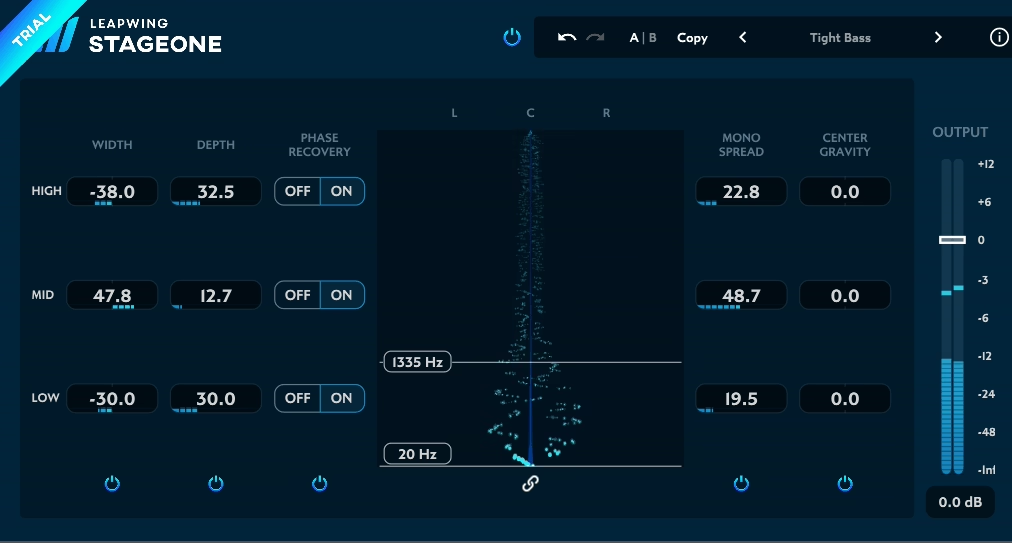
Most stereo widening plugins just offer a single width knob and leave the rest up to you. However, getting professional results means knowing how different frequency ranges behave in the stereo field and adjusting them properly.
When I discovered Leapwing StageOne 2, I realized it was designed specifically for frequency-conscious stereo enhancement that maintains mono compatibility while creating genuine width rather than just phasey artifacts.
The plugin uses smart multiband processing and automatic frequency balancing. It keeps your low end centered and widens the mid and high frequencies where it really matters.
I’ve used it on synth pads to add depth without losing clarity, on drum overheads for a natural sense of width, and on full mixes to make them feel more spacious without that obvious ‘widening effect’ that can sound unprofessional.
- Frequency-Dependent Width Processing
StageOne 2 uses smart frequency analysis to automatically apply different amounts of width to each frequency range. This is what makes it work so well without needing constant adjustments. It keeps low frequencies centered for power and mono compatibility, while letting mid and high frequencies spread out for more space.
With automatic frequency balancing, you don’t have to set crossover points or adjust each band by hand. This makes your workflow much faster than using manual multiband widening.
I noticed the algorithm chooses where to add width based on your actual audio, instead of using fixed frequency splits that might not work for every track.
I’ve found that the frequency-based processing creates width that sounds natural and musical, not obviously processed. The smooth transition from centered lows to wider highs feels cohesive, without any sudden changes that would draw attention to the effect.
In my experience, this smart automation is what sets modern professional tools apart from older ones that needed a lot of manual setup.
StageOne 2 also gives you overall width control, so you’re not stuck with just the algorithm’s choices. You can set the exact amount of width your mix needs, while the plugin takes care of the frequency details.
- Transparent Algorithm
StageOne 2’s width processing is made to be transparent and keep your mix mono compatible. It avoids the phasey artifacts and hollow sound that can come from aggressive widening. The algorithm keeps the left and right channels in phase, so your tracks still sound strong in mono.
I like that the transparent processing lets you add a lot of width without making the sound feel processed or fake. The plugin builds on the stereo information already in your audio, instead of creating artificial width with heavy phase tricks or delays.
This natural-sounding widening works especially well on acoustic tracks and recordings that already have real stereo content but just need a little extra enhancement.
From what I can tell, the transparency comes from sophisticated processing that respects the phase relationships in your audio while expanding the stereo field. The result is a width that enhances rather than replaces your original spatial characteristics, maintaining the integrity of your recordings while making them feel bigger and more enveloping.
- Mono Compatibility Protection
The plugin has automatic mono compatibility checking to make sure your width processing won’t cause issues when your mix is played in mono. This safety feature is crucial for professional work. The algorithm stops you from adding width that could cause phase problems or change the sound in mono playback.
4. UnitedPlugins Expanse 3D – Best Minimal
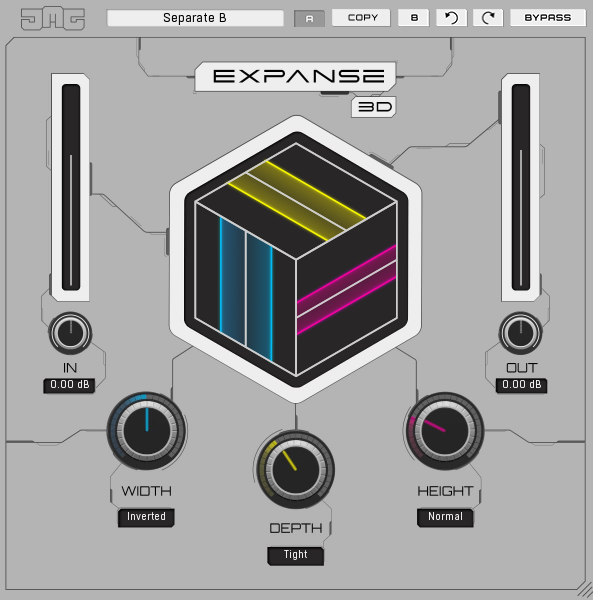
UnitedPlugins Expanse 3D offers 3D positioning (X, Y, and Z axis controls) so you can place sounds left-to-right, front-to-back, and up-to-down in the stereo field. I think this opens creative possibilities that standard width plugins can’t match.
Moving sounds back in the Y dimension creates a sense of distance without just making them quieter, because the plugin uses psychoacoustic processing to simulate how sound behaves in real spaces. The height control on the Z axis adds another layer of spatial interest, especially for atmospheric elements, pads, and effects that need to float above or below the main mix.
The 3D positioning feels natural and intuitive once you start experimenting, because the visual interface shows you where sounds are placed in the virtual space. The real-time visualisation makes it easy to understand how your positioning choices affect the spatial characteristics of your mix.
At the same time, the plugin maintains mono compatibility even with dramatic 3D positioning, because the processing is designed to enhance rather than destroy the fundamental stereo relationships in your source material.
- Distance and Proximity Control
Expanse 3D includes distance simulation that makes sounds feel closer or farther away using psychoacoustic processing beyond simple volume adjustment, and I think this is what creates convincing depth in your mixes. The proximity effect mimics how sound behaves at different distances, with closer sounds having more presence and detail while distant sounds feel more diffuse and ambient.
The distance processing affects frequency response, reflections, and spatial characteristics to create realistic depth perception. I noticed that moving sounds back in the virtual space creates natural-sounding distance without making them feel thin or disconnected from the mix. The front-to-back positioning is particularly useful for creating layers where background elements sit behind foreground elements without just being quieter.
I’ve found the distance control works really well on vocals. You can put doubles and harmonies behind the lead vocal to add depth, and they don’t fight for the same space. The plugin keeps everything clear, even when sounds are placed far back.
- Elevation and Height Positioning
The Z-axis elevation control lets you place sounds at different heights in the stereo field. This adds a new layer of space that most mixing tools don’t offer. You can make atmospheric sounds float above the mix, keep bass and drums low for a solid feel, or stack sounds vertically for a more complex soundstage.
- Reverb and Space Integration
Expanse 3D has built-in reverb that works with the 3D positioning system. This makes the spatial placement feel natural and realistic. The reverb changes based on where you put sounds, adding the right reflections and ambience for each position.
- Visual 3D Interface
The plugin has a graphical 3D interface that clearly shows where your audio sits in space. This makes Expanse 3D easy to use, even if you don’t know much about advanced spatial audio. You can see exactly where each sound is placed compared to the others.
5. BOOM Library STEREOLAB – Best Motion-based
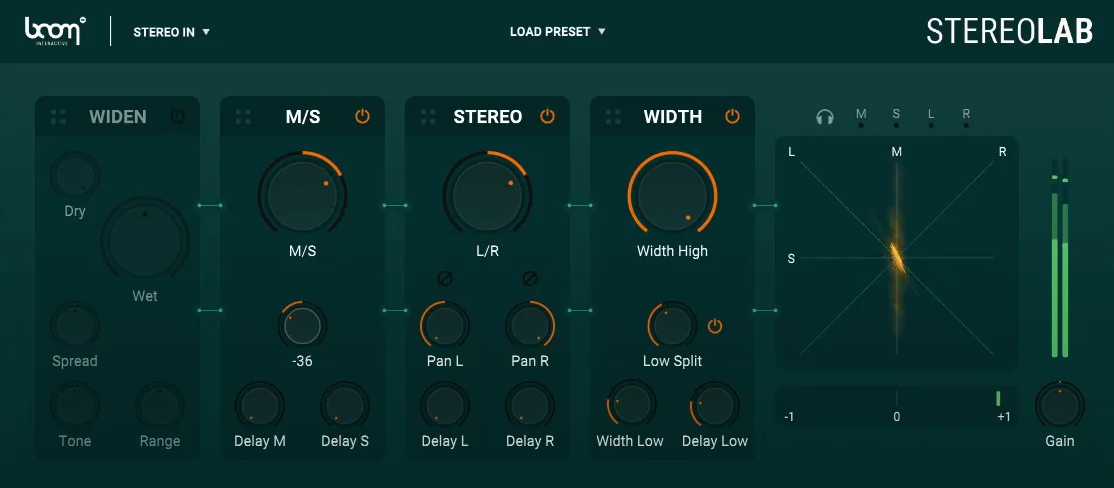
STEREOLAB VST has automated stereo movement, letting sounds move across the stereo field over time. This dynamic positioning sets it apart from plugins that only adjust width. The automation adds panning, circular motion, and complex movement, making static sounds feel lively.
The movement controls let you define speed, direction, and pattern for how sounds move through the stereo field, which is perfect for creating evolving textures, animated backgrounds, or dramatic spatial effects.
In my experience, the automation feels smooth and musical, not robotic. The movement comes across as natural and organic. You can choose from patterns like circular motion, side-to-side sweeps, or even draw your own custom paths.
- Frequency-Dependent Positioning
The plugin uses multiband spatial processing, so different frequency ranges can sit in different spots in the stereo field. This approach adds depth that single-band positioning can’t match. You can put low frequencies in one place and mids or highs somewhere else.
This frequency-based positioning adds depth and layering, since parts of the same sound seem to come from different places in the stereo field.
I like that this mimics real acoustic spaces, where different frequencies reflect and spread out in their own ways. The separate band controls let you build complex, three-dimensional spatial images instead of just simple left-right stereo.
In my experience, frequency-dependent positioning is especially useful for complex textures and layered sounds. It helps create movement and depth within a single audio source.
- Creative Stereo Effects
STEREOLAB offers more than just basic widening. It includes stereo delay, spread, and width modulation for creative sound design. These effects help you shape the stereo image in ways that add interest and character, not just width.
- Visual Spatial Display
The plugin features a detailed visual representation of the stereo field, showing where sounds are positioned and how they move in real time. The visual feedback makes complex spatial processing intuitive because you can see what’s happening rather than just hearing abstract spatial changes.
6. SSL Fusion Stereo Image – Best minimal #2
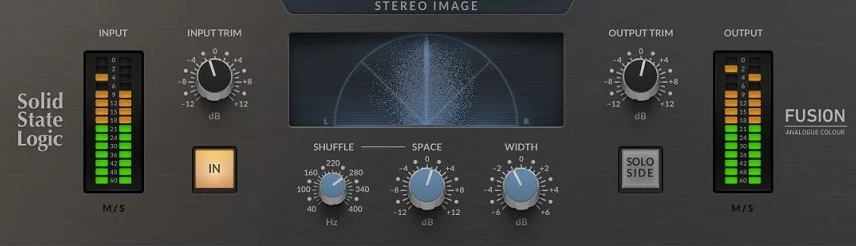
SSL Stereo Image lets you adjust stereo width easily with one main control, making sounds either narrower or wider. This simple approach is great when you’re mixing and want to keep things straightforward. The width knob goes from mono all the way to a wide stereo, so you get a full range of options in one easy-to-use control.
The width processing is transparent and phase-coherent, maintaining good mono compatibility even when you’re pushing the width significantly. I found that the algorithm sounds natural rather than obviously processed, which is what you want from utility tools that should enhance rather than transform your sources.
You can smoothly adjust the width to get just the right amount, without any sudden changes or unwanted noise that could make it hard to set things precisely.
One thing I’ve noticed is that SSL’s width algorithm retains transient information better than some widening tools, which can smear attacks or make drums feel less punchy. The processing respects the dynamic characteristics of your source material while adding a spatial dimension.
Because it’s so simple, you don’t have to mess with frequency bands, M/S controls, or other complicated features. This keeps your workflow fast when you just want to adjust the width quickly.
- Mono Bass Management
The plugin includes automatic low-frequency mono summing that keeps bass content centered regardless of your width settings, and honestly, this intelligent processing is what makes SSL Stereo Image practical for real mixing without constant worry about phase problems. Bass management keeps your low end focused and powerful, even as you add significant width to the mids and highs.
- Clean SSL Sound
SSL Stereo Image gives you the clear, professional sound SSL is known for. It processes your audio cleanly, without adding any unwanted color or noise.
- Minimal CPU Usage
The plugin is very efficient and barely uses any CPU, even if you run it on lots of tracks in a full mix.
7. Softube Widener – Most transparent
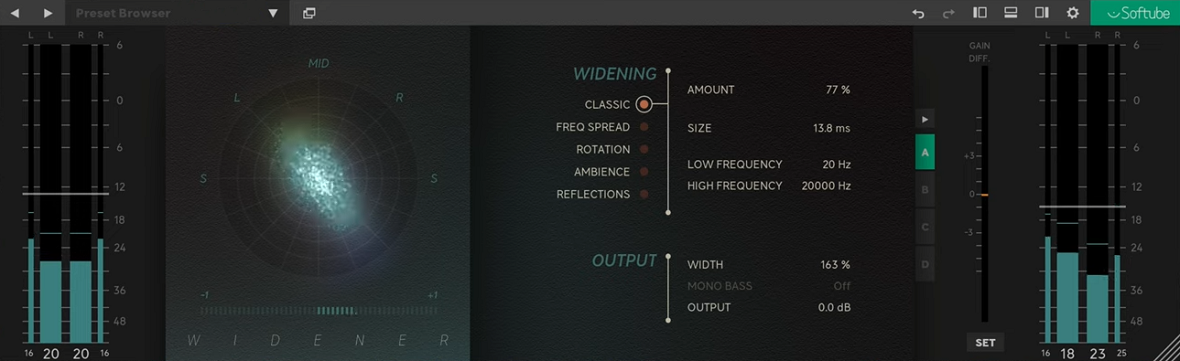
This stereo imaging plugin has a simple interface with just two main controls: width and balance. I think this simplicity makes it really effective when you need quick results while mixing. The width knob controls how much stereo expansion you get, and the balance knob lets you adjust the left-right position of the stereo image.
Having just a few controls helps you avoid decision fatigue and work faster when you want to add width without a lot of setup. I found that using only the essential controls makes you focus on how it sounds instead of getting distracted by too many options.
Because it’s so easy to use, you can load Widener, set the amount of width you want, and get back to your mix in just a few seconds.
I’ve noticed that having fewer controls on Softube Widener often leads to better results. You end up making simple, clear choices instead of second-guessing lots of settings. The interface helps you trust your ears and make confident adjustments instead of constantly tweaking small details.
Here’s what you get:
- Transparent Stereo Processing
The plugin gives you clean, transparent width without adding unwanted color or artifacts to your sound. This transparency is what makes Widener a good choice for professional mixing and mastering. Its high-quality algorithm expands the stereo field while keeping the original character of your audio.
I like that the transparent processing lets Widener work on any source, from clean acoustic recordings to heavily produced electronic tracks, without adding its own sound. The phase-coherent widening avoids the hollow, phasey effect that cheaper stereo enhancers can cause, so your mix stays solid and focused even with a lot of width.
In my experience, the transparency lets you use Widener on several tracks in a mix without making everything sound processed or like you used the same effect everywhere. Its clean operation keeps the unique character of each sound while adding the space you want.
- Automatic Bass Management
Softube Widener has smart low-frequency handling that keeps the bass centered automatically. I think this feature helps avoid common mistakes that can hurt mono compatibility. The automatic bass management keeps your low end focused and strong, no matter how much width you add to the mids and highs.
The plugin handles the bass automatically, so you don’t have to set frequency splits or adjust crossover points. This makes your workflow much simpler. The automatic system makes smart choices about keeping bass in mono, following professional mixing standards, so you don’t have to manage frequency processing yourself.
- Mono Compatibility
The plugin is built to keep mono compatibility a top priority. This means your width changes will still sound good when your mix is played on mono systems. The algorithm avoids too much phase shifting, so you don’t get cancellation or unwanted tonal changes in mono.
Freebies
1. iZotope Ozone Imager 2 (Free plugin)
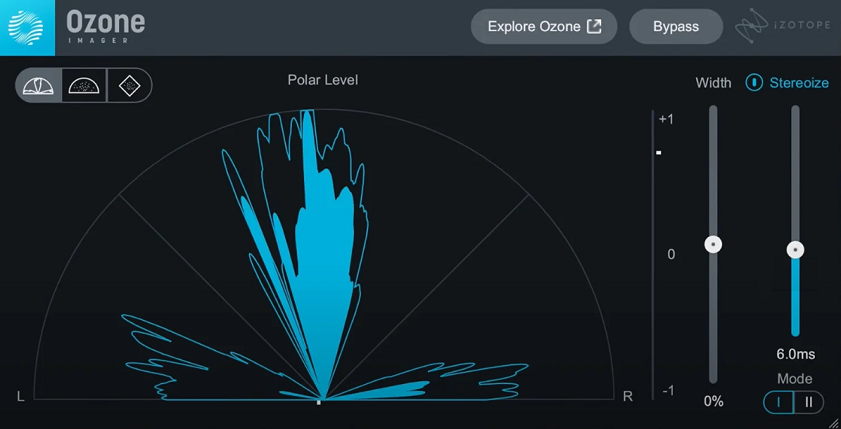
Imager 2 offers width control and visual feedback in a tool made for mastering and final mix processing. In my experience, its features and price make it one of the most practical options for improving stereo width.
When mastering, stereo imaging needs to be precise and transparent. Since you’re working with full mixes, heavy processing can cause issues. Visual feedback helps you make better choices instead of guessing about your adjustments.
The plugin includes a Stereoize slider that lets you adjust the stereo width from mono to a wide stereo effect. This main control is easy for beginners to use but still precise enough for professional mastering.
The width adjustment uses advanced processing to keep phase coherence and avoid the hollow, phasey sound you often get with cheaper widening plugins.
Even though you only use one control, the Stereoize processing is aware of different frequencies. The algorithm keeps the bass focused while widening the mids and highs.
In my experience, the processing sounds natural and clear. It adds space without unwanted artifacts or changes in tone. The smooth control lets you set the width exactly how you want it.
- Visual Vectorscope Display
The plugin features a detailed vectorscope that shows your stereo field in real time, and honestly, this visual feedback is what makes Ozone Imager particularly valuable for learning about stereo imaging and making informed processing decisions.
The vectorscope display shows the width, balance, and phase characteristics of your audio, making it easy to identify problems or verify that your adjustments are having the intended effect.
2. Alex Hilton A1 Stereo Control (Free plugin)
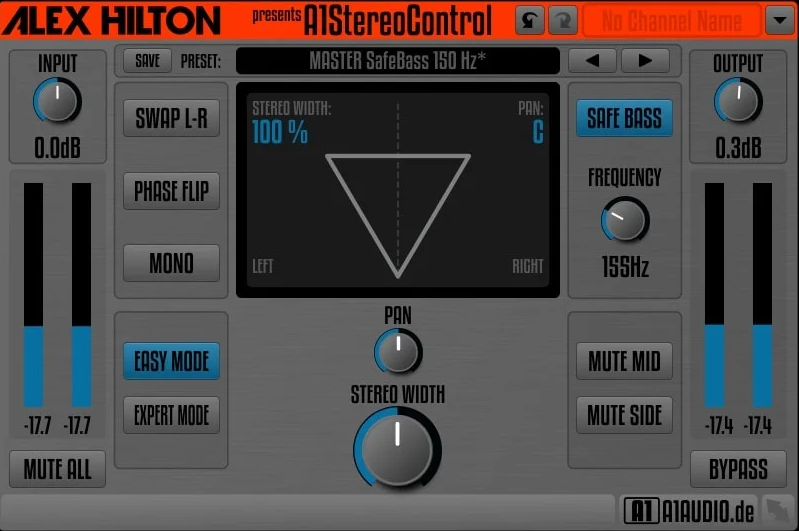
Sometimes you just need basic stereo tools like width adjustment, channel swapping, or mono summing, without having to load a complicated plugin full of features you don’t need. Free plugins are often ignored because people think they’re not as good as paid ones, but Alex Hilton A1 Stereo Control shows that simple, focused tools can work really well when they do a few things right instead of trying to do everything.
- Simple Width Control
A1 Stereo Control lets you adjust stereo width easily with one slider, making sounds either narrower or wider. This basic feature is usually all you need when working with stereo tracks. The width control goes from mono to wide stereo, giving you smooth and continuous adjustment.
The width processing sounds clean and transparent, so your original sound keeps its character even as you change the stereo image.
- Channel Swap Function
The plugin has a stereo channel swap button that flips the left and right channels instantly. This simple feature is really helpful if your stereo recording is wrong. It can fix phase-inverted tracks or correct cases where the left and right sides got mixed up during recording or editing.
I like that the channel swap is just a single button, not something you have to set up or adjust. This one-click fix saves time compared to using other tools or trying to solve channel problems in your DAW.
- Mono Summing
A1 Stereo Control also has mono summing, which collapses the stereo signal to mono so you can check compatibility. I find this monitoring feature essential for making sure your mixes work well on mono playback systems. The mono sum lets you hear how your stereo processing and panning choices hold up in mono, without needing extra monitoring gear.
3. Polyverse Wider 2 (Free plugin)

Polyverse Wider 2 gives you easy stereo widening with just one knob. It works really well for a free plugin. Its simple design and pro-level sound are why so many producers like it.
- Single-Knob Operation
Wider 2 has one main knob to adjust the stereo width. This simple setup makes it quick and easy to use. You can set the width anywhere from 0% to 200%, so you get anything from no change to a big, smooth stereo effect.
Having just one knob means you can set the width in seconds without overthinking it. I like that you can open Wider, turn the knob as you listen, and move on without worrying about technical details. Its simple design makes it easy to try new things, since you don’t have to learn complicated settings.
- Zero Latency
There’s no latency at all.
4. FLUX Stereo Tool V3 (Free plugin)
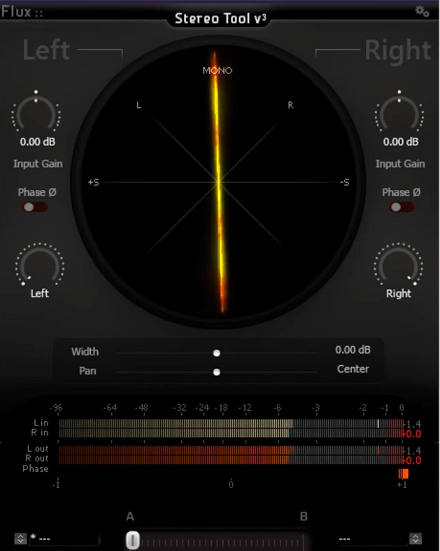
Mastering engineers rely on precise control over stereo imaging and clear visual feedback to understand what’s happening in the stereo field. It’s rare to find these features in a free plugin, which is why Stereo Tool V3 has become a favorite among producers and engineers.
I like that Stereo Tool V3 brings together useful features and professional-level metering. This combination helps you make better choices when working with stereo imaging.
- Precise Width Control
Stereo Tool V3 lets you adjust stereo width in detail, with a numerical readout for precise settings. This level of control makes it a good fit for professional mastering. The width knob moves smoothly from mono to wide stereo, and the visual feedback shows exactly how much you’re changing.
- Comprehensive Metering
Stereo Tool V3 includes detailed correlation and phase meters that show how the left and right channels relate to each other. This visual feedback is a big reason why the plugin is so useful for professional work. The correlation meter also helps you check mono compatibility and spot any phase issues.
- M/S Processing Mode
The plugin also has mid-side processing, so you can control the center and sides separately. With M/S mode, you can adjust the balance between mid and side channels. This is great for mastering when you want to make the stereo image wider without changing the sound of instruments in the center.
In my experience, M/S processing is especially helpful on full mixes. It lets you add width to stereo parts while keeping center-panned instruments clear and strong.
FAQs:
[sp_easyaccordion id=”10047″]

Hello, I’m Viliam, I started this audio plugin focused blog to keep you updated on the latest trends, news and everything plugin related. I’ll put the most emphasis on the topics covering best VST, AU and AAX plugins. If you find some great plugin suggestions for us to include on our site, feel free to let me know, so I can take a look!