
Here are the best reverb plugins for vocals I recommend, and I’m going to be straight with you about why.
Look, reverb on vocals is weird. You need it because vocals without space sound like you recorded them in a closet. But add too much and suddenly you can’t understand the words anymore. It’s one of those things where you know what sounds right, but actually getting there takes forever.
I tried various reverb plugins. Some are genuinely helpful, some are just okay, and some have so many options that I waste 20 minutes tweaking instead of actually finishing the mix. The ones I’m covering here are the ones I keep coming back to because they either solve a specific problem really well or they just get out of the way and let me work fast.
There are lots of plugins in the article, just to name few – Antares Vocal Reverb, LANDR VoxVerb, iZotope Neoverb, Eventide SP2016, and more including some freebies!
Some of these are built specifically for vocals with smart features that keep things clean. Others are just solid reverbs that happen to work great on voices. Three of them are completely free and honestly punch way above their weight. I’m not saying you need all of them, but depending on what kind of vocals you’re mixing and how fast you need to move, at least one of these will probably click for you. Let’s get started:
1. Antares Vocal Reverb
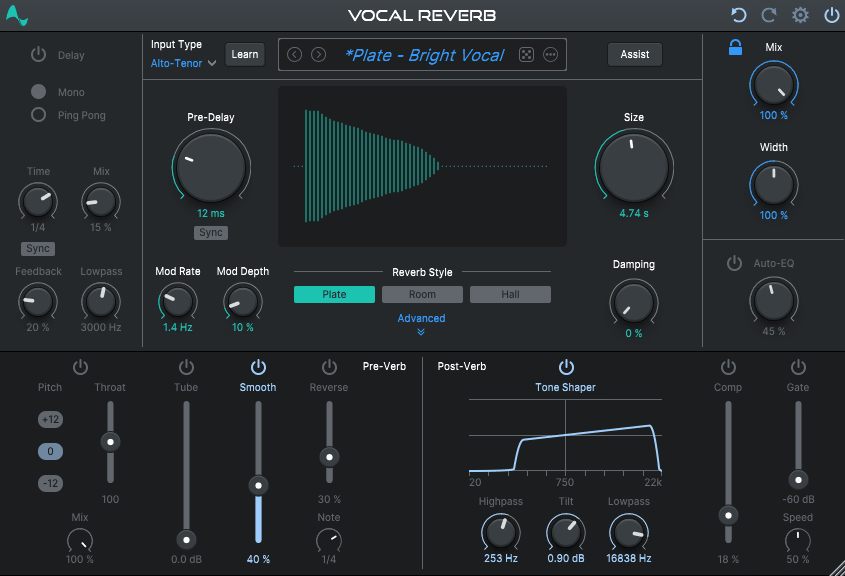
When it comes to Antares Vocal Reverb, it tackles specific vocal problems instead of just being another reverb you have to wrestle into submission. Most reverbs are general-purpose tools that work on anything from drums to synths to vocals. That’s fine, but vocals are different. They move through registers, they have consonants that can explode in a reverb tail, and they need to stay upfront and intelligible even when everything else in the mix is fighting for space.
To me, what makes Vocal Reverb different is how it’s designed as a complete vocal space system rather than just a reverb effect. You’re getting the reverb algorithms plus all the supporting tools you’d normally need in separate plugins to keep vocals clear and controlled.
Here is what you get in a nutshell:
- Hall, Plate, and Room Algorithms Built for Vocals
This specialized vocal reverb plugin gives you 3 core reverb types that cover most modern vocal mixing scenarios. In my opinion, Room is where you go when you want placement without obvious ambience, perfect for close pop vocals or rap where consonants need to stay clean.
Plate delivers that classic vocal polish and density that makes leads feel more expensive in bright, modern productions and lastly Hall is your big emotional move for ballads and cinematic moments where width and length actually serve the song. In fact, these aren’t generic room simulations you’re forcing to work on vocals, they’re designed to stay supportive instead of competing with the singer.
- 10 Module Effects Chain Split Into Pre and Post Processing
This is where Vocal Reverb becomes more than just a reverb. You get 5 pre-reverb effects including Pitch, Throat, Tube, De-Esser, and Reverse. The De-Esser placement before the reverb is huge because it stops sibilance from exploding into the tail, which is one of those “why didn’t I think of that” workflow improvements.
The 5 post-reverb effects are Auto-EQ, Tone Shaper, Compressor, Gate, and Width. This post section is basically your “make it sit” toolkit in one place. For instance, you can use the Gate constantly for that tight, rhythmic reverb behavior that works in modern pop and hip hop, where you want vibe but not wash.
When it comes to Width control, it lets you push ambience outward while keeping the dry vocal centered, which is exactly how you make vocals feel bigger without losing focus. I would say, having all these modules in the reverb itself means you’re building one cohesive sound instead of hoping five separate plugins play nice together.
- AI Assist and Pitch Tracking Auto-EQ
Now, the AI Assist feature recommends starting settings quickly rather than making you audition presets forever, which fits how fast you’re expected to deliver mixes in 2026. But the real workflow saver is Auto-EQ, which uses Antares’ pitch tracking to dynamically clean up the reverb as the vocalist moves through notes.
With that being said, this stops the reverb tail from piling up in the same frequency ranges as the voice itself, which is usually the point where you’d reach for an EQ on the send and start guessing at static cuts. Here it actually adapts in real time, so when the singer jumps registers or the chorus hits harder, the reverb stays musical instead of turning into frequency soup.
2. LANDR VoxVerb
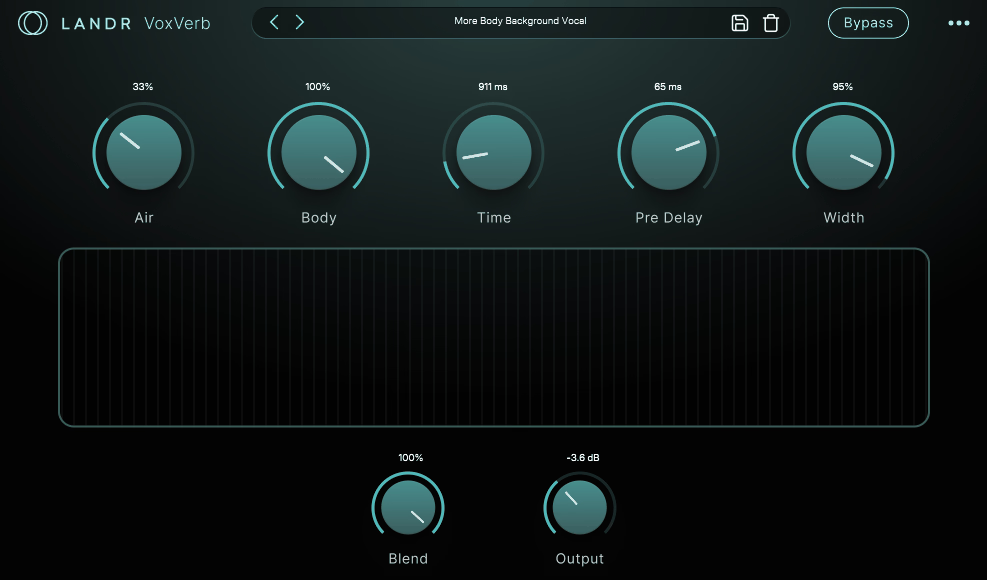
Instead of drowning you in options, LANDR VoxVerb focuses on the one thing that matters most when you’re adding reverb to vocals: keeping the words clear while still creating that sense of space and dimension. I would say this is exactly what modern vocal production needs in 2026, where tracks are dense and bright, and the vocal has to cut through without sounding dry or pasted on.
The plugin feels intentionally streamlined in a good way. You’re not getting a museum of vintage reverb models or endless tweaking options that slow you down. What you’re getting is a reverb that’s tuned specifically for vocal behavior, with controls that directly address the most common problems like sibilance splash, muddy low mids, and that blurry feeling when you turn up the wet knob too much.
- Decay Range for Any Vocal Style
VoxVerb gives you a decay time range from 150 ms all the way up to 6 seconds, which is exactly the span you need for modern vocals. At 150 ms, you’re adding just enough room feel to keep the vocal from sounding like it was recorded in a vacuum, perfect for tight pop and rap where every word needs to land clearly. At the opposite end, 6 seconds gives you that lush, cinematic tail for ballads and slow tempo hooks where you want the vocal to feel massive and emotional. In my opinion, having this much range in a vocal-focused reverb means you can handle everything from intimate verses to epic choruses without switching plugins.
- Millisecond Level Pre-Delay Control
The pre-delay control is front and center in VoxVerb, and it’s adjustable at the millisecond level. This is the parameter that separates the dry vocal from the reverb tail, which is the difference between a vocal that sounds big and clear versus one that sounds big but blurry. For instance, if you are mixing dense productions where the vocal has to cut through aggressive instrumentation, dialing in the right pre-delay does more for clarity than hours of EQ work. It lets the vocal’s attack and diction stay intact while the reverb blooms around it, which is exactly how you fake distance without sacrificing intelligibility.
- Width Expansion with Body and Air Tone Shaping
VoxVerb includes stereo width expansion, which matters because a lot of modern vocal mixes rely on a centered lead with wide ambience around it. You can push the reverb outward while keeping the vocal itself anchored, which is one of the cleanest ways to make vocals sound larger without washing them out.
Then you get Body and Air controls that handle tonal shaping in a way that actually makes sense during mixing. I like how these aren’t forcing you to hunt for exact frequencies, they’re broad musical adjustments. Body adds warmth and fullness when a vocal starts feeling thin after you add effects, and Air brings brightness and polish to the reverb tail so it sparkles without turning harsh.
In addition, this means you’re not constantly bouncing between the reverb and a separate EQ trying to fix the tail, everything happens right inside VoxVerb!
- Presets Built for Speed
LANDR’s support materials describe their FX plugins as typically including around 40+ presets, and VoxVerb fits naturally into that workflow. These aren’t gimmick presets, they’re practical starting points that get you from a dry vocal to a record-ready space quickly.
3. iZotope Neoverb
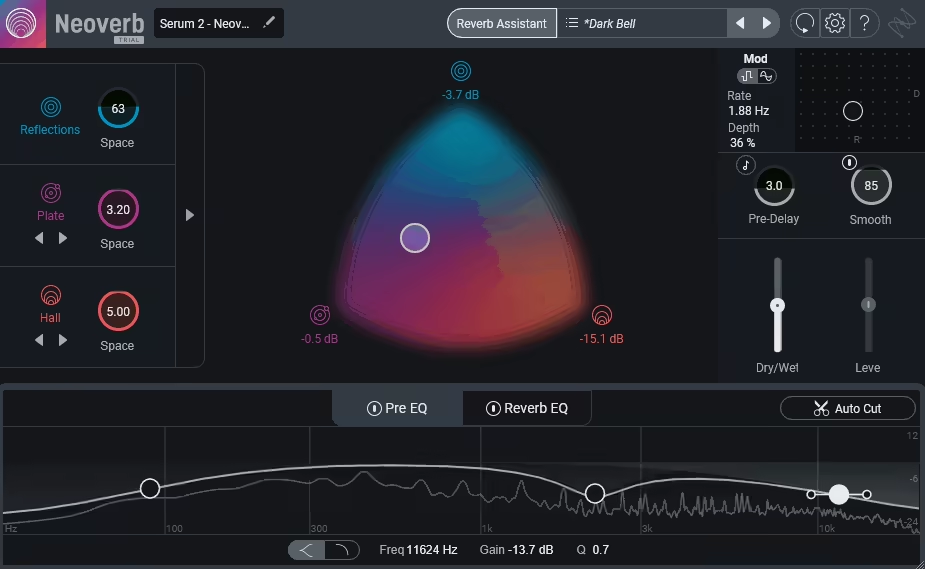
iZotope solves the most frustrating part of vocal reverb: sounding gorgeous in solo but turning your vocal into a blurry mess the moment the full track plays. Instead of just giving you pretty reverb tails, Neoverb acts like an intelligent space designer that actively keeps your vocal clear while still adding the lush ambience you want. I would say this is exactly the type of thinking modern mixing needs in 2026, where dense productions demand reverbs that stay controlled by default.
What makes Neoverb reverb different is how it combines 3 simultaneous reverb engines with built-in masking prevention tools, so you can layer space without drowning the performance. The entire workflow is built around one question: how do you make vocals sound expensive and dimensional without losing intelligibility? In my opinion, that focus is what keeps Neoverb relevant even as reverb plugins continue to pile up.
- Blend Up to 3 Reverbs at Once Using One Instance
Neoverb is built around a 3-engine architecture that lets you run and blend up to 3 reverbs at the same time inside one plugin. This matters because the pro vocal sound is usually already layered in practice, even if people don’t call it that.
You’re often combining an early space for placement, a dense texture for polish, and a longer tail for vibe. Neoverb packages that reality into a single workflow so the blend feels cohesive instead of like three unrelated reverbs fighting each other. For instance, I can keep a verse tight and supportive, then open up the blend for a huge chorus, all without swapping plugins or rebuilding chains.
- 6 Reverb Types That Cover Real Vocal Mixing Needs
You get 6 reverb types including Room, Plate, Hall, and 2 different Chamber sizes. This is a sweet spot for vocals because it’s enough variety to handle different productions without turning every session into a decision paralysis nightmare.
The design splits reverb into practical roles rather than throwing endless algorithms at you. I like how you’re not forced into one single space identity, you can choose tight realism for verses, polished density for leads, or bigger emotional space for choruses without leaving Neoverb.
- 4 Step Reverb Assistant for Fast Starting Points
Neoverb includes a Reverb Assistant structured as a 4-step guided process that gets you to a solid starting point quickly. The important part isn’t that it mixes for you, it’s that it asks the kinds of questions that matter musically, then sets a sensible foundation you can refine.
This is a real advantage when you’re doing lots of vocals or genre-hopping, because instead of burning time scrolling presets, you get in the neighborhood fast and move straight into taste decisions.
- Factory Presets
Neoverb comes with over 60 presets grouped into 5 main categories: All-Purpose, Percussion, Vocals, Guitar, and Instrumental/Orchestral. Inside the Vocals category, you’ll find presets aimed at male, female, and background vocals.
Neoverb’s interface can feel dense at first if you’re not used to iZotope’s design language, and the 3-engine system might be overkill if you just want a simple single reverb for quick jobs.
4. Soundtoys SuperPlate
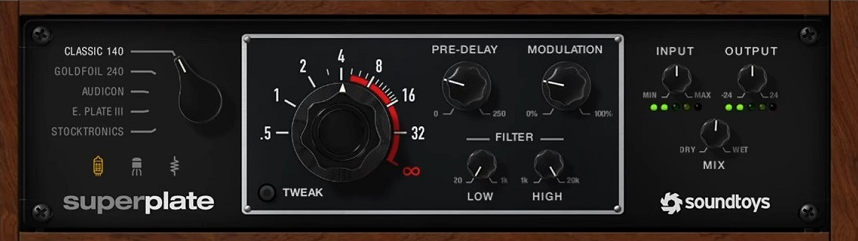
Soundtoys SuperPlate is what happens when you take the most reliable vocal polish reverb ever invented and rebuild it as a modern mix tool that still keeps all the classic flattery. Plates have been the go-to for adding density and sheen to vocals for decades, but SuperPlate isn’t just recreating vintage hardware for nostalgia’s sake.
This is a great reverb plugin for vocals because it gives you that instantly recognizable plate sound with the controls you need to keep vocals clear, upfront, and expensive-sounding even in dense 2026 productions. What I appreciate most is how SuperPlate manages to feel both classic and current at the same time.
You’re getting authentic plate character that sounds like the records you grew up hearing, but with modern features like Auto-Decay and precise stereo control that make it behave like it belongs in your workflow. In my opinion, that balance between heritage and practicality is exactly why SuperPlate keeps showing up on vocal chains across every genre.
- Plate Models
SuperPlate contains 5 distinct plate models based on five different real-world plate units, and these aren’t just tiny variations on one algorithm. Each plate has its own personality, some brighter and more open, some darker and tighter, some bigger with more halo around the vocal.
I love how you’re not stuck trying to force one plate to work on every singer or every production style. You choose the plate character that matches the vibe first, then shape it from there. For instance, a bright modern pop vocal might need a different plate than a warm R&B lead, and SuperPlate gives you the range to cover both without compromise.
- Preamp Flavors
You get 3 preamp modes: Tube, Solid-State, and Clean. This matters because plate reverbs aren’t just about the tail, they’re a whole signal chain, and the front-end character can be the difference between pretty and record-ready.
Tube adds weight and attitude when you want the vocal to feel more aggressive or textured. Solid-State feels more controlled and punch-friendly for cleaner modern styles.
Clean keeps things pure when you want the plate model without extra coloration. In addition, having these options means you can match the preamp vibe to the singer’s tone and the production style without needing separate saturation plugins.
- Auto-Decay
SuperPlate includes Auto-Decay, which is basically the plugin saying “be big when there’s space, get out of the way when the vocal is busy.” This isn’t just a generic ducking feature, it’s designed to reduce overlap and buildup so you can run a lush plate without your mix turning into a smear.
I would say this is one of the most practical features for vocal mixing because it keeps the reverb feeling present and emotional while staying mix-safe. You can push the plate harder without worrying about it stepping on the performance during busy sections.
- 4 Built-In EQ Tools for Surgical Shaping
SuperPlate gives you 4 EQ tools inside the plugin: low-cut, high-cut, plus 2 parametric EQ bands. That’s exactly the kind of control that matters on vocals because it means you can tame boom, soften harshness, or add sheen without building an external cleanup chain every time you switch plates.
The parametric bands are especially useful when you need to notch out a specific problem frequency in the tail or boost a sweet spot that makes the reverb sit better. For me, this kind of integrated shaping keeps your workflow fast and your mix cleaner.
5. FabFilter Pro-R 2
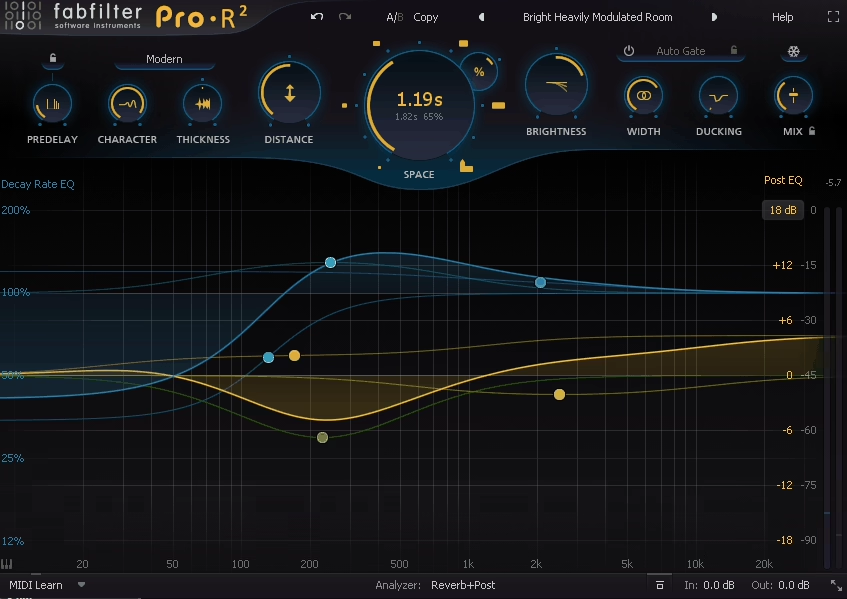
Most reverbs either force you into a specific vintage character or give you so many options that you waste time instead of making decisions.
The goal should be simple: make the vocal feel like it belongs in a space without destroying clarity or intelligibility. FabFilter Pro-R 2 delivers exactly that by focusing on precision control and mix readiness first, with enough flexibility to handle everything from invisible room placement to creative shimmer effects.
I would say this is the reverb for engineers who need their vocal space to behave predictably across different singers, genres, and production densities. It’s built like a surgical mixing tool that happens to sound beautiful, not the other way around.
- 3 Reverb Styles That Cover Modern to Vintage Territory
Pro-R 2 is built around 3 reverb styles: Modern, Vintage, and Plate. This isn’t a small detail, it’s three distinct personalities inside one interface that change the fundamental character of the space.
Modern delivers clean, realistic studio space that makes vocals feel placed instead of drenched. Vintage leans into early digital reverb character with more shimmer and vibe.
Plate targets that classic vocal polish with dense, flattering reflections that add a halo without pushing the singer back in the mix. I feel like having these three styles means you can handle contemporary pop production, nostalgic throwback vibes, and timeless vocal polish without switching plugins.
- 12 Total Shaping Bands for Frequency-Specific Control
Pro-R 2 includes 12 total bands split across two powerful systems: up to 6 Decay Rate EQ bands and up to 6 Post EQ bands. This is where the plugin separates itself from basic reverbs that treat the entire frequency spectrum the same way.
The Decay Rate EQ bands let you control how different frequency ranges decay over time. If you want air and sparkle without harsh sibilance lingering, you shorten decay in the top end.
If the mix gets muddy when reverb hits, you tighten the low mids while keeping other bands open for warmth. I can only say this is what makes Pro-R 2 sound cleaner in a mix even when you push the wet level fairly high.
The Post EQ bands give you surgical tone shaping after the reverb engine, so you can roll off low end to prevent cloudiness or smooth high frequencies to keep sibilance from smearing.
I don’t think most people realize how much time this saves compared to constantly adding external EQs and hoping the tail still sounds natural.
- Controls for Fast Musical Decisions
I’d like to mention that the front panel is organized around 13 main controls: Space, Decay Rate, Style, Predelay, Character, Brightness, Distance, Thickness, Ducking, Auto Gate, Stereo Width, Freeze, and Mix.
These are the controls you actually reach for when mixing vocals, not obscure parameters that force you into the manual.
- Impulse Response Import and Freeze
Pro-R 2 includes Impulse Response import which analyzes an IR and translates it into Pro-R 2’s adjustable parameters. This means you can capture the character of a real space or another reverb, then shape it using all of Pro-R 2’s powerful controls.
The Freeze feature locks the reverb into an infinite sustain state, which is perfect for creative vocal moments and transitions where you want the space to become a sustained texture. It seems like these features expand what “one reverb” can do beyond traditional mixing tasks into sound design territory.
For me, being able to import an IR but still have full access to decay shaping, EQ, and all the other controls is what makes this feature actually useful rather than just a gimmick. I’d recommend using Freeze on vocal throws and phrase endings where you want the reverb to become a production moment.
- Stable Stereo Imaging with Width Control
Pro-R 2’s Stereo Width control is built to keep the lead vocal centered while spreading the reverb around it. The stereo field stays stable and doesn’t feel phasey or smeared, which is critical when you’re stacking vocals with doubles, harmonies, and ad-libs.
6. Valhalla VintageVerb

At a first glance, you might dismiss Valhalla VintageVerb as just another classic reverb plugin, but that completely misses why it’s stayed on vocal chains for years.
This isn’t about recreating one vintage unit or chasing authenticity for the sake of it. It’s about giving you a massive range of usable reverb textures that feel immediately musical on vocals without forcing you to overthink every parameter.
I think the reason VintageVerb keeps showing up in best-of lists is simple: it covers more ground than most dedicated vocal reverbs while staying fast and intuitive. You’re getting everything from tight vocal polish to massive cinematic washes in one plugin that doesn’t slow you down.
- 18 Different Reverb Modes for Texture Variety
VintageVerb includes 18 different reverb modes, and I would say this is what makes it feel like multiple reverbs living inside one interface. These aren’t just different room sizes using the same algorithm, they’re fundamentally different behaviors and textures.
Some modes feel smooth and dense, others lean bright and sparkly, and some get wonderfully weird and characterful. For me personally, this variety means I can match the reverb mode to both the vocalist’s tone and the production style before touching any other controls.
If you’re mixing glossy pop vocals that need supportive sheen, there are modes built for that. If you’re working with ambient or indie vocals where you want width plus movement, other modes excel in that territory. In general, having this many distinct textures means you’re not forcing one sound to work across every vocal you mix.
- Over 200 Presets That Actually Get You Moving
VintageVerb ships with over 200 presets, and what stands out to me is that they’re genuinely usable starting points rather than filler content. You’ll find plenty of vocal-friendly options covering plates, halls, modulated ambiences, and long cinematic washes.
- 3 Color Modes That Shape the Reverb Era
You get 3 Color modes which effectively act like era voicing for the entire reverb. This is a fast way to steer tone and texture without endless EQ adjustments, and I think it’s one of those features that seems simple until you realize how much time it saves.
For vocals, the wrong brightness can exaggerate sibilance or make the reverb sit on top of the singer instead of wrapping around them. With the Color setting, you can make the tail feel cleaner and more modern, darker and smoother, or more retro and characterful depending on what the production needs.
- Modulation Options for Movement and Depth
VintageVerb’s modulation controls let you add subtle movement for natural depth or push things further for that lush, expensive digital reverb sound.
7. Eventide SP2016 Reverb
Some reverbs are built to impress you with feature counts and modern interfaces. Others are built to sound like the records you grew up hearing, the ones where the vocal reverb just worked without calling attention to itself. Eventide SP2016 Reverb plugin falls squarely in the second category, recreating the legendary studio reverb that defined what “professional vocal space” sounded like for decades.
To me, this is a great where the heritage actually matters to the sound you get today. The original SP2016 hardware was famous for giving vocals a sense of natural depth and density that felt finished without sounding like a generic room simulator.
I feel like the plugin version respects that legacy while adding the kind of flexibility modern vocal production demands. At the core of it, you’re getting authentic classic reverb texture with enough control to fit contemporary mixes.
- 6 Distinct Reverbs From 3 Algorithms with Vintage and Modern Versions
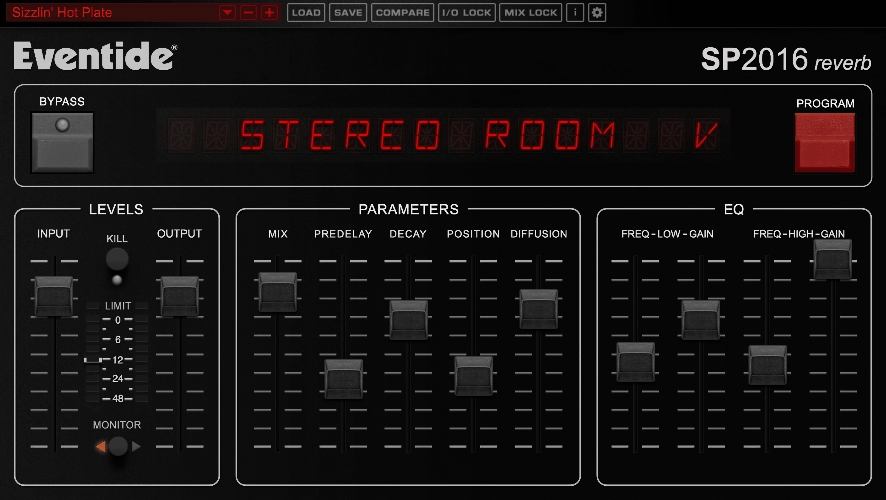
SP2016 is built around 3 core reverb algorithms: Room, Stereo Room, and Hi-Density Plate. Each algorithm comes in 2 versions labeled Vintage and Modern, which gives you 6 distinct reverbs inside a single plugin.
I can only say the two-version approach is more significant than it appears at first. Vintage versions capture the original hardware vibe including that slightly textured quality people associate with classic digital reverbs.
Modern versions are voiced to feel cleaner, brighter, and more diffuse, which fits contemporary vocal production where you want space that feels wide and expensive without obviously sounding retro. In fact, this structure gives you a simple aesthetic choice before you even start tweaking parameters.
If the singer and track want that classic record aura, you work in Vintage mode. If you’re doing shiny modern pop or ultra-clean vocal stacks, Modern gets you there faster without the vintage coloration.
- 11 Primary Sliders for Focused Mixing Control
SP2016 is organized into 5 main sections: Status, Levels, Parameters, EQ, and a Preset Bar. Across the main mixing and tone workflow, you work with 11 primary sliders you’ll touch most often: Input, Output, Mix, Predelay, Decay, Position, Diffusion, plus the EQ’s Low Frequency, Low Gain, High Frequency, and High Gain.
I feel like this focused approach is exactly what vocal mixing needs. You’re not drowning in pages of obscure parameters or experimental controls that don’t translate to better results.
Each slider has been chosen for how much it changes the perceived space without pushing you into weird, unusable territory. Actually, the interface is laid out like studio hardware rather than a complicated sound design instrument, which keeps your workflow consistent and fast.
Freebies:
1. Variety of Sound epicPLATE 2 mkII
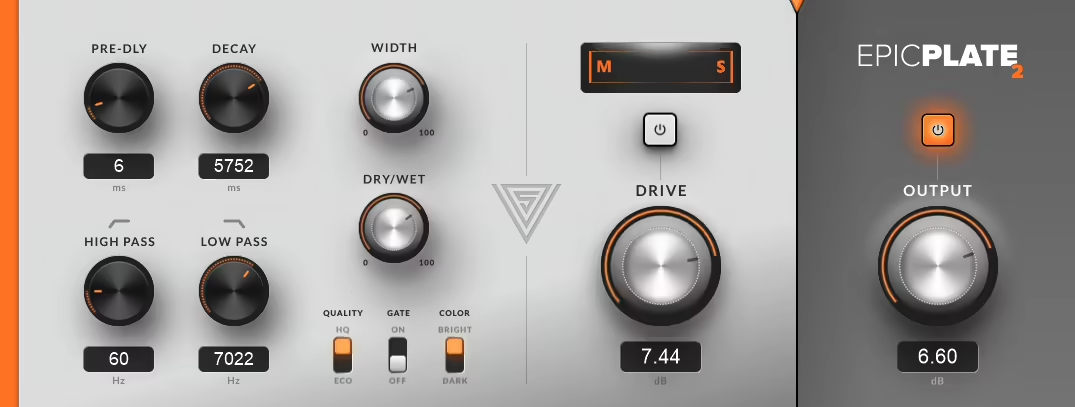
Plate reverb gets thrown around like every plugin does it the same way. Most plates either sound synthetic and disconnected or they’re trying so hard to be vintage that they become impractical for modern vocal production. I don’t think people realize how rare it is to find a plate that just works on vocals without needing a support chain around it. epicPLATE 2 mkII delivers exactly that, a focused plate reverb that gives you classic density and smoothness with just enough control to make it sit in real mixes quickly.
What I like about it is how the plugin doesn’t pretend to be more than it is. You’re getting a plate reverb that knows its job, and it does that job without burying you in options you’ll never use. From my perspective, this directness is what makes epicPLATE such a practical choice for vocals in 2026.
- 8 Main Knobs and 3 Switches for Complete Control
The entire interface is built around 8 main knobs and 3 switches, and I have to say this simplicity is the whole point. The 8 knobs are Drive, Pre-Delay, Decay, High-Pass Filter, Low-Pass Filter, Width, Dry/Wet Mix, and Output.
So basically, you’ve got everything you need to set the space, shape the tone, place it in stereo, and blend it into the track. The 3 switches are Quality, Gate, and Color, which flip the reverb’s personality instantly instead of making you tweak parameters for ten minutes.
Maybe this sounds too simple on paper, but when you’re actually mixing vocals and need results fast, having a focused toolset beats endless options every time. From my perspective, epicPLATE proves that restraint in design can be more powerful than feature bloat.
- 2 Color Modes That Match Different Vocal Types
The Color switch gives you 2 modes: Bright and Dark. Plates naturally lean bright, which works great for adding shine and excitement to vocals, but not every voice needs extra top end and not every mix has room for more brightness.
Having a one-click Bright vs Dark option makes epicPLATE way more usable across different singers and genres. What I like about it is how you can match the reverb’s tone to the vocal instead of forcing the vocal to adapt to the reverb.
2. Variety of Sound epicCLOUDS
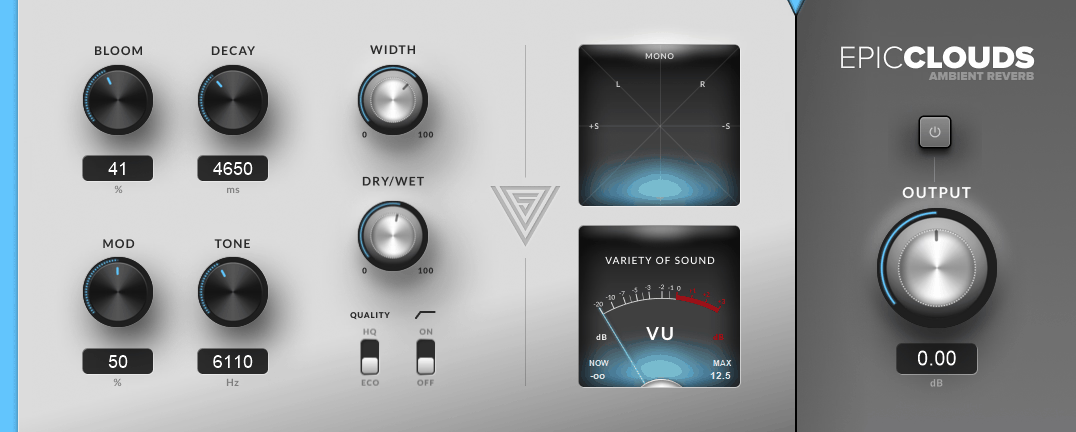
Variety of Sound epicCLOUDs is what happens when you stop trying to recreate vintage hardware and just build a reverb for one specific purpose: creating massive, smooth, immersive cloud spaces that wrap around vocals without destroying clarity.
I believe this kind of focused design is exactly what modern vocal production needs, because sometimes you don’t want a room or a hall, you want pure atmosphere that makes the vocal feel larger than life.
It seems like epicCLOUDS was built by someone who got tired of long reverbs that either sound grainy and obvious or turn into a blurry mess that swallows the vocal. Instead, you’re getting high-density ambience that stays enveloping even when you push decay times into cinematic territory. Honestly, the plugin feels like a finished instrument rather than a science project, and that’s rare in the world of ambient reverbs.
I like how you can open it, turn a few musical controls, and immediately land in that modern ambient space where vocals feel epic without sounding like they’ve been dunked in generic hall presets. The whole design commits to one sound identity and does it exceptionally well.
- 2 Processing Modes That Change Stereo Behavior
epicCLOUDS includes a Quality switch with 2 modes: ECO and HQ, and these aren’t just CPU efficiency labels. They actually change how the reverb behaves in the stereo field in meaningful ways.
In ECO mode, the plugin uses a single reverb-tank approach with classic stereo handling for stable left/right balance. In HQ mode, it increases internal processing precision and switches to true-stereo behavior that reacts more dynamically and feels more physically enveloping around the source.
I believe this 2-mode system is a big deal for vocal work because it gives you two different ways the reverb can sit in the stereo field without needing a second plugin. If you’re using epicCLOUDS as a vocal space layer, having both options means you can choose between stability and immersion depending on what the production needs.
- Analog-Modeled Filtering and Transformer Output Stage
The plugin uses analog-modeled filtering for tone shaping, which keeps the reverb smooth as you steer it darker or brighter. In addition, the output stage includes a transformer-style model that adds subtle polish to the combined dry/wet signal.
Honestly, this isn’t a saturation plugin, but it does help the reverb feel less like a separate layer pasted behind the vocal and more like an integrated part of the sound. I like how these finishing touches feel musical rather than hyped or overprocessed.
I would recommend using the tone control more liberally than you might with other reverbs, because the analog-modeled filtering keeps adjustments sounding natural instead of harsh or digital. The transformer output adds just enough character to help the reverb gel with the dry vocal without needing extra glue processing.
3. Valhalla Supermassive

Valhalla Supermassive is the plugin you grab when a vocal throw needs to become a production moment, or when you want that modern space where delay and reverb blur into one massive, musical texture.
I have to say the reason Supermassive has become such a staple is how it delivers huge sounds with a simple workflow. You’re not building a chain of delays, diffusion, and modulation tricks from scratch. The entire universe lives inside one interface that stays easy to steer even when things get massive.
- 18 Distinct Modes From Echo to Pure Space
Wow. Supermassive includes 18 distinct modes, and these aren’t minor variations on one algorithm. Each mode is a different space engine that spans from tighter rhythmic echo behaviors to massive smeared diffusion that feels almost like a synth pad behind the vocal.
For vocal mixing, this means you can create a clear echo throw that repeats musically, build a reverb-like wash that fills the background, or land in that in-between texture where the vocal blooms into wide atmosphere that doesn’t sound like traditional reverb at all. That being said, this versatility is exactly why people use it for EDM vocals, cinematic productions, indie dream textures, and modern pop transitions.
In fact, it’s one tool that covers multiple “make this vocal moment bigger” jobs without needing separate plugins. I suggest keeping Supermassive on a dedicated send so you can automate it on specific phrases or throws rather than running it on the entire vocal.
- Warp Control That Multiplies Sonic Possibilities
The Warp control is essentially a macro that changes the vibe and density of the space within any mode. Within any one of the 18 modes, Warp can push the engine from cleaner echoes into thick diffusion, from stable tails into evolving motion, and from subtle space into huge cinematic washes.
I mean, this is basically your “make it sound expensive” knob for vocals. It’s perfect for automating on vocal throws, phrase endings, and transitions where you want the reverb to become a designed event instead of static background ambience.
I have to say this is where Supermassive separates itself from basic free delay plugins. You can keep the main vocal relatively clean, then automate Warp up for the last word of a line and suddenly you’ve created a signature production moment. On top of that, the range is huge enough that one preset can give you five different usable sounds just by riding the Warp knob.
- 9 Core Controls Built Around Density and Modulation
The whole plugin operates through 9 core controls: Warp, Delay, Feedback, Density, Mod Rate, Mod Depth, EQ, Width, and Mix. This “1 macro plus 8 shapers” layout is why Supermassive stays fast for vocal work even when the spaces get massive.
Density, Mod Rate, and Mod Depth are what turn repeats into reverb-like texture when you want them to blur. This matters because modern vocal production often wants effects felt as texture rather than heard as discrete taps.
That being said, Supermassive can create that blur without sounding grainy or cheap, and without needing extra plugins to smear the repeats. In the end, you’re working with a focused control set that encourages fast decisions rather than endless tweaking.
- Over 100 Presets Designed for Production Moments
Supermassive ships with over 100 presets, and unlike most preset packs, these are actually the point. They’re designed to show you the range: rhythmic echoes, lush ambient washes, cinematic swells, shimmer textures, and huge modulated clouds.
For vocals, this makes Supermassive especially practical because you can pull up a preset for a chorus throw, dreamy background wash, or EDM build-up moment, then tweak Warp, Mix, and Width and be finished in seconds. I have to say the presets aren’t starter rooms, they’re actual production-ready ideas that work immediately.
I mean, when you’re working fast and need a signature vocal moment, having this kind of preset library beats building effects from scratch every time.

Hello, I’m Viliam, I started this audio plugin focused blog to keep you updated on the latest trends, news and everything plugin related. I’ll put the most emphasis on the topics covering best VST, AU and AAX plugins. If you find some great plugin suggestions for us to include on our site, feel free to let me know, so I can take a look!