
Modulation effects are one of those categories where most producers have the stock plugins from their DAW and figure that’s enough. And honestly, for basic chorus or tremolo, your DAW’s built in tools will get the job done. But there’s a massive gap between a generic modulation plugin and one that’s been carefully designed to capture the specific analog character that made the original hardware effects so special in the first place.
The thing about modulation is that it lives in the subtleties. A great chorus doesn’t just detune a copy of your signal and mix it back in. It introduces warmth, movement, and stereo dimension in a way that feels organic rather than processed.
Same goes for flanging, phasing, vibrato, and all the rest. The best modulation plugins understand that the character of the effect matters just as much as the effect itself, which is why the ones on this list sound fundamentally different from what your DAW ships with.
We’ve put together nine plugins that each cover a different type of modulation, from the lush warmth of analog chorus to the alien textures of ring modulation. Whether you’re looking to add subtle width to a vocal, create swirling psychedelic textures on a guitar, or do something genuinely weird to a synth line, there’s something here that’ll get you there.
1. Arturia Chorus DIMENSION D (Chorus)
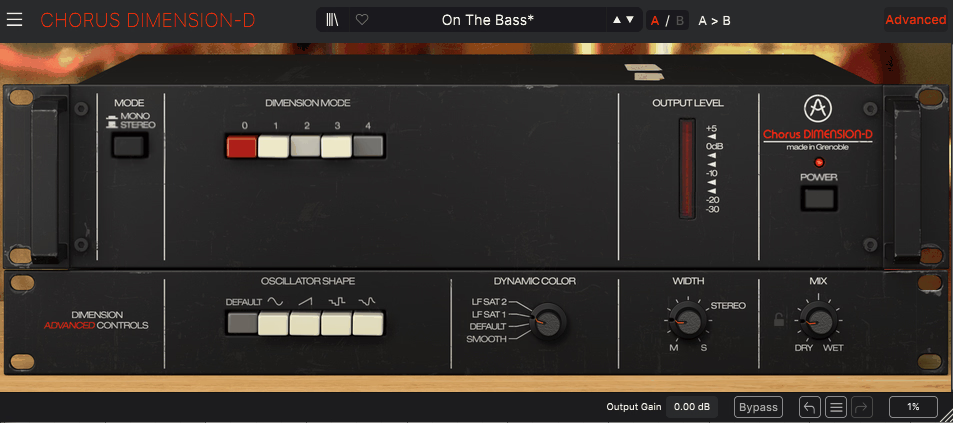
If you’ve ever wondered why certain records from the late 70s and 80s have this impossibly wide, shimmering quality on their synths and vocals, there’s a decent chance the answer is the Roland Dimension D. It wasn’t really a traditional chorus in the way most people think of chorus effects. It was more of a sonic sweetener that simply made everything sound broader, richer, and more suited to a polished stereo mix.
Arturia’s emulation captures that specific magic with the kind of component level accuracy they’ve become known for through their V Collection work. The plugin has found its way onto mixing templates around the world because of how naturally it sits on virtually any source material. It’s one of those effects where you turn it on, things sound better, and you don’t have to overthink it.
- 4 Mode BBD Operation with Analog Compression and Expansion
The heart of the DIMENSION D is a faithful recreation of the original’s bucket brigade device (BBD) circuitry, which is responsible for the warm, smooth character that distinguishes this effect from cleaner digital chorus algorithms. Modes 1 through 3 provide fixed variations on modulation rate and depth, ranging from a gentle shimmer to more animated movement. Mode 4 can be engaged alongside any of the first three to increase the wet signal level for a more pronounced effect.
What sets this apart from a simple pitch modulation is the built in compressor/expander circuit that the original hardware used to manage the BBD signal path. This circuit subtly alters the saturation and dynamic response of your audio, adding a layer of warmth and musical compression that you don’t consciously hear but definitely feel when you A/B the effect. Arturia reconstructed this entire process at the component level, including the filtering and expansion stages that shaped the character of the original unit.
- Five LFO Shapes for Expanded Movement Options
While the original hardware was limited to a single modulation waveform, Arturia added five selectable LFO shapes: triangle (the original default), sine, ramp, sample and hold, and sample and glide. Each shape fundamentally changes the character of the modulation. Triangle and sine produce classic smooth chorus movement, ramp creates an asymmetric sweep that rises gradually and resets sharply, and the sample variations introduce stepped or gliding random modulation for more experimental textures.
Switching between these shapes lets you go from dead accurate vintage emulation to sounds the original unit was never capable of producing. The sample and hold mode in particular turns the Dimension D into something closer to a random modulation source, which can be surprisingly useful on pads and ambient textures where you want unpredictable stereo movement.
- Stereo Width and Color Controls
A Width control lets you shrink or stretch the stereo spread beyond 100%, which gives you more precise control over the left/right crossmix than the original hardware ever offered. Cranking it to the maximum creates an almost head spinning level of stereo immersion, while pulling it back narrows the effect for more focused applications.
The Color control subtly tweaks the saturation and tonal response of the BBD circuit, letting you push the analog character further without using external processing. The plugin operates in mono, mono to stereo, or full stereo modes and includes a standard wet/dry mix control. Available in VST3, AU, AAX, and NKS formats for Windows and macOS.
2. Brainworx A/DA Flanger (Flanger)

The original A/DA Flanger earned the nickname “the Holy Grail of Flangers” in the late 70s and early 80s, and for good reason. Where most flangers of that era produced a relatively tame swooshing effect, the A/DA could go from subtle ripples all the way to completely unhinged metallic ring modulation sounds that no other pedal could touch. It was wild, musical, and expressive in ways that made guitarists lose their minds.
Brainworx developed this emulation with official endorsement from A/DA founder Dave Tarnowski, and the result is one of the most authentic stompbox recreations you’ll find in plugin form. I think what makes it especially useful in a modern context is that flanging has fallen out of fashion enough that using it well immediately makes a mix stand out. Most producers don’t reach for flangers anymore, which means the ones who do tend to get interesting results.
- 40:1 Delay Ratio with Panasonic MN3010 BBD Circuit
The A/DA Flanger’s defining characteristic is its 40:1 delay time ratio, which is double what most other flangers offer at 20:1. This extended range is what gives the effect its ability to produce everything from mild rippling to extreme metallic textures that cross into ring modulation territory. The plugin models the original’s Panasonic MN3010 bucket brigade circuit with the full set of original controls: Threshold (a built in gate that emphasizes the effect on louder passages), Manual (defines the tonal center of the sweep), Range (modifies the frequency spectrum), Speed, and Enhance (a resonance control for depth and intensity).
Armed with these controls, you can dial in everything from mild rippling and faux steel drum tones to ultra wide, slow arcing contours and creative whooshing effects. The range of sounds available from this single plugin is genuinely impressive for a flanger.
- Even/Odd Harmonics Switch for Overtone Shaping
The Even/Odd Harmonics switch lets you choose whether the flanging emphasizes even or odd ordered overtones, which substantially changes the character of the effect. Engaging odd harmonics produces a more aggressive, metallic quality that works well on guitars and synths where you want the flange to bite. Even harmonics deliver a smoother, more musical result that sits better on vocals and pads.
This is a feature that was unique to the original A/DA hardware and remains relatively uncommon in flanger plugins. It’s one of those controls that you might not think you need until you hear the difference, at which point it becomes indispensable.
- Switchable 1979 and 2009 Hardware Models
One genuinely cool addition from Brainworx is the ability to switch between the original 1979 version and the 2009 reissue of the hardware. The 1979 model has a slightly grainier, more saturated signal path with the character that made the original so beloved. The 2009 version is cleaner and brighter, reflecting the improved components used in the reissue. Having both in one plugin gives you two distinct flanging voices from a single interface.
- Plugin Exclusive Additions from Brainworx
Brainworx added several features that the original hardware never had. The XL Saturation circuit provides additional harmonic coloration for a touch of warmth and grit. DAW tempo sync locks the flange speed to your session tempo for rhythmically consistent effects. Dual stereo modes expand the effect across a wide stereo field, and a wet/dry mix control lets you run the flanger as a subtle insert rather than a full wet effect.
Available through Plugin Alliance in VST2, VST3, AU, and AAX formats, and also through Universal Audio for UAD hardware.
3. Apogee Clearmountain’s Phases (Phaser)

Bob Clearmountain is one of those mix engineers whose credit list reads like a greatest hits compilation of rock and pop music, and Phases is built around the specific phasing techniques he developed over decades of professional work. Apogee partnered with Clearmountain to capture not just a generic phaser sound but the actual workflow and tonal preferences of one of the most respected ears in the industry.
What makes Clearmountain’s Phases different from your average phaser plugin is that it was designed by someone who uses modulation effects in the context of real, high stakes mixing sessions rather than in isolation. The result is a tool that sounds musical from the moment you load it, with an approach to phasing that emphasizes practical mix enhancement over abstract sound design experimentation.
- Dual Engine Phaser and Flanger Architecture
The plugin runs two independent modulation engines simultaneously: one handling phasing and the other managing flanging. Both can be adjusted, blended, or used independently depending on the effect you’re after. Each engine has dedicated rate, depth, feedback, and mix parameters, giving you full control over how the two effects interact.
This dual architecture means you can create textures that sit somewhere between phasing and flanging, occupying a sonic space that neither effect can reach on its own. Blending a slow, deep phaser with a subtle, fast flanger produces a complex movement that feels richer and more dimensional than either effect in isolation.
- Multiple Phase Stages for Variable Intensity
The phaser section offers multiple stage options that change the intensity and complexity of the phase shift pattern. More stages produce a deeper, more pronounced swooshing effect with additional notches in the frequency spectrum. Fewer stages keep things subtle and musical, perfect for adding gentle movement to vocals or acoustic instruments without the effect becoming obvious.
The ability to adjust the stage count gives you a range from barely perceptible phase coloring all the way to dramatic, sweeping phase shifts. This is the kind of fine control that separates a professional phaser from the one click options in most DAWs.
- Bob Clearmountain’s Signature Presets
The plugin ships with presets designed by Clearmountain himself, each reflecting specific processing approaches he’s used on real sessions throughout his career. These aren’t theoretical demonstrations. They’re practical starting points based on actual mixing decisions that shaped records by Bruce Springsteen, Bryan Adams, The Rolling Stones, and many others.
- Stereo Width and Tempo Sync
A stereo width control extends the spatial capabilities of the effect, letting you push the modulation wider across the stereo field or narrow it for more focused applications. Full DAW tempo sync keeps the modulation locked to your session when rhythmic consistency matters. Available from Apogee in VST, AU, and AAX formats for Windows and macOS.
4. SoundToys Tremolator (Tremolo)
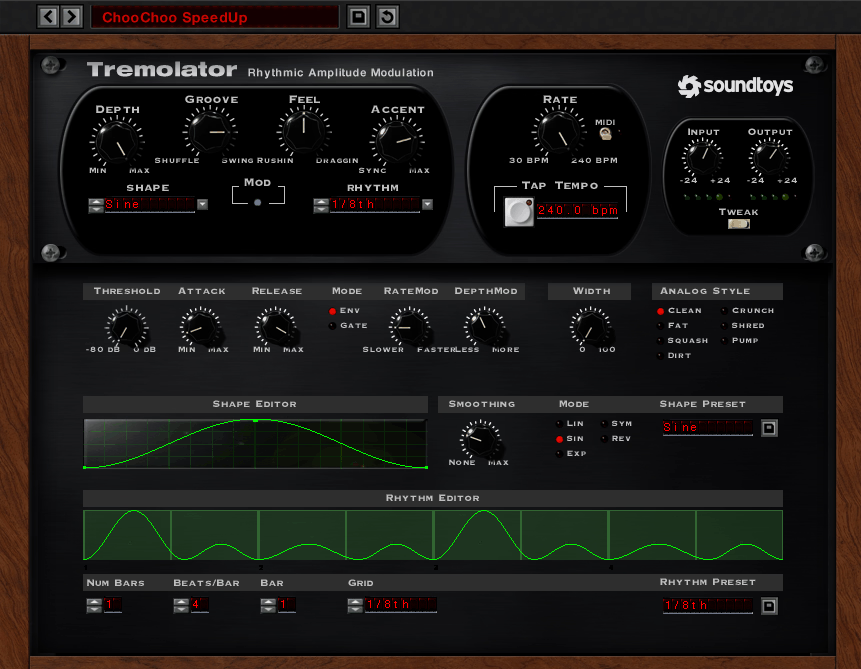
SoundToys has always had a knack for taking straightforward effects and turning them into something that feels more alive and more musical than the competition. Tremolator is a perfect example of that philosophy. At its core, it’s a tremolo effect, which is about as simple as modulation gets: just the volume going up and down in a repeating pattern. But the way SoundToys handles the details transforms it into something genuinely creative.
The big thing with Tremolator is that it goes way beyond the smooth sine wave volume modulation that most tremolo plugins give you. It can do that classic sound perfectly well, but push it further and you get into choppy rhythmic gating, synced stutter effects, and groove based patterns that turn a static pad or guitar part into something rhythmically alive. It’s one of those plugins that gets used as much for creative sound design as it does for traditional tremolo.
- Rhythm Editor with Programmable Volume Patterns
The rhythm section is where Tremolator separates itself from basic tremolo plugins. A step sequencer style grid lets you draw custom volume patterns that repeat in sync with your DAW, turning the tremolo into a rhythmic chopping tool that can create everything from subtle volume pulses to hard gated patterns. You can program patterns that emphasize specific beats, create syncopated movement, or produce complex rhythmic sequences that interact with the groove of your track.
This feature alone makes Tremolator useful well beyond traditional tremolo territory. Use it on a sustained synth pad and suddenly you’ve got a rhythmic element that pulses in time with the rest of the arrangement.
- Groove and Accent Controls for Human Feel
The groove control adds swing and feel to the timing, pushing the effect away from robotic precision toward something that breathes and moves musically. Without swing, tempo synced tremolo sounds mechanical and distracting. With it, the movement flows naturally with the track.
Accent patterns add dynamic variation within each cycle, so certain beats hit harder while others drop away. This creates a more interesting, less predictable rhythmic texture than a simple on/off gating pattern. Combined with the adjustable attack and release for each volume change, you can shape whether the gating is sharp and percussive or soft and gradual.
- Multiple LFO Shapes for Traditional Tremolo
Beyond the rhythm editor, Tremolator offers standard LFO driven tremolo with multiple waveform shapes for more conventional applications. Sine produces classic smooth tremolo, square creates a choppy on/off effect, and triangle sits somewhere between the two. The depth and mix controls allow everything from barely perceptible movement to full signal chopping.
- MIDI Trigger and Analog Character
MIDI trigger mode lets you restart the tremolo cycle from incoming MIDI notes for precise rhythmic control over when the pattern begins. Full tempo sync locks the rate to your session. SoundToys’ signature analog modeling adds warmth and subtle saturation to the signal path, ensuring the volume changes don’t sound sterile or digital.
The Tweak panel provides additional parameters for fine tuning the effect’s character. Available as part of the SoundToys effect rack or individually, in VST, AU, and AAX formats for Windows and macOS.
5. Antelope Audio Adaptive Vibrato (Vibrato)
Antelope Audio is primarily known for their high end converters and clocking hardware, so a dedicated vibrato plugin from them might seem like an odd move. But the technology they applied here draws on their FPGA based hardware processing expertise, bringing a level of analog accuracy to the vibrato effect that most plugin developers don’t bother with because they’re not approaching it from a hardware engineering perspective.
What I find interesting about the Adaptive Vibrato is the philosophy behind it. Antelope didn’t build another generic pitch wobble effect. They approached vibrato as a performance expression tool that should respond intelligently to your playing or your source material, producing results that feel more like a human performer and less like a mechanical process.
- Signal Adaptive Modulation Engine
The adaptive algorithm analyzes the dynamics and frequency content of the incoming audio and adjusts the vibrato response accordingly. Quieter, more delicate passages receive a gentler, more subtle pitch variation, while louder, more energetic material triggers a wider, more expressive vibrato. This mimics how a real performer naturally applies vibrato, varying the intensity based on the musical context rather than keeping it robotically consistent.
The result is a vibrato that sounds organic and musical regardless of the source material. A sustained vocal, a plucked guitar string, and a synth pad each receive a different vibrato response without you needing to adjust any parameters.
- Manual Override and Blending Controls
Manual controls let you override or blend with the adaptive behavior, giving you the option to set a fixed vibrato rate and depth if you prefer a more predictable result. The rate, depth, and mix parameters provide standard vibrato control, while the adaptive engine operates as an additional layer of intelligence on top.
This means you can use the plugin in either fully adaptive mode where the vibrato responds to your dynamics, fully manual mode where it behaves like a traditional vibrato, or anywhere in between. The blending approach gives you flexibility that most vibrato plugins simply don’t offer.
- FPGA Heritage Signal Quality
Antelope’s background in high end analog to digital conversion informs the signal quality of the plugin, which processes audio with the low noise, high headroom characteristics associated with their hardware converters. The vibrato modulation avoids the digital stepping artifacts that can appear in cheaper implementations, producing smooth, continuous pitch variation that sounds natural even at extreme depth settings.
Available in VST, AU, and AAX formats, and also integrated into Antelope’s own hardware ecosystem for users of their audio interfaces.
6. Eventide Rotary Mod (Rotary/Leslie)

Recreating the sound of a Leslie rotary speaker cabinet in software is one of those problems that sounds simple on paper and turns out to be incredibly complex in practice. The Leslie doesn’t just modulate pitch. It creates a complex interaction between Doppler shift, amplitude modulation, cabinet resonance, overdrive, and microphone positioning that gives it that unmistakable three dimensional swirl that keyboard players and guitarists have been chasing for decades.
Eventide’s Rotary Mod tackles this complexity head on with the kind of deep signal processing expertise the company has been building since the 1970s. This is, after all, the company that built the H3000 Harmonizer. Their approach to rotary simulation goes well beyond a simple pitch wobble with some EQ, and the difference is immediately audible.
- Independent Dual Rotor Simulation
The plugin models both the horn (treble) and drum (bass) rotors independently, each with their own speed, acceleration, and deceleration behavior. Real Leslie cabinets exhibit a characteristic ramp up and ramp down when switching between slow and fast modes, where the heavier bass rotor takes longer to change speed than the lighter treble horn. The Rotary Mod captures this mechanical inertia accurately, producing the authentic speed transition that’s a fundamental part of the Leslie sound.
Separate controls for each rotor let you adjust the balance between treble and bass modulation, which gives you more flexibility than working with a real cabinet where the rotor speeds are mechanically fixed.
- Cabinet Resonance and Wooden Enclosure Modeling
Beyond the rotor simulation, the plugin includes cabinet resonance modeling that recreates the coloration imparted by the wooden enclosure of a real Leslie. The cabinet contributes a significant part of the overall tone, adding warmth, low mid resonance, and a sense of physical space that distinguishes a real Leslie from a simple pitch modulator. Without this element, a rotary simulation always sounds thin and artificial.
The modeling accounts for the frequency dependent behavior of sound bouncing around inside the cabinet, where bass frequencies interact with the enclosure differently than treble frequencies. This creates the layered, dimensional quality that makes a real Leslie sound so complex and immersive.
- Overdrive Stage for Tube Amplifier Character
An overdrive stage adds the tube amplifier distortion that’s an integral part of the classic Leslie sound. The original cabinets were driven by tube amps, and pushing the input level into the amp produced the warm, harmonically rich breakup that organists and guitarists used as a core part of their tone. The overdrive ranges from subtle warmth at low settings to full blown grinding distortion at high settings.
- Virtual Microphone Positioning
Microphone positioning lets you adjust the stereo spread and tonal character by changing where the virtual mics sit relative to the cabinet. Close mic positions emphasize the direct rotary modulation with more pronounced speed changes, while distant positions capture more room ambience and a smoother, more blended sound. This is the same technique engineers use when recording real Leslie cabinets, and having it built into the plugin gives you a level of control that would require multiple microphones and a physical room to achieve otherwise.
- Slow/Fast Speed Switching with Variable Acceleration
The speed settings cover the full range from the slow chorale mode to the fast tremolo mode that organists use for dramatic swells. The acceleration time can be adjusted to match different cabinet models, from quick responding modern units to the slower, more dramatic ramp of vintage cabinets. This acceleration behavior is one of the most musically important aspects of the Leslie effect, because the transition between speeds creates a momentary detuning that adds excitement and drama to performance moments.
Available from Eventide in VST, AU, and AAX formats for Windows and macOS.
7. SoundToys PanMan (Autopan)
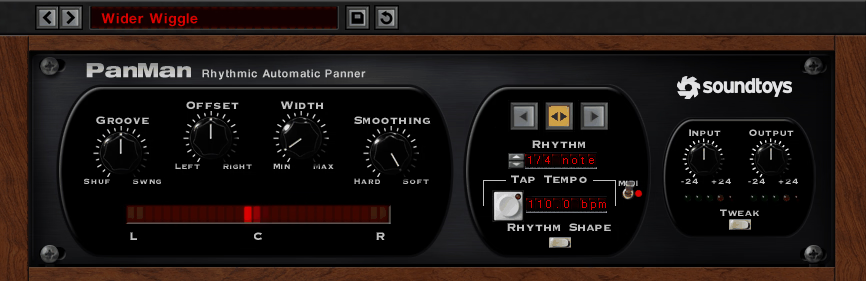
I think PanMan doesn’t get enough attention compared to some of SoundToys’ flashier plugins like EchoBoy or Decapitator, but it’s genuinely one of the most useful tools in their lineup for anyone who works with stereo space. It turns static, center panned elements into moving, animated textures that draw the ear without being distracting.
Like Tremolator, PanMan includes a step sequencer style rhythm editor where you can draw custom panning patterns that sync to your DAW tempo. This means the panning doesn’t just sweep mindlessly from side to side. It follows a programmable rhythmic pattern that can emphasize specific beats, create syncopated movement, or produce complex stereo sequences that interact with the rhythm of your track.
You can create patterns where the sound jumps to the left on beat one, sweeps right through beats two and three, and snaps back to center on beat four. This kind of rhythmic panning adds motion and interest to elements that would otherwise sit statically in the stereo field.
- Groove and Swing for Musical Timing
The groove control adds swing to the panning timing, which is essential for making the effect feel human rather than mechanical. Without swing, tempo synced panning sounds robotic and distracting. With it, the movement breathes and flows with the music. This is a small detail that makes a massive difference in how the effect sits in a mix.
Multiple LFO shapes provide conventional smooth panning for situations where rhythmic patterns aren’t appropriate. Sine produces gentle side to side motion, while square creates hard left/right jumps.
- Width and Offset for Stereo Field Control
A width control determines how far the signal travels from center to the extremes, letting you choose between full hard panning and a more subtle rocking motion that stays closer to the center. Offset shifts the panning center away from the middle of the stereo field for asymmetric movement patterns, which is useful when you want an element to move within one half of the stereo image rather than sweeping the full width.
- Analog Modeling and MIDI Integration
SoundToys’ analog circuit modeling runs through the entire signal path, adding subtle warmth and harmonic content that makes the panning transitions sound smoother and more natural. MIDI trigger restarts the pan pattern from incoming notes for precise rhythmic control. The Tweak panel reveals additional parameters for fine tuning the effect’s character.
Available in VST, AU, and AAX formats for Windows and macOS.
8. Moog Moogerfooger MF 102S Ring Mod (Ring Modulation)

Ring modulation is the oddball of the modulation family. Where chorus, phasing, and tremolo are generally used to make things sound more pleasing, ring mod exists to make things sound alien, metallic, and fundamentally strange. It multiplies two signals together to create sum and difference frequencies that are often completely inharmonic, producing tones that don’t exist in any natural acoustic instrument.
The Moogerfooger MF 102S brings Moog’s legendary analog design philosophy to this inherently wild effect. Based on the original Moogerfooger hardware pedal that Bob Moog designed in the late 90s, the plugin version captures the specific warmth and musicality that Moog’s circuits bring to even the most extreme processing. Ring mod from Moog sounds different from ring mod from anyone else, and that difference matters when you’re trying to create textures that are weird but not unlistenable.
- Carrier Oscillator with Wide Frequency Range
The ring modulator works by multiplying your input signal against an internal carrier oscillator whose frequency determines the character of the resulting harmonics. The frequency control sweeps the carrier across a wide range, producing everything from subtle tonal coloration at low frequencies to completely detuned metallic chaos at higher settings. At very low carrier frequencies, the effect resembles tremolo. As you increase the frequency, it passes through bell like tones and eventually into aggressive inharmonic territory.
The carrier oscillator uses Moog’s analog modeling to produce the slightly imperfect, warm quality of real analog circuitry, which is what gives this ring mod its musicality compared to purely mathematical implementations.
- LFO Modulation for Animated Textures
An LFO modulates the carrier frequency for animated, evolving textures that change over time rather than sitting at a static pitch. The LFO rate controls how fast the carrier pitch sweeps back and forth, while the LFO amount determines how far the frequency deviates from the center position.
Multiple LFO waveforms provide different movement characters, from smooth sine sweeps to more angular triangle and square patterns. Using a slow LFO rate with moderate depth creates slowly evolving metallic textures that work beautifully on pads and ambient sound design.
- Mix and Drive for Parallel Processing
The mix control blends the ring modulated signal with your dry audio, which is essential for making the effect usable in a musical context. Pure ring mod can be overwhelming, but blending even a small amount with the dry signal adds metallic shimmer, harmonic complexity, and movement without destroying the original tonality. This parallel approach is how most producers actually use ring modulation in practice.
The drive stage pushes the circuit into saturation for a more aggressive, distorted character. Combined with the ring modulation, drive produces thick, overdriven metallic textures that are perfect for industrial and experimental genres.
- Moog Filter Ecosystem Integration
The plugin integrates with the broader Moog filter ecosystem, meaning you can pair the ring mod with Moog’s legendary filter designs from the Moogerfooger Software collection for combined processing chains. Running the ring mod output through a Moog ladder filter creates classic analog sound design possibilities that would cost thousands in hardware form.
Available from Moog in VST, AU, and AAX formats as part of the Moogerfooger Software collection.
9. Kuassa EFEKTOR Omnivibe (Univibe)
The univibe holds a special place in guitar history as the effect that gave Jimi Hendrix’s “Machine Gun” its swirling, underwater quality and has been chased by guitarists ever since. It’s technically a phase shifter, but it behaves quite differently from a standard phaser because of the photocell and lamp circuit that creates its characteristic uneven, pulsating modulation.
Kuassa’s EFEKTOR Omnivibe is their answer to the question of what a comprehensive univibe plugin should look like in a modern production environment. For guitarists, keyboardists, and producers who want that specific organic, swampy modulation that you can’t get from a clean digital phaser, this fills the gap at a very reasonable price point without forcing you to commit to a single circuit’s personality.
- Multiple Vintage Photocell Circuit Models
The Omnivibe includes several emulation modes based on different generations and variations of the original photocell modulation design. Each model captures the specific speed response curve, phase shift behavior, and harmonic coloration of a different vintage unit. The photocell modulation produces an inherently uneven sweep where the speed varies naturally through the cycle, creating the organic, almost breathing quality that distinguishes a univibe from a linear phaser.
This variation between models means you’re not locked into one version of the univibe sound. Different models respond differently to the same input, giving you a range of classic tones from a single plugin.
- Chorus/Vibrato Mode Switch
The chorus/vibrato mode switch toggles between two fundamentally different operating modes. Chorus mode mixes the phase shifted signal with the dry signal, producing the classic univibe effect where you hear both the modulated and unmodulated sound together. Vibrato mode passes only the phase shifted signal, removing the dry component entirely for a pure pitch modulation effect that sounds more like a rotating speaker.
Most vintage univibes had this same switch, and the difference between the two modes is dramatic. Chorus mode is warmer and more familiar. Vibrato mode is more intense and disorienting.
- Speed, Depth, and Intensity Controls
Controls for speed, depth, and intensity (feedback) let you dial in everything from a subtle, slow pulse to an aggressive, fast swirl. The speed control ranges from a barely perceptible throb to a rapid warble. Depth adjusts how far the phase shift sweeps across the frequency spectrum. Intensity feeds the output back into the input for a more resonant, pronounced effect that emphasizes the notches in the phase pattern.
At moderate settings, the Omnivibe produces that classic warm, watery univibe tone associated with late 60s and early 70s rock. Pushing the intensity higher takes it into more aggressive, almost rotary speaker territory.
- Stereo Expansion and Mix Integration
Kuassa added stereo processing that extends the originally mono univibe effect into the stereo field, creating a wider, more immersive version of the classic sound. This is something the original hardware couldn’t do, and it makes the Omnivibe substantially more useful in a modern stereo mixing context.
The mix control allows parallel blending for subtle applications, and the output level compensates for any volume changes introduced by the processing. The plugin’s low CPU footprint makes it practical to run on multiple tracks simultaneously. Available from Kuassa in VST, VST3, AU, and AAX formats for Windows and macOS, at a price point that makes it one of the most accessible options for quality univibe emulation.

Hello, I’m Viliam, I started this audio plugin focused blog to keep you updated on the latest trends, news and everything plugin related. I’ll put the most emphasis on the topics covering best VST, AU and AAX plugins. If you find some great plugin suggestions for us to include on our site, feel free to let me know, so I can take a look!