In this guide, I’m walking you through the seven best de-esser plugins that I’ve found genuinely useful. Some are surgical and precise, others are fast and musical, and there’s even a solid free option if you’re just getting started. Whether you’re wrestling with a bright singer, taming overheads, or finishing a master, you’ll find something here that fits your workflow.
When you’re mixing vocals, recording drums, or putting the final touches on a master, harsh high frequencies can ruin an otherwise great track. Sibilant “s” and “t” sounds cut through too bright and the top end becomes fatiguing quite fast. That’s where a de-esser steps in.
A de-esser is a specialized tool that tames those sharp frequencies without dulling the entire mix, and having the right one makes all the difference between a polished sound and something that feels harsh or unfinished. I’ve tested various options to see which ones actually deliver smooth results across vocals, drums, and mastering chains and here are my picks:
| Plugin Name | Engine Type | Key Strength | Pros | Cons |
|---|---|---|---|---|
| 1. Slate Digital FG-DS 902 | Wideband / HF Only | Frequency targeting, Range control, Listen mode | Surgical control, VMR integration, natural tonal preservation | Focused mainly on vocals; requires Slate ecosystem for full workflow |
| 2. FabFilter Pro-DS | Single Vocal / Allround Detection | Visual spectrum feedback, lookahead processing, split-band mode | Clear visual monitoring, adaptable detection, precise gain reduction | High CPU usage on large sessions; visual interface may overwhelm beginners |
| 3. iZotope Velvet | Dual-Channel Processing | Separate sibilance & tonal treatment, adaptive frequency tracking | Soft to aggressive modes, continuous density control, tonal focus | Complex interface; may take time to master for quick sessions |
| 4. Waves Sibilance | Organic ReSynthesis | Intelligent sibilance detection, minimal controls | Fast setup, artifact-free processing, breath-friendly | Limited visual feedback; fewer advanced controls for nuanced edits |
| 5. Antares Vocal De-Esser | Machine Learning Detection | Context-aware analysis, adaptive processing engine | Real-time vocal adaptation, simplified interface, vocal style modes | Focused only on vocals; less hands-on control for complex mixes |
| 6. Lindell Audio 902 De-Esser | Analog-modeled automatic detection | Automatic level tracking, simple 2-knob interface | Natural analog character, fast workflow, versatile beyond vocals | Limited advanced parameter control; best suited for quick mixes |
| 7. Techivation T-De-Esser 2 (Free) | Dual-band Sidechain Detection | Frequency selector, context-aware threshold, ratio control | Free, effective on vocals & dialogue, simple controls | No spectral display; handles only one harsh zone at a time |
1. Slate Digital FG-DS 902

The FG-DS 902 caught my attention because it’s built to sound exactly like the dbx 902 hardware de-esser that you’d find in pro studios.
When I need to tame harsh “s” sounds on vocals without making them sound dull or lifeless, this is where I start. The interface is straightforward, but the control you get is precise enough for detailed vocal work.
I appreciate that it fits inside Slate’s Virtual Mix Rack, so you can build entire vocal chains with other plugins right next to it. This keeps your workflow smooth when you’re jumping between compression, EQ, and de-essing.
Here is what you get:
- Frequency Range Control (800 Hz to 8 kHz)
You can zero in on the exact spot where sibilance lives instead of just crushing the high end. I typically find the problem between 4 kHz and 7 kHz on most vocals, and being able to target that narrow band saves the rest of the vocal’s brightness. It’s way more surgical than older de-essers that just squash everything above a certain point.
- HF Only Mode
This feature gives you two ways to de-ess. In wide-band mode, it works like a traditional de-esser and reduces volume across the whole signal. Switch to HF Only and it only pulls down the harsh frequencies you’re targeting, leaving the low mids untouched.
- Listen Mode
One of my favorite shortcuts is the Listen button. It isolates exactly what the plugin is removing so you can hear if you’re hitting the right frequencies. No more guessing if your settings are actually working or just dulling the vocal. You hear the sibilance by itself, adjust, and move on.
- Range Control for Reduction Amount
Instead of a basic threshold knob, you get a Range control that sets a ceiling on how much reduction happens. Light settings give you natural results, while pushing it harder delivers aggressive de-essing for vocals that really need it. This gives you more musical control than just slamming a threshold.
- VMR Integration with Custom Vocal Chains
Since the FG-DS 902 runs inside Virtual Mix Rack, you can combine it with Slate’s compressors, EQs, and saturation plugins to build custom vocal strips. I like having everything in one window instead of hunting through separate plugin windows during a mix session.
2. FabFilter Pro-DS

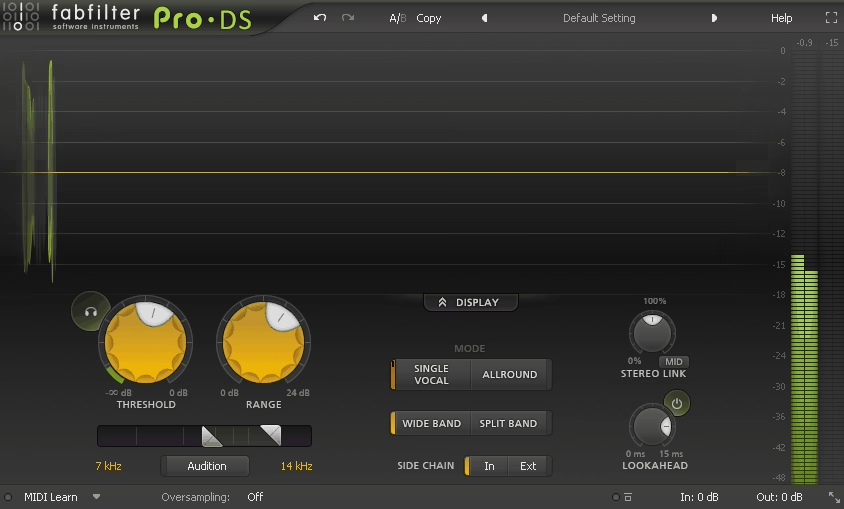
FabFilter Pro-DS de-esser plugin shows you exactly what it’s doing while it’s doing it. The scrolling spectrum display gives you real-time feedback on sibilance detection and gain reduction, so you’re never guessing whether you’re fixing the problem or creating new ones!
I’ve used de-essers that sound fine solo but destroy vocal clarity in the mix. Pro-DS avoids that trap because you can visually confirm you’re only touching the harsh frequencies..
I would say it works on more than just lead vocals. It could be used on drum overheads to tame cymbal wash, on dialogue that was recorded too close to the mic, and even on mastering chains when a full mix has too much top-end bite. The plugin adapts because it gives you two distinct processing modes and two detection approaches depending on what you’re working on.
- Single Vocal vs Allround Detection Modes
Pro-DS doesn’t use one detection algorithm for everything. Single Vocal mode is tuned specifically for human voice and focuses on consonant transients like “S” and “T” sounds. It ignores cymbal hits and breath noise better than most de-essers I’ve tried.
Allround mode widens the detection for drum buses, group tracks, or mastering where you need to catch harshness across multiple sources without clamping down too hard on one element.
- Wide Band and Split Band Processing
You get to choose how gain reduction is applied. Wide Band mode reduces the entire signal when sibilance is detected, which keeps your vocal tone natural and avoids creating spectral holes in the high end.
Split Band mode only reduces the frequency range where sibilance lives, which is perfect for dense mixes or stacked vocals where you can’t afford to touch the low-mids. I use Wide Band on exposed lead vocals and Split Band on background vocal stacks or drum overheads.
- Lookahead Processing for Clean Reduction
Pro-DS uses lookahead to catch fast sibilant spikes before they overshoot. This means you can set lower thresholds without hearing pumping or distortion. You can de-ess aggressively on hyper-compressed pop vocals and still get clean results because the plugin sees the sibilance coming and reacts smoothly.
- Audition Mode
You can monitor only the signal being removed. This feature saves me from over-processing because you can hear exactly what frequencies are getting cut. On mastering or group buses, Audition mode prevents me from accidentally dulling cymbals or removing vocal air when I’m just trying to tame harshness.
3. iZotope Velvet
I kept hearing producers talk about how Velvet by iZotope replaced multiple plugins on their vocal chain, and honestly, I was skeptical until I tried it myself.
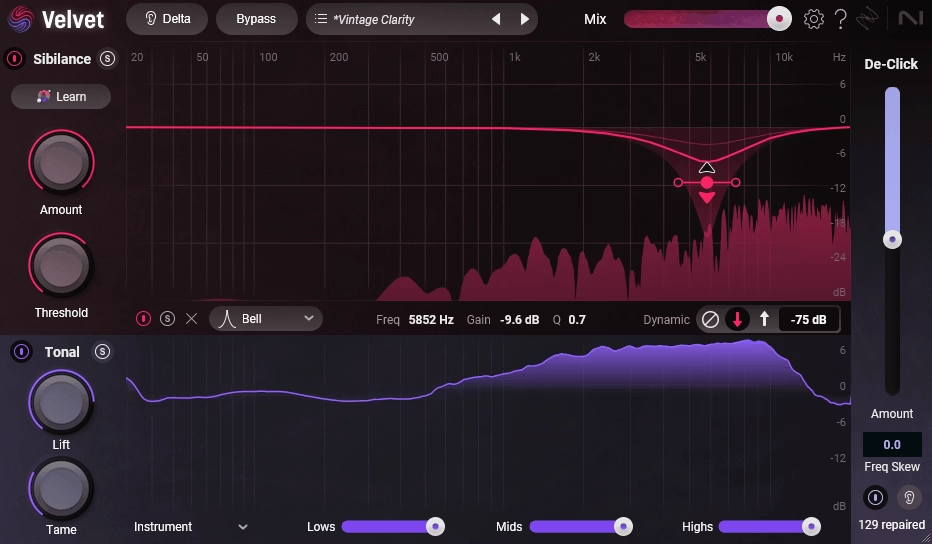
What makes Velvet different is how it thinks about harsh frequencies. You’re not just cutting down sharp “S” sounds like a normal de-esser. Instead, Velvet splits your audio into two separate channels: one for sibilance and one for tone. That means you can smooth out harsh highs, tame brittle upper mids, and clean up mouth clicks all in different ways without turning your vocal into mush.
It’s great on lead vocals when the recording sounds too forward or when compression brings out that annoying 5-8kHz bite. It handles problem areas I used to fix with three different tools.
- Dual-Channel Processing
Velvet separates your vocal into sibilance and tonal content so you can treat each one independently. The sibilance channel catches your typical “S” and “SH” sounds. The tonal channel smooths out harshness that sits in sustained notes and vowels, which most de-essers completely ignore. It’s great because you can reduce edginess without killing the natural brightness of the performance.
- Three Smart Character Modes
You get Soft, Balanced, and Aggressive modes that change how Velvet reacts to your vocal. Soft works great on already clean recordings when you just need a touch of polish. Balanced handles most situations without thinking too hard.
Aggressive digs in when you’re working with budget mics, untreated rooms, or overly bright sources. These aren’t just intensity knobs, they actually shift the plugin’s detection behavior.
- Focus Control for Targeting Problem Frequencies
The Focus slider lets you steer Velvet’s attention toward high-frequency sibilance or upper-mid harshness depending on where your vocal needs help. If your singer sounds nasal or boxy in the 3-5kHz range, you can pull Focus lower. If it’s all air and sharpness up top, push it higher. This adapts to different voices without forcing you into manual frequency hunting.
- Density Slider for Continuous Smoothing
Density controls how constantly Velvet works on your vocal. Low density makes it react only to spikes. High density keeps smoothing even between consonants, which is perfect for taming that brittle tone that builds up after heavy compression.
- Adaptive Frequency Tracking
Velvet doesn’t lock onto one static frequency range like older de-essers. It follows your vocal as pitch and intensity change throughout the song. That means it works across verses, choruses, and ad-libs without needing automation or separate settings for each section.
4. Waves Sibilance

This one actually tries to figure out what is and isn’t sibilance before reducing anything. I’ve found this makes a huge difference when you’re working with naturally bright vocals or tracks where cymbals might accidentally trigger a regular de-esser.
Sibilance VST leaves those alone and only goes after the actual harsh “s” and “sh” sounds. The plugin uses Organic ReSynthesis technology to detect sibilance in a smarter way than threshold-based tools. What I really like is how transparent it sounds. You can push the reduction fairly hard without making vocals sound dull or lifeless.
- Intelligent Sibilance Detection
The plugin analyzes your audio to identify actual sibilant sounds rather than just cutting highs whenever they cross a threshold. It recognizes “s,” “sh,” “ch,” and “t” sounds specifically, so you don’t accidentally reduce brightness from breath or air that you actually want to keep.
I’ve noticed this makes a big difference on breathy vocal styles where traditional de-essers can sound overly aggressive.
- Simple Two-Control Design
Waves kept the interface incredibly straightforward with just two main controls: frequency range and reduction amount. You point it toward where the harshness lives, usually somewhere between 4kHz and 10kHz, then dial in how much you want it to reduce.
There’s no complex sidechain routing or multi-band setup to figure out. I can usually dial in exactly what I need in under 30 seconds, which keeps my workflow moving.
- Listen Mode for Precision
The audition button lets you hear only what the plugin identifies as sibilance. With this feature you can avoid over-processing because you can verify that Sibilance is actually targeting the right sounds.
You can solo the detected sibilance to make sure you’re not accidentally removing vocal character or high-end detail that makes the performance feel alive.
- Transparent Artifact-Free Processing
Because Sibilance uses resynthesis rather than simple frequency reduction, harsh “s” sounds get removed faster without creating the muffled or lispy artifacts that compression-based de-essers often introduce. Your vocals stay bright and present in the mix while the painful peaks disappear. It’s good on pop, R&B, and even podcast vocals where clarity matters just as much as smoothness.
5. Antares Vocal De-Esser

With Vocal De-Esser plugin you get AI-powered sibilance detection that actually understands vocal context. It uses machine learning trained specifically on vocal recordings to tell the difference between actual harsh “s” sounds and other high-frequency content like breath or cymbal bleed.
You’re not hunting for the exact frequency where sibilance lives or riding gain controls throughout the song. The plugin adapts to your vocal as it plays, making real-time decisions about what needs taming.
- AI-Powered Sibilance Detection
The plugin uses a custom-trained neural model that focuses purely on vocal sibilance patterns. When you run a vocal through it, the algorithm analyzes the incoming signal and identifies sibilant consonants based on learned behavior rather than fixed frequency triggers.
This means it can catch problem areas that traditional de-essers might miss while leaving harmonic brightness untouched.
- Adaptive Processing Engine
Unlike static threshold-based tools, Antares adjusts its response based on your vocal’s characteristics. If your singer switches from soft verses to powerful choruses, the plugin recalibrates automatically. You don’t need multiple instances or automation lanes to handle dynamic performances.
- Simplified Control Interface
You work with just a few main controls: sensitivity for how aggressive the detection behaves, and reduction amount for how much the plugin pulls down identified sibilance. There’s no complex sidechain routing or multi-band editing. I find this particularly helpful for fast results without technical deep-dives into signal analysis.
- Vocal Style Modes
The plugin includes preset modes tailored to different vocal types like breathy intimate performances or bright pop vocals. These modes shift how the AI interprets incoming audio, so the detection aligns better with your specific recording style. It’s like having genre-specific intelligence built into the processor.
- Real-Time Contextual Analysis
What sets this apart is how it processes sibilance within the full vocal context rather than isolating frequency bands. The plugin considers surrounding phonemes and vocal tone, which helps preserve the natural character of your voice while removing only the harsh elements. You get smoother vocals without that overly processed or lispy sound.
6. Lindell Audio 902 De-Esser

The 902 De-Esser stands out because it doesn’t ask you to tweak a dozen parameters to get smooth sibilance control.
I appreciate how this plugin models the original dbx 902 hardware from the 1980s, a unit that became a studio standard because it just worked. You don’t hunt for the right threshold or spend time adjusting complex sidechains. Instead, the 902 uses automatic level adjustment that reacts to your vocal’s dynamics without constant babysitting.
I would say this one is great for vocal that needs quick de-essing without losing character. It keeps the natural tone intact while taming harsh “s” sounds in a way that feels musical rather than mechanical.
- 2-Knob Simplicity With Automatic Detection
The 902 gives you just two main controls, and that’s the point. You adjust frequency range and presence, and the plugin handles the rest with automatic gain adjustment. I don’t need to set thresholds or ratios because the plugin continuously monitors the signal and applies reduction proportionally. This saves me time when I’m cutting vocals fast or working through multiple tracks in a session.
- Analog Hardware Character In Plugin Form
What makes the 902 deesser plugin special is how it models the classic dbx 902 circuit behavior. The plugin doesn’t just clamp down on sibilance like a digital gate. It responds to high-frequency energy the way analog gear does, which means you get smoother, more natural results.
I would recommend it on bright condenser mic recordings where digital de-essers sounded too aggressive, and the 902 kept the vocal presence without the harshness.
- Works Beyond Vocals
The 902 isn’t limited to voice work. It’s quite good on cymbals, acoustic guitars, and hi-hats to control transient harshness without killing the sparkle. When you have drum overheads that sound too brittle or strummed guitars with piercing highs, the 902 handles those signals just as well as it does vocals.
- Consistent Results Across Dynamic Ranges
Because the 902 uses automatic level tracking, it works equally well on quiet verses and loud choruses. You don’t need to automate settings or create multiple plugin instances for different sections. The plugin adapts to the signal’s dynamics on its own, which keeps your workflow moving and your vocals sounding consistent from start to finish.
7. Techivation T-De-Esser 2 (Free)
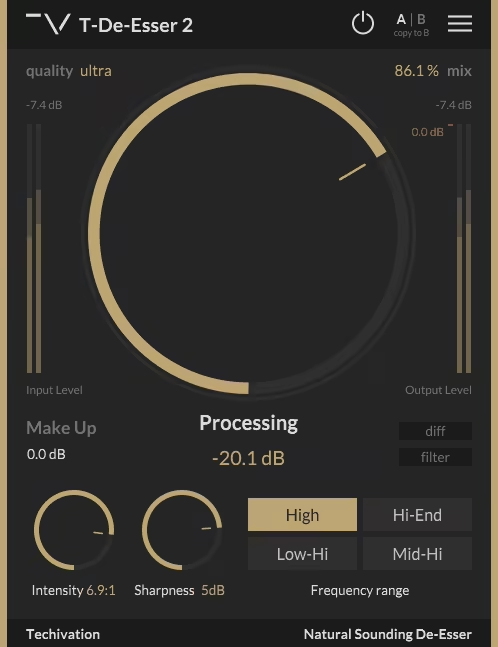
Techivation’s T‑De‑Esser 2 is a free de‑essing plugin that surprises many engineers because it doesn’t behave like an entry‑level or throw‑away utility. It uses a dual-band sidechain detection system you’d normally find in paid tools.
Most free de-essers just slap a compressor on the high end and call it a day, but this one actually compares the sibilance range against your full signal before it reacts.
The plugin won’t falsely trigger on cymbals or string harmonics because it requires the harsh frequencies to genuinely dominate before it kicks in. This matters when you’re working with breathy vocals or complex mixes where the high end is already busy.
You can use it on podcast dialogue with inconsistent mic technique, and it handled fluctuating articulation way better than basic threshold-only plugins.
Frequency Selector (3 kHz to 9 kHz)
This isn’t just picking where the plugin cuts. It’s telling the sidechain where to focus its detection. You sweep through until you hit the spot where harshness is concentrated, usually between 4 kHz and 7 kHz on most voices. The plugin then expects sibilance in that zone instead of just waiting for any loud spike. It works specially well on female vocals where sibilance sits higher than typical male ranges!
Context-Aware Threshold
Unlike standard compressor thresholds, this one measures how much your sibilance band stands above the rest of the signal before firing. If your mix already has bright instruments, the plugin won’t overreact just because the highs have energy. You set it so only the sharpest consonants trigger reduction, which keeps the vocal’s natural air intact.
Ratio Control for Reduction Intensity
Lower ratios preserve bite and presence when you need the vocal to cut through dense arrangements. Push it higher and you’ll clamp down hard on harsh “s” and “t” sounds, though you risk thinning the top end if you’re not careful. I typically start around 3:1 and adjust based on how aggressive the sibilance is…
Gain Compensation
When you pull down sibilance at the top of the spectrum, the vocal can feel quieter even if the meter says otherwise. This control brings back perceived loudness without reintroducing the harshness you just removed. It’s faster than riding faders or adding another gain stage after.
The main limitation: no visual spectral feedback. You’re working by ear, which can slow you down if you’re used to seeing exactly what frequencies are getting hit. It also won’t handle multiple harsh zones at once, if you’ve got problems at both 5 kHz and 10 kHz, you’ll need separate treatment.

Hello, I’m Viliam, I started this audio plugin focused blog to keep you updated on the latest trends, news and everything plugin related. I’ll put the most emphasis on the topics covering best VST, AU and AAX plugins. If you find some great plugin suggestions for us to include on our site, feel free to let me know, so I can take a look!