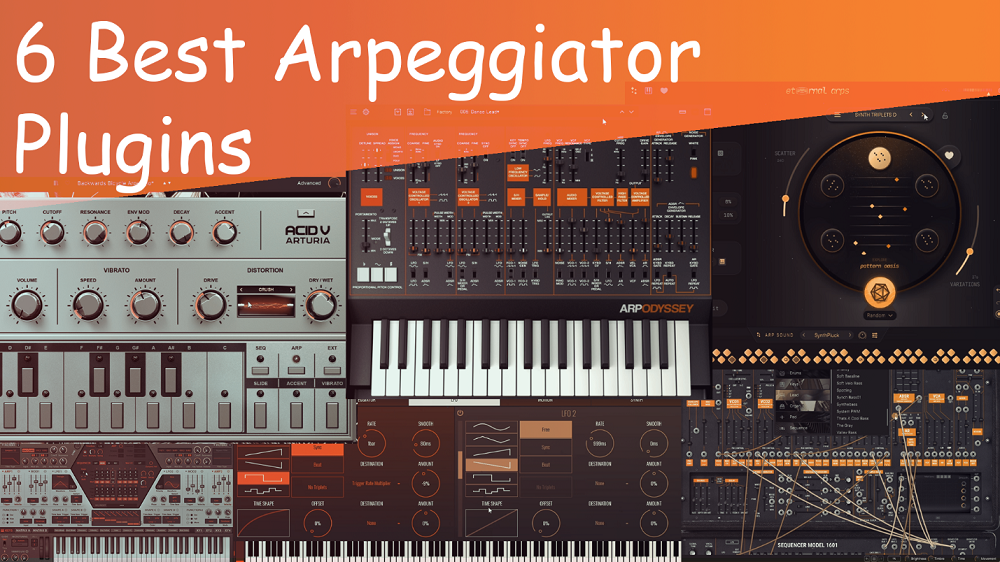
Arpeggiators aren’t just for cycling through notes you play on a keyboard. The right plugin can turn simple chords into moving sequences, create rhythms that fit tightly with your drums, or add just enough unpredictability to inspire new ideas you might not come up with on your own.
No matter if you want clean, tempo-synced patterns for electronic music or more random, evolving lines for ambient sounds, your choice of arpeggiator affects how your music moves. Most built-in DAW arpeggiators only offer simple up and down patterns, but dedicated plugins go much further.
Some integrate directly with synthesis parameters so timbre evolves alongside pitch, while others use probability engines that keep sequences fresh across multiple bars without repetition. A few excel at live performance with macro controls and pattern chaining, while others specialize in lo-fi character or semi-modular routing that turns arpeggiation into sound design.
I’ve tried plugins that range from semi-modular synths with built-in sequencers to MIDI tools that control other gear. Some give you detailed control with 64-step grids and the ability to change each step. Others focus on randomness, using features like directional bias and chord memory that follow your chord changes.
This list includes both paid and free plugins, each picked because it stands out in its own way. If you’re still using only the basic arpeggiators in your DAW, these tools might completely change how you think about rhythm and melody. Let’s dive in.
1. Korg ARP ODYSSEY
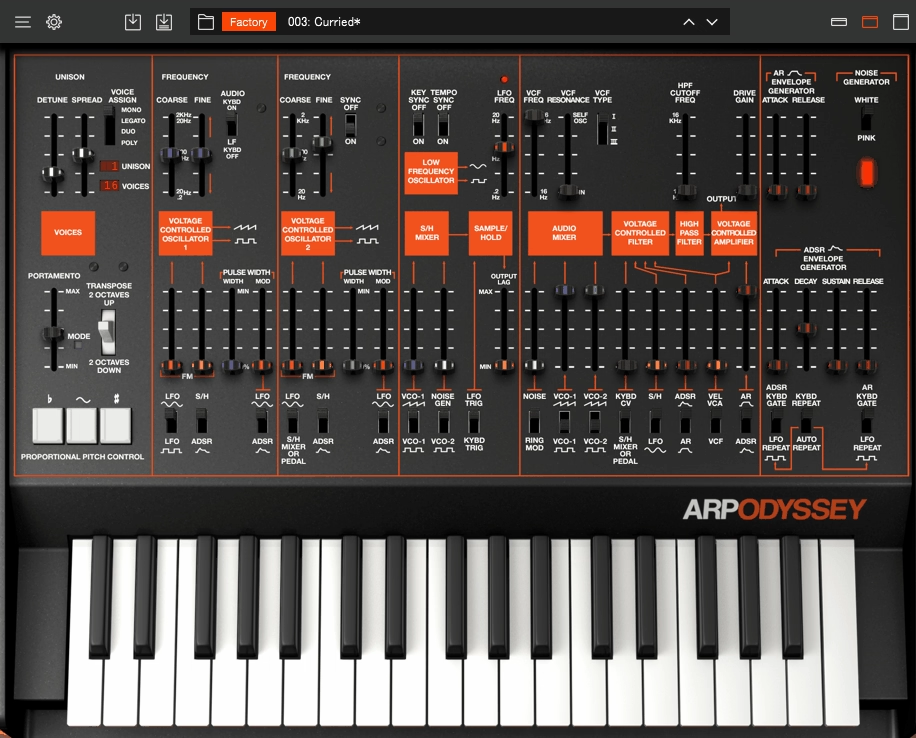
Odyssey’s Component Modeling Technology (CMT) offers something you won’t find in most other software.
It recreates individual analog parts, such as transistors and capacitors, from the original 1970s hardware. This means your arpeggiated patterns do more than just repeat notes—they feel alive and react as if they’re moving through real circuits.
What makes this different is that Korg designed the arpeggiator as part of the synthesis engine, not just as a separate MIDI effect. You have 16-step sequencing with direct control over gate times, semitone shifts, and octave ranges. Even better, you can use these sequences to change internal parameters.
ARP ODYSSEY is a dedicated arpeggiator plugin that’s great for making bass lines with filters that open and close on each step, or leads with sweeping resonance. It includes about 200 presets, and even the built-in arpeggios show how closely the sequencer works with the sound design.
Here is what you get:
- Three Modeled Filter Revisions with Distinct Tonal Behavior
The plugin brings back all three original hardware filter versions, each with its own character. Use the warm filter for rich bass, the aggressive one for sharp leads, or the darker filter for evolving pads. This gives you a range of tones without needing several synths, and the filters react to velocity and modulation just like real analog gear.
- Polyphonic Voice Assignment (Beyond Original Hardware)
The original Odyssey could only play one or two notes at a time, but this plugin lets you use full polyphony. You can arpeggiate whole chords and create complex layers that weren’t possible before. For example, you can stack synth parts so each note in a chord has its own filter movement as the arpeggio plays.
- MIDI-Controllable Arpeggiator Parameters
Every arpeggiator setting (tempo sync, step direction, gate length) is accessible via MIDI CC. You can automate pattern changes directly in your DAW timeline, so your arpeggiated parts can shift dynamically with the arrangement. You can map direction mode to a controller and flip between ascending and random mid-phrase for live performances.
- Modulation Destination Assignments
You can use the arpeggiator output to control things like filter cutoff, LFO depth, or effect levels as the sequence runs. This changes simple note patterns into evolving sounds, with the tone shifting on every step. It’s more about shaping movement than just playing melodies.
2. Arturia ARP2600 V3
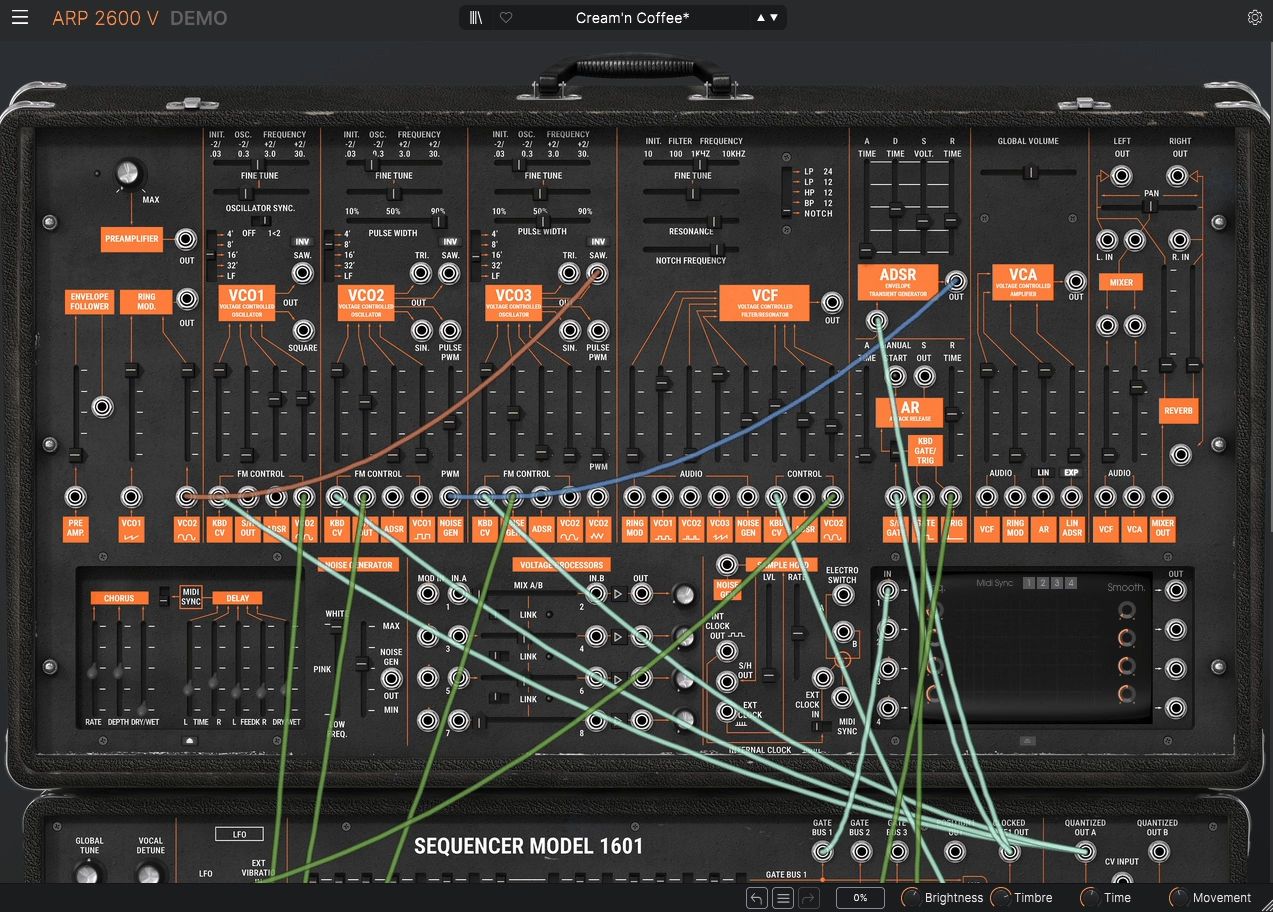
I was surprised that a semi-modular synth could take the place of my usual arpeggiator plugins. With the ARP2600 V3, its built-in sequencer modules and flexible routing let you create arpeggiated patterns that change in sound and movement, not just pitch. It goes far beyond basic up and down modes.
You can patch clock sources into filter cutoff, envelope time, and modulation index, so each note in the sequence changes the sound as it plays.
What sets this apart are the 2- and 3-voice sequencers built right into the synth. These are not just simple pattern generators. They sync with your DAW’s tempo and let you send sequence outputs to several synthesis parameters at once.
I’ve patched sample & hold into both pitch CV and filter resonance at once, which creates patterns that are unpredictable but still feel natural. The ARP2600’s modeled filters react to pitch and volume changes, so your sequences have warmth and grit instead of sounding too digital.
- Semi-Modular Patching for Performance Sequencing
You connect virtual cables between modules, so clock sources, LFOs, and envelopes can control pitch, timing, or dynamics. For example, I’ll send an internal clock to a pitch CV input for steady note changes, then use an envelope to modulate the filter cutoff in time with the sequence.
This approach goes beyond standard arpeggiator logic. You get to shape how each repeat in the sequence behaves.
- Clock Routing to Multiple Modulation Destinations
The internal clock syncs with your DAW and acts as a creative modulation source, not just a tempo guide. You can use it to retrigger envelopes, sync LFOs, or modulate the filter cutoff, so your patterns stay in time but keep changing in sound. This is especially helpful for film scoring, where sequences need to change in harmony and dynamics throughout a cue.
- Sample & Hold Module for Interval Variation
You can trigger sample & hold with the clock and send its output to both pitch CV and filter cutoff at the same time. This gives you arpeggiated patterns that are chaotic but still have structure. The notes are unpredictable but repeat with each clock pulse. By adjusting the sample & hold clock rate and filter resonance, you control how wild or controlled the sequence becomes.
- Real-Time Modulation Changes During Playback
Since you can patch in real time, it’s possible to change modulation targets and clock routings while the sequence is playing. This lets you perform live by switching which parameters the sequencer controls during a phrase, turning a simple arpeggiator into something completely new without stopping the music.
3. Pitch Innovations Eternal Arps
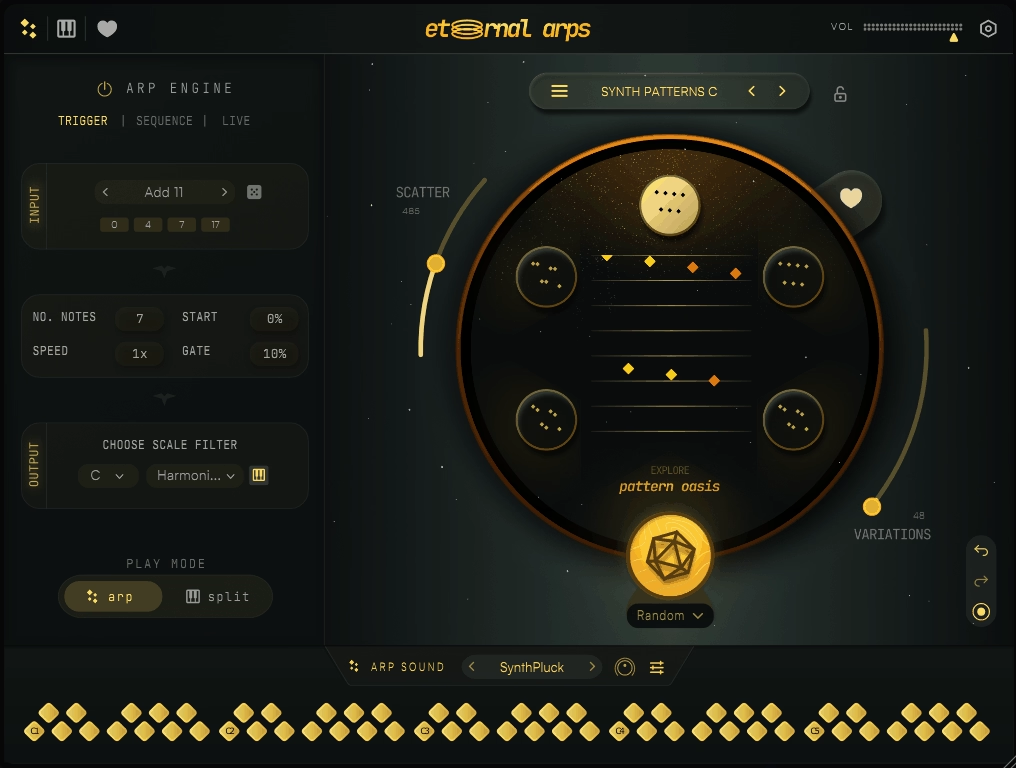
Eternal Arps is a unique arpeggiator plugin that goes beyond simply cycling through the notes you play. Its pattern engine separates pitch from pattern, so it interprets your chord using rhythmic and interval templates instead of just repeating notes. When you hold a chord, the plugin applies a pattern that creates sequences with their own structure, not just basic up or down movement.
The plugin works with MIDI, so you connect it to a synth to hear the sound. What sets it apart is how you can shape velocity and timing, letting you control the dynamics and micro-timing of each step. This means you decide how loud each note feels and can add subtle timing changes to make your patterns groove.
The pattern transform features do more than just reverse or invert. You can repeat, flip, randomize within set limits, and transpose sections on the fly. These changes can be automated or triggered live.
- Pattern Library with Rhythmic and Interval Templates
The plugin includes pattern templates that set rhythmic and interval movement over time. When you hold a chord, it uses your chosen pattern shape to interpret it. These templates sound musical right away, but you can still tweak them. You can also layer, modulate, and transpose patterns for more variety.
- Velocity Contour and Micro-Timing Control
You can adjust the dynamics of your arpeggio so each step has its own loudness. Add timing shifts for push and pull effects that work with your drums or bass, instead of sticking to a strict grid. This approach is more flexible than standard swing settings because it works for each pattern.
- Real-Time Pattern Transforms
You can link transform controls to MIDI CC or DAW automation to change patterns as they play. For example, trigger a transpose during a build or add random intervals during a break. These transforms do more than just flip the pattern; they reorganize sections on the fly without stopping the music.
- Live MIDI Input Response
The engine reacts to incoming MIDI instantly, even while patterns are running. It picks up the order, intervals, and length of the notes as you play, without waiting for you to release the chord. This gives you a live sequencing feel instead of just playing back static patterns.
4. BLEASS Arpeggiator
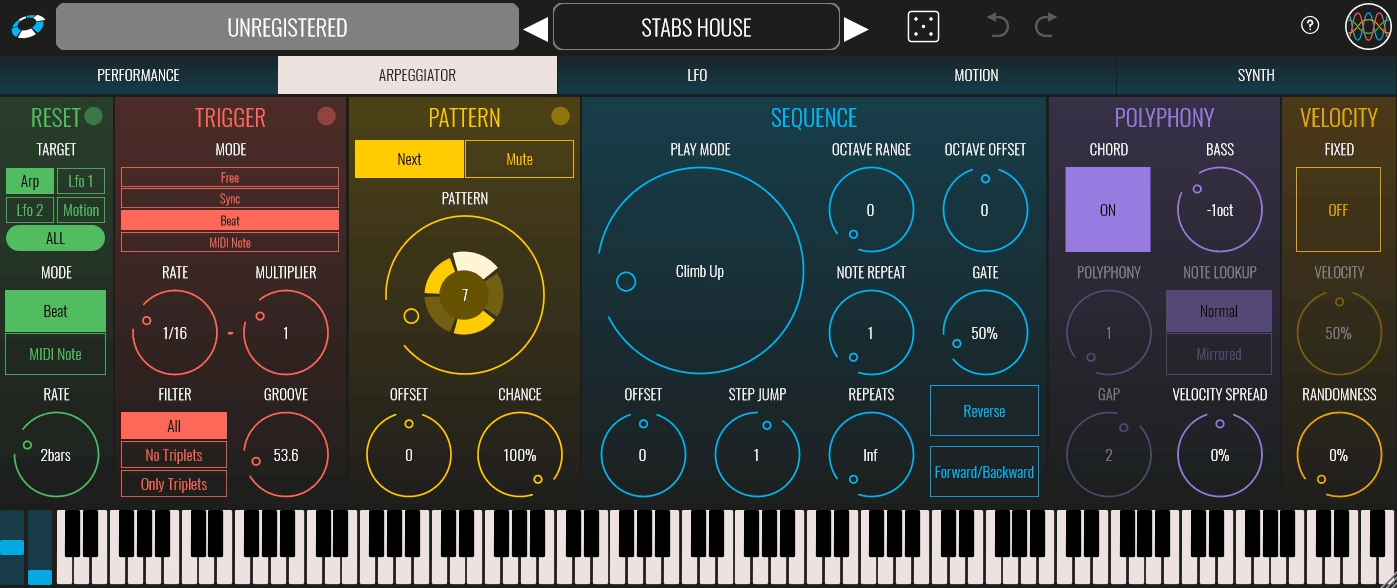
Most arpeggiators I’ve used either keep velocity fixed or just use whatever your MIDI controller sends. With BLEASS, you get velocity contour controls built right into the pattern engine, so you can shape the dynamics of each cycle without needing to edit the piano roll.
When you add in gate length shaping that offers more than just short or long options, you get articulation control that makes your sequences feel like real groove instruments, not just robotic note repeaters.
The BLEASS Arpeggiator plugin lets you control rhythm, velocity, and gate timing as separate layers that work together. You can set up syncopated step timing and adjust swing so your patterns lock in with your drums but don’t sound too mechanical. It works well for indie tracks where you want arpeggiated synths to blend naturally with live bass and guitars.
The humanization parameters add random timing and velocity variations that preserve musical context rather than just scattering notes at random.
- Pattern Engine with Non-Uniform Step Timing
You aren’t stuck with just straight 16th notes or triplets. The pattern grid lets you make off-grid grooves with different step lengths, which is important when you want arpeggios to fit with complex drum parts. I’ll match the swing to my hi-hat groove, and suddenly the arp feels like it belongs in the rhythm section, not just floating above it.
- Velocity Contour Shaping
Instead of every note playing at the same volume, you decide how the loudness changes throughout the pattern. For techno bass lines, you can make the first notes loud and let them fade out, which gives a percussive feel. For ambient music, you can do the opposite and let the later notes fade softly into the mix. This saves you from spending hours drawing velocity curves in the piano roll.
- Gate Control for Articulation
Short gate times make sharp, staccato sequences where each note cuts off quickly. Longer gates give you smooth, legato lines where the notes blend together. You can control how long notes last to match the rhythm, which changes whether the part feels punchy or smooth.
- Directional Modes with Interval Cycling
Besides the usual up, down, or random directions, you also get interval-based cycling and pattern-spliced options. One mode plays your chord as broken intervals, moving smoothly before jumping to more dissonant notes. Another mode focuses on rhythmic jumps.
5. u-he Hive 2
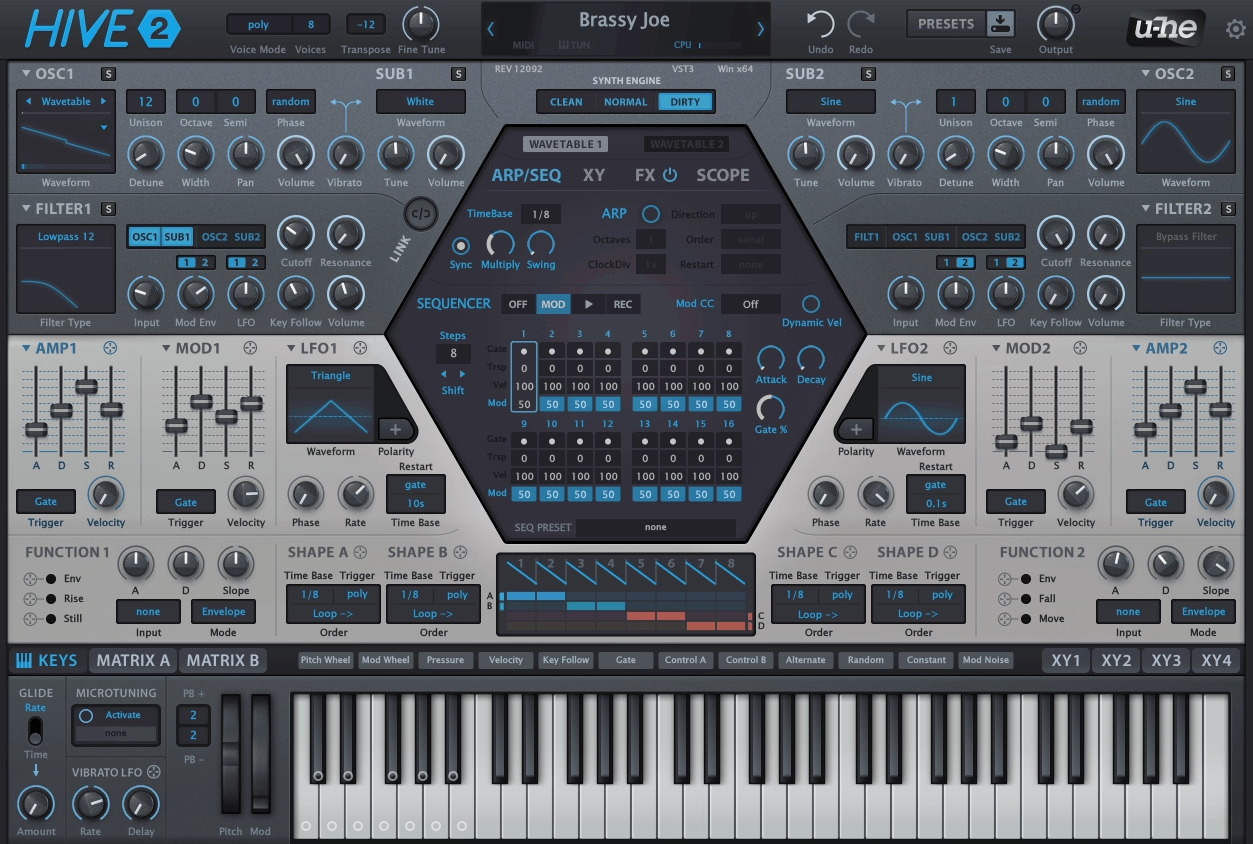
This is a wavetable synth and sequencer/arpeggiator plugin in one. Hive 2 by u-he stands out for its stable timing under automation and tempo changes.
I’ve used arpeggiators that drift or hiccup when you automate tempo or switch presets mid-session, but Hive 2 locks patterns to your DAW clock even when everything else is moving. That reliability matters when building rhythmic parts that need to sit cleanly against drums without timing artifacts.
What sets this apart from basic arp-equipped synths is per-step parameter control, letting you program ties, rests, accents, and retriggers within a single pattern cycle. You’re not just cycling through pitches.
You design intentional gaps and sustained notes that stay phase-locked with envelopes and modulation. The modulation matrix links directly to arp steps, so filter movement, wavetable position, and envelope times can shift per step without external MIDI editing. This is great for dance production where arps need to feel animated but stay arrangement-ready.
- Voice-Aware Arpeggiation
Arpeggiated notes interact with voice allocation and unison behavior, not just oscillator triggers. When you hold a chord and change notes, the arpeggiator reallocates voices instead of abruptly restarting the pattern. This keeps chord transitions smooth during live performance and evolving arrangements, which is critical when playing parts in real time.
- Macro-Controlled Performance Parameters
Assign macros to arp speed, swing amount, or step length and automate them across song sections. A single pattern evolves from tight rhythmic stabs in the verse to loose, swung sequences in the chorus without duplicating tracks. I map one macro to multiple arp parameters and ride it live during sets for instant pattern variation.
- Step Sequencing with Modulation Routing
Route envelopes or LFOs to tonal parameters like filter cutoff or oscillator mix, then scale them so modulation supports the rhythm instead of dominating it. Patterns feel composed rather than looped because timbre changes synchronize with note events.
- CPU-Efficient Engine for Large Sessions
Hive 2 responds instantly even when you run multiple instances in heavy projects. This encourages experimentation. You’ll try pattern variations when the synth reacts without lag. The engine stays lightweight while maintaining all the modulation depth, which is rare in synths this capable.
6. Arturia Acid V
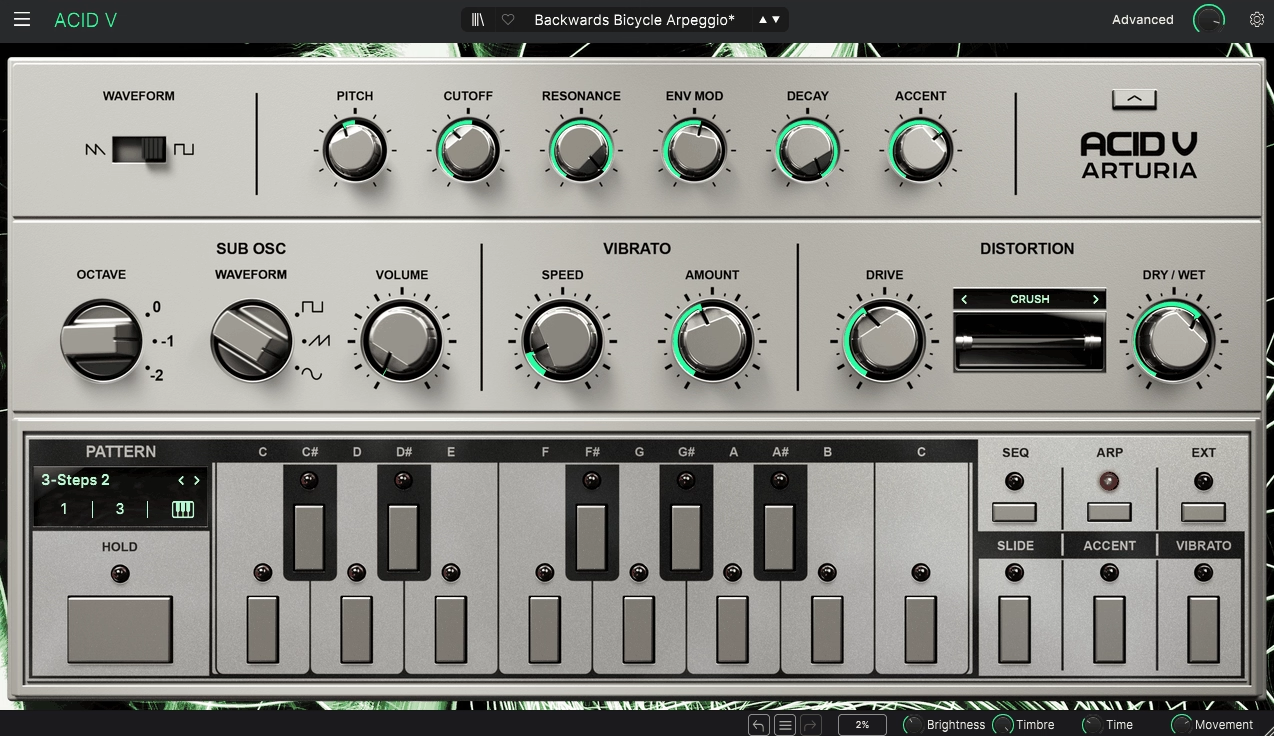
Honestly, I really love the user interface. It looked so good that I ended up trying it myself.
Now, about the sound features. Arturia Acid V surprised me with its 64-step polymetric sequencer, while most acid synths only offer 16 steps. The longer sequence lets you create patterns that evolve instead of repeating right away. You can also adjust slide, accent, and octave for each step, so you control how every note sounds, not just its pitch.
The Transmutation feature creates pattern variations using your sequence and a chosen musical scale. This keeps the results musical and avoids random notes.
Drag-and-drop MIDI export is useful since you can move patterns into your DAW and use them with other instruments. This makes Acid V work as both a pattern generator and a synth.
- Scale-Based Pattern Locking
You can lock sequences to a scale, which automatically prevents wrong notes. This lets you focus on rhythm and sound without worrying about pitch mistakes. For example, set it to minor pentatonic and any changes will stay in key.
- Four-Direction Pattern Shifting
You can rotate, reverse, or flip patterns to make new variations from the same notes. This saves time when you want different versions for the verse and chorus without having to reprogram everything.
- Slide and Accent Per Step
Slide lets you create smooth pitch glides between notes, which is a classic acid bass sound. Accent makes some steps stand out by pushing the filter. Both features add groove and character to your patterns.
- Over 350 Sequence Presets
The preset library helps you see how different settings work together. Some presets are labeled as arpeggios and show pitch modulation techniques you can learn and use in your own music.
- Resonant Filter with Analog Modeling
The TB-303 filter model adds resonance and saturation that react to accents and envelopes. This gives your patterns more movement and warmth, so they don’t sound flat.
Freebies
1. Dirty Harry
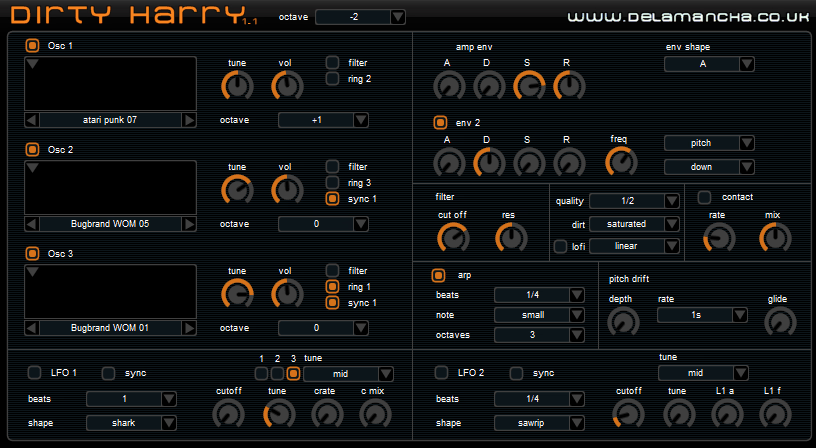
While most arpeggiators focus on clean and precise sounds, the Dirty Harry free arpeggiator VST plugin stands out by welcoming noise and imperfection. It uses samples from DIY circuits like the Atari Punk Console and BugBrand WOM, offering 20 gritty, unique waveforms. The arpeggiator triggers these with intentional instability, making it a great choice if you want sequences that sound purposefully rough, broken, or lo-fi.
The arpeggiator matches your project’s tempo and works with the synth’s unstable oscillators, pitch drift, and ‘bad contact’ emulation. This creates patterns with a rhythmic wobble and character, rather than strict precision.
With two LFOs, where one changes the speed and depth of the other, even simple arpeggios change and grow over time, no DAW automation needed. This setup gives you rich, evolving sounds that fit well in experimental music.
- Three Oscillators with Sync and Ring Modulation
Each oscillator can sync to the first one or ring modulate with the others, then route separately to the filter. Arpeggiated notes repeat different timbres that interact with each other, not just the same pitch over and over.
- Pitch Drift and “Bad Contact” Emulation
Pitch drift adds warble and detune, making patterns feel less rigid. The “bad contact” parameter mimics faulty circuitry with random glitches. Keep it low for warmth, push it high for industrial textures.
- Nested LFO Modulation
LFO 1 controls filter cutoff, pitch, or contact depth. LFO 2 controls LFO 1’s speed and depth. This layering means arpeggiated sequences shift in tone and filter behavior automatically across the pattern.
- Sample Quality Reduction and Distortion
Drop the sample quality or add saturation to change both the tone and rhythmic feel. The arpeggiator retriggers notes in this lo-fi context, creating textures that sound deliberately degraded. Useful for sound design or atmospheric layers.
2. OMG Instruments BlueARP
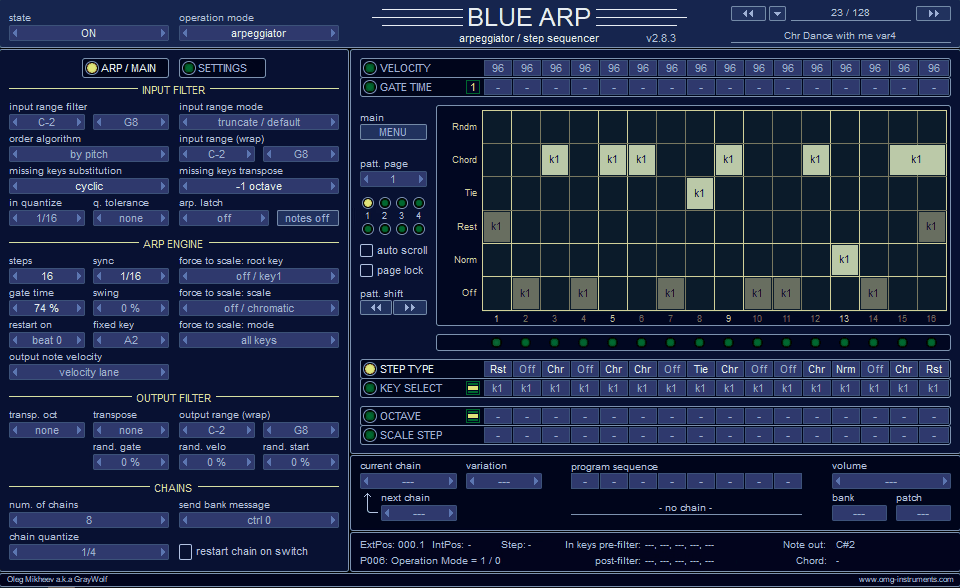
BlueARP only uses MIDI, so it won’t make any sound by itself. To hear it, you need to connect it to a synth or sampler. This setup lets you use it with any instrument you like.
BlueARP offers 64-step pattern sequencing, with options for transposing, changing octaves, and adding swing to each step. This turns your MIDI input into melodic lines, not just repeated notes. The pattern editor lets you set octave jumps, direction changes, and semitone shifts for every step.
Unlike basic arpeggiators, BlueARP recognizes chords and anchors to the root note. Patterns automatically transpose to match the chord root you play, so your harmony stays consistent even if you change chords during a sequence.
With pattern chaining, you can link several patterns and switch between them while playing, without stopping the music. This is helpful for live performances or creating different sections in your arrangement.
- 64-Step Pattern Grid with Semitone and Octave Control
You can set a different semitone shift and octave jump for every step. This helps you create melodies that cover a wide range and evolve over several bars, instead of just repeating every 8 or 16 steps.
- Chord Input Filtering with Harmonic Awareness
You can set keyboard split ranges and choose how many notes BlueARP reads from your chord input, up to five. When you play new chords, the pattern changes to match the chord root, instead of always playing the same sequence.
- Real-Time Pattern Chains for Live Switching
Make several patterns and link them together. You can switch between these chains during a performance without losing sync. This lets you move from verse to chorus patterns in the middle of a song, without having to reload anything.
- MIDI Clock Quantization and DAW Sync
Patterns stay in time with your DAW’s MIDI clock for accurate timing. Real-time quantization corrects any timing issues from live playing. BlueARP works as an AU MIDI-FX on macOS and as a VST3 plugin, making routing easy.
3. CodeFN42 RandARP
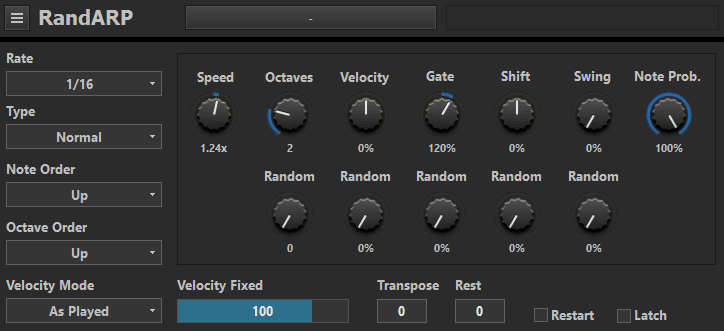
Most arpeggiators just repeat the same loop until you change it. RandARP takes a different approach. It gives each note you hold a probability weight, then chooses the next note based on those weights and the previous notes. This way, the sequence changes each time but still fits the chord you’re playing. The result is musical variation that keeps evolving.
The plugin works only with MIDI, so you route it to a synth or sampler for sound. Directional probability bias affects which intervals are more likely to play without locking you into a fixed up or down pattern. You can favor upward motion without forcing every note to rise.
With the variation depth and rhythm sway controls, your sequences keep their main pitch structure but can change their rhythm or timing a bit as they play over several bars.
- Per-Note Probability Weighting
Give different weights to each note in your chord. Higher weights favor important tones, such as the root and fifth. Lower weights let color tones like 9ths or 7ths show up occasionally. This keeps sequences familiar but not repetitive.
- Direction Bias Without Fixed Patterns
You can guide your sequences to move up, down, or stay balanced by adjusting probabilities instead of using fixed direction settings. Change the bias for different parts of your song to shift the melody’s movement without having to reprogram everything.
- Chord Memory with Contextual Persistence
The plugin remembers notes you played earlier and uses them in future decisions. When chords share common tones, this creates smoother connections between changes, rather than jumping to completely new patterns each time.
- Variation Depth for Generative Evolution
You can decide how much the pattern changes from what it just played. Set it low for steady, repeating themes, or turn it up for more variety as the music goes on. Rhythm sway adds small timing changes so your sequences sound less robotic.
FAQs:
[sp_easyaccordion id=”10029″]

Hello, I’m Viliam, I started this audio plugin focused blog to keep you updated on the latest trends, news and everything plugin related. I’ll put the most emphasis on the topics covering best VST, AU and AAX plugins. If you find some great plugin suggestions for us to include on our site, feel free to let me know, so I can take a look!