
“Looper” covers so much ground now that it barely functions as a single category anymore. On one end of the spectrum, you’ve got plugins that faithfully replicate the experience of stomping on a floor pedal, recording live audio and stacking layers on the fly.
Then there are step-based processors that chop incoming audio into slices and rearrange them through sequenced effects chains, which is a fundamentally different workflow despite sharing the same label.
Somewhere in between sit the ambient and experimental loopers, the ones that treat your recorded audio as raw material for tape-like manipulation, reverse playback, and evolving textural collage.
All of these share the same core idea: capturing audio and doing something interesting with it in real time. Building a live performance from scratch with layered guitar parts, mangling a drum bus into glitchy rhythmic fragments, slowly constructing an ambient soundscape from a single vocal phrase. The right looper plugin turns a linear recording process into something circular and improvisational.
Just having one of these in your collection will change how you approach music. Circa is the ultimate multi-layer performance looper, Looperator is a creative remix engine disguised as a plugin, MSuperLooper gives you an overwhelming amount of flexibility if you’re willing to learn it, Enso is pure ambient tape-loop magic, and Nasty Looper is the best free groovebox you’ll find anywhere.
We’ve tried to be clear about what kind of looping each one is actually designed for, so you don’t end up with a creative slicer when you wanted a performance looper, or vice versa.
1. Audio Damage Circa
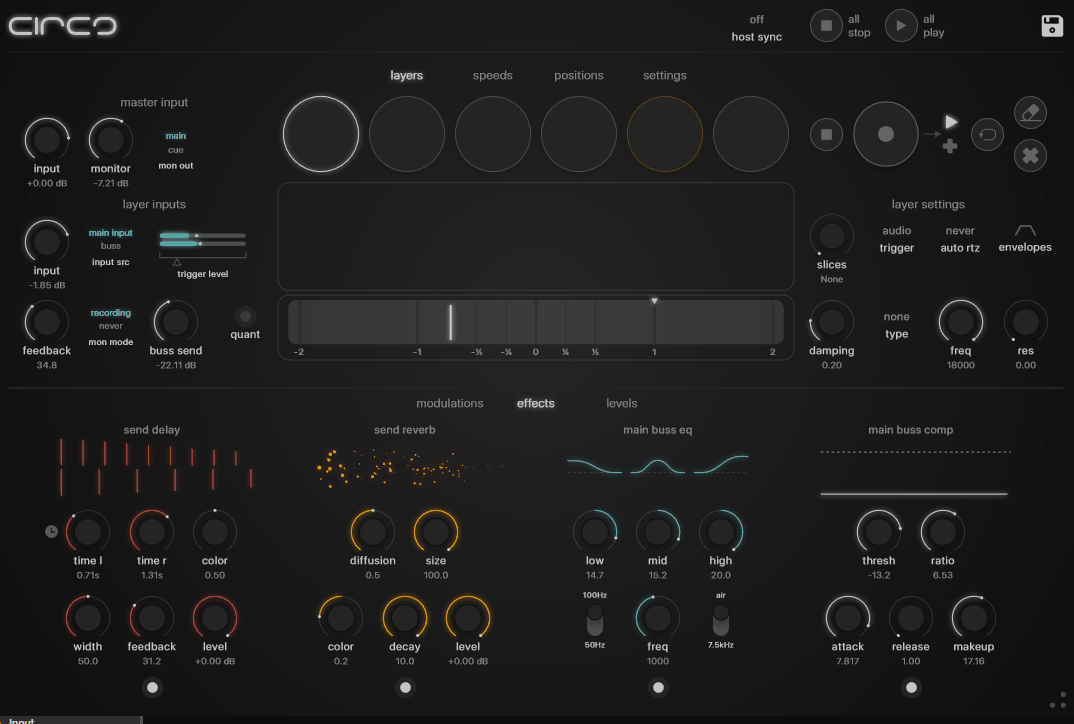
This plugin just had to sit at the top of our list. It is, hands down, one of the most complete performance looping environments you can get in plugin form.
Audio Damage released Circa in 2025 as a companion to their earlier Enso looper. But where Enso focused on single-track tape-style vibes, Circa scales the concept up to six independent stereo layers that can each run on their own terms.
Think of what a floor pedal looper like a Boss RC-505 does, then add capabilities that hardware units simply can’t offer: per-layer effects processing, flexible output routing, and deep MIDI control that turns the whole thing into a genuine performance instrument.
Available on macOS, Windows, and Linux, with an iOS AUv3 version too.
Six circles make up the interface, each representing a loop layer, with clickable waveform displays that let you scrub through recorded audio by dragging. It feels almost like scratching a record or rocking tape reels.
Audio Damage clearly prioritised tactile, hands-on interaction over menu-heavy parameter editing, and the touch-strip controls for speed and position feel designed for iPad use as much as desktop production.
Certain workflows aren’t immediately obvious without reading the manual, as some users on forums have noted. But once the basic controls click into place, the creative possibilities open up fast.
- Six-Layer Architecture
Every single layer operates as a fully independent loop recorder with its own transport, sync mode, and playback settings. You can set layers to sync with the host DAW’s tempo, lock to a designated master loop for consistent timing across layers, or run completely free for asynchronous ambient work where loops drift against each other over time.
Letting loops slowly fall out of phase with each other creates textures that are genuinely impossible to program manually. That’s where this plugin truly shines.
Three triggering options give you flexibility: starting on button press, starting in sync with the next beat division, or audio-triggered recording that begins automatically when signal is detected at the input. Guitarists and vocalists who can’t reach for a mouse mid-performance will love that last one.
Recording, overdubbing, and erasing are all supported on each layer with a per-layer undo function for destructive edits, so you can peel back an overdub without losing the original loop underneath. Waveforms can also be subdivided into slices, turning recorded loops into playable instruments where you jump between segments, reverse individual sections, or reorganise the playback order entirely.
Below each layer sits a speed strip providing continuous control over playback rate including reverse, and a damping knob determines how quickly speed changes take effect. Incredibly fun to play with.
- Routing and Effects
Seven stereo outputs come included: six assignable outputs plus a dedicated cue output for monitoring.
Live performers will appreciate the cue bus more than anything else here. It lets you solo and edit layers through headphones without the audience hearing your adjustments. If you’ve ever performed live with a looper and wished you could tweak something privately, you know how massive this feature is.
Any layer can be routed to any of the six stereo outputs, meaning you can send individual loops to separate mixer channels in your DAW for independent processing. Built-in effects include reverb, delay, parametric EQ, and a compressor pulled directly from Audio Damage’s existing effect library, all available as sends within Circa’s internal mixer. Each layer also has its own filtering controls for basic tone shaping.
Drag and drop export of individual layers to the DAW timeline or desktop as audio files is supported, and user presets are cross-platform compatible across macOS, Windows, Linux, and iOS. Runs as VST3, AU, AAX, CLAP, and LV2.
For live loopers, this thing is an absolute game-changer. The value for what you get is fantastic.
2. Sugar Bytes Looperator
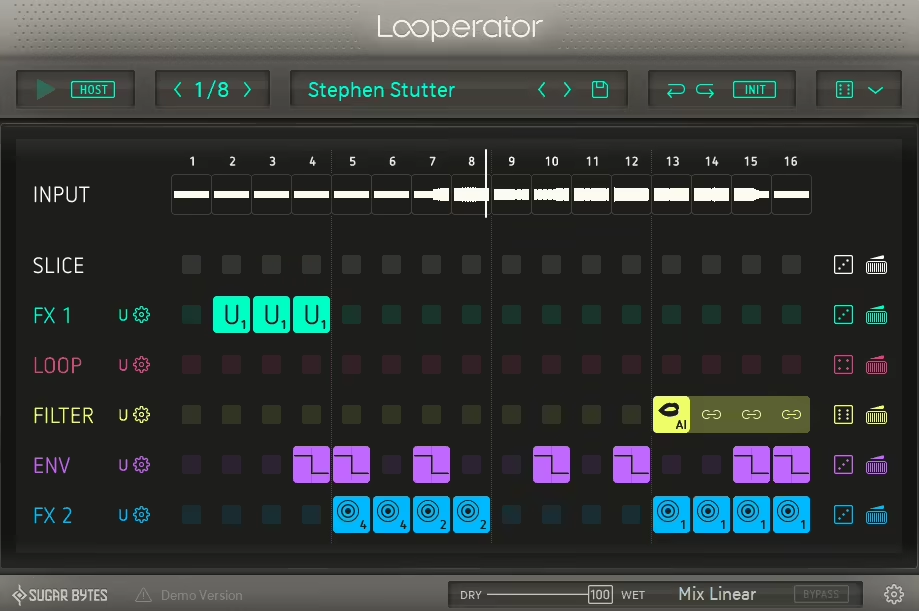
Before you buy this one, understand what it is and what it isn’t. Looperator is not a performance looper in the traditional sense. It doesn’t record audio from a microphone or instrument input. It doesn’t stack layers on top of each other. What it does is take whatever audio is already flowing through it, chop it into 16 steps, then let you rearrange those slices and apply sequenced effects to each step independently.
So what you’re actually getting is a tool for transforming existing loops and audio material into something completely new. Closer to a creative remix engine than a conventional looper, and honestly, that’s what makes it so damn useful.
Sugar Bytes built this one in Berlin as an evolution of their earlier Effectrix and Turnado plugins, carrying the same philosophy of making complex glitch effects accessible through a visual, pattern-based workflow.
We personally love Looperator because of how fast it works. Going from a static drum loop to a completely rearranged, effects-laden variation takes seconds rather than minutes. If you’ve ever spent ages manually programming stutter edits, tape stops, and filter sweeps in your DAW’s automation lane, this plugin does all of that in a fraction of the time.
A workflow accelerator, plain and simple.
- Step-Based Slicer
Incoming audio gets automatically divided into 16 steps at whatever resolution you choose. Half-note, quarter-note, and eighth-note options determine how much audio each step captures. Using the Slice lane in the sequencer, you can assign any of those 16 slices to play back at any step position, meaning a four-bar phrase can be completely reorganised in its playback order step by step.
A small exclamation mark appears on any step that references a slice from later in the sequence, reminding you that on the first playback cycle, that step will pull audio from the previous pass. Nice touch from Sugar Bytes.
Rhythmic stutter and repeat effects live in the Loop lane, with controls over loop duration and direction including reverse playback. Snare rolls, kick doubles, vocal stutters: this is where they’re all built, and the preset steps make creating these effects nearly instant compared to manual programming.
Here’s what really sets Looperator apart from everything else on this list: signal flow is rearrangeable.
Both the Slice and Loop lanes sit within the same sequencer as the effects lanes, and the vertical order of all lanes can be rearranged by dragging, which changes the processing order. Putting the slicer below an effects lane means the effects are applied before the slicing happens, producing wildly different results than the reverse. This is where the real creative power lives.
- Sequenced Effects
Four additional sequencer tracks sit below the Slice and Loop lanes: Filter, Envelope, FX1, and FX2. Every track offers 20 preset effect types plus four user-definable slots, and every step in the sequence can trigger a completely different effect setting.
Filter handles per-step frequency shaping with low-pass, high-pass, band-pass, and a vowel filter that produces formant-like vocal colouring. Envelope controls gating, volume modulation, bitcrushing, and sample rate reduction on a per-step basis. FX1 and FX2 cover the dramatic stuff: scratch effects, tape stops, vinyl simulation, distortion, delay, reverb, and granular processing.
All six lanes running simultaneously means a single 16-step pattern can contain an enormous amount of variation. And the intelligent randomisation system generates patterns with configurable constraints, ensuring the random results stay musically coherent rather than devolving into chaos.
Runs as a standalone application and as VST, VST3, AU, and AAX on macOS and Windows, with MIDI triggering for calling up presets during live sets.
For electronic producers, glitch artists, and anyone who does remix work, Looperator is an absolute no-brainer.
3. MeldaProduction MSuperLooper
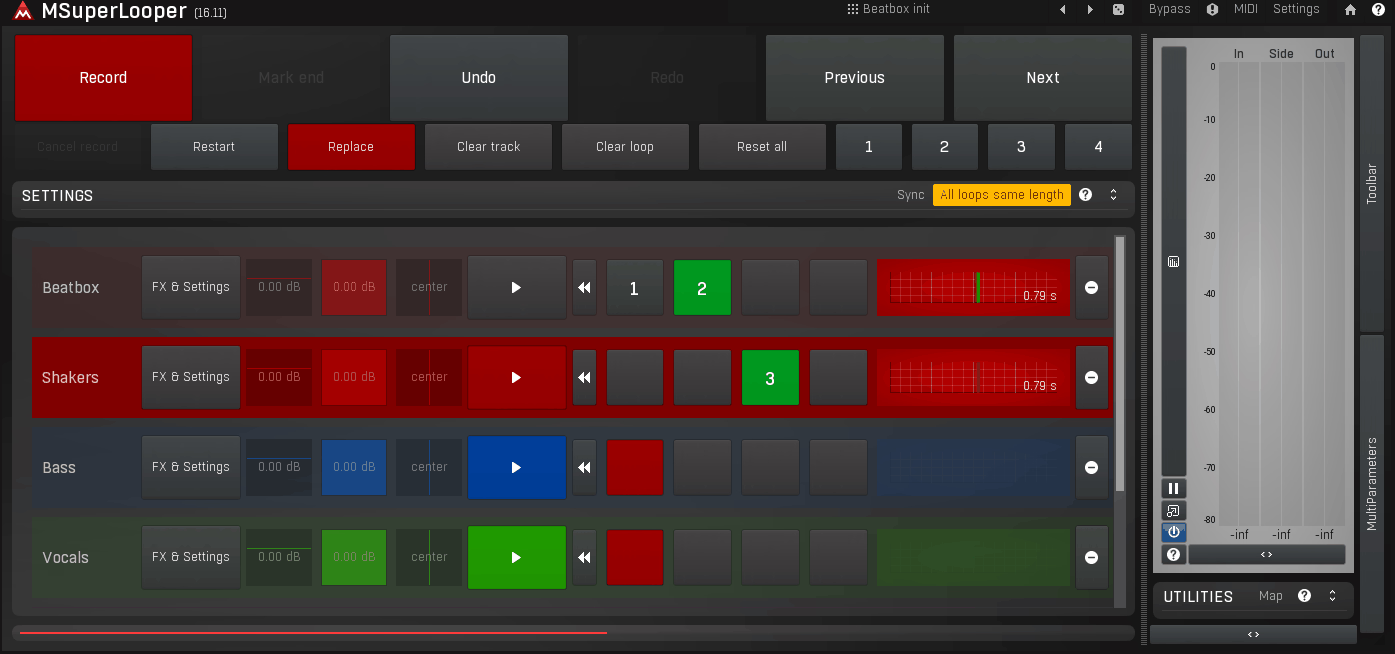
Picture the most feature-packed, deep, slightly overwhelming synthesiser you’ve ever used. Now imagine that energy applied to a looper plugin. That’s MSuperLooper.
Up to 16 simultaneous tracks with four loop slots per track give you 64 possible loops running at once inside a single plugin instance. Hardware pedals can’t even dream of that kind of multitrack looping, and it positions MSuperLooper as one of the most capable live looping environments available in plugin form.
Now here’s the honest part. MSuperLooper inherits the typical MeldaProduction learning curve. Dense interface. 100+ page manual. Some workflows that should be immediately obvious require a bit of discovery. A few users have also expressed frustration that the plugin lacks a standalone mode despite being designed for live performance, and the export function outputs individual stems without baked-in effects rather than a mixed-down file.
But for producers willing to invest the setup time? Nothing else comes close at any price point. It’s a serious investment of your time, but one of the best investments you’ll make as a live looping artist.
- Modular Effects Pipelines
Here’s where MSuperLooper truly separates itself from everything else on this list.
Every track gets its own MXXX-based modular effects pipeline, meaning you can build a completely custom effects chain for each loop track using MeldaProduction’s modular processing architecture. This goes far beyond the basic reverb and delay sends that most loopers ship with. Pitch shifters, vocoders, distortion units, spectral processors: virtually any effect from the MeldaProduction ecosystem can be inserted into each track’s chain.
Record a vocal phrase on one track and run it through a granular processor. Capture a guitar riff on another and route it through a vocoder keyed to a third track’s output. All of this happens within a single plugin instance because of the modular routing.
One important note: while many of the effect modules come included free with MSuperLooper, some require separate licences from MeldaProduction’s catalogue. Worth checking before you assume every possible effect chain is available out of the box.
- Workflow and Control
Deliberately oversized transport controls are designed with touchscreen use and live performance visibility in mind. Record, play, stop, overdub, and undo buttons are large enough to hit reliably during a performance without looking away from your instrument. An autostart feature begins recording the moment audio signal is detected, eliminating the need to manually trigger the record button at the exact right moment.
Switching between loop slot variations during playback is seamless, and settings include options to sync all loops to the same length or allow independent loop durations for polyrhythmic layering.
MIDI learn is comprehensive, letting you map virtually any parameter to external controllers. A/B/C/D morphing between four different parameter states enables smooth live transitions. The GUI is fully resizable with multiple skin options, and MeldaProduction’s lifetime free update policy means the feature set continues expanding.
Runs as VST, VST3, AU, and AAX on macOS and Windows. Put in the hours to learn it, and this thing will reward you endlessly.
4. Audio Damage Enso
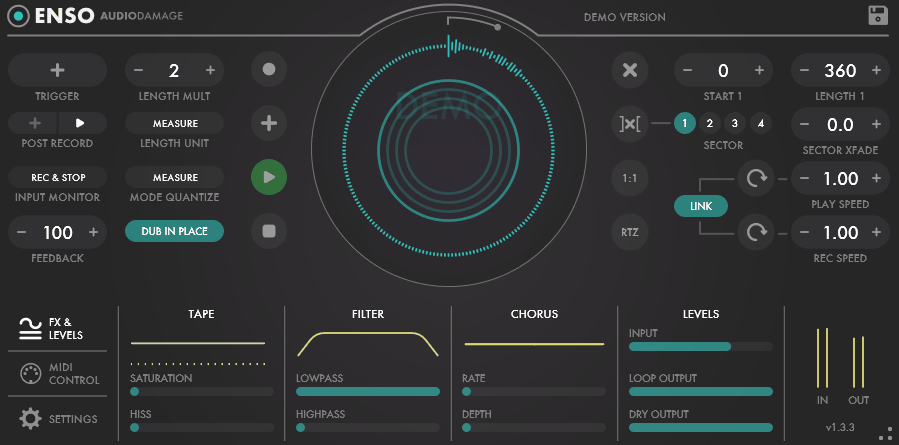
If Circa is the multi-layer performance workstation, Enso is its spiritual opposite: a single-track looper with a tape-machine soul, built for the kind of ambient, experimental, and Frippertronics-style looping where a single evolving layer is the entire point.
Audio Damage designed it around a beautiful idea: the most interesting things happen when a looper stops behaving like a perfect digital recorder and starts acting like an imperfect, aging piece of analog hardware.
Continuous control over playback speed in both directions, feedback that determines how quickly older material fades beneath new overdubs, and a saturation stage that progressively degrades the audio as it recirculates. If you’ve ever used a reel-to-reel tape loop where each pass adds a bit more warmth and a bit more noise until the original recording dissolves into an abstract wash, that’s exactly the territory Enso was built to explore. Available on macOS, Windows, and iOS. One of its most appreciated features? Recorded loops are saved with the DAW project, so your work isn’t lost when you close the session. Thank god.
- Tape-Style Behaviour
Speed operates on a continuous range from fully stopped through half-speed, normal speed, double speed, and into reverse at any point along the way. Pitch changes naturally with speed, just as it would on real tape. Slowing a recorded loop drops its pitch; speeding it up raises it.
Meanwhile, the saturation circuit adds harmonic content that intensifies with each overdub pass, mimicking the way tape machines progressively colour audio that’s been recorded and re-recorded multiple times.
Feedback is what separates Enso from a simple recorder, and it’s where the magic really lives. At 100%, overdubs layer infinitely without the original material ever fading. Below 100%, older layers gradually lose volume with each new pass, creating a naturally evolving texture where recent recordings are prominent and earlier ones decay into the background.
This self-erasing behaviour is what makes tape-loop music so distinctive. Enso captures it more convincingly than most software loopers because the feedback and saturation interact dynamically. They’re not separate, disconnected parameters. They feed into each other in a way that just feels analog.
- Integration and I/O
Most loopers position their filter on the output. Enso does something smarter: the multimode filter sits in the feedback path, processing the recirculating signal rather than just what comes out the other end.
Why does that matter? Because the filter’s effect compounds with each overdub pass. A gentle low-pass setting will progressively darken the looped material over time, with each cycle removing a bit more high-frequency content until the loop evolves from a clear recording into a distant, muffled texture. Combined with the saturation, this creates a sense of organic degradation that feels genuinely analog.
You can dial in some of the most beautiful, haunting ambient textures with this thing in a matter of minutes. It’s the kind of plugin that makes you want to sit down and just play.
Host sync and MIDI trigger modes handle recording and playback, with independent gain controls on input and output for managing levels. Audio Damage built Enso with the expectation that most users would run it alongside reverbs, delays, and other effects in their signal chain, so the plugin’s own processing stays focused on the looping mechanics. Runs as VST, VST3, AU, AAX, and CLAP on macOS and Windows, with an AUv3 version for iOS. For the sound you get out of this plugin, the value for money is insane. Get this beautiful beast.
5. Nasty Looper (Free)
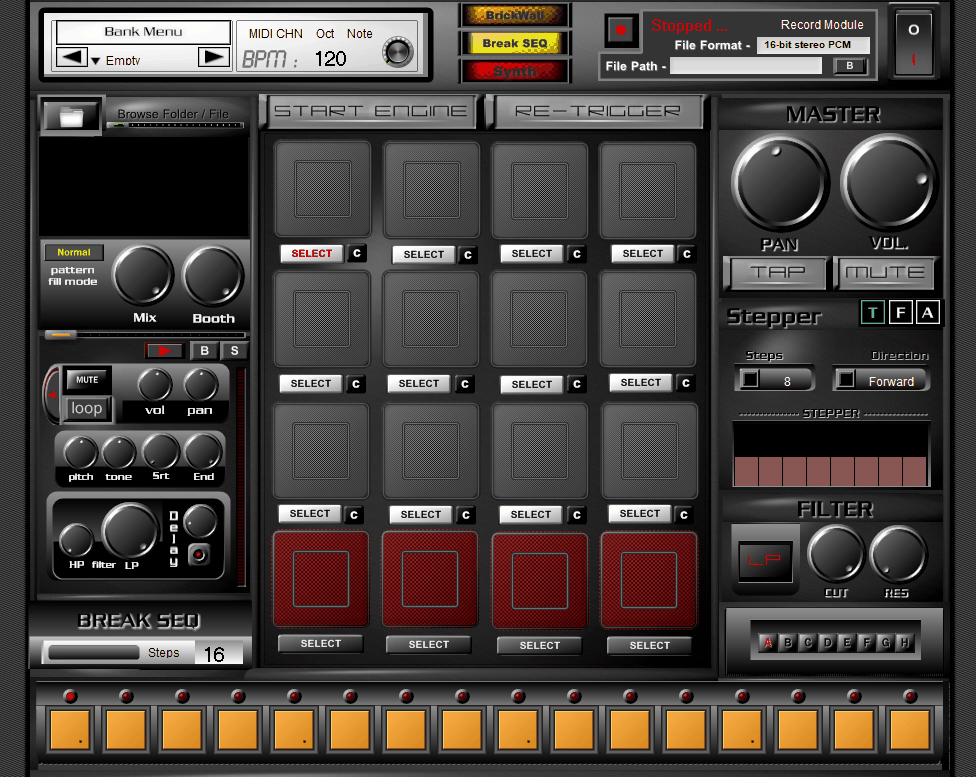
Completely different category from every other plugin on this list, and we wanted to include it because of the sheer value of this monster at zero cost.
Nasty Looper from beatassist.eu isn’t a live audio looper. It’s not a slice-based effects processor either. What you’re getting is a 16-pad sample player with a built-in step sequencer, break sequencer, mini synthesiser, and basic effects, all wrapped in a single free plugin aimed at beat-making and live rhythm performance.
Think of it as a free plugin that punches way above its weight class, with a loyal following of producers who absolutely swear by it.
Limitations are real though, and worth knowing upfront. Windows-only and 32-bit in the original version, which requires bridging on 64-bit systems. The GUI was designed for full HD screens and can be uncomfortably large on lower resolution laptops. No official manual exists, so learning the interface is largely a process of exploration and community knowledge.
A newer Nasty Looper Deluxe version from Psytrance Plugins addresses some of these issues with 64-bit support and cross-platform compatibility, though it’s a paid upgrade.
- Pad-Based Sequencing
16 pads load 16 or 24-bit WAV samples that can be triggered via mouse, mapped to a MIDI controller, or programmed into the built-in pattern sequencer. 64-step patterns handle drum rhythms, while a separate break sequencer running up to 128 steps lets you program silences and gaps for creating breakdowns and fills.
Specifically, the last four pads are configured for loops rather than one-shots, with controls for beat count, start and end position adjustment, delay, and a filter stepper.
Individual controls for pitch, filtering, delay, and step modulation come on every pad, and nearly every parameter can be mapped to MIDI CC for hands-on control during live performance. A built-in synthesiser adds a simple sound source for basslines and tonal elements without requiring a separate instrument plugin, and a brickwall limiter on the master output prevents clipping during aggressive live tweaking.
With all that included for free, Nasty Looper had to make our list.
- Performance Features
What earns Nasty Looper its spot on this list despite its age and limitations is how it functions as an all-in-one live beat performance tool at zero cost. Sample triggering, step sequencing, break programming, and real-time MIDI control combine to let you build and perform complete rhythm sections from within a single plugin window.
Improvisation is baked into the workflow, with pads assignable on the fly and patterns editable during playback. Filter stepper cycles through filter frequencies automatically, adding movement to pads without requiring manual automation.
A delay module provides feedback-based echo effects, and the low-pass and high-pass filters on each pad allow for basic sound sculpting.
Compose sequence is the feature several users have highlighted as the plugin’s strongest capability. It lets you chain patterns into longer arrangements for building full track structures during live sessions.
It won’t match the polished workflow of Looperator or the depth of MSuperLooper. But for the price of absolutely nothing, you’d be mad not to try it.
Available as a free download from beatassist.eu and plugins4free.com.

Hello, I’m Viliam, I started this audio plugin focused blog to keep you updated on the latest trends, news and everything plugin related. I’ll put the most emphasis on the topics covering best VST, AU and AAX plugins. If you find some great plugin suggestions for us to include on our site, feel free to let me know, so I can take a look!