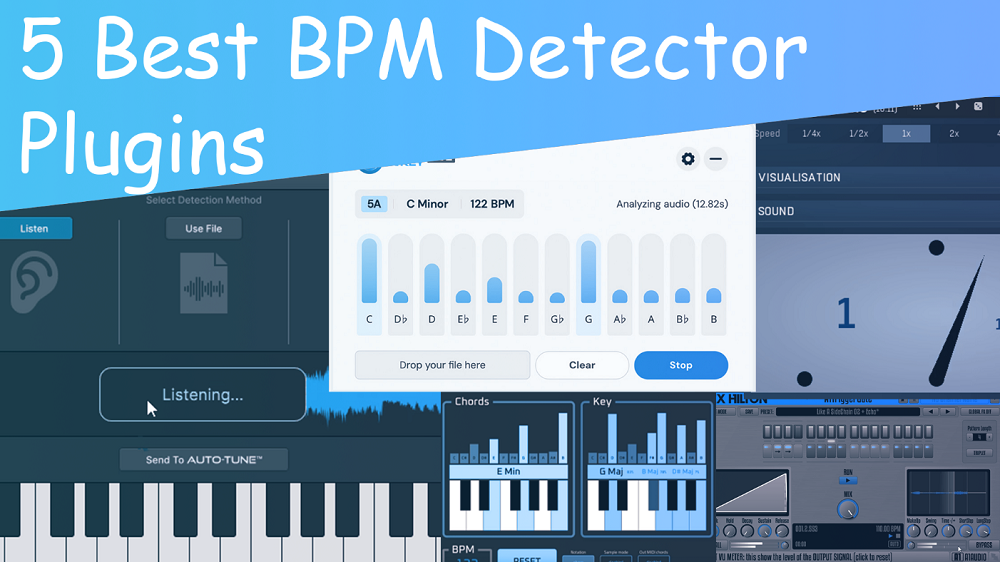
BPM detector plugins can automatically read the tempo and key, making it easy to match loops, samples, or live recordings without any guesswork.
I prefer tools that display the tempo in real time or work smoothly with my DAW. This helps keep everything in sync and lets me focus on making music. Here are some of the best plugins I’ve found useful for checking tempo.
To find the most reliable tools for keeping sessions in sync, I tested these detectors for accuracy, precision, and real-time stability. Here’s a breakdown, based on my results, showing which plugins stay on track and which ones drift.
| Plugin Name | Best For | Engine Type | Key Strength | My Verdict | Pros | Cons |
|---|---|---|---|---|---|---|
| Mixed In Key Live | Sample Matching & Loop Testing | Real-Time Analysis | Instant Key & BPM Detection | Top Overall Pick | Drag-and-drop file analysis, Active note display, CPU-efficient real-time scanning | Limited advanced modulation options |
| Antares AutoKey 2 | Vocal Tuning & Sample Integration | Automatic Key/Tempo Engine | Sync with Auto-Tune & Real-Time Detection | Best Free Option | Automated key changes, Visual keyboard, Multi-format support | Interface can feel cluttered for beginners |
| MeldaProduction MMetronome | Metronome Automation & Arrangement | Granular Tempo Engine | Resizable Visual Feedback | Power User Choice | Audio routing, Tempo-tap speed control, Zero-latency click | Limited key detection capabilities |
| HorNet SongKey MK4 | Live Chord & Key Analysis | Real-Time MIDI Output | Dual Chromagram Display | Best for Harmonic Workflow | Real-time chord extraction, MIDI export, Low-latency analysis | Advanced UI may require learning curve |
| AlexHilton A1 TriggerGate | Rhythmic Pattern Generation | Step Sequenced Gate Engine | Tempo-Adaptive Response | Best for Creative Sampling | DAW-synced 16-step gate, Instant tempo adaptation, Pattern switching | No direct key detection |
1. Mixed In Key Live
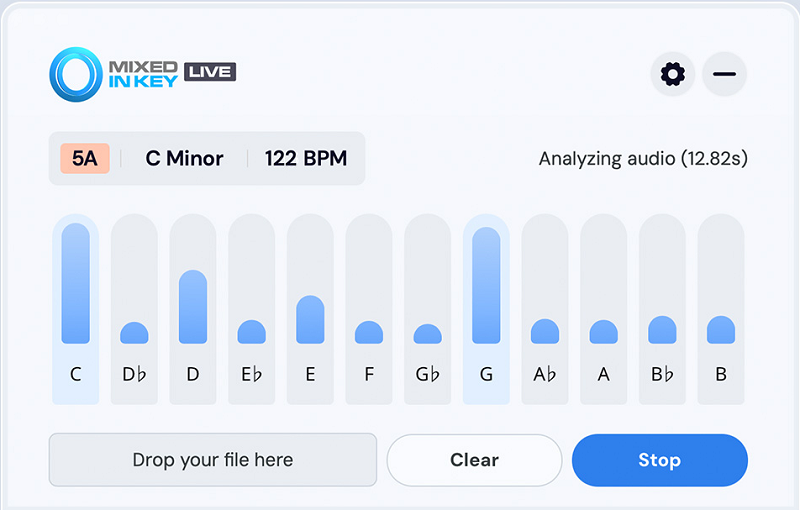
Mixed In Key Live by KSHMR is the first BPM Detector VST that analyzes any audio playing on your computer in real time, and whether you’re auditioning samples on an Akai MPK Mini or streaming from Spotify, you get instant key, scale, and BPM detection without leaving your workflow or switching windows.
I really like that Mixed In Key worked with KSHMR to make this for producers who need quick results. The plugin sits in your menu bar as a small icon, so it’s always available but doesn’t take up screen space.
This makes checking samples much faster since you don’t have to open other software or load files into a detector. You just play something, look at the menu bar, and instantly see if it’s in the right key. It takes away the usual slowdowns when you’re testing lots of sounds.
- System-Wide Audio Analysis
Mixed In Key Live checks all audio playing on your Mac or Windows computer. This means it works with Spotify, Apple Music, YouTube, DAWs, sample browsers, or even vinyl records connected through your audio interface.
This universal approach is what makes it truly useful. You aren’t limited to files you’ve already downloaded or imported. If you hear something on a streaming service or in a Splice preview, you get the key and tempo right away.
- Graphic Note Visualizer
The note visualizer shows the exact notes being played, along with the key, scale, and BPM. This is really helpful when you’re trying to recreate melodies or figure out chord progressions from samples. You can see which notes are active as the audio plays, making it much easier to match synth parts or build harmonies.
- Collapsed Menu Bar View
The plugin includes a compact view that lives in your macOS or Windows menu bar, so you can keep it visible without dedicating screen space to a full window. I found that this workflow integration is what makes the tool practical for everyday use. You can keep it floating over Ableton, Logic, Splice, or any other application, and just glance up when you need key or tempo info.
- Improved Key Detection Algorithm
Mixed In Key Live uses the same well-known harmonic analysis algorithm from Mixed In Key 10, which is known for accurate key detection. This accuracy is important when you’re deciding if samples will work together or if you need to pitch-shift something. The algorithm handles complex music reliably, so you don’t get false readings on tracks with many instruments or dense arrangements. In the end, accurate detection means you spend less time second-guessing and more time making music.
- Instant Workflow Integration
You don’t need to import files, set up routing, or deal with any complicated setup. Mixed In Key Live runs in the background and analyzes whatever audio your system is playing.
2. Antares AutoKey 2 (Also BPM Detector)

If you use Auto-Tune, finding the right key is much easier with the right tool. Manually figuring out keys for every vocal track or sample can get tedious, especially when you have several Auto-Tune instances in a session. Antares designed the AutoKey 2 BPM detector plugin to work with their Auto-Tune system, so you get instant key, scale, and tempo detection that syncs to all your Auto-Tune plugins with just one button.
This plugin is practical because it offers three detection modes: Listen Mode for real-time analysis, File Mode for dragging in audio files, and Keyboard Mode for manual key selection if you already know the key. The “Send to Auto-Tune” button is a real time-saver. Instead of setting the key and scale on each Auto-Tune instance, one click updates them all at once.
- Three Detection Modes for Different Workflows
Listen Mode analyzes audio in real time, which is great for live recording sessions or when you need quick key detection while tracking vocals. File Mode lets you drag and drop MP3, WAV, FLAC, or AIFF files into the plugin for instant analysis without having to play them.
Keyboard Mode gives you manual control if you already know the key and want to set it quickly. I like that these three modes cover all workflow needs. Personally, I use Listen Mode most because it works while I play through a track and gives me results right away.
- One-Click Auto-Tune Integration
The “Send to Auto-Tune” button updates all compatible Auto-Tune instances in your session with the detected key and scale. This feature makes AutoKey 2 essential if you use Auto-Tune Pro, Artist, or Access. You just load the plugin on your master bus or vocal track, let it analyze, click the button, and every Auto-Tune instance in your project is set up correctly. This saves a lot of time on sessions with many vocal tracks, harmonies, or backing vocals where manual setup would take much longer.
- TONART V3 Detection Engine
AutoKey 2 uses the TONART V3 algorithm by zplane, which is known for reliable key detection in many musical styles. It handles complex harmonic content well, even on tracks with several instruments or dense arrangements.
The detection works on vocals, full mixes, stems, and instrumental loops. It may not be perfect on very chromatic or atonal material, but for pop, hip-hop, EDM, or rock, the accuracy is good enough to trust the results.
- Tempo Detection with Doubling and Halving
Besides key detection, AutoKey 2 also finds the BPM and has buttons to double or halve the detected tempo if it reads it wrong. This is helpful because tempo-detection algorithms sometimes pick up half-time or double-time instead of the real tempo.
- Pitch Reference and Detune Control
The plugin has a pitch reference display that shows the detected tuning standard, like A=440 Hz, and a Detune control for adjusting if your audio is not in standard tuning. This is important when working with live recordings, vintage samples, or international music that might use A=432 Hz or other tunings. You can adjust the reference to match your source, so Auto-Tune corrects to the right pitch instead of working against slightly detuned audio.
3. MeldaProduction MMetronome

Most DAWs have a basic metronome, but they’re often hard to find and don’t offer many options. MMetronome lets you set the BPM and gives you both audio and visual feedback. You can customize the click, route it, process it, and automate it just like any other audio track in your session.
Unlike built-in DAW metronomes, MMetronome runs as an audio plugin, which means you can route it through your mixer and process it like any other sound. I love how this lets you add EQ to make the click brighter or darker, throw on reverb for space, or even compress it to make it punchier.
You can automate the volume or mute the click in parts where you don’t need it. This flexibility helps the metronome fit right into your mix, instead of feeling like a separate tool.
- Tempo Tap and Speed Control
The plugin includes a tap tempo feature that lets you click or tap a key to set the BPM, which is perfect when working with live recordings or trying to match an existing track’s tempo.
I found that the Speed control lets you shift the click rate from quarter notes to eighth notes, sixteenths, or other subdivisions without changing your project tempo. Maybe this sounds simple, but in practice, it makes practicing faster or slower passages way easier because you can adjust the subdivision density to match what you need to hear.
- MIDI Learn and Controller Integration
MMetronome has a MIDI processor that works with controllers and keyboards, so you can control settings in real time. This is helpful for live shows, where you might tap tempo with a foot controller or change the click volume with a MIDI fader. The MIDI learn feature makes setup easy, letting you map any control without dealing with complex menus.
With this much control, MMetronome feels more like a performance tool than just something for practice.
- Resizable Visual Interface with GPU Acceleration
The visual feedback system shows meters, waveforms, and time graphs that update in real time as the metronome plays.
4. HorNet SongKey MK4

If you’re building a plugin collection on a budget, the HoRNet SongKey MK4 BPM Detector is worth a look. For about $14, it gives you real-time key, chord, and BPM detection, with AI analysis that updates as your music plays.
The plugin’s dual chromagram display shows chord and key recognition separately, so you can see which notes are active. With MIDI input and output, you can analyze MIDI tracks and record detected chords straight into your DAW.
- AI-Driven Key Detection That Tracks Key Changes
The plugin uses an AI-powered chord progression model to analyze chord sequences and find the song’s key in real time. It picks up key changes automatically, so if your track modulates, SongKey MK4 keeps up without needing a reset.
- MIDI Input and Output for Chord Recording
SongKey MK4 can take MIDI input to detect chords and keys from MIDI tracks, which is handy when you’re using virtual instruments or hardware controllers. The MIDI output sends detected chords right to your DAW as recordable MIDI data, so you can capture and edit chord progressions instantly. I find this feature speeds up arranging, since the plugin handles chord transcription automatically.
- Standalone App with MIDI Clock Generation
The plugin also comes with a standalone app for macOS and Windows that analyzes live audio from any source on your system. This version generates a MIDI clock from the detected tempo, so you can sync external MIDI gear or sequencers to live performances or band recordings. I found this really helpful for keeping backing tracks in time with live musicians during recording or shows.
5. AlexHilton A1 TriggerGate

A1TriggerGate syncs its patterns to your DAW’s current BPM.
It’s basically afree sequenced gate that chops audio in perfect sync with your DAW tempo, and it offers you 16-step patterns (or 12-step triplet mode) with built-in FX that make rhythmic gating instant and musical.
- DAW Tempo Sync with Automatic Adaptation
Patterns lock to your project BPM, including straight, dotted, and triplet grids. If you change your session tempo, the gate adapts right away without drifting. This means you don’t have to manually adjust the tempo, and the plugin follows your DAW in real time.
- Eight Switchable Patterns with Automation
You get 8 independent patterns that can be switched via automation, letting you create evolving rhythmic sequences throughout a track. Each pattern stores the step length (ShortStep, LongStep, StepLink, or NoStep) and individual step-volume faders, giving you detailed control over the gating sequence.
- Integrated Effects Chain
The plugin also includes a lowpass filter, drive/distortion, and echo/delay, all designed for quick results with minimal tweaking. The Global FX Off switch is helpful as you can try out presets without effects, then turn them on when you want the full sound.
- Expert Mode Pattern Commands
With Expert Mode, you get shift left/right, copy/paste, random, and init commands for step volumes and step lengths. The random command for step lengths quickly creates interesting rhythmic changes, which helps break out of predictable patterns and find new ideas.

Hello, I’m Viliam, I started this audio plugin focused blog to keep you updated on the latest trends, news and everything plugin related. I’ll put the most emphasis on the topics covering best VST, AU and AAX plugins. If you find some great plugin suggestions for us to include on our site, feel free to let me know, so I can take a look!